AdGuard vs AdAway (and other hosts-based ad blockers - DNS66, Netguard etc)

Why do we feel there's a need to write an article like this? On forums and in users' messages we often see a widespread belief that Adguard Ad Blocker for Android is just a tool to block ads on devices that don't have ROOT access. And this is a serious mistake. Adguard is the most advanced way to get rid of ads and tracking on Android, no matter if you have your device rooted or not.

I will even say more. Adguard - not just an ad blocker, but a full-featured firewall. With its help, you are able to take under your control all apps on your device, allow or forbid the network access - as a whole, to a specific server or even a specific file! But let's not rush things and start from the beginning.

The history of ad blocking on Android

First ad blockers for Android emerged around 2011. At first, they were Adblock Plus for Android and Adaway. Today, the former is almost abandoned, the latter is still being developed but rather sluggishly - it has very little room for development, and I will explain why.

In the next few years ad blocking on Android suffered several heavy punches:

In 2013 Android KitKat got released, and along with it the prohibition to change proxy settings without ROOT access. This de-facto killed Adblock Plus for Android. For a long time, the use of ad blockers was limited exclusively to rooted devices.

Around this time happened the mass exile of ad blockers from Google Play. Google had adopted a new policy for apps added to Play Store, which practically turned all ad blockers into 'outlaws'.

For the same reason, the very first version of Adguard for Android was kicked out of Play Store in the November 2014, only 5 days after its official release.

With time, more and more browsers with built-in ad blocking feature started to appear, but this is a whole different story, and I'll cover it in the next part of this article.

What's the difference between Adguard and AdAway?

AdAway - is, really, a great and very simple way to block ad networks' domains. What can be easier? You just tell the system that the ad domain is located in a place it can't reach so that all attempts to get to it end up in failure. AdAway does it with the help of a special file called 'hosts' - many of you, probably, know about it. This file contains a list that matches server names with addresses the system should use to reach a particular server.

This method, undoubtedly, possesses some advantages:

  • Simplicity. All you need to do - substitute the contents of one file. As simple as it can be.

  • Easy to implement. All that the app should do is to update the contents of hosts file from time to time. The system will do all the job itself.

There are drawbacks too, of course:

  • Lack of flexibility. You have no way to manage the blocking. If a domain is blocked - it's blocked, you can't change it. Why does it matter? Sometimes blocking of an ad network leads to breaking the functionality of this or that app or website, and you can do nothing about it.

  • Roughness. Imagine that ads are loaded not from the ad network server, but from a server that is also being used for other purposes. What to do in such case? And these cases are far from being unique. A good example is Facebook ad network (don't be tricked by its name - it is used by thousands of different apps). If you want to get rid of such ads with the hosts file, you'll need to forget about using Facebook apps.

  • Limitations of such approach. Not all ads can be blocked like this. For example, you can't eliminate Google ads without so-called cosmetic rules which 'hide' the banners.

Adguard, on the other hand, is a full-fledged 'filter' that passes through itself traffic of all apps, and then decides what to do with it. These decisions are based on the set of special rules. You can rely on Adguard's own filters or use popular external filters such as EasyList - it's up to you. You can even create your own filtering rules, the detailed syntax description is available in our Knowledge base.

Why did we choose this method?

The answer is simple - because we can't cope with the limitations caused by the rough approach of hosts-based ad blockers. We firmly believe that every user should have unlimited control over his data and his device, and this doesn't only mean ad blocking.

Below I will show on examples what exactly are the drawbacks and limitations we refuse to put up with.

Missed ads

It is well known that a picture is worth a thousand words. We collected some examples that vividly illustrate the difference between blocking ads with Adguard and with a hosts-based ad blocker.

Important: to get the same result it's crucial to enable HTTPS filtering in Adguard's settings.

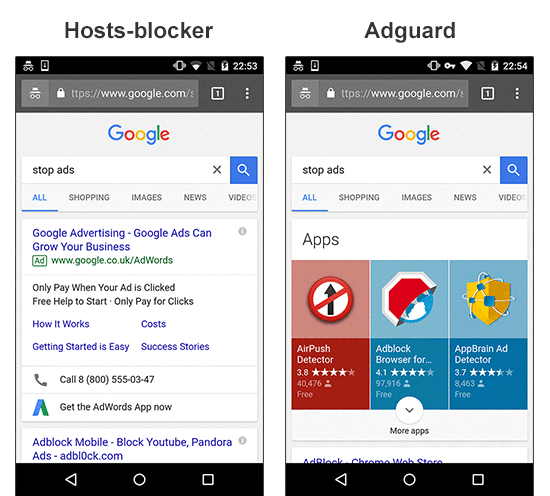
Example #1: ad which is impossible to block without applying cosmetic rules;
  • Left side: proof that Google contextual ads can be irrelevant sometimes.
  • Right side: evidence that Google search still has some room for improvement :).
Adguard vs AdAway

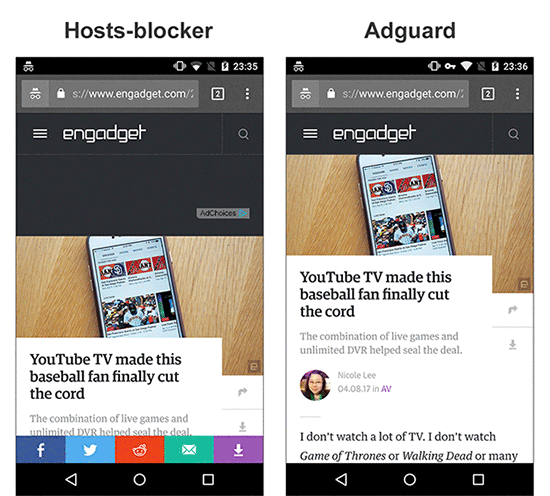
Example #2: ad which is loaded from the same website;
  • Left side: you might have blocked the AdChoices network, but you didn't get rid of the initial ad script loaded from the site's own domain. Hence, half of the page is used for a banner place. I'd also like to draw your attention to the social widget stealing 5-10% of the screen.
  • Right side: the same page processed by Adguard finally lets you focus on content.
Adguard vs AdAway

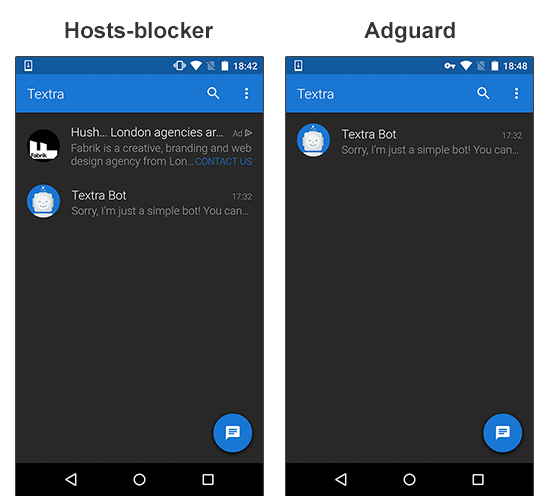
Example #3: Facebook ad network;
  • Left side: the ad is loaded from the Facebook domain. With a hosts-based blocker like Adaway, blocking it means blocking Facebook as well.
  • Right side: the ad is removed by Adguard and you can still use Facebook to tell your friends about it.
Adguard vs AdAway

Messed up websites' layout

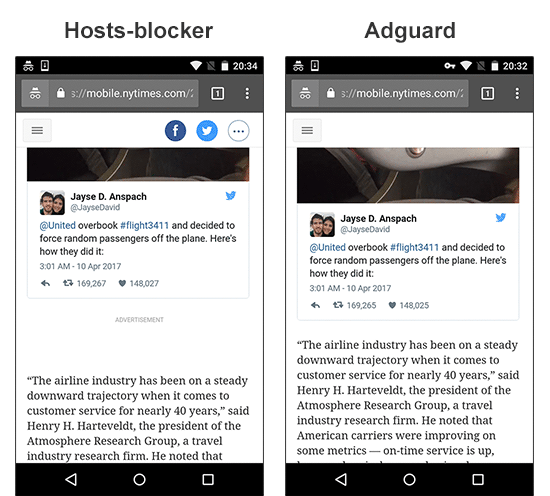
Situations, when hosts-blocker manages to block ads but ruins the websites readability, are not rare. Blank spaces, ad 'remains' - Adguard removes them from the page content or hides with cosmetic rules.

Example #1: the leftovers of a blocked ad;
Adguard vs AdAway

Example #2: empty space after the ad is blocked;
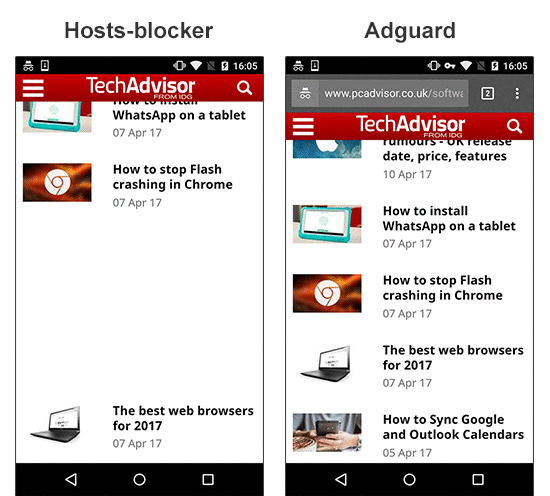
Adguard vs AdAway

Anti-adblockers

This year the fight against ad blockers takes a new turn. Users get to know about new terms they have never heard of before: Ad Reinsertion, Ad Recovery; some websites experiment with limiting functionality or the access to the website to users who have an ad blocker installed. The rough approach of a hosts-blockers doesn't allow to fight back.

Example #1: the website limits the access to its content;
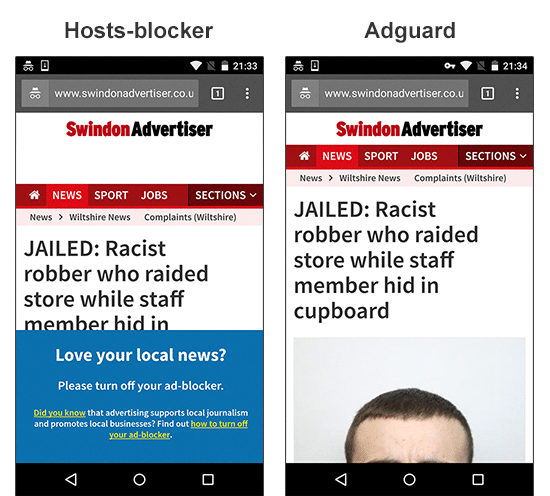
Adguard vs AdAway

Broken functionality

Another scourge of hosts-blockers is 'broken' elements. Video players are one of the most frequent victims.

Example #1: a video player on the website becomes broken;
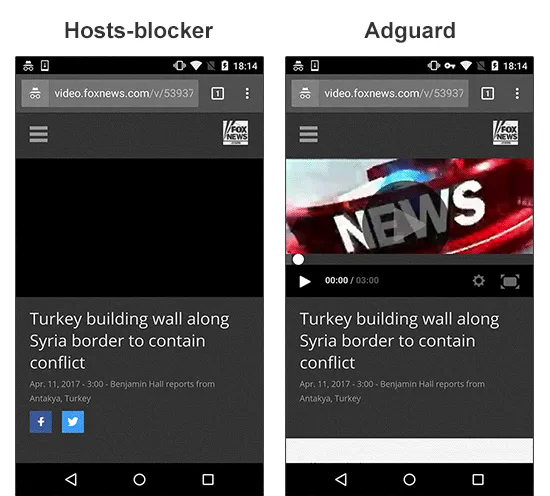
Adguard vs AdAway

Example #2: a video player doesn't work and the content isn't loaded;
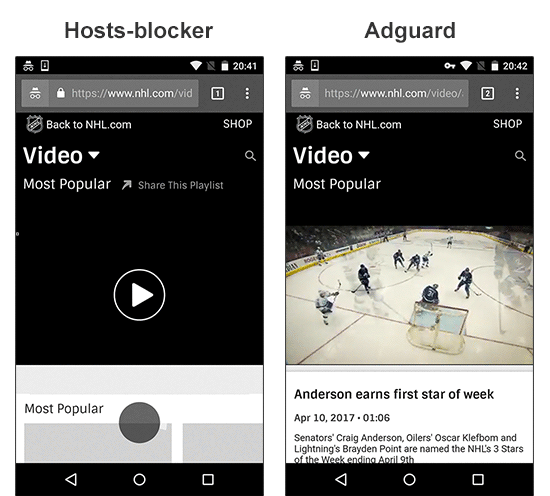
Adguard vs AdAway

Making conclusions

By the way, Adguard, besides everything else, is capable of working in many different modes, including the DNS-blocker mode - this is almost the same as what hosts-blockers do. But despite all the difficulties, we have chosen the full-fledged 'filter' mode as a default. This is our principled stance - only users have to decide for themselves what should be blocked and how. Hosts-based ad blockers, sadly, don't provide such possibilities.

I hope this article clarifies our motifs and demonstrates the differences between the approach of Adguard and other ad blockers on the market. Some of the questions that might have arisen will be touched on in the second part of this article. Or you can ask those questions in the comments, and I or someone else from Adguard team will certainly answer them.


Svidela vam se ova objava?
AdGuard VPN AdGuard DNS AdGuard Mail AdGuard Wallet
Glavni ekran AdGuard za Windows
Ekran Zaštita u AdGuard za Windows, prikazuje funkcije zaštite i podešavanja
Ekran Statistika u AdGuard za Windows, prikazuje statistiku za blokirane oglase i trackere
Ekran Upravljanje aplikacijama u AdGuard za Windows, koji prikazuje opcije upravljanja zaštitom za aplikacije instalirane na uređaju
20.384 20384 recenzije
Odlično!

AdGuard — blokator reklama za Windows

AdGuard za Windows je više od blokatora oglasa. To je višenamenski alat koji blokira oglase, kontroliše pristup opasnim sajtovima, ubrzava učitavanje stranica i štiti decu od neprimerenog sadržaja
Preuzimanjem programa prihvate uslove licenčnog ugovora
Microsoft prodavnica
Preuzimanjem programa prihvate uslove licenčnog ugovora
AdGuard za Windows v.8.0, 14-dnevni probni period
Glavni ekran AdGuard za Mac
Ekran Stealth režima u AdGuard za Mac
20.384 20384 recenzije
Odlično!

AdGuard — blokator reklama za Mac

AdGuard za Mac je jedinstveni blokator oglasa dizajniran imajući u vidu macOS. Pored zaštite od dosadnih oglasa u pregledačima i aplikacijama, štiti vas od praćenja, fišinga i prevara
Preuzimanjem programa prihvate uslove licenčnog ugovora
Saznajte više
AdGuard za Mac v.2.19, 14-dnevni probni period
Glavni ekran AdGuard za Android
Ekran Zaštita od praćenja u AdGuard za Android
Ekran Upravljanje aplikacijama u AdGuard za Android, koji prikazuje opcije upravljanja zaštitom za aplikacije instalirane na uređaju
Ekran Statistika u AdGuard za Android, prikazuje statistiku za blokirane oglase i trackere
Glavni ekran privatnog pregledača AdGuard za Android
QR kod za preuzimanje AdGuard za Android
20.384 20384 recenzije
Odlično!

AdGuard — blokator reklama za Android

Blokira oglase i trackere u svim pregledačima, igrama i drugim aplikacijama. Štiti vašu privatnost i omogućava vam da kontrolišete kako vaše aplikacije koriste Internet. Instalira se putem APK-a
Preuzimanjem programa prihvate uslove licenčnog ugovora
Saznajte više
Skeniranje za preuzimanje
Korišćenje bilo kog QR-kod čitača dostupnog na uređaju
AdGuard za Android v.4.14, 14-dnevni probni period
Glavni ekran AdGuard za iOS
Ekran Zaštita u AdGuard za iOS, prikazuje funkcije zaštite i podešavanja
Ekran Statistika u AdGuard za iOS, prikazuje statistiku za blokirane oglase i trackere
QR kod za preuzimanje AdGuard za iOS
20.384 20384 recenzije
Odlično!

AdGuard — blokator reklama za iOS

Najbolji iOS blokator oglasa za iPhone i iPad. AdGuard uklanja sve vrste oglasa i trackera u Safariju i štiti vašu privatnost u svim aplikacijama na DNS nivou
Preuzimanjem programa prihvate uslove licenčnog ugovora
Saznajte više
Skeniranje za preuzimanje
Korišćenje bilo kog QR-kod čitača dostupnog na uređaju
AdGuard za iOS v.4.5
Glavni ekran AdGuard Content Blocker
Ekran filtera u AdGuard Content Blocker
Ekran podešavanja u AdGuard Content Blocker
20.384 20384 recenzije
Odlično!

AdGuard blokator sadržaja

AdGuard Content Blocker eliminiše sve vrste reklama u mobilnim pregledačima koji podržavaju tehnologiju blokiranja sadržaja – kao što su Samsung Internet i Yandex Browser. Njegove funkcije su ograničene u odnosu na AdGuard za Android, ali je besplatan, lako se instalira i efikasan je
Preuzimanjem programa prihvate uslove licenčnog ugovora
Saznajte više
AdGuard blokator sadržaja v.2.8
Glavni ekran AdGuard Browser Extension
Ekran Zaštita od praćenja u AdGuard Browser Extension
20.384 20384 recenzije
Odlično!

AdGuard proširenje za preglednike

AdGuard je najbrže i najlakše proširenje za blokiranje reklama koje uspešno blokira sve vrste reklama na svim veb stranicama! Izaberite AdGuard za preglednik koji koristite i uživajte u surfovanju bez reklama, koje će postati sigurno i brzo.
Instaliraj
Preuzimanjem programa prihvate uslove licenčnog ugovora
Instaliraj
Preuzimanjem programa prihvate uslove licenčnog ugovora
Instaliraj
Preuzimanjem programa prihvate uslove licenčnog ugovora
Instaliraj
Preuzimanjem programa prihvate uslove licenčnog ugovora
Instaliraj
Preuzimanjem programa prihvate uslove licenčnog ugovora
Saznajte više
Instaliraj
Preuzimanjem programa prihvate uslove licenčnog ugovora
Saznajte više
AdGuard proširenje za preglednike v.5.5
Glavni ekran AdGuard Assistant
20.384 20384 recenzije
Odlično!

AdGuard pomoćnik

Dodatak pregledača za prateće AdGuard desktop aplikacije. Omogućava vam da blokirate prilagođene stavke na vebsajtovima, dodate vebsajtove na listu dozvoljenih i šaljete izveštaje direktno iz pregledača
AdGuard pomoćnik v.1.4
20.384 20384 recenzije
Odlično!

AdGuard Home

AdGuard Home je mrežno rešenje za blokiranje oglasa i tragača. Instalirajte ga jednom na ruteru da biste pokrili sve uređaje na vašoj kućnoj mreži — nije potreban dodatni klijentski softver. Ovo je posebno važno za različite IoT uređaje koji često predstavljaju pretnju vašoj privatnosti
AdGuard Home v.0.107
Glavni ekran AdGuard Pro za iOS
Ekran zaštite u AdGuard Pro za iOS, koji prikazuje funkcije zaštite i podešavanja
Ekran statistike u AdGuard Pro za iOS, koji prikazuje statistiku za blokirane oglase i tragače
20.384 20384 recenzije
Odlično!

AdGuard Pro za iOS

AdGuard Pro za iOS dolazi sa svim naprednim funkcijama zaštite od blokiranja oglasa. Nudi iste alate kao i plaćena verzija AdGuard-a za iOS. Ističe se u blokiranju oglasa u Safariju i omogućava vam da prilagodite DNS postavke kako biste prilagodili svoju zaštitu. Blokira oglase u pretraživačima i aplikacijama, štiti vašu decu od neprikladnog sadržaja i čuva vaše lične podatke na sigurnom
Preuzimanjem programa prihvate uslove licenčnog ugovora
Saznajte više
AdGuard Pro za iOS v.4.5
Glavni ekran AdGuard Mini za Mac
Ekran zaštite za Safari u AdGuard Mini za Mac
Ekran Kreiranje pravila u AdGuard Mini za Mac
20.384 20384 recenzije
Odlično!

AdGuard Mini za Mac — Safari blokator oglasa

AdGuard Mini za Mac je moćan Safari blokator adova. Ova lagana aplikacija uklanja reklame, blokira praćenike i ubrzava učitavanje stranica. Pomaže vam da pretražujete veb u Safariju bez ometanja i da sačuvate svoje podatke privatnim
Instaliraj
Preuzimanjem programa prihvate uslove licenčnog ugovora
Saznajte više
AdGuard Mini za Mac v.2.3
Glavni ekran AdGuard za Android TV sa uključenom zaštitom
Ekran Blokiranje oglasa u AdGuard za Android TV, prikazuje njegove funkcije i podešavanja
Ekran Podešavanja u AdGuard za Android TV
Ekran Upravljanje aplikacijama u AdGuard za Android TV, prikazuje aplikacije gde su oglasi i trackeri blokirani
20.384 20384 recenzije
Odlično!

AdGuard za Android TV

AdGuard za Android TV je jedina aplikacija koja blokira oglase, čuva vašu privatnost i deluje kao zaštitni zid za vaš Smart TV. Dobijajte upozorenja o Veb pretnjama, koristite bezbedni DNS i koristite šifrovani saobraćaj. Opustite se i zaronite u omiljene serije sa vrhunskim obezbeđenjem i nula oglasa!
AdGuard za Android TV v.4.14, 14-dnevni probni period
Maskota AdGuard, Agnar, drži Linux pingvina
20.384 20384 recenzije
Odlično!

AdGuard za Linux

AdGuard za Linuk je prvi sistemski bloker oglasa na svetu. Blokirajte oglase i tragače na nivou uređaja, izaberite unapred instalirane filtere ili dodajte sopstvene — sve kroz interfejs komandne linije
AdGuard za Linux v.1.4
20.384 20384 recenzije
Odlično!

AdGuard Temp Mail

Besplatan generator privremenih email adresa koji vas čuva anonimnim i štiti vašu privatnost. Nema spama u vašem glavnom sandučetu!
20.384 20384 recenzije
Odlično!

AdGuard VPN

75 lokacija širom sveta

Pristup bilo kom sadržaju

Jako šifrovanje

Nema prikupljanja dnevnika

Najbrža veza

24/7 podrška

Probajte besplatno
Preuzimanjem programa prihvate uslove licenčnog ugovora
Saznajte više
20.384 20384 recenzije
Odlično!

AdGuard DNS

AdGuard DNS je alternativno rešenje za blokiranje reklama, zaštitu privatnosti i roditeljsku kontrolu. Lako se postavlja i besplatan je za korišćenje. On obezbeđuje neophodni minimum zaštite od reklama na mreži, praćenja i fišinga, bez obzira koju platformu i uređaj koristite.
20.384 20384 recenzije
Odlično!

AdGuard Mail

Zaštitite svoj identitet, izbegnite spam i održite bezbednost svog sandučeta uz naše alias-e i privremene e-adrese. Uživajte u našoj besplatnoj usluzi prosleđivanja emaila i aplikacijama za sve operativne sisteme.
20.384 20384 recenzije
Odlično!

AdGuard Wallet

Bezbedan i privatan kripto novčanik koji vam daje potpunu kontrolu nad vašom imovinom. Upravljajte više novčanika i otkrijte hiljade kriptovaluta za čuvanje, slanje i razmenu

Preuzimanje AdGuard Da biste instalirali AdGuard, kliknite na datoteku označenu strelicom Izaberite „Otvori“ i kliknite na „U redu“, a zatim sačekajte da se datoteka preuzme. U otvorenom prozoru prevucite ikonu AdGuard u fasciklu „Aplikacije“. Hvala vam što ste izabrali AdGuard! Izaberite „Otvori“ i kliknite na „U redu“, a zatim sačekajte da se datoteka preuzme. U otvorenom prozoru kliknite na „Instaliraj“. Hvala vam što ste izabrali AdGuard!

Instalirajte AdGuard na svoj mobilni uređaj
















































