Your personal data has become an AI training manual and you're not getting it back
Art imitates life, that we all know. But what if art imitates your personal life, your personal likeness and does it so well that the line between what is real and surreal blurs?
Unbeknownst to us, we are becoming models for state-of-the-art AI technology that trains on terabytes of poorly filtered data scraped from all over the web. This data can include our personal photos, medical images, and even copyrighted content — basically, anything ever posted online.
Deep learning text-to-image models like DALL-E 2, Midjourney and Stable Diffusion are getting better at recognizing, interpreting and repurposing this data. When fed a text prompt, they produce detailed images based on what they’ve learnt. And while these images are not picture perfect just yet, they are getting increasingly photorealistic. As implausible as it sounds, at some point an algorithm may spit out your own likeness — at least, it cannot be ruled out.
The odds of all this happening to a regular person are admittedly low. Public figures, however, are far more likely to have their likeness exploited and used to mislead the gullible. AI has gorged on their publicly available data and already knows them in the face — so the only thing a bad actor needs to come up with is a clever text prompt.
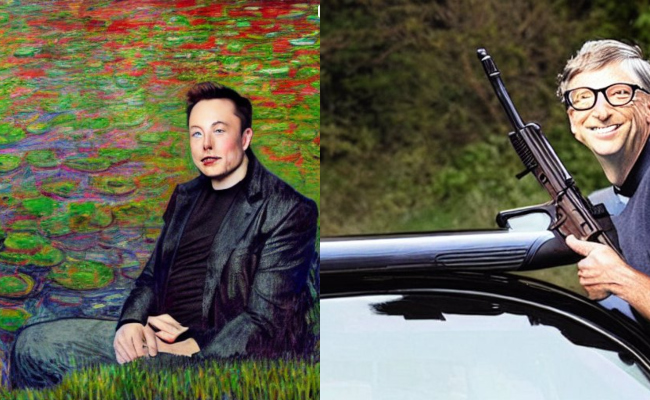
Stable Diffusion images of Elon Musk in a Monet style painting and Bill Gates with a rifle near a car. Image courtesy Stability AI.
There is currently no way to safeguard yourself from being sucked up into the AI data feed. You can only remove your data from this impromptu art class post-factum, that is, after it has already been used as a training sample for AI. For that you have to look it up on sites like Have I Been Trained, make sure that it meets the requirments, file a complaint, and hope for the best.
The state of technology: Awe-inspiring and messy
AI image generators are the new kids on the block, which partially explains why they have so far eschewed regulation. One of the best-known and most advanced tools to create images from a description is DALL-E. The text-to-image encoder was first released last January through a waitlist and became available to the general public this September. Some 1.5 million people have already been using the service,“creating over 2 million images a day,” according to OpenAI, the company behind the tool.
Along with a waitlist, OpenAI has dropped restrictions on editing human faces. But, unlike most of its competitors, OpenAI has put some safeguards in place. Thus, OpenAI said that they have refined AI’s filtering algorthm to block sexual, political, violent, and hateful content. DALL-E’s policy also prohibits users from uploading “images of anyone without their consent” and images that users have no rights to.
There seems to be no practical way for DALL-E to enforce that particular policy other than to take users at their word, though. In a bid to minimize the risks of potential misuse, the developers previously said they had fine-tuned DALL-E’s training process,“limiting” its ability to memorize faces. It was done primarily so that AI does not produce lookalikes of public figures or helps put them in a misleading context. OpenAI’s content policy specifically bans images of “politicians, ballot-boxes, or other content that may used to influence the political process or to campaign” and warns against attempts to create images of public figures. Users have reported that DALL-E indeed appears not to answer prompts mentioning celebrities and politicians.
Despite its name, OpenAI’s text-to-image wonder is not open source, and there is a good reason for it. OpenAI argues that “making the raw components of the system freely available leaves the door open to bad actors who could train them on subjectively inappropriate content, like pornography and graphic violence.”
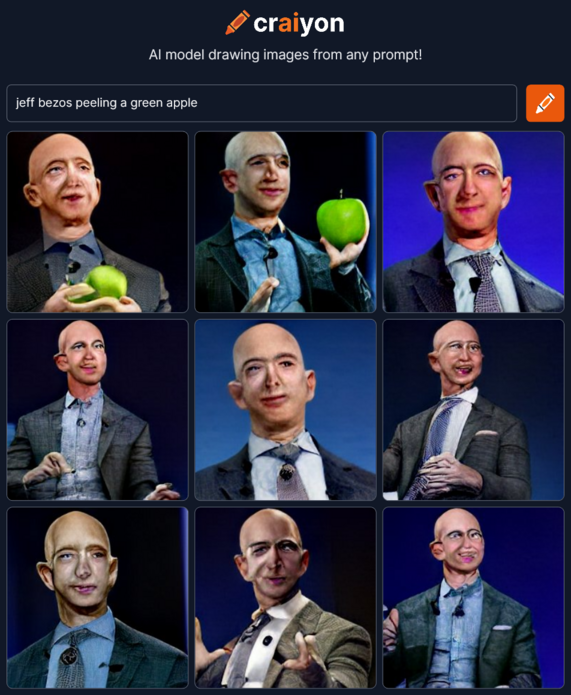
Others, however, picked up the tab where OpenAI left it off. Inspired by DALL-E, a group of AI enthusiasts created Crayion (formerly DALL-E mini), a free open-source AI text-to-image generator. But since it is trained on a relatively small sample of unfiltered data from the internet— about 15 millions pairs of images and corresponding alt-text — the resulting drawings, especially those of people, look far less realistic.
Far more advanced than Crayion and far less restrictive than DALL-E 2 is Stable Diffusion, an open-source model released by startup StabilityAI in August this year. It allows generating images of public figures as well as those of protests and accidents that have never taken place and can potentially be used in disinformation campaigns.
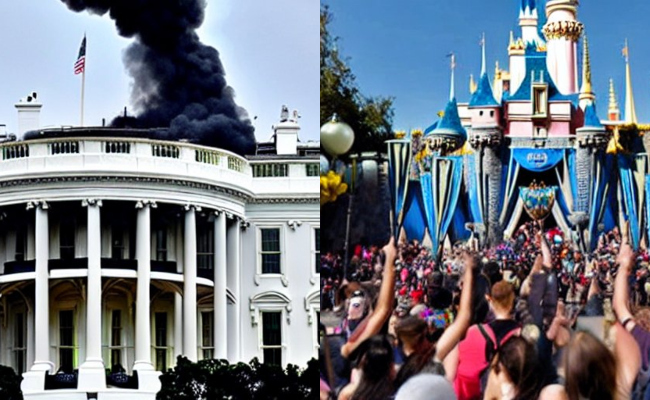
Stable Diffusion Images of smoke billowing from the White House and protests at Disneyland. Image courtesy Stability AI.
Stable Diffusion grants you the permission to distribute and sell your output provided you agree to a list of rules. For instance, you cannot use the model to violate law, harm minors, spread fake information “with the purpose of harming others”, “generate or disseminate personal identifiable information that can be used to harm an individual”, provide medical advice, infringe on copyright, impersonate individuals as well as “defame, disparage or otherwise harass others.” Again, it’s hard to say how the company plans to catch violators. The burden apparently falls on outsiders and the victims themselves to flag the prohibited content.
Making matters worse (or better, depending on where you stand) is the fact that AI models are becoming increasingly good at imitating human touch and incremently closer to fooling human obsevers. A controversy erupted after a non-professional artist was awarded first prize at this year Colorado State Fair’s digital art contest for his work created using Midjourney, another text-to-image AI tool. Not so long ago The Atlantic’s journalist stirred up Twitter’s hornet’s nest after he used Midjourney to concoct two images of conspiracy theorist Alex Jones for a newsletter.
It’s a safe bet that AI-powered tools will become even better with time. Researchers behind Google’s own text-to-image AI model, Imagen, claim that it is already outperforming DALL-E’s latest version — DALL-E 2— in accuracy and image quality.
There is a lot of speculation and uncertainty about how AI-powered image synthesizers will affect art and reality as we know it. Largely it will depend whether developers will be able to tame their AI beasts, but also on the data that they will continue to feast upon.
Where is the data coming from?
AI models like DALL-E and Stable Diffusion train on giant datasets pulled in from all over the web.
Thus, DALL-E 2 was fed 650 million text-image pairs already available on the internet. Stability AI was trained mainly on the English subset of the LAION-5B dataset. LAION 5B (Large-scale Artificial Intelligence Open Network) is an open source dataset containing 5.6 billion images slurped up from the web, including 2.3 billion image-text pairs in the English language, which makes it the the biggest openly accessible image-text dataset in the world. Its predecessor, LAION-400, contains 413 million pairs, and was used by Google to train Imagen. That dataset was initially created by researchers in a bid to replicate the OpenAI dataset, not open to the public.
LAION describes itself as a non-profit on a mission to “democratize research and experimentation around large-scale multi-modal model training”. While the mission is noble, it comes at a high cost to privacy. The data that researchers parsed to find image-text pairs comes from Common Crawl, another non-profit that crawls the web every month and provides petabytes of data freely to the public. In its ToS, Common Crawl states that they “just found it [data] on the web” and “are not vouching for the content or liable if there is something wrong with it”.
Considering where the data stems from, it’s no surprise that personal identifiable information (PII), sensitive images and copyrighted content may creep into the dataset. ArtTechnica reported last month how an AI artist discovered her own medical photos in the LAION-5B dataset. The photos were taken by the artist’s doctor (now deceased) and were intended only for that doctor’s private use.
It’s worth noting that LAION does not host the images, but merely provides URLs from which they can be downloaded. Thus, LAION presumably cannot be held responsible for spreading your personal data or your work. It also means that, legally, we’re hitting a brick wall in a bid to find those culpable for potential misuse of data. Another issue is that there’s no way to opt out from AI training, and you have to bend over backwards to remove your data post-factum.
How to remove your personal data from the AI feed?
For starters, in order to request removal of your images from the AI training dataset you must find them there. It might seem a tall order given that there are millions of image-to-text pairs to go through. Thankfully, now there is a shortcut for that. Last month a company called Spawning AI launched Have I Been Trained?, a site where you can search the LAION-5B database by feeding it either an image or a text prompt. Or you can just play with the algorithm (beware, it might give you some very curious results).
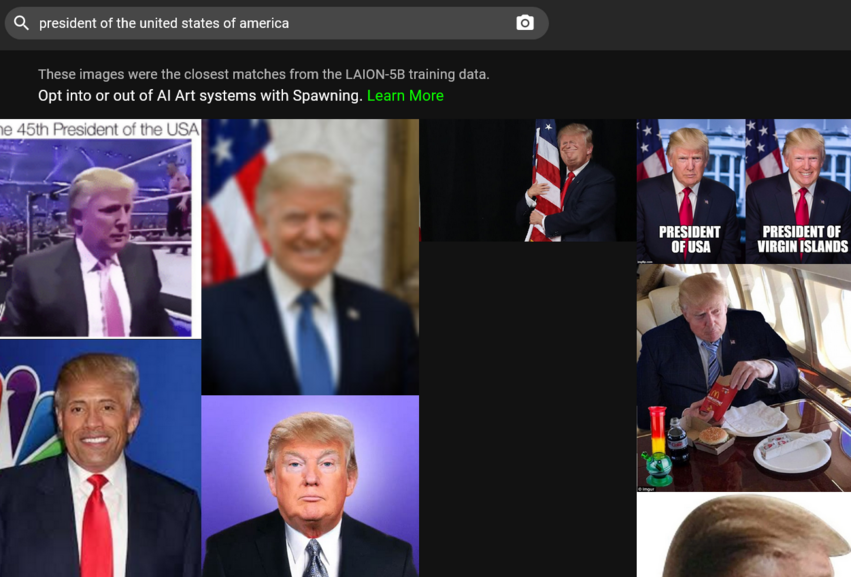
If you succeed in finding your image, you’ll need to fill a takedown form on LAION’s GDPR page. LAION promises to investigate the report and, if it finds the said image in breach of the EU data protection law, to remove it from all data repositories under its control and from future releases.
Spawning is also building tools that would allow artists “to opt into or opt out of the training of large AI models” as well as “set permissions on how their style and likeness is used.” Users may apply for beta access to the tools on the company’s website. Stable Diffusion, which supports Spawning’s efforts, states that it will be building “an opt-in and opt-out system for artists and others that services can use in partnership with leading organisations.”
DALL-E allows individuals who find that their work has been used without their consent to report the violation to the OpenAI mail. As for the mother of dragons, the original source of much of the data — Common Crawl — it appears to only list a PO box where you can report a copyright infringement to.
To sum it up, we are largerly left to our own devices when it comes to making sure our data is not vacuumed up by AI. This is partly because of the legal conundrum when each side claims no responsibility for the final result. Partly, it’s the way the internet works — it never forgets.
Will AI spit out your exact lookalike and can it ‘unlearn’ how you look?
As seen from the example of public figures, AI, with enough training, can generate recognizable images of real people. Technically, there is nothing stopping AI from doing the same trick with your likeness.
OpenAI concedes that although DALL-E 2 cannot “literally generate exact images of people, it may be possible to generate a similar likeness to someone in the training data”. The same is likely true for other AI models. Research has shown that images generated by another class of deep learning models — Generative Adversarial Networks (GANs) — do resemble real people. In the paper titled This Person (Probably) Exists. Identity Membership Attacks Against GAN Generated Faces researchers have shown that it was possible to re-identify source identities that contributed to generating images of “non-existent people”.
“While some samples merely bear resemblance, other generated images strongly share idiosyncratic features of training identities”, the researchers found.
As to whether it is possible for AI models to unlearn what they’ve already learned about you, Stability AI CEO Emad Mostaque told Ars Technica that it was possible, but requires some tweaking or extra work. The big question is whether developers are willing to go to great lengths to do it — as they are not obligated to.
Solving the AI issue. Mission impossible?
There’s no denying that the results achieved by these AI trailblazers are admirable. The fact that some of them make the code open-source, and in the case of Stability AI release it under a permissive license that does not prohibit commercial use, will help researchers, creators and further progress.
However, this can also backfire, as it is extremely difficult to stop bad actors from using the open-source model. Most importantly, perhaps, is that currently there’s no way for artists and regular people to opt out from essentially becoming part of an AI-generated end product. Moreover, even if we want to remove our images from the training data — we have to rely on the companies’ goodwill.
These issues will affect all the more people as these technologies go mainstream. Thus, Microsoft has recently announced that it is integrating two of its apps with DALL-E 2. One of the apps is Image Creator, which will be available in Microsoft search engine Bing and in Edge for free.
The situation calls for regulation. Whether it is careful dataset curation, a clear opt-out mechanism respected by all parties, or some other mitigation methods, we do not know. But as it stands now, AI image-to-text generators remain a privacy threat, which will only be growing.




















































