Can GPT-4 block ads better than humans? We put an AI-powered ad blocker to the test

Everyone knows ChatGPT, an AI chatbot based on OpenAI’s latest model, GPT-4. But beyond OpenAI’s own products, GPT-4 has been integrated into many applications and services, from learning and payment apps to Microsoft’s Bing AI and now ad blocking.

A Chrome extension with a rather straightforward name GPT-AdBlocker was launched in April this year on Product Hunt. It is developed by a company called In5 Tech, based in Dubai, UAE. The extension claims to use GPT-4 technology to block all kinds of trackers and ads, including sponsored content inside YouTube videos that your typical ad blocker cannot block. The GPT-AdBlocker team describes the extension as “the ultimate all-in-one solution.” As far as its accuracy goes, they say it’s “very accurate” in detecting ads in videos but “some errors”may creep in. So far, the extension is available only for Chrome, but the team behind it plans to deploy it to “multiple other browsers.”

Intrigued by the new kid on the block, and the AI-powered one at that, we decided to give it a try.

The ideal outcome: achievable or not?

Before we present you the results of our experiments with GPT-AdBlocker, let’s talk a bit about the extension’s features and how it should work in an ideal world.

GPT-AdBlocker has a very clean, if not ascetic interface and only two switches: one for regular ad blocking and one for AI-powered sponsor blocking, which is what we are interested in today. Of course, you can turn off the AI mode and use it as a regular ad blocker, but that’s not what we’re here for. It is with both of its modes enabled at the same time that GPT AdBlocker is supposed to be at its most efficient.
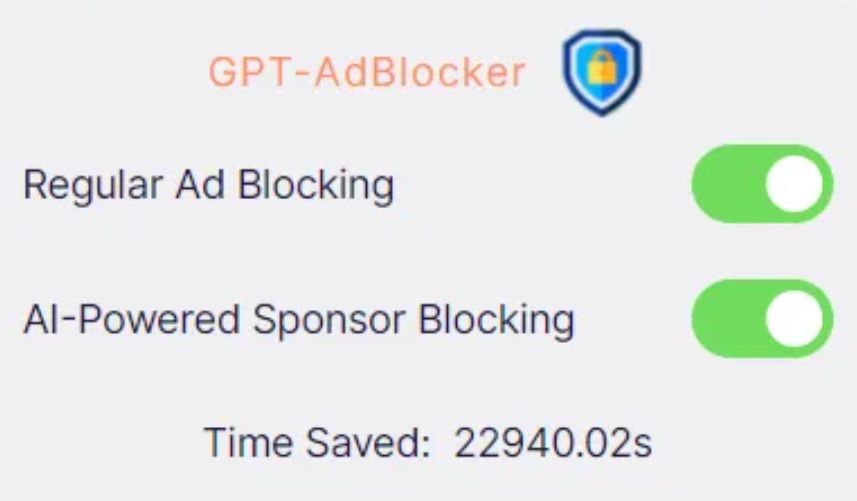
GPT-AdBlocker has a clean and simple interface *mobile

So, in its ideal implementation the GPT-AdBlocker should allow you to skip sponsored content in videos, which are the segments that brands usually pay the content creator directly for.

We imagined it would look something like in the example below, where we used a graphic editor to manually cut the Destroying My RTX 3090 Ti With Incredible Minecraft Graphics YouTube video to remove a sponsored segment.

Some of you might wonder why we had to cut the video manually to demonstrate a ‘near-perfect’ example of how the GPT-AdBlocker is supposed to work. But let’s just say that the results of our interaction with the actual extension to skip sponsored ads were… a very mixed bag. And now we will show you why — with receipts, of course.

The challenges of AI ad blocking: choppy cuts & incomplete sentences

We wanted to test how well the GPT-AdBlocker works on different types of videos that feature at least one sponsored segment. One of these videos was the one that we had manually edited before — now let’s compare it with the version that the AI-powered ad blocker produced.

The difference is not huge, but it is noticeable and not in favor of the extension: after the sponsored segment is skipped, the video resumes abruptly, in the middle of a sentence. However, this by no means a catastrophe and the content is still watchable.

The same cannot be said about videos that feature multiple product placements throughout, which is very common with tutorials, where showing tools, whichever they are, is an inalienable part of the content. When we watched a makeup tutorial with the GPT-AdBlocker on, we counted five skipped segments. The cuts were usually rough, some product placements were removed, some were not. As a result, we missed important parts of the content, which made the video unwatchable. See our compilation of cuts by the extension below (fade in and fade out are done by us).

Sometimes the issue would be just a jagged cut, which made you wonder whether anything valuable was skipped or if it was just how it was supposed to be.

Sometimes it would be just a few words missing, with the video stopping and resuming mid-sentence as in the example below — though, one could argue that even a few words can make a big difference.

Generally, the problems started when the sponsored segment was not a separate part of the video, but an integral part of it. Like in the example below, where AI cropped the video in such a way that the key part of financial advice is missing (we would not weigh in on the merits of that advice, but you get the point).

Oftentimes the extension would not remove the sponsored segment in its entirety, but only parts of it, which is, however, probably still better than removing too much.

Ethical dilemma

In our express analysis on YouTube’s potential ban on ad blockers, we mentioned that content creators are increasingly relying on brand deals, in addition to donations, to support their work. The ways of YouTube when it comes to monetization or demonetization of certain videos and entire channels are generally unsearchable; besides, YouTube takes about 45% of the creators’ ad revenues. Brands, unlike YouTube, pay content creators directly, usually better, and that pay is more stable.

Granted, sponsored segments can be annoying, sketchy and feel too long — but they are still part of the content, so blocking them entirely raises an ethical issue. And as far as we’re concerned, it’s probably unfair to take an axe to all that brand money. Content creators who are transparent about sponsored content in their videos and clearly label it, make it pretty easy to manually skip it. On the other hand, there are plenty of YouTubers who promote junk, but should honest content creators suffer for the unscrupulous ones?

In a nutshell: what we think about AI & ad blocking

The emergence of an AI-powered ad blocking extension is an intriguing and a potentially transformative development in the field. The goal of the extension is to detect and remove sponsored segments from videos, and it does that, but not all of them, and not completely. Sometimes it leaves “leftovers” of sponsored ads, sometimes it cuts the video rather crudely. Sometimes it works nearly perfectly, but rarely.

The approach is interesting and will shape the future of ad blocking to some extent. AI is permeating all areas, and ad blocking, like ad creation, is no exception. However, the current implementation of this technology, exemplified by the GPT-AdBlocker, falls short of providing a reliable and comprehensive solution. Moreover, while the integration of AI into ad blocking is promising, it’s possible that even with additional fine-tuning it won’t be a panacea for all ad-related challenges due to the intricacies of content creation.

In cases where sponsored segments or product placements are seamlessly embedded into a video, GPT-AdBlocker may render the content unwatchable. For example, content genres such as makeup tutorials (or any type of tutorial) can suffer significantly when key segments are omitted.

Nonetheless, AI is already impacting the advertising industry, and it’s only natural that the ad blocking industry will take advantage of its capabilities. The debate is not whether we should use AI, but rather how we should use it.


Svidela vam se ova objava?
AdGuard VPN AdGuard DNS AdGuard Mail AdGuard Wallet
Glavni ekran AdGuard za Windows
Ekran Zaštita u AdGuard za Windows, prikazuje funkcije zaštite i podešavanja
Ekran Statistika u AdGuard za Windows, prikazuje statistiku za blokirane oglase i trackere
Ekran Upravljanje aplikacijama u AdGuard za Windows, koji prikazuje opcije upravljanja zaštitom za aplikacije instalirane na uređaju
20.385 20385 recenzija
Odlično!

AdGuard — blokator reklama za Windows

AdGuard za Windows je više od blokatora oglasa. To je višenamenski alat koji blokira oglase, kontroliše pristup opasnim sajtovima, ubrzava učitavanje stranica i štiti decu od neprimerenog sadržaja
Preuzimanjem programa prihvate uslove licenčnog ugovora
Microsoft prodavnica
Preuzimanjem programa prihvate uslove licenčnog ugovora
AdGuard za Windows v.8.0, 14-dnevni probni period
Glavni ekran AdGuard za Mac
Ekran Stealth režima u AdGuard za Mac
20.385 20385 recenzija
Odlično!

AdGuard — blokator reklama za Mac

AdGuard za Mac je jedinstveni blokator oglasa dizajniran imajući u vidu macOS. Pored zaštite od dosadnih oglasa u pregledačima i aplikacijama, štiti vas od praćenja, fišinga i prevara
Preuzimanjem programa prihvate uslove licenčnog ugovora
Saznajte više
AdGuard za Mac v.2.19, 14-dnevni probni period
Glavni ekran AdGuard za Android
Ekran Zaštita od praćenja u AdGuard za Android
Ekran Upravljanje aplikacijama u AdGuard za Android, koji prikazuje opcije upravljanja zaštitom za aplikacije instalirane na uređaju
Ekran Statistika u AdGuard za Android, prikazuje statistiku za blokirane oglase i trackere
Glavni ekran privatnog pregledača AdGuard za Android
QR kod za preuzimanje AdGuard za Android
20.385 20385 recenzija
Odlično!

AdGuard — blokator reklama za Android

Blokira oglase i trackere u svim pregledačima, igrama i drugim aplikacijama. Štiti vašu privatnost i omogućava vam da kontrolišete kako vaše aplikacije koriste Internet. Instalira se putem APK-a

Preuzimanjem programa prihvate uslove licenčnog ugovora
Saznajte više
Skeniranje za preuzimanje
Korišćenje bilo kog QR-kod čitača dostupnog na uređaju
AdGuard za Android v.4.14, 14-dnevni probni period
Glavni ekran AdGuard za iOS
Ekran Zaštita u AdGuard za iOS, prikazuje funkcije zaštite i podešavanja
Ekran Statistika u AdGuard za iOS, prikazuje statistiku za blokirane oglase i trackere
QR kod za preuzimanje AdGuard za iOS
20.385 20385 recenzija
Odlično!

AdGuard — blokator reklama za iOS

Najbolji iOS blokator oglasa za iPhone i iPad. AdGuard uklanja sve vrste oglasa i trackera u Safariju i štiti vašu privatnost u svim aplikacijama na DNS nivou

Preuzimanjem programa prihvate uslove licenčnog ugovora
Saznajte više
Skeniranje za preuzimanje
Korišćenje bilo kog QR-kod čitača dostupnog na uređaju
AdGuard za iOS v.4.5
Glavni ekran AdGuard Content Blocker
Ekran filtera u AdGuard Content Blocker
Ekran podešavanja u AdGuard Content Blocker
20.385 20385 recenzija
Odlično!

AdGuard blokator sadržaja

AdGuard Content Blocker eliminiše sve vrste reklama u mobilnim pregledačima koji podržavaju tehnologiju blokiranja sadržaja – kao što su Samsung Internet i Yandex Browser. Njegove funkcije su ograničene u odnosu na AdGuard za Android, ali je besplatan, lako se instalira i efikasan je
Preuzimanjem programa prihvate uslove licenčnog ugovora
Saznajte više
AdGuard blokator sadržaja v.2.8
Glavni ekran AdGuard Browser Extension
Ekran Zaštita od praćenja u AdGuard Browser Extension
20.385 20385 recenzija
Odlično!

AdGuard proširenje za preglednike

AdGuard je najbrže i najlakše proširenje za blokiranje reklama koje uspešno blokira sve vrste reklama na svim veb stranicama! Izaberite AdGuard za preglednik koji koristite i uživajte u surfovanju bez reklama, koje će postati sigurno i brzo.
Instaliraj
Preuzimanjem programa prihvate uslove licenčnog ugovora
Instaliraj
Preuzimanjem programa prihvate uslove licenčnog ugovora
Instaliraj
Preuzimanjem programa prihvate uslove licenčnog ugovora
Instaliraj
Preuzimanjem programa prihvate uslove licenčnog ugovora
Instaliraj
Preuzimanjem programa prihvate uslove licenčnog ugovora
Saznajte više
Instaliraj
Preuzimanjem programa prihvate uslove licenčnog ugovora
Saznajte više
AdGuard proširenje za preglednike v.5.5
Glavni ekran AdGuard Assistant
20.385 20385 recenzija
Odlično!

AdGuard pomoćnik

Dodatak pregledača za prateće AdGuard desktop aplikacije. Omogućava vam da blokirate prilagođene stavke na vebsajtovima, dodate vebsajtove na listu dozvoljenih i šaljete izveštaje direktno iz pregledača
AdGuard pomoćnik v.1.4
20.385 20385 recenzija
Odlično!

AdGuard Home

AdGuard Home je mrežno rešenje za blokiranje oglasa i tragača. Instalirajte ga jednom na ruteru da biste pokrili sve uređaje na vašoj kućnoj mreži — nije potreban dodatni klijentski softver. Ovo je posebno važno za različite IoT uređaje koji često predstavljaju pretnju vašoj privatnosti
AdGuard Home v.0.107
Glavni ekran AdGuard Pro za iOS
Ekran zaštite u AdGuard Pro za iOS, koji prikazuje funkcije zaštite i podešavanja
Ekran statistike u AdGuard Pro za iOS, koji prikazuje statistiku za blokirane oglase i tragače
20.385 20385 recenzija
Odlično!

AdGuard Pro za iOS

AdGuard Pro za iOS dolazi sa svim naprednim funkcijama zaštite od blokiranja oglasa. Nudi iste alate kao i plaćena verzija AdGuard-a za iOS. Ističe se u blokiranju oglasa u Safariju i omogućava vam da prilagodite DNS postavke kako biste prilagodili svoju zaštitu. Blokira oglase u pretraživačima i aplikacijama, štiti vašu decu od neprikladnog sadržaja i čuva vaše lične podatke na sigurnom
Preuzimanjem programa prihvate uslove licenčnog ugovora
Saznajte više
AdGuard Pro za iOS v.4.5
Glavni ekran AdGuard Mini za Mac
Ekran zaštite za Safari u AdGuard Mini za Mac
Ekran Kreiranje pravila u AdGuard Mini za Mac
20.385 20385 recenzija
Odlično!

AdGuard Mini za Mac — Safari blokator oglasa

AdGuard Mini za Mac je moćan Safari blokator adova. Ova lagana aplikacija uklanja reklame, blokira praćenike i ubrzava učitavanje stranica. Pomaže vam da pretražujete veb u Safariju bez ometanja i da sačuvate svoje podatke privatnim
Instaliraj
Preuzimanjem programa prihvate uslove licenčnog ugovora
Saznajte više
AdGuard Mini za Mac v.2.3
Glavni ekran AdGuard za Android TV sa uključenom zaštitom
Ekran Blokiranje oglasa u AdGuard za Android TV, prikazuje njegove funkcije i podešavanja
Ekran Podešavanja u AdGuard za Android TV
Ekran Upravljanje aplikacijama u AdGuard za Android TV, prikazuje aplikacije gde su oglasi i trackeri blokirani
20.385 20385 recenzija
Odlično!

AdGuard za Android TV

AdGuard za Android TV je jedina aplikacija koja blokira oglase, čuva vašu privatnost i deluje kao zaštitni zid za vaš Smart TV. Dobijajte upozorenja o Veb pretnjama, koristite bezbedni DNS i koristite šifrovani saobraćaj. Opustite se i zaronite u omiljene serije sa vrhunskim obezbeđenjem i nula oglasa!
AdGuard za Android TV v.4.14, 14-dnevni probni period
Maskota AdGuard, Agnar, drži Linux pingvina
20.385 20385 recenzija
Odlično!

AdGuard za Linux

AdGuard za Linuk je prvi sistemski bloker oglasa na svetu. Blokirajte oglase i tragače na nivou uređaja, izaberite unapred instalirane filtere ili dodajte sopstvene — sve kroz interfejs komandne linije
AdGuard za Linux v.1.4
20.385 20385 recenzija
Odlično!

AdGuard Temp Mail

Besplatan generator privremenih email adresa koji vas čuva anonimnim i štiti vašu privatnost. Nema spama u vašem glavnom sandučetu!
20.385 20385 recenzija
Odlično!

AdGuard VPN

75 lokacija širom sveta

Pristup bilo kom sadržaju

Jako šifrovanje

Nema prikupljanja dnevnika

Najbrža veza

24/7 podrška

Probajte besplatno
Preuzimanjem programa prihvate uslove licenčnog ugovora
Saznajte više
20.385 20385 recenzija
Odlično!

AdGuard DNS

AdGuard DNS je alternativno rešenje za blokiranje reklama, zaštitu privatnosti i roditeljsku kontrolu. Lako se postavlja i besplatan je za korišćenje. On obezbeđuje neophodni minimum zaštite od reklama na mreži, praćenja i fišinga, bez obzira koju platformu i uređaj koristite.
20.385 20385 recenzija
Odlično!

AdGuard Mail

Zaštitite svoj identitet, izbegnite spam i održite bezbednost svog sandučeta uz naše alias-e i privremene e-adrese. Uživajte u našoj besplatnoj usluzi prosleđivanja emaila i aplikacijama za sve operativne sisteme.
20.385 20385 recenzija
Odlično!

AdGuard Wallet

Bezbedan i privatan kripto novčanik koji vam daje potpunu kontrolu nad vašom imovinom. Upravljajte više novčanika i otkrijte hiljade kriptovaluta za čuvanje, slanje i razmenu
Preuzimanje AdGuard Da biste instalirali AdGuard, kliknite na datoteku označenu strelicom Izaberite „Otvori“ i kliknite na „U redu“, a zatim sačekajte da se datoteka preuzme. U otvorenom prozoru prevucite ikonu AdGuard u fasciklu „Aplikacije“. Hvala vam što ste izabrali AdGuard! Izaberite „Otvori“ i kliknite na „U redu“, a zatim sačekajte da se datoteka preuzme. U otvorenom prozoru kliknite na „Instaliraj“. Hvala vam što ste izabrali AdGuard!
Instalirajte AdGuard na svoj mobilni uređaj
















































