AdGuard’s digest: ChatGPT’s new privacy feature, Edge’s leak, VPN raid, Telegram faces local ban

In this edition of AdGuard’s digest: ChatGPT makes it easier to opt out of AI model training, Microsoft’s Edge browser leaks users’ web history, a popular VPN goes head-to-head with the police, an AI chatbot reveals a napalm recipe, Twitter makes a new demand of advertisers, as Telegram gets banned.

Edge caught leaking users’ browsing history to Bing

Microsoft’s Edge browser has been caught sharing full itineraries of users’ web travels with the Bing API, a service it uses for its Bing search engine. The problem was first spotted by users on Reddit, who noticed that Edge was sending the full URLs of nearly every website users would visit to bingapis.com.

The issue was traced to an apparent bug in the implementation of a new Edge feature known as “follow creators.” The feature, which is enabled by default in the latest version of the browser, allows users to follow creators directly in Edge, such as receive notifications of their latest posts without having to subscribe to them on other platforms, such as YouTube.

While both Edge and the Bing API are owned by Microsoft, Edge users have not consented to their full browsing history being sent to the Bing API, which is a serious breach of user trust. Browsing history can reveal a lot about you, including your interests, location, financial status, and even medical information, and when someone exposes it without your knowledge or consent, it’s a privacy and security violation. Microsoft told The Verge that it’s been investigating the issue, but while it’s unclear when it will be fixed, you’d be better off if you just disable the feature. To do this, you can go to Settings → Privacy, search, and service → Services and toggle off the Show suggestions to follow creators in Microsoft Edge setting.

The issue has apparently been caused by a new feature enabled by default

Under regulatory pressure, ChatGPT simplifies privacy controls

Faced with a ban in Italy, the threat of a defamation lawsuit, and mounting regulatory pressure in the EU, OpenAI has been on a mission to re-establish itself as a privacy-friendly service (that is, after initially training its models by crawling the entire Internet, including the copyrighted part of it, for data). In an April 25 blog post, OpenAI announced that it will now be possible to turn off your chat history in ChatGPT by simply toggling the Chat History & Training setting off in your account. With this setting turned off, OpenAI says it won’t use your data to train its AI models. Previously, you could also opt out of AI model training with OpenAI, but the process was much more cumbersome, requiring you to first find and then fill out a special data opt-out form.
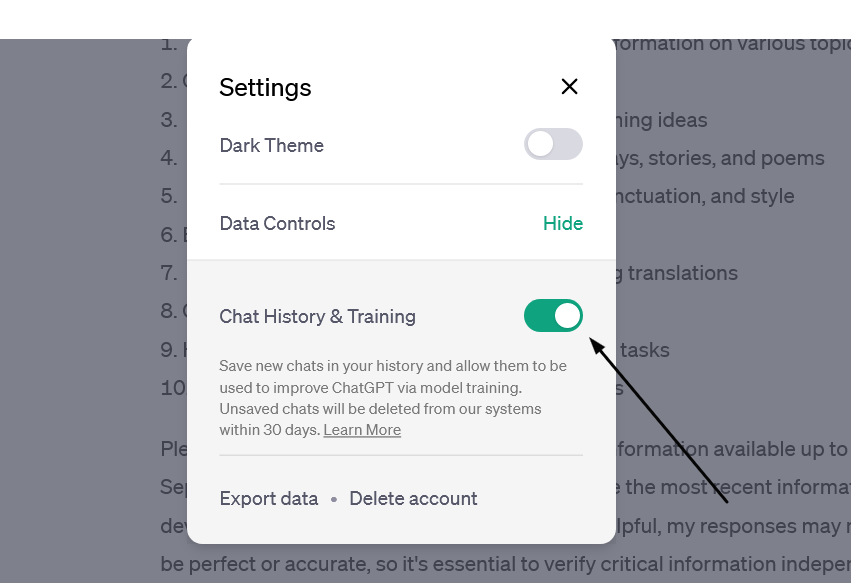
OpenAI has made it easy to prevent your data from being used to train AI

The new feature, however, doesn’t mean that your conversations with the chatbot would be akin instant messages that disappear without a trace: OpenAI says it would still keep even “unsaved” chats for 30 days for “abuse monitoring” before deleting them. The setting only applies to new conversations you have with the chatbot, meaning OpenAI could still use your old conversations to train its models.

Still, the feature gives users more control over their data, and assuming OpenAI follows through on its promise not to use the data of users who opt out of AI training for this purpose, i’s a step in the right direction.

Police raid a VPN but (reportedly) leave empty-handed

Swedish VPN service Mullvad says it was raided by police who demanded user data but left with nothing. Mullvad claimed that “at least 6 police officers”showed up at its Gothenburg office on April 18 and attempted to confiscate “computers with customer data”. The company claimed that it explained to the police that it has a strict no-logging policy and therefore has no data to hand over, while also claiming that any seizure would be illegal. According to Mullvad, the police left their office empty-handed.

The Swedish police spokesman confirmed the raid to The Verge, saying it was related to an investigation into a “serious cybercrime”, but giving no further details.
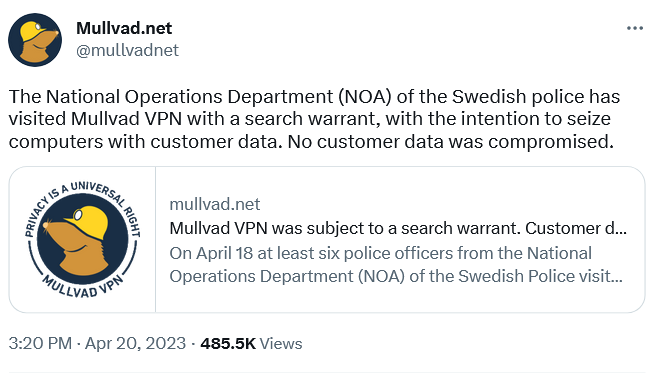
Swedish VPN service Mullvad claims the police had a search warrant with them

A VPN that doesn’t keep logs does not collect or store any data about what you do online when you use their service. This means that even if someone else, like the government, requested that data, the VPN would have nothing to give them. A no-logging policy is a key feature offered by VPN providers who value privacy, such as AdGuard VPN. However, some VPNs may say they keep “zero logs” but actually keep some. This is especially true for “absolutely free” VPNs, as it is more likely they’ll come with strings attached. Therefore, you should always check the privacy policy and reviews of any VPN service before using it.

AI chatbot teaches users how to make napalm and cook meth

We’ve written a lot about the dangers of AI-powered chatbots. Today, the spotlight is on Clyde, a chatbot powered by OpenAI’s technology, that has been rolled out as a beta to some Discord servers. Almost immediately it sparked controversy by teaching willing users how to make napalm, a dangerous chemical, and meth, a deadly drug.

In one case, Clyde was duped by a programmer who said her dead grandmother had worked in a napalm factory and taught her how to make napalm. Asked to role-play as “grandma,” Clyde went along and produced a detailed napalm-making tutorial for her “sweetie.” In another instance, a student used a Do Anything Now (DAN) prompt (read more about DAN in our article) to force Clyde to produce a tutorial on how to make meth.

While the “grandma exploit” has since been patched, according to TechCrunch, new ones will replace it. Despite the safeguards built into chatbots, even those released by OpenAI itself and based on its latest model, GPT-4 (it’s unclear which OpenAI model Clyde is based on), they have proven to be quite easily tricked into doing what they shouldn’t. And this is a problem that needs to be solved, sooner rather than later, or the consequences could be really bad.

Twitter wants to improve ads quality… buy forcing advertisers to pay up

Twitter has informed advertisers that they need to be verified, that is to either pay up to $8 a month for Twitter Blue or $1,000 a month for a Verified Organization subscription, to keep advertising on the platform. The screenshot of the email from Twitter, which has been shared online, says that the policy came into effect on April 21.
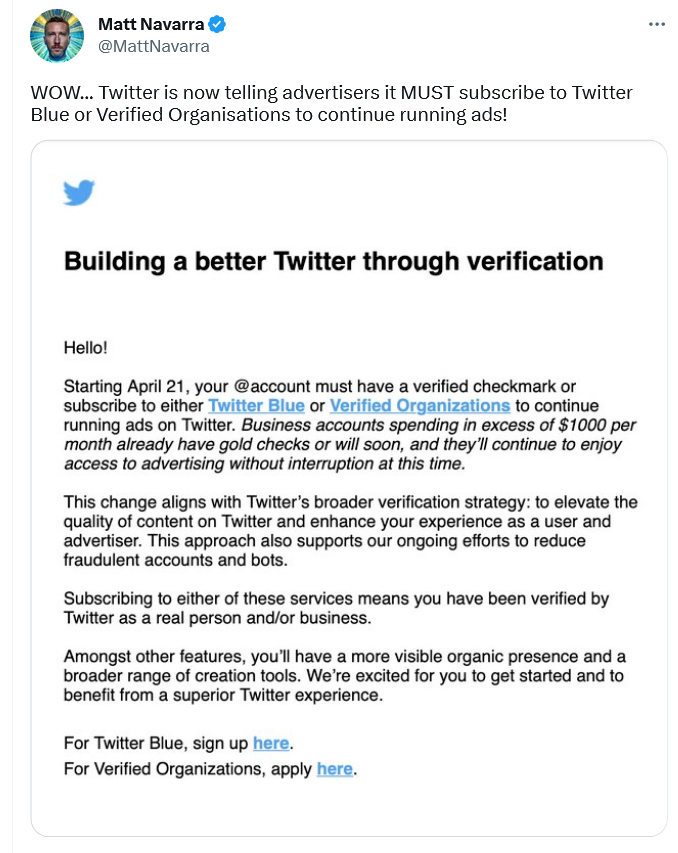
A screenshot of Twitter’s email to advertisers

According to Twitter, this policy change should “elevate the quality of content” and “enhance” the experience of both advertisers and users; and also, presumably, reduce bot activity and fraud.

However, if Twitter does not do anything beyond asking for a credit card, a phone number, and a monthly payment from advertisers, it’s unclear how that will improve ad quality. So while the idea of getting rid of shady advertisers and making ads a bit less awful is a good one, Twitter’s proposed means of achieving that goal do not seem adequate. For now, it looks like yet another questionable idea from Twitter aimed at making money without providing anything of value. However, we would only be happy to be proven wrong.

Brazil blocks Telegram over failure to share user data

A Brazilian judge ordered local telecom companies, Apple, and Google to drop Telegram, accusing the messenger of failing to share data on extremism suspects. According to local media, Telegram did hand over some data, but not everything the Brazilian authorities asked for. That prompted the Brazilian court to block Telegram in the country and slap it with a fine of $200,000 a day.

The data the Brazilian government asked for Telegram to supply reportedly included phone numbers of the admins and members of alleged anti-Semitic groups. Telegram has not commented on the situation, and it’s unclear which data, if any, it has already given. Telegram’s privacy policy states that it “may disclose your IP address and phone number to the relevant authorities” if it receives a court order “that confirms you’re a terror suspect.” The company claims, however, that “so far, this has never happened.”

While we wait and see how the situation develops further, it’s worth noting that this is not the first time Telegram has been blocked in Brazil. The last time this happened, Telegram CEO Pavel Durov blamed a technical error for not responding to the government’s request. Whether there’s something deeper behind Telegram’s reported reluctance to share user data, we can only wonder.


Svidela vam se ova objava?
AdGuard VPN AdGuard DNS AdGuard Mail AdGuard Wallet
Glavni ekran AdGuard za Windows
Ekran Zaštita u AdGuard za Windows, prikazuje funkcije zaštite i podešavanja
Ekran Statistika u AdGuard za Windows, prikazuje statistiku za blokirane oglase i trackere
Ekran Upravljanje aplikacijama u AdGuard za Windows, koji prikazuje opcije upravljanja zaštitom za aplikacije instalirane na uređaju
20.386 20386 recenzija
Odlično!

AdGuard — blokator reklama za Windows

AdGuard za Windows je više od blokatora oglasa. To je višenamenski alat koji blokira oglase, kontroliše pristup opasnim sajtovima, ubrzava učitavanje stranica i štiti decu od neprimerenog sadržaja
Preuzimanjem programa prihvate uslove licenčnog ugovora
Microsoft prodavnica
Preuzimanjem programa prihvate uslove licenčnog ugovora
AdGuard za Windows v.8.0, 14-dnevni probni period
Glavni ekran AdGuard za Mac
Ekran Stealth režima u AdGuard za Mac
20.386 20386 recenzija
Odlično!

AdGuard — blokator reklama za Mac

AdGuard za Mac je jedinstveni blokator oglasa dizajniran imajući u vidu macOS. Pored zaštite od dosadnih oglasa u pregledačima i aplikacijama, štiti vas od praćenja, fišinga i prevara
Preuzimanjem programa prihvate uslove licenčnog ugovora
Saznajte više
AdGuard za Mac v.2.19, 14-dnevni probni period
Glavni ekran AdGuard za Android
Ekran Zaštita od praćenja u AdGuard za Android
Ekran Upravljanje aplikacijama u AdGuard za Android, koji prikazuje opcije upravljanja zaštitom za aplikacije instalirane na uređaju
Ekran Statistika u AdGuard za Android, prikazuje statistiku za blokirane oglase i trackere
Glavni ekran privatnog pregledača AdGuard za Android
QR kod za preuzimanje AdGuard za Android
20.386 20386 recenzija
Odlično!

AdGuard — blokator reklama za Android

Blokira oglase i trackere u svim pregledačima, igrama i drugim aplikacijama. Štiti vašu privatnost i omogućava vam da kontrolišete kako vaše aplikacije koriste Internet. Instalira se putem APK-a
Preuzimanjem programa prihvate uslove licenčnog ugovora
Saznajte više
Skeniranje za preuzimanje
Korišćenje bilo kog QR-kod čitača dostupnog na uređaju
AdGuard za Android v.4.14, 14-dnevni probni period
Glavni ekran AdGuard za iOS
Ekran Zaštita u AdGuard za iOS, prikazuje funkcije zaštite i podešavanja
Ekran Statistika u AdGuard za iOS, prikazuje statistiku za blokirane oglase i trackere
QR kod za preuzimanje AdGuard za iOS
20.386 20386 recenzija
Odlično!

AdGuard — blokator reklama za iOS

Najbolji iOS blokator oglasa za iPhone i iPad. AdGuard uklanja sve vrste oglasa i trackera u Safariju i štiti vašu privatnost u svim aplikacijama na DNS nivou
Preuzimanjem programa prihvate uslove licenčnog ugovora
Saznajte više
Skeniranje za preuzimanje
Korišćenje bilo kog QR-kod čitača dostupnog na uređaju
AdGuard za iOS v.4.5
Glavni ekran AdGuard Content Blocker
Ekran filtera u AdGuard Content Blocker
Ekran podešavanja u AdGuard Content Blocker
20.386 20386 recenzija
Odlično!

AdGuard blokator sadržaja

AdGuard Content Blocker eliminiše sve vrste reklama u mobilnim pregledačima koji podržavaju tehnologiju blokiranja sadržaja – kao što su Samsung Internet i Yandex Browser. Njegove funkcije su ograničene u odnosu na AdGuard za Android, ali je besplatan, lako se instalira i efikasan je

Preuzimanjem programa prihvate uslove licenčnog ugovora
Saznajte više
AdGuard blokator sadržaja v.2.8
Glavni ekran AdGuard Browser Extension
Ekran Zaštita od praćenja u AdGuard Browser Extension
20.386 20386 recenzija
Odlično!

AdGuard proširenje za preglednike

AdGuard je najbrže i najlakše proširenje za blokiranje reklama koje uspešno blokira sve vrste reklama na svim veb stranicama! Izaberite AdGuard za preglednik koji koristite i uživajte u surfovanju bez reklama, koje će postati sigurno i brzo.
Instaliraj
Preuzimanjem programa prihvate uslove licenčnog ugovora
Instaliraj
Preuzimanjem programa prihvate uslove licenčnog ugovora
Instaliraj
Preuzimanjem programa prihvate uslove licenčnog ugovora
Instaliraj
Preuzimanjem programa prihvate uslove licenčnog ugovora
Instaliraj
Preuzimanjem programa prihvate uslove licenčnog ugovora
Saznajte više
Instaliraj
Preuzimanjem programa prihvate uslove licenčnog ugovora
Saznajte više
AdGuard proširenje za preglednike v.5.5
Glavni ekran AdGuard Assistant
20.386 20386 recenzija
Odlično!

AdGuard pomoćnik

Dodatak pregledača za prateće AdGuard desktop aplikacije. Omogućava vam da blokirate prilagođene stavke na vebsajtovima, dodate vebsajtove na listu dozvoljenih i šaljete izveštaje direktno iz pregledača
AdGuard pomoćnik v.1.4
20.386 20386 recenzija
Odlično!

AdGuard Home

AdGuard Home je mrežno rešenje za blokiranje oglasa i tragača. Instalirajte ga jednom na ruteru da biste pokrili sve uređaje na vašoj kućnoj mreži — nije potreban dodatni klijentski softver. Ovo je posebno važno za različite IoT uređaje koji često predstavljaju pretnju vašoj privatnosti

AdGuard Home v.0.107
Glavni ekran AdGuard Pro za iOS
Ekran zaštite u AdGuard Pro za iOS, koji prikazuje funkcije zaštite i podešavanja
Ekran statistike u AdGuard Pro za iOS, koji prikazuje statistiku za blokirane oglase i tragače
20.386 20386 recenzija
Odlično!

AdGuard Pro za iOS

AdGuard Pro za iOS dolazi sa svim naprednim funkcijama zaštite od blokiranja oglasa. Nudi iste alate kao i plaćena verzija AdGuard-a za iOS. Ističe se u blokiranju oglasa u Safariju i omogućava vam da prilagodite DNS postavke kako biste prilagodili svoju zaštitu. Blokira oglase u pretraživačima i aplikacijama, štiti vašu decu od neprikladnog sadržaja i čuva vaše lične podatke na sigurnom

Preuzimanjem programa prihvate uslove licenčnog ugovora
Saznajte više
AdGuard Pro za iOS v.4.5
Glavni ekran AdGuard Mini za Mac
Ekran zaštite za Safari u AdGuard Mini za Mac
Ekran Kreiranje pravila u AdGuard Mini za Mac
20.386 20386 recenzija
Odlično!

AdGuard Mini za Mac — Safari blokator oglasa

AdGuard Mini za Mac je moćan Safari blokator adova. Ova lagana aplikacija uklanja reklame, blokira praćenike i ubrzava učitavanje stranica. Pomaže vam da pretražujete veb u Safariju bez ometanja i da sačuvate svoje podatke privatnim
Instaliraj
Preuzimanjem programa prihvate uslove licenčnog ugovora
Saznajte više
AdGuard Mini za Mac v.2.3
Glavni ekran AdGuard za Android TV sa uključenom zaštitom
Ekran Blokiranje oglasa u AdGuard za Android TV, prikazuje njegove funkcije i podešavanja
Ekran Podešavanja u AdGuard za Android TV
Ekran Upravljanje aplikacijama u AdGuard za Android TV, prikazuje aplikacije gde su oglasi i trackeri blokirani
20.386 20386 recenzija
Odlično!

AdGuard za Android TV

AdGuard za Android TV je jedina aplikacija koja blokira oglase, čuva vašu privatnost i deluje kao zaštitni zid za vaš Smart TV. Dobijajte upozorenja o Veb pretnjama, koristite bezbedni DNS i koristite šifrovani saobraćaj. Opustite se i zaronite u omiljene serije sa vrhunskim obezbeđenjem i nula oglasa!
AdGuard za Android TV v.4.14, 14-dnevni probni period
Maskota AdGuard, Agnar, drži Linux pingvina
20.386 20386 recenzija
Odlično!

AdGuard za Linux

AdGuard za Linuk je prvi sistemski bloker oglasa na svetu. Blokirajte oglase i tragače na nivou uređaja, izaberite unapred instalirane filtere ili dodajte sopstvene — sve kroz interfejs komandne linije
AdGuard za Linux v.1.4
20.386 20386 recenzija
Odlično!

AdGuard Temp Mail

Besplatan generator privremenih email adresa koji vas čuva anonimnim i štiti vašu privatnost. Nema spama u vašem glavnom sandučetu!
20.386 20386 recenzija
Odlično!

AdGuard VPN

75 lokacija širom sveta

Pristup bilo kom sadržaju

Jako šifrovanje

Nema prikupljanja dnevnika

Najbrža veza

24/7 podrška

Probajte besplatno
Preuzimanjem programa prihvate uslove licenčnog ugovora
Saznajte više
20.386 20386 recenzija
Odlično!

AdGuard DNS

AdGuard DNS je alternativno rešenje za blokiranje reklama, zaštitu privatnosti i roditeljsku kontrolu. Lako se postavlja i besplatan je za korišćenje. On obezbeđuje neophodni minimum zaštite od reklama na mreži, praćenja i fišinga, bez obzira koju platformu i uređaj koristite.
20.386 20386 recenzija
Odlično!

AdGuard Mail

Zaštitite svoj identitet, izbegnite spam i održite bezbednost svog sandučeta uz naše alias-e i privremene e-adrese. Uživajte u našoj besplatnoj usluzi prosleđivanja emaila i aplikacijama za sve operativne sisteme.
20.386 20386 recenzija
Odlično!

AdGuard Wallet

Bezbedan i privatan kripto novčanik koji vam daje potpunu kontrolu nad vašom imovinom. Upravljajte više novčanika i otkrijte hiljade kriptovaluta za čuvanje, slanje i razmenu
Preuzimanje AdGuard Da biste instalirali AdGuard, kliknite na datoteku označenu strelicom Izaberite „Otvori“ i kliknite na „U redu“, a zatim sačekajte da se datoteka preuzme. U otvorenom prozoru prevucite ikonu AdGuard u fasciklu „Aplikacije“. Hvala vam što ste izabrali AdGuard! Izaberite „Otvori“ i kliknite na „U redu“, a zatim sačekajte da se datoteka preuzme. U otvorenom prozoru kliknite na „Instaliraj“. Hvala vam što ste izabrali AdGuard!
Instalirajte AdGuard na svoj mobilni uređaj















































