Fake Ad Blockers 2: Now with Cookies and Ad Fraud

— OK, Google, I use Chrome, and I'd like to get an ad blocker for it.
— Sure, head to Chrome Web Store, there are literally hundreds of ad blockers there!
— Hmm, hundreds you say? Is it safe? I heard that last year a lot of them appeared to be fake and malicious!
— No worries, we are going to limit the power of ad blockers soon, this will definitely help!
— Oh, really? That's cool, thank you! I'll grab one from the top of the search results. This "AdBlock" by "AdBlock, Inc" looks legit. It has a privacy policy, it has over 800,000 users, and it is from a German company. Or maybe I'll try this "uBlock" by "Charlie Lee"? Five stars rating, 850,000 users, it must be good as well.

Stop right there!

This "AdBlock" is fake and malicious, and the "uBlock" one is the same. And there are many more not so popular deceptive clones there. How do I know that? I spent quite some time inspecting their code trying to figure out what they do. The real question is, how could you (a casual user) know it?
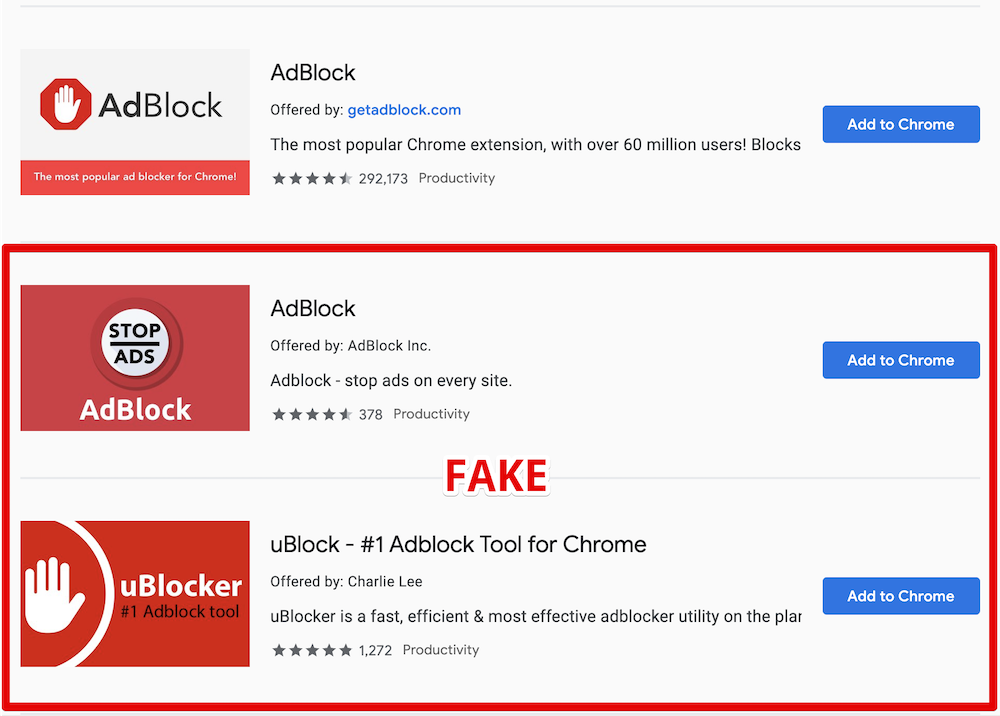
Here is the legit AdBlock extension followed by its clones

What's wrong with them?

For starters, they are using the names of two other very popular ad blockers, and this alone is deceitful and simply not right and should be enough. However, despite multiple reports, these extensions are still not removed.

Apparently, ethical issues and deception cannot be a reason for extension removal. Let's get to the next part then — malicious behavior.

Here goes the technical explanation. Skip to the next part if you're not a developer.

At first, these add-ons just do what they're supposed to do — they block ads. They both are based on the code of the original "AdBlock" extension so the quality is good enough.

Periodically, they send a request like this:

GET https://ublockerext.com/heartbeat/json/?action=config&&id=dgpfeomibahlpbobpnjpcobpechebadh&version=1.7&lt=199&uid=76f24bff-d831-aa47-7377-7ea195bf9cf8&r=1567540438520

At first glance, the server response looks innocent:

{"blockPopups":true,"statuses":[["synchronize_invalid_url","filters_subscription_lastDownload_invalidURL"],["synchronize_connection_error","filters_subscription_lastDownload_connectionError"],["synchronize_invalid_data","filters_subscription_lastDownload_invalidData"],["synchronize_checksum_mismatch","filters_subscription_lastDownload_checksumMismatch"]]}

However, about 55 hours after the installation, the response suddenly changes, and it does not look that innocent anymore.

This new response contains a list of commands for the extension to execute. After that the extensions' behavior changes, and they start doing a few more things besides ad blocking.

They now send a request to urldata.net for each new visited domain. For instance, if you visit teamviewer.com, they'll send a request like this:

http://urldata.net/api?key=4e4a7faf91b2bcda88a60e269e4d6208bfe8d3d6&out=https%3A%2F%2Fteamviewer.com&format=txt

The response to this request contains a special URL:

http://urldata.net/newapi/click/PvdHh16uGq6mLqmbUoT3AaUImj7ynsh0cVlCywkljEF19oBV0JH4jNYpn--xwIyEV36OMPPH1IrESEyclc7yxEbB3mYrfPMxnGqoV4SOmQ4MI9NYNHAQrPHwvJNE0W488ESUN1y7ONahVxwBZKnr4PZlZKI5gNi65DoIfYNwXAPoyFwh8Mgz1bX63V4PnjspvZa-DqjF5GTNxoIJqpHLC1_SwlFRYeoIvVGutkgfCSI4hMHa3z52VbL7VxbaQAhhqLC-uJUJO_s234VL3JDM01O-JE9PS6fXOH6z5XUojvotSQ5mZe7NFEsuMaeSK9rasy8MvaICWZpGDmgxIodzvMpJUv41ppkuqMBDDYpHptCEBb4Za_HffgaiKn-aY_COfan5P650B6ZTQsVqNKidMRRaHY4FxvM7VA79vX5_Oe0J0c9Wczw8VM9GrvzlGLdt4TjyBcF2JEtpcayh99JdL1wxrL_EoEHMml4LDy1JwT8LPxPG2vrlK5QSuoGrx-7tJLHD6Gq3SUeQj1XXEcENy77hkzU79TO9_hEs29Kq6ASdk6NKIZT8gOuJsNOAkU4i0Y9JvmEpdENyBL2ugmFNyitW2CfGzHrLsNex

The extensions will immediately open that URL in the background. A chain of redirects follows this request:

The last request in the chain is:

https://www.teamviewer.com/en/content/2019-cj-emea/?coupon=aff-19-en-10-1&utm_source=affiliate&utm_medium=cj&utm_campaign=dedc1dc5d58611e982c203670a180513&utm_content=2933854&PID=affiliate.cj.q1&s=1&cjevent=dedc1dc5d58611e982c203670a180513

What's going on here, you'd ask? Apparently, this address belongs to Teamviewer's affiliate program. In response, your browser receives a special "affiliate" cookie. Now if you make a purchase on teamviewer.com the extensions owner will be paid a comission by Teamviewer.

This technique is known as Cookie stuffing, and this is basically an ad fraud scheme.

There are many more affiliate links they are using for this. Here's just a small part I've been able to extract in 30 minutes. Here are some notable victims: microsoft.com, linkedin.com, aliexpress.com, booking.com, and many more.

Another interesting thing about this extension is that it contains some self-protection mechanisms. For instance, it detects if the developer console is open, it ceases all suspicious activity at once.

Summary

  • Both fake AdBlock and uBlock deceive users by using names of legitimate popular ad blockers.
  • They have not been taken down by Google despite multiple reports about deceptive naming.
  • The real purpose of these extensions is Cookie stuffing — an illegal ad fraud scheme.
  • The scale is unprecedented. These two add-ons have more than 1.6 Million "weekly active users", who were stuffed with cookies of over than 300 websites from Alexa Top 10000. It is difficult to estimate the damage, but I'd say that we are talking about millions of USD monthly.

Actually, there's a bright side to it. Now that this fraud scheme is uncovered, affiliate programs' owners can follow the money trail and find out who is behind this scheme. Sentences for cookie stuffing are real so there's a chance that the developers of these extensions will be held responsible.

The problem of fake extensions

This problem is not new, and similar cases were reported before. However, despite that, I see no effort from Google to resolve this. It seems that the situation is even worse now. At least fake blockers had to invent a new name before. Now, as you can see, they don't even bother to do that!

It's not only regular users who fall for their tricks. For instance, here is the fake "AdBlock" on the list of ad blockers recommended by androidcentral.com:

Excerpt from the review on Android Central

Is this problem unique to Chrome WebStore? Well, not really. For instance, an AdGuard rip-off has even got a "recommended" badge on Mozilla Add-ons despite multiple reports on the unethical behavior (1, 2). Well, at least it did not try to use our name.

How can this situation be improved?

You might have heard about the solution Google proposed called "Manifest V3". They say that limiting extensions capabilities will improve the overall performance, security and privacy.

Will it, though? While I kinda agree with the performance point, I don't see how it can help with the other two. For instance, it would do no harm to these two add-ons - cookie stuffing is still possible in this scenario.

In fact, I fully agree with what EFF proposes:

In order to truly protect users, Google needs to start properly enforcing existing Chrome Web Store policies.
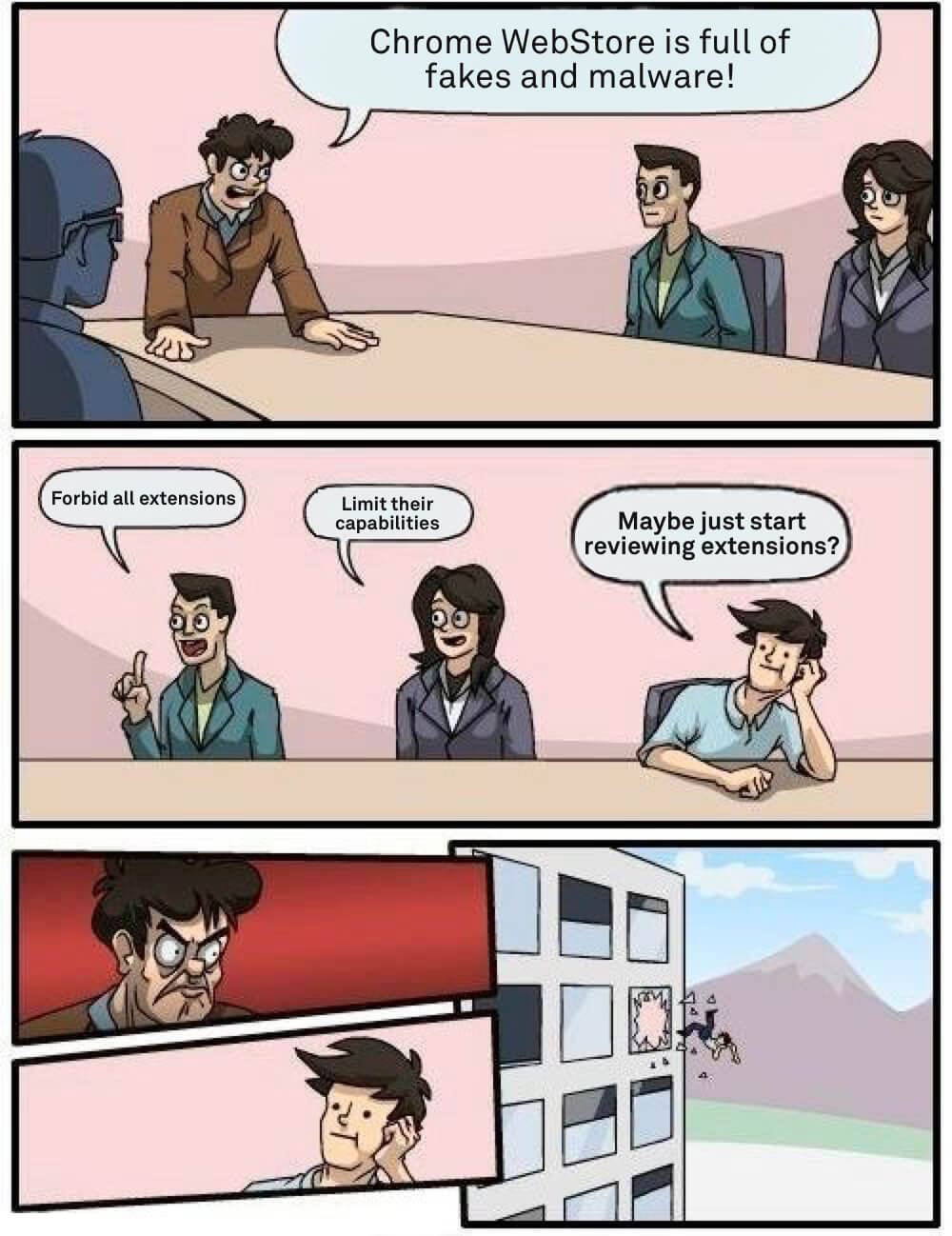
Somewhere at Google office

How can you protect yourself?

As you can see, even journalists sometimes fall for the fakes so this is a difficult question. A year ago I'd have said that the recipe is simple — install extensions only from the developers you trust.

The situation is now worse than before so I'd like to add a couple of things to the list of recommendations, at least until things somehow change:

  1. If you're going to install a browser extension, think again. Maybe you don't really need it?
  2. Don't believe what you read in the extension's description. Be aware that there's almost no review process, and this can easily be a fake.
  3. Reading the users' reviews won't help as well. These two extensions had excellent reviews and yet they were malicious.
  4. Don't use the WebStore internal search, install extensions from the trusted developers' websites directly.

UPD (Sep 18th):
Both malicious extensions we mentioned in this article are currently blocked in Chrome. While this is undoubtedly good news, Google needs to do much, much more to prove they really care about their users' safety.


Svidela vam se ova objava?
AdGuard VPN AdGuard DNS AdGuard Mail AdGuard Wallet
Glavni ekran AdGuard za Windows
Ekran Zaštita u AdGuard za Windows, prikazuje funkcije zaštite i podešavanja
Ekran Statistika u AdGuard za Windows, prikazuje statistiku za blokirane oglase i trackere
Ekran Upravljanje aplikacijama u AdGuard za Windows, koji prikazuje opcije upravljanja zaštitom za aplikacije instalirane na uređaju
20.385 20385 recenzija
Odlično!

AdGuard — blokator reklama za Windows

AdGuard za Windows je više od blokatora oglasa. To je višenamenski alat koji blokira oglase, kontroliše pristup opasnim sajtovima, ubrzava učitavanje stranica i štiti decu od neprimerenog sadržaja

Preuzimanjem programa prihvate uslove licenčnog ugovora
Microsoft prodavnica
Preuzimanjem programa prihvate uslove licenčnog ugovora
AdGuard za Windows v.8.0, 14-dnevni probni period
Glavni ekran AdGuard za Mac
Ekran Stealth režima u AdGuard za Mac
20.385 20385 recenzija
Odlično!

AdGuard — blokator reklama za Mac

AdGuard za Mac je jedinstveni blokator oglasa dizajniran imajući u vidu macOS. Pored zaštite od dosadnih oglasa u pregledačima i aplikacijama, štiti vas od praćenja, fišinga i prevara
Preuzimanjem programa prihvate uslove licenčnog ugovora
Saznajte više
AdGuard za Mac v.2.19, 14-dnevni probni period
Glavni ekran AdGuard za Android
Ekran Zaštita od praćenja u AdGuard za Android
Ekran Upravljanje aplikacijama u AdGuard za Android, koji prikazuje opcije upravljanja zaštitom za aplikacije instalirane na uređaju
Ekran Statistika u AdGuard za Android, prikazuje statistiku za blokirane oglase i trackere
Glavni ekran privatnog pregledača AdGuard za Android
QR kod za preuzimanje AdGuard za Android
20.385 20385 recenzija
Odlično!

AdGuard — blokator reklama za Android

Blokira oglase i trackere u svim pregledačima, igrama i drugim aplikacijama. Štiti vašu privatnost i omogućava vam da kontrolišete kako vaše aplikacije koriste Internet. Instalira se putem APK-a
Preuzimanjem programa prihvate uslove licenčnog ugovora
Saznajte više
Skeniranje za preuzimanje
Korišćenje bilo kog QR-kod čitača dostupnog na uređaju
AdGuard za Android v.4.14, 14-dnevni probni period
Glavni ekran AdGuard za iOS
Ekran Zaštita u AdGuard za iOS, prikazuje funkcije zaštite i podešavanja
Ekran Statistika u AdGuard za iOS, prikazuje statistiku za blokirane oglase i trackere
QR kod za preuzimanje AdGuard za iOS
20.385 20385 recenzija
Odlično!

AdGuard — blokator reklama za iOS

Najbolji iOS blokator oglasa za iPhone i iPad. AdGuard uklanja sve vrste oglasa i trackera u Safariju i štiti vašu privatnost u svim aplikacijama na DNS nivou
Preuzimanjem programa prihvate uslove licenčnog ugovora
Saznajte više
Skeniranje za preuzimanje
Korišćenje bilo kog QR-kod čitača dostupnog na uređaju
AdGuard za iOS v.4.5
Glavni ekran AdGuard Content Blocker
Ekran filtera u AdGuard Content Blocker
Ekran podešavanja u AdGuard Content Blocker
20.385 20385 recenzija
Odlično!

AdGuard blokator sadržaja

AdGuard Content Blocker eliminiše sve vrste reklama u mobilnim pregledačima koji podržavaju tehnologiju blokiranja sadržaja – kao što su Samsung Internet i Yandex Browser. Njegove funkcije su ograničene u odnosu na AdGuard za Android, ali je besplatan, lako se instalira i efikasan je
Preuzimanjem programa prihvate uslove licenčnog ugovora
Saznajte više
AdGuard blokator sadržaja v.2.8
Glavni ekran AdGuard Browser Extension
Ekran Zaštita od praćenja u AdGuard Browser Extension
20.385 20385 recenzija
Odlično!

AdGuard proširenje za preglednike

AdGuard je najbrže i najlakše proširenje za blokiranje reklama koje uspešno blokira sve vrste reklama na svim veb stranicama! Izaberite AdGuard za preglednik koji koristite i uživajte u surfovanju bez reklama, koje će postati sigurno i brzo.
Instaliraj
Preuzimanjem programa prihvate uslove licenčnog ugovora
Instaliraj
Preuzimanjem programa prihvate uslove licenčnog ugovora
Instaliraj
Preuzimanjem programa prihvate uslove licenčnog ugovora
Instaliraj
Preuzimanjem programa prihvate uslove licenčnog ugovora
Instaliraj
Preuzimanjem programa prihvate uslove licenčnog ugovora
Saznajte više
Instaliraj
Preuzimanjem programa prihvate uslove licenčnog ugovora
Saznajte više
AdGuard proširenje za preglednike v.5.5
Glavni ekran AdGuard Assistant
20.385 20385 recenzija
Odlično!

AdGuard pomoćnik

Dodatak pregledača za prateće AdGuard desktop aplikacije. Omogućava vam da blokirate prilagođene stavke na vebsajtovima, dodate vebsajtove na listu dozvoljenih i šaljete izveštaje direktno iz pregledača
AdGuard pomoćnik v.1.4
20.385 20385 recenzija
Odlično!

AdGuard Home

AdGuard Home je mrežno rešenje za blokiranje oglasa i tragača. Instalirajte ga jednom na ruteru da biste pokrili sve uređaje na vašoj kućnoj mreži — nije potreban dodatni klijentski softver. Ovo je posebno važno za različite IoT uređaje koji često predstavljaju pretnju vašoj privatnosti
AdGuard Home v.0.107
Glavni ekran AdGuard Pro za iOS
Ekran zaštite u AdGuard Pro za iOS, koji prikazuje funkcije zaštite i podešavanja
Ekran statistike u AdGuard Pro za iOS, koji prikazuje statistiku za blokirane oglase i tragače
20.385 20385 recenzija
Odlično!

AdGuard Pro za iOS

AdGuard Pro za iOS dolazi sa svim naprednim funkcijama zaštite od blokiranja oglasa. Nudi iste alate kao i plaćena verzija AdGuard-a za iOS. Ističe se u blokiranju oglasa u Safariju i omogućava vam da prilagodite DNS postavke kako biste prilagodili svoju zaštitu. Blokira oglase u pretraživačima i aplikacijama, štiti vašu decu od neprikladnog sadržaja i čuva vaše lične podatke na sigurnom
Preuzimanjem programa prihvate uslove licenčnog ugovora
Saznajte više
AdGuard Pro za iOS v.4.5
Glavni ekran AdGuard Mini za Mac
Ekran zaštite za Safari u AdGuard Mini za Mac
Ekran Kreiranje pravila u AdGuard Mini za Mac
20.385 20385 recenzija
Odlično!

AdGuard Mini za Mac — Safari blokator oglasa

AdGuard Mini za Mac je moćan Safari blokator adova. Ova lagana aplikacija uklanja reklame, blokira praćenike i ubrzava učitavanje stranica. Pomaže vam da pretražujete veb u Safariju bez ometanja i da sačuvate svoje podatke privatnim
Instaliraj
Preuzimanjem programa prihvate uslove licenčnog ugovora
Saznajte više
AdGuard Mini za Mac v.2.3
Glavni ekran AdGuard za Android TV sa uključenom zaštitom
Ekran Blokiranje oglasa u AdGuard za Android TV, prikazuje njegove funkcije i podešavanja
Ekran Podešavanja u AdGuard za Android TV
Ekran Upravljanje aplikacijama u AdGuard za Android TV, prikazuje aplikacije gde su oglasi i trackeri blokirani
20.385 20385 recenzija
Odlično!

AdGuard za Android TV

AdGuard za Android TV je jedina aplikacija koja blokira oglase, čuva vašu privatnost i deluje kao zaštitni zid za vaš Smart TV. Dobijajte upozorenja o Veb pretnjama, koristite bezbedni DNS i koristite šifrovani saobraćaj. Opustite se i zaronite u omiljene serije sa vrhunskim obezbeđenjem i nula oglasa!
AdGuard za Android TV v.4.14, 14-dnevni probni period
Maskota AdGuard, Agnar, drži Linux pingvina
20.385 20385 recenzija
Odlično!

AdGuard za Linux

AdGuard za Linuk je prvi sistemski bloker oglasa na svetu. Blokirajte oglase i tragače na nivou uređaja, izaberite unapred instalirane filtere ili dodajte sopstvene — sve kroz interfejs komandne linije
AdGuard za Linux v.1.4
20.385 20385 recenzija
Odlično!

AdGuard Temp Mail

Besplatan generator privremenih email adresa koji vas čuva anonimnim i štiti vašu privatnost. Nema spama u vašem glavnom sandučetu!
20.385 20385 recenzija
Odlično!

AdGuard VPN

75 lokacija širom sveta

Pristup bilo kom sadržaju

Jako šifrovanje

Nema prikupljanja dnevnika

Najbrža veza

24/7 podrška

Probajte besplatno
Preuzimanjem programa prihvate uslove licenčnog ugovora
Saznajte više
20.385 20385 recenzija
Odlično!

AdGuard DNS

AdGuard DNS je alternativno rešenje za blokiranje reklama, zaštitu privatnosti i roditeljsku kontrolu. Lako se postavlja i besplatan je za korišćenje. On obezbeđuje neophodni minimum zaštite od reklama na mreži, praćenja i fišinga, bez obzira koju platformu i uređaj koristite.
20.385 20385 recenzija
Odlično!

AdGuard Mail

Zaštitite svoj identitet, izbegnite spam i održite bezbednost svog sandučeta uz naše alias-e i privremene e-adrese. Uživajte u našoj besplatnoj usluzi prosleđivanja emaila i aplikacijama za sve operativne sisteme.
20.385 20385 recenzija
Odlično!

AdGuard Wallet

Bezbedan i privatan kripto novčanik koji vam daje potpunu kontrolu nad vašom imovinom. Upravljajte više novčanika i otkrijte hiljade kriptovaluta za čuvanje, slanje i razmenu
Preuzimanje AdGuard Da biste instalirali AdGuard, kliknite na datoteku označenu strelicom Izaberite „Otvori“ i kliknite na „U redu“, a zatim sačekajte da se datoteka preuzme. U otvorenom prozoru prevucite ikonu AdGuard u fasciklu „Aplikacije“. Hvala vam što ste izabrali AdGuard! Izaberite „Otvori“ i kliknite na „U redu“, a zatim sačekajte da se datoteka preuzme. U otvorenom prozoru kliknite na „Instaliraj“. Hvala vam što ste izabrali AdGuard!
Instalirajte AdGuard na svoj mobilni uređaj

















































