Introducing AdGuard Home

As many of you probably know, AdGuard provides a lot of ways to block ads in form of various apps and browser extensions. Some even heard about AdGuard DNS, a way to block ads without installing anything on your device. And today we are announcing the official release of a completely new product — AdGuard Home, which carries a lot of cool new stuff with it.

The short version: AdGuard Home is a network-wide ad-and-tracker blocking DNS server. Its purpose is to let you control your entire network and all your devices, and it does not require using a client-side program. At the same, AdGuard Home features a web interface to easily manage the filtering process.


Where it started

The first step towards AdGuard Home was made two years ago, with the announcement of the AdGuard DNS beta. For the first time, we offered a way to block ads without having to install anything on your device, like a browser extension or an app. And while AdGuard Home is a standalone project, it took a lot from its spiritual predecessor.

In fact, we should probably "thank" Apple for speeding up the development of AdGuard Home. When Apple decided that you couldn't control the traffic on your own devices anymore, we sought ways to put users back in charge of their own gadgets. Naturally, the DNS approach looked the most promising. It's too bad Apple won't allow apps that manage DNS requests anywhere near the AppStore — well, what if you didn't need any apps? And this is the main strength of AdGuard Home: you can set it up anywhere, but I'm getting ahead of myself.

Honestly, I would be lying if I said that we implemented 100% of everything that we wanted. That is why we are calling this version of AdGuard Home "v0.9".

One of the main reasons is that the installation of AdGuard Home is currently not the easiest task for an unprepared user, simplifying it is one of the highest priority tasks as we move forward.

Don't get me wrong, it works perfectly fine in its current state, there's just even more we want to add — and we will, in the official v1.0 release that will be announced before you know it.

But we simply couldn't wait any longer, so meet AdGuard Home 0.9!

Why use it?

It is probably not news to you that ads and trackers follow you on the web wherever you go, not only on your computer, but also on your smartphone (in fact, probably even more on your smartphone!), and even in things like smart fridges, smart vacuums and — God help us all! — smart light bulbs!

Even if you have nothing against companies gathering data about you, tracking can be plain dangerous. Ads are no better — they have long become a gateway to all kinds of malware, viruses, crypto lockers, phishing and more trackers.

Given how densely we are surrounded by gadgets in our life, it can get really tiresome to find, install, configure and maintain an ad blocker app for each of them, and, as I've mentioned already, in case of "smart furniture" this is not possible at all. This is where AdGuard Home comes into play — and shines. It provides a unified solution for blocking ads and trackers on all devices within your network, most commonly your home Wi-Fi network, but nothing prevents you from setting it up in your workspace or anywhere else.

Features and advantages of AG Home

The first thing you will notice is the web interface. We think it looks neat and tidy:
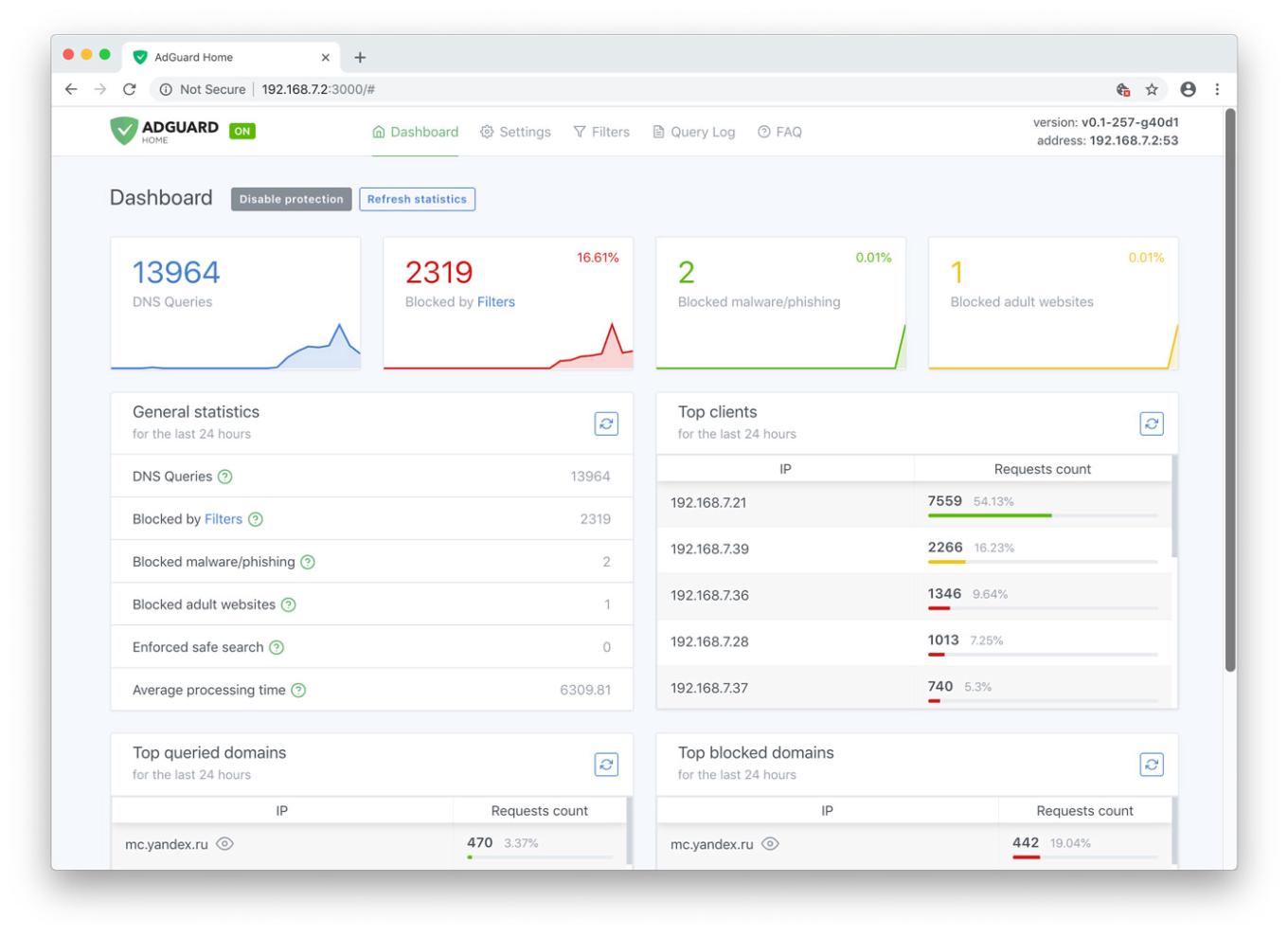
AdGuard Home Dashboard

Let's have a look at the main tab. Here you will find all kinds of statistics, including a vivid graphical representation. As you probably noticed, it looks just like a normal app, but you only need it alone to manage filtering on all your devices within the network.

Unlike application-based solutions for Android and iOS, AdGuard Home is not dependent on media giants like Google and Apple and their countless artificial limitations. Your personal preference is the only deciding factor

Now let's go to the "Settings" tab and look more closely at each of the options offered.
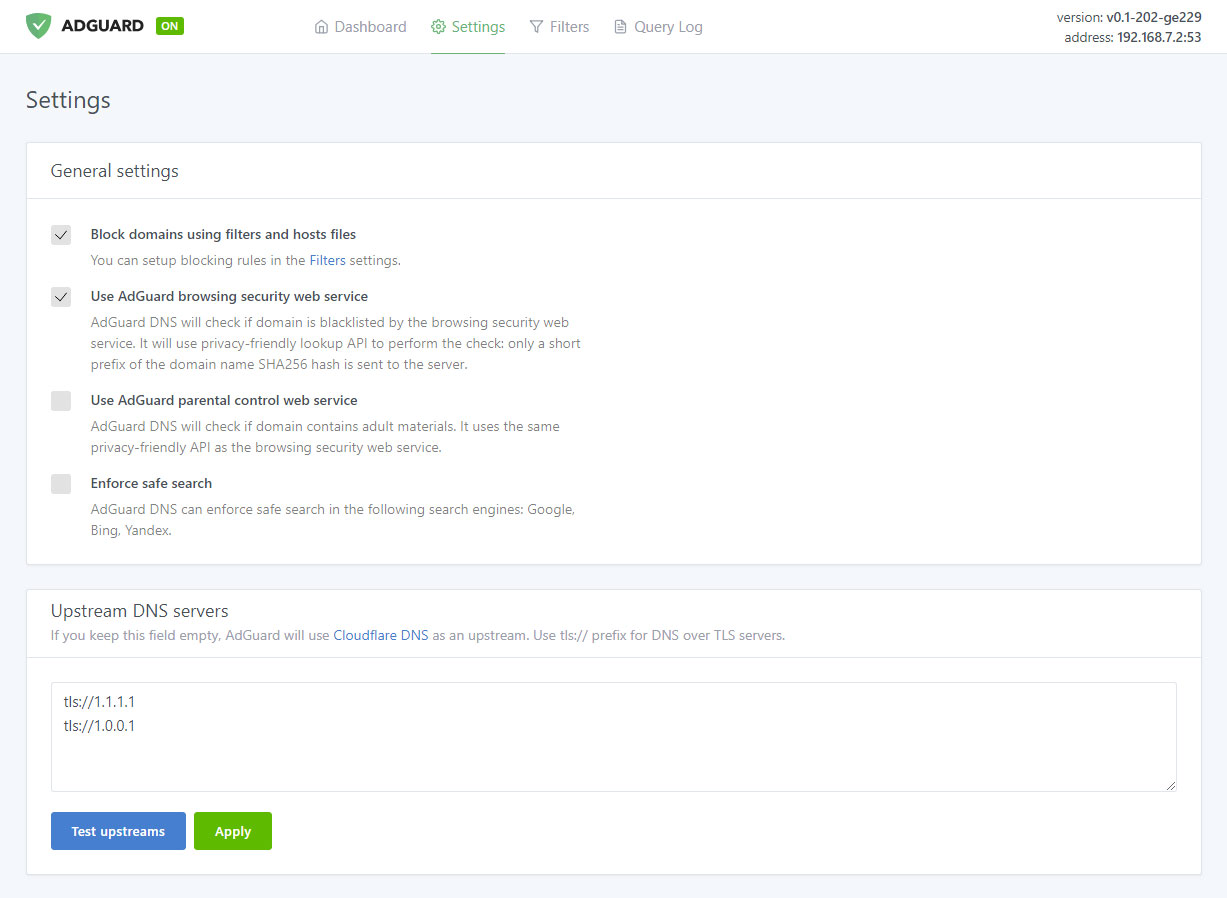
Manage filtering process

Ad blocking

The name speaks for itself. This is the main module, keep it enabled if you want AdGuard Home to block ads and tracking in your network — and it will block a lot. Just look at this comparison:
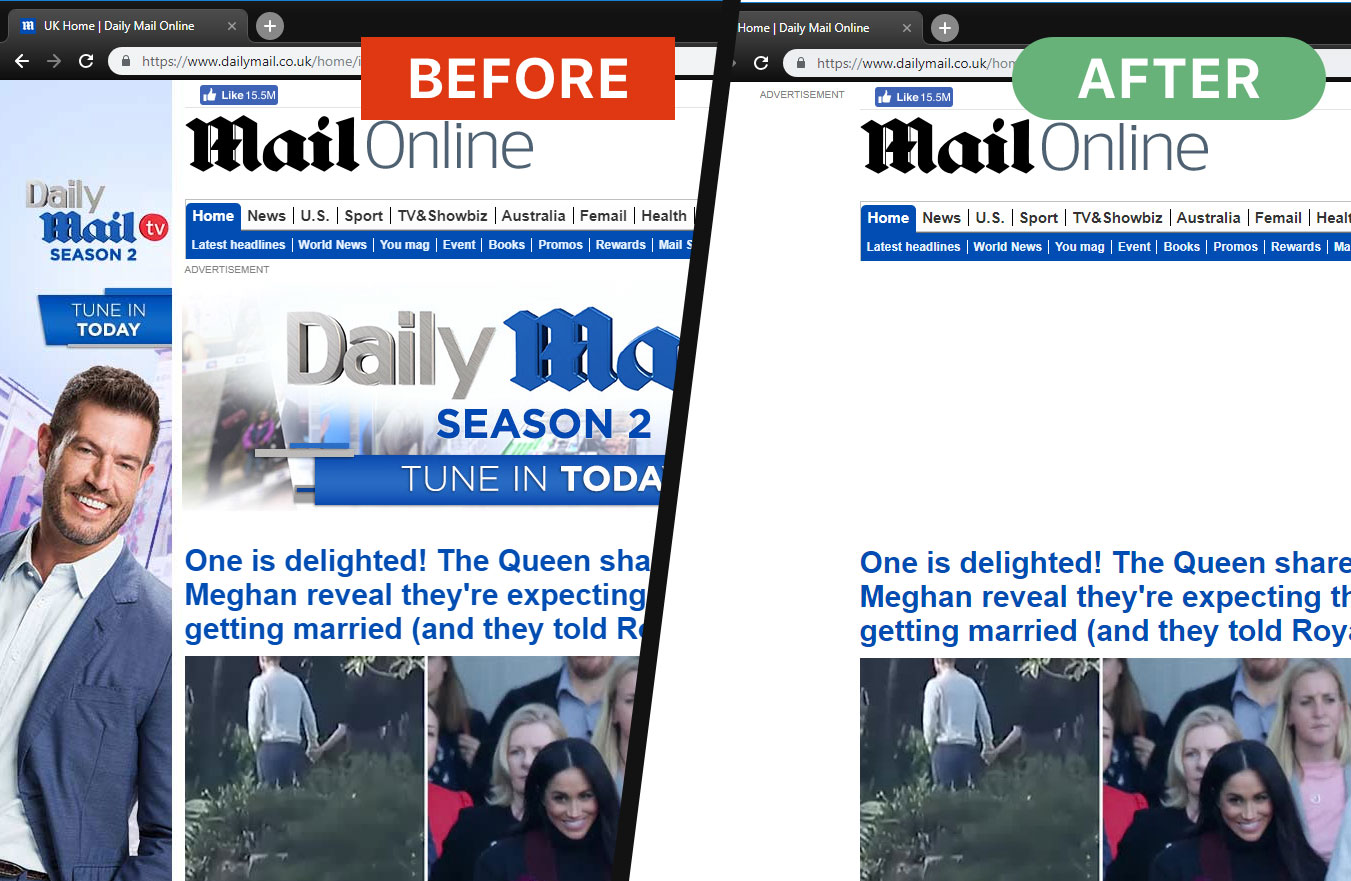
Ads are gone now

And this is not just aesthetics, look at the amount of saved traffic and load speed:
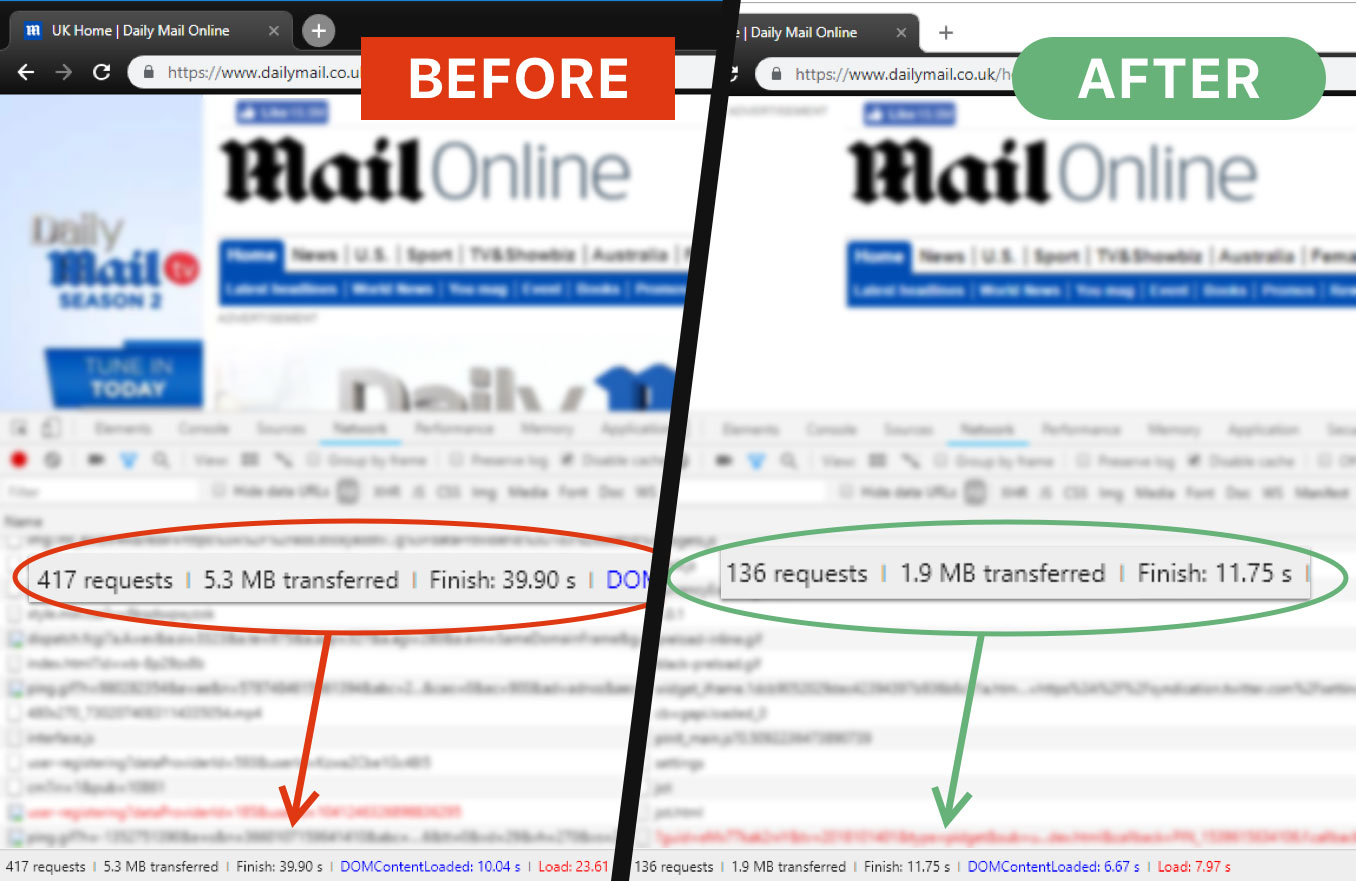
AG Home saves time and traffic

That is more than 3Mb of traffic and 15 seconds of load speed, and that's only one page.

Browsing Security
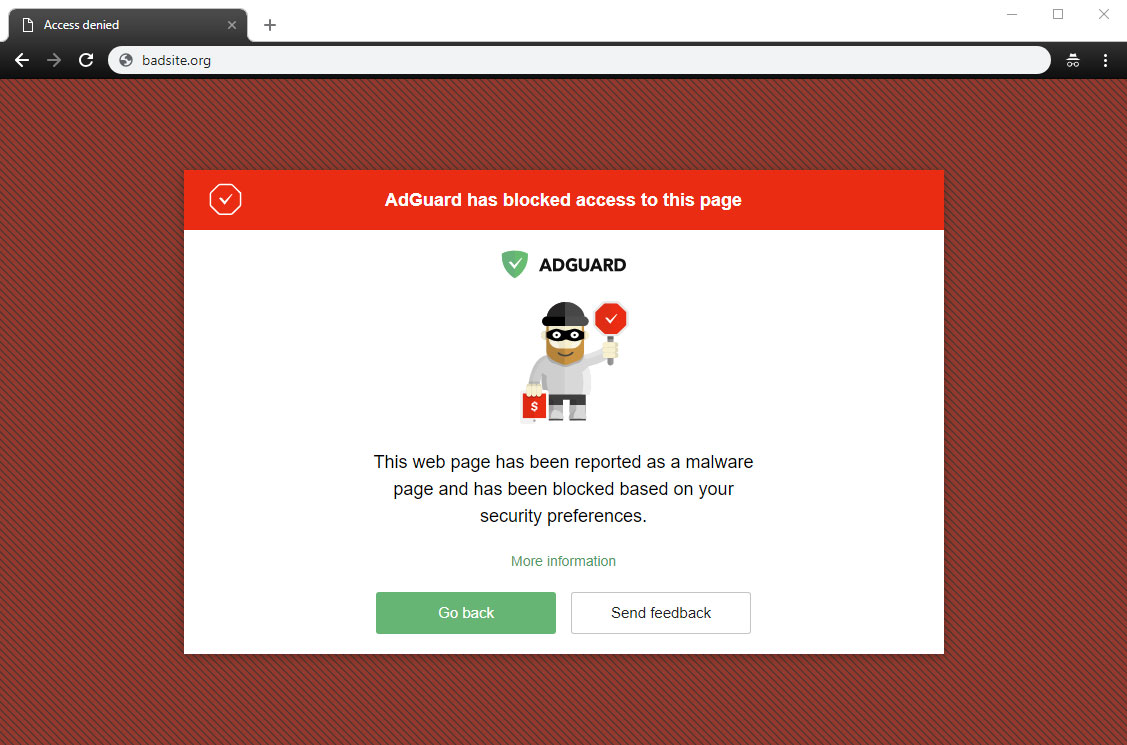
AG Home blocked a dangerous website

This stands for anti-malware and anti-phishing protection. AG Home will block all potentially dangerous requests to malicious and fraudulent websites, protecting you from online threats.

Parental control
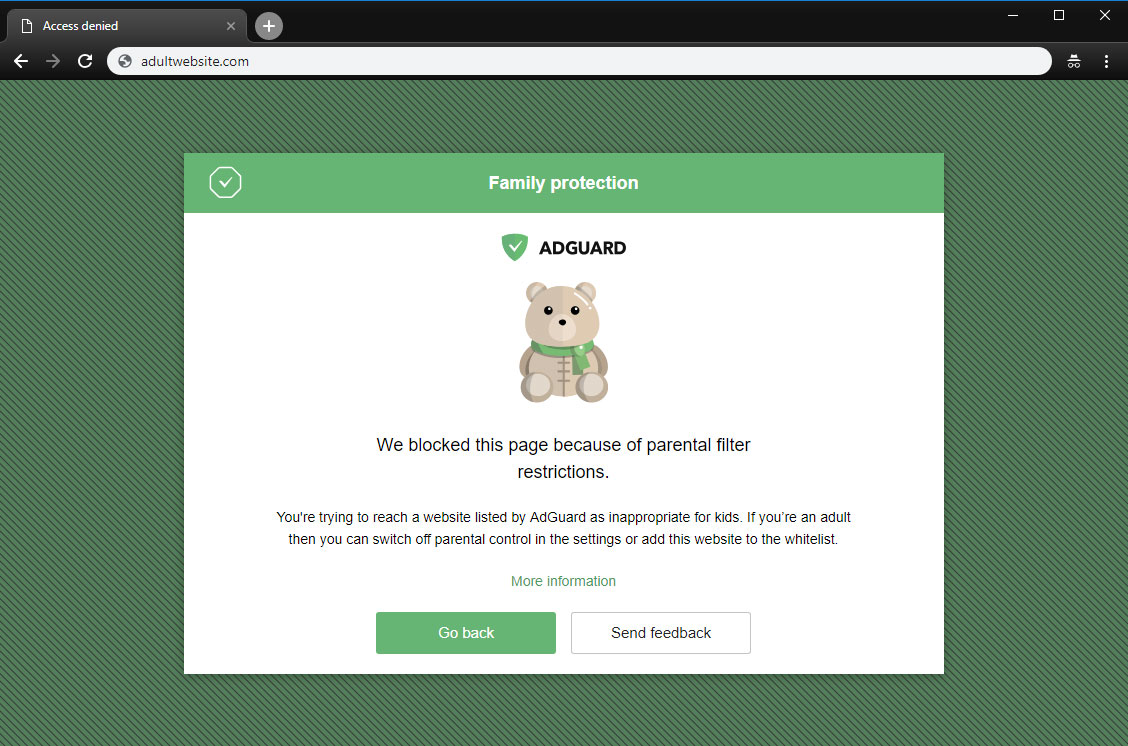
A page is blocked by Parental control

This is useful if you have kids and you don't want them to access websites with inappropriate content.

Safe search
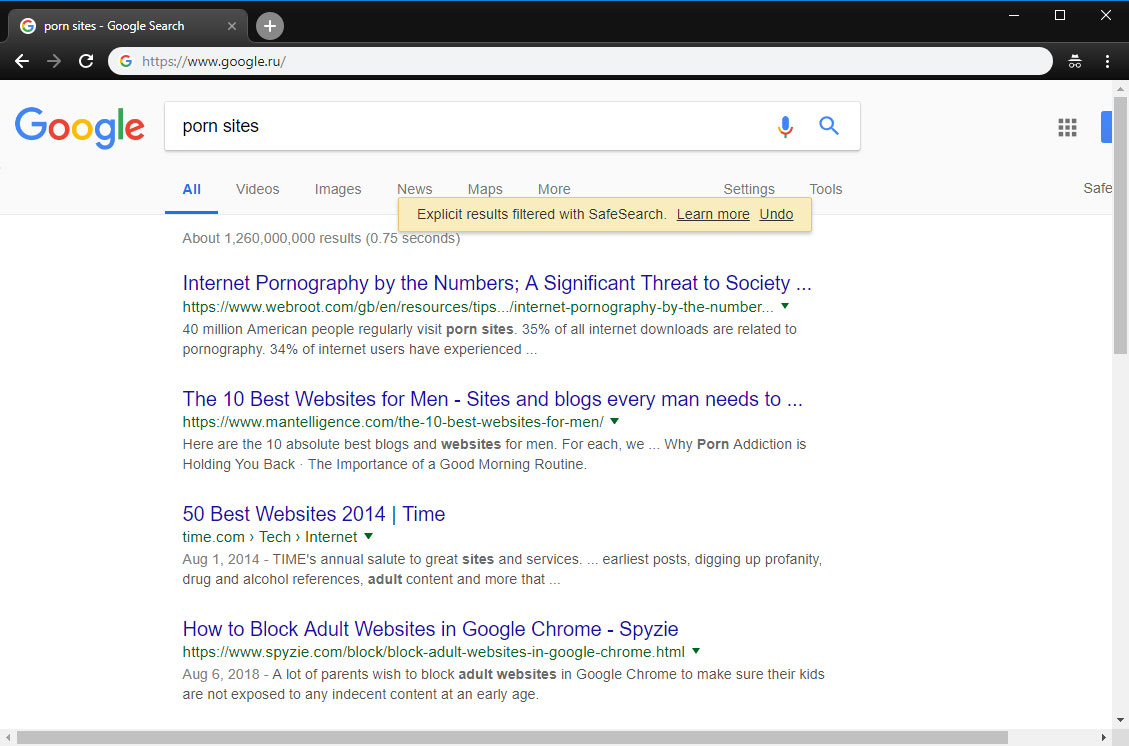
AG Home enforced "Safe search"

In the same vein, this option enforces "Safe search" mode in the most popular search engines (when enabled, it omits adult websites and pictures from being displayed in the search results)

Custom upstream servers

At the bottom of the "Settings" tab is a window to select a preferable upstream DNS server. Don't bother yourself with it unless you know what it means — this option is not essential to the quality filtering at all, but rather is a nice bonus.

AdGuard Home was developed based on the production-ready AdGuard DNS software, which has been used successfully by millions of users from around the globe for the last two years

Filter lists
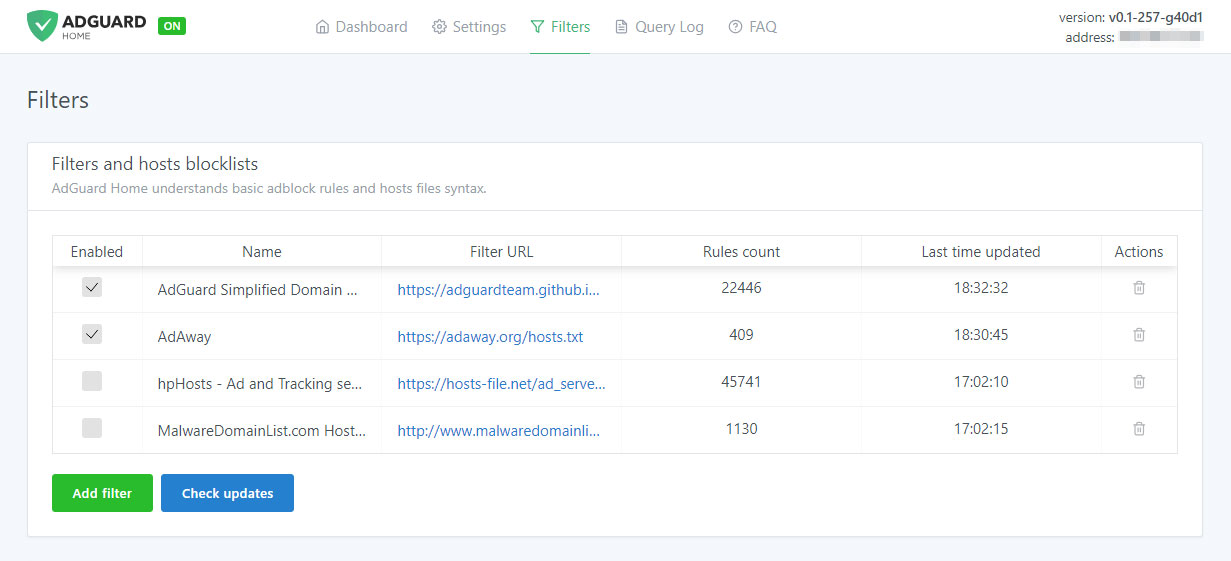
Add third-party filters

The third tab is devoted to filter settings. By default, ad blocking will be managed by the AdGuard SDN filter, but you have an option to add other filters and hosts-based blocking lists (basically, those are lists of rules that tell AG Home what exactly to block), or even create your own custom filtering rules. Multiple filters and hosts lists are available on the Internet.

AdGuard Home is developed by AdGuard — known experts in ad blocking and privacy protection. Over 25,000,000 users entrusted us with their online safety and never looked back

Query log
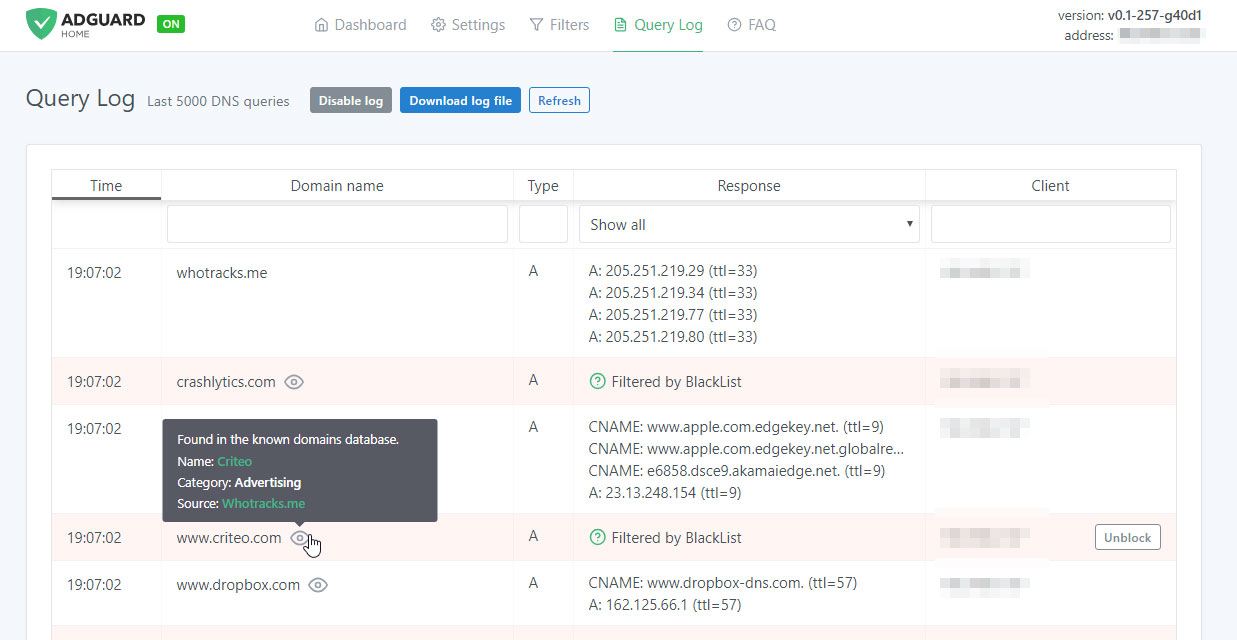
Monitor network activity

In the next tab there is a query log that offers everything you would expect from it — complete information on each and every request, all kinds of sorting. For each blocked request, there is a small tooltip telling you what rule it was filtered by, additional information about its origin and an "Unblock" button right next to it. Similarly, for unblocked requests there is a "Block" button. The log keeps track of the last 5000 queries and, of course, you can download the log file.

Open source

AdGuard Home is an open source project. We would be delighted to see any feedback, suggestions or other contribution from you. Whatever it is you have for us, the place to go to let us know about it is always the GitHub repository.

In summary, AdGuard Home gives you complete control over what is happening within your network.

How to set it up

Currently, you can install AdGuard Home on MacOS, Linux (x32 or x64), and Raspberry Pi. There is no need to go into technical details — we have the installation process described in the dedicated GitHub repository. Also, detailed guides on installing AG DNS to VPS and Raspberry Pi are available in our Wiki.

Further plans

We are not going to stop here: on the contrary, we have big plans regarding the future development of AdGuard Home. Here is a short list of what we are planning to do next:

  • One-click setup of your private VPN integrated with AdGuard Home
  • Improve the UI, make it better both functionally and aesthetically (send us your suggestions!)
  • Enhance the encryption options — DNSCrypt and DoH support, a possibility to run in the encrypted DNS server mode
  • Make it easier to use AdGuard Home with mobile devices (e.g. Mobileconfig for iOS)
  • Integrate AG Home with AdGuard applications

Being optimistic and looking a bit further, we would like AG Home to eventually become the privacy protection center for you and your devices, simple to use and easy to configure, where you can set up a personal proxy, VPN or encrypted DNS just in a couple of clicks.

Can I uninstall my ad blocker now?

The main advantage of AG Home lies in its ability to protect the whole network. When it comes to the sheer "filtering power", DNS-based ad blocking is inherently less potent and flexible than the approach taken by browser extensions and especially less so than dedicated tools. As an example, this article compares AG for Android and hosts-based ad blockers, and it gives a good impression of their relative capabilities. Whether you need this level of protection or not is a matter only you can decide.

And that's about it, hope you'll like AdGuard Home and will find a good use for it!

Do you have any questions or suggestions? We're answering everything on Product Hunt today!

Svidela vam se ova objava?
AdGuard VPN AdGuard DNS AdGuard Mail AdGuard Wallet
Glavni ekran AdGuard za Windows
Ekran Zaštita u AdGuard za Windows, prikazuje funkcije zaštite i podešavanja
Ekran Statistika u AdGuard za Windows, prikazuje statistiku za blokirane oglase i trackere
Ekran Upravljanje aplikacijama u AdGuard za Windows, koji prikazuje opcije upravljanja zaštitom za aplikacije instalirane na uređaju
20.385 20385 recenzija
Odlično!

AdGuard — blokator reklama za Windows

AdGuard za Windows je više od blokatora oglasa. To je višenamenski alat koji blokira oglase, kontroliše pristup opasnim sajtovima, ubrzava učitavanje stranica i štiti decu od neprimerenog sadržaja
Preuzimanjem programa prihvate uslove licenčnog ugovora
Microsoft prodavnica
Preuzimanjem programa prihvate uslove licenčnog ugovora
AdGuard za Windows v.8.0, 14-dnevni probni period
Glavni ekran AdGuard za Mac
Ekran Stealth režima u AdGuard za Mac
20.385 20385 recenzija
Odlično!

AdGuard — blokator reklama za Mac

AdGuard za Mac je jedinstveni blokator oglasa dizajniran imajući u vidu macOS. Pored zaštite od dosadnih oglasa u pregledačima i aplikacijama, štiti vas od praćenja, fišinga i prevara
Preuzimanjem programa prihvate uslove licenčnog ugovora
Saznajte više
AdGuard za Mac v.2.19, 14-dnevni probni period
Glavni ekran AdGuard za Android
Ekran Zaštita od praćenja u AdGuard za Android
Ekran Upravljanje aplikacijama u AdGuard za Android, koji prikazuje opcije upravljanja zaštitom za aplikacije instalirane na uređaju
Ekran Statistika u AdGuard za Android, prikazuje statistiku za blokirane oglase i trackere
Glavni ekran privatnog pregledača AdGuard za Android
QR kod za preuzimanje AdGuard za Android
20.385 20385 recenzija
Odlično!

AdGuard — blokator reklama za Android

Blokira oglase i trackere u svim pregledačima, igrama i drugim aplikacijama. Štiti vašu privatnost i omogućava vam da kontrolišete kako vaše aplikacije koriste Internet. Instalira se putem APK-a
Preuzimanjem programa prihvate uslove licenčnog ugovora
Saznajte više
Skeniranje za preuzimanje
Korišćenje bilo kog QR-kod čitača dostupnog na uređaju
AdGuard za Android v.4.14, 14-dnevni probni period
Glavni ekran AdGuard za iOS
Ekran Zaštita u AdGuard za iOS, prikazuje funkcije zaštite i podešavanja
Ekran Statistika u AdGuard za iOS, prikazuje statistiku za blokirane oglase i trackere
QR kod za preuzimanje AdGuard za iOS
20.385 20385 recenzija
Odlično!

AdGuard — blokator reklama za iOS

Najbolji iOS blokator oglasa za iPhone i iPad. AdGuard uklanja sve vrste oglasa i trackera u Safariju i štiti vašu privatnost u svim aplikacijama na DNS nivou
Preuzimanjem programa prihvate uslove licenčnog ugovora
Saznajte više
Skeniranje za preuzimanje
Korišćenje bilo kog QR-kod čitača dostupnog na uređaju
AdGuard za iOS v.4.5
Glavni ekran AdGuard Content Blocker
Ekran filtera u AdGuard Content Blocker
Ekran podešavanja u AdGuard Content Blocker
20.385 20385 recenzija
Odlično!

AdGuard blokator sadržaja

AdGuard Content Blocker eliminiše sve vrste reklama u mobilnim pregledačima koji podržavaju tehnologiju blokiranja sadržaja – kao što su Samsung Internet i Yandex Browser. Njegove funkcije su ograničene u odnosu na AdGuard za Android, ali je besplatan, lako se instalira i efikasan je
Preuzimanjem programa prihvate uslove licenčnog ugovora
Saznajte više
AdGuard blokator sadržaja v.2.8
Glavni ekran AdGuard Browser Extension
Ekran Zaštita od praćenja u AdGuard Browser Extension
20.385 20385 recenzija
Odlično!

AdGuard proširenje za preglednike

AdGuard je najbrže i najlakše proširenje za blokiranje reklama koje uspešno blokira sve vrste reklama na svim veb stranicama! Izaberite AdGuard za preglednik koji koristite i uživajte u surfovanju bez reklama, koje će postati sigurno i brzo.
Instaliraj
Preuzimanjem programa prihvate uslove licenčnog ugovora
Instaliraj
Preuzimanjem programa prihvate uslove licenčnog ugovora
Instaliraj
Preuzimanjem programa prihvate uslove licenčnog ugovora
Instaliraj
Preuzimanjem programa prihvate uslove licenčnog ugovora
Instaliraj
Preuzimanjem programa prihvate uslove licenčnog ugovora
Saznajte više
Instaliraj
Preuzimanjem programa prihvate uslove licenčnog ugovora
Saznajte više
AdGuard proširenje za preglednike v.5.5
Glavni ekran AdGuard Assistant
20.385 20385 recenzija
Odlično!

AdGuard pomoćnik

Dodatak pregledača za prateće AdGuard desktop aplikacije. Omogućava vam da blokirate prilagođene stavke na vebsajtovima, dodate vebsajtove na listu dozvoljenih i šaljete izveštaje direktno iz pregledača
AdGuard pomoćnik v.1.4
20.385 20385 recenzija
Odlično!

AdGuard Home

AdGuard Home je mrežno rešenje za blokiranje oglasa i tragača. Instalirajte ga jednom na ruteru da biste pokrili sve uređaje na vašoj kućnoj mreži — nije potreban dodatni klijentski softver. Ovo je posebno važno za različite IoT uređaje koji često predstavljaju pretnju vašoj privatnosti
AdGuard Home v.0.107
Glavni ekran AdGuard Pro za iOS
Ekran zaštite u AdGuard Pro za iOS, koji prikazuje funkcije zaštite i podešavanja
Ekran statistike u AdGuard Pro za iOS, koji prikazuje statistiku za blokirane oglase i tragače
20.385 20385 recenzija
Odlično!

AdGuard Pro za iOS

AdGuard Pro za iOS dolazi sa svim naprednim funkcijama zaštite od blokiranja oglasa. Nudi iste alate kao i plaćena verzija AdGuard-a za iOS. Ističe se u blokiranju oglasa u Safariju i omogućava vam da prilagodite DNS postavke kako biste prilagodili svoju zaštitu. Blokira oglase u pretraživačima i aplikacijama, štiti vašu decu od neprikladnog sadržaja i čuva vaše lične podatke na sigurnom
Preuzimanjem programa prihvate uslove licenčnog ugovora
Saznajte više
AdGuard Pro za iOS v.4.5
Glavni ekran AdGuard Mini za Mac
Ekran zaštite za Safari u AdGuard Mini za Mac
Ekran Kreiranje pravila u AdGuard Mini za Mac
20.385 20385 recenzija
Odlično!

AdGuard Mini za Mac — Safari blokator oglasa

AdGuard Mini za Mac je moćan Safari blokator adova. Ova lagana aplikacija uklanja reklame, blokira praćenike i ubrzava učitavanje stranica. Pomaže vam da pretražujete veb u Safariju bez ometanja i da sačuvate svoje podatke privatnim
Instaliraj
Preuzimanjem programa prihvate uslove licenčnog ugovora
Saznajte više
AdGuard Mini za Mac v.2.3
Glavni ekran AdGuard za Android TV sa uključenom zaštitom
Ekran Blokiranje oglasa u AdGuard za Android TV, prikazuje njegove funkcije i podešavanja
Ekran Podešavanja u AdGuard za Android TV
Ekran Upravljanje aplikacijama u AdGuard za Android TV, prikazuje aplikacije gde su oglasi i trackeri blokirani
20.385 20385 recenzija
Odlično!

AdGuard za Android TV

AdGuard za Android TV je jedina aplikacija koja blokira oglase, čuva vašu privatnost i deluje kao zaštitni zid za vaš Smart TV. Dobijajte upozorenja o Veb pretnjama, koristite bezbedni DNS i koristite šifrovani saobraćaj. Opustite se i zaronite u omiljene serije sa vrhunskim obezbeđenjem i nula oglasa!
AdGuard za Android TV v.4.14, 14-dnevni probni period
Maskota AdGuard, Agnar, drži Linux pingvina
20.385 20385 recenzija
Odlično!

AdGuard za Linux

AdGuard za Linuk je prvi sistemski bloker oglasa na svetu. Blokirajte oglase i tragače na nivou uređaja, izaberite unapred instalirane filtere ili dodajte sopstvene — sve kroz interfejs komandne linije
AdGuard za Linux v.1.4
20.385 20385 recenzija
Odlično!

AdGuard Temp Mail

Besplatan generator privremenih email adresa koji vas čuva anonimnim i štiti vašu privatnost. Nema spama u vašem glavnom sandučetu!
20.385 20385 recenzija
Odlično!

AdGuard VPN

75 lokacija širom sveta

Pristup bilo kom sadržaju

Jako šifrovanje

Nema prikupljanja dnevnika

Najbrža veza

24/7 podrška

Probajte besplatno
Preuzimanjem programa prihvate uslove licenčnog ugovora
Saznajte više
20.385 20385 recenzija
Odlično!

AdGuard DNS

AdGuard DNS je alternativno rešenje za blokiranje reklama, zaštitu privatnosti i roditeljsku kontrolu. Lako se postavlja i besplatan je za korišćenje. On obezbeđuje neophodni minimum zaštite od reklama na mreži, praćenja i fišinga, bez obzira koju platformu i uređaj koristite.
20.385 20385 recenzija
Odlično!

AdGuard Mail

Zaštitite svoj identitet, izbegnite spam i održite bezbednost svog sandučeta uz naše alias-e i privremene e-adrese. Uživajte u našoj besplatnoj usluzi prosleđivanja emaila i aplikacijama za sve operativne sisteme.
20.385 20385 recenzija
Odlično!

AdGuard Wallet

Bezbedan i privatan kripto novčanik koji vam daje potpunu kontrolu nad vašom imovinom. Upravljajte više novčanika i otkrijte hiljade kriptovaluta za čuvanje, slanje i razmenu
Preuzimanje AdGuard Da biste instalirali AdGuard, kliknite na datoteku označenu strelicom Izaberite „Otvori“ i kliknite na „U redu“, a zatim sačekajte da se datoteka preuzme. U otvorenom prozoru prevucite ikonu AdGuard u fasciklu „Aplikacije“. Hvala vam što ste izabrali AdGuard! Izaberite „Otvori“ i kliknite na „U redu“, a zatim sačekajte da se datoteka preuzme. U otvorenom prozoru kliknite na „Instaliraj“. Hvala vam što ste izabrali AdGuard!
Instalirajte AdGuard na svoj mobilni uređaj


















































