Light-side UX: How we design and write for privacy at AdGuard

💡
This post is based on the talk presented by Sofia Orlova, UX writer at AdGuard, at the Ad-Filtering Dev Summit in October, 2025. Other content about AFDS

At AdGuard, we develop a whole range of privacy tools: an ad blocker, a VPN, a DNS service, an email service, and soon — a crypto wallet. These products do a lot of complex things under the hood — but they need to stay simple and friendly on the outside.

Our users come from all over the world. Many of them don’t speak English natively, many aren’t tech-savvy. And yet we want all of them to feel supported while using our tools.

In this post, I want to show you how we at AdGuard approach UX design and copy:

  • What our writing and design are built on
  • How we handle different levels of user experience
  • How feedback and real-world constraints shape the final result
  • And how you can help us make it better

Let’s begin with the foundation.

What we build on: Our principles

At AdGuard, we like to say that we’re on the light side of the Internet. This idea runs through everything we do.

  • We care about transparency and openness
  • We actively show it — help users, explain things, or just get out of their way when needed
  • We give the control to the user. We believe the product should adapt to the user — not the other way around

Here’s what it looks like in practice.

Transparency → Clean UI, clear copy

We try to keep interfaces as clean as possible, with just enough visual and textual information to help you complete the task.
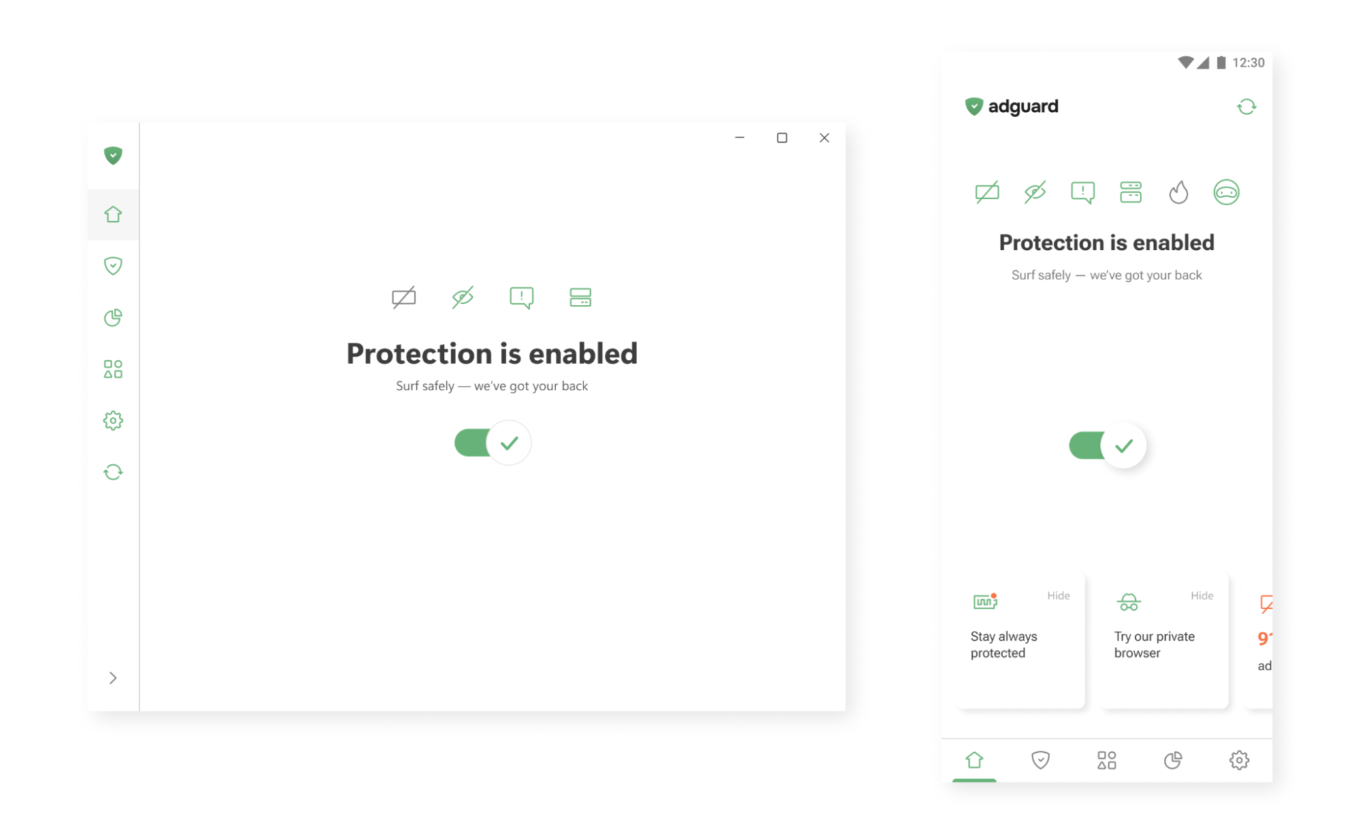
One button to enable protection

Active care → Help that’s always there

In our apps, you’ll often find small hints, tooltips, and summaries. Where needed, we add short explanations or links to longer articles — so you can dive deeper when you want to.
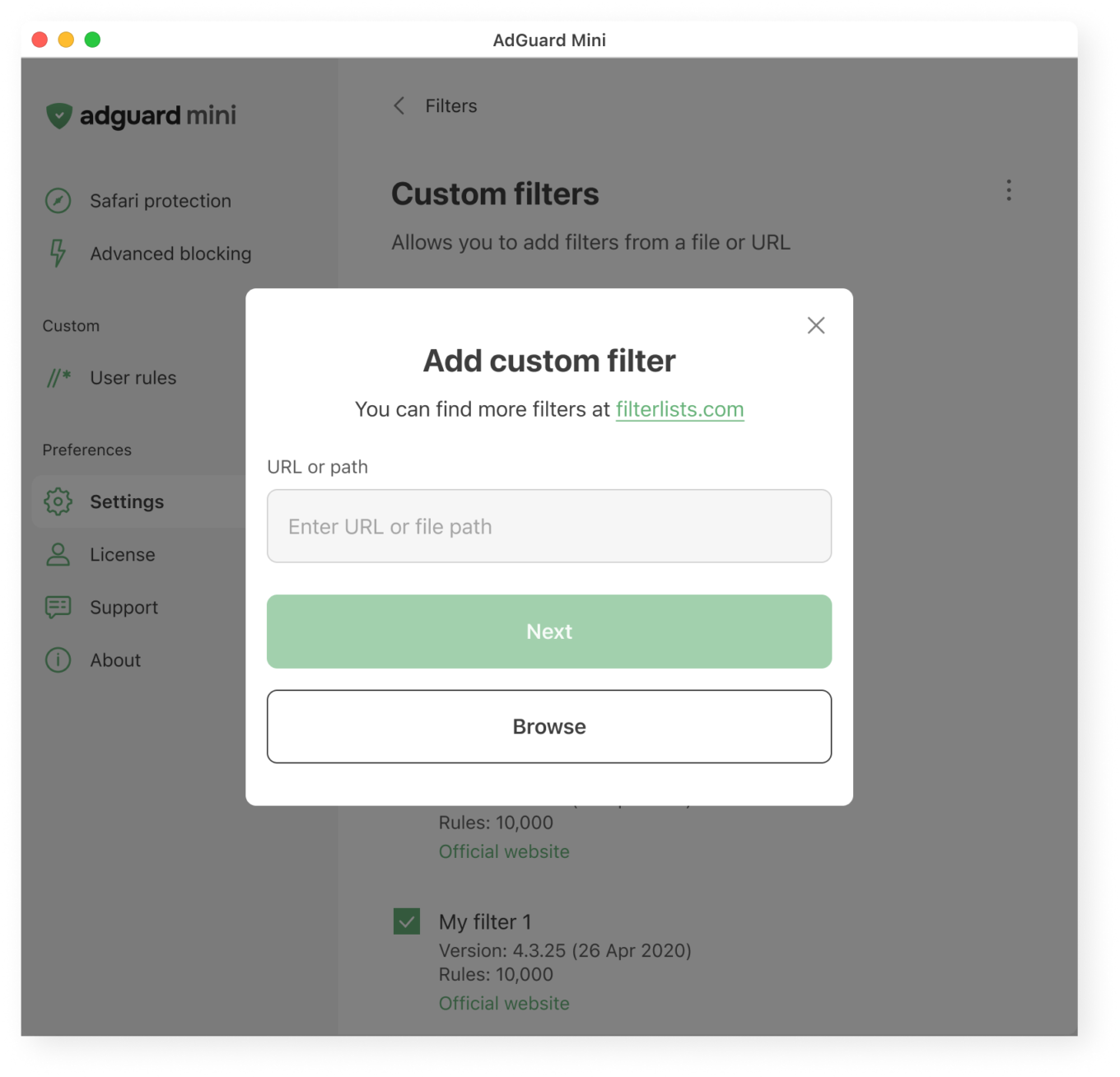
What users see when adding a custom filter

User control → Deep functionality, optional complexity

Most of our apps are layered. If you want to just turn on protection and move on, that’s great. If you want to dig deeper, you’ll find detailed settings, expert modes, and customizations. Your control is not necessary, but if you seek it, we’ll do our best to provide it to you.
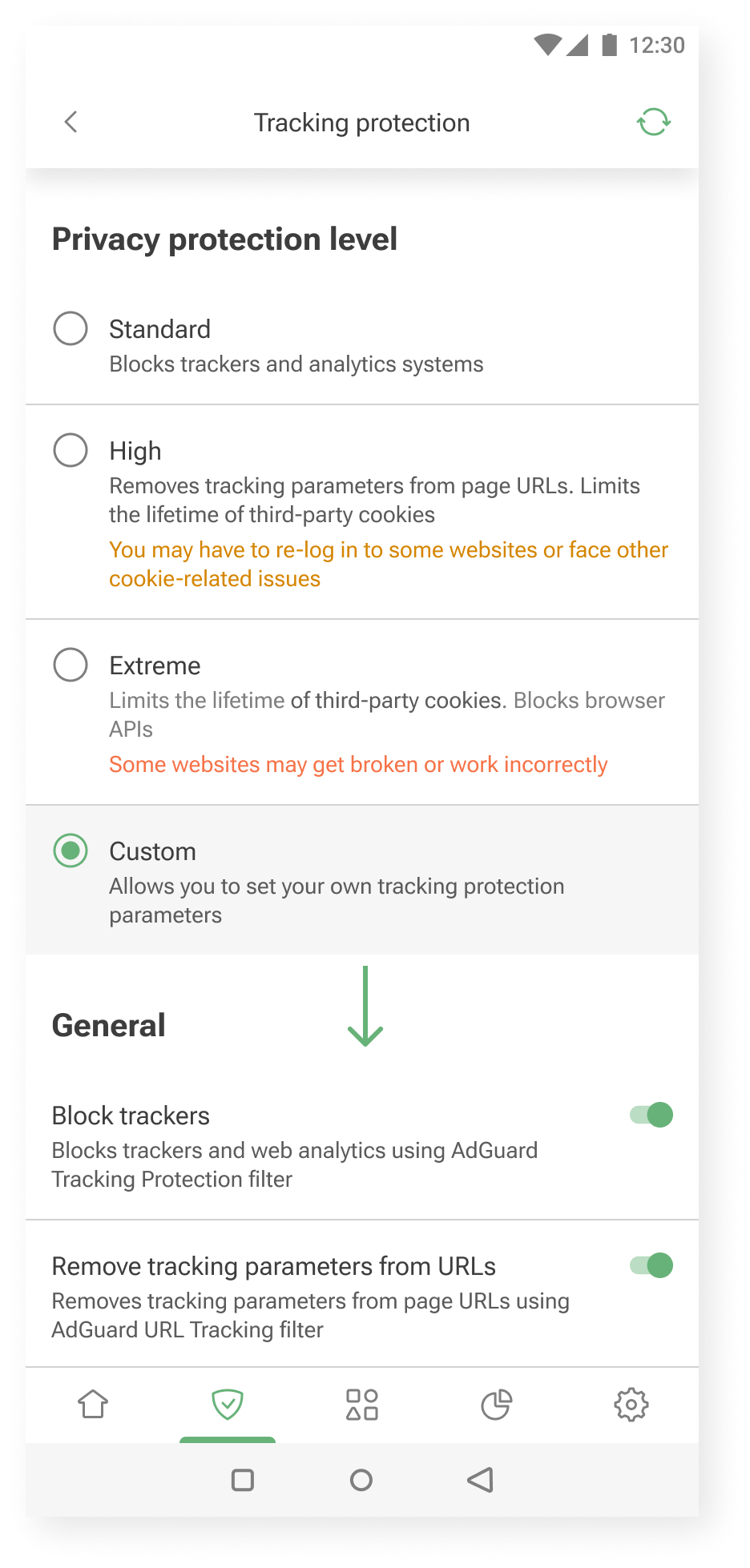
Additional settings are shown when you choose to customize further *mobile
Additional settings are shown when you choose to customize further

Our audience: How we approach different needs

Not everyone uses AdGuard the same way.

Some want to set it and forget it. Others enjoy tweaking settings and learning more about how privacy works. We try to support both.

Here’s how we approach it.

Layered experience

You can think of our apps as layered systems:

  • Simple on the surface — for those who want quick protection
  • Customizable in the middle — for those who are curious to learn and tweak things a bit
  • Deeply configurable — for power users who want full control without hand-holding

This approach helps us keep the UI clean, while still offering depth for those who need it.

One example is our User rules feature — a tool that allows users to create custom filtering rules.

Our previous approach was designed for advanced users only. There was a blank input field and a link to the documentation.
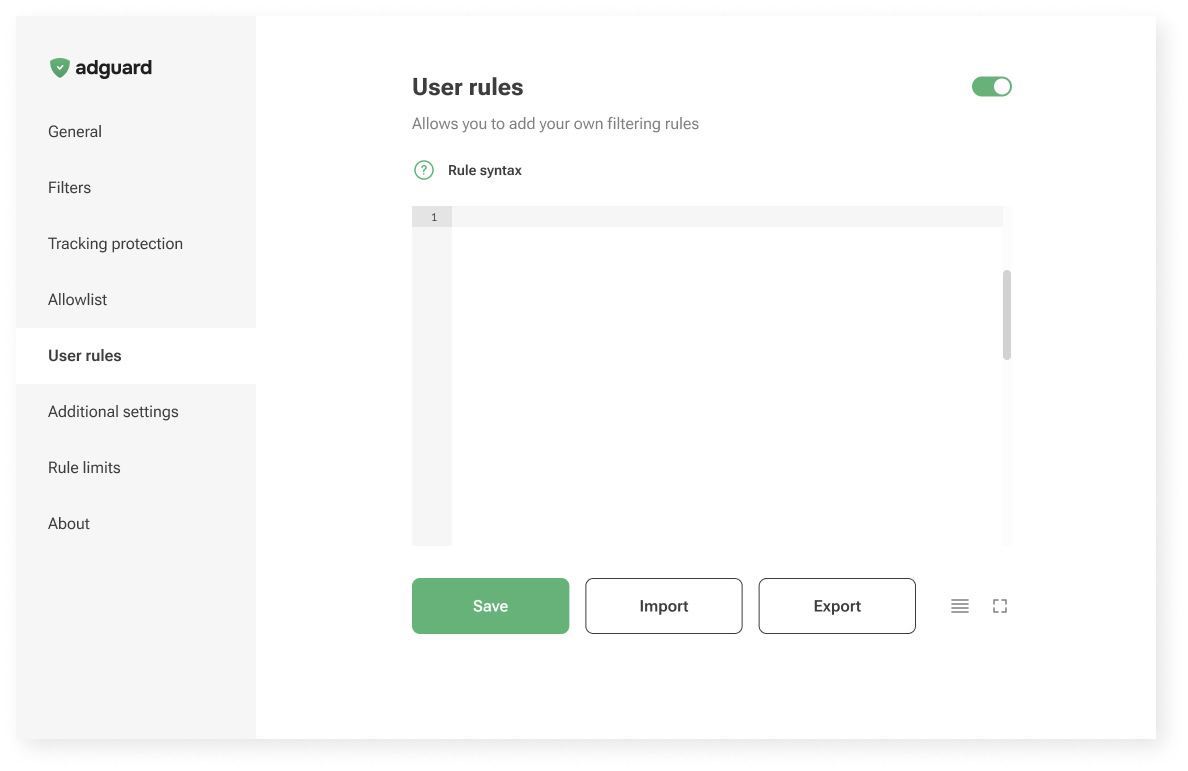
Old User rules unterface

Now, in AdGuard Mini for Mac, we’re trying something new: a guided interface that walks you through the process.
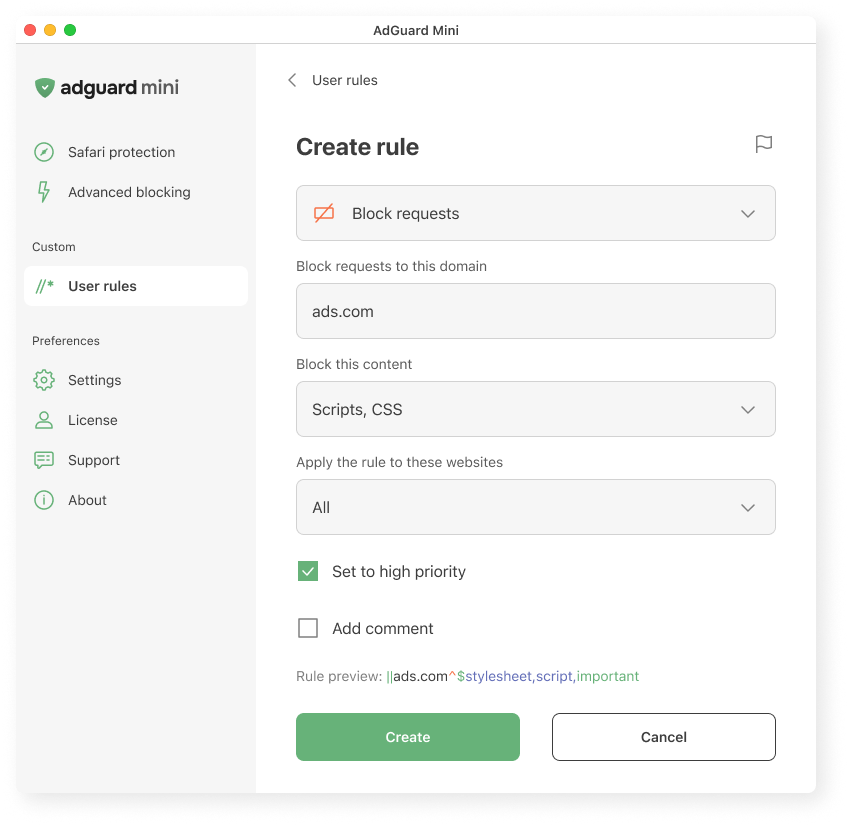
Creating a user rule in AdGuard Mini for Mac
Creating a user rule in AdGuard Mini for Mac

We explain what the rule does, where it applies, and how it works. We hope this makes it easier to get started, even if you’ve never written a rule before.

Let us know what you think: is it clear? Easy to follow? Missing something? Your feedback helps us decide whether to bring this approach to other platforms too.

Vocabulary

To meet users where they are, we adjust the vocabulary based on how familiar they might be with the topic and what they’re trying to achieve.

  • AdGuard protects you from ads and trackers — for those who just want peace of mind online. This works well when the user’s goal is simple: “I want the ads gone,” or “I want to feel safer.”
  • AdGuard blocks known analytics and phishing domains — for users who already understand the basics of online threats and want more transparency: “I know different types of tracking and risks exist, and I want to manage them more consciously.”
  • AdGuard lets you apply advanced cosmetic rules and scriptlets from custom lists — for experienced users who want full control, less explanations and more just tools: “I know what I’m doing; just let me configure it.”

Feedback: Where we learn what works

We’re constantly learning from you — and trying to reflect that in the product.

Sometimes the insights come from anonymous usage data. For example, we noticed that some users were ignoring the “card” about HTTPS filtering on the main screen. Without HTTPS filtering, however, most ads cannot be blocked. So we changed the wording on that “card” — and the result was immediate: the number of users who enabled the feature increased by about one and a half times.
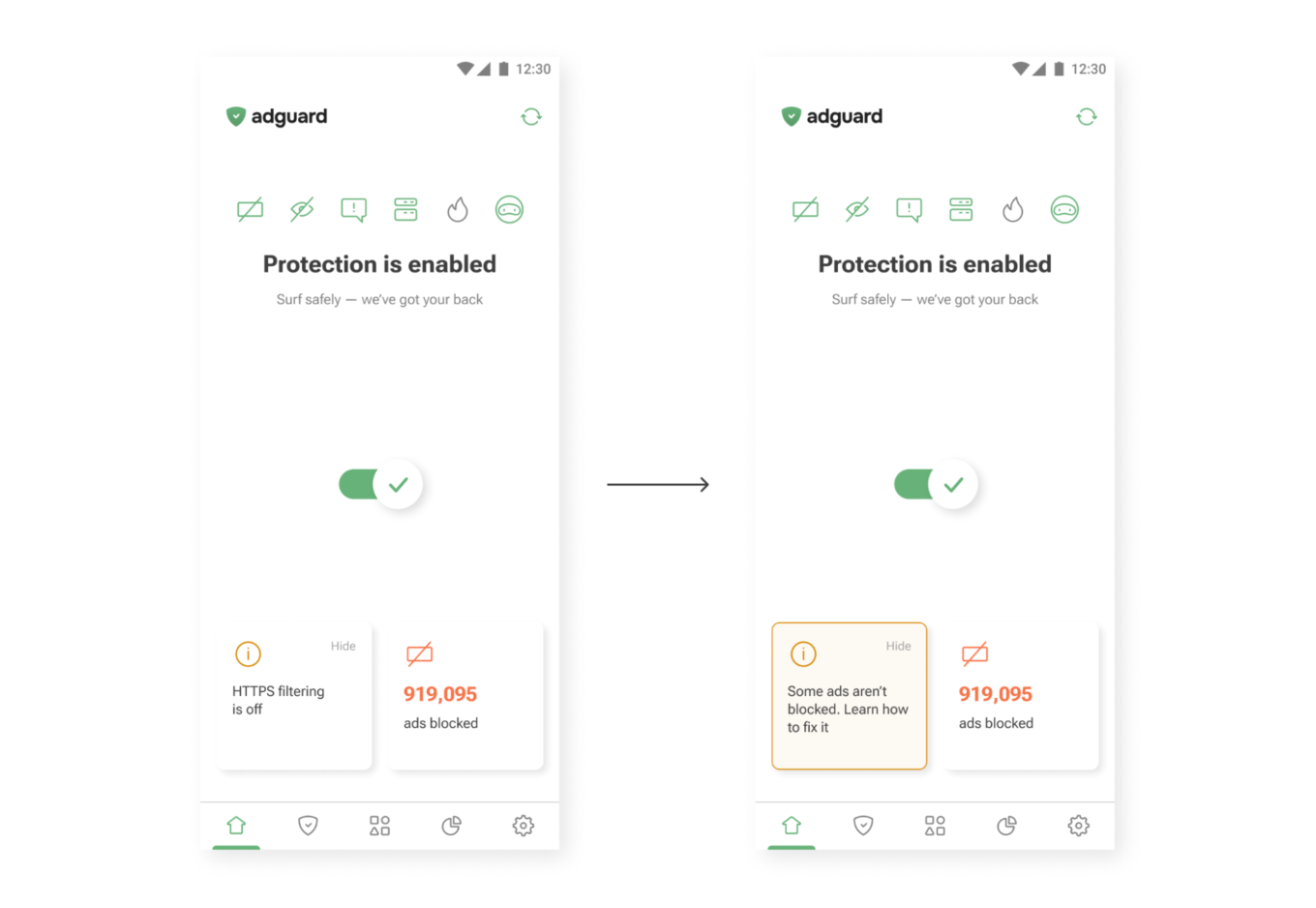
New wording on the main screen
New wording (right) drives more taps than the old one (left)

Sometimes feedback comes from support requests. One user once asked where they could find their VPN license key. The thing is, AdGuard VPN doesn’t use license keys — the subscription is simply tied to the email address used for purchase. So we added a short explanation to the confirmation email that users receive after buying a license. After that, questions about VPN license keys practically disappeared.
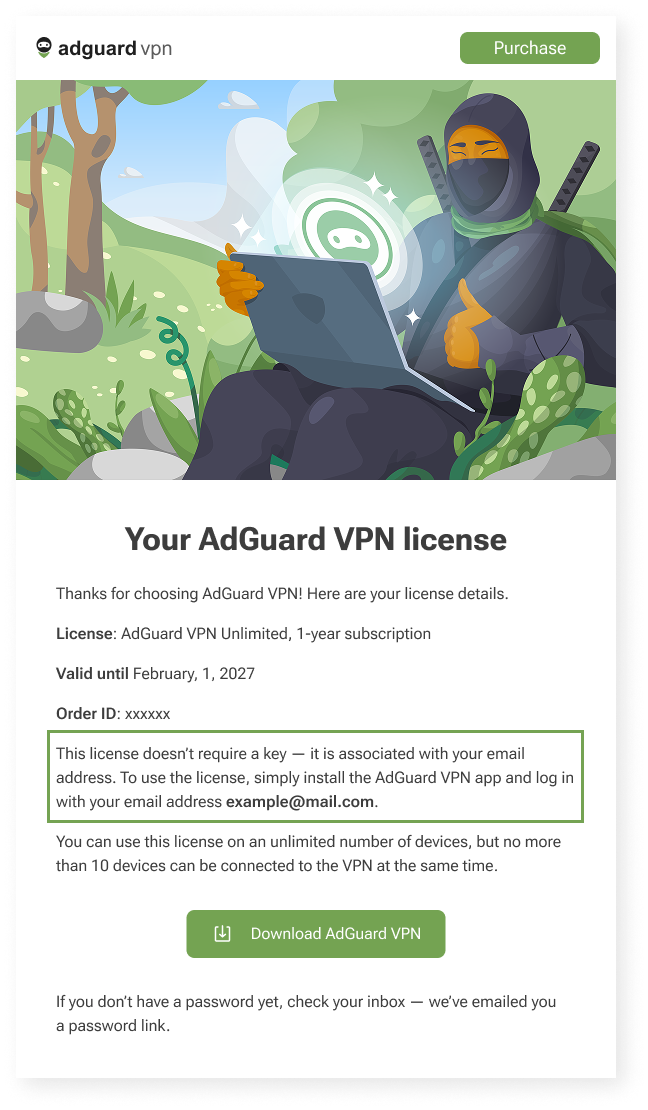
Post-purchase email for AdGuard VPN users *mobile
Post-purchase email for AdGuard VPN users

Constraints

We can’t implement every idea we come up with — and that’s not a bad thing. Constraints shape our work and help us better understand how and what to communicate to users. Here are a few examples of these constraints — and how we deal with them.

We’d love for all our texts to be friendly and concise, but in some cases we need to be legally precise to avoid any ambiguity. That’s why you may come across legal wording in our products — but whenever possible, we also provide a shorter, clearer summary to help you understand it quickly.
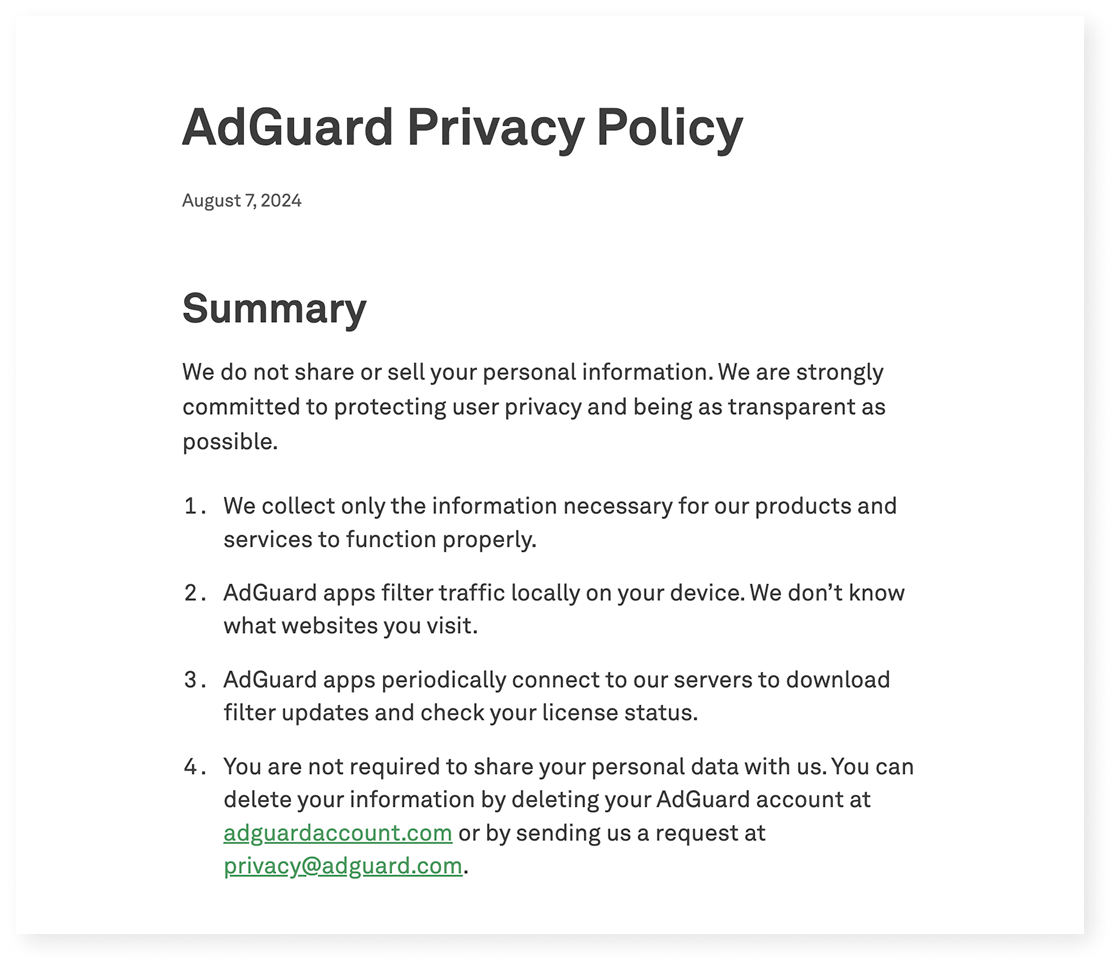
Excerpt from AdGuard’s Privacy policy

Localization

We build products for a global audience, and they are translated into 20+ languages. Even though we try to cover as many languages as possible, there will always be users who interact with our apps in a language that isn’t their native one. That means when we write in English, we have to keep in mind that not only native speakers will read it:

  • Vocabulary and syntax shouldn’t be too complex
  • We avoid local jokes, idioms, and wordplay that only native speakers would understand

Another constraint is how translation works in practice. We have several in-house translators and a group of dedicated volunteers who help us a lot (you can join too — read how). But in some cases, we have to rely on machine translation — and it’s much harder to provide context there.

This leads to a few additional rules:

  • Limit the amount of information in one message — English words are often shorter than their equivalents in other languages
  • Whenever possible, write in full sentences and avoid ending strings with prepositions — this can make translation more difficult

Let’s take another look at the User rules section.

When we were designing it, our initial idea was to make it feel like natural English: “Block request to ads.com.”

But in many languages, that structure wouldn’t work:

  • Slavic languages use grammatical cases
  • Turkic languages use postpositions, not prepositions
  • Asian languages often require more context

So we rewrote it as “Block requests to this domain.” It’s longer, but clearer for most of the users — and translators.
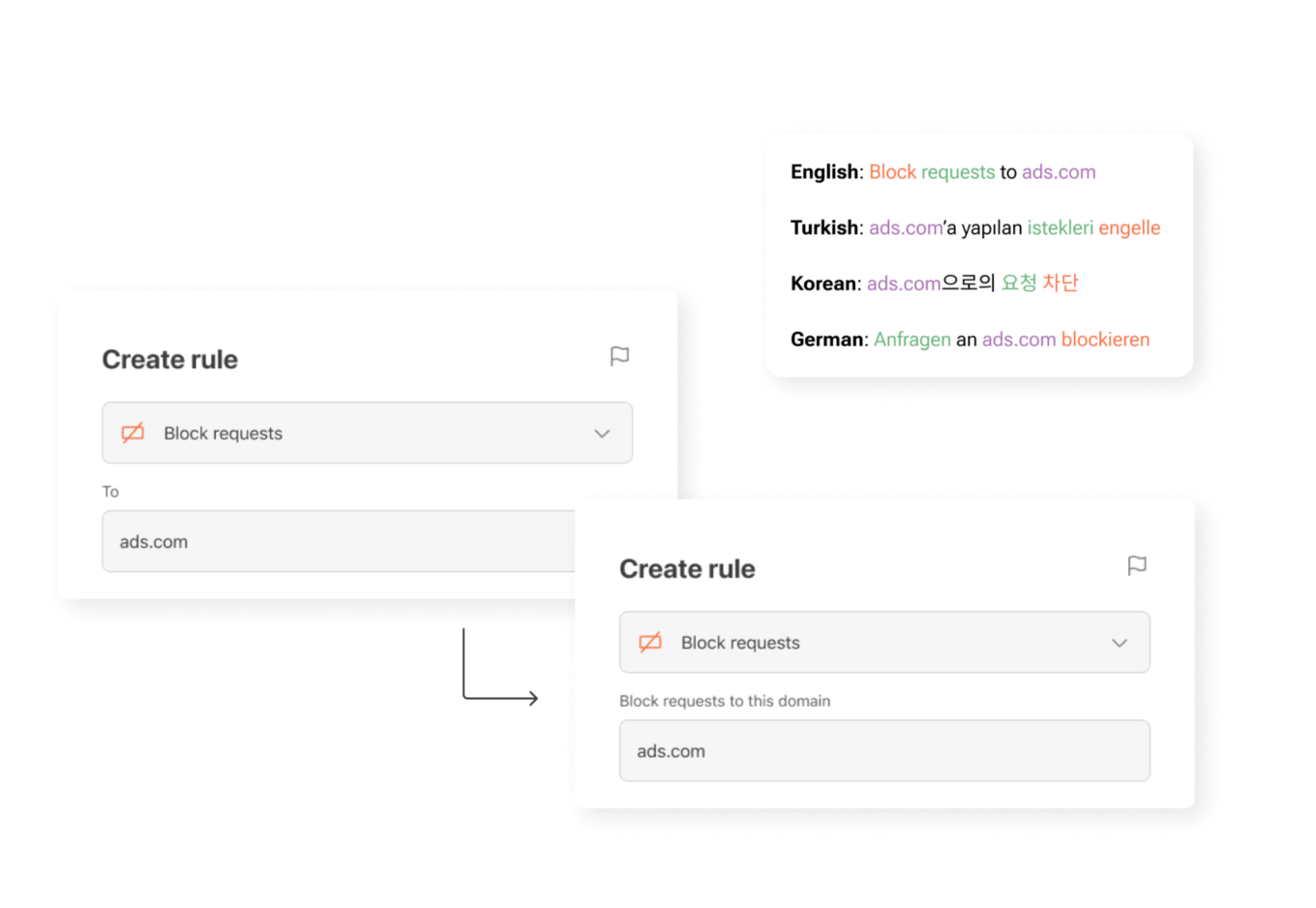
UI element for creating new rules in different languages

What’s next — and how you can help

Here’s a funny paradox: we’re a privacy company, so we collect as little data as possible. But that makes it harder to know which parts of our apps are most useful and which are confusing. We’re working on privacy-friendly ways to learn more about how you use AdGuard — so we can make things simpler, clearer, and more useful.

One small thing you can do to help: turn on the setting called Send anonymized app usage data. You’ll find it in AdGuard Ad Blocker, AdGuard VPN, and AdGuard Mail.

This option doesn’t send anything personal. We don’t collect identifiers, track you, or share your data with anyone. But it does help us see which screens people interact with — and which features need improvement.

Our next step is to rely more on insights like these when making product decisions. They help us see what really matters to users — and guide us in making AdGuard apps even clearer, more intuitive, and more helpful for you.

If you see something confusing — or something that worked well for you on our apps and websites — please let us know by clicking the button below.

We use every opportunity to make our apps clearer, more helpful, and closer to what you actually need!


Svidela vam se ova objava?
AdGuard VPN AdGuard DNS AdGuard Mail AdGuard Wallet
Glavni ekran AdGuard za Windows
Ekran Zaštita u AdGuard za Windows, prikazuje funkcije zaštite i podešavanja
Ekran Statistika u AdGuard za Windows, prikazuje statistiku za blokirane oglase i trackere
Ekran Upravljanje aplikacijama u AdGuard za Windows, koji prikazuje opcije upravljanja zaštitom za aplikacije instalirane na uređaju
20.385 20385 recenzija
Odlično!

AdGuard — blokator reklama za Windows

AdGuard za Windows je više od blokatora oglasa. To je višenamenski alat koji blokira oglase, kontroliše pristup opasnim sajtovima, ubrzava učitavanje stranica i štiti decu od neprimerenog sadržaja
Preuzimanjem programa prihvate uslove licenčnog ugovora
Microsoft prodavnica
Preuzimanjem programa prihvate uslove licenčnog ugovora
AdGuard za Windows v.8.0, 14-dnevni probni period
Glavni ekran AdGuard za Mac
Ekran Stealth režima u AdGuard za Mac
20.385 20385 recenzija
Odlično!

AdGuard — blokator reklama za Mac

AdGuard za Mac je jedinstveni blokator oglasa dizajniran imajući u vidu macOS. Pored zaštite od dosadnih oglasa u pregledačima i aplikacijama, štiti vas od praćenja, fišinga i prevara
Preuzimanjem programa prihvate uslove licenčnog ugovora
Saznajte više
AdGuard za Mac v.2.19, 14-dnevni probni period
Glavni ekran AdGuard za Android
Ekran Zaštita od praćenja u AdGuard za Android
Ekran Upravljanje aplikacijama u AdGuard za Android, koji prikazuje opcije upravljanja zaštitom za aplikacije instalirane na uređaju
Ekran Statistika u AdGuard za Android, prikazuje statistiku za blokirane oglase i trackere
Glavni ekran privatnog pregledača AdGuard za Android
QR kod za preuzimanje AdGuard za Android
20.385 20385 recenzija
Odlično!

AdGuard — blokator reklama za Android

Blokira oglase i trackere u svim pregledačima, igrama i drugim aplikacijama. Štiti vašu privatnost i omogućava vam da kontrolišete kako vaše aplikacije koriste Internet. Instalira se putem APK-a
Preuzimanjem programa prihvate uslove licenčnog ugovora
Saznajte više
Skeniranje za preuzimanje
Korišćenje bilo kog QR-kod čitača dostupnog na uređaju
AdGuard za Android v.4.14, 14-dnevni probni period
Glavni ekran AdGuard za iOS
Ekran Zaštita u AdGuard za iOS, prikazuje funkcije zaštite i podešavanja
Ekran Statistika u AdGuard za iOS, prikazuje statistiku za blokirane oglase i trackere
QR kod za preuzimanje AdGuard za iOS
20.385 20385 recenzija
Odlično!

AdGuard — blokator reklama za iOS

Najbolji iOS blokator oglasa za iPhone i iPad. AdGuard uklanja sve vrste oglasa i trackera u Safariju i štiti vašu privatnost u svim aplikacijama na DNS nivou
Preuzimanjem programa prihvate uslove licenčnog ugovora
Saznajte više
Skeniranje za preuzimanje
Korišćenje bilo kog QR-kod čitača dostupnog na uređaju
AdGuard za iOS v.4.5
Glavni ekran AdGuard Content Blocker
Ekran filtera u AdGuard Content Blocker
Ekran podešavanja u AdGuard Content Blocker
20.385 20385 recenzija
Odlično!

AdGuard blokator sadržaja

AdGuard Content Blocker eliminiše sve vrste reklama u mobilnim pregledačima koji podržavaju tehnologiju blokiranja sadržaja – kao što su Samsung Internet i Yandex Browser. Njegove funkcije su ograničene u odnosu na AdGuard za Android, ali je besplatan, lako se instalira i efikasan je
Preuzimanjem programa prihvate uslove licenčnog ugovora
Saznajte više
AdGuard blokator sadržaja v.2.8
Glavni ekran AdGuard Browser Extension
Ekran Zaštita od praćenja u AdGuard Browser Extension
20.385 20385 recenzija
Odlično!

AdGuard proširenje za preglednike

AdGuard je najbrže i najlakše proširenje za blokiranje reklama koje uspešno blokira sve vrste reklama na svim veb stranicama! Izaberite AdGuard za preglednik koji koristite i uživajte u surfovanju bez reklama, koje će postati sigurno i brzo.
Instaliraj
Preuzimanjem programa prihvate uslove licenčnog ugovora
Instaliraj
Preuzimanjem programa prihvate uslove licenčnog ugovora
Instaliraj
Preuzimanjem programa prihvate uslove licenčnog ugovora
Instaliraj
Preuzimanjem programa prihvate uslove licenčnog ugovora
Instaliraj
Preuzimanjem programa prihvate uslove licenčnog ugovora
Saznajte više
Instaliraj
Preuzimanjem programa prihvate uslove licenčnog ugovora
Saznajte više
AdGuard proširenje za preglednike v.5.5
Glavni ekran AdGuard Assistant
20.385 20385 recenzija
Odlično!

AdGuard pomoćnik

Dodatak pregledača za prateće AdGuard desktop aplikacije. Omogućava vam da blokirate prilagođene stavke na vebsajtovima, dodate vebsajtove na listu dozvoljenih i šaljete izveštaje direktno iz pregledača
AdGuard pomoćnik v.1.4
20.385 20385 recenzija
Odlično!

AdGuard Home

AdGuard Home je mrežno rešenje za blokiranje oglasa i tragača. Instalirajte ga jednom na ruteru da biste pokrili sve uređaje na vašoj kućnoj mreži — nije potreban dodatni klijentski softver. Ovo je posebno važno za različite IoT uređaje koji često predstavljaju pretnju vašoj privatnosti
AdGuard Home v.0.107
Glavni ekran AdGuard Pro za iOS
Ekran zaštite u AdGuard Pro za iOS, koji prikazuje funkcije zaštite i podešavanja
Ekran statistike u AdGuard Pro za iOS, koji prikazuje statistiku za blokirane oglase i tragače
20.385 20385 recenzija
Odlično!

AdGuard Pro za iOS

AdGuard Pro za iOS dolazi sa svim naprednim funkcijama zaštite od blokiranja oglasa. Nudi iste alate kao i plaćena verzija AdGuard-a za iOS. Ističe se u blokiranju oglasa u Safariju i omogućava vam da prilagodite DNS postavke kako biste prilagodili svoju zaštitu. Blokira oglase u pretraživačima i aplikacijama, štiti vašu decu od neprikladnog sadržaja i čuva vaše lične podatke na sigurnom
Preuzimanjem programa prihvate uslove licenčnog ugovora
Saznajte više
AdGuard Pro za iOS v.4.5
Glavni ekran AdGuard Mini za Mac
Ekran zaštite za Safari u AdGuard Mini za Mac
Ekran Kreiranje pravila u AdGuard Mini za Mac
20.385 20385 recenzija
Odlično!

AdGuard Mini za Mac — Safari blokator oglasa

AdGuard Mini za Mac je moćan Safari blokator adova. Ova lagana aplikacija uklanja reklame, blokira praćenike i ubrzava učitavanje stranica. Pomaže vam da pretražujete veb u Safariju bez ometanja i da sačuvate svoje podatke privatnim
Instaliraj
Preuzimanjem programa prihvate uslove licenčnog ugovora
Saznajte više
AdGuard Mini za Mac v.2.3
Glavni ekran AdGuard za Android TV sa uključenom zaštitom
Ekran Blokiranje oglasa u AdGuard za Android TV, prikazuje njegove funkcije i podešavanja
Ekran Podešavanja u AdGuard za Android TV
Ekran Upravljanje aplikacijama u AdGuard za Android TV, prikazuje aplikacije gde su oglasi i trackeri blokirani
20.385 20385 recenzija
Odlično!

AdGuard za Android TV

AdGuard za Android TV je jedina aplikacija koja blokira oglase, čuva vašu privatnost i deluje kao zaštitni zid za vaš Smart TV. Dobijajte upozorenja o Veb pretnjama, koristite bezbedni DNS i koristite šifrovani saobraćaj. Opustite se i zaronite u omiljene serije sa vrhunskim obezbeđenjem i nula oglasa!
AdGuard za Android TV v.4.14, 14-dnevni probni period
Maskota AdGuard, Agnar, drži Linux pingvina
20.385 20385 recenzija
Odlično!

AdGuard za Linux

AdGuard za Linuk je prvi sistemski bloker oglasa na svetu. Blokirajte oglase i tragače na nivou uređaja, izaberite unapred instalirane filtere ili dodajte sopstvene — sve kroz interfejs komandne linije
AdGuard za Linux v.1.4
20.385 20385 recenzija
Odlično!

AdGuard Temp Mail

Besplatan generator privremenih email adresa koji vas čuva anonimnim i štiti vašu privatnost. Nema spama u vašem glavnom sandučetu!
20.385 20385 recenzija
Odlično!

AdGuard VPN

75 lokacija širom sveta

Pristup bilo kom sadržaju

Jako šifrovanje

Nema prikupljanja dnevnika

Najbrža veza

24/7 podrška

Probajte besplatno
Preuzimanjem programa prihvate uslove licenčnog ugovora
Saznajte više
20.385 20385 recenzija
Odlično!

AdGuard DNS

AdGuard DNS je alternativno rešenje za blokiranje reklama, zaštitu privatnosti i roditeljsku kontrolu. Lako se postavlja i besplatan je za korišćenje. On obezbeđuje neophodni minimum zaštite od reklama na mreži, praćenja i fišinga, bez obzira koju platformu i uređaj koristite.
20.385 20385 recenzija
Odlično!

AdGuard Mail

Zaštitite svoj identitet, izbegnite spam i održite bezbednost svog sandučeta uz naše alias-e i privremene e-adrese. Uživajte u našoj besplatnoj usluzi prosleđivanja emaila i aplikacijama za sve operativne sisteme.
20.385 20385 recenzija
Odlično!

AdGuard Wallet

Bezbedan i privatan kripto novčanik koji vam daje potpunu kontrolu nad vašom imovinom. Upravljajte više novčanika i otkrijte hiljade kriptovaluta za čuvanje, slanje i razmenu
Preuzimanje AdGuard Da biste instalirali AdGuard, kliknite na datoteku označenu strelicom Izaberite „Otvori“ i kliknite na „U redu“, a zatim sačekajte da se datoteka preuzme. U otvorenom prozoru prevucite ikonu AdGuard u fasciklu „Aplikacije“. Hvala vam što ste izabrali AdGuard! Izaberite „Otvori“ i kliknite na „U redu“, a zatim sačekajte da se datoteka preuzme. U otvorenom prozoru kliknite na „Instaliraj“. Hvala vam što ste izabrali AdGuard!


Instalirajte AdGuard na svoj mobilni uređaj
















































