TikTok, Meta, X, and others exploit push notifications on iOS to collect data about users

Apple has long said that fingerprinting — tracking a user through the hardware and software features of their device — is not allowed. But apparently some popular apps have found a backdoor that they are exploiting in plain sight.

Privacy researcher Tommy Mysk has discovered that a number of popular iOS apps are using a push notification feature, first introduced in 2016, to send detailed data about the user’s device to their companies’ servers.

Mysk explained that he noticed this disturbing and seemingly persistent pattern when he examined several social media apps, including TikTok, Facebook, FB Messenger, Instagram, Threads, and X. All of these apps took advantage of the feature that allowed them to customize their push notifications even when not running.

This feature is not intrinsically malicious and serves an important purpose. For example, it can be useful for apps that need to decode the notification payload or download additional content to best present the notification to the user. When an app receives a push notification, iOS signals the app to wake up and run for a short time. During this time, the app can do whatever the developer wants, including tweaking the push notification’s appearance in some way. The latter would be the original purpose of the feature, but the problem is that the app may also be collecting data or sending information about the user during that time.

Mysk has observed that the apps he has studied have learned to take full advantage of this limited run time to collect data from the device and send that data to remote servers. The researcher calls the ability to run code in the background “a gold mine for data-hungry apps.”

So how does it all work, according to Mysk?

  • The app developer comes up with a code they want the app to run in the background
  • The developer sends a push notification to the user of the app. The push can be about anything, from a news update, a live sports score to a new friend request
  • The user’s device receives the push notification, but does not show it on the screen yet. iOS recognizes that the push notification is from the social app and wakes it up in the background. The app is now running, but the user can’t see it or interact with it
  • The app runs the code that the developer has prepared in the background. And while it may be innocuous, for example, be used to add more information, such as images, to the notification, it can also be used to harvest data from the user’s device and send that data to the developer’s servers

This scheme can provide developers with a unique combination of the software and hardware characteristics of the user’s device.

Many apps are using this feature as an opportunity to send detailed device information while running quietly in the background. This includes: system uptime, locale, keyboard language, available memory, battery status, device model, display brightness, to mention a few.

This data can subsequently be used to track the user across applications, Mysk points out.

What data is being collected?

In the video describing the examples of such trickery, Mysk shows the types of data that can be collected by social media companies through the push notification loophole. The collection is done either through the company’s own services or with the help of third-party tools, such as Google’s analytics tools — Google Analytics and Firebase.
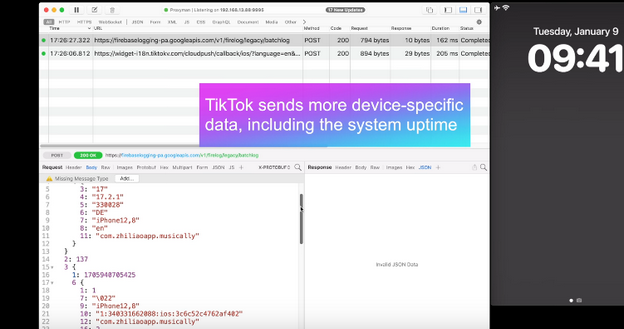
TikTok

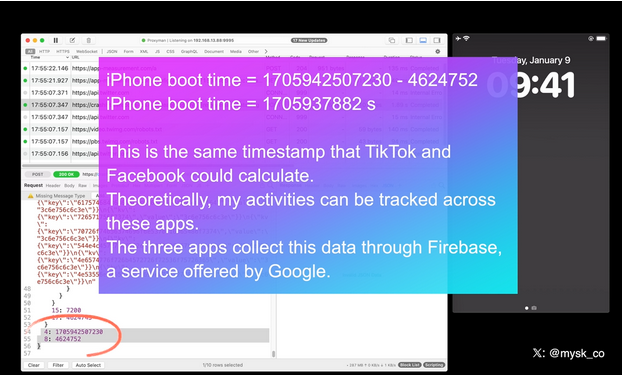
With TikTok, for example, the app sends the iPhone’s boot time to the remote servers every time it receives a push notification.
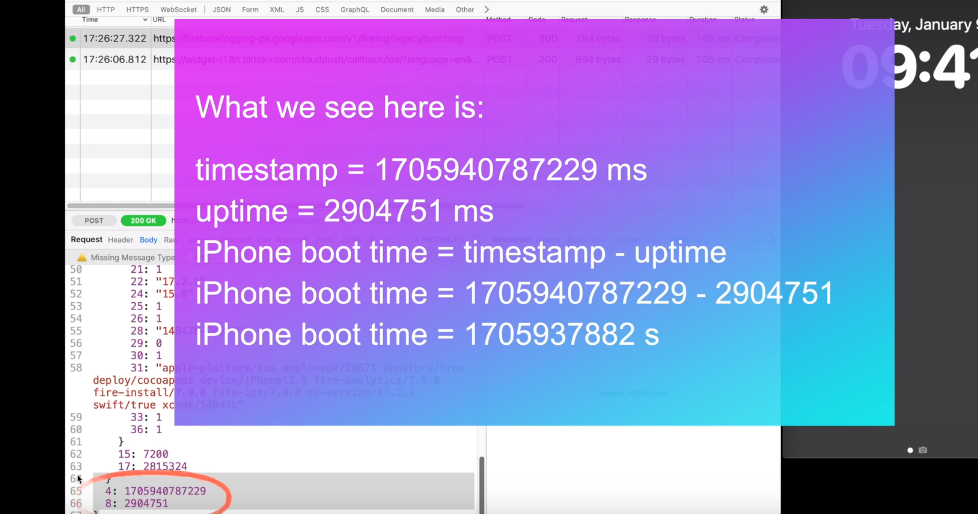
TikTok sends a lot of data to external servers

That means that TikTok knows exactly when the user last restarted their iPhone. If collected over a period of time, the boot time can tell how often the user reboots their iPhone, which can indicate how much they use it or how stable it is. It can be also used to identify the user’s device or track their activity.

When the Facebook app sends a push notification to the same device, Facebook receives the same data about the user’s iPhone last boot time.
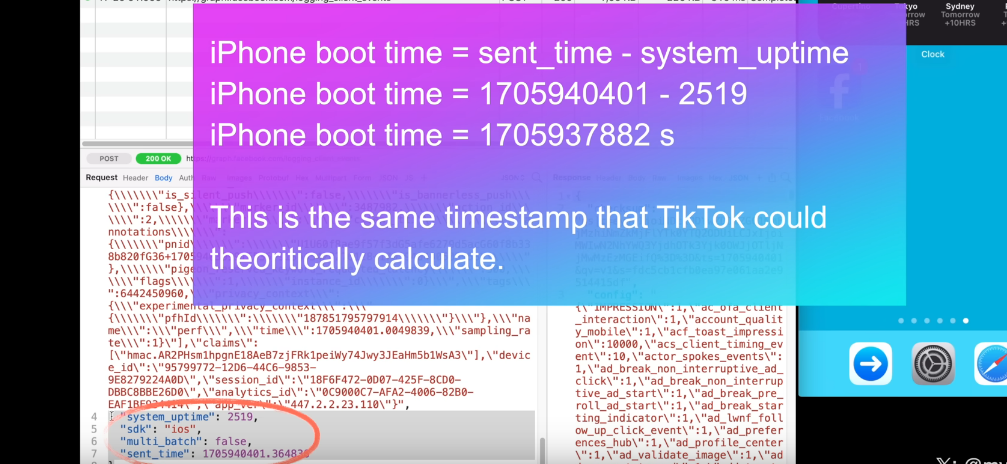
Facebook

As the researcher notes, this may facilitate tracking the user across different apps. That is because the boot time can be used as a unique identifier for the user’s device. If the same device has multiple apps that collect and send the boot time to the same or different servers, these servers can compare the boot time data and link it to the same device. This way, they can track the user’s behavior and preferences across different apps, even if the user does not use the same account or login information for each app. All of this makes the exploitation of the push notification feature by social media companies a legitimate privacy threat.

Moreover, Mysk notes that some apps, for example Facebook and TikTok, also send data when clearing their notifications in Notification Center, which is an iOS feature that provides an overview of alerts from applications.

For example, when a user clears a Facebook notification, the app sends a request with detailed information, including the information about available memory, the last app event, such as liking a post, the time since last app event, the actor ID, that identifies the user’s account on Facebook, the preferred content size, the timestamp (i.e. the exact date and time) when the notification was cleared, the connection type, and so forth.
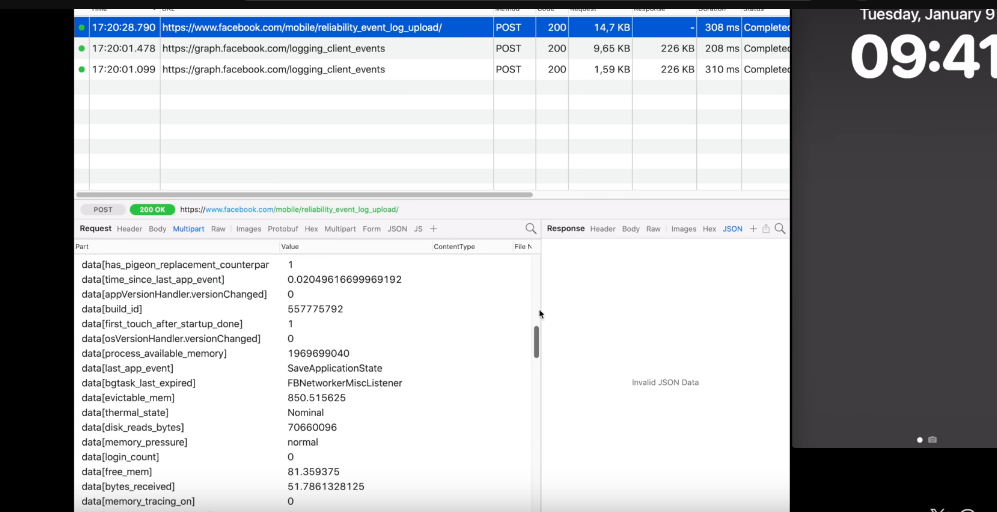
When a user clear a Facebook notification, the app sends detailed information about the user to the external servers

Twitter (X) handles the collection of the user’s information more or less the same way as Facebook and TikTok do.
X/Twitter

All three companies are using Firebase, a service offered by Google, Mysk notes, adding that “the frequency at which many apps send device information after being triggered by a notification is mind-blowing.”

New Apple rule for devs: what will they change?

Mysk pins a lot of hopes on the new rules for developers that Apple has put in place and that will come into effect this spring. As it unveiled the rules, Apple announced that developers would need to explain why their apps have to use certain APIs (Application Programming Interfaces), which are methods for different apps to communicate and share data.

The developers will have to explain why they need to access device information not only for their own code, but also for third-party SDKs (software development kits) that they add to their apps. Both apps and third-party SDKs will need to write one or more “approved reasons” for why they need to access device information through specific APIs in separate documents called “privacy manifest files.” These reasons should be “consistent with the app’s functionality.” We wrote a detailed review of Apple’s new requirement for developers in August — check it out here.

But the question is, will it stop companies from harvesting data from apps through the push notification backdoor? In theory, it should, but only if Apple seriously enforces these rules and monitors developers’ compliance. Which is by no means guaranteed.

We believe that the new rules will improve the situation, but by how much? It is a difficult question with many variables. Developers will have to take the new rules into account, so there’s a chance they’ll try to follow them in good faith. However, those who are hell-bent on continuing to collect this data will likely choose to take risks. And then it’ll be up to Apple and its reviewers to catch these apps in the act.

In any case, we hope Apple takes a proactive and transparent approach to privacy enforcement, or users’ data will continue to be at risk.


Svidela vam se ova objava?
AdGuard VPN AdGuard DNS AdGuard Mail AdGuard Wallet
Glavni ekran AdGuard za Windows
Ekran Zaštita u AdGuard za Windows, prikazuje funkcije zaštite i podešavanja
Ekran Statistika u AdGuard za Windows, prikazuje statistiku za blokirane oglase i trackere
Ekran Upravljanje aplikacijama u AdGuard za Windows, koji prikazuje opcije upravljanja zaštitom za aplikacije instalirane na uređaju
20.385 20385 recenzija
Odlično!

AdGuard — blokator reklama za Windows

AdGuard za Windows je više od blokatora oglasa. To je višenamenski alat koji blokira oglase, kontroliše pristup opasnim sajtovima, ubrzava učitavanje stranica i štiti decu od neprimerenog sadržaja

Preuzimanjem programa prihvate uslove licenčnog ugovora
Microsoft prodavnica
Preuzimanjem programa prihvate uslove licenčnog ugovora
AdGuard za Windows v.8.0, 14-dnevni probni period
Glavni ekran AdGuard za Mac
Ekran Stealth režima u AdGuard za Mac
20.385 20385 recenzija
Odlično!

AdGuard — blokator reklama za Mac

AdGuard za Mac je jedinstveni blokator oglasa dizajniran imajući u vidu macOS. Pored zaštite od dosadnih oglasa u pregledačima i aplikacijama, štiti vas od praćenja, fišinga i prevara
Preuzimanjem programa prihvate uslove licenčnog ugovora
Saznajte više
AdGuard za Mac v.2.19, 14-dnevni probni period
Glavni ekran AdGuard za Android
Ekran Zaštita od praćenja u AdGuard za Android
Ekran Upravljanje aplikacijama u AdGuard za Android, koji prikazuje opcije upravljanja zaštitom za aplikacije instalirane na uređaju
Ekran Statistika u AdGuard za Android, prikazuje statistiku za blokirane oglase i trackere
Glavni ekran privatnog pregledača AdGuard za Android
QR kod za preuzimanje AdGuard za Android
20.385 20385 recenzija
Odlično!

AdGuard — blokator reklama za Android

Blokira oglase i trackere u svim pregledačima, igrama i drugim aplikacijama. Štiti vašu privatnost i omogućava vam da kontrolišete kako vaše aplikacije koriste Internet. Instalira se putem APK-a
Preuzimanjem programa prihvate uslove licenčnog ugovora
Saznajte više
Skeniranje za preuzimanje
Korišćenje bilo kog QR-kod čitača dostupnog na uređaju
AdGuard za Android v.4.14, 14-dnevni probni period
Glavni ekran AdGuard za iOS
Ekran Zaštita u AdGuard za iOS, prikazuje funkcije zaštite i podešavanja
Ekran Statistika u AdGuard za iOS, prikazuje statistiku za blokirane oglase i trackere
QR kod za preuzimanje AdGuard za iOS
20.385 20385 recenzija
Odlično!

AdGuard — blokator reklama za iOS

Najbolji iOS blokator oglasa za iPhone i iPad. AdGuard uklanja sve vrste oglasa i trackera u Safariju i štiti vašu privatnost u svim aplikacijama na DNS nivou
Preuzimanjem programa prihvate uslove licenčnog ugovora
Saznajte više
Skeniranje za preuzimanje
Korišćenje bilo kog QR-kod čitača dostupnog na uređaju
AdGuard za iOS v.4.5
Glavni ekran AdGuard Content Blocker
Ekran filtera u AdGuard Content Blocker
Ekran podešavanja u AdGuard Content Blocker
20.385 20385 recenzija
Odlično!

AdGuard blokator sadržaja

AdGuard Content Blocker eliminiše sve vrste reklama u mobilnim pregledačima koji podržavaju tehnologiju blokiranja sadržaja – kao što su Samsung Internet i Yandex Browser. Njegove funkcije su ograničene u odnosu na AdGuard za Android, ali je besplatan, lako se instalira i efikasan je
Preuzimanjem programa prihvate uslove licenčnog ugovora
Saznajte više
AdGuard blokator sadržaja v.2.8
Glavni ekran AdGuard Browser Extension
Ekran Zaštita od praćenja u AdGuard Browser Extension
20.385 20385 recenzija
Odlično!

AdGuard proširenje za preglednike

AdGuard je najbrže i najlakše proširenje za blokiranje reklama koje uspešno blokira sve vrste reklama na svim veb stranicama! Izaberite AdGuard za preglednik koji koristite i uživajte u surfovanju bez reklama, koje će postati sigurno i brzo.
Instaliraj
Preuzimanjem programa prihvate uslove licenčnog ugovora
Instaliraj
Preuzimanjem programa prihvate uslove licenčnog ugovora
Instaliraj
Preuzimanjem programa prihvate uslove licenčnog ugovora
Instaliraj
Preuzimanjem programa prihvate uslove licenčnog ugovora
Instaliraj
Preuzimanjem programa prihvate uslove licenčnog ugovora
Saznajte više
Instaliraj
Preuzimanjem programa prihvate uslove licenčnog ugovora
Saznajte više
AdGuard proširenje za preglednike v.5.5
Glavni ekran AdGuard Assistant
20.385 20385 recenzija
Odlično!

AdGuard pomoćnik

Dodatak pregledača za prateće AdGuard desktop aplikacije. Omogućava vam da blokirate prilagođene stavke na vebsajtovima, dodate vebsajtove na listu dozvoljenih i šaljete izveštaje direktno iz pregledača
AdGuard pomoćnik v.1.4
20.385 20385 recenzija
Odlično!

AdGuard Home

AdGuard Home je mrežno rešenje za blokiranje oglasa i tragača. Instalirajte ga jednom na ruteru da biste pokrili sve uređaje na vašoj kućnoj mreži — nije potreban dodatni klijentski softver. Ovo je posebno važno za različite IoT uređaje koji često predstavljaju pretnju vašoj privatnosti
AdGuard Home v.0.107
Glavni ekran AdGuard Pro za iOS
Ekran zaštite u AdGuard Pro za iOS, koji prikazuje funkcije zaštite i podešavanja
Ekran statistike u AdGuard Pro za iOS, koji prikazuje statistiku za blokirane oglase i tragače
20.385 20385 recenzija
Odlično!

AdGuard Pro za iOS

AdGuard Pro za iOS dolazi sa svim naprednim funkcijama zaštite od blokiranja oglasa. Nudi iste alate kao i plaćena verzija AdGuard-a za iOS. Ističe se u blokiranju oglasa u Safariju i omogućava vam da prilagodite DNS postavke kako biste prilagodili svoju zaštitu. Blokira oglase u pretraživačima i aplikacijama, štiti vašu decu od neprikladnog sadržaja i čuva vaše lične podatke na sigurnom
Preuzimanjem programa prihvate uslove licenčnog ugovora
Saznajte više
AdGuard Pro za iOS v.4.5
Glavni ekran AdGuard Mini za Mac
Ekran zaštite za Safari u AdGuard Mini za Mac
Ekran Kreiranje pravila u AdGuard Mini za Mac
20.385 20385 recenzija
Odlično!

AdGuard Mini za Mac — Safari blokator oglasa

AdGuard Mini za Mac je moćan Safari blokator adova. Ova lagana aplikacija uklanja reklame, blokira praćenike i ubrzava učitavanje stranica. Pomaže vam da pretražujete veb u Safariju bez ometanja i da sačuvate svoje podatke privatnim
Instaliraj
Preuzimanjem programa prihvate uslove licenčnog ugovora
Saznajte više
AdGuard Mini za Mac v.2.3
Glavni ekran AdGuard za Android TV sa uključenom zaštitom
Ekran Blokiranje oglasa u AdGuard za Android TV, prikazuje njegove funkcije i podešavanja
Ekran Podešavanja u AdGuard za Android TV
Ekran Upravljanje aplikacijama u AdGuard za Android TV, prikazuje aplikacije gde su oglasi i trackeri blokirani
20.385 20385 recenzija
Odlično!

AdGuard za Android TV

AdGuard za Android TV je jedina aplikacija koja blokira oglase, čuva vašu privatnost i deluje kao zaštitni zid za vaš Smart TV. Dobijajte upozorenja o Veb pretnjama, koristite bezbedni DNS i koristite šifrovani saobraćaj. Opustite se i zaronite u omiljene serije sa vrhunskim obezbeđenjem i nula oglasa!
AdGuard za Android TV v.4.14, 14-dnevni probni period
Maskota AdGuard, Agnar, drži Linux pingvina
20.385 20385 recenzija
Odlično!

AdGuard za Linux

AdGuard za Linuk je prvi sistemski bloker oglasa na svetu. Blokirajte oglase i tragače na nivou uređaja, izaberite unapred instalirane filtere ili dodajte sopstvene — sve kroz interfejs komandne linije
AdGuard za Linux v.1.4
20.385 20385 recenzija
Odlično!

AdGuard Temp Mail

Besplatan generator privremenih email adresa koji vas čuva anonimnim i štiti vašu privatnost. Nema spama u vašem glavnom sandučetu!
20.385 20385 recenzija
Odlično!

AdGuard VPN

75 lokacija širom sveta

Pristup bilo kom sadržaju

Jako šifrovanje

Nema prikupljanja dnevnika

Najbrža veza

24/7 podrška

Probajte besplatno
Preuzimanjem programa prihvate uslove licenčnog ugovora
Saznajte više
20.385 20385 recenzija
Odlično!

AdGuard DNS

AdGuard DNS je alternativno rešenje za blokiranje reklama, zaštitu privatnosti i roditeljsku kontrolu. Lako se postavlja i besplatan je za korišćenje. On obezbeđuje neophodni minimum zaštite od reklama na mreži, praćenja i fišinga, bez obzira koju platformu i uređaj koristite.
20.385 20385 recenzija
Odlično!

AdGuard Mail

Zaštitite svoj identitet, izbegnite spam i održite bezbednost svog sandučeta uz naše alias-e i privremene e-adrese. Uživajte u našoj besplatnoj usluzi prosleđivanja emaila i aplikacijama za sve operativne sisteme.
20.385 20385 recenzija
Odlično!

AdGuard Wallet

Bezbedan i privatan kripto novčanik koji vam daje potpunu kontrolu nad vašom imovinom. Upravljajte više novčanika i otkrijte hiljade kriptovaluta za čuvanje, slanje i razmenu
Preuzimanje AdGuard Da biste instalirali AdGuard, kliknite na datoteku označenu strelicom Izaberite „Otvori“ i kliknite na „U redu“, a zatim sačekajte da se datoteka preuzme. U otvorenom prozoru prevucite ikonu AdGuard u fasciklu „Aplikacije“. Hvala vam što ste izabrali AdGuard! Izaberite „Otvori“ i kliknite na „U redu“, a zatim sačekajte da se datoteka preuzme. U otvorenom prozoru kliknite na „Instaliraj“. Hvala vam što ste izabrali AdGuard!
Instalirajte AdGuard na svoj mobilni uređaj

















































