ChatGPT is rolling out ads. Where they will appear and what it means for users’ experience
OpenAI, the AI behemoth behind ChatGPT, is on the verge of bringing ads into its most popular consumer-facing product. And by the looks of it, they’re not trying to reinvent the wheel — they’re sticking to a familiar playbook.
On January 16, OpenAI announced that it would start testing ads in the US for free users and the cheapest subscription tier, Go, in the “coming weeks”. The ads would be shown only to adult users who are logged in. The company clarified that the ads would appear at the bottom of the chatbot’s replies when they are relevant to the user’s current chat. They will be “clearly labeled and separated from the organic answer,” OpenAI noted. The ads will be personalized by default, but users will be able to turn off personalization and clear the data used for ads “at any time.” The statement also claims that it would “never sell your data to advertisers” and keep conversations private from advertisers.
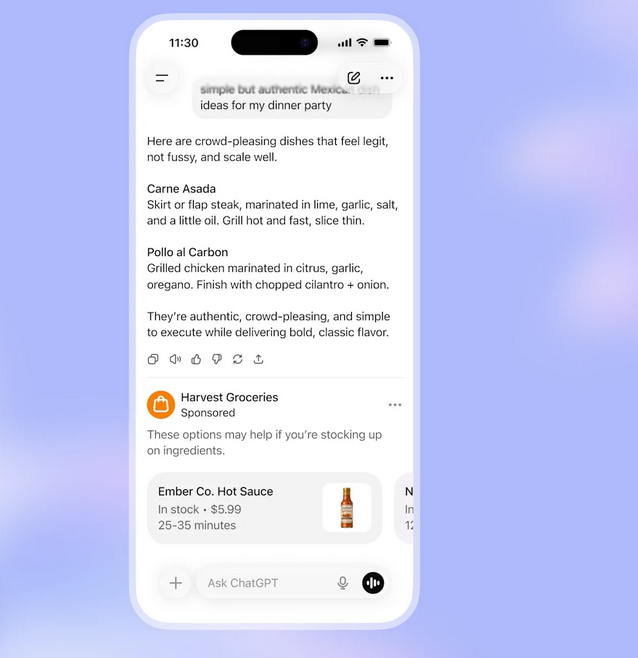
Example of an ad in ChatGPT. Source: OpenAI
The announcement has ended months of speculation about when and where exactly ads in ChatGPT would appear. And at least for its first venture into ads, OpenAI seems to be erring on the side of caution, opting for the most conservative approach.
It could have been worse
In December 2025, the Information reported that OpenAI was exploring a few approaches. One of those (that we now see being realized) was to place ads in modules separate from ChatGPT’s replies, clearly labeled as ads. That sounded a lot like what its competitors like Google and Perplexity AI were already doing.
The other approach, which on the surface sounded far more troubling, would have seen ads or “sponsored content” woven directly into the chatbot’s responses. The Information, citing internal discussions at OpenAI, gave an example: ask for mascara recommendations, and the response might feature an ad for Sephora, a popular beauty brand. The same report said that OpenAI was considering holding off on showing ads until the user displays a clear intent to buy something. In other words, instead of plastering ads below or in the initial response, the idea was to show them only once the user explicitly signals interest in making a purchase. If OpenAI’s own example is any indication, that more cautious approach seems to have been dropped in favor of a much more direct one.
Laying the groundwork for ads
If you’ve been following OpenAI over the past year, the news that ChatGPT would start showing ads probably won’t come as a surprise. During the past year OpenAI had been quietly hiring advertising executives and laying the groundwork for a full-fledged monetization push. One of the most notable hires was Fidji Simo, who joined OpenAI in August 2025 to run applications after first building ad-driven products at Meta and later leading Instacart. Simo specializes in scaling consumer platforms, performance advertising, and monetization — just what OpenAI is likely aiming for with ChatGPT. Reinforcing that direction, OpenAI also posted roles for ad-platform and paid marketing engineers and was searching for a senior monetization lead to oversee subscriptions and advertising.
Most telling of all, though, were leaked references found in a beta version of the ChatGPT Android app, which pointed to an internal advertising framework taking shape as far back as in November 2025.
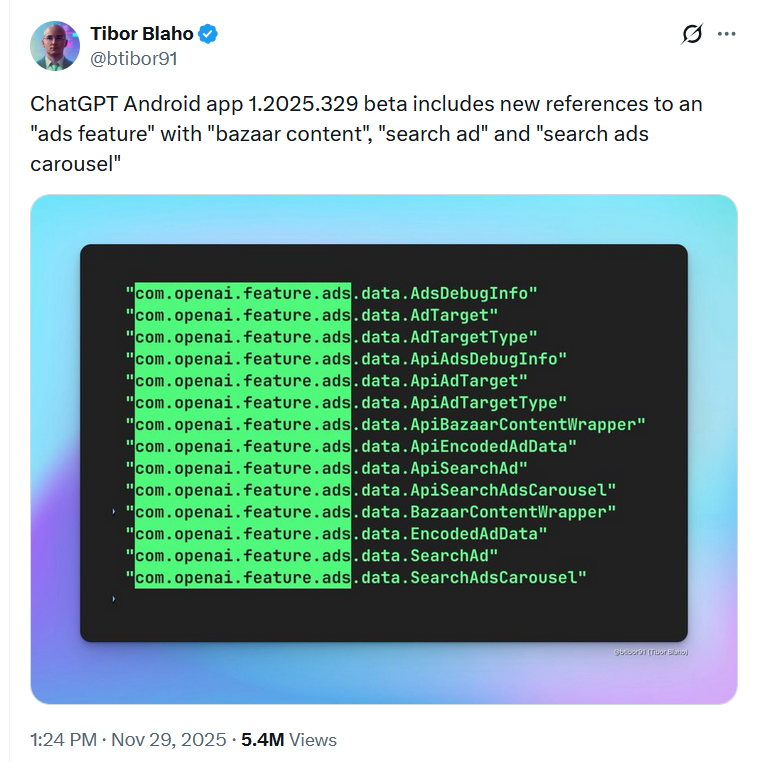
The build, spotted by developer Tibor Blaho, included references to things like “ads feature,” “search ad,” and “bazaar content,” suggesting OpenAI was actively testing how ads might work in practice.
Around the same time, users spotted recommendations for services sitting just below the ChatGPT reply window that looked suspiciously like ads (and knowing what we’re knowing now, they do look like ads that are to be rolled out in the US).
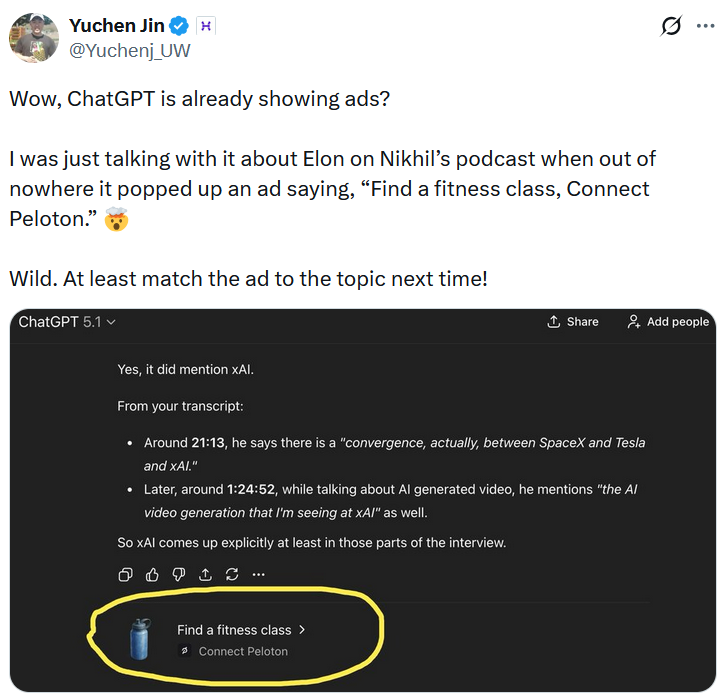
OpenAI denied at the time that advertising had already made its way into the product. Responding to a screenshot showing ChatGPT promoting fitness classes, OpenAI said it wasn’t an ad because “there’s no financial component.” OpenAI did call it a bad user experience, but only on the grounds of “lack of relevancy,” notably sidestepping the more obvious issue: that something this ad-like was appearing there at all. “We’re iterating on the suggestions and UX, trying to make sure they’re awesome,” the company said.
And while ChatGPT seemed ready for ads, the rollout was apparently put on hold when OpenAI famously declared a “code red” in December 2025, shifting focus to improving its models after Google upgraded Gemini. However, even then there was hardly any doubt that OpenAI was preparing to roll out ads to ChatGPT. The only real question left was not if ads were coming, but how intrusive OpenAI was willing to let them become.
From aesthetically ugly to ‘cool’ if done right: how OpenAI’s attitude to ads shifted
While OpenAI’s statement suggests that ads — at least in their first iteration — won’t be overly intrusive, there’s no guarantee that won’t change. People change their minds, and OpenAI CEO Sam Altman is no exception.
Speaking to Lex Friedman during a podcast appearance in March 2024, Altman went as far as to say that he “hated ads” as an “aesthetic choice.” Altman said that while ads needed to happen for the Internet to “get going,” the world was “richer now,” which supposedly should have made them less of a necessity, and more of a choice. That said, Altman left the door slightly ajar, suggesting there might be a way for LLMs to participate in the “transaction stream” in an “unbiased way” that would be “ok” to do. Even with that caveat, he doubled down on his preference for an ad-free ChatGPT, adding: “We have a very simple business model and I like it. I know that I’m not the product.” By contrast, he pointed to Facebook, X, and other ad-supported platforms and summed up his feelings rather plainly: “I don’t love that.”
Six months later, in October 2024, Altman doubled down on his general distaste for ads. Replying to a question whether OpenAI would be exploring alternative monetization strategies like advertising in addition to its current subscription-based model, Altman said: “I will disclose, just as a personal bias, that I hate ads.” At the same time he did not rule out that OpenAI would consider them at one point.
That sort of sentiment: that ads do exist, they are somewhat on the radar, but not on the table for the company at the moment — had persisted throughout 2024, with OpenAI’s Chief Financial Officer Sarah Friar saying in December 2024 that while the company was “open” to exploring other revenue streams, it had “no active plans” to pursue advertising.
It all changed in 2025. The idea of generating ad revenue grew on OpenAI, and rather rapidly. In April 2025, internal documents were leaked, with OpenAI forecasting that new products, including “free user monetization” (read: ads), would bring it $1 billion in revenue in 2026. That number was expected to grow to $25 billion by 2029.
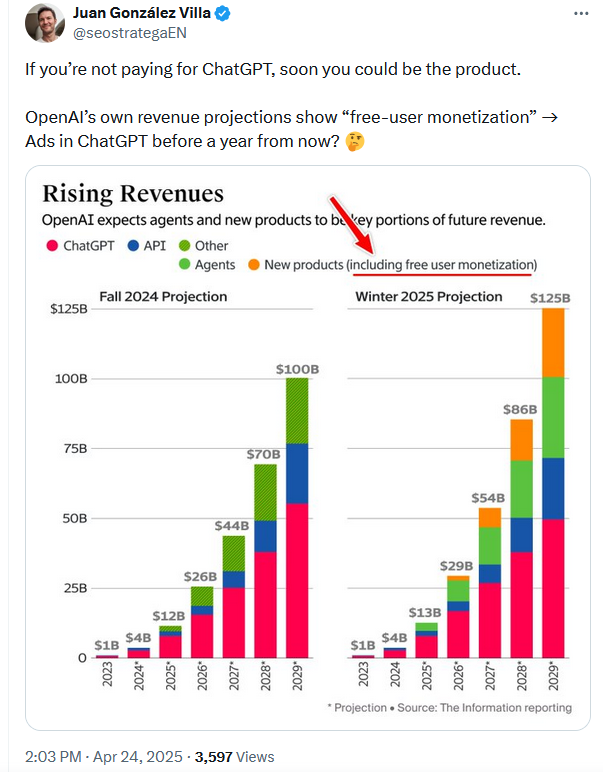
The cat was already out of the bag, but it hadn’t quite meowed yet. That didn’t take long, though. Speaking on the very first episode of The OpenAI Podcast in June 2025, Altman made his position clearer and noticeably softer than before.
“We have not done any advertising product yet. I mean, I’m not totally against it. I can point to areas where I like ads. I think ads on Instagram are kind of cool. I’ve bought a bunch of stuff from them.”
Coming from someone who had long kept advertising at arm’s length, this was more than a casual aside. Altman made it clear he didn’t just tolerate ads, he went as far as describing them as “cool,” a small word that signaled a pretty big shift in attitude.
Still, he was careful to draw a line around where ads should live. Messing with the actual model output, he suggested, would be a dealbreaker. “If we started modifying the output — that stream that comes back from the LLM — in exchange for who is paying us more, that would feel really bad,” he said. “I would hate this as a user. That would be a trust-destroying moment.”
Instead, Altman floated the idea that ads, if they ever arrive, should sit outside the LLM transaction itself, clearly separated from the response and not influencing it in any way. Even then, the bar would be high. “It would have to feel really useful to users and really clear that it was not messing with the LLM output,” he said.
On paper, that all sounds good — and by all appearances, it’s the path OpenAI has chosen to follow. But Altman also pointed to Google as a “good” ad-driven company, albeit with “issues.” Given how deeply advertising has shaped (and sometimes distorted) Google’s products over time, it’s fair to wonder how clean or sustainable any future ad implementation could realistically be.
And that matters, because according to The Information, OpenAI forecasts that ChatGPT’s global annual average revenue per non-paying user (i.e. a user monetized through ads) would reach about $2 in 2026, rising to roughly $15 by 2030.
Even at the high end of that projection, ChatGPT would still be a long way from catching up with companies that have fully embraced the ad-supported model. Meta, for instance, already generates around $50 per user. In other words, the pressure to scale and to push those numbers up might grow, making the promise of “clean” and non-intrusive advertising harder to maintain over time.
That pressure is unlikely to ease anytime soon: OpenAI is not projected to turn a profit before 2030 and expects cumulative losses of roughly $115 billion through 2029. According to HSBC estimates, the company will also need to raise an additional $207 billion to finance its growth plans, underscoring how difficult it may be to resist more aggressive monetization strategies.
What are strategies to block ads?
The obvious next question on ad-blocking users’ minds is likely this: can ChatGPT ads actually be blocked? The short answer is yes. The idea that generative AI somehow makes ads “unblockable” is more hype than reality.
That said, how easy this will be depends almost entirely on where OpenAI decides to put them. If ads stay outside ChatGPT’s reply window, and are clearly separated and labelled, blocking ads in ChatGPT will look fairly familiar. This is very similar to what we’ve seen from other AI products like Perplexity. From an ad-blocking perspective, that kind of implementation is relatively straightforward, and AdGuard already filters out similar formats via its Other Annoyances filter.
Large language models make it possible to move beyond traditional pattern matching and start filtering content based on meaning. By post-analyzing content rather than relying solely on where or how it appears LLMs can help distinguish neutral information from promotional or sponsored material, even when it’s presented in less obvious ways. This isn’t science fiction: it’s something we’re already experimenting with, as outlined in our research article on rethinking ad blocking with LLMs.
The complication arises if OpenAI decides to blend ads into the text of the chatbot answer. That won’t mean they will instantly become unblockable. But it will require different tools to block them. For now, though, there’s no need to overcorrect. Most chatbot ads today are still distinct enough to be filtered using existing techniques. The bigger uncertainty isn’t whether ads can be blocked, but how far OpenAI will ultimately push them. Altman may insist ads won’t “mess with” the LLM output, but as financial pressure mounts, it’s not something users can afford to take on faith alone.




















































