The big brother in your pocket: TeleSign’s ‘reputation score’ system explained

What if there’s a hidden system tracking and scoring you based on every phone call you make or take? It sounds like something from a Black Mirror episode and may remind you of the controversial China’s social credit system. But surprisingly, half of the world’s mobile phone users are already part of such a system, and many are Europeans, who are supposed to enjoy strong privacy protections.

How profiling works and why it’s problematic

NOYB, a privacy advocacy group, has filed a lawsuit against the US company TeleSign, a Belgian telecom provider BICS, and their parent Proximus. They claim these companies are unauthorizedly profiling billions of phone users to assign them a ‘reputation’ or ‘trust’ score.

This score can affect your access to online services: If your score is bad, you may be blocked from accessing certain online platforms, or be subject to additional checks which those with better scores won’t have to go through. These restrictions are imposed by TeleSign’s partners, which reportedly include Microsoft, TikTok, Skype, LinkedIn, and SalesForce. So, who are BICS and TeleSign and what do they do exactly?

BICS is a Belgian telecom giant, which connects networks of mobile phone providers in over 200 countries. By doing so, BICS gains access to personal information of billions of customers. BICS gets to know how often people make calls, how long they talk, for how long they don’t use their phones, where they are, and when they receive calls and from whom. This data is then shared with TeleSign, which assigns ‘reputation scores’ to phone numbers and sells this data as a fraud prevention tool, called ‘Intelligence API’. Per month, TeleSign says it “verifies over five billion phone numbers,” which represents “half of the world’s mobile users,” and “gives critical insight into the remaining billions.”

The problem? Phone users that trust their mobile operators with their information are not aware of this scheme.

The lawsuit points out that the system is problematic also because TeleSign falls under US surveillance laws, which means that the US government can access the data. Sending European personal data across the Atlantic is technically illegal without a valid EU-US data transfer agreement. The old agreement, called the Privacy Shield, was scrapped in 2020 in part because the US laws were deemed too intrusive, and the existing privacy protections in the US not on par with the GDPR standards in the EU. The resulting legal vacuum has left many big tech companies like Meta facing hefty fines for continuing to transfer European user data to the US. In early July, the EU and US finally hammered out the details of a deal that should replace it, but its fate is still uncertain as it is likely to face legal challenges.

What data does TeleSign access to determine a reputation score?

Exactly how the reputation score is calculated is anyone’s guess. On its website, TeleSign claims that the reputation score is assessed on various factors, but the exact methodology is proprietary. Some of the things TeleSign says it uses to assign a score to phone numbers are phone number data and analytics, data from organizations that allow it to check whether a phone number belongs to a known fraudster, patterns in phone usage, frequency of usage (which can also indicate fraud, for example, if it is used every few minutes), and machine learning predictions.

Because the methodology is proprietary, there’s no way to know how these things add up to a high or low trust score. Users can ask TeleSign for a copy of their data, and some have found they received a “medium-low” risk rating.

While users can obtain their data from TeleSign, mobile operators seem unaware that their customer data is being sent to TeleSign, according to NOYB.

So, in a nutshell, your access to a particular online service may be blocked due to an opaque, privately-operated scoring system that assigns you a rating based on an arbitrary set of criteria and works behind the scenes without your knowledge.

Legal basis: what BICS and Telesign say?

The GDPR lists six lawful grounds for processing personal data, namely consent, contract, vital interests, public duty, and legitimate interests. The latter is the most flexible, and it lets companies use data without asking the user directly. For instance, OpenAI uses “legitimate interests” as an excuse to collect and use publicly available personal information to train AI models like GPT, which powers ChatGPT. This justification is highly questionable, and OpenAI’s habit of grabbing personal and other data from the Web has been met with mounting pile of lawsuits accusing it of profiting from privacy violations.

BICS and TeleSign both claim ‘legitimate interests’, specifically, detection or prevention of fraud as their legal basis of data processing.
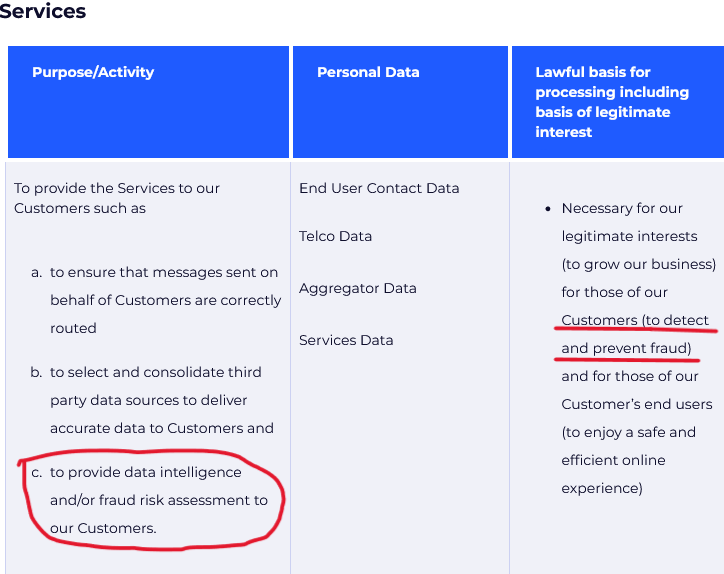
TeleSign claims it processes user data to detect fraud
Source: TeleSign privacy policy

Speaking to Belgian newspaper Le Soir last year, Proximus, which owns both BICS and TeleSign, said that all transferred data is “end-to-end encrypted” while telephone numbers “are masked to prevent individual identification.” As for how it manages privacy risks stemming from transfer of data to the US, which by this day still lacks a federal privacy law, it says that it “has taken additional measures to prevent the identification of individuals should the data end up in the hands of an authority or should a data breach occur.” But how these companies ensure the data does not fall into the wrong hands is unclear.

The lawsuit alleges that BICS and TeleSign’s activities go beyond fraud prevention, and are disproportionate, mainly meant to generate revenue. BICS has never informed users of the data processing, which potentially violates its transparency obligation under article 14 of GDPR.

Something rings a bell?

What the TeleSign system does is basically evaluate your reputation, or in other words, your trustworthiness, based on your phone behavior. To some extent, such a system is reminiscent of China’s social credit system in that they both assess trustworthiness based on behavior data, and can reward or punish individuals based on this data. This should ring alarm bells for privacy-conscious users.
Of course, It would be a stretch to equate the activities of TeleSign and BICS with those of the Chinese government. Firstly, because China’s social credit system is a government policy and not a commercial product, and secondly, it is way wider in scope, as it presumes tracking and scoring people based on a large variety of their online and offline activities.

How the system can negatively affect you

Despite assurances from Proximus, BICS, and TeleSign, the data is not safe with them. There is the obvious danger in the data being processed in the US, where data protection laws are weak, while the safeguards proposed in the newly proposed US-EU transfer agreement have yet to withstand a legal challenge. The collected data could also be exposed by a breach or a leak, leading to identity theft. In addition, and perhaps most importantly, the system can deny services to mobile users based on their reputation scores, which are calculated without their knowledge and consent, and which they have no way of correcting, deleting, or challenging, simply because they are unaware of their existence.

What can you do

Thanks to NOYB exposing the practice, more people will get to know about it and their right to request, rectify, and delete their data from TeleSign. This can be done through a form on TeleSign’s website. According to its privacy policy, it’s possible to opt out of all personal data selling and sharing, including for profiling purposes.

TeleSign privacy policy allows some users to opt out of profiling

Source: TeleSign privacy policy

To avoid being profiled by TeleSign or similar companies, some general recommendations are to use multiple phone numbers for different purposes, or to use a virtual number instead of your real one for online services. For example, if you do cold-calling, you may want to have a separate phone for that, so you won’t be mistaken for a scammer and denied access to certain services.

Moreover, you should be aware of the data protection laws that you can benefit from, such as by asking for the data that companies have on you and requesting its deletion. You should also take other measures to protect your privacy, including using a VPN, limiting the personal information you share online, and being careful with app permissions. These steps won’t stop phone-based profiling directly, but they will add an extra layer of privacy to your browsing.


Svidela vam se ova objava?
AdGuard VPN AdGuard DNS AdGuard Mail AdGuard Wallet
Glavni ekran AdGuard za Windows
Ekran Zaštita u AdGuard za Windows, prikazuje funkcije zaštite i podešavanja
Ekran Statistika u AdGuard za Windows, prikazuje statistiku za blokirane oglase i trackere
Ekran Upravljanje aplikacijama u AdGuard za Windows, koji prikazuje opcije upravljanja zaštitom za aplikacije instalirane na uređaju
20.385 20385 recenzija
Odlično!

AdGuard — blokator reklama za Windows

AdGuard za Windows je više od blokatora oglasa. To je višenamenski alat koji blokira oglase, kontroliše pristup opasnim sajtovima, ubrzava učitavanje stranica i štiti decu od neprimerenog sadržaja

Preuzimanjem programa prihvate uslove licenčnog ugovora
Microsoft prodavnica
Preuzimanjem programa prihvate uslove licenčnog ugovora
AdGuard za Windows v.8.0, 14-dnevni probni period
Glavni ekran AdGuard za Mac
Ekran Stealth režima u AdGuard za Mac
20.385 20385 recenzija
Odlično!

AdGuard — blokator reklama za Mac

AdGuard za Mac je jedinstveni blokator oglasa dizajniran imajući u vidu macOS. Pored zaštite od dosadnih oglasa u pregledačima i aplikacijama, štiti vas od praćenja, fišinga i prevara
Preuzimanjem programa prihvate uslove licenčnog ugovora
Saznajte više
AdGuard za Mac v.2.19, 14-dnevni probni period
Glavni ekran AdGuard za Android
Ekran Zaštita od praćenja u AdGuard za Android
Ekran Upravljanje aplikacijama u AdGuard za Android, koji prikazuje opcije upravljanja zaštitom za aplikacije instalirane na uređaju
Ekran Statistika u AdGuard za Android, prikazuje statistiku za blokirane oglase i trackere
Glavni ekran privatnog pregledača AdGuard za Android
QR kod za preuzimanje AdGuard za Android
20.385 20385 recenzija
Odlično!

AdGuard — blokator reklama za Android

Blokira oglase i trackere u svim pregledačima, igrama i drugim aplikacijama. Štiti vašu privatnost i omogućava vam da kontrolišete kako vaše aplikacije koriste Internet. Instalira se putem APK-a
Preuzimanjem programa prihvate uslove licenčnog ugovora
Saznajte više
Skeniranje za preuzimanje
Korišćenje bilo kog QR-kod čitača dostupnog na uređaju
AdGuard za Android v.4.14, 14-dnevni probni period
Glavni ekran AdGuard za iOS
Ekran Zaštita u AdGuard za iOS, prikazuje funkcije zaštite i podešavanja
Ekran Statistika u AdGuard za iOS, prikazuje statistiku za blokirane oglase i trackere
QR kod za preuzimanje AdGuard za iOS
20.385 20385 recenzija
Odlično!

AdGuard — blokator reklama za iOS

Najbolji iOS blokator oglasa za iPhone i iPad. AdGuard uklanja sve vrste oglasa i trackera u Safariju i štiti vašu privatnost u svim aplikacijama na DNS nivou
Preuzimanjem programa prihvate uslove licenčnog ugovora
Saznajte više
Skeniranje za preuzimanje
Korišćenje bilo kog QR-kod čitača dostupnog na uređaju
AdGuard za iOS v.4.5
Glavni ekran AdGuard Content Blocker
Ekran filtera u AdGuard Content Blocker
Ekran podešavanja u AdGuard Content Blocker
20.385 20385 recenzija
Odlično!

AdGuard blokator sadržaja

AdGuard Content Blocker eliminiše sve vrste reklama u mobilnim pregledačima koji podržavaju tehnologiju blokiranja sadržaja – kao što su Samsung Internet i Yandex Browser. Njegove funkcije su ograničene u odnosu na AdGuard za Android, ali je besplatan, lako se instalira i efikasan je
Preuzimanjem programa prihvate uslove licenčnog ugovora
Saznajte više
AdGuard blokator sadržaja v.2.8
Glavni ekran AdGuard Browser Extension
Ekran Zaštita od praćenja u AdGuard Browser Extension
20.385 20385 recenzija
Odlično!

AdGuard proširenje za preglednike

AdGuard je najbrže i najlakše proširenje za blokiranje reklama koje uspešno blokira sve vrste reklama na svim veb stranicama! Izaberite AdGuard za preglednik koji koristite i uživajte u surfovanju bez reklama, koje će postati sigurno i brzo.
Instaliraj
Preuzimanjem programa prihvate uslove licenčnog ugovora
Instaliraj
Preuzimanjem programa prihvate uslove licenčnog ugovora
Instaliraj
Preuzimanjem programa prihvate uslove licenčnog ugovora
Instaliraj
Preuzimanjem programa prihvate uslove licenčnog ugovora
Instaliraj
Preuzimanjem programa prihvate uslove licenčnog ugovora
Saznajte više
Instaliraj
Preuzimanjem programa prihvate uslove licenčnog ugovora
Saznajte više
AdGuard proširenje za preglednike v.5.5
Glavni ekran AdGuard Assistant
20.385 20385 recenzija
Odlično!

AdGuard pomoćnik

Dodatak pregledača za prateće AdGuard desktop aplikacije. Omogućava vam da blokirate prilagođene stavke na vebsajtovima, dodate vebsajtove na listu dozvoljenih i šaljete izveštaje direktno iz pregledača
AdGuard pomoćnik v.1.4
20.385 20385 recenzija
Odlično!

AdGuard Home

AdGuard Home je mrežno rešenje za blokiranje oglasa i tragača. Instalirajte ga jednom na ruteru da biste pokrili sve uređaje na vašoj kućnoj mreži — nije potreban dodatni klijentski softver. Ovo je posebno važno za različite IoT uređaje koji često predstavljaju pretnju vašoj privatnosti
AdGuard Home v.0.107
Glavni ekran AdGuard Pro za iOS
Ekran zaštite u AdGuard Pro za iOS, koji prikazuje funkcije zaštite i podešavanja
Ekran statistike u AdGuard Pro za iOS, koji prikazuje statistiku za blokirane oglase i tragače
20.385 20385 recenzija
Odlično!

AdGuard Pro za iOS

AdGuard Pro za iOS dolazi sa svim naprednim funkcijama zaštite od blokiranja oglasa. Nudi iste alate kao i plaćena verzija AdGuard-a za iOS. Ističe se u blokiranju oglasa u Safariju i omogućava vam da prilagodite DNS postavke kako biste prilagodili svoju zaštitu. Blokira oglase u pretraživačima i aplikacijama, štiti vašu decu od neprikladnog sadržaja i čuva vaše lične podatke na sigurnom
Preuzimanjem programa prihvate uslove licenčnog ugovora
Saznajte više
AdGuard Pro za iOS v.4.5
Glavni ekran AdGuard Mini za Mac
Ekran zaštite za Safari u AdGuard Mini za Mac
Ekran Kreiranje pravila u AdGuard Mini za Mac
20.385 20385 recenzija
Odlično!

AdGuard Mini za Mac — Safari blokator oglasa

AdGuard Mini za Mac je moćan Safari blokator adova. Ova lagana aplikacija uklanja reklame, blokira praćenike i ubrzava učitavanje stranica. Pomaže vam da pretražujete veb u Safariju bez ometanja i da sačuvate svoje podatke privatnim
Instaliraj
Preuzimanjem programa prihvate uslove licenčnog ugovora
Saznajte više
AdGuard Mini za Mac v.2.3
Glavni ekran AdGuard za Android TV sa uključenom zaštitom
Ekran Blokiranje oglasa u AdGuard za Android TV, prikazuje njegove funkcije i podešavanja
Ekran Podešavanja u AdGuard za Android TV
Ekran Upravljanje aplikacijama u AdGuard za Android TV, prikazuje aplikacije gde su oglasi i trackeri blokirani
20.385 20385 recenzija
Odlično!

AdGuard za Android TV

AdGuard za Android TV je jedina aplikacija koja blokira oglase, čuva vašu privatnost i deluje kao zaštitni zid za vaš Smart TV. Dobijajte upozorenja o Veb pretnjama, koristite bezbedni DNS i koristite šifrovani saobraćaj. Opustite se i zaronite u omiljene serije sa vrhunskim obezbeđenjem i nula oglasa!
AdGuard za Android TV v.4.14, 14-dnevni probni period
Maskota AdGuard, Agnar, drži Linux pingvina
20.385 20385 recenzija
Odlično!

AdGuard za Linux

AdGuard za Linuk je prvi sistemski bloker oglasa na svetu. Blokirajte oglase i tragače na nivou uređaja, izaberite unapred instalirane filtere ili dodajte sopstvene — sve kroz interfejs komandne linije
AdGuard za Linux v.1.4
20.385 20385 recenzija
Odlično!

AdGuard Temp Mail

Besplatan generator privremenih email adresa koji vas čuva anonimnim i štiti vašu privatnost. Nema spama u vašem glavnom sandučetu!
20.385 20385 recenzija
Odlično!

AdGuard VPN

75 lokacija širom sveta

Pristup bilo kom sadržaju

Jako šifrovanje

Nema prikupljanja dnevnika

Najbrža veza

24/7 podrška

Probajte besplatno
Preuzimanjem programa prihvate uslove licenčnog ugovora
Saznajte više
20.385 20385 recenzija
Odlično!

AdGuard DNS

AdGuard DNS je alternativno rešenje za blokiranje reklama, zaštitu privatnosti i roditeljsku kontrolu. Lako se postavlja i besplatan je za korišćenje. On obezbeđuje neophodni minimum zaštite od reklama na mreži, praćenja i fišinga, bez obzira koju platformu i uređaj koristite.
20.385 20385 recenzija
Odlično!

AdGuard Mail

Zaštitite svoj identitet, izbegnite spam i održite bezbednost svog sandučeta uz naše alias-e i privremene e-adrese. Uživajte u našoj besplatnoj usluzi prosleđivanja emaila i aplikacijama za sve operativne sisteme.
20.385 20385 recenzija
Odlično!

AdGuard Wallet

Bezbedan i privatan kripto novčanik koji vam daje potpunu kontrolu nad vašom imovinom. Upravljajte više novčanika i otkrijte hiljade kriptovaluta za čuvanje, slanje i razmenu
Preuzimanje AdGuard Da biste instalirali AdGuard, kliknite na datoteku označenu strelicom Izaberite „Otvori“ i kliknite na „U redu“, a zatim sačekajte da se datoteka preuzme. U otvorenom prozoru prevucite ikonu AdGuard u fasciklu „Aplikacije“. Hvala vam što ste izabrali AdGuard! Izaberite „Otvori“ i kliknite na „U redu“, a zatim sačekajte da se datoteka preuzme. U otvorenom prozoru kliknite na „Instaliraj“. Hvala vam što ste izabrali AdGuard!
Instalirajte AdGuard na svoj mobilni uređaj

















































