Elon, what the ad?? Unmarked ads flood X

Since he took over Twitter a year ago, Elon Musk has made a lot of unpopular decisions. The billionaire has turned the once-coveted verification check into a pay-for-play feature, restricted (presumably temporarily) the number of posts users can see, ended free access to the Twitter API, and is seriously considering introducing $1 annual fee for all new users. And, lest we forget, he rebranded the blue, homey Twitter into a bland black-and-white “X,” a symbol straight out of the Aughts (hi, XTina and X-men) that Musk has long been obsessed with.

Musk’s grand vision of turning X into an “everything app,” similar to China’s WeChat, has been met with skepticism at best, while X’s ad revenue, the company’s main source of income by far, has been falling 55% each month year-on-year.

This alone makes for a pretty dismal record for the first year of Musk’s reign.

While previous moves have been controversial, but one could argue not completely unjustified, the latest one should, and hopefully will, draw universal condemnation. Apparently, X is now experimenting with removing “ad” labels from regular ads as well as introducing ads that cannot be reported at all.

Undercover ads

Since early September, users have been reporting en masse that some of the ads they saw in their algorithmic “for me” feed and “following” feed were missing ad labels.

The only difference between these unlabelled and regular ads was that they were not marked as such. If the user was shrewd enough to figure out that an unlabelled post was in fact an ad and not an organic result, they could click on a three-dot menu in the top right corner of the post and report it.
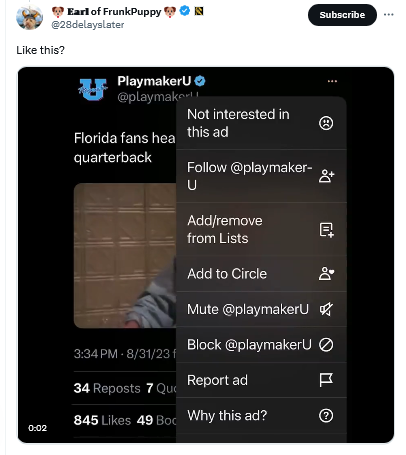
An unmarked X ad

Mashable was first on the story. It noted, giving Musk the benefit of the doubt, that it was “unclear if X, under owner Elon Musk, decided to remove these ad labels or if this is a temporary glitch.”

Judging by how the situation evolved over the next several weeks, the theory that it was a simple glitch seems increasingly unlikely.

About a month later, X users began noticing an even less transparent and more spammy ad format. These low-quality ads were posted by inactive accounts with no username and a profile picture that was a cropped version of the image in the post. The three-dot menu was also missing, making it impossible for users to block or report these ads.
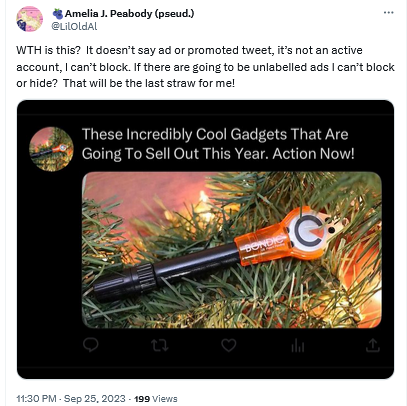
A spammy X ad without labels

We have not seen such ads ourselves, but according to Mashable, clicking on any part of these ads would redirect users to a third-party website. Mashable also reported that there was no mention of this new ad format in X’s ad inventory, which suggested that the ads came from a server of an external ad provider, not from X’s own servers.

X has not provided any explanation as to what is happening to its ads, but it is definitely something fishy. The Wired pointed out, the failure of X to clearly mark ads as ads can land it in trouble with the law, specifically the US Federal Trade Commission Act. The law requires companies to accompany ads with relevant disclosures to prevent that from being “deceptive.” And in the case of Twitter’s new ad formats these disclosures are nowhere to be seen, which makes the ads potentially illegal.

How it all started

X’s experiment with new ad formats and labeling (or rather, the lack thereof) did not come out of the blue. It’s been a slow progression from more obvious labels — to less obvious — and now, to no labels at all.

In fact, Twitter’s ad labels had not changed much for about ten years. When the platform first introduced ads in 2011, they were accompanied by the tag “Promoted” and a yellow arrow in the bottom left corner.
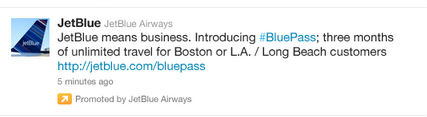
An old Twitter ad

Source: TechCrunch

These ads were displayed only to those users who already followed the advertiser’s account.

In the years that followed, the arrow lost its distinctive yellow color and took on a more subtle gray hue.
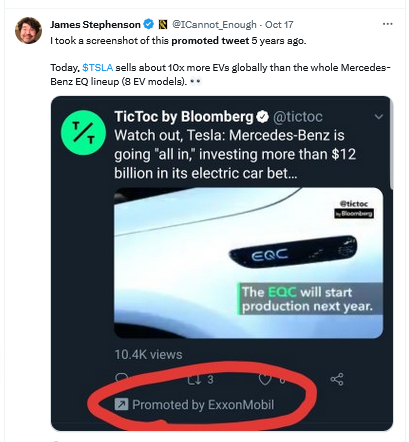
Twitter made the yellow arrow grey

And earlier this year, X changed the look of its ad labels again. It replaced the “promoted” tag in the bottom left corner with the tiny “ad” label in the top right corner, and got rid of the arrow. The new, much more subtle label was not well received by users, who argued that it was harder to spot, but the change stuck.
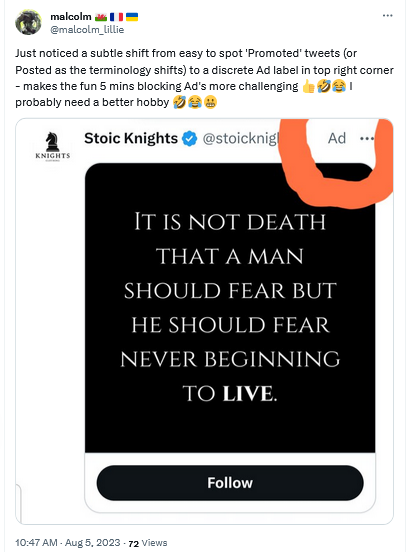
X replaced the 'promoted' tag with the 'ad' tag

It’s not that X is doing something unprecedented by making ad labels less prominent and promoted results less indistinguishable from organic results. Google has been at the forefront of this trend for years. But no one before has had the audacity to get rid of ad labels altogether (federal regulators, anyone?). And this is where X could set a precedent that, if they are allowed to set it, many will be tempted to follow.

Why is X doing that?

There are several possible explanations for X’s Schrödinger labels, and the most obvious one is that by removing the labels, X wants to increase engagement with the ads. The bet is that people who are misled into thinking that the ads are regular posts will click on them, which in turn will increase the click-through rate (CTR) and thus X’s ad revenue.

At first glance, this seems like a desperate move. But Musk, or whoever is in charge of this test, probably thinks that desperate times call for desperate measures. And what are desperate times if not when the majority of advertisers who returned to X reportedly spend 90% less than before. Add to that Musk’s increasing desire to blame X’s ad woes on someone else: first it was the Anti-Defamation League, and now the war in the Middle East.

As for where these spammy ads without handles might be coming from, Mashable pointed out that they are likely being seeded by X’s new third-party ad partners. These are Google and inMobi. Last month, Google confirmed that X would be using its programmatic platform, Google Ad Manager, to sell some of the unclaimed ad space on X’s home feed.

A less likely explanation for X’s new ad labels is a series of terrible glitches that the company (for some reason) has been unable to fix for over a month. While this explanation may seem preposterous, we would not rule it out: remember, we’re still talking about the company which at one point laid off 80% of its employees.

Another one is that Musk is probably testing the waters with regulators. In other words, X may want to see how far it can push the envelope with the government until it gets a slap on the wrist, or something more painful.

Are they possible to block?

X’s testing of these two new ad formats is a worrying development, as it makes ads more intrusive and less transparent. We hope that the regulators take notice, and intervene soon. We also hope that other platforms will not follow X’s example.

The AdGuard Ad Blocker app can block regular ads if X is opened in your browser, including on mobile devices. Note that if you have an Android device, you can block ads in any browser with AdGuard. As for iOS devices, you can only block ads in Safari with AdGuard.

Keep in mind: AdGuard DNS, or any other ad-blocking DNS for that matter, won’t be able to block ads on Twitter (or similar services like YouTube or Instagram) because Twitter uses the same DNS server to serve both ads and all other content.

We have not encountered X’s new ad formats yet, but based on the reports we’ve seen, we cannot rule out that AdGuard may not be able to block unlabelled ads that still have a three-dot menu with the existing filtering rules. However, we’re fairly confident that as soon as X rolls out this new ad format for a wider audience, we will be able to adapt and block these ads as well.

As for the “spammy-looking” ads that are presumably served by third-party networks, AdGuard should be able to block them with current filtering rules.


Svidela vam se ova objava?
AdGuard VPN AdGuard DNS AdGuard Mail AdGuard Wallet
Glavni ekran AdGuard za Windows
Ekran Zaštita u AdGuard za Windows, prikazuje funkcije zaštite i podešavanja
Ekran Statistika u AdGuard za Windows, prikazuje statistiku za blokirane oglase i trackere
Ekran Upravljanje aplikacijama u AdGuard za Windows, koji prikazuje opcije upravljanja zaštitom za aplikacije instalirane na uređaju
20.385 20385 recenzija
Odlično!

AdGuard — blokator reklama za Windows

AdGuard za Windows je više od blokatora oglasa. To je višenamenski alat koji blokira oglase, kontroliše pristup opasnim sajtovima, ubrzava učitavanje stranica i štiti decu od neprimerenog sadržaja

Preuzimanjem programa prihvate uslove licenčnog ugovora
Microsoft prodavnica
Preuzimanjem programa prihvate uslove licenčnog ugovora
AdGuard za Windows v.8.0, 14-dnevni probni period
Glavni ekran AdGuard za Mac
Ekran Stealth režima u AdGuard za Mac
20.385 20385 recenzija
Odlično!

AdGuard — blokator reklama za Mac

AdGuard za Mac je jedinstveni blokator oglasa dizajniran imajući u vidu macOS. Pored zaštite od dosadnih oglasa u pregledačima i aplikacijama, štiti vas od praćenja, fišinga i prevara
Preuzimanjem programa prihvate uslove licenčnog ugovora
Saznajte više
AdGuard za Mac v.2.19, 14-dnevni probni period
Glavni ekran AdGuard za Android
Ekran Zaštita od praćenja u AdGuard za Android
Ekran Upravljanje aplikacijama u AdGuard za Android, koji prikazuje opcije upravljanja zaštitom za aplikacije instalirane na uređaju
Ekran Statistika u AdGuard za Android, prikazuje statistiku za blokirane oglase i trackere
Glavni ekran privatnog pregledača AdGuard za Android
QR kod za preuzimanje AdGuard za Android
20.385 20385 recenzija
Odlično!

AdGuard — blokator reklama za Android

Blokira oglase i trackere u svim pregledačima, igrama i drugim aplikacijama. Štiti vašu privatnost i omogućava vam da kontrolišete kako vaše aplikacije koriste Internet. Instalira se putem APK-a
Preuzimanjem programa prihvate uslove licenčnog ugovora
Saznajte više
Skeniranje za preuzimanje
Korišćenje bilo kog QR-kod čitača dostupnog na uređaju
AdGuard za Android v.4.14, 14-dnevni probni period
Glavni ekran AdGuard za iOS
Ekran Zaštita u AdGuard za iOS, prikazuje funkcije zaštite i podešavanja
Ekran Statistika u AdGuard za iOS, prikazuje statistiku za blokirane oglase i trackere
QR kod za preuzimanje AdGuard za iOS
20.385 20385 recenzija
Odlično!

AdGuard — blokator reklama za iOS

Najbolji iOS blokator oglasa za iPhone i iPad. AdGuard uklanja sve vrste oglasa i trackera u Safariju i štiti vašu privatnost u svim aplikacijama na DNS nivou
Preuzimanjem programa prihvate uslove licenčnog ugovora
Saznajte više
Skeniranje za preuzimanje
Korišćenje bilo kog QR-kod čitača dostupnog na uređaju
AdGuard za iOS v.4.5
Glavni ekran AdGuard Content Blocker
Ekran filtera u AdGuard Content Blocker
Ekran podešavanja u AdGuard Content Blocker
20.385 20385 recenzija
Odlično!

AdGuard blokator sadržaja

AdGuard Content Blocker eliminiše sve vrste reklama u mobilnim pregledačima koji podržavaju tehnologiju blokiranja sadržaja – kao što su Samsung Internet i Yandex Browser. Njegove funkcije su ograničene u odnosu na AdGuard za Android, ali je besplatan, lako se instalira i efikasan je
Preuzimanjem programa prihvate uslove licenčnog ugovora
Saznajte više
AdGuard blokator sadržaja v.2.8
Glavni ekran AdGuard Browser Extension
Ekran Zaštita od praćenja u AdGuard Browser Extension
20.385 20385 recenzija
Odlično!

AdGuard proširenje za preglednike

AdGuard je najbrže i najlakše proširenje za blokiranje reklama koje uspešno blokira sve vrste reklama na svim veb stranicama! Izaberite AdGuard za preglednik koji koristite i uživajte u surfovanju bez reklama, koje će postati sigurno i brzo.
Instaliraj
Preuzimanjem programa prihvate uslove licenčnog ugovora
Instaliraj
Preuzimanjem programa prihvate uslove licenčnog ugovora
Instaliraj
Preuzimanjem programa prihvate uslove licenčnog ugovora
Instaliraj
Preuzimanjem programa prihvate uslove licenčnog ugovora
Instaliraj
Preuzimanjem programa prihvate uslove licenčnog ugovora
Saznajte više
Instaliraj
Preuzimanjem programa prihvate uslove licenčnog ugovora
Saznajte više
AdGuard proširenje za preglednike v.5.5
Glavni ekran AdGuard Assistant
20.385 20385 recenzija
Odlično!

AdGuard pomoćnik

Dodatak pregledača za prateće AdGuard desktop aplikacije. Omogućava vam da blokirate prilagođene stavke na vebsajtovima, dodate vebsajtove na listu dozvoljenih i šaljete izveštaje direktno iz pregledača
AdGuard pomoćnik v.1.4
20.385 20385 recenzija
Odlično!

AdGuard Home

AdGuard Home je mrežno rešenje za blokiranje oglasa i tragača. Instalirajte ga jednom na ruteru da biste pokrili sve uređaje na vašoj kućnoj mreži — nije potreban dodatni klijentski softver. Ovo je posebno važno za različite IoT uređaje koji često predstavljaju pretnju vašoj privatnosti
AdGuard Home v.0.107
Glavni ekran AdGuard Pro za iOS
Ekran zaštite u AdGuard Pro za iOS, koji prikazuje funkcije zaštite i podešavanja
Ekran statistike u AdGuard Pro za iOS, koji prikazuje statistiku za blokirane oglase i tragače
20.385 20385 recenzija
Odlično!

AdGuard Pro za iOS

AdGuard Pro za iOS dolazi sa svim naprednim funkcijama zaštite od blokiranja oglasa. Nudi iste alate kao i plaćena verzija AdGuard-a za iOS. Ističe se u blokiranju oglasa u Safariju i omogućava vam da prilagodite DNS postavke kako biste prilagodili svoju zaštitu. Blokira oglase u pretraživačima i aplikacijama, štiti vašu decu od neprikladnog sadržaja i čuva vaše lične podatke na sigurnom
Preuzimanjem programa prihvate uslove licenčnog ugovora
Saznajte više
AdGuard Pro za iOS v.4.5
Glavni ekran AdGuard Mini za Mac
Ekran zaštite za Safari u AdGuard Mini za Mac
Ekran Kreiranje pravila u AdGuard Mini za Mac
20.385 20385 recenzija
Odlično!

AdGuard Mini za Mac — Safari blokator oglasa

AdGuard Mini za Mac je moćan Safari blokator adova. Ova lagana aplikacija uklanja reklame, blokira praćenike i ubrzava učitavanje stranica. Pomaže vam da pretražujete veb u Safariju bez ometanja i da sačuvate svoje podatke privatnim
Instaliraj
Preuzimanjem programa prihvate uslove licenčnog ugovora
Saznajte više
AdGuard Mini za Mac v.2.3
Glavni ekran AdGuard za Android TV sa uključenom zaštitom
Ekran Blokiranje oglasa u AdGuard za Android TV, prikazuje njegove funkcije i podešavanja
Ekran Podešavanja u AdGuard za Android TV
Ekran Upravljanje aplikacijama u AdGuard za Android TV, prikazuje aplikacije gde su oglasi i trackeri blokirani
20.385 20385 recenzija
Odlično!

AdGuard za Android TV

AdGuard za Android TV je jedina aplikacija koja blokira oglase, čuva vašu privatnost i deluje kao zaštitni zid za vaš Smart TV. Dobijajte upozorenja o Veb pretnjama, koristite bezbedni DNS i koristite šifrovani saobraćaj. Opustite se i zaronite u omiljene serije sa vrhunskim obezbeđenjem i nula oglasa!
AdGuard za Android TV v.4.14, 14-dnevni probni period
Maskota AdGuard, Agnar, drži Linux pingvina
20.385 20385 recenzija
Odlično!

AdGuard za Linux

AdGuard za Linuk je prvi sistemski bloker oglasa na svetu. Blokirajte oglase i tragače na nivou uređaja, izaberite unapred instalirane filtere ili dodajte sopstvene — sve kroz interfejs komandne linije
AdGuard za Linux v.1.4
20.385 20385 recenzija
Odlično!

AdGuard Temp Mail

Besplatan generator privremenih email adresa koji vas čuva anonimnim i štiti vašu privatnost. Nema spama u vašem glavnom sandučetu!
20.385 20385 recenzija
Odlično!

AdGuard VPN

75 lokacija širom sveta

Pristup bilo kom sadržaju

Jako šifrovanje

Nema prikupljanja dnevnika

Najbrža veza

24/7 podrška

Probajte besplatno
Preuzimanjem programa prihvate uslove licenčnog ugovora
Saznajte više
20.385 20385 recenzija
Odlično!

AdGuard DNS

AdGuard DNS je alternativno rešenje za blokiranje reklama, zaštitu privatnosti i roditeljsku kontrolu. Lako se postavlja i besplatan je za korišćenje. On obezbeđuje neophodni minimum zaštite od reklama na mreži, praćenja i fišinga, bez obzira koju platformu i uređaj koristite.
20.385 20385 recenzija
Odlično!

AdGuard Mail

Zaštitite svoj identitet, izbegnite spam i održite bezbednost svog sandučeta uz naše alias-e i privremene e-adrese. Uživajte u našoj besplatnoj usluzi prosleđivanja emaila i aplikacijama za sve operativne sisteme.
20.385 20385 recenzija
Odlično!

AdGuard Wallet

Bezbedan i privatan kripto novčanik koji vam daje potpunu kontrolu nad vašom imovinom. Upravljajte više novčanika i otkrijte hiljade kriptovaluta za čuvanje, slanje i razmenu
Preuzimanje AdGuard Da biste instalirali AdGuard, kliknite na datoteku označenu strelicom Izaberite „Otvori“ i kliknite na „U redu“, a zatim sačekajte da se datoteka preuzme. U otvorenom prozoru prevucite ikonu AdGuard u fasciklu „Aplikacije“. Hvala vam što ste izabrali AdGuard! Izaberite „Otvori“ i kliknite na „U redu“, a zatim sačekajte da se datoteka preuzme. U otvorenom prozoru kliknite na „Instaliraj“. Hvala vam što ste izabrali AdGuard!
Instalirajte AdGuard na svoj mobilni uređaj

















































