AdGuard’s digest: Google’s data trade, E2E encryption victory, rumors of ads in WhatsApp, and X’s risky verification

In this edition of AdGuard’s digest: Google faces a privacy investigation in the Netherlands, Adobe is paying creators for having used their images to train AI, the UK delays killing E2E encryption, WhatsApp may be toying with an idea to introduce ads, X (formerly Twitter) wants subscribers to upload government IDs for verification.

Google’s ‘ad auctions’ face a privacy challenge in the Netherlands

Google has been accused of intrusive online surveillance by more than 82,000 people who have signed up to a class action lawsuit against the tech giant in the Netherlands. The plaintiffs argue that Google scoops up data about their online behavior and location with little transparency and without their explicit permission — all to then sell it to the highest bidder. The lawsuit cites previous research into Google that has revealed that so-called “ad auctions,” in which the internet activity and locations of EU users are traded, take place “on average almost 380 times a day.”

Unlike fellow tech giant Meta, Google has escaped relatively unscathed from the claws of EU regulators. Last year, the EU’s top privacy watchdog was even sued by activists for failing to investigate “the largest data breach ever,” as they call Google’s ad auctions that allow it to trade people’s data in real time.

Hopefully there will be more interest in the matter from the Dutch court where the case has been filed. Google has been trying to rebrand itself as a champion of privacy, and its plan to phase out tracking cookies is supposed to become the icing on that cake. However, cookies’ successor — Topics — is just as bad, as we and others like Apple and Mozilla have repeatedly pointed out. By introducing Topics in Chrome anyway, Google has essentially embedded its user-tracking platform into the browser itself. Learn how to opt out in our article.

Adobe starts paying out stock contributors for helping train AI

At the time when Google claims it has the right to scrape everything you post online and use it for its AI training, Adobe is taking a different approach. To train Firefly, its generative AI model, the company only uses content that it has rights to through its stock image platform Adobe Stock or that is in the public domain. But not only that. Adobe has now started to make good on its promise to compensate Adobe Stock creators who may lose out from the widespread adoption of AI.

The announcement coincided with Firefly’s official release — the feature had been in beta since March, and was used to generate about 2 billion images in that time. The bonus will be calculated on an individual basis and depend on the number and popularity of images used for AI training during a 12-month period from June 2022 to June 2023. Adobe’s announcement says that “subsequent bonus” will be based on new approved images and licenses they generated, which implies that creators would be compensated for specific images only once, even if they continue to generate revenue for Adobe through Firefly.

This approach may not seem very generous, as Adobe notes that the payment is subject to its discretion and “is not guaranteed.” However, it is better than nothing, and it may pave the way for more companies to follow suit.

UK backs down on encryption-breaking plan, but too early to celebrate

We have previously written about the UK government’s plan to compel service providers, including messengers, to scan encrypted chats for child porn. The plan, embodied by the UK’s Online Safety Bill, drew pushback from Signal, WhatsApp, and Apple, who all threatened to withdraw from the country if it went through. So, now the UK government says that it won’t use the powers in the bill to force them to scan messages for the signs of child sexual abuse material (CSAM), acknowledging that there is no technology right now that would enable them to do so without undermining privacy and end-to-end encryption.

While some industry players, notably, Signal’s Meredith Whittaker, called the UK government’s decision “a victory” for end-to-end encrypted messengers we are not out of the woods yet. Although the British government promised not to force companies to use unproven technology to snoop on users, it may try to enforce the so-called “spy clause” in the future if better and more secure (in the government’s eyes) technology emerges. If anything, this backdown by the UK government provides a reprieve for users and providers alike, but it may be short-lived.

Despite the fact that the “spy clause” has not been removed from the law and the UK government has given no guarantees about its future uses, this case shows that pressure, when applied by many actors, really does work. Had Signal, Element, Session, Threema, Viber, WhatsApp, and Apple not formed a united front, there would have been little chance of the government backtracking.

WhatsApp denies it will have ads. False alarm or no smoke without fire?

In a bombshell, the Financial Times has reported that WhatsApp is considering inserting ads into lists of conversations with contacts in a bid to increase its revenue. The FT reported that different teams within the Meta-owned messenger were discussing whether to show ads for the first time in WhatsApp’s history, and that no final decision was made.

The story immediately got a lot of traction, and hours later a rebuttal from WhatsApp head Will Cathcart followed. “This @FT story is false. We aren’t doing this,” Cathcart wrote on X. Still, the FT stood by their story, claiming that before it was published they had reached out to WhatsApp, and they had not denied such conversations could have taken place. Citing sources within WhatsApp, the FT then reported that another option that was being discussed is to introduce a paid ad-free version of WhatsApp.

Since we’re not privy to the internal WhatsApp conversations, it’s not clear whether the report by the FT was a false alarm, or whether there’s something more to it. But we wouldn’t be surprised if WhatsApp was really mulling over introducing ads, because it would not be its first time. Before, WhatsApp had already toyed with an idea to sell ads in WhatsApp’s ‘Status’ feature, but ultimately scrapped this plan in 2020 after it caused a lot of controversy. One thing is clear: if WhatsApp ever decides to do it, it has the entire Meta’s ad-targeting machine to rely on, and that would spell doom for privacy.

X unveils verification system based on govt. ID, and it creeps users out

X, formerly Twitter, has begun offering its paid subscribers a new way of verification. Now, they can upload their government-issued IDs along with their selfie, and get an “ID verified” label on their profile along with “prioritized support.”
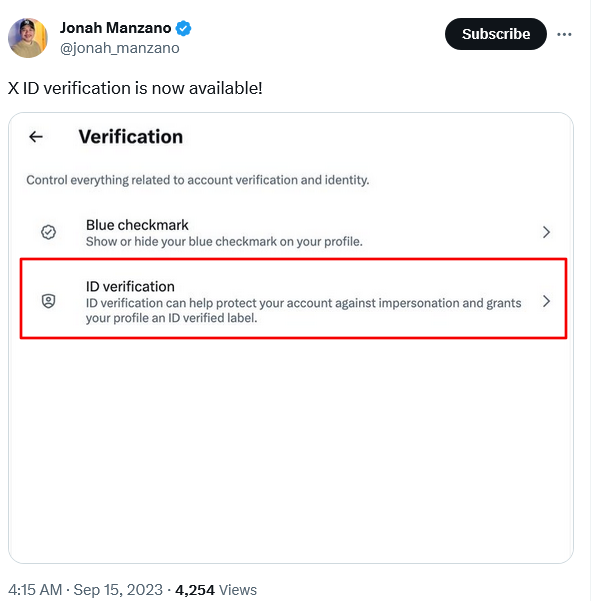
Twitter has presented a new verification method

While uploading a photo of your ID to the platform that has not been exactly truthful about what it uses your data for in the past is already risky, what adds fuel to the fire is that the third-party contractor X teamed up with for that purpose is the face-recognition and ID intelligence firm Au10tix. The Israel-based company is supposed to retain the information it obtains from users for verification purposes for 30 days.

Users have doubts about the safety of the new feature

Regardless of the firm’s origin, the mere fact that users are nudged to share their sensitive personal data such as government ID with a third party, may expose them to identity theft and fraud, if it is leaked or misused by Au10tix or X. What’s more, it could be exploited by X or others to track or profile users based on their real identity, location, age and other data derived from their IDs. And while these fears may now seem overblown, they are not that unfounded, if we remember the time Twitter used users’ phone numbers and emails for ad targeting while claiming it was collecting them for security purposes only.


Svidela vam se ova objava?
AdGuard VPN AdGuard DNS AdGuard Mail AdGuard Wallet
Glavni ekran AdGuard za Windows
Ekran Zaštita u AdGuard za Windows, prikazuje funkcije zaštite i podešavanja
Ekran Statistika u AdGuard za Windows, prikazuje statistiku za blokirane oglase i trackere
Ekran Upravljanje aplikacijama u AdGuard za Windows, koji prikazuje opcije upravljanja zaštitom za aplikacije instalirane na uređaju
20.385 20385 recenzija
Odlično!

AdGuard — blokator reklama za Windows

AdGuard za Windows je više od blokatora oglasa. To je višenamenski alat koji blokira oglase, kontroliše pristup opasnim sajtovima, ubrzava učitavanje stranica i štiti decu od neprimerenog sadržaja

Preuzimanjem programa prihvate uslove licenčnog ugovora
Microsoft prodavnica
Preuzimanjem programa prihvate uslove licenčnog ugovora
AdGuard za Windows v.8.0, 14-dnevni probni period
Glavni ekran AdGuard za Mac
Ekran Stealth režima u AdGuard za Mac
20.385 20385 recenzija
Odlično!

AdGuard — blokator reklama za Mac

AdGuard za Mac je jedinstveni blokator oglasa dizajniran imajući u vidu macOS. Pored zaštite od dosadnih oglasa u pregledačima i aplikacijama, štiti vas od praćenja, fišinga i prevara
Preuzimanjem programa prihvate uslove licenčnog ugovora
Saznajte više
AdGuard za Mac v.2.19, 14-dnevni probni period
Glavni ekran AdGuard za Android
Ekran Zaštita od praćenja u AdGuard za Android
Ekran Upravljanje aplikacijama u AdGuard za Android, koji prikazuje opcije upravljanja zaštitom za aplikacije instalirane na uređaju
Ekran Statistika u AdGuard za Android, prikazuje statistiku za blokirane oglase i trackere
Glavni ekran privatnog pregledača AdGuard za Android
QR kod za preuzimanje AdGuard za Android
20.385 20385 recenzija
Odlično!

AdGuard — blokator reklama za Android

Blokira oglase i trackere u svim pregledačima, igrama i drugim aplikacijama. Štiti vašu privatnost i omogućava vam da kontrolišete kako vaše aplikacije koriste Internet. Instalira se putem APK-a
Preuzimanjem programa prihvate uslove licenčnog ugovora
Saznajte više
Skeniranje za preuzimanje
Korišćenje bilo kog QR-kod čitača dostupnog na uređaju
AdGuard za Android v.4.14, 14-dnevni probni period
Glavni ekran AdGuard za iOS
Ekran Zaštita u AdGuard za iOS, prikazuje funkcije zaštite i podešavanja
Ekran Statistika u AdGuard za iOS, prikazuje statistiku za blokirane oglase i trackere
QR kod za preuzimanje AdGuard za iOS
20.385 20385 recenzija
Odlično!

AdGuard — blokator reklama za iOS

Najbolji iOS blokator oglasa za iPhone i iPad. AdGuard uklanja sve vrste oglasa i trackera u Safariju i štiti vašu privatnost u svim aplikacijama na DNS nivou
Preuzimanjem programa prihvate uslove licenčnog ugovora
Saznajte više
Skeniranje za preuzimanje
Korišćenje bilo kog QR-kod čitača dostupnog na uređaju
AdGuard za iOS v.4.5
Glavni ekran AdGuard Content Blocker
Ekran filtera u AdGuard Content Blocker
Ekran podešavanja u AdGuard Content Blocker
20.385 20385 recenzija
Odlično!

AdGuard blokator sadržaja

AdGuard Content Blocker eliminiše sve vrste reklama u mobilnim pregledačima koji podržavaju tehnologiju blokiranja sadržaja – kao što su Samsung Internet i Yandex Browser. Njegove funkcije su ograničene u odnosu na AdGuard za Android, ali je besplatan, lako se instalira i efikasan je
Preuzimanjem programa prihvate uslove licenčnog ugovora
Saznajte više
AdGuard blokator sadržaja v.2.8
Glavni ekran AdGuard Browser Extension
Ekran Zaštita od praćenja u AdGuard Browser Extension
20.385 20385 recenzija
Odlično!

AdGuard proširenje za preglednike

AdGuard je najbrže i najlakše proširenje za blokiranje reklama koje uspešno blokira sve vrste reklama na svim veb stranicama! Izaberite AdGuard za preglednik koji koristite i uživajte u surfovanju bez reklama, koje će postati sigurno i brzo.
Instaliraj
Preuzimanjem programa prihvate uslove licenčnog ugovora
Instaliraj
Preuzimanjem programa prihvate uslove licenčnog ugovora
Instaliraj
Preuzimanjem programa prihvate uslove licenčnog ugovora
Instaliraj
Preuzimanjem programa prihvate uslove licenčnog ugovora
Instaliraj
Preuzimanjem programa prihvate uslove licenčnog ugovora
Saznajte više
Instaliraj
Preuzimanjem programa prihvate uslove licenčnog ugovora
Saznajte više
AdGuard proširenje za preglednike v.5.5
Glavni ekran AdGuard Assistant
20.385 20385 recenzija
Odlično!

AdGuard pomoćnik

Dodatak pregledača za prateće AdGuard desktop aplikacije. Omogućava vam da blokirate prilagođene stavke na vebsajtovima, dodate vebsajtove na listu dozvoljenih i šaljete izveštaje direktno iz pregledača
AdGuard pomoćnik v.1.4
20.385 20385 recenzija
Odlično!

AdGuard Home

AdGuard Home je mrežno rešenje za blokiranje oglasa i tragača. Instalirajte ga jednom na ruteru da biste pokrili sve uređaje na vašoj kućnoj mreži — nije potreban dodatni klijentski softver. Ovo je posebno važno za različite IoT uređaje koji često predstavljaju pretnju vašoj privatnosti
AdGuard Home v.0.107
Glavni ekran AdGuard Pro za iOS
Ekran zaštite u AdGuard Pro za iOS, koji prikazuje funkcije zaštite i podešavanja
Ekran statistike u AdGuard Pro za iOS, koji prikazuje statistiku za blokirane oglase i tragače
20.385 20385 recenzija
Odlično!

AdGuard Pro za iOS

AdGuard Pro za iOS dolazi sa svim naprednim funkcijama zaštite od blokiranja oglasa. Nudi iste alate kao i plaćena verzija AdGuard-a za iOS. Ističe se u blokiranju oglasa u Safariju i omogućava vam da prilagodite DNS postavke kako biste prilagodili svoju zaštitu. Blokira oglase u pretraživačima i aplikacijama, štiti vašu decu od neprikladnog sadržaja i čuva vaše lične podatke na sigurnom
Preuzimanjem programa prihvate uslove licenčnog ugovora
Saznajte više
AdGuard Pro za iOS v.4.5
Glavni ekran AdGuard Mini za Mac
Ekran zaštite za Safari u AdGuard Mini za Mac
Ekran Kreiranje pravila u AdGuard Mini za Mac
20.385 20385 recenzija
Odlično!

AdGuard Mini za Mac — Safari blokator oglasa

AdGuard Mini za Mac je moćan Safari blokator adova. Ova lagana aplikacija uklanja reklame, blokira praćenike i ubrzava učitavanje stranica. Pomaže vam da pretražujete veb u Safariju bez ometanja i da sačuvate svoje podatke privatnim
Instaliraj
Preuzimanjem programa prihvate uslove licenčnog ugovora
Saznajte više
AdGuard Mini za Mac v.2.3
Glavni ekran AdGuard za Android TV sa uključenom zaštitom
Ekran Blokiranje oglasa u AdGuard za Android TV, prikazuje njegove funkcije i podešavanja
Ekran Podešavanja u AdGuard za Android TV
Ekran Upravljanje aplikacijama u AdGuard za Android TV, prikazuje aplikacije gde su oglasi i trackeri blokirani
20.385 20385 recenzija
Odlično!

AdGuard za Android TV

AdGuard za Android TV je jedina aplikacija koja blokira oglase, čuva vašu privatnost i deluje kao zaštitni zid za vaš Smart TV. Dobijajte upozorenja o Veb pretnjama, koristite bezbedni DNS i koristite šifrovani saobraćaj. Opustite se i zaronite u omiljene serije sa vrhunskim obezbeđenjem i nula oglasa!
AdGuard za Android TV v.4.14, 14-dnevni probni period
Maskota AdGuard, Agnar, drži Linux pingvina
20.385 20385 recenzija
Odlično!

AdGuard za Linux

AdGuard za Linuk je prvi sistemski bloker oglasa na svetu. Blokirajte oglase i tragače na nivou uređaja, izaberite unapred instalirane filtere ili dodajte sopstvene — sve kroz interfejs komandne linije
AdGuard za Linux v.1.4
20.385 20385 recenzija
Odlično!

AdGuard Temp Mail

Besplatan generator privremenih email adresa koji vas čuva anonimnim i štiti vašu privatnost. Nema spama u vašem glavnom sandučetu!
20.385 20385 recenzija
Odlično!

AdGuard VPN

75 lokacija širom sveta

Pristup bilo kom sadržaju

Jako šifrovanje

Nema prikupljanja dnevnika

Najbrža veza

24/7 podrška

Probajte besplatno
Preuzimanjem programa prihvate uslove licenčnog ugovora
Saznajte više
20.385 20385 recenzija
Odlično!

AdGuard DNS

AdGuard DNS je alternativno rešenje za blokiranje reklama, zaštitu privatnosti i roditeljsku kontrolu. Lako se postavlja i besplatan je za korišćenje. On obezbeđuje neophodni minimum zaštite od reklama na mreži, praćenja i fišinga, bez obzira koju platformu i uređaj koristite.
20.385 20385 recenzija
Odlično!

AdGuard Mail

Zaštitite svoj identitet, izbegnite spam i održite bezbednost svog sandučeta uz naše alias-e i privremene e-adrese. Uživajte u našoj besplatnoj usluzi prosleđivanja emaila i aplikacijama za sve operativne sisteme.
20.385 20385 recenzija
Odlično!

AdGuard Wallet

Bezbedan i privatan kripto novčanik koji vam daje potpunu kontrolu nad vašom imovinom. Upravljajte više novčanika i otkrijte hiljade kriptovaluta za čuvanje, slanje i razmenu
Preuzimanje AdGuard Da biste instalirali AdGuard, kliknite na datoteku označenu strelicom Izaberite „Otvori“ i kliknite na „U redu“, a zatim sačekajte da se datoteka preuzme. U otvorenom prozoru prevucite ikonu AdGuard u fasciklu „Aplikacije“. Hvala vam što ste izabrali AdGuard! Izaberite „Otvori“ i kliknite na „U redu“, a zatim sačekajte da se datoteka preuzme. U otvorenom prozoru kliknite na „Instaliraj“. Hvala vam što ste izabrali AdGuard!
Instalirajte AdGuard na svoj mobilni uređaj

















































