How it works: looking inside the unique AdGuard VPN protocol
For years, we were concentrating on developing all flavors of ad blocking apps and browser extensions. And two years ago we resolved to develop our own VPN service, seemingly out of nowhere. When in reality, there were a few reasons that prompted us to do so.
- AdGuard mobile apps had compatibility issues with VPN apps. That's why we saw the development of an in-house VPN as the only feasible solution that could guarantee compatibility: after we apply some magic, the two apps are able to work together as one VPN service.
- Secondly, VPN seemed more than relevant to our philosophy and priorities.
- Finally, during years of developing AdGuard software, we have become experts in filtering network traffic. This was to allow us to bring in something new instead of becoming another wishy-washy VPN.
From the outset, we decided that AdGuard VPN would have one key difference from its competitors — we shall develop and deploy an in-house VPN protocol instead of picking one of the ready-made solutions.
Why go to all that trouble, you could ask. In this article, we'll tell you why we weren't satisfied with existing protocols and created our own, and share our roadmap.
Spoiler: AdGuard VPN protocol is harder to detect and it's quicker than its analogs.
But first we'll need to dig deep into some technical aspects and figure out:
- How Internet works
- How popular VPN protocols work
- Limitations of existing protocols
- Benefits of AdGuard VPN protocol
- Development plans
How Internet works
Have no fear: we won't dare to explain the whole Internet here, but we will cover the fundmamentals of how it works. Now, all communication on the Internet is based on transmission of small data "packets" from a computer to a server and back. There are several different types of packets, each serving its purpose. Rules of packet encapsulation and processing are called a protocol.
IP protocol
I'm sure you've heard about the IP address, haven't you? So, IP address is a part of IP protocol — the principal mechanism of the network data transmission. Each packet consists of three parts: data itself, IP addresses of the sender and recipient.
The receiver knows who has sent the packet, and therefore can send some data back. However, the "pure" IP protocol is virtually unused, but two other protocols based on it are used everywhere — TCP and UDP.
TCP protocol
TCP is the main "work horse" of the Internet. When you open a website, it is very likely that TCP is used for data transmission.
A TCP packet consists of four parts:
- IP packet header, including source and destination addresses.
- Port numbers of the sender and recipient. This number is needed for the operating system to understand which program to send the packet to for processing.
- Packet sequence number. Packets may not arrive to the recipient in the order they were sent. Sequence numbers allow the correct sequence to be restored.
- Packet type. This property is needed to implement "guaranteed delivery," which is discussed below.
Whichever network you use, there's a chance that some sent packets might get lost on their way. TCP protocol ensures that they succeed in reaching the destination: in response to each packet sent, the receiver sends a small TCP packet confirming receipt. If the sender does not obtain confirmation, it will resend the packet until the confirmation is finally received.
UDP protocol
UDP is another known, though less popular, IP-based protocol. Compared to the IP protocol, the only difference is that except for data itself and addresses of the sender and the recipient, it transmits information about port numbers (see the description of port numbers in TCP section) distinguish UDP from IP. As you can see from the animation, data packet flow moves faster than in case of TCP — and no wonder, there is no delivery confirmation in UDP. Unlike TCP, UDP doesn't guarantee anything. But it also does not send extra packets of confirmation, which makes it faster.
How VPN protocols work
When you send a letter or email to someone, you can do without the contents, the header, the signature, but not without the recipient's address. The Internet works the same way — you need an IP address to send data.
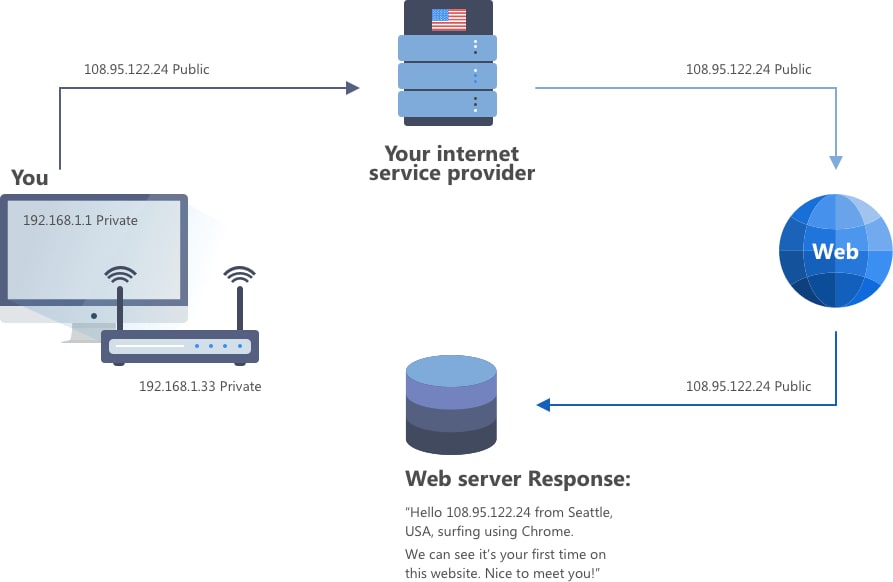
When you visit a website, your IP address is visible to it, and knowing the IP address, it's not that difficult to figure out the user's location. A VPN allows your data to be routed through an encrypted connection from your home/workplace or smartphone to another point on the Internet, perhaps in another country, and then onto the public Internet. Like a sneaky rabbit diving into a hole that leads to the exit to the looking glass.
As a result of encryption, your data is assigned an IP address from the other end of the tunnel instead of your home or work address. Now, when you connect to a web server, what it sees is not your home IP address, but someone else's, belonging to the VPN endpoint. Thus, if you go to a website, your data won't be disclosed.
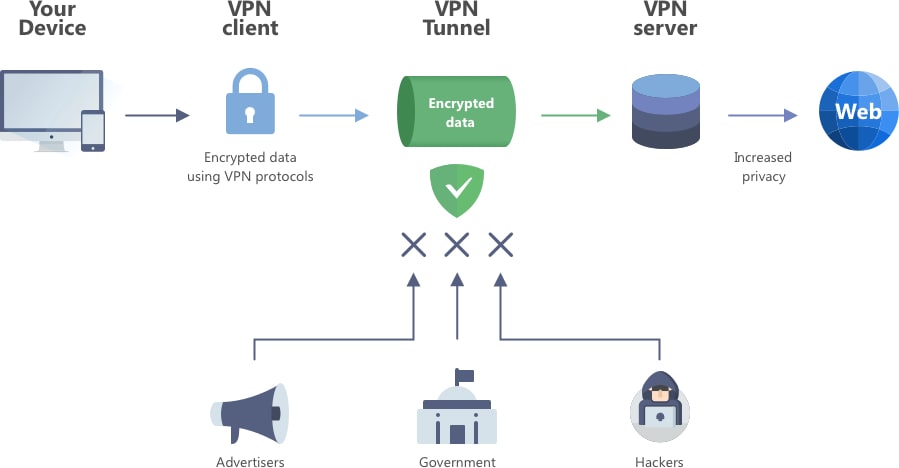
Probably, you already knew that, but a recap wouldn't hurt, right? Now let's actually dig into the technical details. For a VPN to function, it needs to transmit and encrypt data from your device to the VPN server and back. The rules for transmitting and encrypting this data are called a VPN protocol. The most common VPN protocols are OpenVPN, WireGuard and IPSec. They all work roughly the same, and functionally they are very similar, but the devil is in the details (of encryption and connection establishment).
Let's look at how they work. Say you want to visit a website. If you have a VPN enabled, the VPN server mediates between you and the website. Initially, an encrypted IP packet is sent to the server. The VPN server decrypts it, changes the "sender address" (i.e. your IP) and sends the packet to the recipient (i.e. the website). This is usually performed using UDP as a transport as it is generally "faster" since it does not require waiting for confirmation.
Limitations of existing VPN protocols
All popular VPN protocols (OpenVPN, WireGuard, IPSec etc.) are united by two shortcomings:
- They can be easily detected and blocked on the network level.
- If you try to "hide" them, the performance will drop.
To "conceal" the use of VPN, the data flow is often "wrapped" in a TCP connection, and sometimes it is additionally encrypted to make the traffic look like a normal website connection. Unfortunately, this approach has a disadvantage – due to the use of TCP, there is a need for additional confirmation of delivery.
So, using any popular VPN protocol, we are always facing a trade-off: fast but easy to detect vs. slow.
What's great about AdGuard VPN protocol
We developed the AdGuard VPN protocol seeing the disadvantages of previous protocols and not willing to deal with them. So what are its strengths?
- It's nearly impossible to distinguish from normal HTTPS traffic, that is, the connection to the AdGuard VPN server looks exactly the same as the connection to a normal website.
- For encryption we use HTTPS (TLS), which copes with this task perfectly. It is the most popular encryption method in the world, and the libraries that implement it are constantly audited for security.
Some existing VPN protocols also handle the encryption task, and they (and thus, the fact of using a VPN) are hard to detect. But this usually comes at the price of reduced speed. This is not our case, thanks to several solutions.
- We use the HTTP/2 transport protocol, which makes it virtually impossible to detect AdGuard VPN protocol while maintaining high speed.
- Unlike others, AdGuard VPN protocol operates with data and not with packets. This means that AdGuard VPN establishes a separate "tunnel" for each connection, each HTTP/2 stream corresponds to one connection. AdGuard VPN transfers data through this tunnel. This allows us to speed up the operation by saving on confirmation packets, because we can buffer the data of several packets into one before sending it to the VPN server (or from the server to the client). And the fewer packets, the fewer confirmations are needed.
Plans for the future
Switching to HTTP/3 and QUIC
The first thing we intend to do is switch to using the HTTP/3 and QUIC protocols to communicate with the server. HTTP/3 is the latest, most advanced version of HTTP. Unfortunately, the new protocols won't affect speed when the connection is fine and stable, but their benefits will show up when the connection is worse – for example, on mobile devices or when connecting to public Wi-Fi. There are several obvious advantages of the new protocols – they won't cause packet retransmissions and Head of Line Blocking (or HoLB) queues, and they will also allow connection migration. Without being too technical, the main advantage is the already mentioned improvement of connection quality in non-ideal conditions.
TCP and other protocols working over it (TLS, SSL, HTTP /1.1 and HTTP/2) have been around for a while and are great at what they do, but there's just one thing: they need near-perfect conditions to work smoothly. This means that they perform well on a network with a stable and high-quality connection (say, a home Wi-Fi network). But stepping out into the outside world with its mobile networks, you can't safeguard against weak signals, slow connections, and other woes that cause packet loss. These losses lead to the above-mentioned retransmissions and HoLB. Even 5G is not almighty, and the connection will be worse in elevators and long subway sections between stations. With VPN over HTTP/3 the problem is magically solved: the VPN connection won't get broken, even if you go into an elevator, or the network changes for some other reason.
We are currently testing a prototype of this new implementation. Expect it to be ready in a couple of months.
Оpen source
If you've been familiar with AdGuard for a long time, you already know how many of our products are open-source. The concept of open-source software is close to us because we believe that such projects help people and contribute to the development of technology. But our approach is privacy-friendly, so we make products open-source only where possible.
We are going to make our protocol implementation publicly available in the future. Sadly, right now we don't have enough time to prepare the project, because it is a lot of work. But we hope that by the end of this year we can find enough time and publish the code of both the server and client implementations.
Our protocol is used by all AdGuard VPN mobile and desktop applications. Download any of our products (or several ones!) now and use it knowing that your data is protected in the most secure way. And if you wish to, share your impressions with us — in the comments section of the blog post or on social networks.




















































