Is ad-free streaming doomed?

Those of us who have been around for a while may remember the blissful old days when streaming was strongly associated with an ad-free experience. Sick and tired of the commercial breaks on cable TV (and let’s not even get started on linear TV), we would embrace streaming as a healthy alternative to the choiceless and ad-laden regular TV viewing.

Little did we know that this would not last forever… a paradise lost, likely never to be rediscovered. Slowly but surely, the old subscription-based streaming services introduced ad-supported tiers, while the new ones, like Discovery+ or Peacock, received ad-supported tiers right out of the gate.

Last year, it was time for streaming veteran Netflix to bow to the trend: Netflix introduced an ad-supported tier for $6.99 a month and, to rub salt in the wound, in July this year dropped its $9.99 ad-free basic plan in the US, the UK, and Canada, with its cheapest ad-free plan now costing $15.49 a month. We have already lamented the demise of the completely ad-free Netflix, which once promised to never introduce ads. You can read our detailed epitaph here. This time, the bell has tolled for Amazon Prime.

Prime Video is past its prime

This month, Amazon announced that its Prime Video streaming service will begin featuring ads in shows and movies in early 2024. The rollout will begin in the US, UK, Germany, and Canada, and later expand to France, Italy, Spain, Mexico, and Australia. In a press release, Amazon justified the introduction of a new ad-supported tier by citing the need to support the creation of “compelling content,” such as its hit series The Marvelous Mrs. Maisel.

Whatever the justification, the fact that Prime Video is turning to an ad-supported model is frustrating. And it’s not just a matter of seeing ads in places where there were none before. The other problem with any ad-supported service is that it collects a lot of viewers’ data in order to show them the most relevant ads. We do not know what kind of information Amazon will use to target ads in Prime Video, but we can assume that it will have a lot of data to work with, given the role that Amazon services play in the daily lives of the average American. For example, Amazon has 148 million Prime members in the US who use its various services such as streaming, retail, prescription drugs, grocery delivery, photo storage, and gaming. This means that Amazon can track and analyze their online behavior, preferences, purchases, and more. The sheer amount of data potentially available to advertisers means that they will be willing to pay a lot of money to reach these customers with personalized ads.

For Amazon Prime users who want to keep watching videos without ads, they will have to shell out an extra $2.99/month. That may sound like just a cup of coffee, but it’s actually a huge price hike. It means paying ~20% more for the monthly Prime subscription in the US (currently $14.99) or ~26% more for the annual one (currently $139).

This, along with the sneaky way that Amazon is rolling out the ad-supported option, suggests that the company’s real goal is to lure users into staying on the ad-infested tier, rather than a genuine offer to let them choose between ads and no ads.

But what is so sneaky about Amazon’s new hard-to-resist offer?

‘No action required’

The sneaky part is that while there’s a fundamental difference between ads and no ads, and it may be a deal-breaker for many, Amazon isn’t technically introducing a new ad-supported tier that you are free to join; rather, it’s automatically enrolling all of its Prime users into the ad-supported plan.

In a statement announcing the arrival of ads to Prime Video, Amazon says: “No action is required for Prime members.” In the same statement it describes ads as a necessary evil that should not detract much from the Prime viewing experience, at least in comparison with its competitors: “We aim to have meaningfully fewer ads than linear TV and other streaming TV providers.”

However, the wording leaves much to interpretation, and we cannot possibly know what Amazon means by “meaningfully fewer ads” and who are “streaming TV providers” it compares itself with. For instance, subscribers of Netflix ad-supported plan should see on average 4 minutes of ads per hour, while Discovery +’s and Hulu’s ad load is higher — 5 minutes of ads per hour and 7.3(!) minutes of ads per hour respectively. According to Media Radar, the largest advertising-based video on-demand platforms average 6.1 minutes of ads per hour.

The way Amazon Prime is quietly pushing its subscribers toward the ad-supported plan reeks of unfair practices and dark patterns. And it’s not like Amazon is new to this. Just three months ago the US Federal Trade Commission (FTC) accused the company of having “knowingly duped millions into unknowingly enrolling in Amazon Prime,” that is without their consent or knowledge. The FTC claimed that Amazon had employed “manipulative, coercive or deceptive user-interface designs known as 'dark patterns' to trick consumers into enrolling in automatically renewing Prime subscriptions.” History repeating itself?

It’s bigger than Amazon

We have zeroed in on Amazon in this article not because it is an outlier, but because it is a perfect illustration of the domineering trend. Many streaming services nowadays are either adding ad-supported tiers or raising prices of the already existing ones. The ultimate goal seems to be to get users to accept the idea that what was once considered incompatible, even absurd — paying for subscriptions and still watching ads — is now the new normal.

In arguably the same vein, YouTube recently removed its cheapest ad-free plan, ‘Premium Lite,’ from several wealthy European countries where it was previously available. However, YouTube has not ruled out the plan’s return in some other form, and has launched ‘YouTube Lite’ in Thailand.

In any case, the idea that ads are something we have to come to terms with is being hammered vigorously into our minds. For instance, Telsey Advisory Group analyst Joseph Feldman, complementing Amazon for boosting its ad business via the new tier, notes that “for members who are heavy consumers of video, the ad-supported and ad-free options are standards in the industry, including Netflix, Inc NFLX and Hulu, and should not be a surprise.”

However, some users still beg to differ. In response to Amazon’s announcement, some have argued that the presence of ads, and not just the generic ads you can see on cable TV, but highly-targeted high-paying ads, is enough of a trade-off between the user and the service provider.
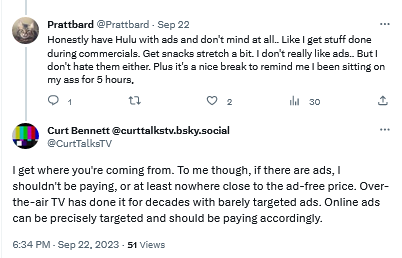
Users are not yet comfortable with streaming services introducing ad tiers

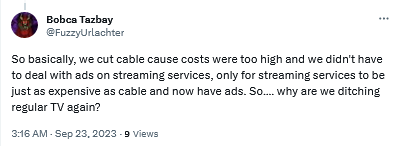
By introducing ads streaming services become just like regular TV

Bracing for the worst, hoping for the best

Unfortunately, everything points to a future where users are forced to be comfortable with ads as an inherent part of subscription-based services. We can come up with various reasons why this is so, but the most likely one is that ads are simply too lucrative to pass up, and no subscription revenue can (probably) make up for what they bring in.

Streaming platforms train us to see ads not as what they are — inherently intrusive and privacy-breaking nuisances — but as an inalienable part of every service, of every interface. We believe that users deserve a better streaming experience, and if platforms are not willing to provide it to them, it’s only natural that they turn to ad blockers.

However, there are limits to what ad blockers can do when you want to block ads on streaming services. If you want to get the most out of your ad blocker, we recommend that you use your streaming service in the browser. This way, an ad blocker (a browser extension or standalone app) is able to apply more complicated filtering techniques and block most ads. But it comes with no surprise that streaming platforms do not like their ads to be blocked, and they try to prevent ad blockers from working at full tilt. They do this by constantly changing their code and ad loading mechanism. This, in turn, requires ad blockers and filter developers to constantly update their filters to keep up with these changes. That takes time, as it’s not easy to monitor numerous streaming services all at once — and then there are thousands of other websites to block ads on, too. That’s why we at AdGuard appreciate it so much when you send us reports about missed ads. If you’re using AdGuard and notice an ad — please, take a minute of your time to report it. It really helps us a lot to stay on top of things.

Note that while DNS services (such as AdGuard DNS) can occasionally block some ads on some streaming services, it’s more the exception than the rule. So we would not recommend relying on DNS-level blocking alone to stop ads on your streaming platform of choice. The reason for this is that streaming services often use the same domain name for both the video content and the ads, making it impossible for the DNS server to distinguish between them. DNS blocking has its applications, but this isn’t the job for it.


Bu gönderiyi beğendiniz mi?
AdGuard VPN AdGuard DNS AdGuard Mail AdGuard Wallet
Windows için AdGuard'ın ana ekranı
Windows için AdGuard'ın koruma özelliklerini ve ayarlarını gösteren koruma ekranı
Windows için AdGuard'ın engellenen reklamların ve izleyicilerin istatistiklerini gösteren İstatistik ekranı
Windows için AdGuard'ın uygulama yönetimi ekranı, cihazda yüklü uygulamalar için koruma yönetimi seçeneklerini göstermektedir
21.372 21372 kullanıcı incelemesi
Mükemmel!

AdGuard: Windows için reklam engelleyici

Windows için AdGuard, bir reklam engelleyiciden daha fazlasıdır. Reklamları engelleyen, tehlikeli sitelere erişimi kontrol eden, sayfanın açılışını hızlandıran ve çocukları uygunsuz içerikten koruyan çok amaçlı bir araçtır

Programı indirerek Lisans sözleşmesi şartlarını kabul etmiş olursunuz
Microsoft Mağazası
Programı indirerek Lisans sözleşmesi şartlarını kabul etmiş olursunuz
Windows için AdGuard v8.0, 14 gün deneme süresi
Mac için AdGuard'ın ana ekranı
Mac için AdGuard'ın Gizlilik Modu ekranı
21.372 21372 kullanıcı incelemesi
Mükemmel!

AdGuard: Mac için reklam engelleyici

Mac için AdGuard, macOS düşünülerek tasarlanmış benzersiz bir reklam engelleyicidir. Sizi tarayıcılar ve uygulamalardaki rahatsız edici reklamlardan korumanın yanı sıra, izleme, kimlik avı ve dolandırıcılıktan da korur
Programı indirerek Lisans sözleşmesi şartlarını kabul etmiş olursunuz
Devamını oku
Mac için AdGuard v2.19, 14 gün deneme süresi
Android için AdGuard'ın ana ekranı
Android için AdGuard'ın İzleme koruması ekranı
Android için AdGuard'ın uygulama yönetimi ekranı, cihazda yüklü uygulamalar için koruma yönetimi seçeneklerini göstermektedir
Android için AdGuard'ın engellenen reklamların ve izleyicilerin istatistiklerini gösteren İstatistik ekranı
Android için AdGuard'ın özel tarayıcısının ana ekranı
Android için AdGuard'ı indirme QR kodu
21.372 21372 kullanıcı incelemesi
Mükemmel!

AdGuard: Android için reklam engelleyici

Tüm tarayıcılarda, oyunlarda ve diğer uygulamalarda reklamları ve izleyicileri engeller. Gizliliğinizi korur ve uygulamalarınızın interneti nasıl kullandığını kontrol etmenizi sağlar. APK aracılığıyla yüklenir
Programı indirerek Lisans sözleşmesi şartlarını kabul etmiş olursunuz
Devamını oku
İndirmek için tara
Cihazınızda bulunan herhangi bir QR kod okuyucuyu kullanın
Android için AdGuard v4.14, 14 gün deneme süresi
iOS için AdGuard'ın ana ekranı
iOS için AdGuard'ın koruma özelliklerini ve ayarlarını gösteren koruma ekranı
iOS için AdGuard'ın engellenen reklamların ve izleyicilerin istatistiklerini gösteren İstatistik ekranı
iOS için AdGuard'ı indirme QR kodu
21.372 21372 kullanıcı incelemesi
Mükemmel!

AdGuard: iOS için reklam engelleyici

iPhone ve iPad için en iyi iOS reklam engelleyici. AdGuard, Safari'de her türlü reklamı ve izleyiciyi ortadan kaldırır ve DNS düzeyinde tüm uygulamalarda gizliliğinizi korur
Programı indirerek Lisans sözleşmesi şartlarını kabul etmiş olursunuz
Devamını oku
İndirmek için tara
Cihazınızda bulunan herhangi bir QR kod okuyucuyu kullanın
iOS için AdGuard v4.5
AdGuard İçerik Engelleyicinin ana ekranı
AdGuard İçerik Engelleyicinin Filtreler ekranı
AdGuard İçerik Engelleyicinin Ayarlar ekranı
21.372 21372 kullanıcı incelemesi
Mükemmel!

AdGuard İçerik Engelleyici

AdGuard Content Blocker, içerik engelleme teknolojisini destekleyen mobil tarayıcılarda her türlü reklamı ortadan kaldırır — örneğin, Samsung Internet ve Yandex Browser. Android için AdGuard'a kıyasla özellikleri sınırlıdır, ancak ücretsiz, yüklemesi kolay ve etkilidir
Programı indirerek Lisans sözleşmesi şartlarını kabul etmiş olursunuz
Devamını oku
AdGuard İçerik Engelleyici v2.8
AdGuard Tarayıcı Uzantısı'nın ana ekranı
AdGuard Tarayıcı Uzantısı'nın İzleme koruması ekranı
21.372 21372 kullanıcı incelemesi
Mükemmel!

AdGuard Tarayıcı Uzantısı

AdGuard, tüm web sayfalarındaki tüm reklam türlerini etkili bir şekilde engelleyen en hızlı ve en hafif reklam engelleme uzantısıdır! Kullandığınız tarayıcı için AdGuard'ı seçin ve reklamsız, hızlı ve güvenli gezinmenin tadını çıkarın.
Yükle
Programı indirerek Lisans sözleşmesi şartlarını kabul etmiş olursunuz
Yükle
Programı indirerek Lisans sözleşmesi şartlarını kabul etmiş olursunuz
Yükle
Programı indirerek Lisans sözleşmesi şartlarını kabul etmiş olursunuz
Yükle
Programı indirerek Lisans sözleşmesi şartlarını kabul etmiş olursunuz
Yükle
Programı indirerek Lisans sözleşmesi şartlarını kabul etmiş olursunuz
Devamını oku
Yükle
Programı indirerek Lisans sözleşmesi şartlarını kabul etmiş olursunuz
Devamını oku
AdGuard Tarayıcı Uzantısı v5.5
AdGuard Asistanın ana ekranı
21.372 21372 kullanıcı incelemesi
Mükemmel!

AdGuard Asistanı

AdGuard masaüstü uygulamaları için bir yardımcı tarayıcı uzantısıdır. Bu uzantı, sitelerde özel öğeleri engellemenize, siteleri izin listesine eklemenize ve tarayıcınızdan doğrudan bildirimler göndermenize izin verir
AdGuard Asistanı v1.4
21.372 21372 kullanıcı incelemesi
Mükemmel!

AdGuard Home

AdGuard Home, reklamları ve izleyicileri engellemek için ağ tabanlı bir çözümdür. Ev ağınızdaki tüm cihazları kapsaması için yönlendiricinize bir kez kurun — ek istemci yazılımı gerekmez. Bu özellikle gizliliğinize tehdit oluşturan çeşitli IoT cihazları için önemlidir
AdGuard Home v0.107
iOS için AdGuard Pro'nun ana ekranı
iOS için AdGuard Pro'nun koruma özelliklerini ve ayarlarını gösteren Koruma ekranı
iOS için AdGuard Pro'nun İstatistikler ekranı, engellenen reklamlar ve izleyicilere ilişkin istatistikleri gösterir
21.372 21372 kullanıcı incelemesi
Mükemmel!

iOS için AdGuard Pro

AdGuard Pro for iOS, tüm gelişmiş reklam engelleme koruma özellikleri etkin olarak gelir. iOS için ücretli AdGuard sürümüyle aynı araçları sunar. Safari'de reklamları engellemede mükemmeldir ve korumanızı özelleştirmeniz için DNS ayarlarını kişiselleştirmenize olanak tanır. Tarayıcılar ve uygulamalarda reklamları engeller, çocuklarınızı uygunsuz içeriklerden korur ve kişisel verilerinizi güvenli tutar
Programı indirerek Lisans sözleşmesi şartlarını kabul etmiş olursunuz
Devamını oku
iOS için AdGuard Pro v4.5
Mac için AdGuard Mini'nin ana ekranı
Mac için AdGuard Mini'nin Safari koruma ekranı
Mac için AdGuard Mini'nin kural oluşturma ekranı
21.372 21372 kullanıcı incelemesi
Mükemmel!

AdGuard Mini for Mac — Safari reklam engelleyici

Mac için AdGuard Mini, güçlü bir Safari reklam engelleyicisidir. Bu hafif uygulama reklamları kaldırır, izleyicileri engeller ve sayfa yüklemeyi hızlandırır. Safari'de Web'de dikkatiniz dağılmadan gezinmenize ve verilerinizi gizli tutmanıza yardımcı olur
Yükle
Programı indirerek Lisans sözleşmesi şartlarını kabul etmiş olursunuz
Devamını oku
Mac için AdGuard Mini v2.3
Android TV için AdGuard'ın korumanın etkin olduğu ana ekranı
Android TV için AdGuard'ın özelliklerini ve ayarlarını gösteren Reklam Engelleme ekranı
Android TV için AdGuard'ın ayarlar ekranı
Android TV için AdGuard'ın reklamların ve izleyicilerin engellendiği uygulamaları gösteren Uygulama Yönetimi ekranı
21.372 21372 kullanıcı incelemesi
Mükemmel!

Android TV için AdGuard

Android TV için AdGuard, reklamları engelleyen, gizliliğinizi koruyan ve Akıllı TV'niz için bir güvenlik duvarı görevi gören tek uygulamadır. Web tehditleri hakkında uyarılar alın, güvenli DNS kullanın ve şifrelenmiş trafikten yararlanın. Birinci sınıf güvenlik; sıfır reklam ile rahatlayın ve en sevdiğiniz programlara dalın!
Android TV için AdGuard v4.14, 14 gün deneme süresi
Linux penguenini tutan AdGuard maskotu Agnar
21.372 21372 kullanıcı incelemesi
Mükemmel!

Linux için AdGuard

Linux için AdGuard, dünyanın ilk sistem genelinde Linux reklam engelleyicisidir. Reklamları ve izleyicileri cihaz düzeyinde engelleyin, önceden yüklenmiş filtrelerden seçim yapın veya kendi filtrenizi ekleyin — tüm bunları komut satırı arayüzü aracılığıyla gerçekleştirin
Linux için AdGuard v1.4
21.372 21372 kullanıcı incelemesi
Mükemmel!

AdGuard Temp Mail

Sizi anonim tutan ve gizliliğinizi koruyan ücretsiz bir geçici e-posta adresi oluşturucu. Ana gelen kutunuzda istenmeyen posta olmaz!
21.372 21372 kullanıcı incelemesi
Mükemmel!

AdGuard VPN

Dünya çapında 75 konum

Herhangi bir içeriğe erişim

Güçlü şifreleme

Günlük tutmama politikası

En hızlı bağlantı

7/24 destek

Ücretsiz dene
Programı indirerek Lisans sözleşmesi şartlarını kabul etmiş olursunuz
Devamını oku
21.372 21372 kullanıcı incelemesi
Mükemmel!

AdGuard DNS

AdGuard DNS, herhangi bir uygulamanın yüklenmesini gerektirmeyen internet reklamlarını engellemenin kusursuz bir yoludur. Kullanımı kolay, tamamen ücretsizdir, herhangi bir cihazda kolayca ayarlanır ve reklamları, sayaçları, kötü amaçlı siteleri ve yetişkinlere yönelik içeriği engellemek için gerekli minimum işlevleri sağlar.
21.372 21372 kullanıcı incelemesi
Mükemmel!

AdGuard Mail

Kimliğinizi koruyun, istenmeyen postadan kaçının; gelen kutunuzu takma adlarımız ve geçici e-posta adreslerimizle güvende tutun. Tüm işletim sistemleri için ücretsiz e-posta yönlendirme hizmetimizin ve uygulamalarımızın keyfini çıkarın
21.372 21372 kullanıcı incelemesi
Mükemmel!

AdGuard Wallet

Varlıklarınız üzerinde tam kontrol sağlayan güvenli ve özel bir kripto cüzdanı. Birden fazla cüzdanı yönetin ve saklamak, göndermek ve takas etmek için binlerce kripto para birimini keşfedin
AdGuard indiriliyor AdGuard'ı kurmak için okla gösterilen dosyaya tıklayın "Aç" öğesini seçin ve "Tamam" öğesine tıklayın, ardından dosyanın indirilmesini bekleyin. Açılan pencerede AdGuard simgesini "Uygulamalar" klasörüne sürükleyin. AdGuard'ı seçtiğiniz için teşekkür ederiz! "Aç" öğesini seçin ve "Tamam" öğesine tıklayın, ardından dosyanın indirilmesini bekleyin. Açılan pencerede "Kur" öğesine tıklayın. AdGuard'ı seçtiğiniz için teşekkür ederiz!
AdGuard'ı mobil cihazınıza yükleyin

















































