Apple’s new EU terms: accept and lose money, or reject and stay within the walled garden

Apple’s ecosystem has always been known as a walled garden because of the restrictions it imposed on app developers and users. Developers had no choice but to list their apps on Apple’s App Store if they wanted an iOS user to install them. And if they wanted the user to buy something from them, they had to process payments through Apple’s own payment mechanism.

Such a closed system made life difficult not only for developers, who had to pay Apple’s 30% standard fee on in-app purchases (or 15% for small businesses), but also for users. The latter had less of a choice when it came to apps and download options than the users of the Android-based phones, since Google has always allowed sideloading.

This situation is about to change. The culprit is the EU’s upcoming antitrust law, known as the Digital Markets Act (DMA). In September 2023, App Store, iOS operating system, and Safari browser, all owned by Apple, received gatekeeper status under the DMA. This means that by March 6, 2024, Cupertino will have to open them up to competitors or face hefty fines of up to 10% of the company’s total global turnover.

As the deadline draws closer, Apple has come up with a plan for how it’s going to comply with the DMA. And after taking a look at this plan, it’s clear as day to us that Apple intends to comply with the legislation in letter, but definitely not in spirit. Essentially, Apple offers developers a false choice: either they agree to stay within the iOS ecosystem’s confines, or they can explore alternative payment methods and app stores — and risk going under in the process.

What’s wrong with Apple’s new business terms in Europe?

The dilemma that developers face right now is the following: they can either stay on the official App Store under the current terms, or accept the new terms and be subject to the new Core Technology Fee (CTF) that may cost them a fortune. Before we zoom in on the CTF and what it means for developers, especially those of free and freemium apps, we will briefly list the other parts of Apple’s DMA compliance plan.
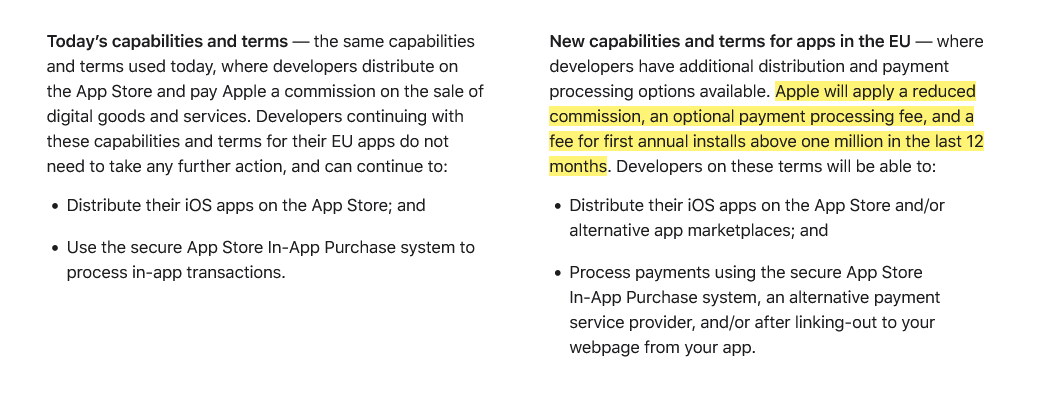
Apple introduces new terms for developers in the EU

Screenshot: Apple gives developers in the EU two options: stay on the current terms or accept the new news. Source: Apple

Under the plan, Apple says it will apply a “reduced commission” to in-app purchases. Developers in Apple’s small business program will pay a 10% fee instead of 15%, regardless of the payment method they choose. Others will pay a 17% fee instead of the standard 30% commission. If developers choose to continue using Apple as their payment processor, they’ll pay an additional 3% payment processing fee. But if they decide to ditch Apple and switch to an alternative payment system or redirect users to their own site for payment, they won’t have to pay Apple any additional fees.

So far so good, right?

It’s when we move to the third part of this masterplan, the Core Technology Fee, that things stop being pretty. In fact, they are starting to look pretty ugly.
The Core Technology Fee (CTF) is the fee that will apply only to the iOS apps whose developers accepted the new business terms. Importantly, it will apply both to iOS apps distributed on the App Store, as well as to the apps that are distributed through alternative app stores, or “marketplaces” as Apple calls them.

The definition of the 'first annual install' is not that straightforward

Subject to the fee are the developers whose apps will clock in over 1 million first annual installs in the past 12 months. They will have to pay a €0.50 fee to Apple for each user over 1 million who installed their app for the first time in a year. After these 12 months, developers will have to pay the fee again, and it does not have to be an install per se. The developer terms state that “app updates,” for instance, are also counted as new installs, “as long as they start a new 12-month period.”
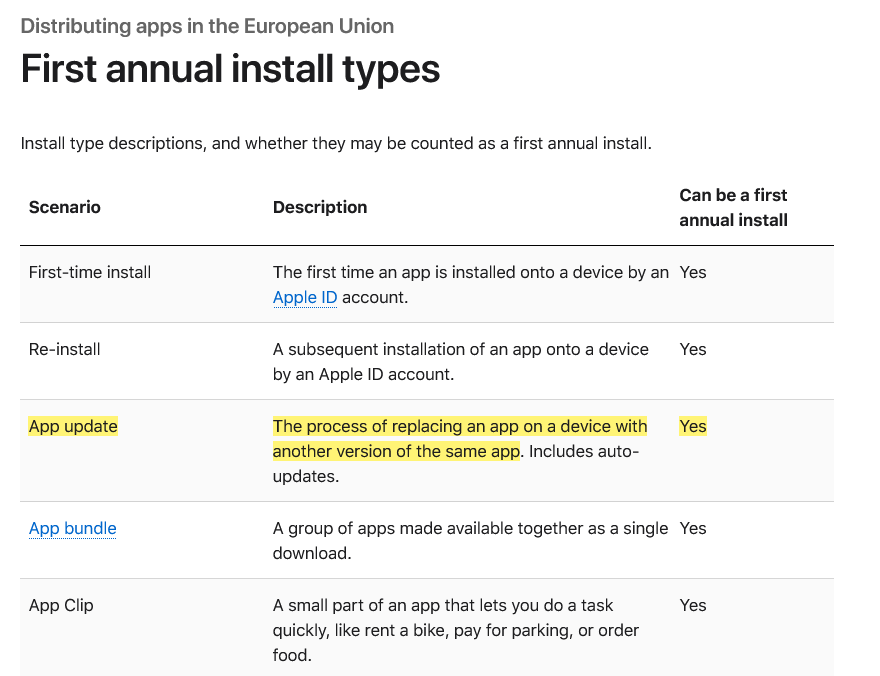
Types of first annual install under Apple's new terms

Marketplace apps or alternative app stores will have it even worse under Apple’s new and supposedly more competition-friendly rules. The developers who will create and distribute their own app stores for iOS apps in the EU are due a €0.50 CTF to Apple for each user who installs their app store for the first time in a year even if it happens before the developer racks up one million installs in total.

Go DMA and go broke: what CTF means in practice

If any of the “big guns,” meaning apps that get more than 1 million downloads in a year, could afford such a fee, it would be the paid apps. However, when it comes to free apps that make money by showing ads, or to freemium apps that offer part of their functionality for free, the fee is insurmountable.

Needless to say, Apple’s masterplan did not strike a chord with developers. Spotify did not hold back, calling the CTF “extortion, plain and simple.”

A key issue raised by Spotify in its scathing response to Apple’s plan is the vulnerable position it puts free app developers in: “How will a developer pay Apple back if its free app goes viral — multiple millions of accounts install that free app, and then that developer owes Apple millions?” Indeed, if a developer of a free or freemium app makes the unfortunate decision to accept Apple’s new terms in the EU, and then has a breakthrough and sees the app gain popularity, the last thing on their mind would be celebrating their achievement, because the first thing they should be thinking about is how to pay Apple back the fees they would owe. And, as Spotify points out, there is nothing preventing Apple from raising the fees at any time they deem fit.

To be fair, Apple has made no big secret of how punitive the new terms could be for some developers. Anyone can estimate how much they’ll pay Apple under its DMA compliance plan using its fee calculator. So let’s take a game that hit the sweet spot and went moderately viral, reaching 2 million installs in the EU in 12 months. Under the new terms, it would have to pay Apple $45,290 per month, whereas under the old terms, it would have to pay nothing. The choice seems a no-brainer to us.
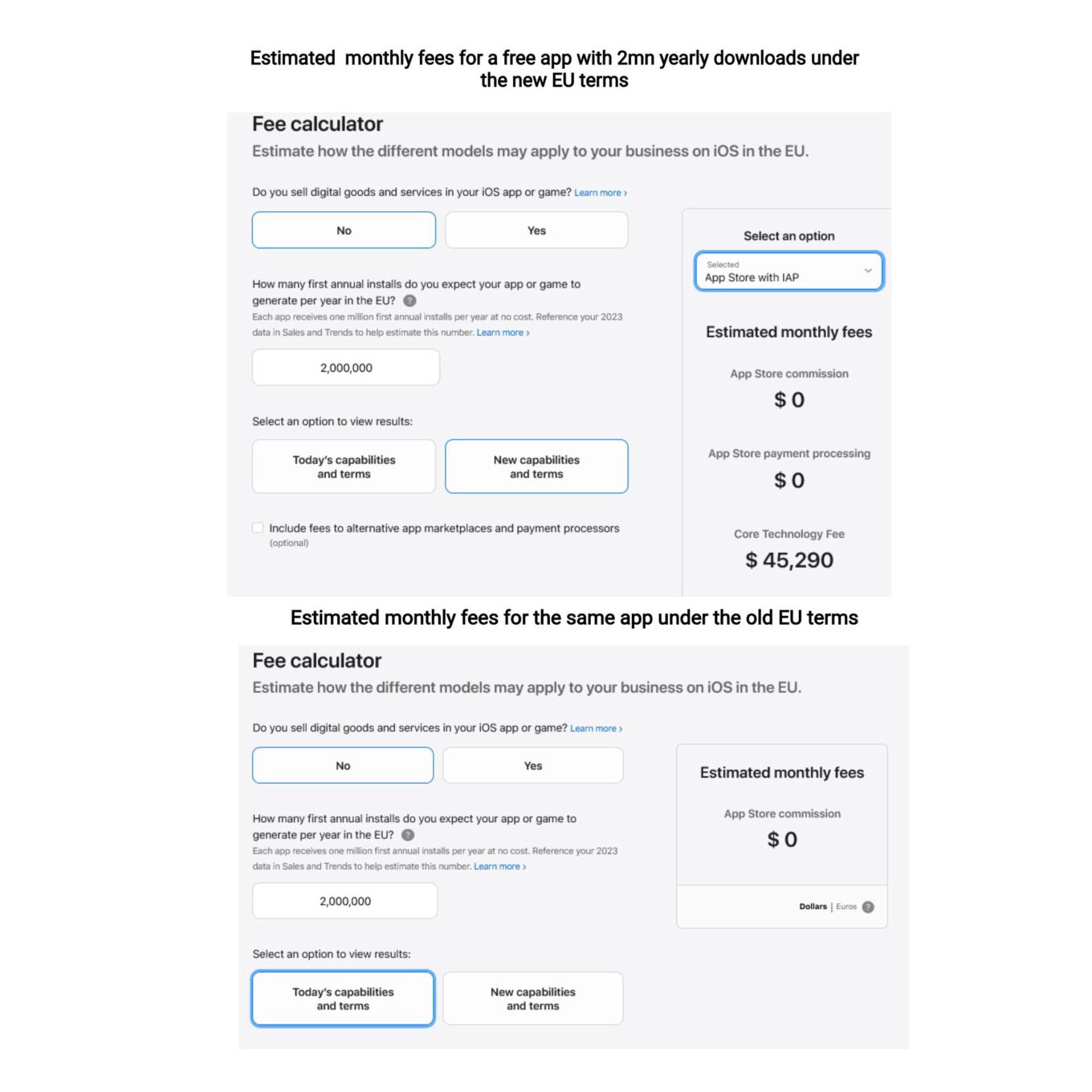
You can use a calculator to estimate your potential CTF

What Apple is effectively doing is trying to discourage developers from switching to the new terms, where they would have had more freedom to choose distribution and payment options. They are betting, and rightly so, that not so many would be willing to risk going into the red if their app takes off or experiences a sudden surge in popularity.

So, while Apple allows alternative stores de jure, de facto there is a prohibitive Core Technology Fee that blocks the way for free and freemium apps to enter alternative stores. In AdGuard’s case, we cannot take advantage of this offer either, simply because we do not have enough resources to pay the Core Technology Fee, and we are not alone in this. The only option left on the table is to make the app fully paid — which we have no intention of doing.

Will the EU regulators buy it?

It remains to be seen whether the DMA-focused changes that Apple plans to introduce will raise an issue with the EU regulators. As TechCrunch points out, the Article 6(12) of the DMA states that “the gatekeeper shall apply fair, reasonable, and non-discriminatory general conditions of access for business users to its software application stores, online search engines and online social networking services.” Is the Core Technology Fee fair? We don’t think so.

Apple’s plan to comply with the DMA is a clever attempt to spin the regulation to its own advantage, and to pressure developers into sticking with the old terms. By imposing the Core Technology Fee on apps that exceed a certain threshold of downloads, Apple is effectively penalizing developers who want to explore alternative distribution and payment options. This is a false choice and a mockery of real freedom and real competition in the digital sector. We hope that the EU regulators will not be fooled by Apple’s cosmetic changes and will insist that the DMA is enforced in a way that truly benefits consumers and developers.


Bu gönderiyi beğendiniz mi?
AdGuard VPN AdGuard DNS AdGuard Mail AdGuard Wallet
Windows için AdGuard'ın ana ekranı
Windows için AdGuard'ın koruma özelliklerini ve ayarlarını gösteren koruma ekranı
Windows için AdGuard'ın engellenen reklamların ve izleyicilerin istatistiklerini gösteren İstatistik ekranı
Windows için AdGuard'ın uygulama yönetimi ekranı, cihazda yüklü uygulamalar için koruma yönetimi seçeneklerini göstermektedir
21.372 21372 kullanıcı incelemesi
Mükemmel!

AdGuard: Windows için reklam engelleyici

Windows için AdGuard, bir reklam engelleyiciden daha fazlasıdır. Reklamları engelleyen, tehlikeli sitelere erişimi kontrol eden, sayfanın açılışını hızlandıran ve çocukları uygunsuz içerikten koruyan çok amaçlı bir araçtır

Programı indirerek Lisans sözleşmesi şartlarını kabul etmiş olursunuz
Microsoft Mağazası
Programı indirerek Lisans sözleşmesi şartlarını kabul etmiş olursunuz
Windows için AdGuard v8.0, 14 gün deneme süresi
Mac için AdGuard'ın ana ekranı
Mac için AdGuard'ın Gizlilik Modu ekranı
21.372 21372 kullanıcı incelemesi
Mükemmel!

AdGuard: Mac için reklam engelleyici

Mac için AdGuard, macOS düşünülerek tasarlanmış benzersiz bir reklam engelleyicidir. Sizi tarayıcılar ve uygulamalardaki rahatsız edici reklamlardan korumanın yanı sıra, izleme, kimlik avı ve dolandırıcılıktan da korur
Programı indirerek Lisans sözleşmesi şartlarını kabul etmiş olursunuz
Devamını oku
Mac için AdGuard v2.19, 14 gün deneme süresi
Android için AdGuard'ın ana ekranı
Android için AdGuard'ın İzleme koruması ekranı
Android için AdGuard'ın uygulama yönetimi ekranı, cihazda yüklü uygulamalar için koruma yönetimi seçeneklerini göstermektedir
Android için AdGuard'ın engellenen reklamların ve izleyicilerin istatistiklerini gösteren İstatistik ekranı
Android için AdGuard'ın özel tarayıcısının ana ekranı
Android için AdGuard'ı indirme QR kodu
21.372 21372 kullanıcı incelemesi
Mükemmel!

AdGuard: Android için reklam engelleyici

Tüm tarayıcılarda, oyunlarda ve diğer uygulamalarda reklamları ve izleyicileri engeller. Gizliliğinizi korur ve uygulamalarınızın interneti nasıl kullandığını kontrol etmenizi sağlar. APK aracılığıyla yüklenir
Programı indirerek Lisans sözleşmesi şartlarını kabul etmiş olursunuz
Devamını oku
İndirmek için tara
Cihazınızda bulunan herhangi bir QR kod okuyucuyu kullanın
Android için AdGuard v4.14, 14 gün deneme süresi
iOS için AdGuard'ın ana ekranı
iOS için AdGuard'ın koruma özelliklerini ve ayarlarını gösteren koruma ekranı
iOS için AdGuard'ın engellenen reklamların ve izleyicilerin istatistiklerini gösteren İstatistik ekranı
iOS için AdGuard'ı indirme QR kodu
21.372 21372 kullanıcı incelemesi
Mükemmel!

AdGuard: iOS için reklam engelleyici

iPhone ve iPad için en iyi iOS reklam engelleyici. AdGuard, Safari'de her türlü reklamı ve izleyiciyi ortadan kaldırır ve DNS düzeyinde tüm uygulamalarda gizliliğinizi korur
Programı indirerek Lisans sözleşmesi şartlarını kabul etmiş olursunuz
Devamını oku
İndirmek için tara
Cihazınızda bulunan herhangi bir QR kod okuyucuyu kullanın
iOS için AdGuard v4.5
AdGuard İçerik Engelleyicinin ana ekranı
AdGuard İçerik Engelleyicinin Filtreler ekranı
AdGuard İçerik Engelleyicinin Ayarlar ekranı
21.372 21372 kullanıcı incelemesi
Mükemmel!

AdGuard İçerik Engelleyici

AdGuard Content Blocker, içerik engelleme teknolojisini destekleyen mobil tarayıcılarda her türlü reklamı ortadan kaldırır — örneğin, Samsung Internet ve Yandex Browser. Android için AdGuard'a kıyasla özellikleri sınırlıdır, ancak ücretsiz, yüklemesi kolay ve etkilidir
Programı indirerek Lisans sözleşmesi şartlarını kabul etmiş olursunuz
Devamını oku
AdGuard İçerik Engelleyici v2.8
AdGuard Tarayıcı Uzantısı'nın ana ekranı
AdGuard Tarayıcı Uzantısı'nın İzleme koruması ekranı
21.372 21372 kullanıcı incelemesi
Mükemmel!

AdGuard Tarayıcı Uzantısı

AdGuard, tüm web sayfalarındaki tüm reklam türlerini etkili bir şekilde engelleyen en hızlı ve en hafif reklam engelleme uzantısıdır! Kullandığınız tarayıcı için AdGuard'ı seçin ve reklamsız, hızlı ve güvenli gezinmenin tadını çıkarın.
Yükle
Programı indirerek Lisans sözleşmesi şartlarını kabul etmiş olursunuz
Yükle
Programı indirerek Lisans sözleşmesi şartlarını kabul etmiş olursunuz
Yükle
Programı indirerek Lisans sözleşmesi şartlarını kabul etmiş olursunuz
Yükle
Programı indirerek Lisans sözleşmesi şartlarını kabul etmiş olursunuz
Yükle
Programı indirerek Lisans sözleşmesi şartlarını kabul etmiş olursunuz
Devamını oku
Yükle
Programı indirerek Lisans sözleşmesi şartlarını kabul etmiş olursunuz
Devamını oku
AdGuard Tarayıcı Uzantısı v5.5
AdGuard Asistanın ana ekranı
21.372 21372 kullanıcı incelemesi
Mükemmel!

AdGuard Asistanı

AdGuard masaüstü uygulamaları için bir yardımcı tarayıcı uzantısıdır. Bu uzantı, sitelerde özel öğeleri engellemenize, siteleri izin listesine eklemenize ve tarayıcınızdan doğrudan bildirimler göndermenize izin verir
AdGuard Asistanı v1.4
21.372 21372 kullanıcı incelemesi
Mükemmel!

AdGuard Home

AdGuard Home, reklamları ve izleyicileri engellemek için ağ tabanlı bir çözümdür. Ev ağınızdaki tüm cihazları kapsaması için yönlendiricinize bir kez kurun — ek istemci yazılımı gerekmez. Bu özellikle gizliliğinize tehdit oluşturan çeşitli IoT cihazları için önemlidir
AdGuard Home v0.107
iOS için AdGuard Pro'nun ana ekranı
iOS için AdGuard Pro'nun koruma özelliklerini ve ayarlarını gösteren Koruma ekranı
iOS için AdGuard Pro'nun İstatistikler ekranı, engellenen reklamlar ve izleyicilere ilişkin istatistikleri gösterir
21.372 21372 kullanıcı incelemesi
Mükemmel!

iOS için AdGuard Pro

AdGuard Pro for iOS, tüm gelişmiş reklam engelleme koruma özellikleri etkin olarak gelir. iOS için ücretli AdGuard sürümüyle aynı araçları sunar. Safari'de reklamları engellemede mükemmeldir ve korumanızı özelleştirmeniz için DNS ayarlarını kişiselleştirmenize olanak tanır. Tarayıcılar ve uygulamalarda reklamları engeller, çocuklarınızı uygunsuz içeriklerden korur ve kişisel verilerinizi güvenli tutar
Programı indirerek Lisans sözleşmesi şartlarını kabul etmiş olursunuz
Devamını oku
iOS için AdGuard Pro v4.5
Mac için AdGuard Mini'nin ana ekranı
Mac için AdGuard Mini'nin Safari koruma ekranı
Mac için AdGuard Mini'nin kural oluşturma ekranı
21.372 21372 kullanıcı incelemesi
Mükemmel!

AdGuard Mini for Mac — Safari reklam engelleyici

Mac için AdGuard Mini, güçlü bir Safari reklam engelleyicisidir. Bu hafif uygulama reklamları kaldırır, izleyicileri engeller ve sayfa yüklemeyi hızlandırır. Safari'de Web'de dikkatiniz dağılmadan gezinmenize ve verilerinizi gizli tutmanıza yardımcı olur
Yükle
Programı indirerek Lisans sözleşmesi şartlarını kabul etmiş olursunuz
Devamını oku
Mac için AdGuard Mini v2.3
Android TV için AdGuard'ın korumanın etkin olduğu ana ekranı
Android TV için AdGuard'ın özelliklerini ve ayarlarını gösteren Reklam Engelleme ekranı
Android TV için AdGuard'ın ayarlar ekranı
Android TV için AdGuard'ın reklamların ve izleyicilerin engellendiği uygulamaları gösteren Uygulama Yönetimi ekranı
21.372 21372 kullanıcı incelemesi
Mükemmel!

Android TV için AdGuard

Android TV için AdGuard, reklamları engelleyen, gizliliğinizi koruyan ve Akıllı TV'niz için bir güvenlik duvarı görevi gören tek uygulamadır. Web tehditleri hakkında uyarılar alın, güvenli DNS kullanın ve şifrelenmiş trafikten yararlanın. Birinci sınıf güvenlik; sıfır reklam ile rahatlayın ve en sevdiğiniz programlara dalın!
Android TV için AdGuard v4.14, 14 gün deneme süresi
Linux penguenini tutan AdGuard maskotu Agnar
21.372 21372 kullanıcı incelemesi
Mükemmel!

Linux için AdGuard

Linux için AdGuard, dünyanın ilk sistem genelinde Linux reklam engelleyicisidir. Reklamları ve izleyicileri cihaz düzeyinde engelleyin, önceden yüklenmiş filtrelerden seçim yapın veya kendi filtrenizi ekleyin — tüm bunları komut satırı arayüzü aracılığıyla gerçekleştirin
Linux için AdGuard v1.4
21.372 21372 kullanıcı incelemesi
Mükemmel!

AdGuard Temp Mail

Sizi anonim tutan ve gizliliğinizi koruyan ücretsiz bir geçici e-posta adresi oluşturucu. Ana gelen kutunuzda istenmeyen posta olmaz!
21.372 21372 kullanıcı incelemesi
Mükemmel!

AdGuard VPN

Dünya çapında 75 konum

Herhangi bir içeriğe erişim

Güçlü şifreleme

Günlük tutmama politikası

En hızlı bağlantı

7/24 destek

Ücretsiz dene
Programı indirerek Lisans sözleşmesi şartlarını kabul etmiş olursunuz
Devamını oku
21.372 21372 kullanıcı incelemesi
Mükemmel!

AdGuard DNS

AdGuard DNS, herhangi bir uygulamanın yüklenmesini gerektirmeyen internet reklamlarını engellemenin kusursuz bir yoludur. Kullanımı kolay, tamamen ücretsizdir, herhangi bir cihazda kolayca ayarlanır ve reklamları, sayaçları, kötü amaçlı siteleri ve yetişkinlere yönelik içeriği engellemek için gerekli minimum işlevleri sağlar.
21.372 21372 kullanıcı incelemesi
Mükemmel!

AdGuard Mail

Kimliğinizi koruyun, istenmeyen postadan kaçının; gelen kutunuzu takma adlarımız ve geçici e-posta adreslerimizle güvende tutun. Tüm işletim sistemleri için ücretsiz e-posta yönlendirme hizmetimizin ve uygulamalarımızın keyfini çıkarın
21.372 21372 kullanıcı incelemesi
Mükemmel!

AdGuard Wallet

Varlıklarınız üzerinde tam kontrol sağlayan güvenli ve özel bir kripto cüzdanı. Birden fazla cüzdanı yönetin ve saklamak, göndermek ve takas etmek için binlerce kripto para birimini keşfedin
AdGuard indiriliyor AdGuard'ı kurmak için okla gösterilen dosyaya tıklayın "Aç" öğesini seçin ve "Tamam" öğesine tıklayın, ardından dosyanın indirilmesini bekleyin. Açılan pencerede AdGuard simgesini "Uygulamalar" klasörüne sürükleyin. AdGuard'ı seçtiğiniz için teşekkür ederiz! "Aç" öğesini seçin ve "Tamam" öğesine tıklayın, ardından dosyanın indirilmesini bekleyin. Açılan pencerede "Kur" öğesine tıklayın. AdGuard'ı seçtiğiniz için teşekkür ederiz!
AdGuard'ı mobil cihazınıza yükleyin

















































