Cloudflare says Encrypted Client Hello might ‘solve privacy for good’. The reality is not that simple

A cutting-edge technology that is “filling the privacy gap in our existing online security infrastructure” and that, if widely adopted, “might even solve privacy for good.” Sounds promising, right? That’s how Mozilla and Cloudflare describe Encrypted Client Hello (ECH), a protocol that encrypts the entire “hello” message or the first communication between your browser and a website’s server.

We believe ECH is indeed a major element of Internet privacy, and the importance of its support by such major players as Mozilla, Chrome, and Cloudflare cannot be understated. At AdGuard, we have added ECH support in our Windows, Mac, and Android apps, because we believe in the technology’s potential to make browsing more private. AdGuard’s ECH support works across all apps and browsers that AdGuard filters. But is ECH the missing piece of the puzzle that will solve privacy and defeat censorship once and for all? As much as we would like it to, it is unlikely.

And before we pour some cold water on the excitement over ECH and its supposed invincibility to censors, copyright authorities, peeping toms, and other prying eyes, we need to take a step back and cover some basics.

What is ECH and why do we need it?

Imagine you are sending a letter to your friend. You seal the envelope and write their name and address on it. No one can open the envelope and read your letter without breaking the seal. But anyone can see who you are sending the letter to by looking at the address.

That’s kind of how HTTPS, a default protocol that is used by over 84% of websites, works. The first piece of information your browser communicates when establishing an encrypted connection to the website is known as “Client Hello.” Some information in Client Hello, such as SNI (Server Name Indication, which is a way for your browser to tell the server which website it wants to connect to), is not encrypted. This, in turn, means that network operators, including your ISP, can see it. Having received the Client Hello message, the server replies with some information known as “Server Hello” to complete the ‘handshake’ with the device.
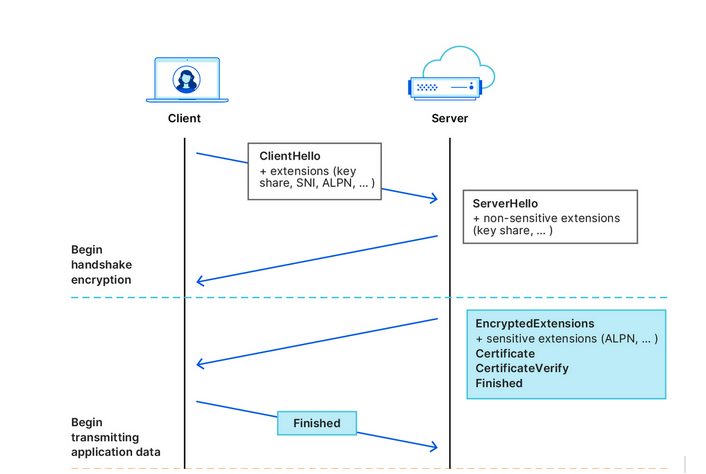
Cloudflare illustrates how the handshake works
Source: Cloudflare

After that first greeting, the data your browser exchanges with the server is encrypted, so that only you and the website can see what’s inside it. But by that point, your internet provider already knows the name of the website you are visiting. For example, if you went to www.google.com, your internet provider couldn’t see what you were searching for, but they could see that you were using Google.

What we’ve described above is how a TLS handshake works. TLS stands for Transport Layer Security, which is a cryptographic protocol that provides end-to-end security for data sent over the Internet. To be more technical, the first “Client Hello” message that your browser sends in clear text to the website’s servers contains not only the SNI, but also the TLS version and an encryption algorithm. But the main point is it’s not encrypted, so anyone who can see the network traffic can also see the website name your browser is requesting.

The question is, how can we shield that first piece of data that is not encrypted and that exposes our browsing habits?

This is where the Encrypted Client Hello protocol comes in. In simple terms, ECH encrypts the Client Hello message containing SNI, which, as we’ve already mentioned, indicates the name of the website you are visiting. Instead of showing the website’s real domain name, like www.google.com, to any external observers, your browser only shows the name of a so-called client-facing server, behind which multiple backend servers with their own domain names are hidden. The client-facing server has a general domain name: for example, Cloudflare uses cloudflare-ech.com as its client-facing server name. But how does your browser know which information to send to it to connect to a specific website?

The client-facing server acts as a middleman that has a special decryption key with which it opens your inner letter and sees your website name. Then it forwards the request to the real domain and sends back the response. This is possible because ECH splits Client Hello into two parts: the outer part contains non-sensitive information like the name of the client-facing server, and the inner part contains the inner SNI indicating the domain name of the backend server, which is the website you want to visit. To continue with our letter analogy: it’s like having the same address written on letters to different recipients, and having to use a magic wand to break the seal to see the inner letter with an actual address.
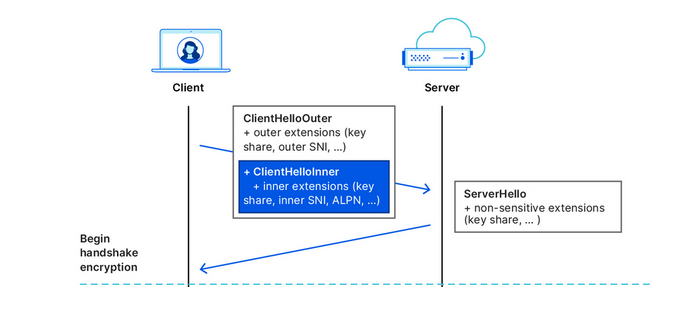
Cloudflare illustrates how the ECH works
Source: Cloudflare

What is the situation like with ECH adoption?

In recent months, more and more industry players have begun to warm up to ECH. Google started shipping the feature in Chrome 117, while Chrome 118 became the first stable release of Google’s browser with ECH support. In Firefox, ECH is on by default as of Firefox 118, but only works if you have DNS-over-HTTPS enabled. Edge is also testing ECH, but has yet to roll it out in a stable version.

However, support for ECH from the browser side means little without being reciprocated from the server side. It only means that a browser can send encrypted ECH messages to the servers that support this protocol. So, the move by Cloudflare, the most popular CDN provider on the market, to also support the protocol has made a big difference in the ECH adoption. Cloudflare, which handles around 20% of all the traffic on the Internet, announced that it began supporting ECH for all customers on free plans at the end of September, and encouraged paid customers to apply for the feature.

The protocol, however, still has a long way to go before it is widely accepted. As of right now, many of Cloudflare’s free domains are missing information about ECH in their DNS records, so Chrome can’t use ECH for those websites. But, since the ECH rollout is still in its early stages, this issue will likely be resolved over time.

So, is privacy solved?

As much as we would like to see it happen, declaring privacy solved is wishful thinking.

On the one hand, the universal adoption of the ECH, if it happens, will render useless some of the tried-and-tested blocking techniques employed by Internet authorities around the world to tackle online piracy, incur geo-fencing, and impose censorship. For one, law enforcement authorities will find it more difficult to target specific websites based on their names, because they will be hidden by the ECH.

However, this does not mean that censors won’t be able to clear this hurdle. It may require some adjustments on their part, but blocking will still be possible.

ECH’s weak spots or potential blocking methods

Now, we’re going to play devil’s advocate and give you some concrete ways that censors can try to block websites despite the implementation of the ECH.

  • One way is to “cut” the ECH from DNS records. To establish an ECH connection with a server, your browser needs a special DNS record from that server. This record tells your browser which domain name and decryption key to use in the outer and inner part of the ECH. However, if your DNS traffic is not encrypted, which is the case for most users, then anyone who can see your DNS queries, such as your ISP or a censor, can also see the ECH record. They can use this record to identify and block your ECH connection. Of course, if users have encrypted their DNS traffic, then this method won’t work.

  • A cruder, but a fairly effective way is to block all known client-facing servers, such as clouflare-ech.com. Realistically, there shouldn’t be many of these servers, so it should not be hard for censors to identify and block them all. But this method is very risky because it could break the Internet for many users. If the censors block all the servers that support ECH, then the browsers will not be able to establish a connection with the websites that have ECH enabled. This may, in turn, prompt Cloudflare to disable ECH for countries with strict internet censorship. It remains to be seen how Cloudflare will react if their client-facing server gets blocked by censors in countries like China or Russia. They will face a difficult choice, for sure. Another pitfall that awaits those banking on ECH as the ultimate solution to all privacy-related problems is a risk that website owners will simply refuse to adopt it or will opt out of the protocol because of the very same reason. If censors target ECH and make websites that enable it unaccessible, then website owners might want to disable the ECH support rather than lose their visitors.

There’s no denying that ECH is an exciting and a very promising technology that aims to make the Internet more private. However, it is not foolproof, and should not be regarded as a panacea against surveillance. Moreover, its widespread adoption favors the use of certain CDN services, such as the one offered by Cloudflare. While these services may not be problematic in and of themselves, their promotion as a side-effect of the ECH adoption risks making the Internet even more centralized than before. Only time will tell if this is for better or worse.


Bu gönderiyi beğendiniz mi?
AdGuard VPN AdGuard DNS AdGuard Mail AdGuard Wallet
Windows için AdGuard'ın ana ekranı
Windows için AdGuard'ın koruma özelliklerini ve ayarlarını gösteren koruma ekranı
Windows için AdGuard'ın engellenen reklamların ve izleyicilerin istatistiklerini gösteren İstatistik ekranı
Windows için AdGuard'ın uygulama yönetimi ekranı, cihazda yüklü uygulamalar için koruma yönetimi seçeneklerini göstermektedir
21.372 21372 kullanıcı incelemesi
Mükemmel!

AdGuard: Windows için reklam engelleyici

Windows için AdGuard, bir reklam engelleyiciden daha fazlasıdır. Reklamları engelleyen, tehlikeli sitelere erişimi kontrol eden, sayfanın açılışını hızlandıran ve çocukları uygunsuz içerikten koruyan çok amaçlı bir araçtır

Programı indirerek Lisans sözleşmesi şartlarını kabul etmiş olursunuz
Microsoft Mağazası
Programı indirerek Lisans sözleşmesi şartlarını kabul etmiş olursunuz
Windows için AdGuard v8.0, 14 gün deneme süresi
Mac için AdGuard'ın ana ekranı
Mac için AdGuard'ın Gizlilik Modu ekranı
21.372 21372 kullanıcı incelemesi
Mükemmel!

AdGuard: Mac için reklam engelleyici

Mac için AdGuard, macOS düşünülerek tasarlanmış benzersiz bir reklam engelleyicidir. Sizi tarayıcılar ve uygulamalardaki rahatsız edici reklamlardan korumanın yanı sıra, izleme, kimlik avı ve dolandırıcılıktan da korur
Programı indirerek Lisans sözleşmesi şartlarını kabul etmiş olursunuz
Devamını oku
Mac için AdGuard v2.19, 14 gün deneme süresi
Android için AdGuard'ın ana ekranı
Android için AdGuard'ın İzleme koruması ekranı
Android için AdGuard'ın uygulama yönetimi ekranı, cihazda yüklü uygulamalar için koruma yönetimi seçeneklerini göstermektedir
Android için AdGuard'ın engellenen reklamların ve izleyicilerin istatistiklerini gösteren İstatistik ekranı
Android için AdGuard'ın özel tarayıcısının ana ekranı
Android için AdGuard'ı indirme QR kodu
21.372 21372 kullanıcı incelemesi
Mükemmel!

AdGuard: Android için reklam engelleyici

Tüm tarayıcılarda, oyunlarda ve diğer uygulamalarda reklamları ve izleyicileri engeller. Gizliliğinizi korur ve uygulamalarınızın interneti nasıl kullandığını kontrol etmenizi sağlar. APK aracılığıyla yüklenir
Programı indirerek Lisans sözleşmesi şartlarını kabul etmiş olursunuz
Devamını oku
İndirmek için tara
Cihazınızda bulunan herhangi bir QR kod okuyucuyu kullanın
Android için AdGuard v4.14, 14 gün deneme süresi
iOS için AdGuard'ın ana ekranı
iOS için AdGuard'ın koruma özelliklerini ve ayarlarını gösteren koruma ekranı
iOS için AdGuard'ın engellenen reklamların ve izleyicilerin istatistiklerini gösteren İstatistik ekranı
iOS için AdGuard'ı indirme QR kodu
21.372 21372 kullanıcı incelemesi
Mükemmel!

AdGuard: iOS için reklam engelleyici

iPhone ve iPad için en iyi iOS reklam engelleyici. AdGuard, Safari'de her türlü reklamı ve izleyiciyi ortadan kaldırır ve DNS düzeyinde tüm uygulamalarda gizliliğinizi korur
Programı indirerek Lisans sözleşmesi şartlarını kabul etmiş olursunuz
Devamını oku
İndirmek için tara
Cihazınızda bulunan herhangi bir QR kod okuyucuyu kullanın
iOS için AdGuard v4.5
AdGuard İçerik Engelleyicinin ana ekranı
AdGuard İçerik Engelleyicinin Filtreler ekranı
AdGuard İçerik Engelleyicinin Ayarlar ekranı
21.372 21372 kullanıcı incelemesi
Mükemmel!

AdGuard İçerik Engelleyici

AdGuard Content Blocker, içerik engelleme teknolojisini destekleyen mobil tarayıcılarda her türlü reklamı ortadan kaldırır — örneğin, Samsung Internet ve Yandex Browser. Android için AdGuard'a kıyasla özellikleri sınırlıdır, ancak ücretsiz, yüklemesi kolay ve etkilidir
Programı indirerek Lisans sözleşmesi şartlarını kabul etmiş olursunuz
Devamını oku
AdGuard İçerik Engelleyici v2.8
AdGuard Tarayıcı Uzantısı'nın ana ekranı
AdGuard Tarayıcı Uzantısı'nın İzleme koruması ekranı
21.372 21372 kullanıcı incelemesi
Mükemmel!

AdGuard Tarayıcı Uzantısı

AdGuard, tüm web sayfalarındaki tüm reklam türlerini etkili bir şekilde engelleyen en hızlı ve en hafif reklam engelleme uzantısıdır! Kullandığınız tarayıcı için AdGuard'ı seçin ve reklamsız, hızlı ve güvenli gezinmenin tadını çıkarın.
Yükle
Programı indirerek Lisans sözleşmesi şartlarını kabul etmiş olursunuz
Yükle
Programı indirerek Lisans sözleşmesi şartlarını kabul etmiş olursunuz
Yükle
Programı indirerek Lisans sözleşmesi şartlarını kabul etmiş olursunuz
Yükle
Programı indirerek Lisans sözleşmesi şartlarını kabul etmiş olursunuz
Yükle
Programı indirerek Lisans sözleşmesi şartlarını kabul etmiş olursunuz
Devamını oku
Yükle
Programı indirerek Lisans sözleşmesi şartlarını kabul etmiş olursunuz
Devamını oku
AdGuard Tarayıcı Uzantısı v5.5
AdGuard Asistanın ana ekranı
21.372 21372 kullanıcı incelemesi
Mükemmel!

AdGuard Asistanı

AdGuard masaüstü uygulamaları için bir yardımcı tarayıcı uzantısıdır. Bu uzantı, sitelerde özel öğeleri engellemenize, siteleri izin listesine eklemenize ve tarayıcınızdan doğrudan bildirimler göndermenize izin verir
AdGuard Asistanı v1.4
21.372 21372 kullanıcı incelemesi
Mükemmel!

AdGuard Home

AdGuard Home, reklamları ve izleyicileri engellemek için ağ tabanlı bir çözümdür. Ev ağınızdaki tüm cihazları kapsaması için yönlendiricinize bir kez kurun — ek istemci yazılımı gerekmez. Bu özellikle gizliliğinize tehdit oluşturan çeşitli IoT cihazları için önemlidir
AdGuard Home v0.107
iOS için AdGuard Pro'nun ana ekranı
iOS için AdGuard Pro'nun koruma özelliklerini ve ayarlarını gösteren Koruma ekranı
iOS için AdGuard Pro'nun İstatistikler ekranı, engellenen reklamlar ve izleyicilere ilişkin istatistikleri gösterir
21.372 21372 kullanıcı incelemesi
Mükemmel!

iOS için AdGuard Pro

AdGuard Pro for iOS, tüm gelişmiş reklam engelleme koruma özellikleri etkin olarak gelir. iOS için ücretli AdGuard sürümüyle aynı araçları sunar. Safari'de reklamları engellemede mükemmeldir ve korumanızı özelleştirmeniz için DNS ayarlarını kişiselleştirmenize olanak tanır. Tarayıcılar ve uygulamalarda reklamları engeller, çocuklarınızı uygunsuz içeriklerden korur ve kişisel verilerinizi güvenli tutar
Programı indirerek Lisans sözleşmesi şartlarını kabul etmiş olursunuz
Devamını oku
iOS için AdGuard Pro v4.5
Mac için AdGuard Mini'nin ana ekranı
Mac için AdGuard Mini'nin Safari koruma ekranı
Mac için AdGuard Mini'nin kural oluşturma ekranı
21.372 21372 kullanıcı incelemesi
Mükemmel!

AdGuard Mini for Mac — Safari reklam engelleyici

Mac için AdGuard Mini, güçlü bir Safari reklam engelleyicisidir. Bu hafif uygulama reklamları kaldırır, izleyicileri engeller ve sayfa yüklemeyi hızlandırır. Safari'de Web'de dikkatiniz dağılmadan gezinmenize ve verilerinizi gizli tutmanıza yardımcı olur
Yükle
Programı indirerek Lisans sözleşmesi şartlarını kabul etmiş olursunuz
Devamını oku
Mac için AdGuard Mini v2.3
Android TV için AdGuard'ın korumanın etkin olduğu ana ekranı
Android TV için AdGuard'ın özelliklerini ve ayarlarını gösteren Reklam Engelleme ekranı
Android TV için AdGuard'ın ayarlar ekranı
Android TV için AdGuard'ın reklamların ve izleyicilerin engellendiği uygulamaları gösteren Uygulama Yönetimi ekranı
21.372 21372 kullanıcı incelemesi
Mükemmel!

Android TV için AdGuard

Android TV için AdGuard, reklamları engelleyen, gizliliğinizi koruyan ve Akıllı TV'niz için bir güvenlik duvarı görevi gören tek uygulamadır. Web tehditleri hakkında uyarılar alın, güvenli DNS kullanın ve şifrelenmiş trafikten yararlanın. Birinci sınıf güvenlik; sıfır reklam ile rahatlayın ve en sevdiğiniz programlara dalın!
Android TV için AdGuard v4.14, 14 gün deneme süresi
Linux penguenini tutan AdGuard maskotu Agnar
21.372 21372 kullanıcı incelemesi
Mükemmel!

Linux için AdGuard

Linux için AdGuard, dünyanın ilk sistem genelinde Linux reklam engelleyicisidir. Reklamları ve izleyicileri cihaz düzeyinde engelleyin, önceden yüklenmiş filtrelerden seçim yapın veya kendi filtrenizi ekleyin — tüm bunları komut satırı arayüzü aracılığıyla gerçekleştirin
Linux için AdGuard v1.4
21.372 21372 kullanıcı incelemesi
Mükemmel!

AdGuard Temp Mail

Sizi anonim tutan ve gizliliğinizi koruyan ücretsiz bir geçici e-posta adresi oluşturucu. Ana gelen kutunuzda istenmeyen posta olmaz!
21.372 21372 kullanıcı incelemesi
Mükemmel!

AdGuard VPN

Dünya çapında 75 konum

Herhangi bir içeriğe erişim

Güçlü şifreleme

Günlük tutmama politikası

En hızlı bağlantı

7/24 destek

Ücretsiz dene
Programı indirerek Lisans sözleşmesi şartlarını kabul etmiş olursunuz
Devamını oku
21.372 21372 kullanıcı incelemesi
Mükemmel!

AdGuard DNS

AdGuard DNS, herhangi bir uygulamanın yüklenmesini gerektirmeyen internet reklamlarını engellemenin kusursuz bir yoludur. Kullanımı kolay, tamamen ücretsizdir, herhangi bir cihazda kolayca ayarlanır ve reklamları, sayaçları, kötü amaçlı siteleri ve yetişkinlere yönelik içeriği engellemek için gerekli minimum işlevleri sağlar.
21.372 21372 kullanıcı incelemesi
Mükemmel!

AdGuard Mail

Kimliğinizi koruyun, istenmeyen postadan kaçının; gelen kutunuzu takma adlarımız ve geçici e-posta adreslerimizle güvende tutun. Tüm işletim sistemleri için ücretsiz e-posta yönlendirme hizmetimizin ve uygulamalarımızın keyfini çıkarın
21.372 21372 kullanıcı incelemesi
Mükemmel!

AdGuard Wallet

Varlıklarınız üzerinde tam kontrol sağlayan güvenli ve özel bir kripto cüzdanı. Birden fazla cüzdanı yönetin ve saklamak, göndermek ve takas etmek için binlerce kripto para birimini keşfedin
AdGuard indiriliyor AdGuard'ı kurmak için okla gösterilen dosyaya tıklayın "Aç" öğesini seçin ve "Tamam" öğesine tıklayın, ardından dosyanın indirilmesini bekleyin. Açılan pencerede AdGuard simgesini "Uygulamalar" klasörüne sürükleyin. AdGuard'ı seçtiğiniz için teşekkür ederiz! "Aç" öğesini seçin ve "Tamam" öğesine tıklayın, ardından dosyanın indirilmesini bekleyin. Açılan pencerede "Kur" öğesine tıklayın. AdGuard'ı seçtiğiniz için teşekkür ederiz!
AdGuard'ı mobil cihazınıza yükleyin

















































