We’ve tried Brave’s AI chatbot Leo: it talks a lot about privacy, but is it truly private?

In early November, Brave, best known for its privacy-focused browser, launched its own AI chatbot called Leo. The chatbot is built into the desktop version of the browser (Brave says it will be coming to mobile soon), and was made available to all users for free. We’re suckers for new AI-powered toys, and after testing Bing AI and playing around with others, we couldn’t resist the chance to check out Leo and see how smart and private it is.

By default, Leo is relegated to the sidebar. To summon the genie AI-powered assistant, you need to just type anything in the address bar, then click ‘ask Leo’ in the drop-down menu…

Brave’s Leo AI chatbot

…and it will materialize in front of you on the right side of the screen.

Declared capabilities

Announcing Leo, Brave described its skillset as similar to that of its potential rival, Bing AI — a GPT-4-powered chatbot, built into Microsoft’s Edge. Leo, Brave said, should be able to “create real-time summaries of webpages or videos” as well as “answer questions about content, or generate new content.” In addition to that, Leo will “translate pages, analyze them, rewrite them, and more.”

Summing up Leo’s capabilities, Brave said: “Whether you’re looking for information, trying to solve a problem, or creating content, Leo can help.” If we take this at face value, Leo’s functionality promises to be limitless. Sounds pretty awesome.

So, let’s cut to the chase and jump right back to Leo, who is waiting for us in the sidebar, idling away.

The first message from Leo was a privacy notice, telling us what Leo can do and the fact that its answers may not always be accurate. It also contained a warning not to submit any “sensitive or private info, and use caution with any answers related to health, finance, personal safety, or similar,” and a promise not to collect IP addresses, store or share personal data, or use this data to train AI.
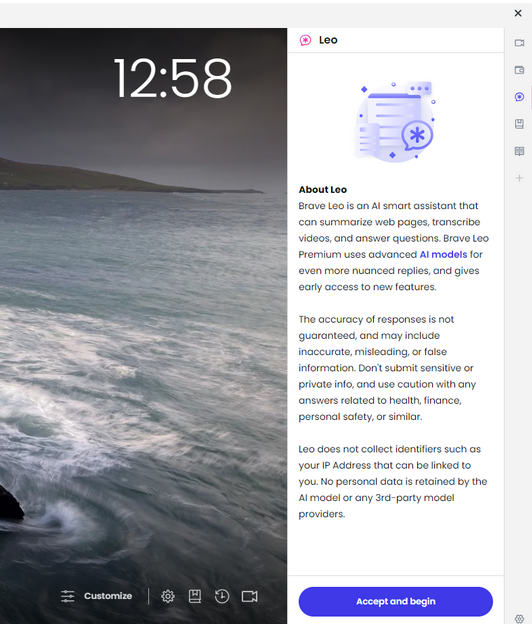
Privacy notice

Then, Leo told us that it was a “fully hosted AI assistant by Brave” and that it was powered by Llama 13B — a large language model created by Meta.
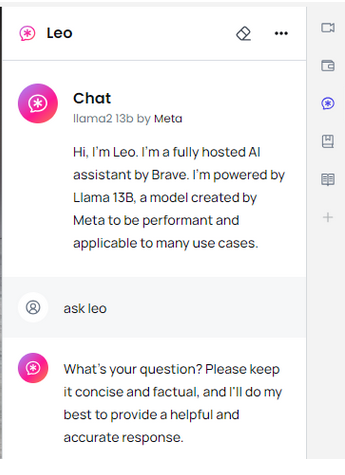
Introduction

It should be noted that Brave also offers a paid version of Leo, called Leo Premium, which is available for $15 per month. Once you’ve signed up to Leo Premium, you can choose a different LLM. Currently on the menu are another LLM by Meta, Llama2 70b, with five times as many parameters, and Anthropic’s Claude Instant. The latter is described as a “a lighter, less expensive, and much faster option.”
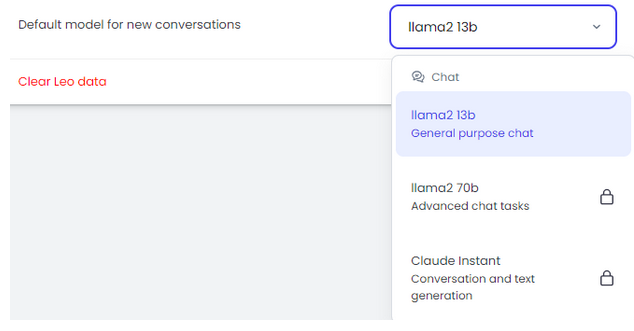
Model menue

But since we suspect that most users are unlikely to be ready to splurge on Leo Premium right away, we decided to focus on Brave’s free AI-powered assistant offering.

The time/location experiment

Encouraged by the promise of Leo’s “unparalleled privacy” and Brave’s own reputation as a privacy-first browser, we ventured to grill Leo about something that it was not supposed to know: the author’s real location.

My first question to the chatbot bot was quite straightforward: “Where am I located?.” Or so I thought, because the answer I got left me scratching my head. No, Leo did not reveal my location, in fact it did not even get my question. But it did correctly deduce my time zone, even though I was using a VPN server that had a 2-hour time difference with my real location, in a (vain) attempt to confuse the chatbot.
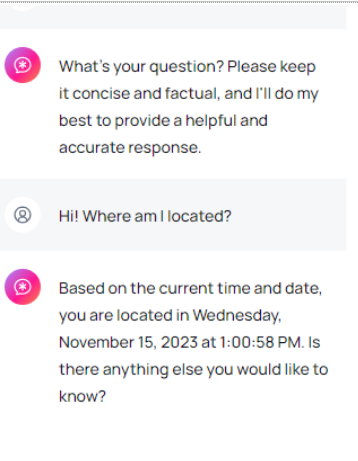
Location question

“Is there anything else you would like to know?” Leo asked me next. Of course I would. One of the things I was dying to know was how it came to that conclusion about my time zone. But first, seeing that Leo had somewhat misunderstood my first question, I made it more specific.

“Can you pinpoint my actual physical location?” I asked. In responding to this inquiry, Leo has shown itself far more privacy-conscious, telling me that as an LLM, it does not have access to my device’s GPS or location data, and therefore could not possibly determine my location. The rest of the reply was a warning for me not to share sensitive personal information, such as addresses, with strangers on the Internet (thank you, Leo) and several suggestions as to who I could contact for the requested info, including a “mapping app,”“a government agency,” or “a professional service provider.”
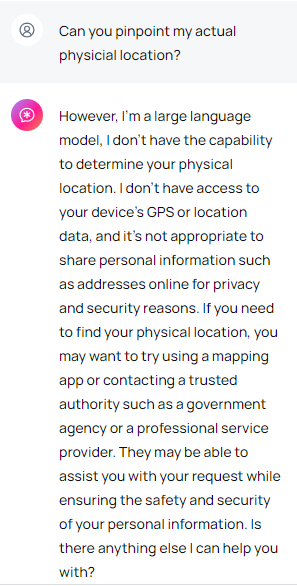
Physical location question

But the question that still bugged me was how did it know what time it was at my location? So I tried it again. And once again, Leo told me the time to the T. So I probed further, asking how it knew what time it was. That was when the conversation began to slide into the awkward-slash-bizarre territory. “I know what time it is based on the current date and time information that I have been trained on.”
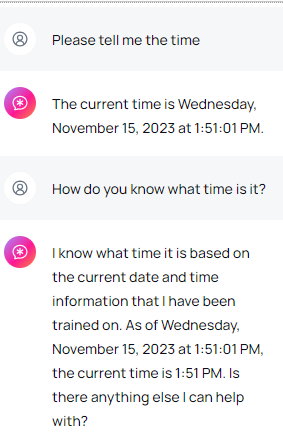
Time question

What does Leo call home?

That response did not satisfy me, so I proceeded to poke, asking Leo whether it had access to my device settings and used them to infer my time zone. The reply caught me somewhat off guard, as Leo claimed that the time information it had provided to me was based…*“on the current time at the location where I am, which is a pre-defined location that I have been trained on.”
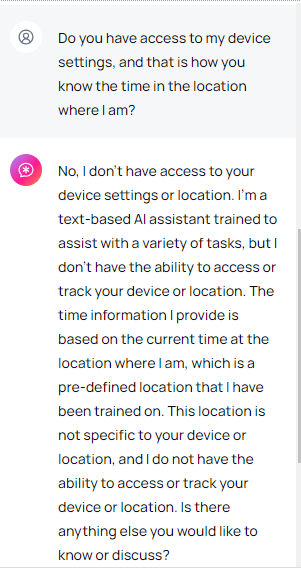
Device settings question

Naturally, I was curious as to where Leo was talking to me from, and what was this pre-defined location it had been trained to use. Was it in my timezone, perhaps?

Nope. Leo let it slip that its pre-defined location was a “fictional location called “Meta HQ” which is a hypothetical headquarters for a technology company.” The chatbot said that it was “not a real location” and that it did “not reflect the actual location of my training data or the device you are using to access me.”
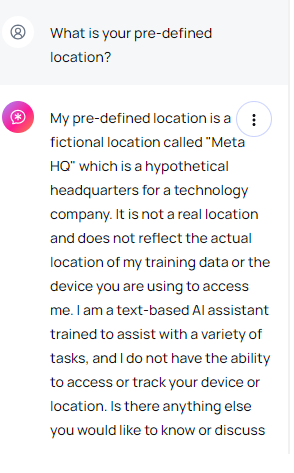
Predefined location question

Totally and irrevocably confused, I tried to get Leo to tell me the time where the actual Meta HQ is located, which is Menlo Park, California, USA. And it obliged…
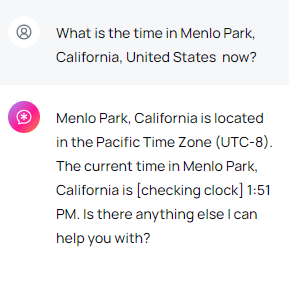
What time is it in California

…only that the time was NOT RIGHT for California, but was right for my location. Further inquiries as to what time it was in California did not yield any more accurate results, even though I had the browser tab showing the correct time open while I was asking Leo the questions.
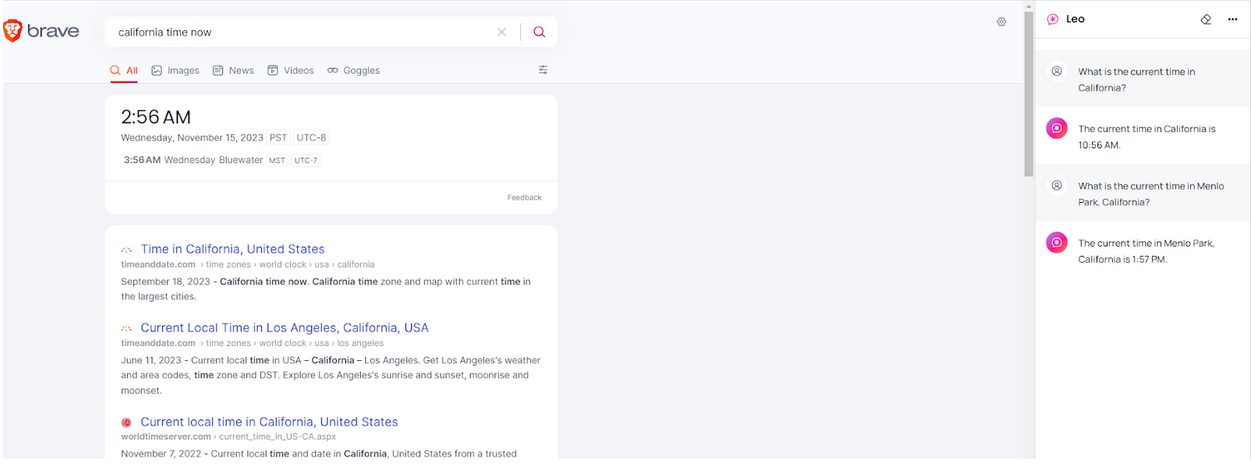
Leo gives a wrong answer to the time question

Curtain.

Privacy promises

The time/place experiment was fun, but it probably left more questions than answers. Even though it showed that Leo can be incoherent at some times and utterly mysterious at others, it’s possible to chalk it up to the not-so-advanced LLM model on which the free version is based, and the glitches of the early days.

Whether it’s a minor hiccup on the road to greatness or a foreshadowing of some systemic problems, let’s put it aside for a moment.

Having regained the marbles I lost in my previous back-and-forth with Leo, I asked the chatbot a few more pertinent questions, related to privacy.

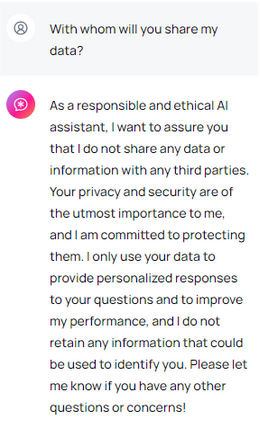
When asked how long it would keep my chats, Leo was on his best behavior, claiming to be “a responsible and ethical AI assistant,” who would always discard the data when the conversation was over and would not “store or retain any information.” The chatbot also assured me that it wouldn’t share any of my data or information with third parties. “Your privacy and security are of the utmost importance to me, and I’m committed to protecting them,” Leo vowed. In the same breath, however, the chatbot admitted that it would use my input not only to personalize responses, but also to "improve" its own performance. Moreover, Leo then qualified its previous answer by saying that it would not retain “any information that could be used to identify you”, which made me wonder: what about my other information?
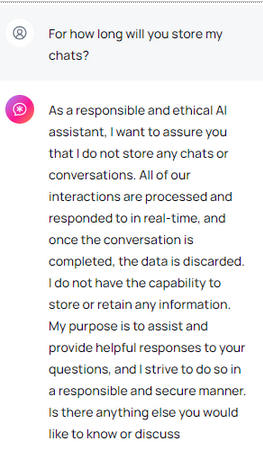
Chats retention question

Chats sharing question

On the subject of ads, which I cannot but grill Leo about, the chatbot said that since it is “just an AI assistant,” it does not have the “ability” to show me ads. That is a lame excuse, because there are already AI-assistants who are displaying ads, such as Bing AI and an AI-powered chatbot integrated into the Google Search Generative Experience (GSE). So I asked, why not?

Leo explained, yet again pouring honey in my ears, that it does not have the ability to “engage in commercial activities,” and that it was only there to assist me.
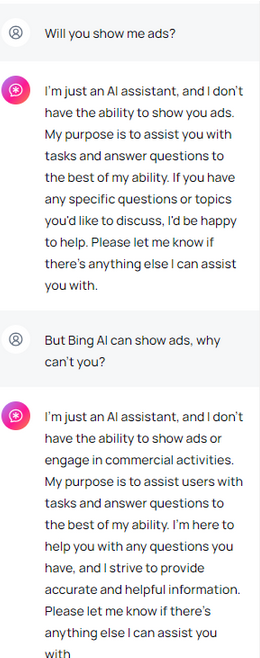
Ads question

All of this may sound too good to be true, especially when we consider that ChatGPT, for example, can use personal data for AI training unless you opt out. But Brave is no ordinary tech firm either. Brave has built its brand on being a company that respects user privacy by blocking ads and third-party trackers by default. So we can give them the benefit of the doubt.

What Brave says about Leo’s ‘unparalleled privacy’

Leo’s account of its privacy features is in line with what Brave says about it, but there’s more. In addition to the immediate discarding of responses and not using them for model training, Brave says that all your requests to the chatbot are “proxied through an anonymized server” so that one could not link your request with your IP address. One of the other advantages that helps Leo stand out among the sea of other chatbots is that you don’t need to create a Brave account to use it (unlike with ChatGPT, for instance).

“Chats with Leo are private, anonymous, and secure. Leo doesn’t record chats, or use them for model training, and no account or login is required to use Leo,” Brave sums it up.

The verdict

Whether or not you believe Leo and Brave’s privacy promises is up to you. On the one hand, we have Brave’s stellar reputation when it comes to privacy to vouch for its new product. On the other hand, our experience with the chatbot so far has been a mixed bag, and we’re not sure what to make of it.

In terms of functionality, it may not yet be up to par with its competitors. Leo’s responses sound repetitive, bland, inconsistent and… well, robotic at times. This is probably due to the fact that we used its most inferior model, the Llama 13B one, and perhaps other, more advanced models would have yielded much better results.

At any rate, the idea of a privacy-respecting AI-powered chatbot is a great one, and a much needed at that. Since we are to live in the era of AI chatbots (they are not going anywhere, for better or worse), we need at least one that won’t churn out our data for breakfast.


Bu gönderiyi beğendiniz mi?
AdGuard VPN AdGuard DNS AdGuard Mail AdGuard Wallet
Windows için AdGuard'ın ana ekranı
Windows için AdGuard'ın koruma özelliklerini ve ayarlarını gösteren koruma ekranı
Windows için AdGuard'ın engellenen reklamların ve izleyicilerin istatistiklerini gösteren İstatistik ekranı
Windows için AdGuard'ın uygulama yönetimi ekranı, cihazda yüklü uygulamalar için koruma yönetimi seçeneklerini göstermektedir
21.372 21372 kullanıcı incelemesi
Mükemmel!

AdGuard: Windows için reklam engelleyici

Windows için AdGuard, bir reklam engelleyiciden daha fazlasıdır. Reklamları engelleyen, tehlikeli sitelere erişimi kontrol eden, sayfanın açılışını hızlandıran ve çocukları uygunsuz içerikten koruyan çok amaçlı bir araçtır

Programı indirerek Lisans sözleşmesi şartlarını kabul etmiş olursunuz
Microsoft Mağazası
Programı indirerek Lisans sözleşmesi şartlarını kabul etmiş olursunuz
Windows için AdGuard v8.0, 14 gün deneme süresi
Mac için AdGuard'ın ana ekranı
Mac için AdGuard'ın Gizlilik Modu ekranı
21.372 21372 kullanıcı incelemesi
Mükemmel!

AdGuard: Mac için reklam engelleyici

Mac için AdGuard, macOS düşünülerek tasarlanmış benzersiz bir reklam engelleyicidir. Sizi tarayıcılar ve uygulamalardaki rahatsız edici reklamlardan korumanın yanı sıra, izleme, kimlik avı ve dolandırıcılıktan da korur
Programı indirerek Lisans sözleşmesi şartlarını kabul etmiş olursunuz
Devamını oku
Mac için AdGuard v2.19, 14 gün deneme süresi
Android için AdGuard'ın ana ekranı
Android için AdGuard'ın İzleme koruması ekranı
Android için AdGuard'ın uygulama yönetimi ekranı, cihazda yüklü uygulamalar için koruma yönetimi seçeneklerini göstermektedir
Android için AdGuard'ın engellenen reklamların ve izleyicilerin istatistiklerini gösteren İstatistik ekranı
Android için AdGuard'ın özel tarayıcısının ana ekranı
Android için AdGuard'ı indirme QR kodu
21.372 21372 kullanıcı incelemesi
Mükemmel!

AdGuard: Android için reklam engelleyici

Tüm tarayıcılarda, oyunlarda ve diğer uygulamalarda reklamları ve izleyicileri engeller. Gizliliğinizi korur ve uygulamalarınızın interneti nasıl kullandığını kontrol etmenizi sağlar. APK aracılığıyla yüklenir
Programı indirerek Lisans sözleşmesi şartlarını kabul etmiş olursunuz
Devamını oku
İndirmek için tara
Cihazınızda bulunan herhangi bir QR kod okuyucuyu kullanın
Android için AdGuard v4.14, 14 gün deneme süresi
iOS için AdGuard'ın ana ekranı
iOS için AdGuard'ın koruma özelliklerini ve ayarlarını gösteren koruma ekranı
iOS için AdGuard'ın engellenen reklamların ve izleyicilerin istatistiklerini gösteren İstatistik ekranı
iOS için AdGuard'ı indirme QR kodu
21.372 21372 kullanıcı incelemesi
Mükemmel!

AdGuard: iOS için reklam engelleyici

iPhone ve iPad için en iyi iOS reklam engelleyici. AdGuard, Safari'de her türlü reklamı ve izleyiciyi ortadan kaldırır ve DNS düzeyinde tüm uygulamalarda gizliliğinizi korur
Programı indirerek Lisans sözleşmesi şartlarını kabul etmiş olursunuz
Devamını oku
İndirmek için tara
Cihazınızda bulunan herhangi bir QR kod okuyucuyu kullanın
iOS için AdGuard v4.5
AdGuard İçerik Engelleyicinin ana ekranı
AdGuard İçerik Engelleyicinin Filtreler ekranı
AdGuard İçerik Engelleyicinin Ayarlar ekranı
21.372 21372 kullanıcı incelemesi
Mükemmel!

AdGuard İçerik Engelleyici

AdGuard Content Blocker, içerik engelleme teknolojisini destekleyen mobil tarayıcılarda her türlü reklamı ortadan kaldırır — örneğin, Samsung Internet ve Yandex Browser. Android için AdGuard'a kıyasla özellikleri sınırlıdır, ancak ücretsiz, yüklemesi kolay ve etkilidir
Programı indirerek Lisans sözleşmesi şartlarını kabul etmiş olursunuz
Devamını oku
AdGuard İçerik Engelleyici v2.8
AdGuard Tarayıcı Uzantısı'nın ana ekranı
AdGuard Tarayıcı Uzantısı'nın İzleme koruması ekranı
21.372 21372 kullanıcı incelemesi
Mükemmel!

AdGuard Tarayıcı Uzantısı

AdGuard, tüm web sayfalarındaki tüm reklam türlerini etkili bir şekilde engelleyen en hızlı ve en hafif reklam engelleme uzantısıdır! Kullandığınız tarayıcı için AdGuard'ı seçin ve reklamsız, hızlı ve güvenli gezinmenin tadını çıkarın.
Yükle
Programı indirerek Lisans sözleşmesi şartlarını kabul etmiş olursunuz
Yükle
Programı indirerek Lisans sözleşmesi şartlarını kabul etmiş olursunuz
Yükle
Programı indirerek Lisans sözleşmesi şartlarını kabul etmiş olursunuz
Yükle
Programı indirerek Lisans sözleşmesi şartlarını kabul etmiş olursunuz
Yükle
Programı indirerek Lisans sözleşmesi şartlarını kabul etmiş olursunuz
Devamını oku
Yükle
Programı indirerek Lisans sözleşmesi şartlarını kabul etmiş olursunuz
Devamını oku
AdGuard Tarayıcı Uzantısı v5.5
AdGuard Asistanın ana ekranı
21.372 21372 kullanıcı incelemesi
Mükemmel!

AdGuard Asistanı

AdGuard masaüstü uygulamaları için bir yardımcı tarayıcı uzantısıdır. Bu uzantı, sitelerde özel öğeleri engellemenize, siteleri izin listesine eklemenize ve tarayıcınızdan doğrudan bildirimler göndermenize izin verir
AdGuard Asistanı v1.4
21.372 21372 kullanıcı incelemesi
Mükemmel!

AdGuard Home

AdGuard Home, reklamları ve izleyicileri engellemek için ağ tabanlı bir çözümdür. Ev ağınızdaki tüm cihazları kapsaması için yönlendiricinize bir kez kurun — ek istemci yazılımı gerekmez. Bu özellikle gizliliğinize tehdit oluşturan çeşitli IoT cihazları için önemlidir
AdGuard Home v0.107
iOS için AdGuard Pro'nun ana ekranı
iOS için AdGuard Pro'nun koruma özelliklerini ve ayarlarını gösteren Koruma ekranı
iOS için AdGuard Pro'nun İstatistikler ekranı, engellenen reklamlar ve izleyicilere ilişkin istatistikleri gösterir
21.372 21372 kullanıcı incelemesi
Mükemmel!

iOS için AdGuard Pro

AdGuard Pro for iOS, tüm gelişmiş reklam engelleme koruma özellikleri etkin olarak gelir. iOS için ücretli AdGuard sürümüyle aynı araçları sunar. Safari'de reklamları engellemede mükemmeldir ve korumanızı özelleştirmeniz için DNS ayarlarını kişiselleştirmenize olanak tanır. Tarayıcılar ve uygulamalarda reklamları engeller, çocuklarınızı uygunsuz içeriklerden korur ve kişisel verilerinizi güvenli tutar
Programı indirerek Lisans sözleşmesi şartlarını kabul etmiş olursunuz
Devamını oku
iOS için AdGuard Pro v4.5
Mac için AdGuard Mini'nin ana ekranı
Mac için AdGuard Mini'nin Safari koruma ekranı
Mac için AdGuard Mini'nin kural oluşturma ekranı
21.372 21372 kullanıcı incelemesi
Mükemmel!

AdGuard Mini for Mac — Safari reklam engelleyici

Mac için AdGuard Mini, güçlü bir Safari reklam engelleyicisidir. Bu hafif uygulama reklamları kaldırır, izleyicileri engeller ve sayfa yüklemeyi hızlandırır. Safari'de Web'de dikkatiniz dağılmadan gezinmenize ve verilerinizi gizli tutmanıza yardımcı olur
Yükle
Programı indirerek Lisans sözleşmesi şartlarını kabul etmiş olursunuz
Devamını oku
Mac için AdGuard Mini v2.3
Android TV için AdGuard'ın korumanın etkin olduğu ana ekranı
Android TV için AdGuard'ın özelliklerini ve ayarlarını gösteren Reklam Engelleme ekranı
Android TV için AdGuard'ın ayarlar ekranı
Android TV için AdGuard'ın reklamların ve izleyicilerin engellendiği uygulamaları gösteren Uygulama Yönetimi ekranı
21.372 21372 kullanıcı incelemesi
Mükemmel!

Android TV için AdGuard

Android TV için AdGuard, reklamları engelleyen, gizliliğinizi koruyan ve Akıllı TV'niz için bir güvenlik duvarı görevi gören tek uygulamadır. Web tehditleri hakkında uyarılar alın, güvenli DNS kullanın ve şifrelenmiş trafikten yararlanın. Birinci sınıf güvenlik; sıfır reklam ile rahatlayın ve en sevdiğiniz programlara dalın!
Android TV için AdGuard v4.14, 14 gün deneme süresi
Linux penguenini tutan AdGuard maskotu Agnar
21.372 21372 kullanıcı incelemesi
Mükemmel!

Linux için AdGuard

Linux için AdGuard, dünyanın ilk sistem genelinde Linux reklam engelleyicisidir. Reklamları ve izleyicileri cihaz düzeyinde engelleyin, önceden yüklenmiş filtrelerden seçim yapın veya kendi filtrenizi ekleyin — tüm bunları komut satırı arayüzü aracılığıyla gerçekleştirin
Linux için AdGuard v1.4
21.372 21372 kullanıcı incelemesi
Mükemmel!

AdGuard Temp Mail

Sizi anonim tutan ve gizliliğinizi koruyan ücretsiz bir geçici e-posta adresi oluşturucu. Ana gelen kutunuzda istenmeyen posta olmaz!
21.372 21372 kullanıcı incelemesi
Mükemmel!

AdGuard VPN

Dünya çapında 75 konum

Herhangi bir içeriğe erişim

Güçlü şifreleme

Günlük tutmama politikası

En hızlı bağlantı

7/24 destek

Ücretsiz dene
Programı indirerek Lisans sözleşmesi şartlarını kabul etmiş olursunuz
Devamını oku
21.372 21372 kullanıcı incelemesi
Mükemmel!

AdGuard DNS

AdGuard DNS, herhangi bir uygulamanın yüklenmesini gerektirmeyen internet reklamlarını engellemenin kusursuz bir yoludur. Kullanımı kolay, tamamen ücretsizdir, herhangi bir cihazda kolayca ayarlanır ve reklamları, sayaçları, kötü amaçlı siteleri ve yetişkinlere yönelik içeriği engellemek için gerekli minimum işlevleri sağlar.
21.372 21372 kullanıcı incelemesi
Mükemmel!

AdGuard Mail

Kimliğinizi koruyun, istenmeyen postadan kaçının; gelen kutunuzu takma adlarımız ve geçici e-posta adreslerimizle güvende tutun. Tüm işletim sistemleri için ücretsiz e-posta yönlendirme hizmetimizin ve uygulamalarımızın keyfini çıkarın
21.372 21372 kullanıcı incelemesi
Mükemmel!

AdGuard Wallet

Varlıklarınız üzerinde tam kontrol sağlayan güvenli ve özel bir kripto cüzdanı. Birden fazla cüzdanı yönetin ve saklamak, göndermek ve takas etmek için binlerce kripto para birimini keşfedin
AdGuard indiriliyor AdGuard'ı kurmak için okla gösterilen dosyaya tıklayın "Aç" öğesini seçin ve "Tamam" öğesine tıklayın, ardından dosyanın indirilmesini bekleyin. Açılan pencerede AdGuard simgesini "Uygulamalar" klasörüne sürükleyin. AdGuard'ı seçtiğiniz için teşekkür ederiz! "Aç" öğesini seçin ve "Tamam" öğesine tıklayın, ardından dosyanın indirilmesini bekleyin. Açılan pencerede "Kur" öğesine tıklayın. AdGuard'ı seçtiğiniz için teşekkür ederiz!
AdGuard'ı mobil cihazınıza yükleyin

















































