Musk versus Apple, Meta employees hijack accounts, as Twitter and WhatsApp (allegedly) leak data. AdGuard’s Digest

In this edition of AdGuard’s digest: Elon Musk criticizes App Store, a tracking tool sends sensitive financial info to Meta, Apple’s tracking accusations escalate, stolen data of millions of Twitter users surfaces up for free, as WhatsApp may or may not have leaked user data.

Elon Musk takes on Apple’s 30% tax and ‘censorship’

Twitter CEO Elon Musk has reignited a feud with Apple, blasting the company for stopping nearly all advertisements on Twitter and criticizing a 30% cut it takes from in-app purchases. On November 28, Musk tweeted that Apple had “threatened” to remove Twitter from the App Store. In another tweet, Musk accused Apple of failing to support free speech on the platform by winding down its ad spend.

Elon Musk has rekindled the row with Apple over its App Store commission

Photo: Brett Jordan/Unsplash

Musk has sparred with Apple over its App Store fee before. In May, Musk argued the 30% cut “literally 10 times higher than it should be”. Musk’s growing frustration with Apple was reportedly part of the reason while he pushed back the launch of the revamped Twitter Blue subsription. However, if there was some beef between Apple and Twitter, Musk called a truce after meeting with Apple’s Tim Cook later that week. “Among other things, we resolved the misunderstanding about Twitter potentially being removed from the App Store,” he said. Apple has since resumed advertising on Twitter. It’s unclear if Apple’s 30% tax was on the agenda of the Musk-Cook meeting.

And while Musk and Cook may have buried the hatchet (at least temporary), the steep fee that iOS developers must pay Apple has long been an issue. As we explained in our recent article, the dominance of the Apple and Google app stores hurts developers and users alike.

Meta employees used internal tool called ‘Oops’ to hijack user accounts

Multiple Meta employees have been found out to have accepted bribes for getting into Instagram and Facebook accounts with a secret internal tool. The tool called “Oops” (short for Online Operations) was designed so that Meta employees and contractors could restore accounts for their friends and family without them needing to reach out to Meta’s support. However, some employees and contractors apparently decided to monetize their privileged access to the shortcut. According to a report in the Wall Street Journal, they offered their recovery services both to legitimate users who’d got locked out of their accounts as well as to hackers.

The Journal reported that some workers and contractors allegedly received “thousands of dollars in bribes” for resetting Facebook accounts. Interestingly, some of those workers were supposed to provide security for Meta. Over two dozen people were either “disciplined or fired” after Meta conducted an internal probe.

Given the scale on which Meta has mishandled user data before, it has long been apparent that the company cares more about collecting user data, than ensuring it is secure, or investing into proper customer service. That and an unclear moderation policy apparently allow Meta employees to play demigods. Thus, earlier this year, an OnlyFans star claimed that she slept with several Meta employees to reverse her Instagram ban.

Meta’s tracking tool sends user financial info to… Meta

Roses are red, violets are blue, Meta is always tracking you. Meta Pixel, a notorious tracking tool that has previously been found sending sensitive health data from hospital websites to Meta, made headlines again. This time, the code was sending financial information from several US tax filing websites to the tech giant. The information sent included email addresses, names, income, refund amounts, and, sometimes, even the names of the dependents, The Markup investigation found.

Meta has been receiving sensitive user financial data from tax filing websites

Photo: Christin Hume/Unsplash

Meta has denied any wrongdoing, blaming the website owners for failing to properly configure the tool. “Advertisers should not send sensitive information about people through our Business Tools,” a Meta spokesperson said. The tech giant has also said that it has special filters in place to prevent it from actually being able to detect the sensitive data. Since the report went live, several tax filing websites have removed the pixel, some saying that they were unaware that it had been sending the data to Facebook.

While Meta argues that it was sent the data by mistake, it’s worth noting that Meta’s lifeline is user data, which it repurposes for targeted advertising — its main source of revenue. So, one has to take with a pinch of salt the company’s assurances that it might have been fed the data against its will.

Apple collects personally identifiable info despite promises not to

The information that Apple’s native apps send to Apple include a permanent ID number that is tied to a user’s name, email, and phone number, independent researchers from the software company Mysk have found. This apparently runs contrary to Apple’s privacy policy, which states that “none of the collected information identifies you personally.”
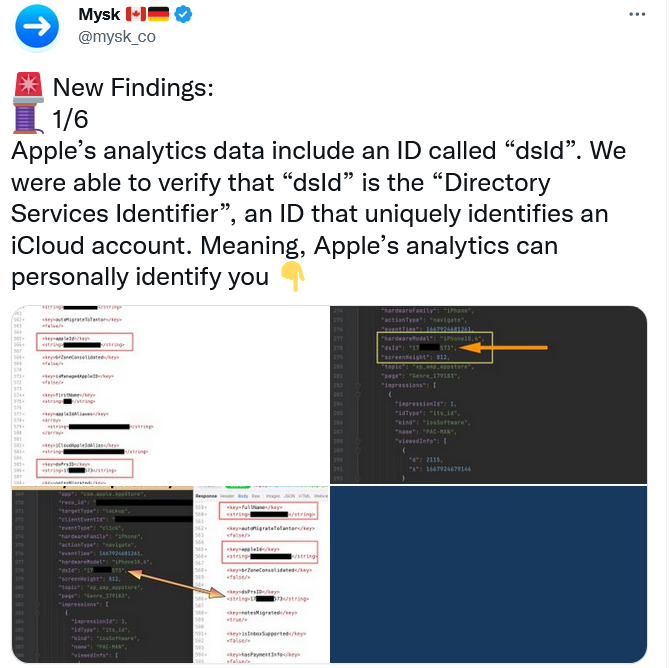
Apple collects data directly linked to your identity, but insists it is not tracking you

The researchers noted that the user has no way to opt out from Apple’s tracking. “All these detailed analytics are going to be linked directly to you. And that’s a problem, because there’s no way to switch it off,”researcher Tommy Mysk told Gizmodo. Earlier, the same researchers found that Apple keeps on collecting detailed real-time usage data even if the user has disabled all personalization options, including “Share iPhone Analytics.” Apple is now facing a class-action lawsuit over allegedly deceiving users with its privacy settings.

Apple has long claimed to prioritize privacy. However, its reputation as a privacy stalwart has been showing more and more cracks as of late. Experts question whether Apple is holding itself to the same standards regarding tracking that it imposes on third parties such as Meta. And as Apple builds its own advertising empire, these privacy concerns only intensify.

Someone is selling 500 million WhatsApp users’ phone numbers… maybe

A hacker has claimed to be selling an up-to-date database containing 487 million WhatsApp user mobile numbers. According to a report by Cybernews that investigated a sample of US and UK telephone numbers from the database, the claim is “likely” true. The bad actor alleged that the dataset contains phone numbers of the residents of 84 countries. Cybernews speculated that the data was most likely obtained by scraping, rather than in the course of an actual hack.

WhatsApp has denied that there has been a data leak. A spokesman for the company said that the report was based “on unsubstantiated screenshots,” even though Cybernews said that they had contacted the seller.

Whether this particular report is true or not, WhatsApp is known to regularly suffer from security vulnerabilities. Not long ago, WhatsApp’s rival Telegram CEO Pavel Durov called WhatsApp a “surveillance tool” commenting on a report about a recent security issue that struck WhatsApp. The issue could have allowed hackers gain “full access” to everything on WhatsApp users’ phones. It’s also not a secret that WhatsApp itself collects vast amounts of unencrypted metadata, including users’ phone numbers, which it can share with Meta and police.

Over 5.4 million Twitter user records offered for free on dark web

While some bad actors want to cash in on the user data, others give it out for free. A large dataset containing 5.4 million of Twitter user records has been posted on a hacker forum, the Bleeping Computer reported. The trove includes user phone numbers and email addresses in addition to Twitter logins, names, locations and IDs. Previously, the same dump was advertised for sale for $30,000.

The data was scraped in December 2021 through a Twitter security vulnerability that has since been patched. The issue, however, is now believed to be way more serious than previously thought. A much larger Twitter dump reportedly consisting of over 17 million records has been uncovered by security researcher Chad Loder. The data in the dump appears to be different from the 5.4 million dataset. The Irish privacy watchdog has started looking into the alleged breach.

While we can assume that Twitter is still suffering from the effects of a vulnerability that has long been fixed, it does not help that some of the platform’s top security and privacy executives resigned following Elon Musk’s Twitter takeover. Unless Musk takes serious steps to protect Twitter’s security and privacy, this probably won’t be the last such incident. The inherent risk is that Twitter collects a lot of personal information and has been known to misuse it.


Bu gönderiyi beğendiniz mi?
AdGuard VPN AdGuard DNS AdGuard Mail AdGuard Wallet
Windows için AdGuard'ın ana ekranı
Windows için AdGuard'ın koruma özelliklerini ve ayarlarını gösteren koruma ekranı
Windows için AdGuard'ın engellenen reklamların ve izleyicilerin istatistiklerini gösteren İstatistik ekranı
Windows için AdGuard'ın uygulama yönetimi ekranı, cihazda yüklü uygulamalar için koruma yönetimi seçeneklerini göstermektedir
21.373 21373 kullanıcı incelemesi
Mükemmel!

AdGuard: Windows için reklam engelleyici

Windows için AdGuard, bir reklam engelleyiciden daha fazlasıdır. Reklamları engelleyen, tehlikeli sitelere erişimi kontrol eden, sayfanın açılışını hızlandıran ve çocukları uygunsuz içerikten koruyan çok amaçlı bir araçtır

Programı indirerek Lisans sözleşmesi şartlarını kabul etmiş olursunuz
Microsoft Mağazası
Programı indirerek Lisans sözleşmesi şartlarını kabul etmiş olursunuz
Windows için AdGuard v8.0, 14 gün deneme süresi
Mac için AdGuard'ın ana ekranı
Mac için AdGuard'ın Gizlilik Modu ekranı
21.373 21373 kullanıcı incelemesi
Mükemmel!

AdGuard: Mac için reklam engelleyici

Mac için AdGuard, macOS düşünülerek tasarlanmış benzersiz bir reklam engelleyicidir. Sizi tarayıcılar ve uygulamalardaki rahatsız edici reklamlardan korumanın yanı sıra, izleme, kimlik avı ve dolandırıcılıktan da korur
Programı indirerek Lisans sözleşmesi şartlarını kabul etmiş olursunuz
Devamını oku
Mac için AdGuard v2.19, 14 gün deneme süresi
Android için AdGuard'ın ana ekranı
Android için AdGuard'ın İzleme koruması ekranı
Android için AdGuard'ın uygulama yönetimi ekranı, cihazda yüklü uygulamalar için koruma yönetimi seçeneklerini göstermektedir
Android için AdGuard'ın engellenen reklamların ve izleyicilerin istatistiklerini gösteren İstatistik ekranı
Android için AdGuard'ın özel tarayıcısının ana ekranı
Android için AdGuard'ı indirme QR kodu
21.373 21373 kullanıcı incelemesi
Mükemmel!

AdGuard: Android için reklam engelleyici

Tüm tarayıcılarda, oyunlarda ve diğer uygulamalarda reklamları ve izleyicileri engeller. Gizliliğinizi korur ve uygulamalarınızın interneti nasıl kullandığını kontrol etmenizi sağlar. APK aracılığıyla yüklenir
Programı indirerek Lisans sözleşmesi şartlarını kabul etmiş olursunuz
Devamını oku
İndirmek için tara
Cihazınızda bulunan herhangi bir QR kod okuyucuyu kullanın
Android için AdGuard v4.14, 14 gün deneme süresi
iOS için AdGuard'ın ana ekranı
iOS için AdGuard'ın koruma özelliklerini ve ayarlarını gösteren koruma ekranı
iOS için AdGuard'ın engellenen reklamların ve izleyicilerin istatistiklerini gösteren İstatistik ekranı
iOS için AdGuard'ı indirme QR kodu
21.373 21373 kullanıcı incelemesi
Mükemmel!

AdGuard: iOS için reklam engelleyici

iPhone ve iPad için en iyi iOS reklam engelleyici. AdGuard, Safari'de her türlü reklamı ve izleyiciyi ortadan kaldırır ve DNS düzeyinde tüm uygulamalarda gizliliğinizi korur
Programı indirerek Lisans sözleşmesi şartlarını kabul etmiş olursunuz
Devamını oku
İndirmek için tara
Cihazınızda bulunan herhangi bir QR kod okuyucuyu kullanın
iOS için AdGuard v4.5
AdGuard İçerik Engelleyicinin ana ekranı
AdGuard İçerik Engelleyicinin Filtreler ekranı
AdGuard İçerik Engelleyicinin Ayarlar ekranı
21.373 21373 kullanıcı incelemesi
Mükemmel!

AdGuard İçerik Engelleyici

AdGuard Content Blocker, içerik engelleme teknolojisini destekleyen mobil tarayıcılarda her türlü reklamı ortadan kaldırır — örneğin, Samsung Internet ve Yandex Browser. Android için AdGuard'a kıyasla özellikleri sınırlıdır, ancak ücretsiz, yüklemesi kolay ve etkilidir
Programı indirerek Lisans sözleşmesi şartlarını kabul etmiş olursunuz
Devamını oku
AdGuard İçerik Engelleyici v2.8
AdGuard Tarayıcı Uzantısı'nın ana ekranı
AdGuard Tarayıcı Uzantısı'nın İzleme koruması ekranı
21.373 21373 kullanıcı incelemesi
Mükemmel!

AdGuard Tarayıcı Uzantısı

AdGuard, tüm web sayfalarındaki tüm reklam türlerini etkili bir şekilde engelleyen en hızlı ve en hafif reklam engelleme uzantısıdır! Kullandığınız tarayıcı için AdGuard'ı seçin ve reklamsız, hızlı ve güvenli gezinmenin tadını çıkarın.
Yükle
Programı indirerek Lisans sözleşmesi şartlarını kabul etmiş olursunuz
Yükle
Programı indirerek Lisans sözleşmesi şartlarını kabul etmiş olursunuz
Yükle
Programı indirerek Lisans sözleşmesi şartlarını kabul etmiş olursunuz
Yükle
Programı indirerek Lisans sözleşmesi şartlarını kabul etmiş olursunuz
Yükle
Programı indirerek Lisans sözleşmesi şartlarını kabul etmiş olursunuz
Devamını oku
Yükle
Programı indirerek Lisans sözleşmesi şartlarını kabul etmiş olursunuz
Devamını oku
AdGuard Tarayıcı Uzantısı v5.5
AdGuard Asistanın ana ekranı
21.373 21373 kullanıcı incelemesi
Mükemmel!

AdGuard Asistanı

AdGuard masaüstü uygulamaları için bir yardımcı tarayıcı uzantısıdır. Bu uzantı, sitelerde özel öğeleri engellemenize, siteleri izin listesine eklemenize ve tarayıcınızdan doğrudan bildirimler göndermenize izin verir
AdGuard Asistanı v1.4
21.373 21373 kullanıcı incelemesi
Mükemmel!

AdGuard Home

AdGuard Home, reklamları ve izleyicileri engellemek için ağ tabanlı bir çözümdür. Ev ağınızdaki tüm cihazları kapsaması için yönlendiricinize bir kez kurun — ek istemci yazılımı gerekmez. Bu özellikle gizliliğinize tehdit oluşturan çeşitli IoT cihazları için önemlidir
AdGuard Home v0.107
iOS için AdGuard Pro'nun ana ekranı
iOS için AdGuard Pro'nun koruma özelliklerini ve ayarlarını gösteren Koruma ekranı
iOS için AdGuard Pro'nun İstatistikler ekranı, engellenen reklamlar ve izleyicilere ilişkin istatistikleri gösterir
21.373 21373 kullanıcı incelemesi
Mükemmel!

iOS için AdGuard Pro

AdGuard Pro for iOS, tüm gelişmiş reklam engelleme koruma özellikleri etkin olarak gelir. iOS için ücretli AdGuard sürümüyle aynı araçları sunar. Safari'de reklamları engellemede mükemmeldir ve korumanızı özelleştirmeniz için DNS ayarlarını kişiselleştirmenize olanak tanır. Tarayıcılar ve uygulamalarda reklamları engeller, çocuklarınızı uygunsuz içeriklerden korur ve kişisel verilerinizi güvenli tutar
Programı indirerek Lisans sözleşmesi şartlarını kabul etmiş olursunuz
Devamını oku
iOS için AdGuard Pro v4.5
Mac için AdGuard Mini'nin ana ekranı
Mac için AdGuard Mini'nin Safari koruma ekranı
Mac için AdGuard Mini'nin kural oluşturma ekranı
21.373 21373 kullanıcı incelemesi
Mükemmel!

AdGuard Mini for Mac — Safari reklam engelleyici

Mac için AdGuard Mini, güçlü bir Safari reklam engelleyicisidir. Bu hafif uygulama reklamları kaldırır, izleyicileri engeller ve sayfa yüklemeyi hızlandırır. Safari'de Web'de dikkatiniz dağılmadan gezinmenize ve verilerinizi gizli tutmanıza yardımcı olur
Yükle
Programı indirerek Lisans sözleşmesi şartlarını kabul etmiş olursunuz
Devamını oku
Mac için AdGuard Mini v2.3
Android TV için AdGuard'ın korumanın etkin olduğu ana ekranı
Android TV için AdGuard'ın özelliklerini ve ayarlarını gösteren Reklam Engelleme ekranı
Android TV için AdGuard'ın ayarlar ekranı
Android TV için AdGuard'ın reklamların ve izleyicilerin engellendiği uygulamaları gösteren Uygulama Yönetimi ekranı
21.373 21373 kullanıcı incelemesi
Mükemmel!

Android TV için AdGuard

Android TV için AdGuard, reklamları engelleyen, gizliliğinizi koruyan ve Akıllı TV'niz için bir güvenlik duvarı görevi gören tek uygulamadır. Web tehditleri hakkında uyarılar alın, güvenli DNS kullanın ve şifrelenmiş trafikten yararlanın. Birinci sınıf güvenlik; sıfır reklam ile rahatlayın ve en sevdiğiniz programlara dalın!
Android TV için AdGuard v4.14, 14 gün deneme süresi
Linux penguenini tutan AdGuard maskotu Agnar
21.373 21373 kullanıcı incelemesi
Mükemmel!

Linux için AdGuard

Linux için AdGuard, dünyanın ilk sistem genelinde Linux reklam engelleyicisidir. Reklamları ve izleyicileri cihaz düzeyinde engelleyin, önceden yüklenmiş filtrelerden seçim yapın veya kendi filtrenizi ekleyin — tüm bunları komut satırı arayüzü aracılığıyla gerçekleştirin
Linux için AdGuard v1.4
21.373 21373 kullanıcı incelemesi
Mükemmel!

AdGuard Temp Mail

Sizi anonim tutan ve gizliliğinizi koruyan ücretsiz bir geçici e-posta adresi oluşturucu. Ana gelen kutunuzda istenmeyen posta olmaz!
21.373 21373 kullanıcı incelemesi
Mükemmel!

AdGuard VPN

Dünya çapında 75 konum

Herhangi bir içeriğe erişim

Güçlü şifreleme

Günlük tutmama politikası

En hızlı bağlantı

7/24 destek

Ücretsiz dene
Programı indirerek Lisans sözleşmesi şartlarını kabul etmiş olursunuz
Devamını oku
21.373 21373 kullanıcı incelemesi
Mükemmel!

AdGuard DNS

AdGuard DNS, herhangi bir uygulamanın yüklenmesini gerektirmeyen internet reklamlarını engellemenin kusursuz bir yoludur. Kullanımı kolay, tamamen ücretsizdir, herhangi bir cihazda kolayca ayarlanır ve reklamları, sayaçları, kötü amaçlı siteleri ve yetişkinlere yönelik içeriği engellemek için gerekli minimum işlevleri sağlar.
21.373 21373 kullanıcı incelemesi
Mükemmel!

AdGuard Mail

Kimliğinizi koruyun, istenmeyen postadan kaçının; gelen kutunuzu takma adlarımız ve geçici e-posta adreslerimizle güvende tutun. Tüm işletim sistemleri için ücretsiz e-posta yönlendirme hizmetimizin ve uygulamalarımızın keyfini çıkarın
21.373 21373 kullanıcı incelemesi
Mükemmel!

AdGuard Wallet

Varlıklarınız üzerinde tam kontrol sağlayan güvenli ve özel bir kripto cüzdanı. Birden fazla cüzdanı yönetin ve saklamak, göndermek ve takas etmek için binlerce kripto para birimini keşfedin
AdGuard indiriliyor AdGuard'ı kurmak için okla gösterilen dosyaya tıklayın "Aç" öğesini seçin ve "Tamam" öğesine tıklayın, ardından dosyanın indirilmesini bekleyin. Açılan pencerede AdGuard simgesini "Uygulamalar" klasörüne sürükleyin. AdGuard'ı seçtiğiniz için teşekkür ederiz! "Aç" öğesini seçin ve "Tamam" öğesine tıklayın, ardından dosyanın indirilmesini bekleyin. Açılan pencerede "Kur" öğesine tıklayın. AdGuard'ı seçtiğiniz için teşekkür ederiz!
AdGuard'ı mobil cihazınıza yükleyin

















































