TikTok, Meta, X, and others exploit push notifications on iOS to collect data about users

Apple has long said that fingerprinting — tracking a user through the hardware and software features of their device — is not allowed. But apparently some popular apps have found a backdoor that they are exploiting in plain sight.

Privacy researcher Tommy Mysk has discovered that a number of popular iOS apps are using a push notification feature, first introduced in 2016, to send detailed data about the user’s device to their companies’ servers.

Mysk explained that he noticed this disturbing and seemingly persistent pattern when he examined several social media apps, including TikTok, Facebook, FB Messenger, Instagram, Threads, and X. All of these apps took advantage of the feature that allowed them to customize their push notifications even when not running.

This feature is not intrinsically malicious and serves an important purpose. For example, it can be useful for apps that need to decode the notification payload or download additional content to best present the notification to the user. When an app receives a push notification, iOS signals the app to wake up and run for a short time. During this time, the app can do whatever the developer wants, including tweaking the push notification’s appearance in some way. The latter would be the original purpose of the feature, but the problem is that the app may also be collecting data or sending information about the user during that time.

Mysk has observed that the apps he has studied have learned to take full advantage of this limited run time to collect data from the device and send that data to remote servers. The researcher calls the ability to run code in the background “a gold mine for data-hungry apps.”

So how does it all work, according to Mysk?

  • The app developer comes up with a code they want the app to run in the background
  • The developer sends a push notification to the user of the app. The push can be about anything, from a news update, a live sports score to a new friend request
  • The user’s device receives the push notification, but does not show it on the screen yet. iOS recognizes that the push notification is from the social app and wakes it up in the background. The app is now running, but the user can’t see it or interact with it
  • The app runs the code that the developer has prepared in the background. And while it may be innocuous, for example, be used to add more information, such as images, to the notification, it can also be used to harvest data from the user’s device and send that data to the developer’s servers

This scheme can provide developers with a unique combination of the software and hardware characteristics of the user’s device.

Many apps are using this feature as an opportunity to send detailed device information while running quietly in the background. This includes: system uptime, locale, keyboard language, available memory, battery status, device model, display brightness, to mention a few.

This data can subsequently be used to track the user across applications, Mysk points out.

What data is being collected?

In the video describing the examples of such trickery, Mysk shows the types of data that can be collected by social media companies through the push notification loophole. The collection is done either through the company’s own services or with the help of third-party tools, such as Google’s analytics tools — Google Analytics and Firebase.
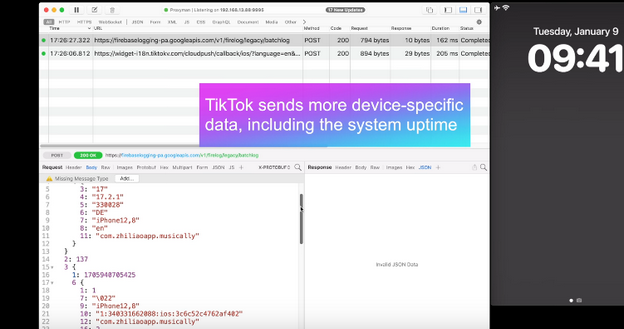
TikTok

With TikTok, for example, the app sends the iPhone’s boot time to the remote servers every time it receives a push notification.
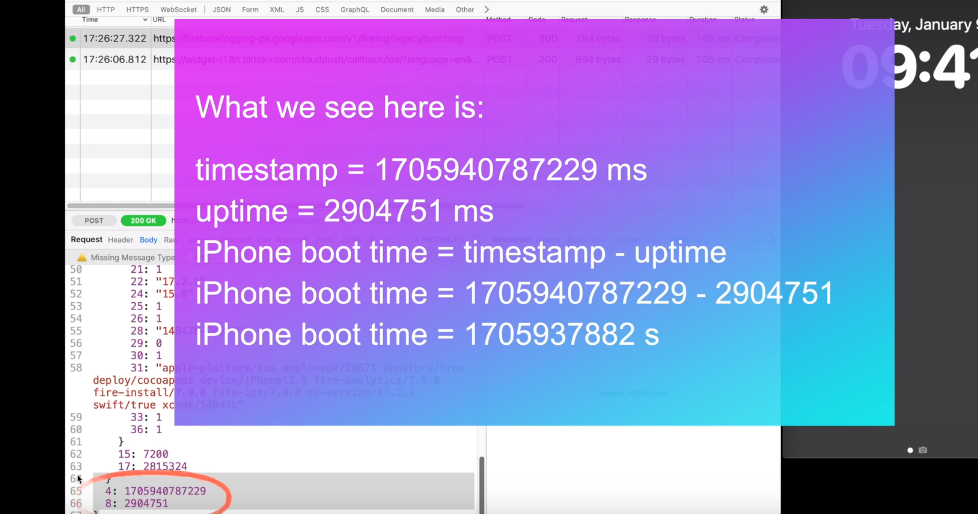
TikTok sends a lot of data to external servers

That means that TikTok knows exactly when the user last restarted their iPhone. If collected over a period of time, the boot time can tell how often the user reboots their iPhone, which can indicate how much they use it or how stable it is. It can be also used to identify the user’s device or track their activity.

When the Facebook app sends a push notification to the same device, Facebook receives the same data about the user’s iPhone last boot time.
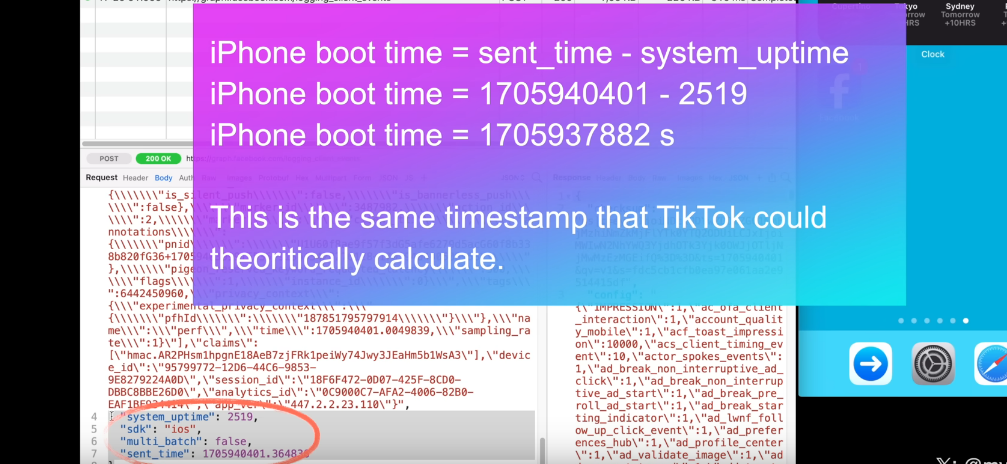
Facebook

As the researcher notes, this may facilitate tracking the user across different apps. That is because the boot time can be used as a unique identifier for the user’s device. If the same device has multiple apps that collect and send the boot time to the same or different servers, these servers can compare the boot time data and link it to the same device. This way, they can track the user’s behavior and preferences across different apps, even if the user does not use the same account or login information for each app. All of this makes the exploitation of the push notification feature by social media companies a legitimate privacy threat.

Moreover, Mysk notes that some apps, for example Facebook and TikTok, also send data when clearing their notifications in Notification Center, which is an iOS feature that provides an overview of alerts from applications.

For example, when a user clears a Facebook notification, the app sends a request with detailed information, including the information about available memory, the last app event, such as liking a post, the time since last app event, the actor ID, that identifies the user’s account on Facebook, the preferred content size, the timestamp (i.e. the exact date and time) when the notification was cleared, the connection type, and so forth.
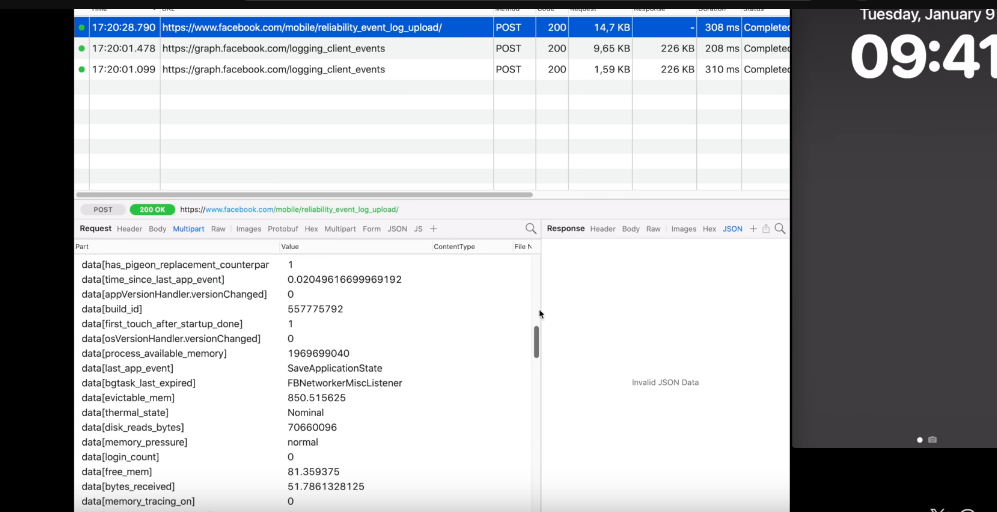
When a user clear a Facebook notification, the app sends detailed information about the user to the external servers

Twitter (X) handles the collection of the user’s information more or less the same way as Facebook and TikTok do.
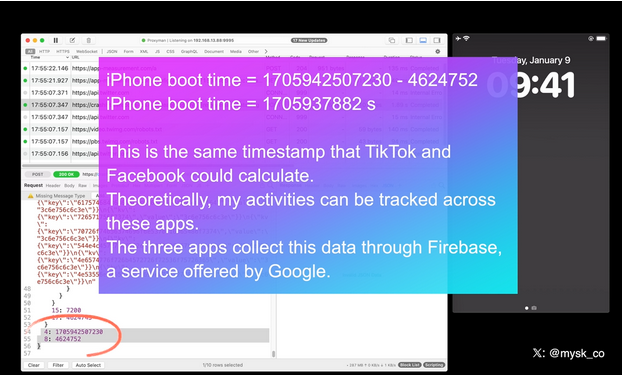
X/Twitter

All three companies are using Firebase, a service offered by Google, Mysk notes, adding that “the frequency at which many apps send device information after being triggered by a notification is mind-blowing.”

New Apple rule for devs: what will they change?

Mysk pins a lot of hopes on the new rules for developers that Apple has put in place and that will come into effect this spring. As it unveiled the rules, Apple announced that developers would need to explain why their apps have to use certain APIs (Application Programming Interfaces), which are methods for different apps to communicate and share data.

The developers will have to explain why they need to access device information not only for their own code, but also for third-party SDKs (software development kits) that they add to their apps. Both apps and third-party SDKs will need to write one or more “approved reasons” for why they need to access device information through specific APIs in separate documents called “privacy manifest files.” These reasons should be “consistent with the app’s functionality.” We wrote a detailed review of Apple’s new requirement for developers in August — check it out here.

But the question is, will it stop companies from harvesting data from apps through the push notification backdoor? In theory, it should, but only if Apple seriously enforces these rules and monitors developers’ compliance. Which is by no means guaranteed.

We believe that the new rules will improve the situation, but by how much? It is a difficult question with many variables. Developers will have to take the new rules into account, so there’s a chance they’ll try to follow them in good faith. However, those who are hell-bent on continuing to collect this data will likely choose to take risks. And then it’ll be up to Apple and its reviewers to catch these apps in the act.

In any case, we hope Apple takes a proactive and transparent approach to privacy enforcement, or users’ data will continue to be at risk.


Bu gönderiyi beğendiniz mi?
AdGuard VPN AdGuard DNS AdGuard Mail AdGuard Wallet
Windows için AdGuard'ın ana ekranı
Windows için AdGuard'ın koruma özelliklerini ve ayarlarını gösteren koruma ekranı
Windows için AdGuard'ın engellenen reklamların ve izleyicilerin istatistiklerini gösteren İstatistik ekranı
Windows için AdGuard'ın uygulama yönetimi ekranı, cihazda yüklü uygulamalar için koruma yönetimi seçeneklerini göstermektedir
21.372 21372 kullanıcı incelemesi
Mükemmel!

AdGuard: Windows için reklam engelleyici

Windows için AdGuard, bir reklam engelleyiciden daha fazlasıdır. Reklamları engelleyen, tehlikeli sitelere erişimi kontrol eden, sayfanın açılışını hızlandıran ve çocukları uygunsuz içerikten koruyan çok amaçlı bir araçtır

Programı indirerek Lisans sözleşmesi şartlarını kabul etmiş olursunuz
Microsoft Mağazası
Programı indirerek Lisans sözleşmesi şartlarını kabul etmiş olursunuz
Windows için AdGuard v8.0, 14 gün deneme süresi
Mac için AdGuard'ın ana ekranı
Mac için AdGuard'ın Gizlilik Modu ekranı
21.372 21372 kullanıcı incelemesi
Mükemmel!

AdGuard: Mac için reklam engelleyici

Mac için AdGuard, macOS düşünülerek tasarlanmış benzersiz bir reklam engelleyicidir. Sizi tarayıcılar ve uygulamalardaki rahatsız edici reklamlardan korumanın yanı sıra, izleme, kimlik avı ve dolandırıcılıktan da korur
Programı indirerek Lisans sözleşmesi şartlarını kabul etmiş olursunuz
Devamını oku
Mac için AdGuard v2.19, 14 gün deneme süresi
Android için AdGuard'ın ana ekranı
Android için AdGuard'ın İzleme koruması ekranı
Android için AdGuard'ın uygulama yönetimi ekranı, cihazda yüklü uygulamalar için koruma yönetimi seçeneklerini göstermektedir
Android için AdGuard'ın engellenen reklamların ve izleyicilerin istatistiklerini gösteren İstatistik ekranı
Android için AdGuard'ın özel tarayıcısının ana ekranı
Android için AdGuard'ı indirme QR kodu
21.372 21372 kullanıcı incelemesi
Mükemmel!

AdGuard: Android için reklam engelleyici

Tüm tarayıcılarda, oyunlarda ve diğer uygulamalarda reklamları ve izleyicileri engeller. Gizliliğinizi korur ve uygulamalarınızın interneti nasıl kullandığını kontrol etmenizi sağlar. APK aracılığıyla yüklenir
Programı indirerek Lisans sözleşmesi şartlarını kabul etmiş olursunuz
Devamını oku
İndirmek için tara
Cihazınızda bulunan herhangi bir QR kod okuyucuyu kullanın
Android için AdGuard v4.14, 14 gün deneme süresi
iOS için AdGuard'ın ana ekranı
iOS için AdGuard'ın koruma özelliklerini ve ayarlarını gösteren koruma ekranı
iOS için AdGuard'ın engellenen reklamların ve izleyicilerin istatistiklerini gösteren İstatistik ekranı
iOS için AdGuard'ı indirme QR kodu
21.372 21372 kullanıcı incelemesi
Mükemmel!

AdGuard: iOS için reklam engelleyici

iPhone ve iPad için en iyi iOS reklam engelleyici. AdGuard, Safari'de her türlü reklamı ve izleyiciyi ortadan kaldırır ve DNS düzeyinde tüm uygulamalarda gizliliğinizi korur
Programı indirerek Lisans sözleşmesi şartlarını kabul etmiş olursunuz
Devamını oku
İndirmek için tara
Cihazınızda bulunan herhangi bir QR kod okuyucuyu kullanın
iOS için AdGuard v4.5
AdGuard İçerik Engelleyicinin ana ekranı
AdGuard İçerik Engelleyicinin Filtreler ekranı
AdGuard İçerik Engelleyicinin Ayarlar ekranı
21.372 21372 kullanıcı incelemesi
Mükemmel!

AdGuard İçerik Engelleyici

AdGuard Content Blocker, içerik engelleme teknolojisini destekleyen mobil tarayıcılarda her türlü reklamı ortadan kaldırır — örneğin, Samsung Internet ve Yandex Browser. Android için AdGuard'a kıyasla özellikleri sınırlıdır, ancak ücretsiz, yüklemesi kolay ve etkilidir
Programı indirerek Lisans sözleşmesi şartlarını kabul etmiş olursunuz
Devamını oku
AdGuard İçerik Engelleyici v2.8
AdGuard Tarayıcı Uzantısı'nın ana ekranı
AdGuard Tarayıcı Uzantısı'nın İzleme koruması ekranı
21.372 21372 kullanıcı incelemesi
Mükemmel!

AdGuard Tarayıcı Uzantısı

AdGuard, tüm web sayfalarındaki tüm reklam türlerini etkili bir şekilde engelleyen en hızlı ve en hafif reklam engelleme uzantısıdır! Kullandığınız tarayıcı için AdGuard'ı seçin ve reklamsız, hızlı ve güvenli gezinmenin tadını çıkarın.
Yükle
Programı indirerek Lisans sözleşmesi şartlarını kabul etmiş olursunuz
Yükle
Programı indirerek Lisans sözleşmesi şartlarını kabul etmiş olursunuz
Yükle
Programı indirerek Lisans sözleşmesi şartlarını kabul etmiş olursunuz
Yükle
Programı indirerek Lisans sözleşmesi şartlarını kabul etmiş olursunuz
Yükle
Programı indirerek Lisans sözleşmesi şartlarını kabul etmiş olursunuz
Devamını oku
Yükle
Programı indirerek Lisans sözleşmesi şartlarını kabul etmiş olursunuz
Devamını oku
AdGuard Tarayıcı Uzantısı v5.5
AdGuard Asistanın ana ekranı
21.372 21372 kullanıcı incelemesi
Mükemmel!

AdGuard Asistanı

AdGuard masaüstü uygulamaları için bir yardımcı tarayıcı uzantısıdır. Bu uzantı, sitelerde özel öğeleri engellemenize, siteleri izin listesine eklemenize ve tarayıcınızdan doğrudan bildirimler göndermenize izin verir
AdGuard Asistanı v1.4
21.372 21372 kullanıcı incelemesi
Mükemmel!

AdGuard Home

AdGuard Home, reklamları ve izleyicileri engellemek için ağ tabanlı bir çözümdür. Ev ağınızdaki tüm cihazları kapsaması için yönlendiricinize bir kez kurun — ek istemci yazılımı gerekmez. Bu özellikle gizliliğinize tehdit oluşturan çeşitli IoT cihazları için önemlidir
AdGuard Home v0.107
iOS için AdGuard Pro'nun ana ekranı
iOS için AdGuard Pro'nun koruma özelliklerini ve ayarlarını gösteren Koruma ekranı
iOS için AdGuard Pro'nun İstatistikler ekranı, engellenen reklamlar ve izleyicilere ilişkin istatistikleri gösterir
21.372 21372 kullanıcı incelemesi
Mükemmel!

iOS için AdGuard Pro

AdGuard Pro for iOS, tüm gelişmiş reklam engelleme koruma özellikleri etkin olarak gelir. iOS için ücretli AdGuard sürümüyle aynı araçları sunar. Safari'de reklamları engellemede mükemmeldir ve korumanızı özelleştirmeniz için DNS ayarlarını kişiselleştirmenize olanak tanır. Tarayıcılar ve uygulamalarda reklamları engeller, çocuklarınızı uygunsuz içeriklerden korur ve kişisel verilerinizi güvenli tutar
Programı indirerek Lisans sözleşmesi şartlarını kabul etmiş olursunuz
Devamını oku
iOS için AdGuard Pro v4.5
Mac için AdGuard Mini'nin ana ekranı
Mac için AdGuard Mini'nin Safari koruma ekranı
Mac için AdGuard Mini'nin kural oluşturma ekranı
21.372 21372 kullanıcı incelemesi
Mükemmel!

AdGuard Mini for Mac — Safari reklam engelleyici

Mac için AdGuard Mini, güçlü bir Safari reklam engelleyicisidir. Bu hafif uygulama reklamları kaldırır, izleyicileri engeller ve sayfa yüklemeyi hızlandırır. Safari'de Web'de dikkatiniz dağılmadan gezinmenize ve verilerinizi gizli tutmanıza yardımcı olur
Yükle
Programı indirerek Lisans sözleşmesi şartlarını kabul etmiş olursunuz
Devamını oku
Mac için AdGuard Mini v2.3
Android TV için AdGuard'ın korumanın etkin olduğu ana ekranı
Android TV için AdGuard'ın özelliklerini ve ayarlarını gösteren Reklam Engelleme ekranı
Android TV için AdGuard'ın ayarlar ekranı
Android TV için AdGuard'ın reklamların ve izleyicilerin engellendiği uygulamaları gösteren Uygulama Yönetimi ekranı
21.372 21372 kullanıcı incelemesi
Mükemmel!

Android TV için AdGuard

Android TV için AdGuard, reklamları engelleyen, gizliliğinizi koruyan ve Akıllı TV'niz için bir güvenlik duvarı görevi gören tek uygulamadır. Web tehditleri hakkında uyarılar alın, güvenli DNS kullanın ve şifrelenmiş trafikten yararlanın. Birinci sınıf güvenlik; sıfır reklam ile rahatlayın ve en sevdiğiniz programlara dalın!
Android TV için AdGuard v4.14, 14 gün deneme süresi
Linux penguenini tutan AdGuard maskotu Agnar
21.372 21372 kullanıcı incelemesi
Mükemmel!

Linux için AdGuard

Linux için AdGuard, dünyanın ilk sistem genelinde Linux reklam engelleyicisidir. Reklamları ve izleyicileri cihaz düzeyinde engelleyin, önceden yüklenmiş filtrelerden seçim yapın veya kendi filtrenizi ekleyin — tüm bunları komut satırı arayüzü aracılığıyla gerçekleştirin
Linux için AdGuard v1.4
21.372 21372 kullanıcı incelemesi
Mükemmel!

AdGuard Temp Mail

Sizi anonim tutan ve gizliliğinizi koruyan ücretsiz bir geçici e-posta adresi oluşturucu. Ana gelen kutunuzda istenmeyen posta olmaz!
21.372 21372 kullanıcı incelemesi
Mükemmel!

AdGuard VPN

Dünya çapında 75 konum

Herhangi bir içeriğe erişim

Güçlü şifreleme

Günlük tutmama politikası

En hızlı bağlantı

7/24 destek

Ücretsiz dene
Programı indirerek Lisans sözleşmesi şartlarını kabul etmiş olursunuz
Devamını oku
21.372 21372 kullanıcı incelemesi
Mükemmel!

AdGuard DNS

AdGuard DNS, herhangi bir uygulamanın yüklenmesini gerektirmeyen internet reklamlarını engellemenin kusursuz bir yoludur. Kullanımı kolay, tamamen ücretsizdir, herhangi bir cihazda kolayca ayarlanır ve reklamları, sayaçları, kötü amaçlı siteleri ve yetişkinlere yönelik içeriği engellemek için gerekli minimum işlevleri sağlar.
21.372 21372 kullanıcı incelemesi
Mükemmel!

AdGuard Mail

Kimliğinizi koruyun, istenmeyen postadan kaçının; gelen kutunuzu takma adlarımız ve geçici e-posta adreslerimizle güvende tutun. Tüm işletim sistemleri için ücretsiz e-posta yönlendirme hizmetimizin ve uygulamalarımızın keyfini çıkarın
21.372 21372 kullanıcı incelemesi
Mükemmel!

AdGuard Wallet

Varlıklarınız üzerinde tam kontrol sağlayan güvenli ve özel bir kripto cüzdanı. Birden fazla cüzdanı yönetin ve saklamak, göndermek ve takas etmek için binlerce kripto para birimini keşfedin
AdGuard indiriliyor AdGuard'ı kurmak için okla gösterilen dosyaya tıklayın "Aç" öğesini seçin ve "Tamam" öğesine tıklayın, ardından dosyanın indirilmesini bekleyin. Açılan pencerede AdGuard simgesini "Uygulamalar" klasörüne sürükleyin. AdGuard'ı seçtiğiniz için teşekkür ederiz! "Aç" öğesini seçin ve "Tamam" öğesine tıklayın, ardından dosyanın indirilmesini bekleyin. Açılan pencerede "Kur" öğesine tıklayın. AdGuard'ı seçtiğiniz için teşekkür ederiz!
AdGuard'ı mobil cihazınıza yükleyin

















































