Zuckerberg touts WhatsApp as a more secure and private alternative to iMessage. Is he bluffing?
WhatsApp might be the world’s most-used messenger with 2 billion users, yet it is still lagging behind Apple’s iMessage in the lucrative US market — a state of things that is rattling WhatsApp parent, Meta. Even though its very own Facebook Messenger reigns supreme as the most popular chat app in the US, Meta has put its chips on WhatsApp, pitting it against iMessage. This month, a giant WhatsApp ad appeared at New York’s Penn Station. The banner featured three message bubbles: a blue bubble for end-to-end encrypted iMessage texts, a green bubble for non-encrypted SMS texts iMessage users send to Android devices, and a “private” WhatsApp bubble.
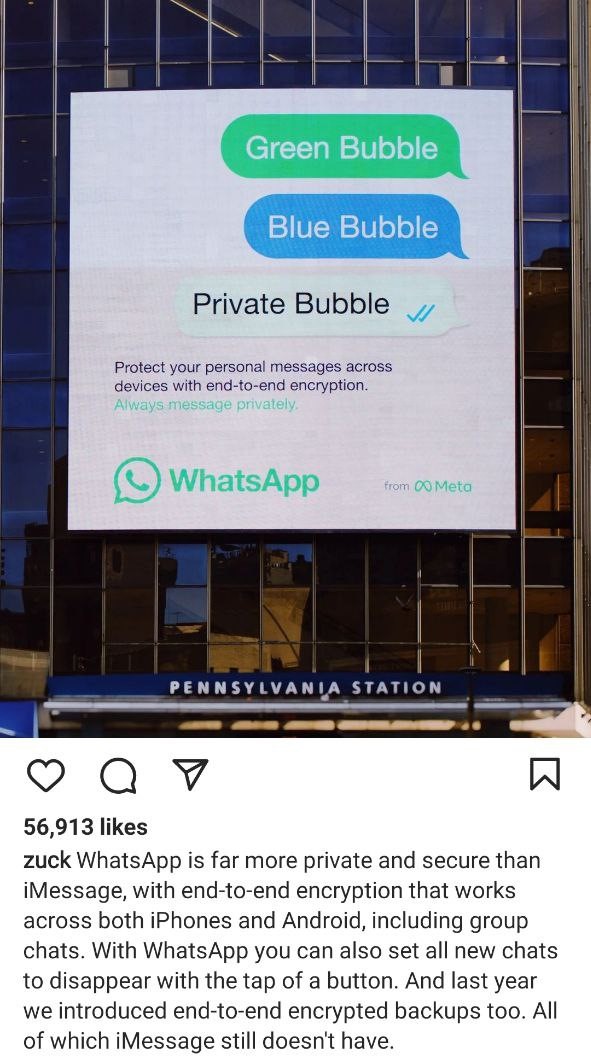
Mark Zuckerberg reposted the ad, touting WhatsApp as “far more private and secure than iMessage.” In a not-so-thinly-veiled jab at Apple, Meta CEO argued that WhatsApp compares favorably to Apple’s messaging service due to its compatibility with both iOS and Android, and a couple of opt-in features such as end-to-end encrypted backup that iMessage does not have.
By calling out its archenemy, WhatsApp has invited more scrutiny upon itself. Indeed, why do so many Americans prefer to stay clear from WhatsApp? Could it be because of its bad reputation? And what if WhatsApp, like good wine, really does get better with age and we haven’t been paying attention?
iMessage — easy target
First of all, it’s easy to pick holes in Apple’s chat app due to a simple fact that it has never been marketed as a one-size-fits-all solution. iMessage is tailor-made for iPhone: texts between two Apple devices with iMessage enabled are always end-to-end encrypted. However, there will be no encryption if an iMessage user sends a text to an Android device. In order to make the distinction clear, Apple placed the encrypted texts in blue bubbles, while the much-maligned SMS messages between iOS and Android are locked in green bubbles.
So far, Apple has resisted calls to accommodate iPhone owners who have to text with less fortunate relatives, friends, and customers who use Android. As of now, there is no end in sight to what has become known as the “bubble war”. Apple CEO Tim Cook rejected the idea of implementing Rich Communication Service (RCS) so that Android users could send high-quality multimedia messages to iPhones. Instead, Cook turned the iMessage’s incompatibility with Android into a marketing pitch, advising iPhone owners to buy iPhones for their uninitiated family and friends. iPhone sales have been Apple’s main source of revenue for over a decade, so such stubbornness makes sense. And if this is a dangerous gamble, it works for Apple in the US, where iPhones hold the 50% smartphone market share after single-handedly taking over the entire Android family this summer. Given Apple’s prevalence in the US, it’s not surpising that WhatsApp is struggling to win over Americans.
Another feature that Zuckerberg says gives WhatsApp a competitive edge is end-to-end encrypted backend. Your WhatsApp’s message history is backed up to either iCloud or Google Drive and is not encrypted by default. This means that WhatsApp has the encryption key needed to unscramble the data. It also means that the backup could potentially be hacked. In an effort to close this security hole, WhatsApp introduced end-to-end encrypted backend in 2021. The feature is opt-in and must be enabled in the settings.
For its part, iMessage backs up data to iCloud, and those backups are not encrypted by default either. Apple reportedly considered doing so, but decided against the move. The company subsequently courted controversy for turning over iCloud backup of a suspect in a high-profile US shooting case. That being said, if you really want to, you can create your own encrypted backup for iMessage that will be out of Apple’s reach.
So, while iMessage is not as universal and secure as WhatsApp, and probably deserves criticism, it is like this by design. You don’t compare a kitchen knife to a Swiss army knife and expect the former to also serve as a screwdriver. Apple has never positioned iMessage as a direct competitor to Telegram, Signal or other standalone privacy-focused messaging apps, including WhatsApp.
And when it comes to privacy and security, it’s not that WhatsApp itself is beyond reproach.
Can WhatsApp read your messages?
If we had to answer this question point-blank, the answer would be: it depends. WhatsApp says that all of your messages are encrypted end-to-end, which means that only you and the person you are texting with can see them. There’s, however, a caveat. WhatsApp retains 1,000 content moderators or “reviewers” who can examine your messages if the other person flags them as abusive. Once flagged, the messages are copied to the recipient device and sent for a review. WhatsApp receives not only the reported message itself, but the last five messages sent by the reported user including the allegedly abusive one. A ProPublica investigation last year revealed that human reviewers who sift through the messages have three courses of action to choose from: ignore the report, put the sender on “watch” for further scrutiny, or ban the account from WhatsApp — and they have less than a minute to make that life-or-death decision.
The practice of policing user content is rife with Facebook, Instagram and Twitter, but social media platforms are not typically held to the same standards as a messaging service that styles itself as secure and private. For instance, Telegram has recently been fined by the German government for failing to create a channel where users would be able to report “criminal content.” Telegram, which is not end-to-end encrypted by default, also has human moderators processing spam reports, and some claimed that they were banned from the service for no reason. Telegram, however, says that it does not process any illegal content requests relating to private chats and groups. Signal, which is end-to-end encrypted, chose a hands-off approach that does not involve content moderation. When a user clicks “Report Spam and Block”, Signal receives the phone number and a “one-time anonymous message ID,” but not the message itself. If a certain account is being repeatedly reported for spam, Signal will throw a spanner in its works, forcing the user to complete CAPTCHA.
Bottom line: WhatsApp supposedly cannot read your messages unless they are reported by someone. In that sense, it may not be the most secure option available, but not something totally unheard of. However, Meta has signaled that it is prepared to do more.
Backdooring rumors: false alarm or no smoke without fire?
In June 2019, Facebook riled up the privacy-conscious public by discussing the benefits of client-side scanning using filtering AI. During a public talk called “Applying AI to Keep the Platform Safe”, the company officials spoke about shrinking the size of AI models to deploy and train them on the device. The talk caused quite a stir, with tech entrepreneur and Forbes contributor Kale Leetaru alleging that Facebook was preparing to “move a global mass surveillance infrastructure directly onto users’ devices” and circumvent end-to-end encryption. That take gained quite a lot of traction. Facebook was quick to pour cold water on the speculation, insisting that it was not planning to build a backdoor into WhatsApp. Head of WhatsApp, Will Cathcart, claimed that the company had “zero plans to do so.”
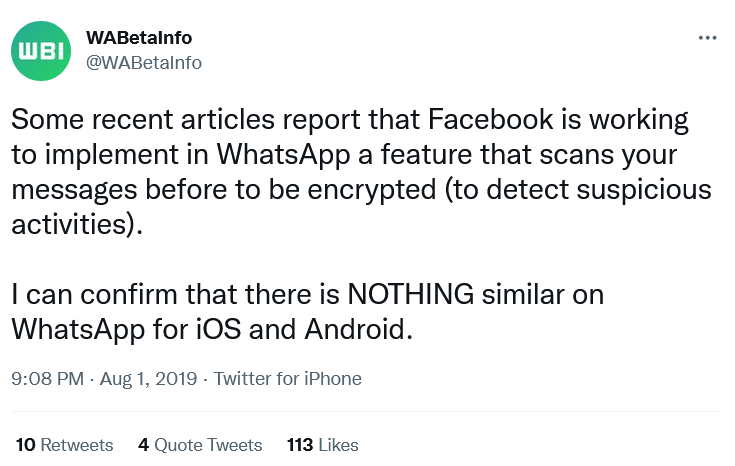
Although it may have been a false alarm, that doesn’t mean we shouldn’t remain vigilant. If Meta has anyone to blame for its perpetual lack of credibility, it should blame itself. Facebook, and now Meta, owes its dismal reputation to its murky data collection and sharing practices. WhatsApp, as part of Meta’s ecosystem, is not much different.
Metadata collection and sharing
WhatsApp may not be able to access your encrypted messages (unless somebody reports them). However, WhatsApp collects vast swathes of unencrypted metadata, which it can share with both Facebook and law enforcement.
The metadata that WhatsApp can collect and share includes email address, country, IP address, phone number, as well as your contacts and device information. The latter, in its turn, includes hardware model, OS, battery level, app version, mobile operator, browser information, time zone, language, and identifiers “unique to Meta Company Products.” WhatsApp also collects information about how you interact with the app, including your statuses, groups (their names, pictures and descriptions), your profile photo, “about you” information, and whether you are online and when you last used the app. WhatsApp can also receive information about you from other users, such as your phone number and name, and from businesses you interact with on WhatsApp.
WhatsApp began sharing metadata with Facebook by default back in 2016, but it was not until last year that many users woke up to the fact. The reason for this crude awakening and the mass exodus to rival apps, primarily Telegram, was an update to WhatsApp’s privacy policy — namely, the removal of a clause that allowed users to opt out of data-sharing with Facebook. As The Wired explained at the time, the update was just a codification of the existent status quo, as WhatsApp had since long removed the opt-out option for new users (without attracting much attention).
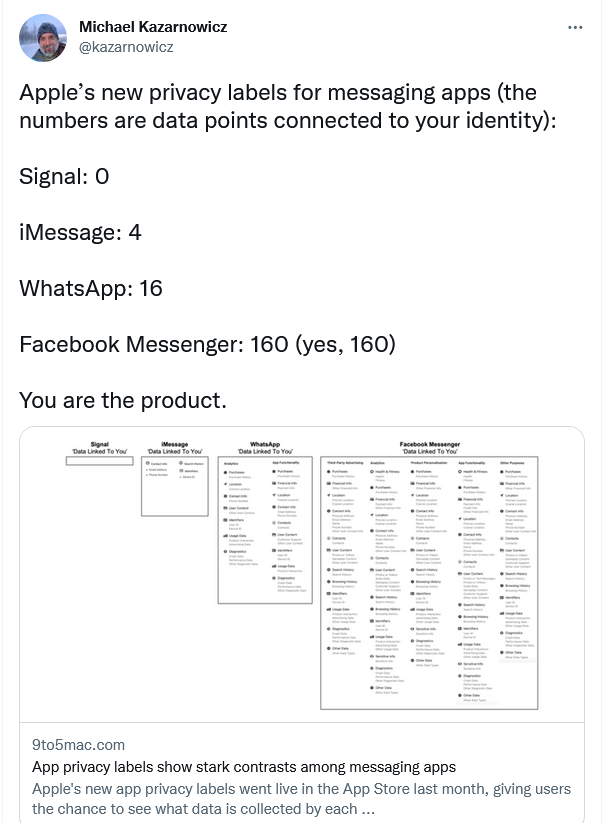
While every chat app collects at least some information, WhatsApp pulls far ahead of most of the competition in the amount of usage and location data it harvests. Apple’s “privacy labels” launched last year made that ever more clear — and users took notice.
And if you may think that metadata means nothing, you are wrong. Access to metadata could prove instrumental in solving criminal cases. An FBI document obtained by Rolling Stone last year revealed that WhatsApp, unlike most other messaging apps, provides law enforcement with near “real time” user information in response to the so-called “pen register” or surveillance requests. The document indicated that WhatsApp is far more forthcoming than the majority of other apps when it comes to data sharing. The metadata provided by WhatsApp to the US government reportedly became a game changer in the arrest of US Treasury Department whistleblower Natalie Edwards.
Telegram CEO Pavel Durov has recently branded WhatsApp a “surveillance tool”. And while there is no love lost between Telegram and its bitter rival WhatsApp, WhatsApp’s own privacy record certainly does not speak to its defense.
Ads in the DNA
WhatsApp has its pros and cons, just like any other messenger on the market. However, having become part of the Meta empire, it cannot be regarded as a separate unit. Meta’s main source of revenue is advertising for which it needs as much and as accurate user data as possible.
Each to their own, but it’s probably not the best idea to entrust your data to a company (even the less problematic part of it) that lives off the sale of targeted ads. Meta has been racking its brains over how to monetize WhatsApp for years, and reportedly toyed with the idea of bringing ads to WhatsApp, but ultimately scrapped the plan. For now.
It’s up to you to decide if WhatsApp has worked hard enough to redeem itself and earn your trust, and if its brand new features such as end-to-end encrypted backups and disappearing messages make it a reformed citizen. If you choose to use WhatsApp, we recommend arming yourself with tools that would limit the amount of data that could be potentially collected about you. As such, you can use an ad blocker to deter ads, trackers, third-party cookies and a VPN to hide your IP address. You can also install DNS filtering software that will help protect you from ads, trackers, analytics systems, and malicious websites on DNS level.




















































