Apple’s new EU terms: accept and lose money, or reject and stay within the walled garden

Apple’s ecosystem has always been known as a walled garden because of the restrictions it imposed on app developers and users. Developers had no choice but to list their apps on Apple’s App Store if they wanted an iOS user to install them. And if they wanted the user to buy something from them, they had to process payments through Apple’s own payment mechanism.

Such a closed system made life difficult not only for developers, who had to pay Apple’s 30% standard fee on in-app purchases (or 15% for small businesses), but also for users. The latter had less of a choice when it came to apps and download options than the users of the Android-based phones, since Google has always allowed sideloading.

This situation is about to change. The culprit is the EU’s upcoming antitrust law, known as the Digital Markets Act (DMA). In September 2023, App Store, iOS operating system, and Safari browser, all owned by Apple, received gatekeeper status under the DMA. This means that by March 6, 2024, Cupertino will have to open them up to competitors or face hefty fines of up to 10% of the company’s total global turnover.

As the deadline draws closer, Apple has come up with a plan for how it’s going to comply with the DMA. And after taking a look at this plan, it’s clear as day to us that Apple intends to comply with the legislation in letter, but definitely not in spirit. Essentially, Apple offers developers a false choice: either they agree to stay within the iOS ecosystem’s confines, or they can explore alternative payment methods and app stores — and risk going under in the process.

What’s wrong with Apple’s new business terms in Europe?

The dilemma that developers face right now is the following: they can either stay on the official App Store under the current terms, or accept the new terms and be subject to the new Core Technology Fee (CTF) that may cost them a fortune. Before we zoom in on the CTF and what it means for developers, especially those of free and freemium apps, we will briefly list the other parts of Apple’s DMA compliance plan.
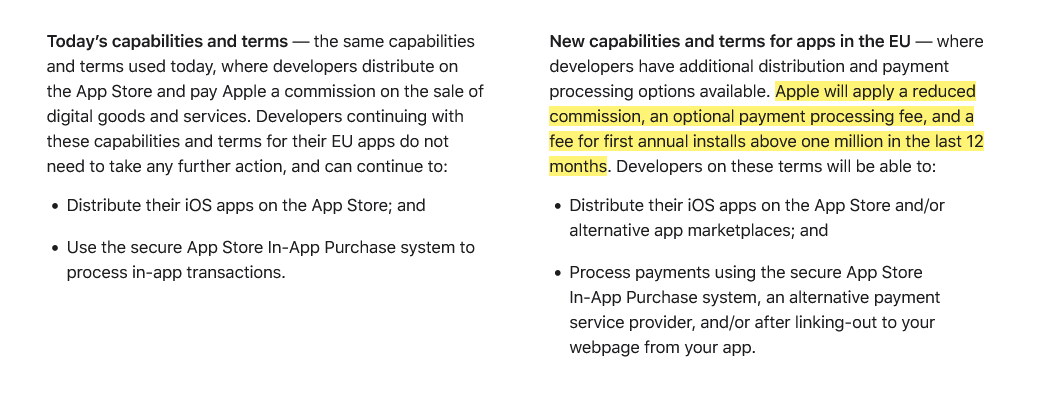
Apple introduces new terms for developers in the EU

Screenshot: Apple gives developers in the EU two options: stay on the current terms or accept the new news. Source: Apple

Under the plan, Apple says it will apply a “reduced commission” to in-app purchases. Developers in Apple’s small business program will pay a 10% fee instead of 15%, regardless of the payment method they choose. Others will pay a 17% fee instead of the standard 30% commission. If developers choose to continue using Apple as their payment processor, they’ll pay an additional 3% payment processing fee. But if they decide to ditch Apple and switch to an alternative payment system or redirect users to their own site for payment, they won’t have to pay Apple any additional fees.

So far so good, right?

It’s when we move to the third part of this masterplan, the Core Technology Fee, that things stop being pretty. In fact, they are starting to look pretty ugly.
The Core Technology Fee (CTF) is the fee that will apply only to the iOS apps whose developers accepted the new business terms. Importantly, it will apply both to iOS apps distributed on the App Store, as well as to the apps that are distributed through alternative app stores, or “marketplaces” as Apple calls them.

The definition of the 'first annual install' is not that straightforward

Subject to the fee are the developers whose apps will clock in over 1 million first annual installs in the past 12 months. They will have to pay a €0.50 fee to Apple for each user over 1 million who installed their app for the first time in a year. After these 12 months, developers will have to pay the fee again, and it does not have to be an install per se. The developer terms state that “app updates,” for instance, are also counted as new installs, “as long as they start a new 12-month period.”
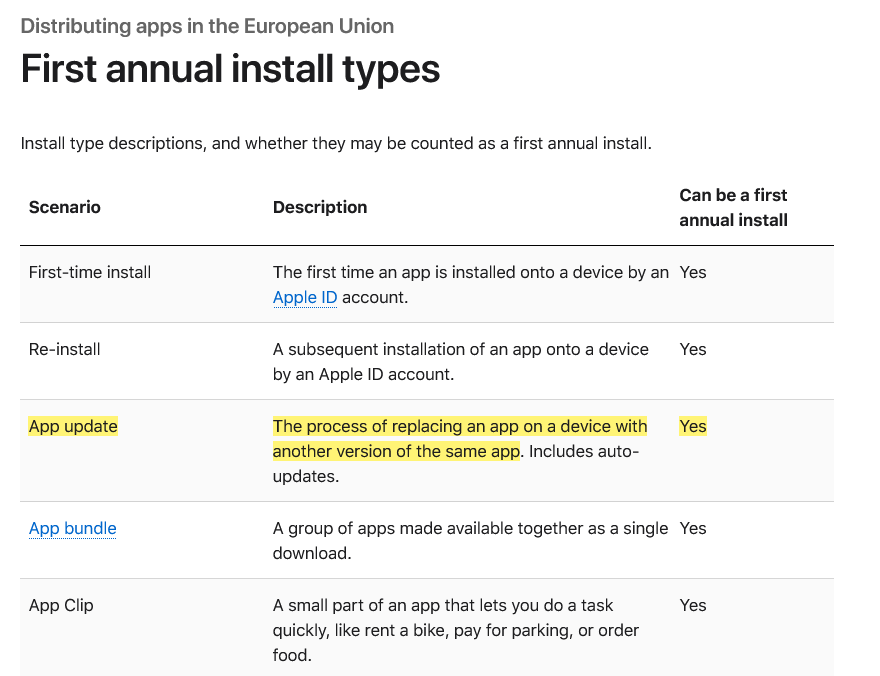
Types of first annual install under Apple's new terms

Marketplace apps or alternative app stores will have it even worse under Apple’s new and supposedly more competition-friendly rules. The developers who will create and distribute their own app stores for iOS apps in the EU are due a €0.50 CTF to Apple for each user who installs their app store for the first time in a year even if it happens before the developer racks up one million installs in total.

Go DMA and go broke: what CTF means in practice

If any of the “big guns,” meaning apps that get more than 1 million downloads in a year, could afford such a fee, it would be the paid apps. However, when it comes to free apps that make money by showing ads, or to freemium apps that offer part of their functionality for free, the fee is insurmountable.

Needless to say, Apple’s masterplan did not strike a chord with developers. Spotify did not hold back, calling the CTF “extortion, plain and simple.”

A key issue raised by Spotify in its scathing response to Apple’s plan is the vulnerable position it puts free app developers in: “How will a developer pay Apple back if its free app goes viral — multiple millions of accounts install that free app, and then that developer owes Apple millions?” Indeed, if a developer of a free or freemium app makes the unfortunate decision to accept Apple’s new terms in the EU, and then has a breakthrough and sees the app gain popularity, the last thing on their mind would be celebrating their achievement, because the first thing they should be thinking about is how to pay Apple back the fees they would owe. And, as Spotify points out, there is nothing preventing Apple from raising the fees at any time they deem fit.

To be fair, Apple has made no big secret of how punitive the new terms could be for some developers. Anyone can estimate how much they’ll pay Apple under its DMA compliance plan using its fee calculator. So let’s take a game that hit the sweet spot and went moderately viral, reaching 2 million installs in the EU in 12 months. Under the new terms, it would have to pay Apple $45,290 per month, whereas under the old terms, it would have to pay nothing. The choice seems a no-brainer to us.
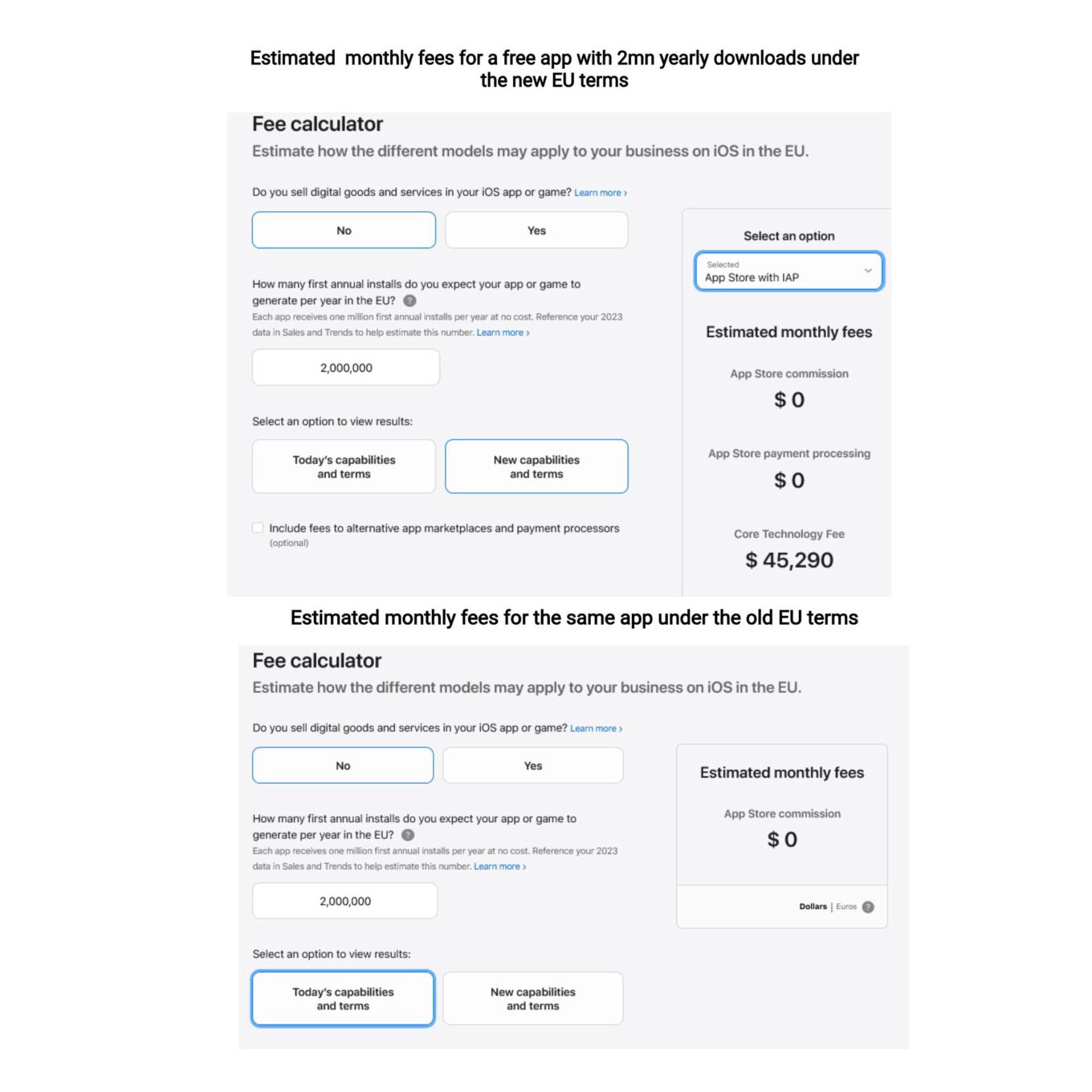
You can use a calculator to estimate your potential CTF

What Apple is effectively doing is trying to discourage developers from switching to the new terms, where they would have had more freedom to choose distribution and payment options. They are betting, and rightly so, that not so many would be willing to risk going into the red if their app takes off or experiences a sudden surge in popularity.

So, while Apple allows alternative stores de jure, de facto there is a prohibitive Core Technology Fee that blocks the way for free and freemium apps to enter alternative stores. In AdGuard’s case, we cannot take advantage of this offer either, simply because we do not have enough resources to pay the Core Technology Fee, and we are not alone in this. The only option left on the table is to make the app fully paid — which we have no intention of doing.

Will the EU regulators buy it?

It remains to be seen whether the DMA-focused changes that Apple plans to introduce will raise an issue with the EU regulators. As TechCrunch points out, the Article 6(12) of the DMA states that “the gatekeeper shall apply fair, reasonable, and non-discriminatory general conditions of access for business users to its software application stores, online search engines and online social networking services.” Is the Core Technology Fee fair? We don’t think so.

Apple’s plan to comply with the DMA is a clever attempt to spin the regulation to its own advantage, and to pressure developers into sticking with the old terms. By imposing the Core Technology Fee on apps that exceed a certain threshold of downloads, Apple is effectively penalizing developers who want to explore alternative distribution and payment options. This is a false choice and a mockery of real freedom and real competition in the digital sector. We hope that the EU regulators will not be fooled by Apple’s cosmetic changes and will insist that the DMA is enforced in a way that truly benefits consumers and developers.


Сподобався цей пост?
AdGuard VPN AdGuard DNS AdGuard Mail AdGuard Wallet
Головний екран AdGuard для Windows
Екран захист AdGuard для Windows, що показує функції захисту та налаштування
Екран статистика AdGuard для Windows, що показує статистика заблокованої реклами та трекерів
Екран Керування програмою AdGuard для Windows, що показує параметри керування захистом для програм, встановлених на пристрої
20 467 20467 відгуків
Чудово!

AdGuard — блокувальник реклами для Windows

AdGuard для Windows — це більше, ніж блокувальник реклами. Це багатофункціональний інструмент, який блокує рекламу, контролює доступ до небезпечних сайтів, прискорює завантаження сторінок і захищає дітей від неприйнятного контенту

Завантажуючи програму, ви приймаєте умови Ліцензійної угоди
Магазин Microsoft
Завантажуючи програму, ви приймаєте умови Ліцензійної угоди
AdGuard для Windows, версія 8.0, пробний період 14 днів
Головний екран AdGuard для Mac
Екран прихованого режиму AdGuard для Mac
20 467 20467 відгуків
Чудово!

AdGuard — блокувальник реклами для Mac

AdGuard для Mac — це унікальний блокувальник реклами, розроблений з урахуванням macOS. Окрім захисту від настирливої реклами в браузерах і застосунках, він захищає вас від відстеження, фішингу та шахрайства.
Завантажуючи програму, ви приймаєте умови Ліцензійної угоди
Докладніше
AdGuard для Mac, версія 2.19, пробний період 14 днів
Головний екран AdGuard для Android
Екран Захист від стеження AdGuard для Android
Екран Керування програмою AdGuard для Android, що показує параметри керування захистом для програм, встановлених на пристрої
Екран статистика AdGuard для Android, що показує статистика заблокованої реклами та трекерів
Головний екран приватного браузера AdGuard для Android
QR-код, щоб завантажити AdGuard для Android
20 467 20467 відгуків
Чудово!

AdGuard — блокувальник реклами для Android

Блокує рекламу та трекери у всіх браузерах, іграх та інших застосунках. Захищає вашу конфіденційність і дозволяє контролювати, як ваші застосунки використовують Інтернет. Встановлюється через APK
Завантажуючи програму, ви приймаєте умови Ліцензійної угоди
Докладніше
Сканування для завантаження
Використовуйте будь-який зчитувач QR-коду, доступний на вашому пристрої
AdGuard для Android, версія 4.14, пробний період 14 днів
Головний екран AdGuard для iOS
Екран захист AdGuard для iOS, що показує функції захисту та налаштування
Екран статистика AdGuard для iOS, що показує статистика заблокованої реклами та трекерів
QR-код, щоб завантажити AdGuard для iOS
20 467 20467 відгуків
Чудово!

AdGuard — блокувальник реклами для Safari

Найкращий блокувальник реклами для iOS для iPhone та iPad. AdGuard усуває всі види реклами й трекерів у Safari та захищає вашу конфіденційність у всіх застосунках на рівні DNS
Завантажуючи програму, ви приймаєте умови Ліцензійної угоди
Докладніше
Сканування для завантаження
Використовуйте будь-який зчитувач QR-коду, доступний на вашому пристрої
AdGuard для iOS, 4.5
Головний екран AdGuard Content Blocker
Екран фільтрів AdGuard Content Blocker
Екран налаштувань AdGuard Content Blocker
20 467 20467 відгуків
Чудово!

AdGuard Content Blocker

AdGuard Content Blocker усуває всі види реклами в мобільних браузерах, які підтримують технологію блокування контенту, а саме в Samsung Internet та Яндекс Браузері. Його можливості обмежені у порівнянні з AdGuard для Android, але він безкоштовний, простий у встановленні та ефективний
Завантажуючи програму, ви приймаєте умови Ліцензійної угоди
Докладніше
AdGuard Content Blocker, 2.8
Головний екран AdGuard Browser Extension
Екран Захист від стеження AdGuard Browser Extension
20 467 20467 відгуків
Чудово!

Браузерне розширення AdGuard

AdGuard - найшвидше і легше браузерне розширення для блокування усіх типів реклами! Вибирайте AdGuard для швидкого і безпечного серфінгу без реклами.
Встановити
Завантажуючи програму, ви приймаєте умови Ліцензійної угоди
Встановити
Завантажуючи програму, ви приймаєте умови Ліцензійної угоди
Встановити
Завантажуючи програму, ви приймаєте умови Ліцензійної угоди
Встановити
Завантажуючи програму, ви приймаєте умови Ліцензійної угоди
Встановити
Завантажуючи програму, ви приймаєте умови Ліцензійної угоди
Докладніше
Встановити
Завантажуючи програму, ви приймаєте умови Ліцензійної угоди
Докладніше
Браузерне розширення AdGuard, 5.5
Головний екран Браузерний помічник
20 467 20467 відгуків
Чудово!

Помічник AdGuard

Браузерне розширення-компаньйон для настільних додатків AdGuard. Воно дозволяє блокувати власні елементи на сайтах, додавати сайти до списку дозволених та надіслати звіти з браузера
Помічник AdGuard, 1.4
20 467 20467 відгуків
Чудово!

AdGuard Home

AdGuard Home – це мережеве рішення для блокування реклами та трекерів. Встановіть його один раз на маршрутизатор, щоб покрити всі пристрої домашньої мережі — додаткове клієнтське програмне забезпечення не потрібне. Це особливо важливо для різних пристроїв IoT, які часто становлять загрозу для вашої конфіденційності
AdGuard Home, 0.107
Головний екран AdGuard Pro для iOS
Екран Захист AdGuard Pro для iOS, що показує функції та налаштування захисту
Екран Статистика AdGuard Pro для iOS, що показує статистику заблокованої реклами та трекерів
20 467 20467 відгуків
Чудово!

AdGuard Pro для iOS

AdGuard Pro для iOS постачається з усіма розширеними функціями захисту від блокування реклами. Він пропонує ті ж інструменти, що й платна версія AdGuard для iOS. Він чудово блокує рекламу в Safari та дозволяє налаштовувати параметри DNS для власного захисту. Він блокує рекламу в браузерах і додатках, захищає ваших дітей від небажаного контенту та забезпечує безпеку ваших особистих даних.
Завантажуючи програму, ви приймаєте умови Ліцензійної угоди
Докладніше
AdGuard Pro для iOS, 4.5
Головний екран AdGuard Mini для Mac
Екран захисту Safari в AdGuard Mini для Mac
Екран створення правила в AdGuard Mini для Mac
20 467 20467 відгуків
Чудово!

AdGuard Mini для Mac — блокувальник реклами в Safari

AdGuard Mini для Mac — це потужний блокувальник реклами для Safari. Цей легкий додаток видаляє рекламу, блокує трекери та пришвидшує завантаження сторінок. Він допомагає вам переглядати інтернет у Safari без відволікань і захищає ваші дані відсторонені
Встановити
Завантажуючи програму, ви приймаєте умови Ліцензійної угоди
Докладніше
AdGuard Mini для Mac, 2.3
Головний екран AdGuard для Android TV із увімкненим захистом
Екран блокування реклами AdGuard для Android TV, що показує його функції та налаштування
Екран налаштування AdGuard для Android TV
Екран Керування програмою AdGuard для Android TV, що показує програми, де реклама і трекери заблоковано
20 467 20467 відгуків
Чудово!

AdGuard для Android TV

AdGuard для Android TV - це єдина програма, яка блокує рекламу, захищає вашу конфіденційність і працює як брандмауер для вашого Smart TV. Отримуйте попередження про веб-загрози, використовуйте безпечні DNS і користуйтеся перевагами зашифрованого трафіку. Розслабтеся і пориньте в улюблені шоу з першокласним захистом і нульовою рекламою!
AdGuard для Android TV, версія 4.14, пробний період 14 днів
Маскот AdGuard Агнар, який тримає пінгвіна Linux
20 467 20467 відгуків
Чудово!

AdGuard для Linux

AdGuard для Linux — це перший у світі блокувальник реклами для Linux на рівні системи. Блокуйте рекламу та трекери на рівні пристрою, вибирайте з попередньо встановлених фільтрів або додавайте свої — все через інтерфейс командного рядка
AdGuard для Linux, 1.4
20 467 20467 відгуків
Чудово!

AdGuard Temp Mail

Безкоштовний генератор тимчасових адрес електронної пошти, який зберігає вашу анонімність і захищає вашу конфіденційність. Ніякого спаму у вашій основній поштовій скриньці!
20 467 20467 відгуків
Чудово!

AdGuard VPN

75 місцезнаходжень у світі

Безпечний стрімінг

Надійне шифрування

Без журналювання

Найшвидше з'єднання

Цілодобова підтримка

Спробувати безплатно
Завантажуючи програму, ви приймаєте умови Ліцензійної угоди
Докладніше
20 467 20467 відгуків
Чудово!

AdGuard DNS

AdGuard DNS — це альтернативний спосіб заблокувати рекламу, захистити особисті дані і захистити дітей від дорослих матеріалів. Він простий в налаштуванні і використанні і забезпечує необхідний мінімум захисту від реклами, трекінгу і фішингу, незалежно від платформи.
20 467 20467 відгуків
Чудово!

AdGuard Mail

Захистіть свою особистість, уникайте спаму та забезпечуйте безпеку вашої скриньки за допомогою наших псевдонімів і тимчасових адрес електронної пошти. Користуйтеся нашою безплатною послугою переадресації електронної пошти та застосунками для всіх операційних систем.
20 467 20467 відгуків
Чудово!

AdGuard Wallet

Безпечний і приватний криптогаманець, який дає вам повний контроль над вашими активами. Відкривайте для себе тисячі криптовалют для зберігання, надсилання та обміну
Завантаження AdGuard Натисніть на кнопку, на яку вказує стрілка, щоб почати встановлювати програму. Виберіть «Відкрити», натисніть «OK» та дочекайтеся завантаження файлу. У вікні, що відкриєтьсяся, перетягніть значок AdGuard в папку «Додатка». Дякуємо, що обрали AdGuard! Виберіть «Відкрити», натисніть «OK» та дочекайтеся завантаження файлу. У вікні, що відкрилося, натисніть «Встановити». Дякуємо, що обрали AdGuard!
Встановіть AdGuard на мобільному

















































