Unwanted product ads want to take over your Smart TV. That’s how to stop them

Ads, the nuisance which we once hoped to avoid by switching from satellite and cable to streaming TV, have never quite gone away. Not only do streaming services themselves show ads before or during the shows (Netflix and Disney+ are the latest to have hopped on the ad-supported trend) but smart TVs also display ads on their own. These ads can pop up on the TV’s home screen, app store, or app launcher. They come from the TV’s operating system or platform, such as Roku OS for Roku TVs or Android TV for Nvidia Shield TV.

Paying for a streaming device and subscriptions and still seeing ads may feel counterintuitive and even unfair. But with the price of large, high-end smart TVs dropping to historic lows, ads are what help manufacturers offset expenses, allowing them to sell hardware for the cost of making it, or even less.

Smart TVs collect data about what you watch, how often, and for how long, and share this information with advertisers so they can target ads to you. They do this either by default or by prompting you to opt in during setup. One technology that allows smart TVs to gain insight into what you’re watching is called ACR, which stands for Automatic Content Recognition. It works by sampling any type of content you play on the TV, including commercials, and creating a ‘fingerprint’ of that sample. It then matches that fingerprint against its library of fingerprints to learn exactly what you watched.

In addition to your viewing history, smart TVs can also collect device information, such as your TV’s IP address, and infer your approximate location. This data may be enriched with other information about you, such as your estimated age or other demographic data sourced from third parties. For more about how your smart TV tracks you and how you can opt out of some of it, see our article.

Pushing cars and cafes is pushing it too far?

Whether we like it or not, ads have become a staple of smart TVs, but some of them can be more icky and intrusive than others. You may not even mind seeing ads for a new episode of your favorite show or a new action movie that is based on your past viewing history, but what about ads for things that have nothing to do with your TV experience, like a carbonated drink, a physical store or a car?

That’s what some smart TV users with Google TV and Android TV operating systems have faced this year. Some have reported seeing ads for products and stores that are completely unrelated to their streaming preferences, such as an ad for an Apple reseller in India, an ad for a coffee/donut chain in Canada, and an ad for an Audi car in Germany.
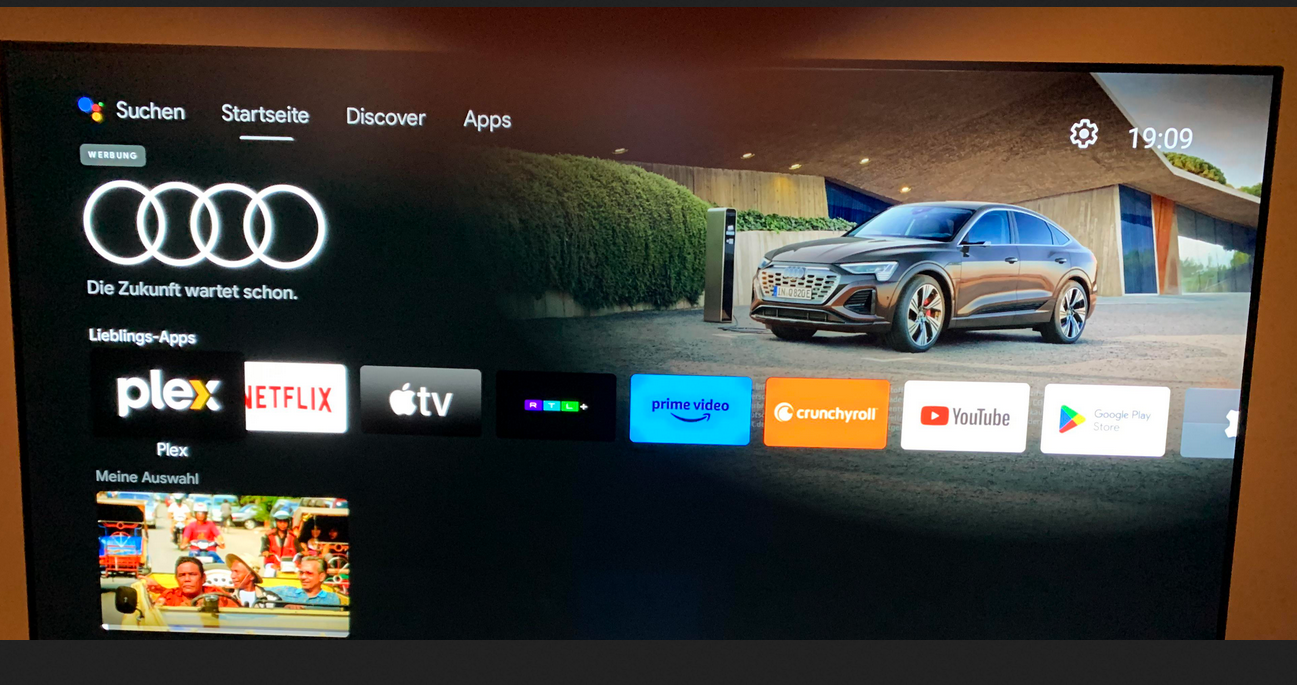
An ad for an Audi car shown on Android TV

Source: Reddit. The Reddit user who posted the screenshot claimed he had seen the Audi ad on the homescreen of his Nvidia Shield TV running Android TV.

Google introduced homescreen ads on Android TV back in 2020. Initially, the company said that it would only be sharing “cinematic teasers for the most popular movies and shows” suggested either by Google itself or “sponsored by media partners.” However, even when highlights featured only ads for shows, they drew pushback from users, with some claiming that suggestions were also often nonsensical, like an ad for a Christmas movie in July.

With homescreen ads now graduating to physical products like cars, it’s no wonder that the practice rubs a lot of users the wrong way. Taking up a huge portion of your screen, these unwanted ads hardly improve your viewing experience, and if anything, are reminiscent of ads on traditional TV — the relic of the past we all hoped to leave behind in the smart TV era.

How to block ads on smart TV

If you want to enjoy the ‘smart’ features of Android TV or Google TV, you have to sign in with a Google account and agree to Google’s privacy policy. This means Google can use your account data and TV activity to show you ads that match your interests, unless you turn off personalized ads in your device settings or your Google account settings. But even if you do that, you won’t get rid of all ads on your TV. Instead, you’ll still see generic ads that may be just as intrusive and annoying.

In order to block ads, and not just make them less relevant to you, you’ll need to either change the DNS server settings on your TV or on your router, or block the domains that send ads to your smart TV one by one yourself.

  • These methods require different levels of technical skill, but perhaps the easiest one is to change your TV’s default DNS server to one that can filter out ads and trackers, such as AdGuard DNS. You can usually change your DNS server by going to your TV’s ‘Network settings.’ Not all smart TVs allow you to do this, but most popular TV brands do.

  • You can also change the DNS server settings on your router — this way you would block ads and trackers on all devices connected to your home network, not just on your smart TV. However, this method requires more technical expertise on your part, as you’ll first need to access your router’s web interface, which means you’ll need to know its IP address and login credentials (if you’ve never changed your credentials, you can look up your router’s default credentials online — but we also encourage you not to stick to the default ones, it’s a big privacy risk).

It’s important to note, however, that changing your DNS server to one that zaps ads may not give you a completely ad-free experience. It won’t affect ads that are embedded in the content — for example, if an ad is part of the show itself, like a product that the characters use or a logo that flashes on the screen, the DNS server won’t block it. It also won’t block ads that come from the same domain as the content you want to watch. If it did, you wouldn’t see any ads, but you wouldn't see any movies either! This is because the DNS server cannot distinguish between different types of content within the same domain.

  • You can also block domains that send ads to your smart TV yourself through your router’s settings. To do this you’ll need to create your own filter or blacklist and add these domains to it. This method is the most technically challenging of the three, as it requires you to not only know which domains are sending ads to your TV, but also to regularly update the list of blocked domains. And frankly, this isn’t necessary — there are many ready-to-use ad blocking DNS servers and filters.

  • For those running Android TV, you can install a dedicated app like AdGuard for Android TV. This is the most comprehensive method, as it operates directly on your device to act as a system-wide firewall. It blocks ads in browsers and apps, encrypts your DNS traffic, and protects your device from tracking.


Сподобався цей пост?
AdGuard VPN AdGuard DNS AdGuard Mail AdGuard Wallet
Головний екран AdGuard для Windows
Екран захист AdGuard для Windows, що показує функції захисту та налаштування
Екран статистика AdGuard для Windows, що показує статистика заблокованої реклами та трекерів
Екран Керування програмою AdGuard для Windows, що показує параметри керування захистом для програм, встановлених на пристрої
20 468 20468 відгуків
Чудово!

AdGuard — блокувальник реклами для Windows

AdGuard для Windows — це більше, ніж блокувальник реклами. Це багатофункціональний інструмент, який блокує рекламу, контролює доступ до небезпечних сайтів, прискорює завантаження сторінок і захищає дітей від неприйнятного контенту

Завантажуючи програму, ви приймаєте умови Ліцензійної угоди
Магазин Microsoft
Завантажуючи програму, ви приймаєте умови Ліцензійної угоди
AdGuard для Windows, версія 8.0, пробний період 14 днів
Головний екран AdGuard для Mac
Екран прихованого режиму AdGuard для Mac
20 468 20468 відгуків
Чудово!

AdGuard — блокувальник реклами для Mac

AdGuard для Mac — це унікальний блокувальник реклами, розроблений з урахуванням macOS. Окрім захисту від настирливої реклами в браузерах і застосунках, він захищає вас від відстеження, фішингу та шахрайства.
Завантажуючи програму, ви приймаєте умови Ліцензійної угоди
Докладніше
AdGuard для Mac, версія 2.19, пробний період 14 днів
Головний екран AdGuard для Android
Екран Захист від стеження AdGuard для Android
Екран Керування програмою AdGuard для Android, що показує параметри керування захистом для програм, встановлених на пристрої
Екран статистика AdGuard для Android, що показує статистика заблокованої реклами та трекерів
Головний екран приватного браузера AdGuard для Android
QR-код, щоб завантажити AdGuard для Android
20 468 20468 відгуків
Чудово!

AdGuard — блокувальник реклами для Android

Блокує рекламу та трекери у всіх браузерах, іграх та інших застосунках. Захищає вашу конфіденційність і дозволяє контролювати, як ваші застосунки використовують Інтернет. Встановлюється через APK
Завантажуючи програму, ви приймаєте умови Ліцензійної угоди
Докладніше
Сканування для завантаження
Використовуйте будь-який зчитувач QR-коду, доступний на вашому пристрої
AdGuard для Android, версія 4.14, пробний період 14 днів
Головний екран AdGuard для iOS
Екран захист AdGuard для iOS, що показує функції захисту та налаштування
Екран статистика AdGuard для iOS, що показує статистика заблокованої реклами та трекерів
QR-код, щоб завантажити AdGuard для iOS
20 468 20468 відгуків
Чудово!

AdGuard — блокувальник реклами для Safari

Найкращий блокувальник реклами для iOS для iPhone та iPad. AdGuard усуває всі види реклами й трекерів у Safari та захищає вашу конфіденційність у всіх застосунках на рівні DNS
Завантажуючи програму, ви приймаєте умови Ліцензійної угоди
Докладніше
Сканування для завантаження
Використовуйте будь-який зчитувач QR-коду, доступний на вашому пристрої
AdGuard для iOS, 4.5
Головний екран AdGuard Content Blocker
Екран фільтрів AdGuard Content Blocker
Екран налаштувань AdGuard Content Blocker
20 468 20468 відгуків
Чудово!

AdGuard Content Blocker

AdGuard Content Blocker усуває всі види реклами в мобільних браузерах, які підтримують технологію блокування контенту, а саме в Samsung Internet та Яндекс Браузері. Його можливості обмежені у порівнянні з AdGuard для Android, але він безкоштовний, простий у встановленні та ефективний
Завантажуючи програму, ви приймаєте умови Ліцензійної угоди
Докладніше
AdGuard Content Blocker, 2.8
Головний екран AdGuard Browser Extension
Екран Захист від стеження AdGuard Browser Extension
20 468 20468 відгуків
Чудово!

Браузерне розширення AdGuard

AdGuard - найшвидше і легше браузерне розширення для блокування усіх типів реклами! Вибирайте AdGuard для швидкого і безпечного серфінгу без реклами.
Встановити
Завантажуючи програму, ви приймаєте умови Ліцензійної угоди
Встановити
Завантажуючи програму, ви приймаєте умови Ліцензійної угоди
Встановити
Завантажуючи програму, ви приймаєте умови Ліцензійної угоди
Встановити
Завантажуючи програму, ви приймаєте умови Ліцензійної угоди
Встановити
Завантажуючи програму, ви приймаєте умови Ліцензійної угоди
Докладніше
Встановити
Завантажуючи програму, ви приймаєте умови Ліцензійної угоди
Докладніше
Браузерне розширення AdGuard, 5.5
Головний екран Браузерний помічник
20 468 20468 відгуків
Чудово!

Помічник AdGuard

Браузерне розширення-компаньйон для настільних додатків AdGuard. Воно дозволяє блокувати власні елементи на сайтах, додавати сайти до списку дозволених та надіслати звіти з браузера
Помічник AdGuard, 1.4
20 468 20468 відгуків
Чудово!

AdGuard Home

AdGuard Home – це мережеве рішення для блокування реклами та трекерів. Встановіть його один раз на маршрутизатор, щоб покрити всі пристрої домашньої мережі — додаткове клієнтське програмне забезпечення не потрібне. Це особливо важливо для різних пристроїв IoT, які часто становлять загрозу для вашої конфіденційності
AdGuard Home, 0.107
Головний екран AdGuard Pro для iOS
Екран Захист AdGuard Pro для iOS, що показує функції та налаштування захисту
Екран Статистика AdGuard Pro для iOS, що показує статистику заблокованої реклами та трекерів
20 468 20468 відгуків
Чудово!

AdGuard Pro для iOS

AdGuard Pro для iOS постачається з усіма розширеними функціями захисту від блокування реклами. Він пропонує ті ж інструменти, що й платна версія AdGuard для iOS. Він чудово блокує рекламу в Safari та дозволяє налаштовувати параметри DNS для власного захисту. Він блокує рекламу в браузерах і додатках, захищає ваших дітей від небажаного контенту та забезпечує безпеку ваших особистих даних.
Завантажуючи програму, ви приймаєте умови Ліцензійної угоди
Докладніше
AdGuard Pro для iOS, 4.5
Головний екран AdGuard Mini для Mac
Екран захисту Safari в AdGuard Mini для Mac
Екран створення правила в AdGuard Mini для Mac
20 468 20468 відгуків
Чудово!

AdGuard Mini для Mac — блокувальник реклами в Safari

AdGuard Mini для Mac — це потужний блокувальник реклами для Safari. Цей легкий додаток видаляє рекламу, блокує трекери та пришвидшує завантаження сторінок. Він допомагає вам переглядати інтернет у Safari без відволікань і захищає ваші дані відсторонені
Встановити
Завантажуючи програму, ви приймаєте умови Ліцензійної угоди
Докладніше
AdGuard Mini для Mac, 2.3
Головний екран AdGuard для Android TV із увімкненим захистом
Екран блокування реклами AdGuard для Android TV, що показує його функції та налаштування
Екран налаштування AdGuard для Android TV
Екран Керування програмою AdGuard для Android TV, що показує програми, де реклама і трекери заблоковано
20 468 20468 відгуків
Чудово!

AdGuard для Android TV

AdGuard для Android TV - це єдина програма, яка блокує рекламу, захищає вашу конфіденційність і працює як брандмауер для вашого Smart TV. Отримуйте попередження про веб-загрози, використовуйте безпечні DNS і користуйтеся перевагами зашифрованого трафіку. Розслабтеся і пориньте в улюблені шоу з першокласним захистом і нульовою рекламою!
AdGuard для Android TV, версія 4.14, пробний період 14 днів
Маскот AdGuard Агнар, який тримає пінгвіна Linux
20 468 20468 відгуків
Чудово!

AdGuard для Linux

AdGuard для Linux — це перший у світі блокувальник реклами для Linux на рівні системи. Блокуйте рекламу та трекери на рівні пристрою, вибирайте з попередньо встановлених фільтрів або додавайте свої — все через інтерфейс командного рядка
AdGuard для Linux, 1.4
20 468 20468 відгуків
Чудово!

AdGuard Temp Mail

Безкоштовний генератор тимчасових адрес електронної пошти, який зберігає вашу анонімність і захищає вашу конфіденційність. Ніякого спаму у вашій основній поштовій скриньці!
20 468 20468 відгуків
Чудово!

AdGuard VPN

75 місцезнаходжень у світі

Безпечний стрімінг

Надійне шифрування

Без журналювання

Найшвидше з'єднання

Цілодобова підтримка

Спробувати безплатно
Завантажуючи програму, ви приймаєте умови Ліцензійної угоди
Докладніше
20 468 20468 відгуків
Чудово!

AdGuard DNS

AdGuard DNS — це альтернативний спосіб заблокувати рекламу, захистити особисті дані і захистити дітей від дорослих матеріалів. Він простий в налаштуванні і використанні і забезпечує необхідний мінімум захисту від реклами, трекінгу і фішингу, незалежно від платформи.
20 468 20468 відгуків
Чудово!

AdGuard Mail

Захистіть свою особистість, уникайте спаму та забезпечуйте безпеку вашої скриньки за допомогою наших псевдонімів і тимчасових адрес електронної пошти. Користуйтеся нашою безплатною послугою переадресації електронної пошти та застосунками для всіх операційних систем.
20 468 20468 відгуків
Чудово!

AdGuard Wallet

Безпечний і приватний криптогаманець, який дає вам повний контроль над вашими активами. Відкривайте для себе тисячі криптовалют для зберігання, надсилання та обміну
Завантаження AdGuard Натисніть на кнопку, на яку вказує стрілка, щоб почати встановлювати програму. Виберіть «Відкрити», натисніть «OK» та дочекайтеся завантаження файлу. У вікні, що відкриєтьсяся, перетягніть значок AdGuard в папку «Додатка». Дякуємо, що обрали AdGuard! Виберіть «Відкрити», натисніть «OK» та дочекайтеся завантаження файлу. У вікні, що відкрилося, натисніть «Встановити». Дякуємо, що обрали AdGuard!
Встановіть AdGuard на мобільному

















































