Musk taking over Twitter has created chaos. Will he make order out of it?

Some thought that this day would never come, but on October 27 billionaire entreprenuer Elon Musk officially closed the deal with Twitter, acquiring the social media company for $44 billion. Musk took the reins in rather dramatic fashion, showing the entire Twitter board of directors the door and making himself its sole director and CEO (presumably temporarily).

After becoming the Chief Twit, Musk unveiled his plan to change the platform’s monetization model via premium subscriptions. About 90% of Twitter’s revenue currently comes from advertising, and Twitter’s overreliance on ad money along with its spam bots have always been one of Musk’s biggest pet peeves.

Faced with the irreversable fact of Musk’s takeover, the Twittersphere descended into chaos. Users have envisaged doomsday scenarios in which Twitter would become a “cesspool of vitriol and hatred”, free of any regulation, and accused Musk of trying to turn it into “a money grabbing cash machine.”

With Musk taking his first steps at Twitter, only time will tell whether he breathes new life into the platform or indeed puts the final nail into its coffin. Musk himself declared that he added Twitter to his already extensive portfolio of assets not to make more money, but to “try to help humanity” and that he does not rule out that he fails in this quest. There is “a very real possibility” of that, according to the entrepreneur himself.

Still, Musk’s vision for Twitter’s future as a freemium service is spot-on. However, there are just too many variables that one has to take into account to bet on his success.

Moving away from ad-based monetization model

Musk had been talking about how he would change Twitter at length even before he bought the company. But the only proposal the auto tycon has given specific details about so far is how he plans to steer Twitter away from its ad-driven monetization model.
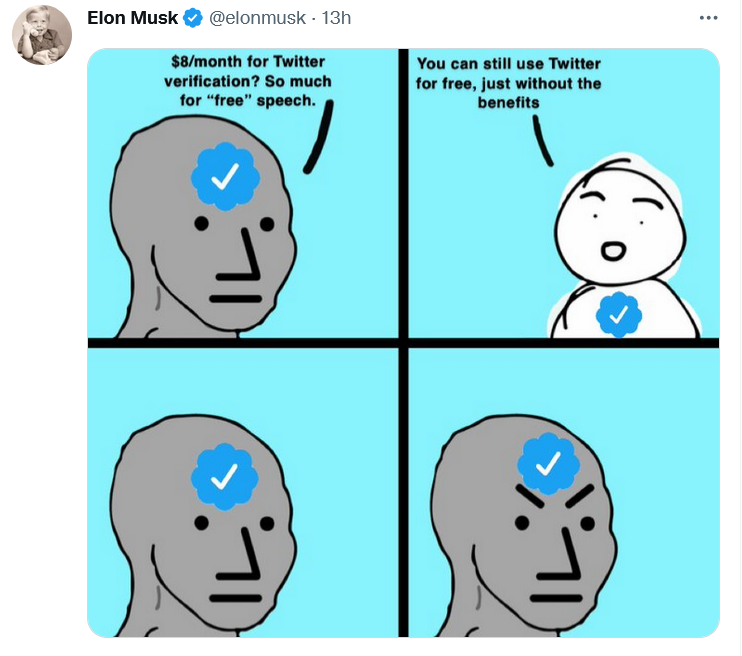
Musk explained Twitter’s freemium model in his favorite way — with a meme

In a series of tweets on November 1, Musk blasted the Twitter verification system as unfair. “Twitter’s current lords & peasants system for who has or doesn’t have a blue checkmark is bullshit,” the billionaire wrote.

To open up verification to all users, Musk suggested making the blue checkmark part of a paid Twitter Blue subscription. Launched last June, Twitter Blue is so far only available in the US, Canada, Australia, and New Zealand. Subscribers pay a monthly fee adjusted for the region. In the US, the fee amounts to $4.99/month.

As of now, Twitter requires an account to be “authentic,”“notable,” and “active” for a blue tick to be bestowed upon it. The allocation of verification badges and their removal is solely at Twitter’s discretion. The practice sparked controversy in the past: in 2016 Twitter “unverified” the account of right-wing personality Milo Yiannopoulos, fuelling the debate about censorship on the platform.

Good value for money finally or a rip-off?

Although Twitter Blue went live more than a year ago, the revenue stream from the company’s original attempt to diversify its monetization model has been more of a trickle. Sensor Tower estimated that Twitter Blue generated only $6.4 million in global spending to date, a drop in the ocean compared to Twitter’s annual revenue of $5.08 billion in 2021. Now Musk, apparently, wants to turn Twitter Blue into something worth paying for. Whether he succeeds in doing so or kills Twitter while trying, is a very big question.

Twitter Blue currently does offer a number of useful features, but they have failed to win over power users. Subscribers can already save tweets to bookmarks, undo a tweet within up to 60 seconds of sending it, read long threads as a single page of text, customize the navigation bar, and get instant access to the most-shared articles from people they follow. Most recently, Twitter Blue allowed subscribers in Australia, Canada, and New Zealand to edit tweets up to five times in 30 minutes after posting.

Musk proposed increasing the Twitter Blue fee from $4.5 to $8 a month in the US, but he also touted additional features that should turn things around for the paid service.

Apart from the blue tick, subscribers will get priority in replies, mentions and search. They will also be able to post longer videos and audios, as well as gain access to paywalled content from publishers willing to partner with Twitter.
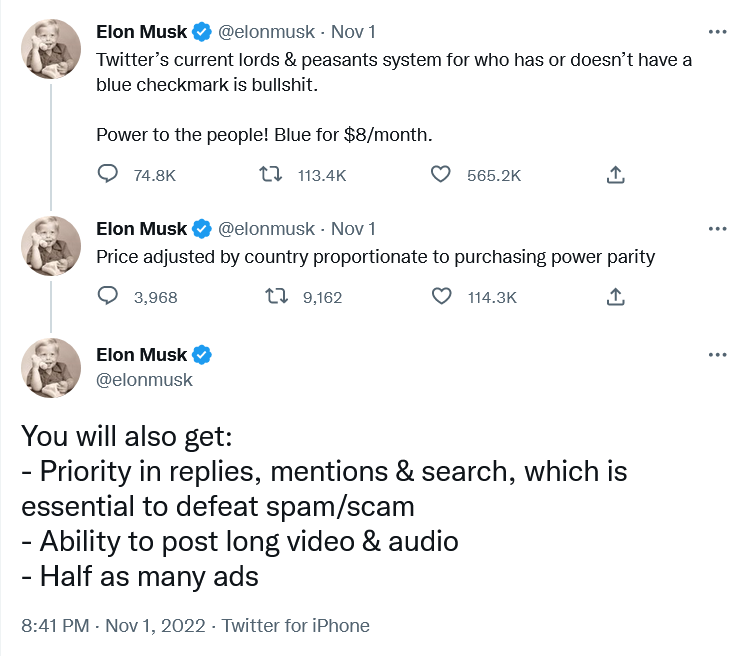
Musk unveiled his plan for Twitter monetization…on Twitter

According to different estimates, there are from 300,000 up to 400,000 verified accounts on Twitter. In the second quarter of 2022, Twitter reported 237 million monetizable daily users. It’s unclear how many of them will buy into the Musk vision, and will be ready to pay for it from their own pockets.

Under Musk’s plan, public figures should remain recognizable even if they do not pay for the subscription. Twitter would add “a secondary tag” below their names, “which is already the case for politicians,” according to Musk. Apparently, the Twitter CEO referred to the labels for government and state-affiliated media accounts Twitter introduced back in 2020.

Fewer ads for subscribers

Most interesting for regular users, perhaps, is that subscribers will see fewer distractions, namely, “half as many ads.”

Some may consider this as a letdown from a man who once said that he “hates advertising.”. In a since deleted Twitter thread from April, Musk proposed essentially the same model, but suggested that those who sign up for Twitter Blue should see no ads at all.

“The power of corporations to dictate policy is greatly enhanced if Twitter depends on advertising money to survive,” Musk tweeted at the time.
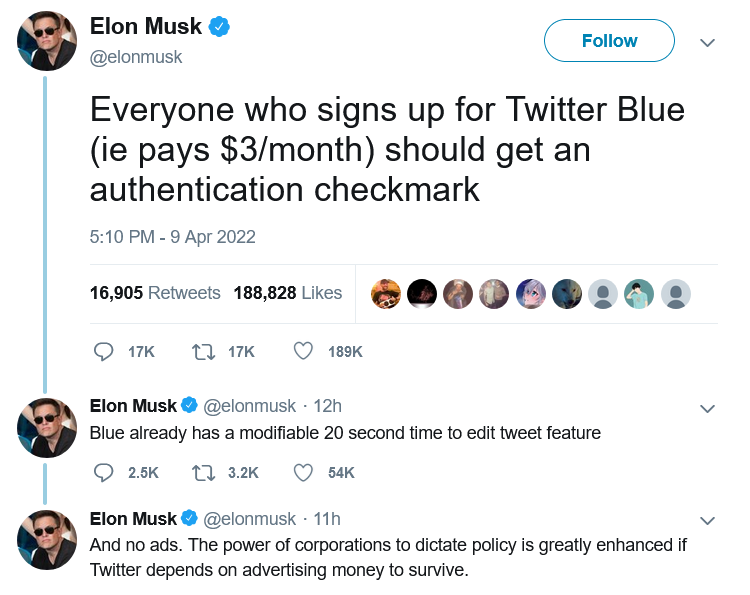
Half a year before becoming Twitter CEO, Musk suggested disabling ads for Twitter Blue subscribers

At the moment, though, Twitter Blue subscribers are being bombarded with the same amount of ads as non-subscribers. So, Musk’s decision can be seen as a step in the right direction.

According to Musk, the new system should enable Twitter to “defeat spam/scam on the platform”, as well as provide it with a “revenue stream to reward content creators.”

Ads will not go away, so won’t content moderation

After ascending to the Twitter throne, Musk has softened his stance towards advertisers. On the same day the Twitter deal was officially done and dusted, Musk addressed the advertising industry in a Twitter post titled “Dear Twitter Advertisers.”

“There has been much speculation about why I bought Twitter and what I think about advertising. Most of it has been wrong,”Musk wrote. The billionaire, who is known as a vocal advocate of the freedom of speech, added that while he wants the platform to be “warm and welcoming to all,” it won’t be completely free of regulation. “Twitter obviously cannot become a free-for-all hellspace, where anything can be said for no consequences!”

Musk then made it clear that advertisers will stay on the platform, but hinted that the rules for how they conduct their business can change. “It is essentially to show Twitter users advertising that is as relevant as possible to their needs. Low relevancy ads are spam, but highly relevant ads are actually content!” Musk went on to write.

The post was too sketchy on details as far as the future of ads on Twitter is concerned. Musk said that he wants to make Twitter “the most respected advertising platform in the world,” and judging by his previous rhetoric it is unlikely to mean harvesting more personal data without user consent. Hopefully, quite the opposite.

Meanwhile, individual companies, such as automaker GM (which, incidentally, is a Tesla competitor), have decided to suspend advertising on Twitter. It is unclear how many advertisers will decide to stick with the platform when the dust settles.

What to expect next?

It remains to be seen if Musk comes back to various proposals he’d made while still not at the helm of Twitter. One of them is to introduce end-to-end encryption for Twitter DMs like in the privacy-first Signal messanger. Another is to make Twitter algorithms open source. If Musk brings these ideas of his to life, Twitter would become more private and secure.

Given that Musk, however successful his other business ventures may be, is rather unpredictable, it’s difficult to gauge what will come out of his great Twitter gamble.

But a pivot from an ad-based revenue model to a model based on paid subscriptions is also pivot to more privacy. If Twitter’s revenue no longer fully depends on advertising, big corporations will have less sway over the company, and Twitter — fewer incentives to sell user data.
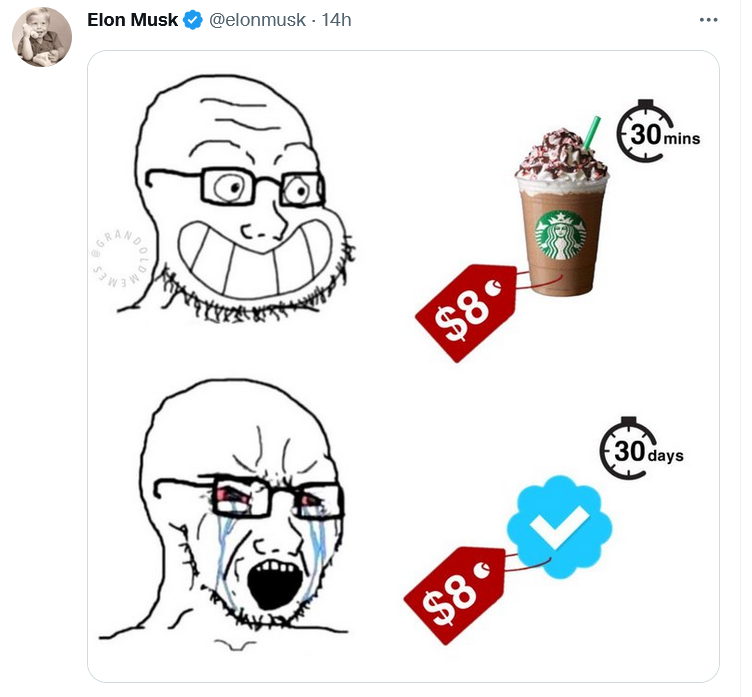
Musk compared the proposed Twitter subscription fee to a price of one cup of coffee

Whether the new model takes off, and what shape it will take in the end, one can only guess. Right now the odds are not in Musk’s favor, but no one becomes the richest man in the world for nothing. Much will depend on how Musk uses his personal marketing appeal to sell Twitter Blue to users, whether and how quickly he adds new features, and how well he listens to feedback. For now, everything is still up in the air. For example, it’s unclear how many ads are “half as many ads” exactly, and whether all the new proposed features would be enough to convince users to pay for a subscription.

As for the price tag, $8 is less than the cost of a few cups of coffee. It’s more about whether Musk will be able to sweeten the deal up enough.


Сподобався цей пост?
AdGuard VPN AdGuard DNS AdGuard Mail AdGuard Wallet
Головний екран AdGuard для Windows
Екран захист AdGuard для Windows, що показує функції захисту та налаштування
Екран статистика AdGuard для Windows, що показує статистика заблокованої реклами та трекерів
Екран Керування програмою AdGuard для Windows, що показує параметри керування захистом для програм, встановлених на пристрої
20 468 20468 відгуків
Чудово!

AdGuard — блокувальник реклами для Windows

AdGuard для Windows — це більше, ніж блокувальник реклами. Це багатофункціональний інструмент, який блокує рекламу, контролює доступ до небезпечних сайтів, прискорює завантаження сторінок і захищає дітей від неприйнятного контенту

Завантажуючи програму, ви приймаєте умови Ліцензійної угоди
Магазин Microsoft
Завантажуючи програму, ви приймаєте умови Ліцензійної угоди
AdGuard для Windows, версія 8.0, пробний період 14 днів
Головний екран AdGuard для Mac
Екран прихованого режиму AdGuard для Mac
20 468 20468 відгуків
Чудово!

AdGuard — блокувальник реклами для Mac

AdGuard для Mac — це унікальний блокувальник реклами, розроблений з урахуванням macOS. Окрім захисту від настирливої реклами в браузерах і застосунках, він захищає вас від відстеження, фішингу та шахрайства.
Завантажуючи програму, ви приймаєте умови Ліцензійної угоди
Докладніше
AdGuard для Mac, версія 2.19, пробний період 14 днів
Головний екран AdGuard для Android
Екран Захист від стеження AdGuard для Android
Екран Керування програмою AdGuard для Android, що показує параметри керування захистом для програм, встановлених на пристрої
Екран статистика AdGuard для Android, що показує статистика заблокованої реклами та трекерів
Головний екран приватного браузера AdGuard для Android
QR-код, щоб завантажити AdGuard для Android
20 468 20468 відгуків
Чудово!

AdGuard — блокувальник реклами для Android

Блокує рекламу та трекери у всіх браузерах, іграх та інших застосунках. Захищає вашу конфіденційність і дозволяє контролювати, як ваші застосунки використовують Інтернет. Встановлюється через APK
Завантажуючи програму, ви приймаєте умови Ліцензійної угоди
Докладніше
Сканування для завантаження
Використовуйте будь-який зчитувач QR-коду, доступний на вашому пристрої
AdGuard для Android, версія 4.14, пробний період 14 днів
Головний екран AdGuard для iOS
Екран захист AdGuard для iOS, що показує функції захисту та налаштування
Екран статистика AdGuard для iOS, що показує статистика заблокованої реклами та трекерів
QR-код, щоб завантажити AdGuard для iOS
20 468 20468 відгуків
Чудово!

AdGuard — блокувальник реклами для Safari

Найкращий блокувальник реклами для iOS для iPhone та iPad. AdGuard усуває всі види реклами й трекерів у Safari та захищає вашу конфіденційність у всіх застосунках на рівні DNS
Завантажуючи програму, ви приймаєте умови Ліцензійної угоди
Докладніше
Сканування для завантаження
Використовуйте будь-який зчитувач QR-коду, доступний на вашому пристрої
AdGuard для iOS, 4.5
Головний екран AdGuard Content Blocker
Екран фільтрів AdGuard Content Blocker
Екран налаштувань AdGuard Content Blocker
20 468 20468 відгуків
Чудово!

AdGuard Content Blocker

AdGuard Content Blocker усуває всі види реклами в мобільних браузерах, які підтримують технологію блокування контенту, а саме в Samsung Internet та Яндекс Браузері. Його можливості обмежені у порівнянні з AdGuard для Android, але він безкоштовний, простий у встановленні та ефективний
Завантажуючи програму, ви приймаєте умови Ліцензійної угоди
Докладніше
AdGuard Content Blocker, 2.8
Головний екран AdGuard Browser Extension
Екран Захист від стеження AdGuard Browser Extension
20 468 20468 відгуків
Чудово!

Браузерне розширення AdGuard

AdGuard - найшвидше і легше браузерне розширення для блокування усіх типів реклами! Вибирайте AdGuard для швидкого і безпечного серфінгу без реклами.
Встановити
Завантажуючи програму, ви приймаєте умови Ліцензійної угоди
Встановити
Завантажуючи програму, ви приймаєте умови Ліцензійної угоди
Встановити
Завантажуючи програму, ви приймаєте умови Ліцензійної угоди
Встановити
Завантажуючи програму, ви приймаєте умови Ліцензійної угоди
Встановити
Завантажуючи програму, ви приймаєте умови Ліцензійної угоди
Докладніше
Встановити
Завантажуючи програму, ви приймаєте умови Ліцензійної угоди
Докладніше
Браузерне розширення AdGuard, 5.5
Головний екран Браузерний помічник
20 468 20468 відгуків
Чудово!

Помічник AdGuard

Браузерне розширення-компаньйон для настільних додатків AdGuard. Воно дозволяє блокувати власні елементи на сайтах, додавати сайти до списку дозволених та надіслати звіти з браузера
Помічник AdGuard, 1.4
20 468 20468 відгуків
Чудово!

AdGuard Home

AdGuard Home – це мережеве рішення для блокування реклами та трекерів. Встановіть його один раз на маршрутизатор, щоб покрити всі пристрої домашньої мережі — додаткове клієнтське програмне забезпечення не потрібне. Це особливо важливо для різних пристроїв IoT, які часто становлять загрозу для вашої конфіденційності
AdGuard Home, 0.107
Головний екран AdGuard Pro для iOS
Екран Захист AdGuard Pro для iOS, що показує функції та налаштування захисту
Екран Статистика AdGuard Pro для iOS, що показує статистику заблокованої реклами та трекерів
20 468 20468 відгуків
Чудово!

AdGuard Pro для iOS

AdGuard Pro для iOS постачається з усіма розширеними функціями захисту від блокування реклами. Він пропонує ті ж інструменти, що й платна версія AdGuard для iOS. Він чудово блокує рекламу в Safari та дозволяє налаштовувати параметри DNS для власного захисту. Він блокує рекламу в браузерах і додатках, захищає ваших дітей від небажаного контенту та забезпечує безпеку ваших особистих даних.
Завантажуючи програму, ви приймаєте умови Ліцензійної угоди
Докладніше
AdGuard Pro для iOS, 4.5
Головний екран AdGuard Mini для Mac
Екран захисту Safari в AdGuard Mini для Mac
Екран створення правила в AdGuard Mini для Mac
20 468 20468 відгуків
Чудово!

AdGuard Mini для Mac — блокувальник реклами в Safari

AdGuard Mini для Mac — це потужний блокувальник реклами для Safari. Цей легкий додаток видаляє рекламу, блокує трекери та пришвидшує завантаження сторінок. Він допомагає вам переглядати інтернет у Safari без відволікань і захищає ваші дані відсторонені
Встановити
Завантажуючи програму, ви приймаєте умови Ліцензійної угоди
Докладніше
AdGuard Mini для Mac, 2.3
Головний екран AdGuard для Android TV із увімкненим захистом
Екран блокування реклами AdGuard для Android TV, що показує його функції та налаштування
Екран налаштування AdGuard для Android TV
Екран Керування програмою AdGuard для Android TV, що показує програми, де реклама і трекери заблоковано
20 468 20468 відгуків
Чудово!

AdGuard для Android TV

AdGuard для Android TV - це єдина програма, яка блокує рекламу, захищає вашу конфіденційність і працює як брандмауер для вашого Smart TV. Отримуйте попередження про веб-загрози, використовуйте безпечні DNS і користуйтеся перевагами зашифрованого трафіку. Розслабтеся і пориньте в улюблені шоу з першокласним захистом і нульовою рекламою!
AdGuard для Android TV, версія 4.14, пробний період 14 днів
Маскот AdGuard Агнар, який тримає пінгвіна Linux
20 468 20468 відгуків
Чудово!

AdGuard для Linux

AdGuard для Linux — це перший у світі блокувальник реклами для Linux на рівні системи. Блокуйте рекламу та трекери на рівні пристрою, вибирайте з попередньо встановлених фільтрів або додавайте свої — все через інтерфейс командного рядка
AdGuard для Linux, 1.4
20 468 20468 відгуків
Чудово!

AdGuard Temp Mail

Безкоштовний генератор тимчасових адрес електронної пошти, який зберігає вашу анонімність і захищає вашу конфіденційність. Ніякого спаму у вашій основній поштовій скриньці!
20 468 20468 відгуків
Чудово!

AdGuard VPN

75 місцезнаходжень у світі

Безпечний стрімінг

Надійне шифрування

Без журналювання

Найшвидше з'єднання

Цілодобова підтримка

Спробувати безплатно
Завантажуючи програму, ви приймаєте умови Ліцензійної угоди
Докладніше
20 468 20468 відгуків
Чудово!

AdGuard DNS

AdGuard DNS — це альтернативний спосіб заблокувати рекламу, захистити особисті дані і захистити дітей від дорослих матеріалів. Він простий в налаштуванні і використанні і забезпечує необхідний мінімум захисту від реклами, трекінгу і фішингу, незалежно від платформи.
20 468 20468 відгуків
Чудово!

AdGuard Mail

Захистіть свою особистість, уникайте спаму та забезпечуйте безпеку вашої скриньки за допомогою наших псевдонімів і тимчасових адрес електронної пошти. Користуйтеся нашою безплатною послугою переадресації електронної пошти та застосунками для всіх операційних систем.
20 468 20468 відгуків
Чудово!

AdGuard Wallet

Безпечний і приватний криптогаманець, який дає вам повний контроль над вашими активами. Відкривайте для себе тисячі криптовалют для зберігання, надсилання та обміну
Завантаження AdGuard Натисніть на кнопку, на яку вказує стрілка, щоб почати встановлювати програму. Виберіть «Відкрити», натисніть «OK» та дочекайтеся завантаження файлу. У вікні, що відкриєтьсяся, перетягніть значок AdGuard в папку «Додатка». Дякуємо, що обрали AdGuard! Виберіть «Відкрити», натисніть «OK» та дочекайтеся завантаження файлу. У вікні, що відкрилося, натисніть «Встановити». Дякуємо, що обрали AdGuard!
Встановіть AdGuard на мобільному

















































