Ford’s self-repossessing cars: a brilliant innovation or a dystopian disaster?
Imagine you’re in your car and it suddenly starts making piercing sounds, causing you to swerve off a road and into a ditch. Or you are driving in the dark on a strange and deserted road, relying on your GPS navigator, and then your GPS stops working.
This might sound like a scene from a ‘rise of the machines’ movie, but it can become reality, if Ford’s newest patent becomes a thing. The patent lets the lender take over the car from a distance and tell it to turn features off. The makeunder could start with the car losing non-essential features like GPS and radio. Then the AC and remote key fob might go. Finally, the engine might stop and you might be locked out of the car. After that, the car can drive itself to a public road, a repossession office or go straight to a junkyard if that’s cheaper.
The patent says this would make things easier for banks and repo agents, who wouldn’t have to deal with difficult customers in person.
While the proposed scheme may indeed help to avert some heated confrontations, it exposes the car owners to various privacy and security risks, such as hacking, tracking, and loss of personal data. Depending on the implementation, Ford and other parties involved could be able to track your every move, know where you live, what’s in your garage — and share that data with each other.
As the code base needed to support such a complex system will grow, so will the attack surface, making the car more vulnerable to hacks than before. In general, the more complicated the system, the more chances there are for something to go wrong. Even a minor glitch could have deadly consequences — for example, if your brakes get disabled by mistake…
But before we go any further, let’s see how Ford envisions it all to work.
Is any new hardware needed?
The whole process of dumbing down a car to the point it becomes useless relies on electronics that come with it. The key component is “the repossession system’s computer” that communicates with a remote server operated by the lender. The patent says that “in some embodiments” a regular vehicle computer can be configured to do the repossession system computer’s job. So, in theory, the repossession system can work on any car with internet connection, without any new hardware needed.
The repossession system’s computer becomes an integral part of a large network. Within this network it can share the data it receives from vehicle’s cameras and sensors with several other entities. These include the repossession agency, the police, a medical facility, a lending institution (bank), and the car owner.
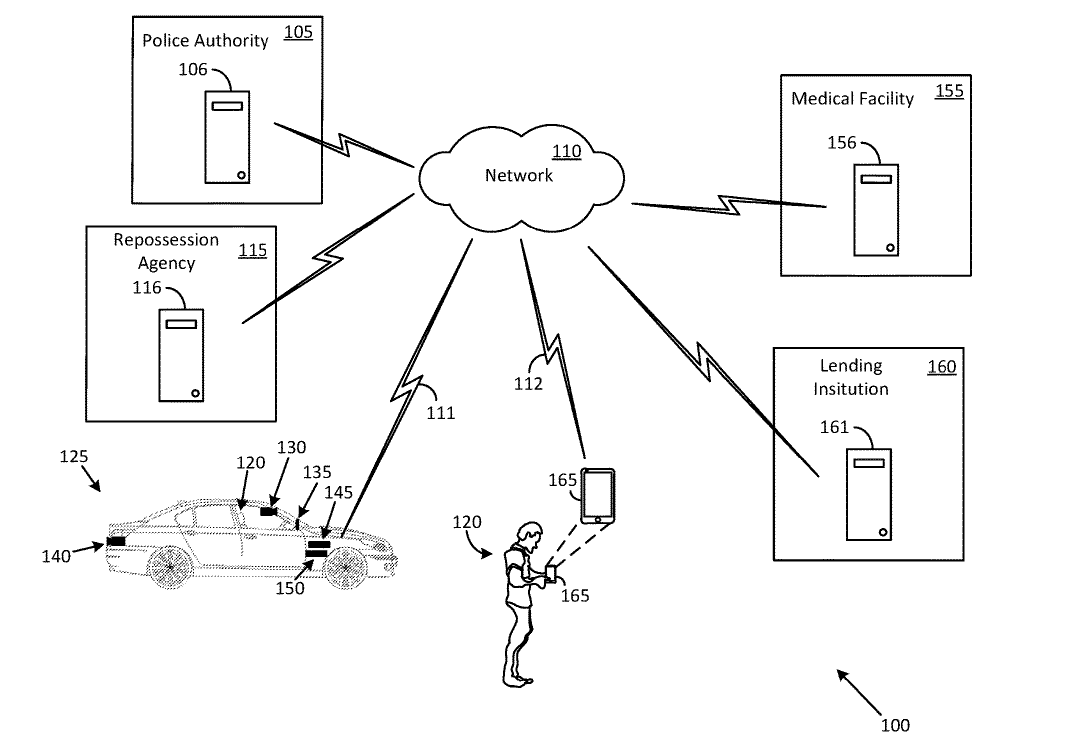
Source: Ford’s patent
What triggers the repossession process?
It all starts with a bank sending a notice to the owner that it has not received a payment. It’s when the owner repeatedly ignores such notices that all hell breaks loose and the multi-stage repossession process begins in earnest. In the patent, Ford describes the repossession process as a last resort, activated only when all other options have been exhausted.
Once the bank runs out of patience, its computer instructs the repossession system’s computer to turn off features, starting with the less important ones such as radio, GPS, MP3 player, cruise control, power windows, and power seats. After a few days and another reminder, it’s time for more features to go. The second group includes things that can be critical in some cases, such as air conditioning (think of the situation when it’s hot outside and you have a baby in the car), as well as remote key fob and automatic door unlocking. The third and final blow to the car’s functionality includes disabling its engine, the steering wheel, brakes, and, finally, the doors.
At first, the lockout may be partial, meaning you can still use your car to drive to work on weekdays, but not on weekends. Or you may be allowed to drive only within a certain area close to your home, or ‘geofence’, so you can get food and take your kids to school.
This means that the car manufacturer and possibly a whole host of other parties would already know a lot about you by that time: where you live, where your children go to school, where you shop, where you work and when you go home. This level of data collection sounds alarming to us.
What is also alarming is that some of the penalties suggested by Ford seem especially harsh, almost over-the-top. Instead of just turning off the radio, the repossession system’s computer can blast it louder or activate other signals such as a beeper or a chime. The computer can also make the sound as annoying as possible by “varying a tone, a timber, a pitch, a cadence, a beat, or a volume of the sound”. Needless to say that this, along with many of the downgrades mentioned before, can cause the driver to crash the car or get into a serious traffic accident if they still try to use it.
How is all of this possible?
The features can be disabled (or enabled, as in the case of an annoying sound) using over-the-air updates, the technology pioneered by Tesla in the mid-2000s. The technology allows carmakers to remotely activate or deactivate built-in hardware. In recent years, more and more manufacturers have started to sell features that can be controlled remotely, seeing them as a source of recurrent revenue. Thus, BMW charges $18 a month for heated seats, while Mercedes — $1,200 a year for faster acceleration.
But no manufacturer before Ford has described a scenario in which someone else has complete control of the car and the owner has none. Perhaps the most disturbing glimpse of this vision is Ford’s idea of the car literally driving itself away from the owner.
How exactly can a car drive itself away?
Once the owner is stranded, the car, on the bank’s orders, will look for the perfect opportunity to escape. The owner is given one last chance to pay, and if he does not, the repossession system’s computer may tell the car’s computer to drive it out of the garage onto a public road. There, it can be picked up by a tow truck with greater ease and less resistance from the owner.
In the case of an autonomous vehicle, it can even go further than that. The car can be instructed to drive itself straight to the repossessor’s premises or, if its market value is deemed too low for all the fuss, directly to the junkyard.
But what happens when the car is behind the closed doors of the garage? No, the repossession system’s computer won’t tell the car to ram the walls, as would have been in the spirit of a true sci-fi horror. Instead, the computer will send the images from inside the garage to the bank’s computer, which will pass the information on to the police. The latter may then take action, such as swooping on the garage.
Medical emergency exception
The proposed system would seem to benefit mainly bankers and repo agents, while potentially costing consumers an extra dollar plus the inconvenience. But Ford says it has the regular Joe in mind too.
According to the patent, the repossession system’s computer could save a driver’s life in the event of a medical emergency. The computer could supposedly check the car’s cameras to see if the owner is having a medical crisis, such as a heart attack, and alert a hospital. If the car owner’s family member suffers such an emergency, the car owner can ask the repossession system’s computer to lift the lockout. The computer can also call a hospital and work out the best way to get there. If the car can drive itself, it can drive itself to the nearest hospital or to meet an ambulance. Once the emergency is over, the hospital’s computer can tell the car’s computer about it so that it can lock itself again.
It’s not clear, though, how all of this would actually work. If a human sometimes can’t tell just by looking if someone is having a heart attack or any other health emergency, it seems unlikely that the car’s computer can do it well. Not to mention that such a system could be easily abused in many ways, but that’s a topic for a separate discussion.
Risks to privacy and security hard to justify
All in all, it’s hard to argue for a system that seems to prioritize the convenience of bankers and repo agents over the safety and privacy of consumers.
Such a system could allow a car to collect a lot of personal data about the owner, such as their location, their usual routes, photos of their home, their health information, and share it in real time with others, including the police, a bank and a hospital. They may all have different uses for this data. For example, this data may be given, intentionally or accidentally, to advertisers, such as a health insurance company, which may use it to raise the price of insurance. Any of the entities with access to the data can suffer a breach or leak — the more parties involved in handling the data, the more likely it is to happen.
A car where everything can be turned off and on remotely can even become a deadly weapon in the hands of hackers, or used for blackmail. There is also the risk that a repossession process could be accidentally triggered by a technical glitch or human error, with potentially fatal consequences.
There are currently no fully autonomous cars on the market, so it’s unlikely we’ll be seeing a car driving itself to the scrap yard any time soon. While the patent is only a rough vision of the future and the mechanics of the process have yet to be worked out, we can only hope that if Ford does bring it to life, they will take enough precautions to ensure that none of the scenarios described above become reality. At the moment, however, the risk/reward ratio seems too skewed in favor of risk.
A glimpse of the future we’d rather not
Ford claimed that it did not intend to use the technology after the patent application became public. That doesn’t, however, mean that they won’t use it in the future, or that other manufacturers won’t think of something similar.
Ford’s concept may sound too futuristic and even implausible at first. But in fact it is a natural progression of the trend for manufacturers to take control of vehicles away from drivers. Some carmakers are already charging owners a monthly or annual fee for extra features, and some had toyed with the idea of making basic features like a remote key fob part of a subscription. So if it’s conceivable that one day your remote key fob might stop working because you haven’t paid for it, it’s also conceivable that one day your car might drive itself away for the very same reason.
The car is fast becoming a service, and the way and the speed at which it’s happening is deeply worrying. It’s not the future we wish for.




















































