There's no such thing as a free lunch: 21 million user data leaked from 3 Android VPNs
We haven't covered the industry news for quite a long time but we can't help but comment on the recent situation.
As CyberNews reported a few days ago, databases with the credentials of 21 million users are sold on a popular hacker forum. The data was stolen from three VPN services for Android — SuperVPN, GeckoVPN and ChatVPN. You may have heard (or even installed) one of them – SuperVPN has 100+ million downloads on Google Play, GeckoVPN has 10 million downloads, and ChatVPN has 50K ones.
Partly, these services owe their popularity to the mere fact that you don't have to pay for all or most of their features. It's easy to jump at the bait – who is not attracted to free or freemium services? But, as you know, the only free cheese is in the mousetrap. Let’s figure out what happened and why such leaks are dangerous.
What is sold at the forum
The author of the forum post sells three archives, two of them allegedly include the following data:
- Email addresses
- Usernames
- Full names
- Country names
- Randomly generated password strings
- Payment-related data
- Premium member status and its expiration date
Seven months ago 1.2 TB of data leaked from seven VPN providers who claimed not to log anything. Among the fantastic fourthe hateful eight the unlucky seven, there was also SuperVPN, so if you occasionally read cybersecurity news, this name may be familiar to you.
Judging by the samples from the second archive, it seems that the database contains detailed information about users' devices:
- Device serial numbers
- Phone types and manufacturers
- Device IDs
- Device IMSI numbers
Why you should not use (free) VPNs that log your data
Assuming the threat actor truly has all this data, it appears that the three above mentioned VPN providers log much more information about their users than stated in their Privacy Policies:
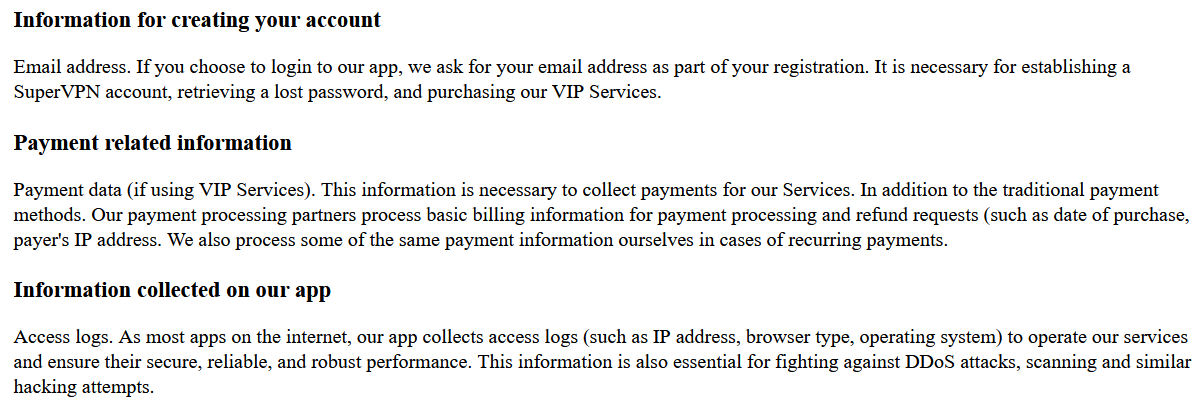
SuperVPN Privacy Policy
Theoretically, VPNs are developed primarily to encrypt Internet traffic and protect user privacy from ISPs, governments, or attackers. It looks like SuperVPN, GeckoVPN, and ChatVPN failed to fulfil their core mission, compromising millions of gullible users’ privacy.
How leaks can be dangerous
Hackers can abuse users' personal data stored on compromised VPN servers for phishing and MITM (man in the middle) attacks. In this case, the attacker is eavesdropping a communication channel (between the victim and the dedicated resource or between two victims) and attempts to replace the intercepted message, get something useful from it and redirect the user to some external resource. If the user's web session is intercepted, credit card details and other sensitive data may be at risk.
As demonstrated by this leak, you might have to pay a heavy price for using an unreliable VPN. Don’t cut corners on safety if you do not want to fall prey to such circumstances.
How to protect yourself
Firstly, use a reliable VPN. Paid or freemium one — this is a pricing strategy when most of the product features are available in the free version but you need a subscription to get access to premium features. This is not the only indicator of the service reliability but one of possible criteria.
Each VPN service pays money for its users’ traffic. The more of them, the greater the VPN servers maintenance. One wonders, therefore, if a VPN is free or isn’t worth a penny, what does it earn? As the famous phrase goes, "If you don't pay for the product, then you are the product."
Of course, we recommend AdGuard VPN. Try out our apps for Android and iOS and browser extensions for Chrome, Firefox, and Edge. To make the VPN connection as secure as possible and protect users from leaks of their personal information, we use our own VPN protocol, AES-256 encryption, Kill Switch, and other advanced technology.
Secondly, consider choosing a good password manager. This is way more reliable than using the same password for a dozen of your accounts on different platforms (yep, one should not do this). You can check if the password associated with your email address has been pawned here or there.
Thirdly, switch to two-factor authentication wherever possible. An additional level of protection factor definitely won't hurt. Please note that 2FA is available for the AdGuard personal account where your subscriptions are stored. You can enable it here.


















































