Ad blocking and battery saving
One of the most important drawbacks of modern mobile devices is short battery life. So it's not amusing that many smartphone users pay attention specifically to that. If you are using Adguard on your smartphone and have once looked into the statistics of battery usage, you probably noticed that Adguard is often in the list of programs that consume most of the battery juice. But is it really so? Let's look at the details.
Ad blocking and battery saving
One can assume that ad blocking shall help us save on battery consumption.
Here is the short list of what you are saving on:
- Loading of advertising scripts
- Rendering of ads by browser
- The time it takes for advertising and tracking scripts to do their job
In theory, it's all clear and smooth, but why is Adguard often in the first half of the list of consuming apps in Android statistics?
Can you trust Android statistics?
As practice shows, it can't be always trusted. Let us first try to understand some of the basic parameters which total in the battery consumption. In fact, there are only four of them: the screen, Wi-Fi data, mobile data and CPU consumption. It is important that the most "demanding" of the following is not a screen, but mobile data.
If you're using Adguard or any other similar filtering app, then all your traffic goes through it. And here lies the root of all problems. Android records all bandwidth consumption on Adguard "account". At the same time, apps that really consume the traffic seem innocent and not consuming at all. It turns out amazingly bizarre: battery consumption by other apps is attributed to Adguard. It's possible though to understand how much of that battery juice was consumed solely by Adguard, but it will require some math calculations.
How we tested
To conduct tests, we have developed special utility WebBatteryTester (its code is published on github). This tool opens websites one by one from the list compiled in advance. After tests, it shows results: bandwidth and CPU consumption, and the statistics on sent and blocked requests. Knowing the CPU and the bandwidth consumption, it is not difficult to calculate the actual battery consumption.
As a test, we used 10 very popular news sites. The utility was loading these websites one by one, 5 times each. I can not say that they looked overloaded with ads, so results were quite unexpected for me.
For tests, we used Google Pixel phone with Android 7.1.1.
We have also used recent stable version 2.8.76 of Adguard.
What we tested
First, we conducted a basic test without using any ad blocker whatsoever. We will put the results of other tests in comparison with this baseline test.
Adguard in "high-speed" configuration
The following settings were changed after installation of Adguard:
- Filtering method: "High-speed"
- HTTPS filtering was enabled
- Advanced option "DNS-level blocking" was also enabled
Adguard in "high-quality" configuration
The following settings were changed after installation of Adguard:
- Filtering method: "High-quality"
- HTTPS filtering was enabled
Adguard in DNS-level blocking mode
We have already told you about this mode of Adguard.
Let us briefly recall what it is all about. In this mode, Adguard is limited to the blocking on hosts level. This is very similar to what Adaway does and other programs similar to it.
This mode has some advantages:
- Ad blocking takes fewer CPU resources.
- Adguard doesn't need to filter apps' traffic, which means that it doesn't get to the statistics of Android battery consumption.
However, there are some significant disadvantages as well. This approach to ad blocking is very "rough". In general, the blocking quality will visually be much worse:
- It is not possible to apply cosmetic filters and hide ads that can not be blocked (for example, advertising on Google search).
- It is not possible to block ads that are loaded from non-advertising hosts.
Test results
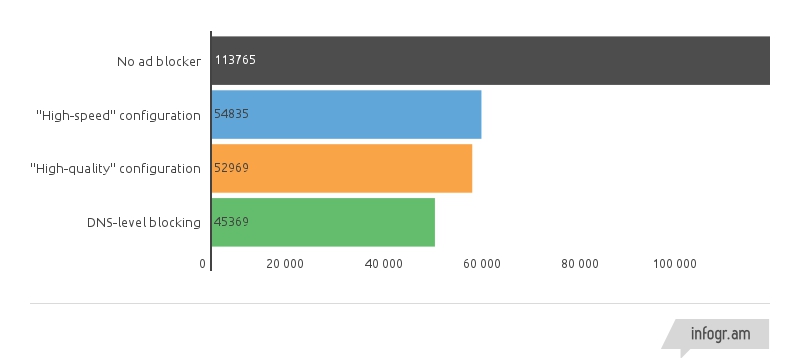
We have collected all the results in graphs: data usage, CPU consumption, ad & tracking blocking result.
CPU consumption
As we can see from the graph if there is an ad blocker, CPU consumption is two times less! And this applies to all Adguard configurations. Expectedly, Adguard in DNS-level blocker configuration consumes somewhat less than in other two.
Data usage
Now let's have a look at the most important thing - mobile data usage. Again, we see a huge saving, more than 50% economy while using any filtering method.
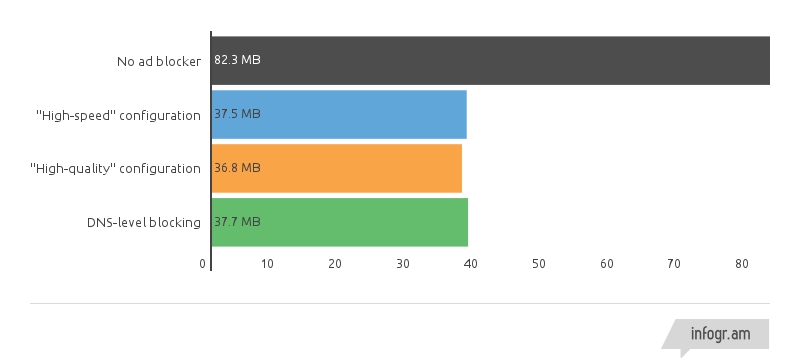
By the way, mobile data usage is the major contributor to the battery consumption.
Blocking ads and tracking
Judging by the results of previous tests, DNS-level blocking shows slightly better results. It's time to show its drawbacks.
Please note the original data at the "Without an ad blocker" test. 85% of requests were sent to third-party hosts, the vast majority of which are not in any way related to the website. And those are mobile versions of websites, those that should be as lightweight as possible!
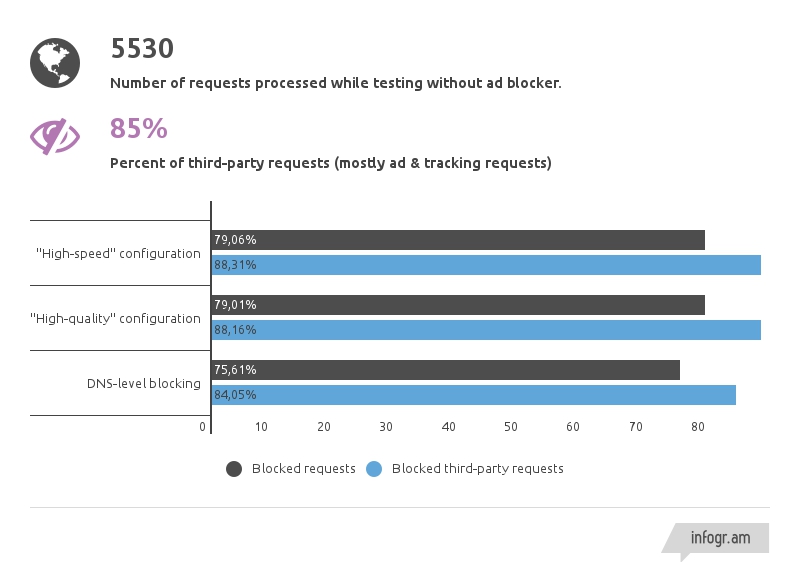
The final result shows a noticeable lag of DNS-level blocking in the number of blocked requests. But this was the expected outcome.
Conclusion
When you are using an ad blocker, it doesn't reduce the battery life. On the contrary, any ad blocker noticeably helps you save it.
Moreover, you not only save battery power but also money, because advertising and tracking constitute more than half of all loaded data.
If you have questions about this article, or if you want us to supplement it with new information, just write it in the comments.


















































