AdGuard 4.1 for iOS: native DNS support and new low-level settings
Less than two months from the previous release, and here we go again. Meet AdGuard 4.1 for iOS! Let’s see what’s good about it.
But first we need to confess. This morning our boss told us, the content team, that we need to write blog posts about new versions, and I quote, "In a more funny way". All so that you, dear users, won't be bored by all the technical stuff. We totally agree, of course, and are very excited about it 😬 But in this case, there was no time to rewrite the post.
So we've found a solution: we hand-picked three absolutely delightful jokes to spice up the text and deliver it to you "in a more funny way". Let's kick it out of the gates with the first one:
What did Batman say to Robin before they got in the car?
"Robin, get in the car!"
...
Oh God. Let's get to the changelog.
Native DNS support
Long time ago scientists discovered an interesting phenomenon. While we typically think that what we most want is to actually get what we want, the most intense current of pleasure lies in looking forward to getting what we want. It’s been months since Apple added native DNS encryption support to iOS, and you might’ve thought that we at AdGuard just have been lazy not adding support it? Well, not at all! We’ve just been trying to follow science and provide you with as much pleasure as possible. Finally, the intensification period ends and catharsis begins!
So yeah, the most important thing this release features is native DNS support.
As you may remember, we already wrote that Apple started natively supporting encrypted DNS. Namely, two protocols were supported — DNS-over-TLS and DNS-over-HTTPS (DoT and DoH correspondingly). In that post we added a manual on how to set up and manage DNS profiles in AdGuard. Yet, the solution wasn’t so elegant.
In the new version, there are already three protocols supported (Regular DNS as well) and the method has become native not only to the iOS, but also to AdGuard. We have simplified the scheme: now you don’t need to download and install DNS profiles, it would suffice to enable Native implementation in AdGuard for iOS settings:
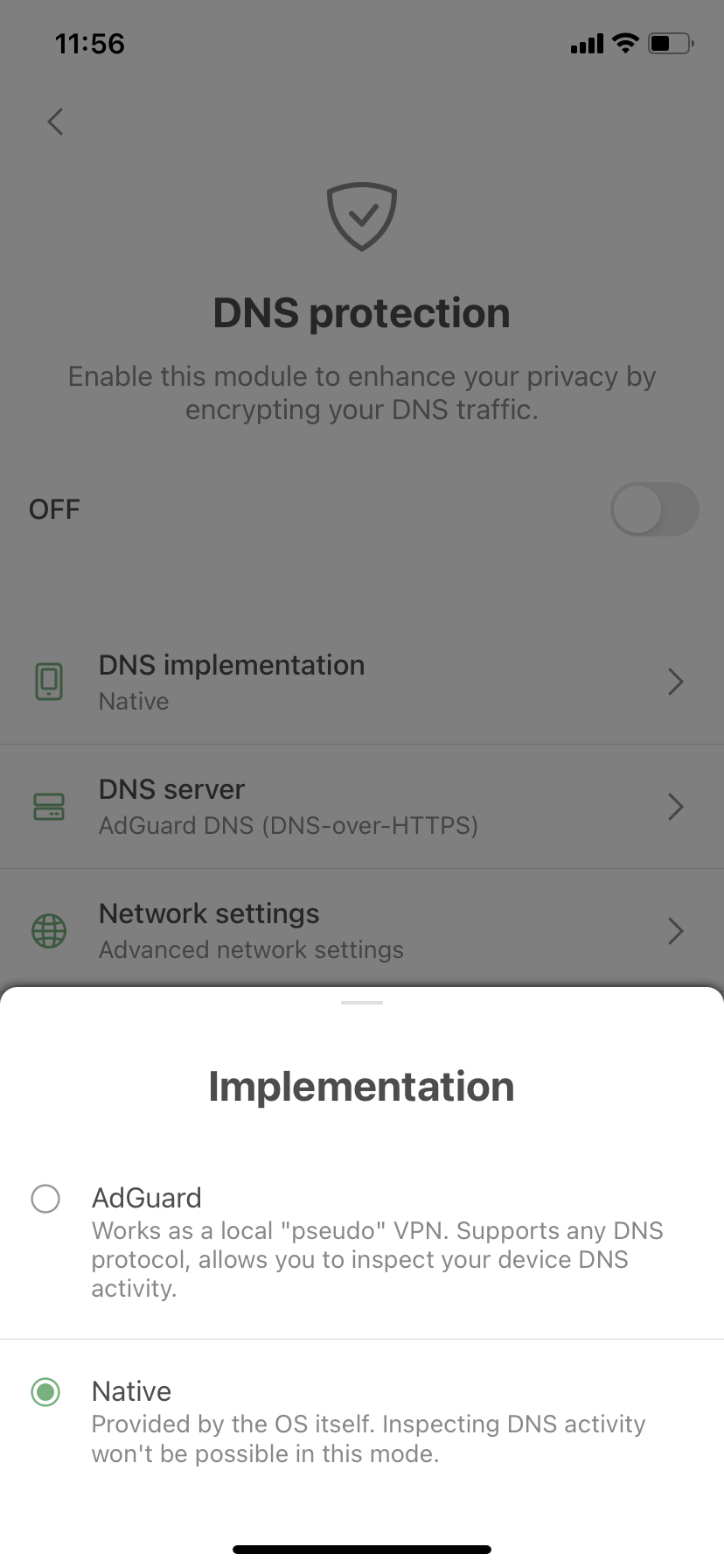
- Open AdGuard Settings > DNS protection > DNS implementation > Switch to Native.
- Toggle on DNS protection. You’ll see an instruction saying what to do next (Open System settings, go to General > VPN & Network > DNS and select AdGuard there).
The new method of setting up DNS isn't really superior to the one you're already familiar with, but it has one slight advantage: the DNS is handled by the system and not the app. This means that AdGuard doesn't have to create a local VPN. Sadly, this will not help you circumvent system restrictions and use AdGuard alongside other VPN-based applications — if any VPN is enabled, native DNS is ignored. Consequently, you won't be able to filter traffic locally or to use our brand new DNS-over-QUIC protocol (DoQ).
All that protocols and other DNS details didn't scare you away? Cool! This means you can reward yourself with another refined joke.
How do you feel when there's no coffee?
Depresso.
...
...
Now off to other changes.
Low-level settings
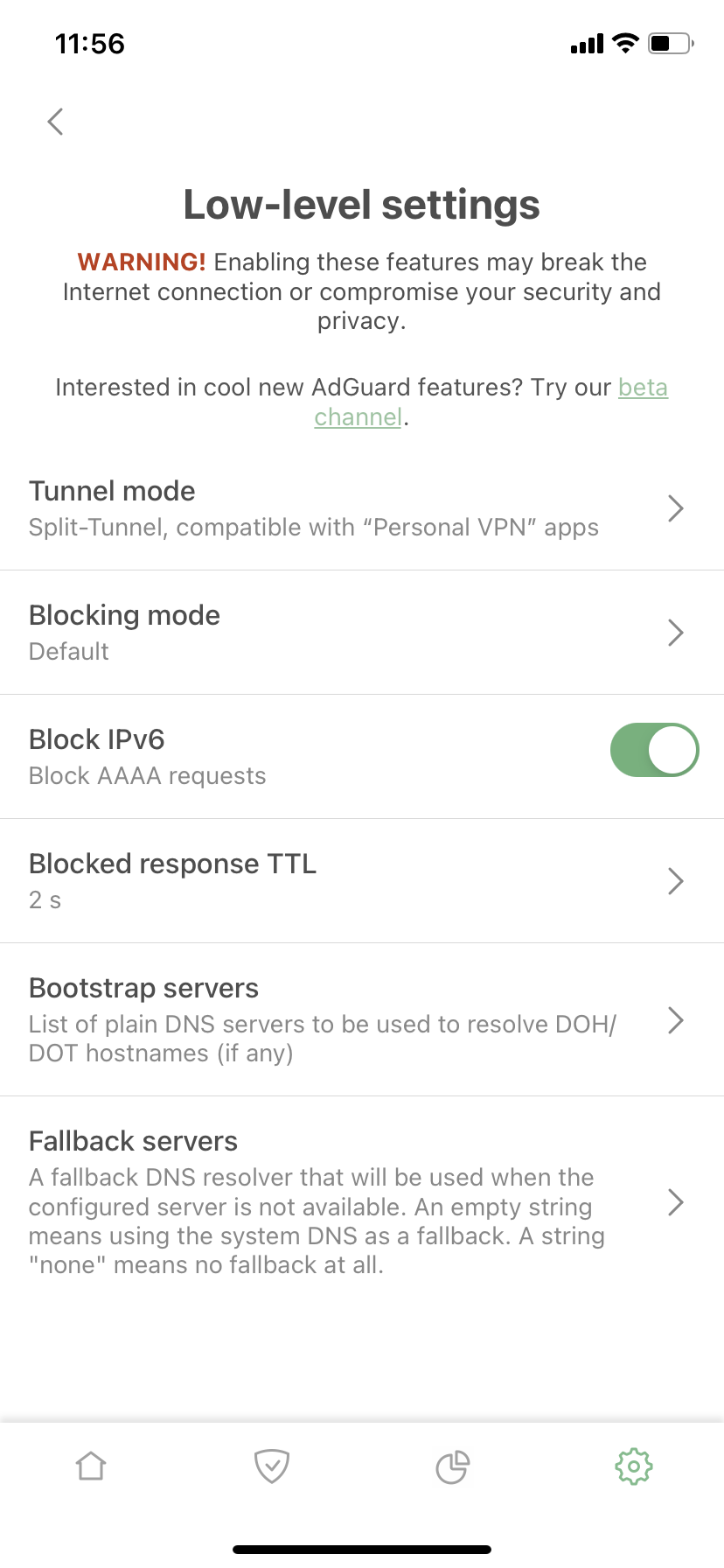
This section of AdGuard’s settings could confuse users with the provocative ‘Are you a developer?’ question in its description. But if you are a bit of a geek, there are several new functions that might come in handy.
Bootstrap and Fallback
The important ones are Bootstrap and Fallback servers. What are those?
With Fallback, everything is fairly simple — it’s a backup DNS server. If you chose a DNS server and something happened to it (whatever the reason), a fallback is needed to set the backup DNS server until the main server responds.
With Bootstrap, it’s a little more complicated. For AdGuard for iOS to use a custom secure DNS server, our app needs to get its IP address first. For this purpose, the system DNS is used by default, but sometimes this is not possible for various reasons. In such cases, Bootstrap could be used to get the IP address of the selected secure DNS server. Here are two examples to illustrate when a custom Bootstrap server might help:
- When a system default DNS server does not return the IP address of a secure DNS server and it is not possible to use a secure one.
- When our app and third-party VPN are used simultaneously and it is not possible to use System DNS as a Bootstrap.
Let's pause it here for the third joke to top it all.
Why is Peter Pan always flying?
He neverlands
...
Ok, we've got one more thing to deal with.
Block IPv6
For any DNS query sent to get an IPv6 address, our app returns an empty response (as if this IPv6 address does not exist). Now there is an option not to return IPv6 addresses. At this point the description of this function becomes too technical: configuring or disabling IPv6 is the exclusive domain of advanced users. Presumably, if you are one of them, it will be good to know that we now have this feature, if not – there is no need to dive into it.
Well, that's all for today. Hopefully, you'll like the new version. Go ahead and update now. As usual, the complete list of changes can be seen on GitHub. And remember that we're always happy to receive your feedback. Share your thoughts with us in the comments section below or on social media!


















































