AdGuard roadmap
Hello friends!
Get ready, it’s time for an ‘ambitious plans post': we decided to build a roadmap – gather ideas for all Adguard products in one place. If you’re interested in what we plan to add/update/change in our programs and apps, then this post will shed light on it! :)

General changes
These are changes that concern all our products, and that is why it is something all Adguard users shall know.
Cool “Cloud Sync” innovation
This awesome feature was offered by our users. The point is that Adguard setting could be exported and imported, meaning that enabled filters, created filtering rules and such will be synchronized on all of your devices. Let us assume that you use Adguard on PC, create rules for websites you visit to block what you want, add some domains to the whitelist (to support them). And then you go online via Android, and… you have to do it all again. But Cloud Sync will allow you to easily move program settings to Android device. Or import Adguard settings from one computer to another (created rules on a work computer you will be able to transfer to a home device, for instance).
Moreover, we want to make synchronisation possible not only with our server. Thus you could choose the most convenient tool, be it Dropbox, iCloud, Google Drive or such. A useful thing, as you can see. Will work on it.
New reporting tool
Next, we need a more practical tool to process your complaints on websites. Currently we have this feature as a part of Assistant and looks like this:
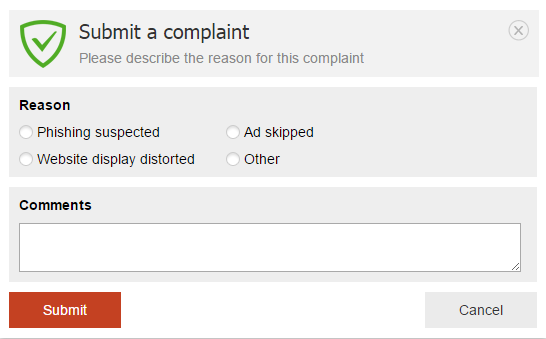
With such ‘nondescript’ reports we couldn’t understand what you had encountered on the website. What exactly had displayed incorrectly, what content had you seen on a page. Often we couldn’t repeat the problem, and so elimination took too much time.
What are we planning to do?
A mechanism that will allow to send with a complaint:
- Info on the website or page;
- Filters that the user has enabled (sometimes the reason for missed ads lies in some important filter being disabled);
- A screenshot with the highlighted missed ad (optional);
- Users comment.
The reports will be available on a special website, so you could easily send us a direct link on the report.
Adguard Assistant
Assistant itself will also be modernized: we are planning to redesign it. It will be more convenient and functional.
Adguard for Windows
First, we want to complete the work on version 6.0. After the update from 5.10, as it ususally happens after such milestone release, we got many little bugs. And we are planning to fix them in the nearest future. And alongside work on other improvements and new features:
Stealth mode
In the article about release of 6.0 we wrote that this is the first realisation of privacy protection mode and that we will continue to work on its improvement. And we will keep our promise ! :) We’ve got a plan, and it includes the following:
- Improvement of “Hide IP address” feature.
- Blocking of browser location API = hiding of your geolocation.
- Self-destructing cookies. Cookies (saved passwords, logins and other data) can be used for getting your personal info, that is why it’s a good idea to reset them from time to time. Now, we already have this option, but cookies can be reset whenever they want, and log out you on the website. In the new version of Stealh mode we will add ability to choose time gap, after which cookies will be reset (10 minutes? 30 minutes? Hour?…).
- Blocking of Windows 10 telemetry. Win10 gathers information about performance of apps, drivers, and other devices for OS optimization. However, this information can be used to track what you launch on your computer. We want to prevent data collection.
Other
More than 250 tasks, which we need to solve/implement in future versions… These are very important, but if we tell here about each of them, this post will be just too enormous ! :)
Adguard for Mac
Changes await OS X version as well:
- Adding of the separate Stealth mode. It’s time to protect data privacy of Mac users.
- Support of userscripts for extension of program functionality, which we already have in Windows version.
- Adding filters by URL. Almost like in Adguard for Windows:
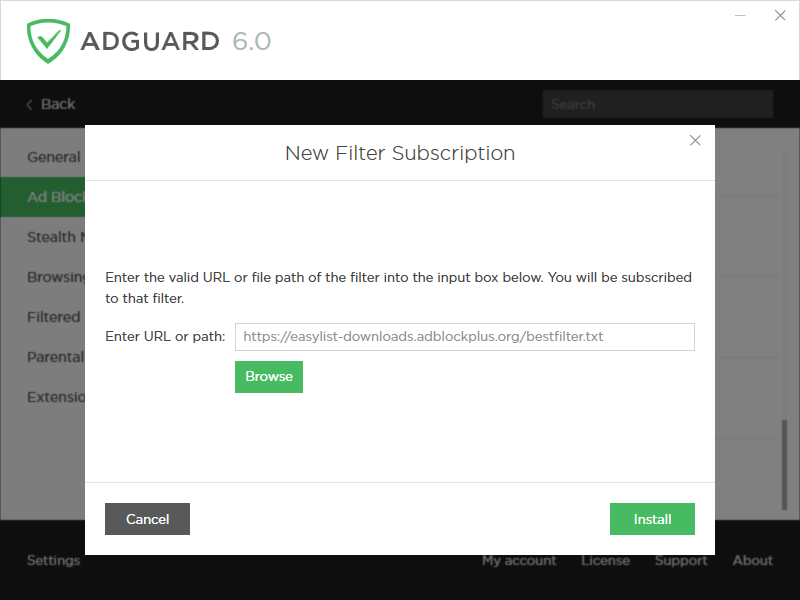
It is useful for those who are interested in different filters and want to fine-tune the filtering.
Adguard for Android
Mobile app for Android devices will also meet new serious changes.
HTTPS filtering
This innovation already works in test mode: we have released Adguard 2.5 beta version, the release itself will be somewhat in a month. Why is it cool? Earlier we were powerless over sites (and applications) where ads were loaded through https protocol, but now we are able to filter them. So, now we can block ads in Youtube app. Hooray!
Redesign
Last year we switched to Google Material design, and at that moment this interface upgrade was enough. However for more than 1,5 years of existence, our app got a lot of new features, and the old design doesn’t meet our requirements anymore. We will be changing it, and don’t worry – it will be beautiful and user-friendly.
**Performance statistics **
- We are planning to add filtering log (tool that shows all requests processed by Adguard at the moment: what is blocked and where and etc..).
- Per-app statistics (top of used or blocked domains). For each app we will keep statistics of domains (with a counter), which an app has ‘visited’.
**Massive Firewall improvement **
- Power saving mode. When this mode is enabled we don’t let anything (apart from the apps you selected) go on the Internet, even if the phone is connected toa network.
- Various Firewall profiles (by default, when screen is off, roaming, night and etc). For each app there will be several checkboxes, which will enable/disable access to the web in “specific state”. Meaning that a user can choose which apps will work with the screen off, during day-time, and which in roaming.
- Teaching mode. Initially it will be prohibited for all apps to go online. But later, when an app will try to go to the Internet, Adguard will show a notification with two buttons ‘Allow’ and ‘Prohibit’. Thus you will gradually teach Firewall to work the way you want.
Stealth mode
This is a long term plan. But someday we will add this module to Android. The app totally needs its own privacy protection module.
Adguard for iOS
Assistant
An already known tool, which allows you to manually block any(!) element on a page, is about to be added to our app for iPhones and iPads.
Adguard for iOS PRO
We want to release a ‘premium’ iOS version, which in addition to ad blocking in Safari with Content Blocking API will be able to block ads on a network level. Basically, Adguard for iOS PRO will block ads in other apps.
Adguard browser extensions
New functionality awaits our browser extensions as well.
Stealth mode
Ad blocking, phishing protection, now it’s time to add protection of your personal info.
Extension for Microsoft Edge
Microsoft announced extensions support in their new Edge browser. And users came to us to request new product. We will to develop it anytime soon.
So as you see, we have truly immense plans and a lot of work to do. We have learned from experience, so this time we will not pick up any exact dates, because, as you know, “one does not simply release a version in time” ! :)
Maybe you have any ideas of what else is missing in Adguard. We welcome your comments and offers.
And in the meantime we will follow our general roadmap. Stay tuned, a lot of interesting stuff is coming!


















































