Apple announced privacy labels and WebExtensions support
Apple pays more attention to privacy protection issues than its competitors. Well-defined privacy policies and rather severe restrictions on what user information an app or extension can get make Apple products more secure for users. However, from the perspective of transparency, everything was not so obvious for Apple. The latest announcement shows that the corporation is ready to take a few more steps towards increasing transparency in the field of privacy protection.
Privacy labels are to inform the user, not to block trackers
A high level of centralization and information protection allowed us to say that Apple's policy continues to be selective. Even experienced iOS users don't know where their browsing history leaks, because they usually don't see at what point apps connect to the network or which servers process requests.
One of the most significant changes to iOS 14 is related to the processing of location tracking. In the new version it will be possible to securely share approximate location data. Approximate location allows to correctly personalize content, but it does not reveal the user's real whereabouts. They also announced protection against using cameras or microphones without the user's knowledge.
The labels appearing in iOS 14 will help users control how an app applies their personal data and whether this data is shared with third parties. Based on these labels, the users might find it easier to take their own decision and refuse to install the app if necessary. These labels, however, are not designed to block tracking. Everything is implemented at the simplest level. Developers are encouraged to inform how the user's personal data will be applied.
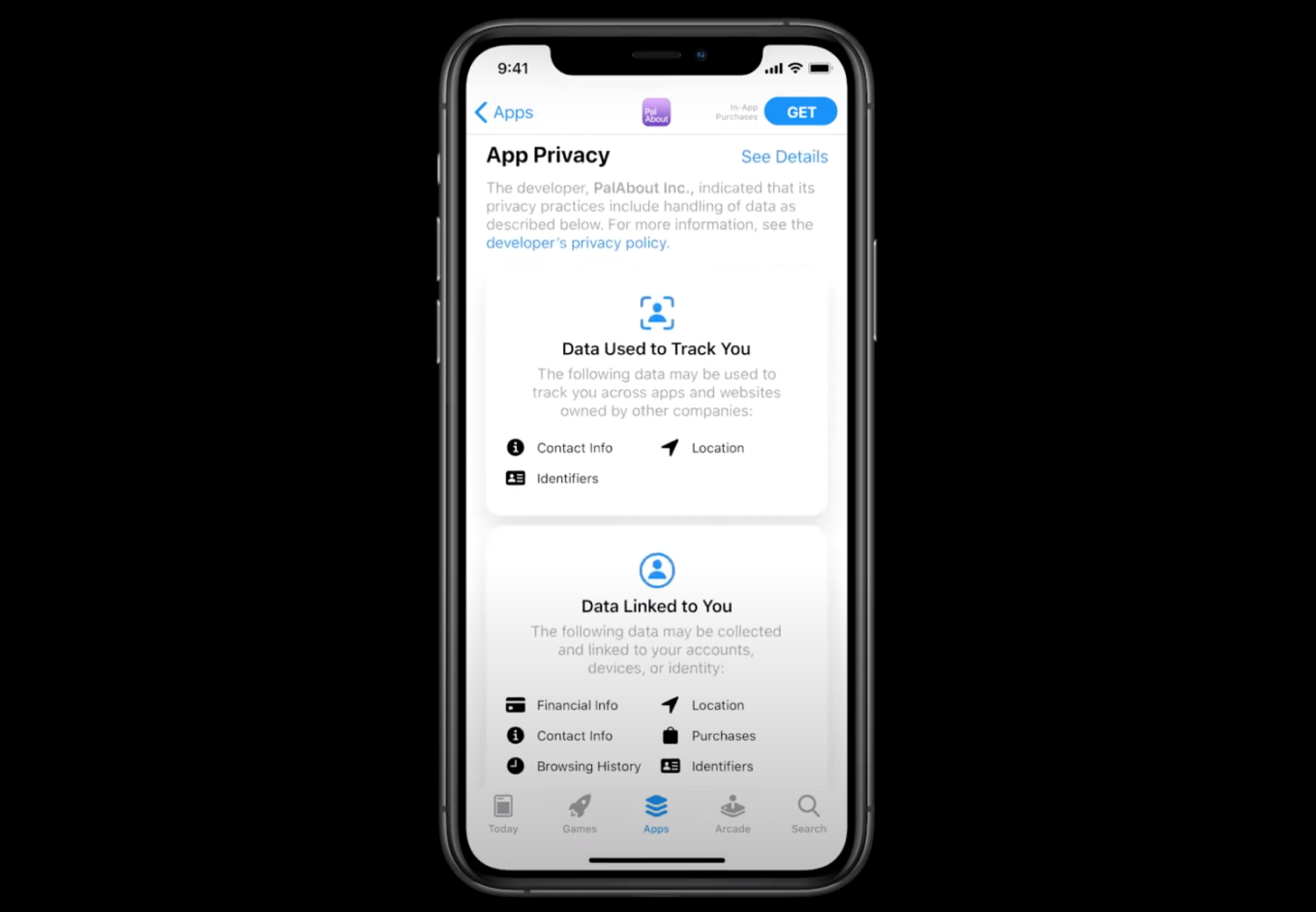
This way Apple greatly increases transparency. You don't have to read the full text of the privacy policy to understand what data the app collects. This is announced immediately. And then the user has to decide whether they are willing to continue using the app at this point or not. Or, he/she might ASK the app not to track them.

But, for instance, let's consider the situation with Safari Content Blockers. Apple gives the user tools to protect themselves against tracking. In other words, in case of Safari, the situation is as follows: a user who doesn't want to be tracked BLOCKS the trackers automatically. And the website may ASK the user for permission to track them or show them ads.
What is the reason for such a discrepancy? Why do the people in Apple believe that this is the app user who should be "asking for it", and not vice versa? And why can’t Apple provide app developers with tools similar to Safari Content Blocking, and why on Earth do they suppress the development of its own mechanisms (let's recall what happened to AdGuard Pro)?
The problem is that Apple cannot and does not plan to test the integrity of the developer, and, without effective control, users will have to take it on trust, and take cues only from what the developers themselves say. In this regard, it is possible that by trusting all labels implicitly, the user risks forming a false impression about the app.
Safari WebExtension support
macOS Big Sur introduced new features in Safari. Namely, they have added support for the cross-platform WebExtensions API used by Chrome, Firefox, and Edge browsers. This step should facilitate the work for developers of browser extensions who deal with Safari and then distribute extensions via the Mac App Store. It seems Apple has finally realized that their API limits their own platform and they don’t benefit from this approach.
Due to these limitations, developers have always created extensions for Chrome and Firefox first (where it was easier to do this), and only then, residually, did they create extensions for Safari. The same could be said about support. Extensions for the Chrome and Firefox browsers are almost always updated on a first-priority basis. After all, there is no point in spending a huge effort to support the Safari browser, which holds only 10% of the market.
As for the developers of ad and tracking blockers, their rights to the Mac App Store already were severely restricted. Unlike other browsers, Apple provided its own API for content blockers. On the one hand, of course, this is very good, but on the other, Apple's API was not as flexible as those used by Firefox and Chrome. And besides, it has hardly developed in recent years.
In iOS 14, support for the WebExtensions API is only partially implemented. Nothing useful has been realized in the part that content blockers need. For example, there are no blocking requests using webRequest. This policy creates a problem with extending functionality for all apps protecting privacy.
There will be no rapid changes
To sum up, privacy labels and WebExtensions API for Firefox and Chrome set out the correct direction of development for Apple and gives hope for a brighter future for ad blockers. However, there is still a long way to go and we should not expect immediate changes because:
- It's not clear how labels will be implemented upon completion, or whether this policy will be enforced.
- Once again, as far as WebExtensions support is concerned – nothing brand new has been introduced for blockers, so it's too early to talk about a proper API.
Developers and users expect Apple to take a consistent approach. If for some reason the company is not ready/does not want to implement privacy protection tools itself, then at least developers should be given an API and the opportunity to do it. We believe that this is what many other Apple developers worldwide are waiting for.


















































