Apple fights fingerprinting: new rules require developers to justify access to device data
Apple has just made life more difficult for mobile ad networks and other third parties who track you around the Web and push stuff to you or sell your data. With the latest change of rules for developers, Apple is taking aim at fingerprinting, a sneaky technique that some apps may use to covertly spy on you and your device.
While Apple builds protections into its ecosystem, you can take control of your mobile privacy right away by using a comprehensive tool like AdGuard for iOS to block trackers and secure your traffic.
Apple has announced that developers will need to explain why their apps have to use certain APIs (Application Programming Interfaces), which are ways for different apps to talk to each other and exchange information. Through these APIs developers can collect seemingly harmless data about your device, such as when you created and last edited a file, how much disk space you have left, when you turned on your phone last time, what keyboard you use, or what settings you prefer.
At first glance, this kind of information may seem completely useless: why would anyone want to know what keyboard you use, and why does Apple care about who knows that? However, while these bits of information may not seem very personal or private, when combined they can help companies create a unique profile or “fingerprint” of your device. This “fingerprint” can then be used to track you around the web and target you with ads.
Broadly defined, a device’s “fingerprint” is a combination of its hardware and software features. The more of these features are unique and known, the easier it is to track you. Of course, unlike your name or date of birth and your actual physical fingerprint, your device fingerprint is not set in stone. Its so-called “uniqueness” can fluctuate over time, which means it is not a foolproof way to track or identify you. Still, since Apple had already cracked down on other means of third-party tracking, this was a loophole that companies could use to continue snooping.
‘Approved reasons’ for using Apple APIs: what are they?
The requirement for developers to justify access to device information will apply not only to their own code, but also to third-party SDKs (software development kits) that they embed in their apps. SDKs are third-party tools or libraries that help developers add functionality to their applications. However, some SDKs — such as a massively popular Facebook Ads SDK and other advertising SDKs — also gather a lot of data about the app’s users and their devices. These SDKs are often chosen by developers who seek to monetize their apps through ads: developers can show personalized ads from a SDK vendor in their apps and get paid a portion of the ad revenue.
According to Apple’s new rules, both apps and third-party SDKs will need to write one or more “approved reasons” for why they need to access device information through specific APIs in separate documents called “privacy manifest files.” These reasons should be “consistent with the app’s functionality.” For example, a flashlight app does not need to access the disk space API to work, as it only needs to access the camera flash or the screen brightness. So, if a flashlight app wants to access the device’s memory, it might have some hidden or malicious purpose for that (such as displaying ads for disk cleanup apps, collecting data for fingerprinting or even installing malware). In this case, the reason for the flashlight app to use the disk space API will be inconsistent with the app’s functionality, and the app may be determined to have violated Apple’s policy and be removed.
Apple also said that app developers will have to write all the internet domains that they connect to for tracking purposes in the privacy manifest file. However, this only works if the user allows the app to track them. If the user does not allow tracking, the app won’t be able to connect to those domains at all.
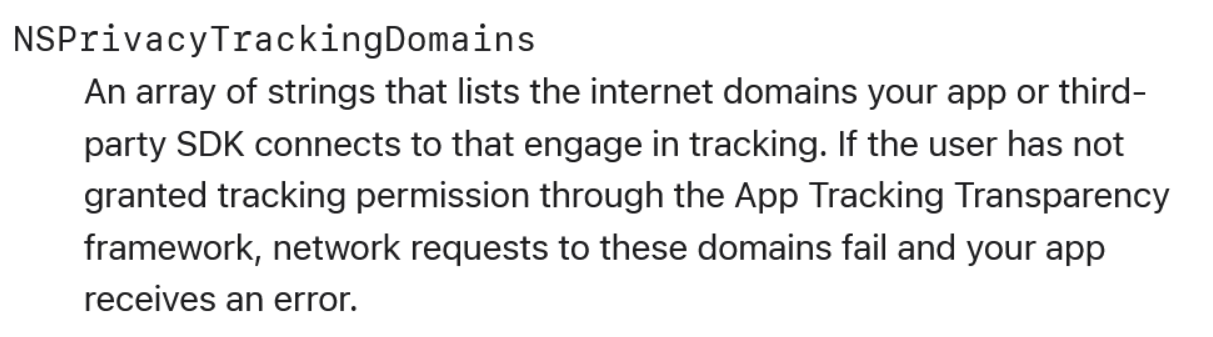
Source: Apple developer rules
First and foremost, this new policy appears to be aimed at stopping apps that trick users into granting unnecessary permissions from using this data to serve ads or fingerprint them.
Of course, a tech-savvy user is unlikely to grant their apps any dubious permissions anyway, as any such request would raise a giant flailing red flag with them. But sometimes we are in a rush or not paying attention. Besides, most phone owners are not even aware of the dangers that granting a random app access to their phone’s data can bring.
Permission to track ≠ permission to fingerprint
Apple has made it clear that even if an app secures a user’s permission to track them — which is already rare, as over 90% of US iPhone users deny apps such permission after Apple made third-party tracking an opt-in feature in 2021 — that does not mean it can “fingerprint” them.
Regardless of whether a user gives your app permission to track, fingerprinting is not allowed.
Developers will have to comply with the new requirements by the spring of 2024 at the latest. Starting this fall, they may receive a notice from Apple asking them to provide reasons for using certain APIs. And if they don’t provide them by spring 2024, their apps will no longer be accepted in the App Store.
While Apple has stepped up to the plate on fingerprinting, the policy itself is not new. What’s new is Apple’s enforcement of the ban. Already at the 2022 Worldwide Developers Conference (WWDC) Apple stated: “Fingerprinting is never allowed. Regardless of whether a user gives your app permission to track, fingerprinting — or using signals from the device to try to identify the device or user — is not allowed per the Apple Developer Program License Agreement.”
In fact, one could see Apple going after device fingerprinting long before that. Back in 2017 Uber almost got itself kicked out of the App Store after its app was caught extracting iPhone serial numbers out of the device’s operating system.
How Apple is leading the way in privacy protection
The new anti-fingerprinting measure is just one in a series of other steps Apple has taken over the years to strengthen its users’ privacy and security. Cupertino has always styled itself as a champion of privacy, making its protection an inherent part of its marketing pitch. And while the iPhone maker has come under fire for allowing its own native apps to track users without their explicit permission, there’s no denying that Apple is on the cutting edge of privacy, at least among Big Tech.
Below are some of the key privacy-protecting features that help Apple users to take more control over their data and decrease their online footprint:
The App Tracking Transparency (ATT) feature, introduced in iOS 14.5 in April 2021, is perhaps the most important in terms of its impact on third-party tracking. It lets you choose whether you want to allow apps to track you or not. When you open an app that wants to track you, it will show you a pop-up message asking for your permission. You can either tap “allow” or “ask the app not to track”. Most Apple users chose the second option, which means they blocked the apps from tracking their IDFA (Identifier for Advertisers) — a code unique to each device. That dealt a blow to ad revenue for ad tech giants like Meta, which estimated its losses in the billions of dollars.
App Privacy Labels, launched by Apple in late 2020, allow you to see what information an app collects and for what purpose right in the App Store or on Apple’s website. The privacy labels are divided into three categories: data not linked to you, data linked to you, and data used to track you. The last category is the most telling, because it shows what data an app may use to track you across other apps or websites, including for targeted advertising. Note, however, that when you click “See Details” under the “App Privacy” section of an app’s description in the App Store, you will see the following warning: “This information has not been verified by Apple.” This means that, by and large, Apple is relying on developers to provide the correct privacy labels for their apps, and numerous reports have since exposed many of them as incomplete or misleading. In response to criticism, Apple says it regularly audits apps and makes developers correct inaccuracies.
Available since 2021 App Privacy Report is a feature that shows you how often apps use the permissions you’ve given them to access your location, camera, microphone, contacts, and other data. You are also able to see which internet domains apps contact most often, and check if these domains can be used for tracking or advertising purposes. Armed with this information, you can revoke permissions you’d granted your apps or stop using them altogether if you think they are spying on you. The App Privacy Report feature can be turned on in the device’s privacy settings.
Mail Privacy Protection is a feature that hides your IP address from email senders, preventing them from learning your exact location. The feature also helps users avoid letting senders know whether they opened an email and what they did with it. Marketers typically learn this information with the help of tracking pixels — tiny transparent images embedded in emails. The feature, first introduced in iOS 15, is an opt-in that must be enabled in the Mail app’s settings.
Intelligent Tracking Prevention (ITP) is a feature for Apple’s Safari browser that blocks third-party cookies and trackers from collecting data about your online behavior. Starting with iOS 15, it also began hiding your IP address from trackers, meaning they can’t tie your activity to your location or device and build your advertising profile. The feature is turned on in Safari by default.
Hide my Email feature is a service that lets users keep their real email address private when creating accounts with apps or websites. You can use this feature for free when signing in with Apple on third-party websites, provided they allow you to use your Apple account for sign-up.
Privacy Policy for all iOS apps. In 2018, Apple made it mandatory for all iOS apps to link their privacy policy in the App Store. Prior to that, the requirement applied only to subscription-based apps, which may seem dubious by today’s standards. Again, there seems to be a problem with enforcement of this policy. A 2022 study by Pixalate found that 13% of the surveyed apps in the App Store lacked privacy policies. However, it’s unclear how many of these apps were “abandoned” apps, meaning they may not have been updated in years and were uploaded to the store before 2018.
Of course, there are other Apple features that help boost your privacy — some are only available to paid users, such as Apple’s Private Relay, which helps obfuscate your browsing history from both Apple and third parties. Here we’ve mentioned just a few of Apple’s key features that are either on by default or available to all via Settings.
But they are proof enough that Apple, for all its flaws and controversy over its own tracking practices, is moving in the right direction in terms of protecting users from third-party tracking.
Hopefully, the move will inspire an industry-wide shift on fingerprinting, and prompt Apple’s main rival, Google, to consider similar measures.


















































