AdGuard’s digest: Apple’s tracking trouble, AI detector’s demise, OpenAI chief’s eye-scanning quest
In this edition of AdGuard’s digest: France probes Apple for tracking users, OpenAI scraps its AI text detection tool, hospitals get alerted about Meta’s and Google’s data collection, OpenAI CEO’s side hustle sparks privacy concerns, all while Google and Apple team up to stop unwanted AirTag tracking.
France probes Apple for abusing its position to track users
A French watchdog has launched a formal investigation into whether Apple violated antitrust laws by tracking people through its native apps. The watchdog, L’Autorité de la Concurrence, released a statement accusing Cupertino of “abusing its dominant position by imposing discriminatory, non-objective and non-transparent conditions for the use of user data for advertising purposes.”
What the regulator meant is that Apple has been using the data it collects from its own apps, such as its News and Stocks apps, to track users across its own iOS ecosystem. But unlike third-party apps, they don’t have to ask users for permission to track them. This is because Apple insists that what it is doing is not tracking because it stays within its own platform. However, third-party advertisers disagree, accusing Apple of hypocrisy. The French watchdog’s investigation stems from the 2020 complaint by “victims” of Apple’s policy, who face reduced ad revenue from people who opted out of third-party tracking at Apple’s nudging.
We have already written about how Apple stands to gain from cracking down on third-party tracking with its App Tracking Transparency (“ATT”) feature. It seems that the French regulator is not impressed by Apple’s semantic excuse. Whatever comes next, we think ATT is great in the sense that it has helped reduce tracking, but we would like to see all tracking labeled as such, no matter where it comes from.
OpenAI drops its AI text detection tool due to poor accuracy
Risking to disappoint all educators around the world, OpenAI put a lid on its ‘AI classifier’ tool that was supposed to distinguish between text written by a human and that generated by AI. In an update, OpenAI said that the tool was discontinued“due to its low rate of accuracy.”
The classifier, which once seemed to be the saving grace for teachers, lasted for half a year. However, for those who read a statement about its initial launch even that might seem too long. Already when introducing the tool in January, OpenAI warned that it was not “fully reliable.” And that was a massive understatement, if you ask us: the statement revealed that the AI classifier correctly identified 26% of AI-written text, which, by any standard, is not reliable at all.
Announcing the AI classifier’s demise, OpenAI noted that it was not giving up on finding effective techniques that would allow distinguishing between human and AI-generated text as well as audio and image. It sounds encouraging. While OpenAI’s first try might have been a flop, such tools are needed not only to catch classroom cheats, but also to prevent abuse of AI, for instance, for spam, fake news and deep fakes. But with how rapidly AI evolves, we can only hope that conjuring up such detection tools won’t become an insurmountable task.
US agencies warn hospitals: Don’t let Meta and Google spy on your patients’ data
The US Department of Health and Human Services (HHS) and the Federal Trade Commission (FTC) have sent a letter to about 130 US hospitals and telehealth providers, urging them to stop sharing sensetive patient data with Meta and Google through their websites. The letter reminds them that they have a legal obligation to protect the privacy and security of sensitive health information, such as diagnoses, doctor appointments, and medical treatments, and not to disclose it to third parties without consent, even if they don’t profit from it.
The letter is part of a regulatory crackdown on the use of tracking codes that enable hospitals to monitor user behavior for marketing purposes. A recent survey revealed that more than 98% of American hospitals embed third-party tracking codes that routinely transfer patients’ data to big tech corporations, social media, advertisers and data brokers. This practice has been exposed by the Markup’s investigation last year, which led to several lawsuits against Meta for collecting patient data without consent and using it to target ads on and off Facebook. Meta denied any wrongdoing and blamed the hospitals for choosing to install the trackers.
It’s great to see that the US is taking action on this issue of rampant tracking that Meta and Google conduct on websites that contain highly sensitive information about people’s health. The leak or misuse of this data could result in identity theft, blackmail and public humiliation. We hope that the regulators will follow through on this issue, and that hospitals will be more careful about the analytics tools they use, prioritizing patient privacy over their own convenience.
OpenAI boss’ iris scanning project sparks privacy concerns
OpenAI CEO Sam Altman’s new cryptocurrency project has sparked concerns in the UK, where the privacy regulator has launched an inquiry into it. The project, called Worldcoin, aims to create a unique digital ID for every person on the planet that can be used to verify their identity online and prevent AI impersonation. However, how this idea is being implemented some have found unsettling.
To get your World ID, which you can access through the Worldcoin app on your smartphone, you have to scan your iris with a spherical device called “the Orb” at one of the project’s locations. As a reward, you will receive some Worldcoin (WLD), a new cryptocurrency that the project hopes will become widely used. The project has been busy scanning irises in 35 cities across 20 countries, including London, where people lined up in the dark to get their eyes scanned for about $50 worth of WLD.

The privacy concerns revolve around Worldcoin’s use of iris-scanning tech and potentially wide-ranging consequences for privacy and security in case of a breach. Ethereum’s co-founder Vitalik Buterin has pointed to some of these risks in his blog post, warning that a leak of iris hash data can reveal personal information such as medical conditions, ethnicity, and sex. There’s also an emergent problem of fake Worldcoin IDs, fuelled by reports of people in poorer countries willing to “sell” their irises to register the Worldcoin app and get the reward.
We are not sure what to make of this idea. It seems to have a noble vision, but it also seems to have a lot of flaws and uncertainties. We would not perhaps rush to scan your irises for coins just yet.
Your Android phone will (finally) alert you if you’re being tracked
A new feature on Android phones will automatically notify you if someone is using an Apple tracking device, called an AirTag, to track you without your permission. Your Android phone will now alert you with a message if it senses an unknown AirTag moving with you. The message will tell you where and when the AirTag started following you, and how to disable it by removing its battery. You can also make the AirTag play a sound to help you locate it and see if it belongs to someone you know or not. You will also be able to scan your surroundings for AirTags yourself. In its blog post, Google said that it plans to expand the detection feature to other Bluetooth-powered tracking devices.
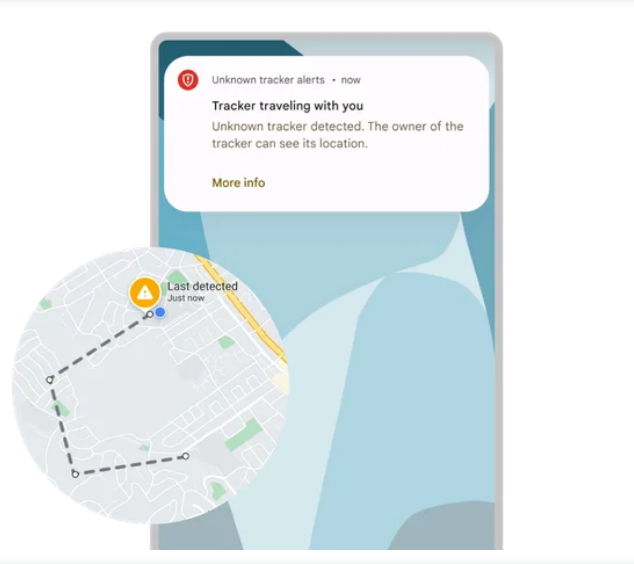
AirTag’s intended purpose is to help users find their keys and other misplaced items. Instead, the tracker has been in the media spotlight mostly for reports of it being used to stalk people. Previously, Android users could only scan for nearby AirTags by downloading an official Tracker Detect app from Apple.
The fact that Android users now have a way to avoid unwanted tracking is great news. This is a rare example of two tech giants, Google and Apple, working together for a good cause. We hope to see more of this in the future.


















































