Ouch, it stings! Google Ads promote trojanized versions of ChatGPT, Zoom, Cisco software
Nobody likes ads, but it is one thing when they are just annoying, and quite another when they are downright dangerous. Such is the case with some Google search ads that trick users searching for popular applications into downloading malware.
It works like this: cybercriminals pay Google to run an ad in search so that their link appears at the top of search results. An unsuspecting user, believing that Google has vetted an advertiser before running an ad, clicks on the ad and is taken to a usually harmless site that has nothing to do with the software and then redirected to a clone of the company’s official website. From there, the user downloads a Trojan horse, believing it to be a legitimate product. This malware can then steal personal information, install other malware, including ransomware, or even take control of the computer.
These attacks do not take a rocket scientist to pull off and have become increasingly popular in recent times. One of the latest examples is a malware aptly named Bumblebee. According to researchers at SecureWorks, the malware loader, which used to be distributed primarily through phishing links, is now being spread through Google ads and search engine optimization (SEO) poisoning. SEO poisoning involves a cybercriminal stuffing a malicious website with keywords, fake backlinks, and content that cause the rogue site to rank higher in search results than a legitimate site. While SEO poisoning and Google Ads abuse are complementary, our focus in this article will be specifically on Google Ads.
Beware of the (Bumble)bee
In a recent blog post, SecureWorks said that cybercriminals have been populating Google ads with links that direct users to download hot new software, such as ChatGPT, and software that is favored by remote workers: Zoom, Cisco AnyConnect, a secure remote access VPN client, and Citrix Workspace, another popular remote work application. When users follow the links, they end up on fake download pages where they are greeted by “trojanized” versions of the above software.
In one campaign, SecureWorks observed two files being executed during installation of a rogue Cisco software laced with Bumblebee’s venom: a legitimate installer for Cisco AnyConnect and a malicious program called PowerShell, which, in turn, contained Bumblebee. The PowerShell script loaded Bumblebee into the computer’s memory without running it, making its detection by antivirus software difficult.
According to SecureWorks, the end goal of the attackers was to deploy ransomware, a type of malware that locks your computer or files and demands a ransom payment in order to regain access.
Google Ads: a haven for malvertising?
Bumblebee is just one example of malware that has the potential to spread like wildfire through ads before The Big G gets a handle on it. The Google Ads malvertising problem is far from new. In fact, Google ads, including the sponsored links you see in search results, have been flooded with ‘bad’ ads for years. With the online advertising market booming, Google simply can’t keep up with the ‘bad’ ads that slip through its policies. In 2013, Google said it removed over 350 million ‘bad’ ads, disabled ads from more than 400,000 sites hiding malware, and banned 270,000 ‘bad’ advertisers.
In 2022, the numbers were much higher: in its latest ad safety report, Google said it blocked over 5.2 billion ‘bad’ ads (including 142 million for violating its misrepresentation policy) and suspended 6.7 million advertiser accounts.
Despite all the efforts by Google, the tide shows no signs of turning. Experts are sounding the alarm that the situation with malware being distributed through Google Ads is not getting better, but if anything, seems to be getting worse.
With these types of malvertising attacks on the rise, it’s hard to find a popular application or piece of software that hasn’t been used as bait. Just in the last few months, criminals have used ads to lure users to fake websites offering products like Slack, Grammarly, μTorrent, Malwarebytes, and Microsoft Visual Studio. Another challenge is that while you’d expect your antivirus software to stop your computer from actually uploading malware, cybercriminals have become quite adept at evading detection by antivirus programs.
How to protect yourself
Since the use of antivirus software on its own is not enough to protect you from these attacks, we need to use other methods as well. The FBI, which has also noticed an increase in malware attacks using search ads, recently shared some tips on how to avoid becoming a victim. The FBI suggests that users should be more careful about what they download, i.e. check the URL before clicking on an ad, and better yet — skip Google and type the site’s URL directly into the browser.
These are, no doubt, working tips, but they may not work when you’re in a rush or not paying attention. Besides, malvertisers can trick you by hiding the real URL of the site with a technique known as ad cloaking.
Another way to stay safe, according to the FBI, is to use an ad blocker. Using an ad blocker, either a browser extension such as the AdGuard Browser extension or a standalone application, seems to be the most surefire way to protect yourself from the threat of ads placed by cybercriminals. With an ad blocker, you do not have to check the URL of an ad because you can configure your ad blocker such as not to see search ads at all. In the AdGuard extension you can do this in one click by toggling Block search ads and website’s self-promotion, which is disabled by default.
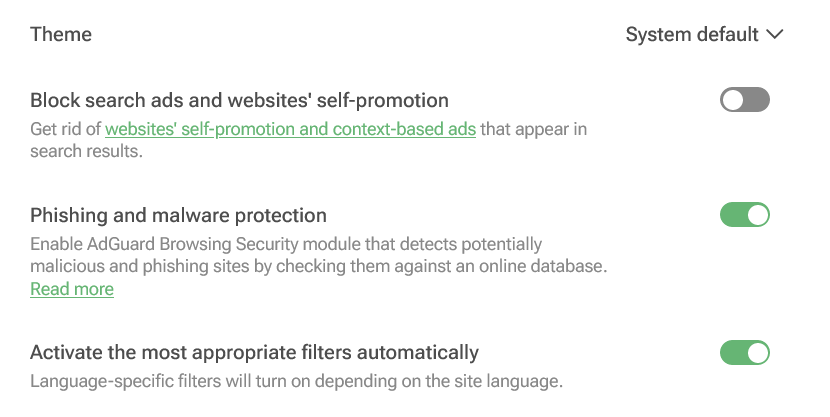
Screenshot: AdGuard Browser extension
And as an added bonus, some ad blockers — AdGuard among them — will protect you from going to known malicious and phishing websites.


















































