EasyList is in trouble and so are many ad blockers
21st October Update: Thanks to Cloudflare, the problem with servers overload was resolved. However, the origin of the issue is still unclear.
You may not be aware of it, but the work of every ad blocker is powered by “filter lists” — lists of rules that tell the ad blocker how exactly it should block ads. EasyList is a community-run project that maintains one of the world’s most popular ad blocking filter lists.
There are many popular lists (AdGuard filters is one of them), but EasyList has always stood out as the most prominent and the most popular one. If you're using an ad blocker, there's a 99.99% chance you are using EasyList or one of its derivatives.
At its core, EasyList is basically just a text file available at the following address: https://easylist.to/easylist/easylist.txt. However, if you try to download this file now, you'll see that it takes about 5 minutes to do so, even though the file size is not that big.
What happened
A couple of weeks ago EasyList maintainers saw a huge spike in traffic. The overall traffic quickly snowballed from a couple of terabytes per day to 10-20 times that amount. The source of that dramatic surge, it turned out, were Android devices from India. This whole situation rang a bell with us, because last year we had to grapple with the very same problem. Last November, our bandwidth usage shot up through the roof for no good reason. After investigating the issue, we found out that two apps with ad-blocking functionality were abusing our servers.
What happened to us bears a striking resemblance to what is now crippling EasyList:
- There’s an open source Android browser (now seemingly abandoned) that implements ad-blocking functionality.
- This browser is forked by a couple of other browsers that are very popular in India.
- The problem is that this browser has a very serious flaw. It tries to download filters updates on every startup, and on Android it may happen lots of times per day. It can even happen when the browser is running in the background.
When we encountered a similar problem last year, we found a simple solution: block the undesired traffic from these apps. Even so, we continue to serve about 100TB of “Access Denied” pages monthly!
EasyList is hosted on Github and proxied with CloudFlare. Unfortunately, CloudFlare does not allow non-enterprise users use that much traffic, and now all requests to the EasyList file are getting throttled.
EasyList tried to reach out to CloudFlare support, but the latter said they could not help. Moreover, serving EasyList actually may violate the CloudFlare ToS.
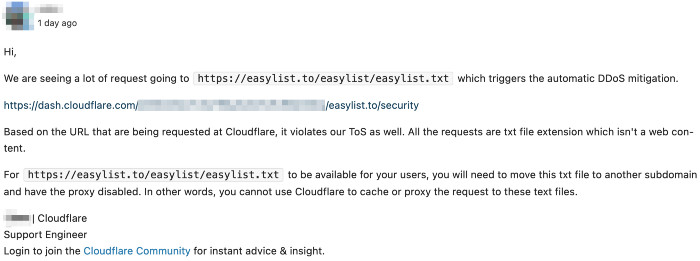
(The screenshot of the message was passed to me by one of EasyList maintainers)
So, the bottom line is this:
- Many ad blockers cannot download filters updates because EasyList is throttled.
- EasyList may need to change the domain name. These faulty browsers will DDOS any hosting EasyList chooses as long as they continue to use the
easylist.todomain.
Are you affected?
AdGuard re-hosts all filter lists on its own servers, so if you use our apps or browser extensions this problem doesn’t affect you directly.
If you use a different ad blocker, then there’s a high chance that it has already switched to a mirror domain or that it will do so soon. But what happens when these browsers notice that issue and start DDoSing the new address?
It’s unclear what EasyList should do now. It is a community project supported by volunteers, and it cannot afford to pay for the enterprise CloudFlare plan. Should they start accepting donations for their invaluable work to fund hosting? This is easier said than done. They can change the domain name, but it is a rather painful procedure that will affect many other open source projects that rely on EasyList (and there are literally hundreds if not thousands).
If you’re a security researcher and can help find these Android browsers that DDoS EasyList and AdGuard filters, your help would be greatly appreciated. Last time we found two such browsers and contacted developers, but the issue was not resolved and even got worse, so probably there are more out there. Look for the ones that constantly download one of these three files:
https://easylist.to/easylist/easylist.txthttps://filters.adtidy.org/extension/ublock/filters/2_without_easylist.txthttps://filters.adtidy.org/extension/ublock/filters/11.txt


















































