Google wants to kill open Web under the guise of making it safer
Let’s face it: Google has never been a fan of ad blocking. The “Big G” first went on the warpath against ad blockers about 10 years ago: that included a mass purge of ad blockers from the Google Play Store in 2013-2014, changes to developer policies to specifically target ad blockers in 2016, and most recently, Google-owned YouTube launching a crackdown on ad blocking users. The reason for this long-running tug-of-war is that Google is not only the maker of the world’s most popular browser, Chrome, and a long list of other services used daily by billions of users, but first and foremost it is an ad tech giant. The lion’s share of Google’s profits, about 80%, comes from online advertising.
Google’s sneaky proposal
Now it looks like instead of trying to ban ad blockers outright, Google has taken a more roundabout approach. A group of Google engineers have proposed an API called Web Environment Integrity. Its stated goal is to make the Web safer by letting websites verify that the devices and apps that visit them are safe and genuine in such a way so as not to facilitate fingerprinting and infringe on users’ privacy.
In short, with the Web Environment Integrity API, when you visit a website, the website can ask a third party called an “attester” to prove that your device or application is real and trustworthy. To do this, the attester sends a special code called a token that describes your device in a “low-entropy” way, meaning with basic information, to the website. The website then “inspects” the token’s payload to see if it has any security problems or has been modified in any way. In addition, the website may ask the attester for more information about your device (“low-entropy signals”), such as how often you use it.
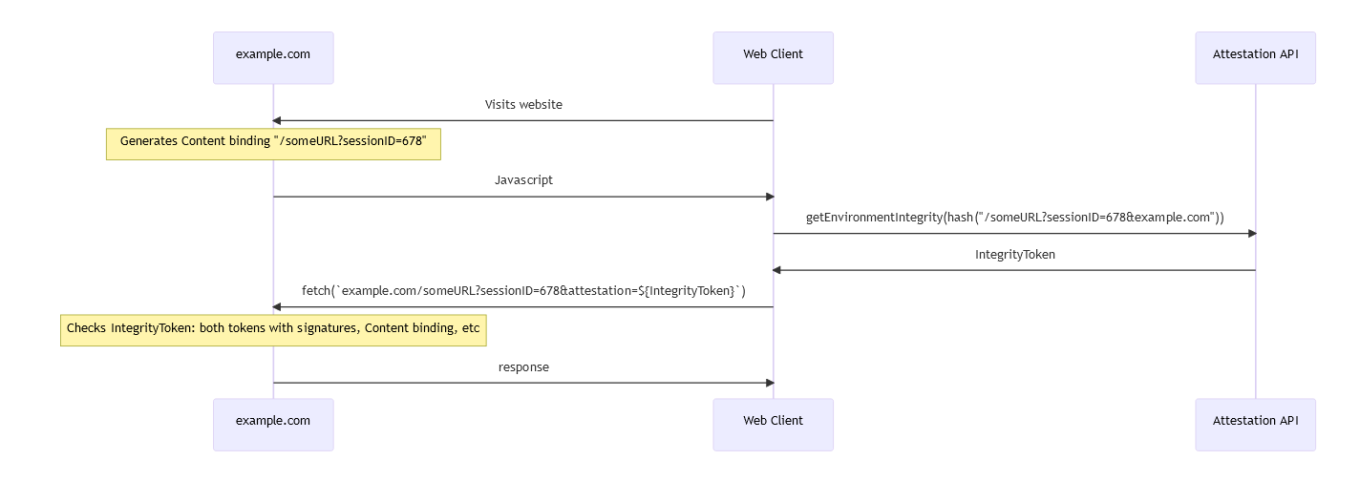
A scheme of web environment integrity attestation proposed by Google engineers. Source: GitHub
As for who can be an attester, the proposal says that the attester can “сome from” the operating system, presumably a developer or vendor, but this is not set in stone. They also say that different operating systems can use the same attester, so in theory, the attester could be Windows or even Google itself.
What are the risks for ad blockers and other client apps?
When you visit a website, your browser or extension can modify the website’s code, for instance, to protect your privacy. For example, DuckDuckGo and AdGuard modify the code to stop websites from tracking you or showing you ads. The AdGuard Browser Extension, in particular, may change website code to block ads and trackers, spyware, adware, and adblock circumvention scripts, depending on your configuration.
So what happens if websites are armed with the WEI API? They’ll be able to detect if you’re running DuckDuckGo, AdGuard, or any other browser, app, or plugin they don’t like, and block you from accessing their content. In fact, implementing this API can hamstring not only privacy protection tools, but also password managers, translation tools, video players, and, in general, tools that may change the layout of the website. This can turn a huge portion of the Internet into a walled garden, accessible to only certain “whitelisted” applications. This is a big concern.
The engineers say they don’t want to “force or interfere with browser functionality, including plugins and extensions,” but it’s hard to take that claim at face value, and we’re not the only ones who smell something fishy. Could it be that Google’s real plan is to kill ad blockers and any other client applications that defy their authority? We think there’s a good chance.
A death blow to the open Web?
If the proposed API is widely adopted and Google is able to muscle its implementation through Chromium-based browsers, it could spell the end of the Web as we know it. In a worst-case scenario, you’d only be able to access a particular website using a particular device and browser with settings approved by Big Tech.
Some might say that this proposal is not Google’s, but just four engineers acting on their own. While technically true, we would be very surprised if Google, the ad tech giant, was not pulling the strings behind the scenes.
Chrome is the dominant force in the browser industry with more than 60% market share, and it might seem that nothing could be done to stop Google’s plans, whatever they are. However, giving up without a fight is not the answer. What everyone needs to do now is spread the word about what we see as an existential threat to the architecture of the Web. The least we can do is raise awareness of the issue so that more people know what is going on and can protest.
On a broader scale, authorities in the US and especially the EU have already shown that they have the power and means to regulate tech companies so that they don’t abuse their position of power. The upcoming Digital Markets Act (DMA) is one example of this trend. So there’s a glimmer of hope that this Google’s proposal won’t see the light of day.
What you can do right now to prevent many useful apps, plugins, and extensions from potentially dying a slow death is to share this news on social media and leave your comment. The louder the backlash, the higher the chance that they will back down.


















































