Google Chrome rolls out new ad privacy controls as it (slowly) bids farewell to cookies
Update: On July 18, 2023, Chrome began rolling out its new browser version, Chrome 115, which includes its new ad targeting technology, the Topics API, designed to replace cross-site tracking cookies, to all Windows, Mac and Linux users.
After repeatedly pushing back the timeline for phasing out third-party cookies in Chrome, Google appears to have finally settled on a date: In a recent blog post, Google announced that it will disable third-party cookies for up to 1% of browsers worldwide in the first quarter of 2024.
Before that, Google will give developers a chance to “meaningfully preview what it’s like to operate in a world without third-party cookies.” During this preview phase, which will begin for all developers with the release of the next version of Chrome in July, they will be able to test various APIs that make up Google’s Privacy Sandbox. This includes testing its key component, the Topics API, which is designed to replace third-party cookies as the primary tool for interest-based advertising in Chrome.
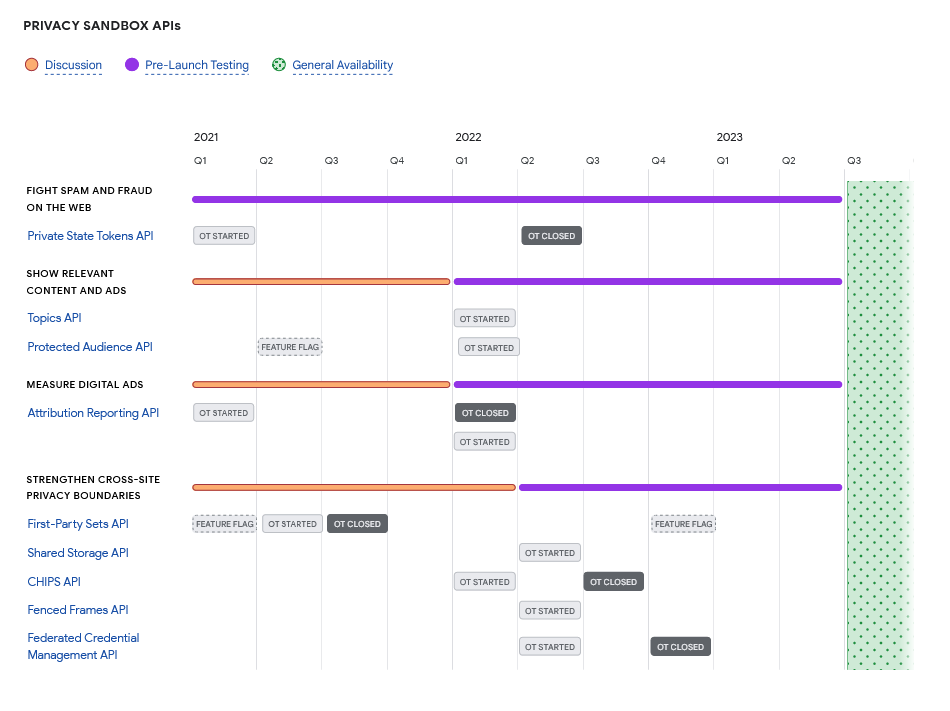
We have written extensively about the Google Privacy Sandbox: for an overview of its key features, see our article (note that Google since renamed its FLEDGE API ‘Protected Audience’).
To help sites transition to the cookie-less world as smoothly as possible, in the last three months of 2023, Google will give developers “the ability… to simulate the Chrome third-party cookie deprecation for a configurable percentage of their users.” In other words, it will let developers choose a percentage of their users who will not get third-party cookies from Chrome so they can test how well they can target ads without them.
Here’s a quick reminder of what third-party cookies are, and what Chrome’s history with them has been so far:
When you visit a website, it may send a small file or a tracking code to your browser. This is called a cookie. Some cookies are created by the website you are on — they are called first-party cookies and help the website remember your preferences and login details. Other cookies are the cookies that are created by websites other than the one you are on. They are called third-party cookies or “tracking cookies” because they allow advertisers to track you across different websites where they show their ads. Many rightfully see tracking based on third-party cookies as the most intrusive and privacy-unfriendly. That’s why most browsers, including Firefox, Safari, Brave, and Tor, already block third-party cookies by default. But Chrome, the world’s most popular browser, still has not done so. Chrome has delayed killing the third-party cookies until it has a replacement. Its first proposed replacement for third-party cookies, FLoC, faced huge backlash and did not stick, and last year, Google proposed Topics instead.
We and many other industry players, including Mozilla, Apple’s WebKit, Brave, and the W3C Technical Architecture Group (TAG), a special working group within the World Wide Web Consortium, have criticized Topics as an underwhelming solution to the problem of unwanted tracking and profiling on the Web. In short, while it may prevent smaller individual sites from identifying users, it won’t stop large corporations that juggle multiple services (like Google itself) from doing so. Worse, the new, “privacy-friendly” alternative to third-party cookies, may actually further cement Google’s advertising monopoly.
Despite criticism and the risk of limited browser adoption, Google chose to go ahead with implementing the Topics API.
A sneak peek at Chrome’s new ad privacy controls
The Privacy Sandbox rollout is still in its infancy, but some Chrome users are already able to access new ad privacy settings that reflect the browser’s gradual transition to Topics.
Google says it’s testing this new interface with a small group of Chrome users, but if you’re not one of them, you can try it out already in the Chrome Canary version. Just go to Settings → Privacy and security and look for ‘Ad privacy.’
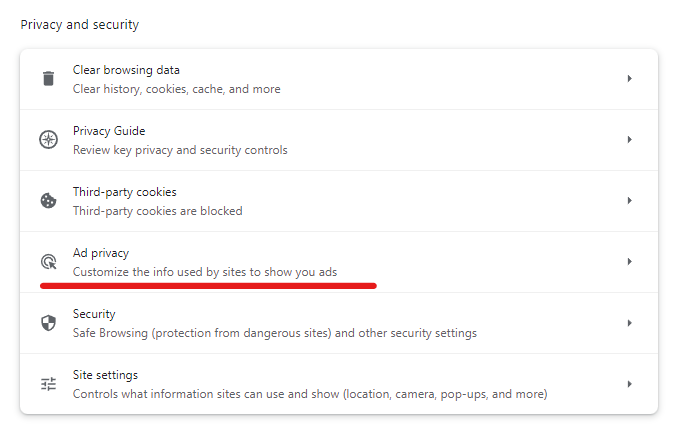
When you click on ‘Ad privacy’, you’ll see that Topics, Site-suggested ads, and Ad measurement are turned on by default.
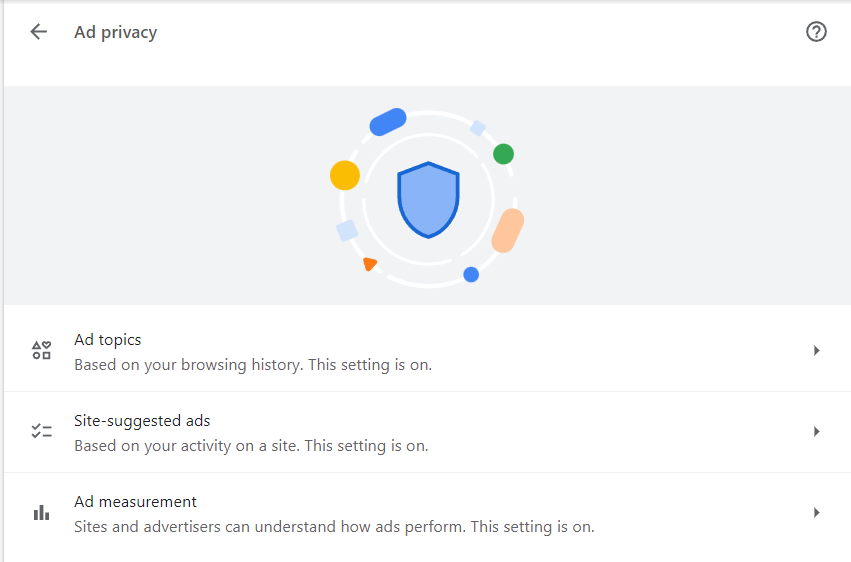
You can turn off any of these settings by clicking on them and toggling them off. For Topics, you can turn the feature off completely, or you can exclude certain topics that Chrome has determined you are interested in from being shared with sites. This way they won’t serve you personalized ads based on them.
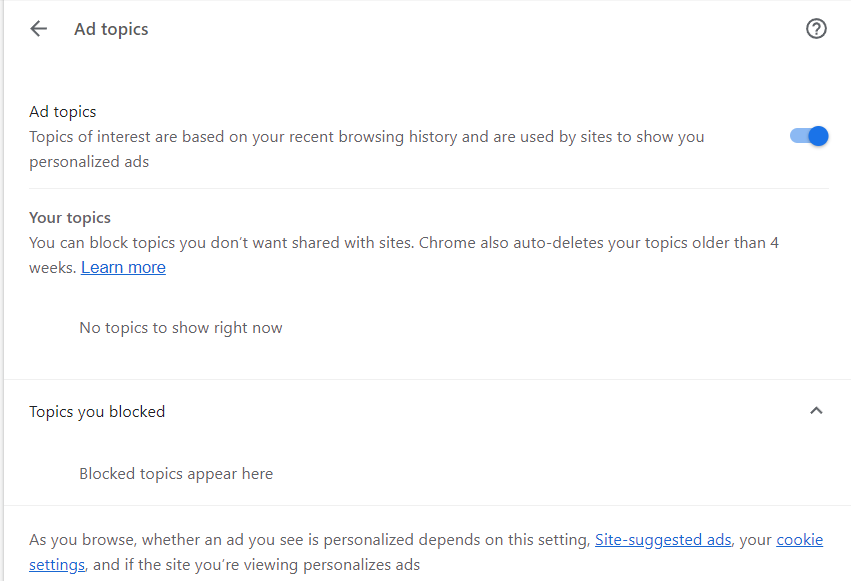
As with any service, we encourage you to use all available privacy controls in Google Chrome to protect yourself from tracking. However, since Google is still evaluating the new user controls, the final ad privacy settings may look different in the stable version. Besides, it’s too early to tell how well these opt-outs will work in practice and whether they’ll result in interest-based ads not being shown at all.
We are monitoring the situation closely and will update you as Google moves forward with the deployment of Topics. In any case, if you’re using AdGuard, you don’t need to worry about the potential privacy implications of Google’s new tracking method because AdGuard has already committed to blocking the Topics API.


















































