Google admits Chrome’s Incognito Mode is not so private after all
In a tale that should be cautionary for all Big Tech companies, users forced Google to change the language in its Chrome’s Incognito mode disclaimer so that it reflects the reality of the company’s clandestine tracking operation. The Davids, or the plaintiffs in the $5 billion class-action lawsuit, claimed that Google — the Goliath — intentionally misled Chrome users by not disclosing the full scope of its tracking activities in the Incognito mode.
Elephant in the room
The legal battle had been dragging on since 2020, when the lawsuit was filed. The plaintiffs claimed that while Chrome’s disclaimer admitted that your browsing activity in the Incognito mode would still be visible “to the websites you visit,” it was nowhere near a sufficient explanation of what was really happening behind the scenes. The biggest issue the plaintiffs had was that Google never mentioned itself as the party privy to all that information. Specifically, the lawsuit alleged that Google continued to harvest the data from the websites that embed its analytics tools, such as Ad Manager or Google Analytics, in private browsing mode, “unbeknownst to website developers or the users themselves.”
And given that Google Analytics tools collectively account for about 70% of the web analytics technologies market and are used by more than half of all existing websites, this is something you would expect to earn at least a passing mention somewhere.
For its part, Google argued that users had consented to having their data being vacuumed up by the company by the virtue of the disclaimer alone. But the judge disagreed, siding with the plaintiffs: “Google never explicitly told users that it does so, the Court cannot find as a matter of law that users explicitly consented to the at-issue data collection.”
For more on what Google’s Incognito mode is, what it does and what it does not do, and why it cannot protect your privacy, read our in-depth article on the subject.
So in December, having exhausted all other options to wriggle out of the lawsuit, Google agreed to settle. The terms of the settlement were not disclosed, and it is still subject to court approval. But the first effects of it are already visible in the developer build of Chrome, its latest Canary version.
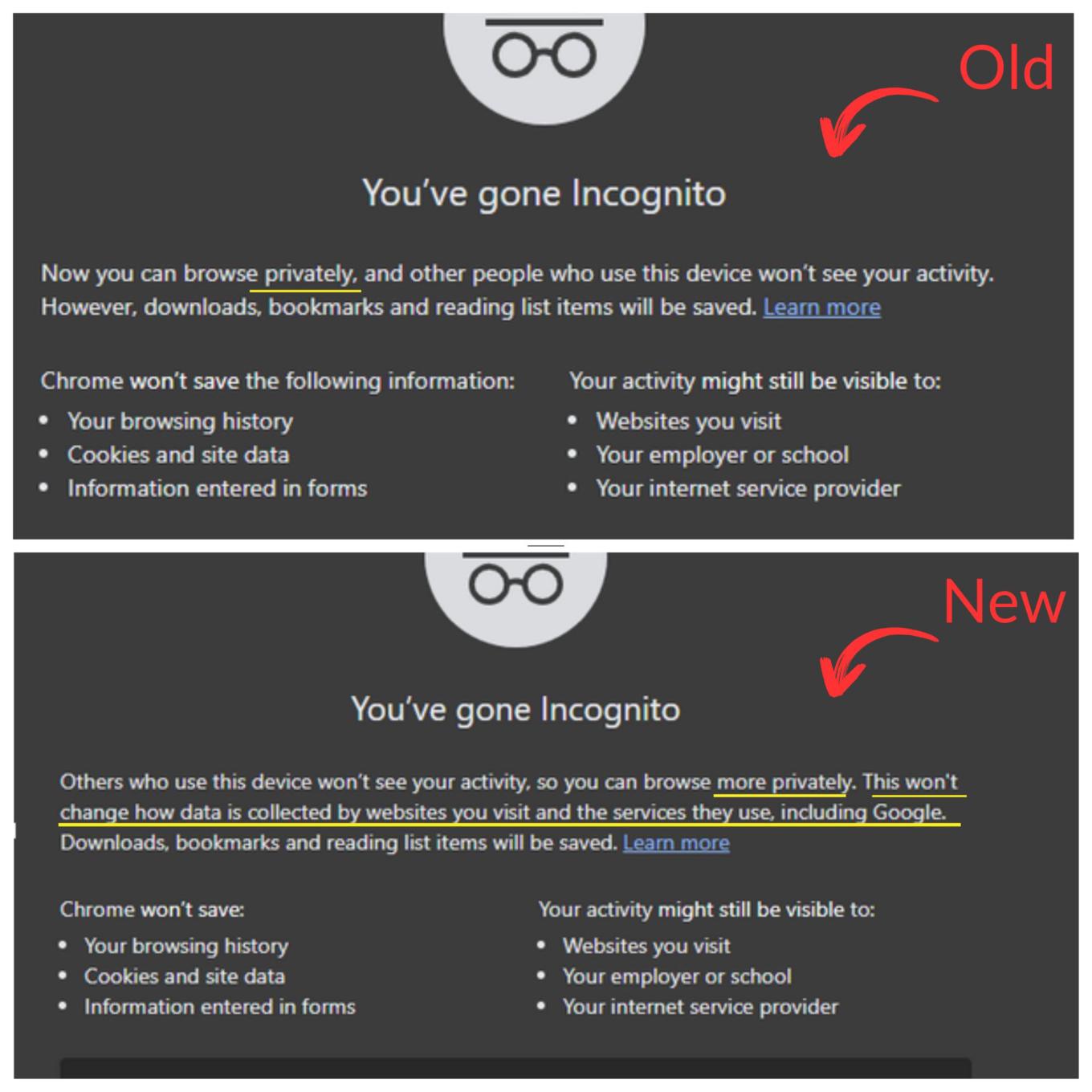
Not 'privately,' but 'more privately'
Sometimes it’s all about qualifiers, the subtle changes that make all the difference.
A new version of Chrome’s Incognito mode disclaimer, not yet in the stable build, now says that you can “browse more privately” while in Incognito mode. Compare that to: “now you can browse privately” in the current Chrome version. Another difference is that the new disclaimer elaborates that browsing in Incognito mode “won’t change how data is collected by the websites you visit and the services they use, including Google.” The elephant has made itself seen, at long last. In other words, Google is no longer hiding the fact that it tracks your browsing activity, even when you think you are anonymous.
What does it all mean for you
It’s always good to separate the wheat from the chaff, and to remind ourselves that Google bringing the fact that it tracks Incognito mode users out into the open does not make the Incognito mode itself any more private or useful.
The only practical application of Incognito mode that we can think of is to hide your web searches from users of the same device, such as your partner or child. This is because pretty much the only thing Incognito mode does is prevent your search history from being stored on your device. So if you’re looking for a birthday gift for your loved one and don’t want them to accidentally find out, turn on Incognito mode.
However, if you don’t want your provider, your network administrator, your employer, or Google itself to know what you’ve been up to online, then Incognito mode is completely useless. In fact, it’s actually harmful to your privacy because it can give you a false sense of security and anonymity.
If you want to protect your privacy in earnest, there are far better ways to do so. For one, you can switch to a more privacy-focused browser, such as Brave or Tor (but brace yourself for massive compatibility issues and slow speeds in that case), use a VPN service, and an ad blocker. The latter will not only ban ads, but also trackers.


















































