Unwanted product ads want to take over your Smart TV. That’s how to stop them
Ads, the nuisance which we once hoped to avoid by switching from satellite and cable to streaming TV, have never quite gone away. Not only do streaming services themselves show ads before or during the shows (Netflix and Disney+ are the latest to have hopped on the ad-supported trend) but smart TVs also display ads on their own. These ads can pop up on the TV’s home screen, app store, or app launcher. They come from the TV’s operating system or platform, such as Roku OS for Roku TVs or Android TV for Nvidia Shield TV.
Paying for a streaming device and subscriptions and still seeing ads may feel counterintuitive and even unfair. But with the price of large, high-end smart TVs dropping to historic lows, ads are what help manufacturers offset expenses, allowing them to sell hardware for the cost of making it, or even less.
Smart TVs collect data about what you watch, how often, and for how long, and share this information with advertisers so they can target ads to you. They do this either by default or by prompting you to opt in during setup. One technology that allows smart TVs to gain insight into what you’re watching is called ACR, which stands for Automatic Content Recognition. It works by sampling any type of content you play on the TV, including commercials, and creating a ‘fingerprint’ of that sample. It then matches that fingerprint against its library of fingerprints to learn exactly what you watched.
In addition to your viewing history, smart TVs can also collect device information, such as your TV’s IP address, and infer your approximate location. This data may be enriched with other information about you, such as your estimated age or other demographic data sourced from third parties. For more about how your smart TV tracks you and how you can opt out of some of it, see our article.
Pushing cars and cafes is pushing it too far?
Whether we like it or not, ads have become a staple of smart TVs, but some of them can be more icky and intrusive than others. You may not even mind seeing ads for a new episode of your favorite show or a new action movie that is based on your past viewing history, but what about ads for things that have nothing to do with your TV experience, like a carbonated drink, a physical store or a car?
That’s what some smart TV users with Google TV and Android TV operating systems have faced this year. Some have reported seeing ads for products and stores that are completely unrelated to their streaming preferences, such as an ad for an Apple reseller in India, an ad for a coffee/donut chain in Canada, and an ad for an Audi car in Germany.
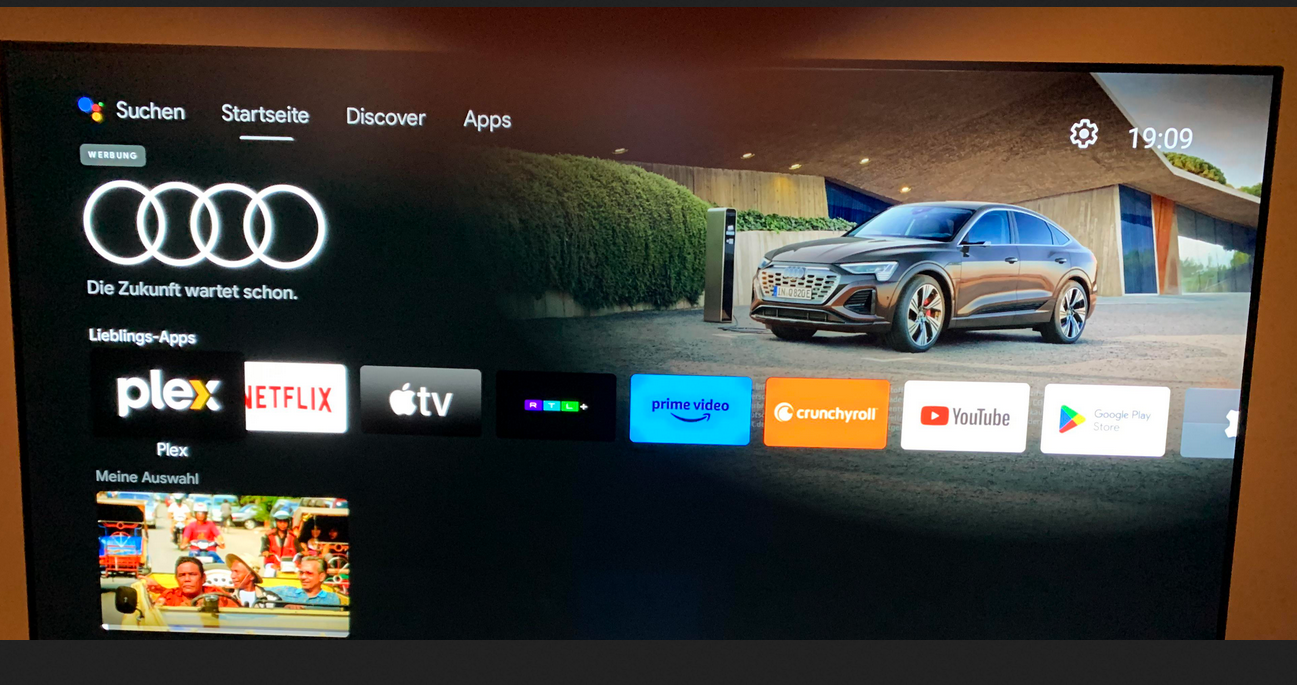
Source: Reddit. The Reddit user who posted the screenshot claimed he had seen the Audi ad on the homescreen of his Nvidia Shield TV running Android TV.
Google introduced homescreen ads on Android TV back in 2020. Initially, the company said that it would only be sharing “cinematic teasers for the most popular movies and shows” suggested either by Google itself or “sponsored by media partners.” However, even when highlights featured only ads for shows, they drew pushback from users, with some claiming that suggestions were also often nonsensical, like an ad for a Christmas movie in July.
With homescreen ads now graduating to physical products like cars, it’s no wonder that the practice rubs a lot of users the wrong way. Taking up a huge portion of your screen, these unwanted ads hardly improve your viewing experience, and if anything, are reminiscent of ads on traditional TV — the relic of the past we all hoped to leave behind in the smart TV era.
How to block ads on smart TV
If you want to enjoy the ‘smart’ features of Android TV or Google TV, you have to sign in with a Google account and agree to Google’s privacy policy. This means Google can use your account data and TV activity to show you ads that match your interests, unless you turn off personalized ads in your device settings or your Google account settings. But even if you do that, you won’t get rid of all ads on your TV. Instead, you’ll still see generic ads that may be just as intrusive and annoying.
In order to block ads, and not just make them less relevant to you, you’ll need to either change the DNS server settings on your TV or on your router, or block the domains that send ads to your smart TV one by one yourself.
These methods require different levels of technical skill, but perhaps the easiest one is to change your TV’s default DNS server to one that can filter out ads and trackers, such as AdGuard DNS. You can usually change your DNS server by going to your TV’s ‘Network settings.’ Not all smart TVs allow you to do this, but most popular TV brands do.
You can also change the DNS server settings on your router — this way you would block ads and trackers on all devices connected to your home network, not just on your smart TV. However, this method requires more technical expertise on your part, as you’ll first need to access your router’s web interface, which means you’ll need to know its IP address and login credentials (if you’ve never changed your credentials, you can look up your router’s default credentials online — but we also encourage you not to stick to the default ones, it’s a big privacy risk).
It’s important to note, however, that changing your DNS server to one that zaps ads may not give you a completely ad-free experience. It won’t affect ads that are embedded in the content — for example, if an ad is part of the show itself, like a product that the characters use or a logo that flashes on the screen, the DNS server won’t block it. It also won’t block ads that come from the same domain as the content you want to watch. If it did, you wouldn’t see any ads, but you wouldn't see any movies either! This is because the DNS server cannot distinguish between different types of content within the same domain.
You can also block domains that send ads to your smart TV yourself through your router’s settings. To do this you’ll need to create your own filter or blacklist and add these domains to it. This method is the most technically challenging of the three, as it requires you to not only know which domains are sending ads to your TV, but also to regularly update the list of blocked domains. And frankly, this isn’t necessary — there are many ready-to-use ad blocking DNS servers and filters.
For those running Android TV, you can install a dedicated app like AdGuard for Android TV. This is the most comprehensive method, as it operates directly on your device to act as a system-wide firewall. It blocks ads in browsers and apps, encrypts your DNS traffic, and protects your device from tracking.


















































