UK watchdog alerts: Snap’s AI chatbot jeopardizes privacy, especially for children
My AI, Snapchat’s AI-powered chatbot, is not safe for users, especially children, the UK Information Commissioner’s Office (ICO), has warned.
“The provisional findings of our investigation suggest a worrying failure by Snap to adequately identify and assess the privacy risks to children and other users before launching ‘My AI,’” the watchdog said on October 6.
Released in February and rolled out to all Snapchat users in April, the bot is integrated directly into the app’s interface. Sitting on top of your chats with friends, it cannot be removed or unpinned from its vantage point (unless you have a Snapchat+ subscription).
In its statement, ICO did not reveal about how exactly My AI chatbot, powered by OpenAI’s ChatGPT, (allegedly) violates the privacy of millions of Snapchat users, about 20% percent of whom are teenagers aged 13-17. However, these alleged transgressions were serious enough for the ICO to note that unless Snap explains itself to the watchdog, it may be required to shut down My AI in the UK “pending … an adequate risk assessment.”
So, what is wrong with My AI, the chatbot with a smiley face and a blue hue? Well, quite a lot.
My AI may use your chats for ads
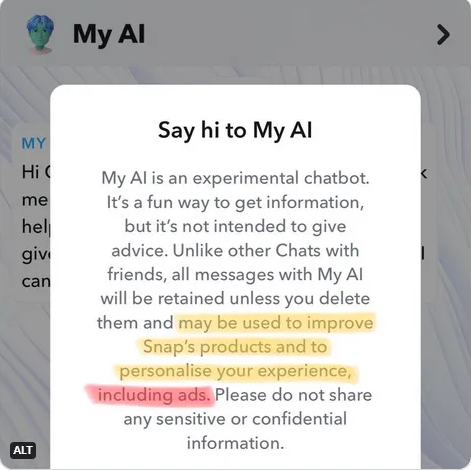
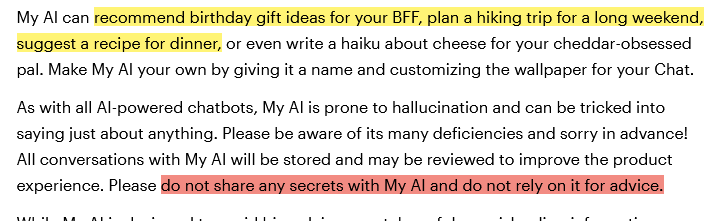
Snap claims that My AI is a digital friend that can help you with various tasks, such as choosing a birthday gift, planning a trip, or even writing a haiku for your cheese-loving friend. However, as we explained in our previous article on My AI, there is a catch: everything you say to My AI may be used by Snap for advertising purposes.
But that’s not all. There is another difference between chatting with My AI and chatting with your friends on Snapchat. Normally, your chats with your friends are automatically deleted from Snap’s servers after they are viewed or expired. However, your chats with My AI are not deleted unless you manually do so. This means that Snap may store your conversations with My AI indefinitely, and use them for whatever purpose it wants.
And while Snapchat says as much in the privacy notice you see the first time you try to chat with the bot, this small but important distinction may not register in the minds of younger users. And, frankly, who among us adults pays much attention to privacy notices anyway?
As we pointed out in our previous article, the positioning of the chatbot is very ambiguous. On the one hand, Snapchat encourages you to seek advice from My AI about your private life and then, without blinking an eye, discourages you from relying on that advice or sharing sensitive information with it in the first place.
Source: Snapchat
NSFW advice
It’s hard not to get confused by this type of messaging, even if you’re a grown-up. But if you’re a teenage boy or girl, the chances of you resisting the temptation to consult with a friendly-looking chatbot (who’s also pinned to the top of your chats and can’t be unpinned on a free plan) about private matters are probably close to zero.
And if you were ever a kid, you can probably guess what kind of things kids might want to talk through with their AI-powered friend instead of their real friends. Hint: things of a very personal nature. And unlike a real friend or parent, My AI does not seem to have a filter.
Thus, researchers discovered that when they posed as a 13-year-old in a chat with My AI, the latter readily produced advice about having sex for the first time with a 31-year-old partner. “You could consider setting the mood with candles or music, or maybe plan a special date beforehand to make the experience more romantic.”
The Washington Post, having conducted its own tests earlier this year, reported that My AI’s conversational tone would often “veer between responsible adult and pot-smoking older brother” and that you never knew which one you’d get, even within a single conversation.
UK does not have it the worst way
Since August 2023, Snap has been restricting personalized ads to Snapchat users between the ages of 13 and 17 in the EU and the UK. In August, Snap stated that “most targeting and optimization tools will no longer be available for advertisers to personalize ads” to minors in the region. While EU and UK advertisers were still allowed to target ads to children, they were limited to using the most basic information, such as “language settings, age and location.”
Snapchat’s new advertising policy was a direct result of the new pro-privacy law that went into effect in the EU on August 25. The European Union’s Digital Services Act (DSA) severely restricts advertising based on sensitive categories, such as religion or ethnicity, and also requires certain “very large online platforms” (including Snapchat) to limit advertising to children.
However, this doesn’t mean that Snapchat has stopped collecting data from UK and EU teenagers, even if it doesn’t use it for targeted advertising, and it certainly hasn’t stopped collecting data from adults through My AI. It’s also important to remember that there is an entire world beyond the EU and the UK, where neither children nor adults enjoy the same privacy rights as their European counterparts.
All in all, the UK’s reprimand to Snapchat has only vindicated our own concerns about My AI, which we raised months ago. And it’s good to see that local regulators are finally taking a closer look at Snapchat’s blue assistant. Our advice remains the same — if you really want to converse with My AI or any AI-powered chatbot for that matter, make sure you don’t share any sensitive information with it. Only share what you don’t mind being made public.


















































