Windows Phone rises from the ashes to help block YouTube ads. But it’s tricky
Windows Phone, the ill-fated mobile operating system that Microsoft once dreamed would rival iOS and Android, is long dead. It only lasted seven years — from 2010 to 2017 — and for most of that time, the Windows Phone operating system languished in relative obscurity.
Windows Phone’s launch was met with a wave of enthusiasm, with The Verge calling it“in many ways ahead of its time” in its obituary. However, that initial enthusiasm soon faded as Microsoft struggled to fix compatibility issues and attract third-party app makers.
Six years after its farewell, the much-maligned Windows Phone OS has come back to bite Google, and more specifically, its video platform YouTube.
An X (ex-Twitter) user @endermanch discovered that Windows Phone can help you watch YouTube videos with an ad blocker and avoid those irritating pop-ups that ask you to turn off your ad blocker or pay for YouTube Premium. How? By changing your user-agent string, which is a piece of information that tells websites (YouTube in this case) what kind of device and browser you are using. If you make YouTube think you are using a Windows Phone, it will not bother you with ads or pop-ups, the user revealed.
The trick may not work for long, as YouTube may update the system to detect it. But it’s the sweetest revenge possible.
How YouTube killed Windows Phone
From the original release in 2010 and up to its demise, Windows Phone had a hard time competing with the dominant mobile platforms of iOS and Android. One of the main reasons was the scarcity of apps that it offered to its users, and although Microsoft tried to solve this problem, it was consistently falling flat. The most painful blow, which spelled, or at least significantly sped up, Windows Phone’s eventual death, came from Google and was inextricably linked to YouTube.
In August 2013, two days after Microsoft released a revamped version of its YouTube app for Windows Phone, Google blocked it (for the second time), citing a violation of its terms of service.
Does this ring a bell? To us it does. The exact same reason was cited by Google when it unleashed a crackdown on ad-blocking apps on its Google Play app store the same year. AdGuard Ad Blocker subsequently fell victim to it, two weeks after its release.
At the time, Google claimed that the Microsoft’s app did not meet its standards for a “fully-featured YouTube experience.” Before releasing the app, Microsoft had tried to comply with most of Google’s demands, such as displaying Google’s ads, but failed to code the app in HTML5, which Google insisted on (even though the YouTube apps for iOS and Android were not built on HTML5 either). The allegedly inferior user experience and the “wrong” programming language were then used as an excuse by Google to pull the app.
That Google’s decision predictably did not sit well with Microsoft. The latter accused Google of deliberately sabotaging its app and coming up with “manufactured” reasons to block it. “The roadblocks Google has set up are impossible to overcome, and they know it,” said Microsoft’s then-VP David Howard.
Despite its scathing words, Microsoft was probably still hoping to negotiate with Google and find some middle ground, but the balance of power between the two had long since shifted. Google, then already the dominant force in both the browser and mobile OS markets, refused to budge. In the end, Microsoft had to capitulate, releasing the stripped-down version of its YouTube app that CNET described as “bare bones”. It was essentially an old initial version of the YouTube app for Windows Phone that only linked to the YouTube homepage through Internet Explorer.
Well, now these bones are showing that they have some life left in them after all…
Windows Phone revenge
According to @endermanch, agent spoofing — the practice of altering your user agent string to make the websites think that you are using a different device or browser — does not seem to breach YouTube’s Terms of Service (TOS). This could imply that you can avoid ads by making YouTube believe that you are using a Windows Phone. Using an old and discontinued device may be extremely odd, but it is not against the law.
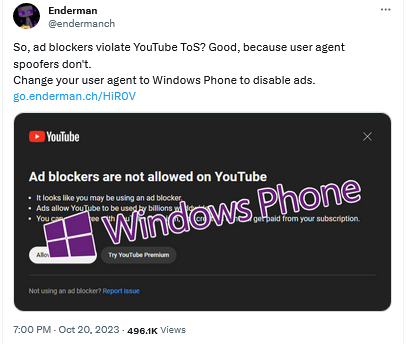
Whether this is true or not depends on how you interpret Youtube’s TOS. The most recent version says that “when you block YouTube ads, you violate YouTube’s Terms of Service.” And while ad blockers are specifically prohibited, there is not a word about other methods.
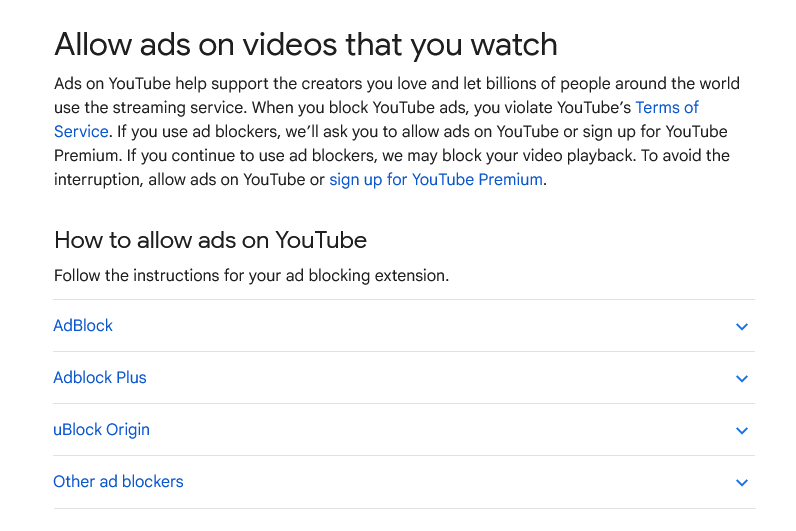
Source: Google
There are several ways of changing your user-agent string. @endermanch used a free agent-switcher extension from Google’s Chrome Web Store.
The AdGuard Ad Blocker app also lets you to set a custom User Agent, such as Mozilla/5.0 (compatible; MSIE 10.0; Windows Phone 8.0; Trident/6.0; IEMobile/10.0; ARM; Touch; NOKIA; Lumia 920), which will make your device mimic a Windows Phone.
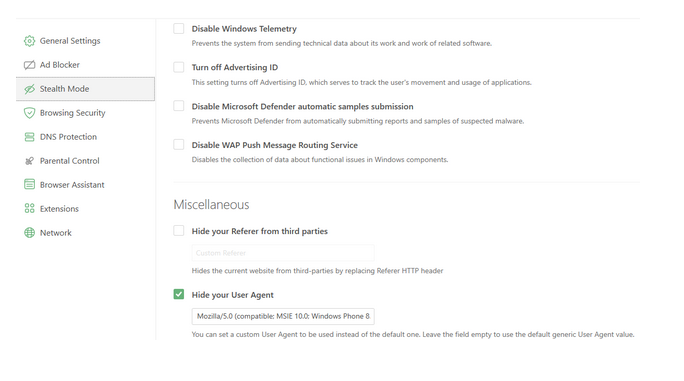
Limitations and other ways to block YouTube ads
We couldn’t resist the temptation to give it a try ourselves, but the results were a mixed bag. Sometimes YouTube would break for us (especially on Google’s Chrome browser), sometimes it would work, and seemingly even without ads. But the interface…well, it was made for mobile and is outdated, which makes sense, since Windows Phone is no longer. The worst part, perhaps, was that it lacked a sound tumbler — we had to adjust the volume through our system settings. The quality was also poor, set to 360 by default, though it could go up to 1080p. Overall, it was far from a user-friendly experience.
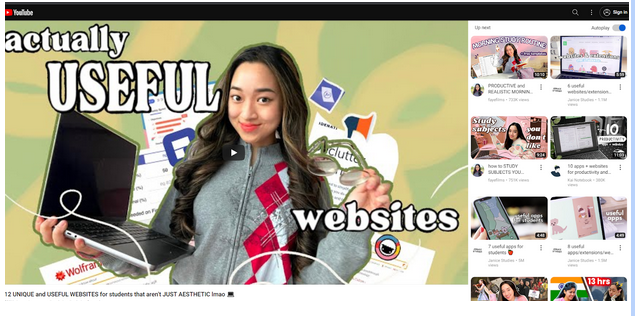
Screenshot: YouTube accessed through “Windows Phone”
Desperate times call for desperate measures, and changing your user agent string may seem like one of them. But this is not the way you want to experiment, at least we strongly recommend users against attempting this method. It can not only break sites for you, but also interfere with the work of actual ad blockers and make the YouTube’s task of detecting them easier.
The reason that such an unorthodox and very questionable method has emerged at all is that ad blockers have been on the receiving end of YouTube’s rage. At the moment, extensions seem to be more vulnerable to YouTube’s anti-ad blocking measures than system-wide ad-blocking software (such as the AdGuard Ad Blocker for Windows or Mac).
As for why extensions got the short end of the stick, our theory is that YouTube is putting more effort into targeting free extension users because there are many more of them than paid ad-blocking app users. Out of free extension users, Chrome users seem to be having the worst time. Again, we cannot be sure as to why, but it’s probably in part because Chrome and YouTube are both owned by Google, and it’s possible that Chrome is sharing data about users of ad-blocking extensions with YouTube. At least we wouldn’t put it past them.
In any case, we suspect that the Windows Phone workaround will be short-lived. And if you give this oddball method a go, we will be curious to know whether it worked for you.
As for us, we understand the frustration that many people feel when their ad blocker does not work. We strive to react to anti-adblocker moves by YouTube (and other websites) as fast as possible: over half a dozen filter engineers work at AdGuard on adding new filter rules and updating the old ones. But it’s not enough to add a new rule to the filter: the users should receive it too. And AdGuard Browser Extension normally checks for filter updates only once every 48 hours. So if you come across a YouTube’s anti-adblock pop-up, the first thing to do is to check for filter updates manually — maybe the rule you need to get past it is already waiting for you.


















































