AdGuard roadmap

Hello friends!

Get ready, it’s time for an ‘ambitious plans post': we decided to build a roadmap – gather ideas for all Adguard products in one place. If you’re interested in what we plan to add/update/change in our programs and apps, then this post will shed light on it! :)

Adguard Roadmap

General changes

These are changes that concern all our products, and that is why it is something all Adguard users shall know.

Cool “Cloud Sync” innovation

This awesome feature was offered by our users. The point is that Adguard setting could be exported and imported, meaning that enabled filters, created filtering rules and such will be synchronized on all of your devices. Let us assume that you use Adguard on PC, create rules for websites you visit to block what you want, add some domains to the whitelist (to support them). And then you go online via Android, and… you have to do it all again. But Cloud Sync will allow you to easily move program settings to Android device. Or import Adguard settings from one computer to another (created rules on a work computer you will be able to transfer to a home device, for instance).

Moreover, we want to make synchronisation possible not only with our server. Thus you could choose the most convenient tool, be it Dropbox, iCloud, Google Drive or such. A useful thing, as you can see. Will work on it.

New reporting tool

Next, we need a more practical tool to process your complaints on websites. Currently we have this feature as a part of Assistant and looks like this:
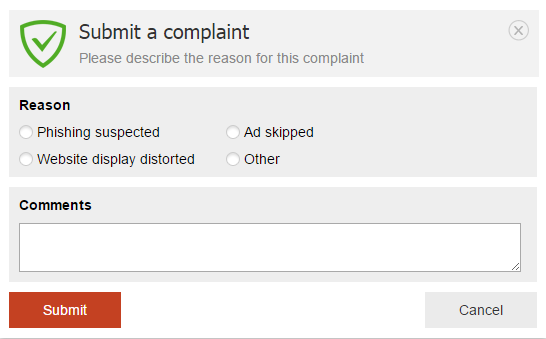
Submit a complaint

With such ‘nondescript’ reports we couldn’t understand what you had encountered on the website. What exactly had displayed incorrectly, what content had you seen on a page. Often we couldn’t repeat the problem, and so elimination took too much time.

What are we planning to do?

A mechanism that will allow to send with a complaint:

  1. Info on the website or page;
  2. Filters that the user has enabled (sometimes the reason for missed ads lies in some important filter being disabled);
  3. A screenshot with the highlighted missed ad (optional);
  4. Users comment.

The reports will be available on a special website, so you could easily send us a direct link on the report.

Adguard Assistant

Assistant itself will also be modernized: we are planning to redesign it. It will be more convenient and functional.


Adguard for Windows

First, we want to complete the work on version 6.0. After the update from 5.10, as it ususally happens after such milestone release, we got many little bugs. And we are planning to fix them in the nearest future. And alongside work on other improvements and new features:

Stealth mode

In the article about release of 6.0 we wrote that this is the first realisation of privacy protection mode and that we will continue to work on its improvement. And we will keep our promise ! :) We’ve got a plan, and it includes the following:

  • Improvement of “Hide IP address” feature.
  • Blocking of browser location API = hiding of your geolocation.
  • Self-destructing cookies. Cookies (saved passwords, logins and other data) can be used for getting your personal info, that is why it’s a good idea to reset them from time to time. Now, we already have this option, but cookies can be reset whenever they want, and log out you on the website. In the new version of Stealh mode we will add ability to choose time gap, after which cookies will be reset (10 minutes? 30 minutes? Hour?…).
  • Blocking of Windows 10 telemetry. Win10 gathers information about performance of apps, drivers, and other devices for OS optimization. However, this information can be used to track what you launch on your computer. We want to prevent data collection.

Other

More than 250 tasks, which we need to solve/implement in future versions… These are very important, but if we tell here about each of them, this post will be just too enormous ! :)


Adguard for Mac

Changes await OS X version as well:

  • Adding of the separate Stealth mode. It’s time to protect data privacy of Mac users.
  • Support of userscripts for extension of program functionality, which we already have in Windows version.
  • Adding filters by URL. Almost like in Adguard for Windows:
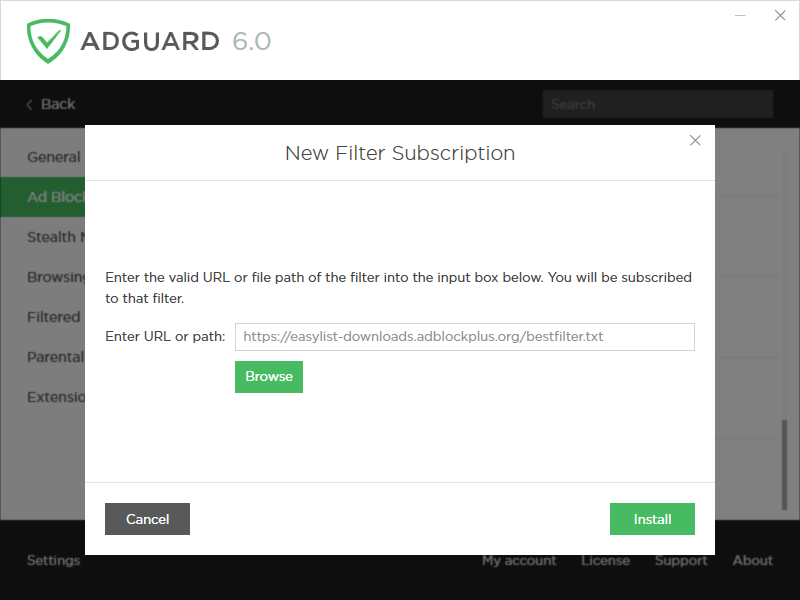
Add filter by URL

It is useful for those who are interested in different filters and want to fine-tune the filtering.


Adguard for Android

Mobile app for Android devices will also meet new serious changes.

HTTPS filtering

This innovation already works in test mode: we have released Adguard 2.5 beta version, the release itself will be somewhat in a month. Why is it cool? Earlier we were powerless over sites (and applications) where ads were loaded through https protocol, but now we are able to filter them. So, now we can block ads in Youtube app. Hooray!

Redesign

Last year we switched to Google Material design, and at that moment this interface upgrade was enough. However for more than 1,5 years of existence, our app got a lot of new features, and the old design doesn’t meet our requirements anymore. We will be changing it, and don’t worry – it will be beautiful and user-friendly.

**Performance statistics **

  • We are planning to add filtering log (tool that shows all requests processed by Adguard at the moment: what is blocked and where and etc..).
  • Per-app statistics (top of used or blocked domains). For each app we will keep statistics of domains (with a counter), which an app has ‘visited’.

**Massive Firewall improvement **

  • Power saving mode. When this mode is enabled we don’t let anything (apart from the apps you selected) go on the Internet, even if the phone is connected toa network.
  • Various Firewall profiles (by default, when screen is off, roaming, night and etc). For each app there will be several checkboxes, which will enable/disable access to the web in “specific state”. Meaning that a user can choose which apps will work with the screen off, during day-time, and which in roaming.
  • Teaching mode. Initially it will be prohibited for all apps to go online. But later, when an app will try to go to the Internet, Adguard will show a notification with two buttons ‘Allow’ and ‘Prohibit’. Thus you will gradually teach Firewall to work the way you want.

Stealth mode

This is a long term plan. But someday we will add this module to Android. The app totally needs its own privacy protection module.


Adguard for iOS

Assistant

An already known tool, which allows you to manually block any(!) element on a page, is about to be added to our app for iPhones and iPads.

Adguard for iOS PRO

We want to release a ‘premium’ iOS version, which in addition to ad blocking in Safari with Content Blocking API will be able to block  ads on a network level. Basically, Adguard for iOS PRO will block ads in other apps.


Adguard browser extensions

New functionality awaits our browser extensions as well.

Stealth mode

Ad blocking, phishing protection, now it’s time to add protection of your personal info.

Extension for Microsoft Edge

Microsoft announced extensions support in their new Edge browser. And users came to us to request new product. We will to develop it anytime soon.

So as you see, we have truly immense plans and a lot of work to do. We have learned from experience, so this time we will not pick up any exact dates, because, as you know, “one does not simply release a version in time” ! :)

Maybe you have any ideas of what else is missing in Adguard. We welcome your comments and offers.

And in the meantime we will follow our general roadmap. Stay tuned, a lot of interesting stuff is coming!

Спадабаўся пост?
AdGuard VPN AdGuard DNS AdGuard Mail AdGuard Wallet
Галоўны экран AdGuard для Windows
Экран абароны AdGuard для Windows, які паказвае функцыі абароны і налады
Экран Статыстыка AdGuard для Windows, які паказвае статыстыку заблакіраванай рэкламы і праграм сачэння
Экран Кіраванне праграмамі ў AdGuard для Windows, які паказвае параметры кіравання абаронай для праграм, усталяваных на прыладзе
20 362 20362 водгукі
Выдатна!

AdGuard: блакіроўшчык рэкламы для Windows

AdGuard для Windows — гэта больш, чым блакіроўшчык рэкламы. Гэта шматфункцыянальны інструмент, які блакуе рэкламу, кантралюе доступ да небяспечных сайтаў, паскарае загрузку старонак і абараняе дзяцей ад непажаданага кантэнту
Спампоўваючы праграму, вы прымаеце ўмовы Ліцэнзійнага пагаднення
Microsoft Store
Спампоўваючы праграму, вы прымаеце ўмовы Ліцэнзійнага пагаднення
AdGuard для Windows версія 8.0, 14 дзён пробнага перыяду
Галоўны экран AdGuard для Mac
Экран рэжыму нябачнасці AdGuard для Mac
20 362 20362 водгукі
Выдатна!

AdGuard: блакіроўшчык рэкламы для Mac

AdGuard для Mac — гэта ўнікальны блакіроўшчык рэкламы, распрацаваны з улікам macOS. Акрамя абароны ад надакучлівай рэкламы ў браўзерах і праграмах, ён абараняе вас ад адсочвання, фішынгу і махлярства
Спампоўваючы праграму, вы прымаеце ўмовы Ліцэнзійнага пагаднення
Чытаць далей
AdGuard для Mac версія 2.19, 14 дзён пробнага перыяду
Галоўны экран AdGuard для Android
Экран Абарона ад сачэння ў AdGuard для Android
Экран Кіраванне праграмамі ў AdGuard для Android, які паказвае параметры кіравання абаронай для праграм, усталяваных на прыладзе
Экран Статыстыка AdGuard для Android, які паказвае статыстыку заблакіраванай рэкламы і праграм сачэння
Галоўны экран прыватнага браўзера AdGuard для Android
QR-код, каб спампаваць AdGuard для Android
20 362 20362 водгукі
Выдатна!

AdGuard: блакіроўшчык рэкламы для Android

Блакуе рэкламу і трэкеры ва ўсіх браўзерах, гульнях і іншых праграмах. Абараняе вашу прыватнасць і дазваляе вам кантраляваць, як вашы праграмы выкарыстоўваюць Інтэрнэт. Усталёўваецца праз APK
Спампоўваючы праграму, вы прымаеце ўмовы Ліцэнзійнага пагаднення
Чытаць далей
Сканіраванне для загрузкі
Выкарыстоўвайце любы счытвальнік QR-кодаў, даступны на вашай прыладзе
AdGuard для Android версія 4.14, 14 дзён пробнага перыяду
Галоўны экран AdGuard для iOS
Экран абароны AdGuard для iOS, які паказвае функцыі абароны і налады
Экран Статыстыка AdGuard для iOS, які паказвае статыстыку заблакіраванай рэкламы і праграм сачэння
QR-код, каб спампаваць AdGuard для iOS
20 362 20362 водгукі
Выдатна!

AdGuard: блакіроўшчык рэкламы для iOS

Найлепшы блакіроўшчык рэкламы для iOS для iPhone і iPad. AdGuard ліквідуе ўсе віды рэкламы і трэкераў у Safari і абараняе вашу прыватнасць ва ўсіх праграмах на ўзроўні DNS
Спампоўваючы праграму, вы прымаеце ўмовы Ліцэнзійнага пагаднення
Чытаць далей
Сканіраванне для загрузкі
Выкарыстоўвайце любы счытвальнік QR-кодаў, даступны на вашай прыладзе
AdGuard для iOS, 4.5
Галоўны экран AdGuard Content Blocker
Экран фільтры ў AdGuard Content Blocker
Экран налады ў AdGuard Content Blocker
20 362 20362 водгукі
Выдатна!

Блакіроўшчык кантэнту AdGuard

AdGuard Content Blocker ухіляе ўсе віды рэкламы ў мабільных браўзерах, якія падтрымліваюць тэхналогію блакіроўкі змесціва — напрыклад, Samsung Internet і Яндэкс.Браўзер. Яго функцыі абмежаваныя ў параўнанні з AdGuard для Android, але ён бясплатны, просты ў усталёўцы і эфектыўны
Спампоўваючы праграму, вы прымаеце ўмовы Ліцэнзійнага пагаднення
Чытаць далей
Блакіроўшчык кантэнту AdGuard, 2.8
Галоўны экран браузернае пашырэнне AdGuard
Экран Абарона ад сачэння ў браузернае пашырэнне AdGuard
20 362 20362 водгукі
Выдатна!

Браўзернае пашырэнне AdGuard

AdGuard — самае хуткае і лёгкае браўзарнае пашырэнне для блакавання ўсіх тыпаў рэкламы! Абірайце AdGuard для хуткага і бяспечнага сёрфінга без рэкламы.
Усталяваць
Спампоўваючы праграму, вы прымаеце ўмовы Ліцэнзійнага пагаднення
Усталяваць
Спампоўваючы праграму, вы прымаеце ўмовы Ліцэнзійнага пагаднення
Усталяваць
Спампоўваючы праграму, вы прымаеце ўмовы Ліцэнзійнага пагаднення
Усталяваць
Спампоўваючы праграму, вы прымаеце ўмовы Ліцэнзійнага пагаднення
Усталяваць
Спампоўваючы праграму, вы прымаеце ўмовы Ліцэнзійнага пагаднення
Чытаць далей
Усталяваць
Спампоўваючы праграму, вы прымаеце ўмовы Ліцэнзійнага пагаднення
Чытаць далей
Браўзернае пашырэнне AdGuard, 5.5
Галоўны экран Браўзерны памочнік AdGuard
20 362 20362 водгукі
Выдатна!

Памочнік AdGuard

Пашырэнне для браўзера-компаньён для настольных прыкладанняў AdGuard. Яно дазваляе блакіраваць карыстальніцкія элементы на вэб-сайтах, дадаваць вэб-сайты ў спіс дазволеных і адпраўляць справаздачы непасрэдна з вашага браўзера
Памочнік AdGuard, 1.4
20 362 20362 водгукі
Выдатна!

AdGuard Home

AdGuard Home — гэта сеткавае рашэнне для блакіроўкі рэкламы і праграм сачэння. Усталюйце яго адзін раз на вашым маршрутызатары, каб ахапіць усе прылады ў сетцы — дадатковае праграмнае забеспячэнне не патрабуецца. Гэта асабліва важна для розных прылад IoT, якія часта ўяўляюць пагрозу вашай прыватнасці
AdGuard Home, 0.107
Галоўны экран AdGuard Pro для iOS
Экран абароны ў AdGuard Pro для iOS, які паказвае функцыі абароны і налады
Экран Статыстыка ў AdGuard Pro для iOS, які паказвае статыстыку заблакіраванай рэкламы і праграм сачэння
20 362 20362 водгукі
Выдатна!

AdGuard Pro для iOS

AdGuard Pro для iOS пастаўляецца з усімі дадатковымі функцыямі блакіроўкі рэкламы і абароны, якія ўключаны. Ён прапануе тыя ж інструменты, што і платная версія AdGuard для iOS. Выдатна блакіруе рэкламу ў Safari, а таксама дазваляе наладжваць налады DNS, каб адаптаваць вашу абарону. Ён блакіруе рэкламу ў браўзерах і дадатках, абараняе дзяцей ад недапушчальнага кантэнту і захоўвае вашы асабістыя даныя бяспечнымі
Спампоўваючы праграму, вы прымаеце ўмовы Ліцэнзійнага пагаднення
Чытаць далей
AdGuard Pro для iOS, 4.5
Галоўны экран AdGuard Mini для Mac
Экран абароны Safari ў AdGuard Mini для Mac
Экран стварэння правіла ў AdGuard Mini для Mac
20 362 20362 водгукі
Выдатна!

AdGuard Mini для Mac — блакіроўшчык рэкламы ў Safari

AdGuard Mini для Mac — гэта магутны блакіроўшчык рэкламы для Safari. Гэта лёгкая праграма выдаляе рэкламу, блакуе праграмы сачэння і паскарае загрузку старонак. Яна дапамагае вам аглядаць вэб у Safari без адцягненняў і захоўваць вашы даныя ў прыватнасці
Усталяваць
Спампоўваючы праграму, вы прымаеце ўмовы Ліцэнзійнага пагаднення
Чытаць далей
AdGuard Mini для Mac, 2.3
Галоўны экран AdGuard для Android TV з уключанай абаронай
Экран блакіроўкі рэкламы AdGuard для Android TV, які паказвае яго функцыі і налады
Экран налады AdGuard для Android TV
Экран Кіраванне праграмамі AdGuard для Android TV, які паказвае праграмы, дзе рэклама і праграмы сачэння заблакіравана
20 362 20362 водгукі
Выдатна!

AdGuard для Android TV

AdGuard для Android TV — адзіная праграма, якая блакіруе рэкламу, ахоўвае вашу прыватнасць і працуе як міжсеткавы экран для вашага Smart TV. Атрымуйце папярэджанні аб вэб-пагрозах, выкарыстоўвайце бяспечны DNS і атрымлівайце перавагі ад шыфраванага трафіку. Адпачывайце і атрымлівайце асалоду ад улюбёных шоу з першакласнай абаронай і без рэкламы!
AdGuard для Android TV версія 4.14, 14 дзён пробнага перыяду
Маскот AdGuard, Агнар, трымае пінгвіна Linux
20 362 20362 водгукі
Выдатна!

AdGuard для Linux

AdGuard для Linux — гэта першы ў свеце сістэмны блакіроўшчык рэкламы для Linux. Блакуйце рэкламу і трэкеры на ўзроўні прылады, выбірайце з папярэдне ўсталяваных фільтраў альбо дадавайце ўласныя — усё праз інтэрфейс каманднага радка
AdGuard для Linux, 1.4
20 362 20362 водгукі
Выдатна!

AdGuard Temp Mail

Ваш часовы паштовую скрыню, каб на асноўную пошту не прыходзіў спам
20 362 20362 водгукі
Выдатна!

AdGuard VPN

75 лакацый па ўсім свеце

Доступ да любога кантэнту

Моцнае шыфраванне

Без лагавання

Самае хуткае злучэнне

Цэладзённая падтрымка

Паспрабуйце бясплатна
Спампоўваючы праграму, вы прымаеце ўмовы Ліцэнзійнага пагаднення
Чытаць далей
20 362 20362 водгукі
Выдатна!

AdGuard DNS

AdGuard DNS – гэта альтэрнатыўны спосаб заблакаваць рэкламу, абараніць асабістыя дадзеныя і ахаваць дзяцей ад дарослых матэрыялаў. Ён просты ў наладзе і выкарыстанні і забяспечвае патрэбны мінімум абароны ад рэкламы, трэкінгу і фішынгу, незалежна ад платформы.
20 362 20362 водгукі
Выдатна!

AdGuard Mail

Абараняйце сваю асобу, пазбягайце спаму і трымайце ўваходную пошту ў бяспецы з дапамогай нашых псеўданімаў і часовых адрасоў электроннай пошты. Скарыстайцеся нашым бясплатным сэрвісам перасылкі электроннай пошты і праграмамі для ўсіх аперацыйных сістэм.
20 362 20362 водгукі
Выдатна!

AdGuard Wallet

Бяспечны і прыватны крыпта-кашалёк, які дае вам поўны кантроль над вашымі актывамі. Адкрывайце для сябе тысячы крыптавалют для захоўвання, адпраўкі і абмену
Спампоўка AdGuard Каб усталяваць AdGuard, пстрыкніце файл, пазначаны стрэлкай Выберыце «Адкрыць» і націсніце «ОК», затым дачакайцеся спампоўкі файла. У акне, якое адкрылася, перацягніце значок AdGuard у папку «Праграмы». Дзякуй, што выбралі AdGuard! Выберыце «Адкрыць» і націсніце «ОК», затым дачакайцеся спампоўкі файла. У акне, якое адкрылася, націсніце «Усталяваць». Дзякуй, што выбралі AdGuard!
Усталюйце AdGuard на мабільную прыладу


















































