Getting to know AdGuard v4.0 for Android: the Statistics screen

We're back with more on the new features of AdGuard v4.0 for Android. This is the second in the series of articles designed to get you up to speed with the upgraded app. If you missed our first article comparing v4.0 with its predecessor v3.6, you can catch up here.

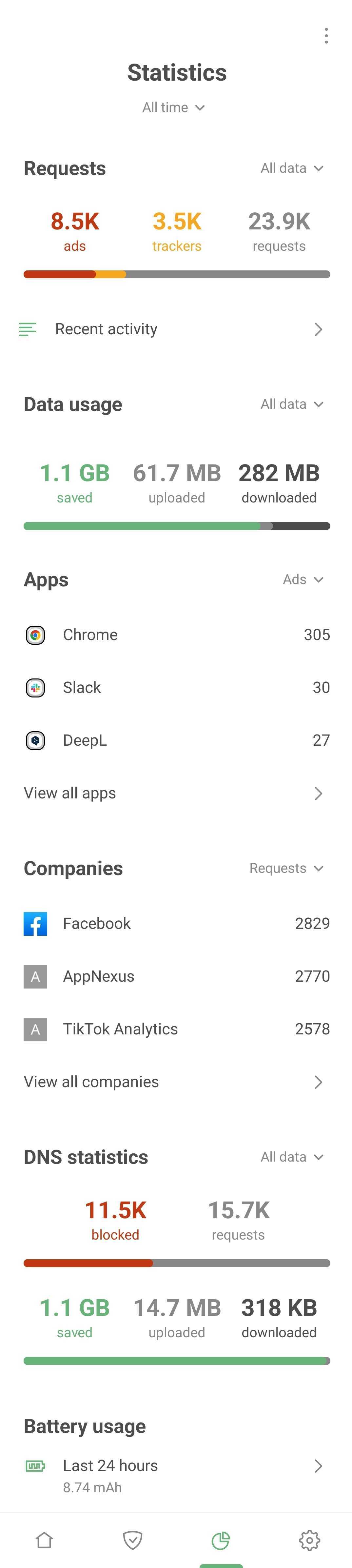
The latest version, AdGuard v4.0 for Android, comes with a brand new Statistics screen. It's like a control room, bringing together a wealth of data that was previously scattered across multiple screens, or not visible at all. So, let's dive in and explore this feature in detail.
Statistics *mobile_border

To get started with Statistics, simply tap the chart icon, located second from the right in the navigation bar at the bottom of the screen. The stats are neatly categorized into different sections for your convenience:

  • Requests
  • Data usage
  • Apps
  • Companies
  • DNS statistics
  • Battery usage

Requests

Here you can see the number of blocked ads, trackers, and the total number of requests. Select the time period for which you want to see these stats: 24 hours, 7 days, 30 days, or all time.

But here's where it gets interesting. You can tap any stat to open a graph that visually represents the request trends for the chosen time period. You can also filter requests by data type: mobile data, Wi-Fi, or all data combined.

You'll also notice a Recent activity feature, formerly known as Filter log. It shows the last 10,000 requests processed by AdGuard. And with a few quick taps, you can block or unblock any request.

For those who want to dive deeper, the Recent activity section is a goldmine. It's particularly useful for advanced users and those creating their own filtering rules.

Data usage

We're always talking about how AdGuard helps you save traffic by blocking ads and trackers. But with AdGuard v4.0 for Android, we've taken it a step further, providing a visual representation of your saved traffic right on the usage graph.

Not only does this chart show you the traffic saved, but it also reveals the amount of traffic downloaded and uploaded on your device. If you want to get more specific, you can filter these requests by data type.

Apps

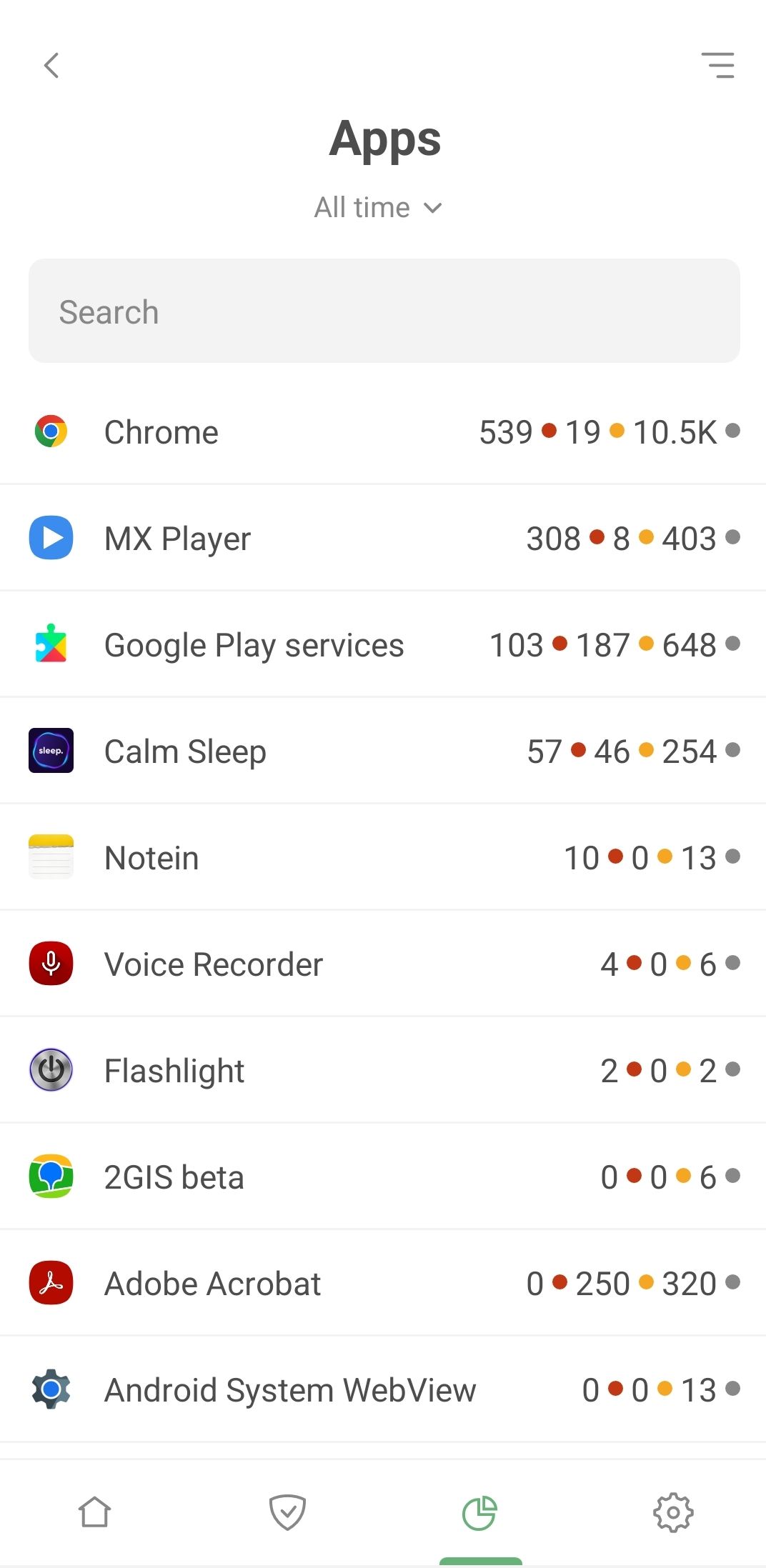
Now, let's move on to the fun stuff – the statistics for every single app installed on your Android device. Tap View all apps to find out which apps are the most eager to track your activity and bombard you with ads. Bet Chrome leads the pack.
List of apps *mobile_border

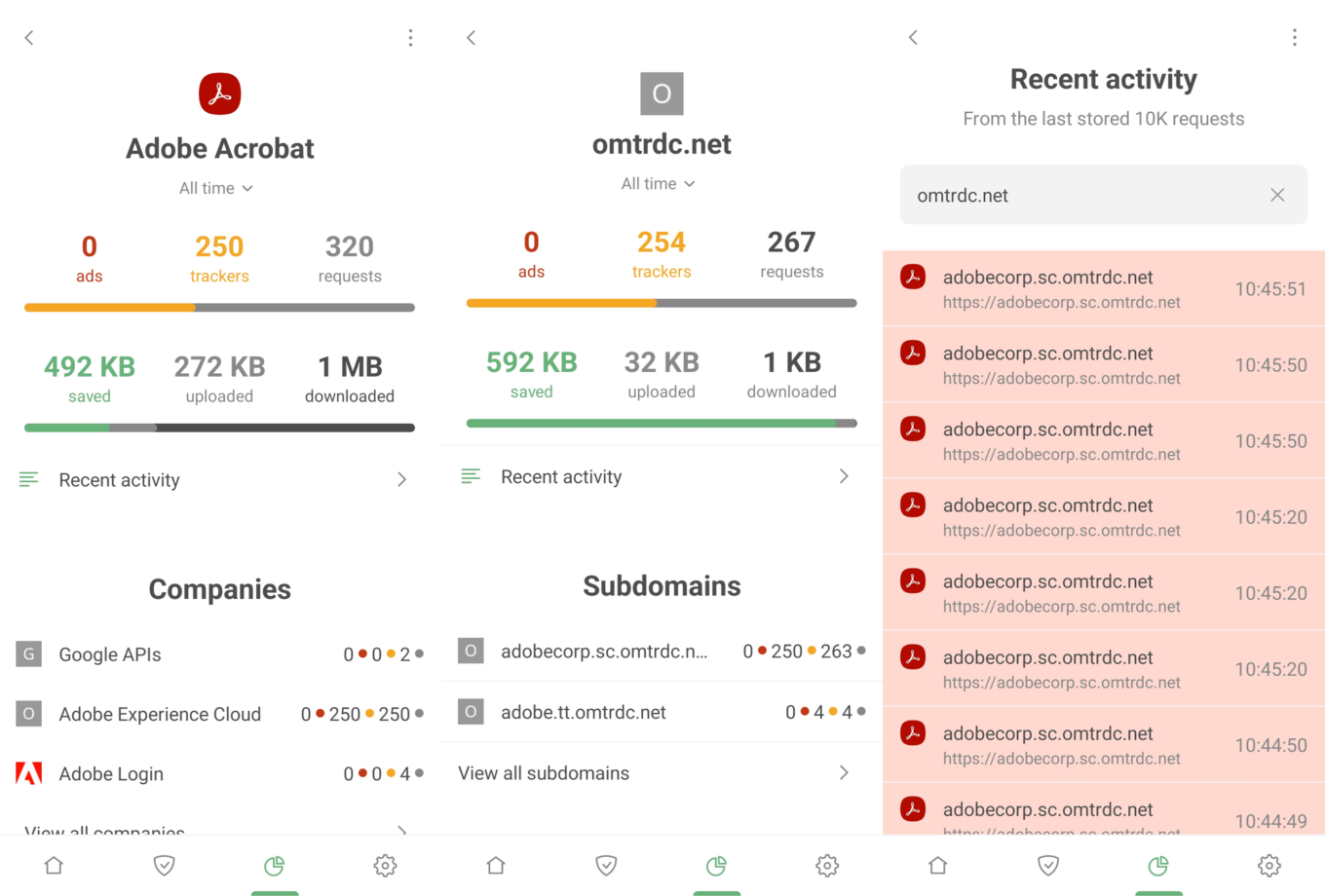
Select any app from the list and tap it to dive deeper. Here you'll see the full story – the companies and domains your apps are reaching out to.
Adobe Acrobat Statistics *border

Take Adobe Acrobat, a popular app for working with PDF files. What do we find? A significant number of blocked requests to the omtrdc.net domain used by Adobe to collect personal data.

AdGuard is more than capable of blocking numerous known trackers, just make sure Tracking protection is enabled. However, sometimes we have to let some "questionable" requests through to avoid disrupting your Internet experience. For instance, Google services are baked into almost every app. If we blocked all Google requests, we'd probably interfere with how these apps work.
MX Player Statistics *border

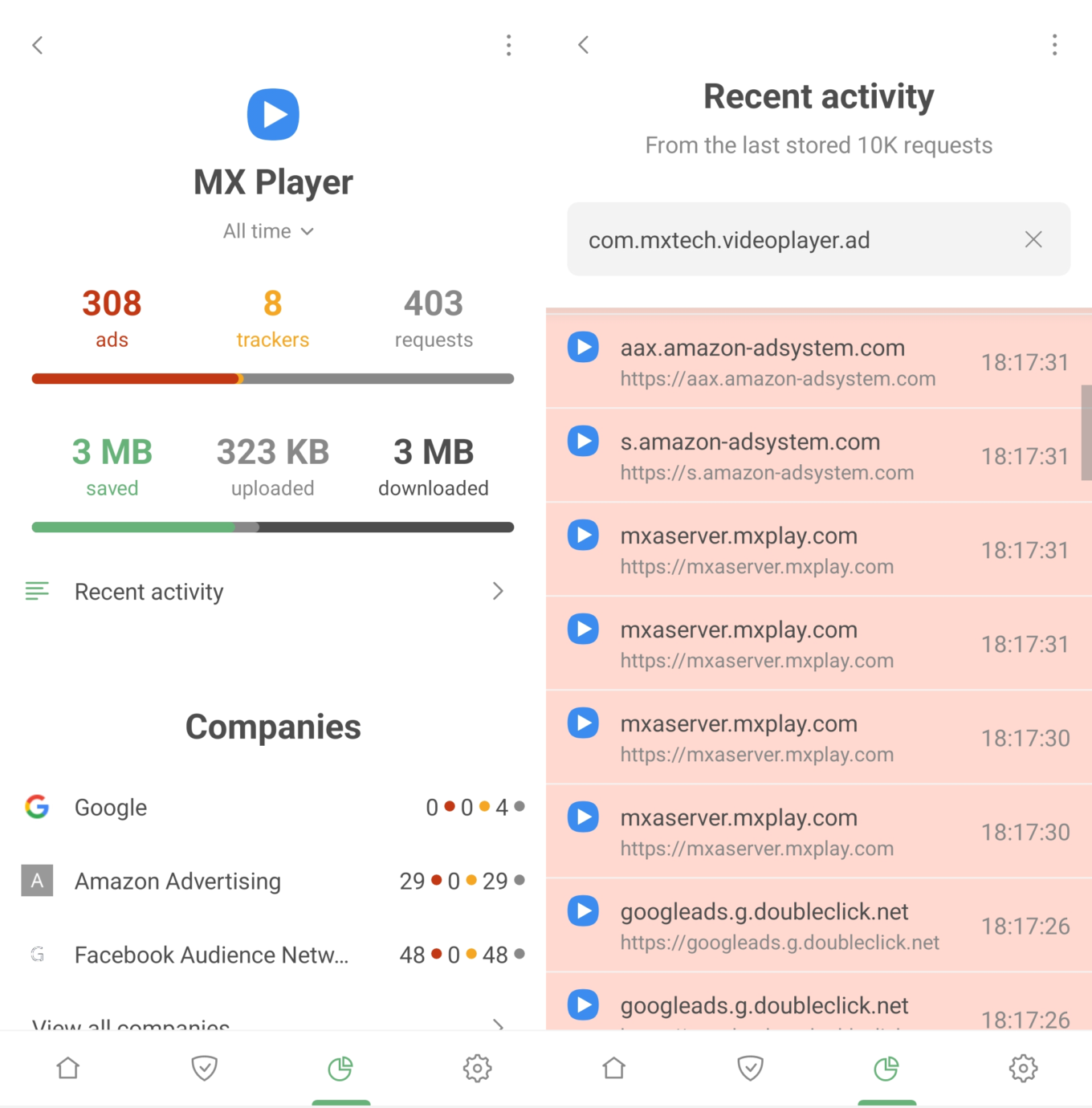
Or take the MX Player app, loved by many for its wide range of video and audio format support. Surprising number of ad server requests, don't you think?

Deciding what to do next is entirely in your hands. If you don’t like the amount of requests an app is making to a not-so-reputable company, you can uninstall it and find an alternative. Or you can navigate to Recent activity, identify a particularly suspicious request, and set up a blocking rule right on the spot.

Companies

The Companies section provides a unique perspective on your data. Here, you can see all the companies that your device has sent requests to. Simply tap View all companies to see the full list, including the number of ads and trackers blocked for each company, as well as the total number of requests.

But that's not all. Tap any company, and you'll find a wealth of information. Which domains the requests are going to, how many are blocked, which apps sent them – it's all there, giving you a complete picture of what's happening behind the scenes.

For an interesting example, go to Companies and search for Facebook Audience Network. This is an ad network and app audience analytics service run by none other than Facebook.
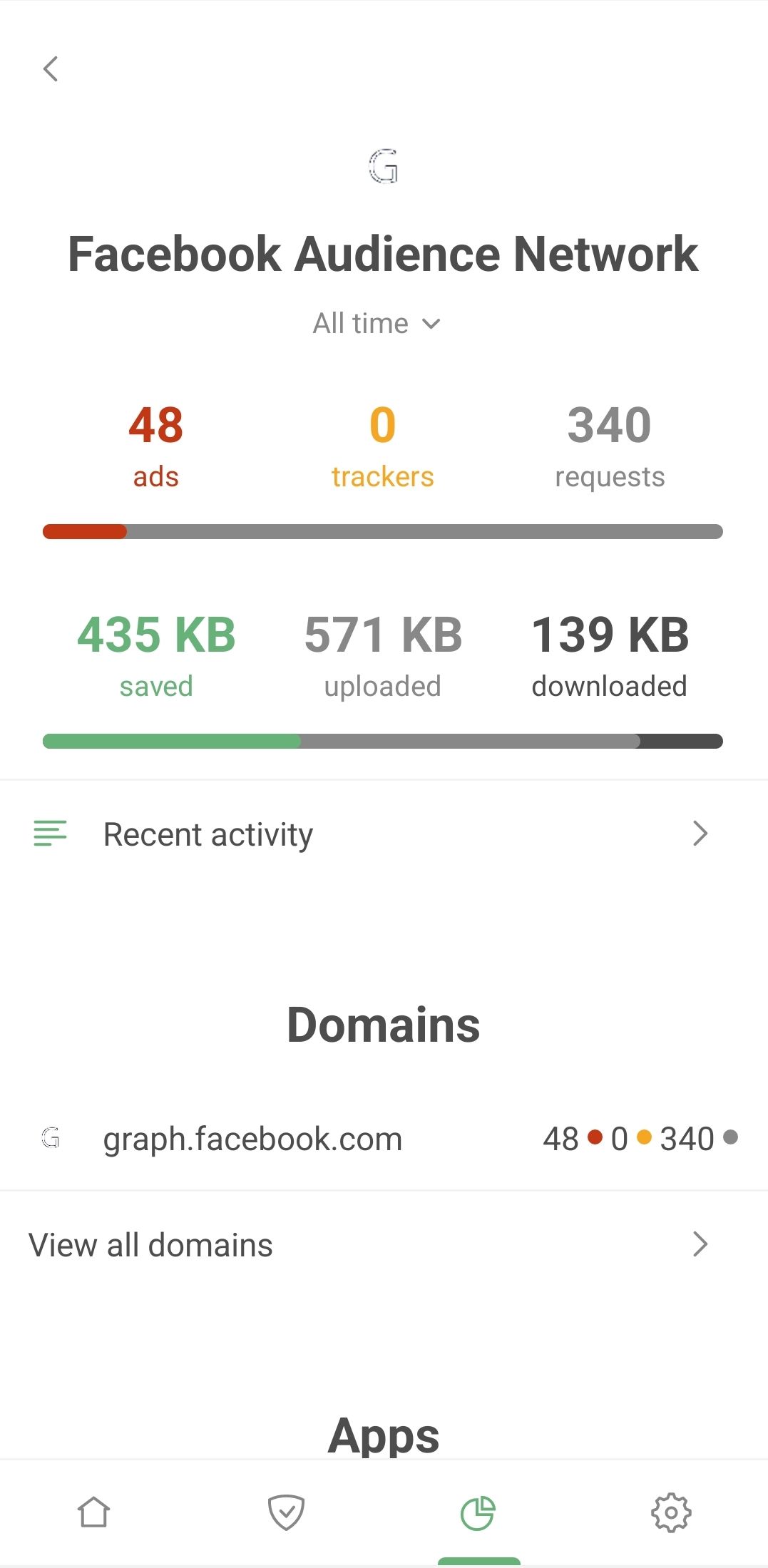
Facebook Audience Network in Statistics *mobile_border

Check out which apps have been sending requests to the Facebook Audience Network domain. Your phone's gallery and photo editor, your smartwatch, messaging apps, health, and shopping apps... they're all potentially sending your data to Facebook.

How does this happen? Developers often sign up to Audience Network to monetize their apps through ads and to study user behavior. In other words, it's Facebook studying your behavior. Even if you've never created a Facebook account, these apps could still be sharing your information with the platform. We first discussed this issue back in 2018, and it seems as relevant as ever.

DNS statistics

You'll need to have DNS protection enabled before the data in this section can be populated. You can see the total number of requests sent and how many were blocked by AdGuard in figures and graphs. You'll also find statistics on the amount of traffic saved, downloaded, and uploaded.

Battery usage

If you've noticed AdGuard topping power consumption charts on your smartphone, it may seem counterintuitive, especially since blocking ads should save battery power by preventing ad scripts from being downloaded and processed.

However, it's important to remember that AdGuard filters the traffic of all the apps on your device. As a result, Android attributes all this traffic usage to AdGuard, skewing the picture. To get a realistic understanding of the resources AdGuard is actually using, head over to the Battery usage tab.

Bottom line

In an age where companies are constantly on the prowl for user data and apps seem to be giving it away willy-nilly, we believe it's crucial to arm users with a comprehensive understanding of what's happening on their devices. The Statistics screen in AdGuard 4.0 for Android is our response to the audacity of tech giants who often overstep personal boundaries in their pursuit of profit.

We plan to continue refining Statistics. For instance, in the future, we intend to show not only the names of the companies your requests are going to but also their industry.

What else would you like to see in Statistics? AdGuard has always valued community input during development. If you have ideas, we invite you to suggest new features or vote on existing ones.

Start using AdGuard v4.0 for Android today and take back control of your data.

Спадабаўся пост?
AdGuard VPN AdGuard DNS AdGuard Mail AdGuard Wallet
Галоўны экран AdGuard для Windows
Экран абароны AdGuard для Windows, які паказвае функцыі абароны і налады
Экран Статыстыка AdGuard для Windows, які паказвае статыстыку заблакіраванай рэкламы і праграм сачэння
Экран Кіраванне праграмамі ў AdGuard для Windows, які паказвае параметры кіравання абаронай для праграм, усталяваных на прыладзе
20 363 20363 водгукі
Выдатна!

AdGuard: блакіроўшчык рэкламы для Windows

AdGuard для Windows — гэта больш, чым блакіроўшчык рэкламы. Гэта шматфункцыянальны інструмент, які блакуе рэкламу, кантралюе доступ да небяспечных сайтаў, паскарае загрузку старонак і абараняе дзяцей ад непажаданага кантэнту

Спампоўваючы праграму, вы прымаеце ўмовы Ліцэнзійнага пагаднення
Microsoft Store
Спампоўваючы праграму, вы прымаеце ўмовы Ліцэнзійнага пагаднення
AdGuard для Windows версія 8.0, 14 дзён пробнага перыяду
Галоўны экран AdGuard для Mac
Экран рэжыму нябачнасці AdGuard для Mac
20 363 20363 водгукі
Выдатна!

AdGuard: блакіроўшчык рэкламы для Mac

AdGuard для Mac — гэта ўнікальны блакіроўшчык рэкламы, распрацаваны з улікам macOS. Акрамя абароны ад надакучлівай рэкламы ў браўзерах і праграмах, ён абараняе вас ад адсочвання, фішынгу і махлярства
Спампоўваючы праграму, вы прымаеце ўмовы Ліцэнзійнага пагаднення
Чытаць далей
AdGuard для Mac версія 2.19, 14 дзён пробнага перыяду
Галоўны экран AdGuard для Android
Экран Абарона ад сачэння ў AdGuard для Android
Экран Кіраванне праграмамі ў AdGuard для Android, які паказвае параметры кіравання абаронай для праграм, усталяваных на прыладзе
Экран Статыстыка AdGuard для Android, які паказвае статыстыку заблакіраванай рэкламы і праграм сачэння
Галоўны экран прыватнага браўзера AdGuard для Android
QR-код, каб спампаваць AdGuard для Android
20 363 20363 водгукі
Выдатна!

AdGuard: блакіроўшчык рэкламы для Android

Блакуе рэкламу і трэкеры ва ўсіх браўзерах, гульнях і іншых праграмах. Абараняе вашу прыватнасць і дазваляе вам кантраляваць, як вашы праграмы выкарыстоўваюць Інтэрнэт. Усталёўваецца праз APK
Спампоўваючы праграму, вы прымаеце ўмовы Ліцэнзійнага пагаднення
Чытаць далей
Сканіраванне для загрузкі
Выкарыстоўвайце любы счытвальнік QR-кодаў, даступны на вашай прыладзе
AdGuard для Android версія 4.14, 14 дзён пробнага перыяду
Галоўны экран AdGuard для iOS
Экран абароны AdGuard для iOS, які паказвае функцыі абароны і налады
Экран Статыстыка AdGuard для iOS, які паказвае статыстыку заблакіраванай рэкламы і праграм сачэння
QR-код, каб спампаваць AdGuard для iOS
20 363 20363 водгукі
Выдатна!

AdGuard: блакіроўшчык рэкламы для iOS

Найлепшы блакіроўшчык рэкламы для iOS для iPhone і iPad. AdGuard ліквідуе ўсе віды рэкламы і трэкераў у Safari і абараняе вашу прыватнасць ва ўсіх праграмах на ўзроўні DNS
Спампоўваючы праграму, вы прымаеце ўмовы Ліцэнзійнага пагаднення
Чытаць далей
Сканіраванне для загрузкі
Выкарыстоўвайце любы счытвальнік QR-кодаў, даступны на вашай прыладзе
AdGuard для iOS, 4.5
Галоўны экран AdGuard Content Blocker
Экран фільтры ў AdGuard Content Blocker
Экран налады ў AdGuard Content Blocker
20 363 20363 водгукі
Выдатна!

Блакіроўшчык кантэнту AdGuard

AdGuard Content Blocker ухіляе ўсе віды рэкламы ў мабільных браўзерах, якія падтрымліваюць тэхналогію блакіроўкі змесціва — напрыклад, Samsung Internet і Яндэкс.Браўзер. Яго функцыі абмежаваныя ў параўнанні з AdGuard для Android, але ён бясплатны, просты ў усталёўцы і эфектыўны
Спампоўваючы праграму, вы прымаеце ўмовы Ліцэнзійнага пагаднення
Чытаць далей
Блакіроўшчык кантэнту AdGuard, 2.8
Галоўны экран браузернае пашырэнне AdGuard
Экран Абарона ад сачэння ў браузернае пашырэнне AdGuard
20 363 20363 водгукі
Выдатна!

Браўзернае пашырэнне AdGuard

AdGuard — самае хуткае і лёгкае браўзарнае пашырэнне для блакавання ўсіх тыпаў рэкламы! Абірайце AdGuard для хуткага і бяспечнага сёрфінга без рэкламы.
Усталяваць
Спампоўваючы праграму, вы прымаеце ўмовы Ліцэнзійнага пагаднення
Усталяваць
Спампоўваючы праграму, вы прымаеце ўмовы Ліцэнзійнага пагаднення
Усталяваць
Спампоўваючы праграму, вы прымаеце ўмовы Ліцэнзійнага пагаднення
Усталяваць
Спампоўваючы праграму, вы прымаеце ўмовы Ліцэнзійнага пагаднення
Усталяваць
Спампоўваючы праграму, вы прымаеце ўмовы Ліцэнзійнага пагаднення
Чытаць далей
Усталяваць
Спампоўваючы праграму, вы прымаеце ўмовы Ліцэнзійнага пагаднення
Чытаць далей
Браўзернае пашырэнне AdGuard, 5.5
Галоўны экран Браўзерны памочнік AdGuard
20 363 20363 водгукі
Выдатна!

Памочнік AdGuard

Пашырэнне для браўзера-компаньён для настольных прыкладанняў AdGuard. Яно дазваляе блакіраваць карыстальніцкія элементы на вэб-сайтах, дадаваць вэб-сайты ў спіс дазволеных і адпраўляць справаздачы непасрэдна з вашага браўзера
Памочнік AdGuard, 1.4
20 363 20363 водгукі
Выдатна!

AdGuard Home

AdGuard Home — гэта сеткавае рашэнне для блакіроўкі рэкламы і праграм сачэння. Усталюйце яго адзін раз на вашым маршрутызатары, каб ахапіць усе прылады ў сетцы — дадатковае праграмнае забеспячэнне не патрабуецца. Гэта асабліва важна для розных прылад IoT, якія часта ўяўляюць пагрозу вашай прыватнасці
AdGuard Home, 0.107
Галоўны экран AdGuard Pro для iOS
Экран абароны ў AdGuard Pro для iOS, які паказвае функцыі абароны і налады
Экран Статыстыка ў AdGuard Pro для iOS, які паказвае статыстыку заблакіраванай рэкламы і праграм сачэння
20 363 20363 водгукі
Выдатна!

AdGuard Pro для iOS

AdGuard Pro для iOS пастаўляецца з усімі дадатковымі функцыямі блакіроўкі рэкламы і абароны, якія ўключаны. Ён прапануе тыя ж інструменты, што і платная версія AdGuard для iOS. Выдатна блакіруе рэкламу ў Safari, а таксама дазваляе наладжваць налады DNS, каб адаптаваць вашу абарону. Ён блакіруе рэкламу ў браўзерах і дадатках, абараняе дзяцей ад недапушчальнага кантэнту і захоўвае вашы асабістыя даныя бяспечнымі
Спампоўваючы праграму, вы прымаеце ўмовы Ліцэнзійнага пагаднення
Чытаць далей
AdGuard Pro для iOS, 4.5
Галоўны экран AdGuard Mini для Mac
Экран абароны Safari ў AdGuard Mini для Mac
Экран стварэння правіла ў AdGuard Mini для Mac
20 363 20363 водгукі
Выдатна!

AdGuard Mini для Mac — блакіроўшчык рэкламы ў Safari

AdGuard Mini для Mac — гэта магутны блакіроўшчык рэкламы для Safari. Гэта лёгкая праграма выдаляе рэкламу, блакуе праграмы сачэння і паскарае загрузку старонак. Яна дапамагае вам аглядаць вэб у Safari без адцягненняў і захоўваць вашы даныя ў прыватнасці
Усталяваць
Спампоўваючы праграму, вы прымаеце ўмовы Ліцэнзійнага пагаднення
Чытаць далей
AdGuard Mini для Mac, 2.3
Галоўны экран AdGuard для Android TV з уключанай абаронай
Экран блакіроўкі рэкламы AdGuard для Android TV, які паказвае яго функцыі і налады
Экран налады AdGuard для Android TV
Экран Кіраванне праграмамі AdGuard для Android TV, які паказвае праграмы, дзе рэклама і праграмы сачэння заблакіравана
20 363 20363 водгукі
Выдатна!

AdGuard для Android TV

AdGuard для Android TV — адзіная праграма, якая блакіруе рэкламу, ахоўвае вашу прыватнасць і працуе як міжсеткавы экран для вашага Smart TV. Атрымуйце папярэджанні аб вэб-пагрозах, выкарыстоўвайце бяспечны DNS і атрымлівайце перавагі ад шыфраванага трафіку. Адпачывайце і атрымлівайце асалоду ад улюбёных шоу з першакласнай абаронай і без рэкламы!
AdGuard для Android TV версія 4.14, 14 дзён пробнага перыяду
Маскот AdGuard, Агнар, трымае пінгвіна Linux
20 363 20363 водгукі
Выдатна!

AdGuard для Linux

AdGuard для Linux — гэта першы ў свеце сістэмны блакіроўшчык рэкламы для Linux. Блакуйце рэкламу і трэкеры на ўзроўні прылады, выбірайце з папярэдне ўсталяваных фільтраў альбо дадавайце ўласныя — усё праз інтэрфейс каманднага радка
AdGuard для Linux, 1.4
20 363 20363 водгукі
Выдатна!

AdGuard Temp Mail

Ваш часовы паштовую скрыню, каб на асноўную пошту не прыходзіў спам
20 363 20363 водгукі
Выдатна!

AdGuard VPN

75 лакацый па ўсім свеце

Доступ да любога кантэнту

Моцнае шыфраванне

Без лагавання

Самае хуткае злучэнне

Цэладзённая падтрымка

Паспрабуйце бясплатна
Спампоўваючы праграму, вы прымаеце ўмовы Ліцэнзійнага пагаднення
Чытаць далей
20 363 20363 водгукі
Выдатна!

AdGuard DNS

AdGuard DNS – гэта альтэрнатыўны спосаб заблакаваць рэкламу, абараніць асабістыя дадзеныя і ахаваць дзяцей ад дарослых матэрыялаў. Ён просты ў наладзе і выкарыстанні і забяспечвае патрэбны мінімум абароны ад рэкламы, трэкінгу і фішынгу, незалежна ад платформы.
20 363 20363 водгукі
Выдатна!

AdGuard Mail

Абараняйце сваю асобу, пазбягайце спаму і трымайце ўваходную пошту ў бяспецы з дапамогай нашых псеўданімаў і часовых адрасоў электроннай пошты. Скарыстайцеся нашым бясплатным сэрвісам перасылкі электроннай пошты і праграмамі для ўсіх аперацыйных сістэм.
20 363 20363 водгукі
Выдатна!

AdGuard Wallet

Бяспечны і прыватны крыпта-кашалёк, які дае вам поўны кантроль над вашымі актывамі. Адкрывайце для сябе тысячы крыптавалют для захоўвання, адпраўкі і абмену
Спампоўка AdGuard Каб усталяваць AdGuard, пстрыкніце файл, пазначаны стрэлкай Выберыце «Адкрыць» і націсніце «ОК», затым дачакайцеся спампоўкі файла. У акне, якое адкрылася, перацягніце значок AdGuard у папку «Праграмы». Дзякуй, што выбралі AdGuard! Выберыце «Адкрыць» і націсніце «ОК», затым дачакайцеся спампоўкі файла. У акне, якое адкрылася, націсніце «Усталяваць». Дзякуй, што выбралі AdGuard!
Усталюйце AdGuard на мабільную прыладу


















































