Apple integrates content-blocking feature into Safari. What we know so far

Apple is purportedly planning to integrate ad-blocking directly into its Safari browser, as reported by AppleInsider in an exclusive scoop. According to the publication, the feature will be dubbed “Web Eraser” and will be accessible through the updated page control menu set to debut with the forthcoming iOS 18.

True to its name, the feature is said to enable users to “erase unwanted content from any page of their choosing.” This will encompass nuisances like banner ads, images, text, and, if desired, can extend to “entire page sections.” The report indicates that the process of purging distractions or other undesired elements from web pages should be effortless and can be accomplished “with relative ease.”

Once you’ve gotten rid of all the distractions, they’re gone for good and won’t scurry back to the page when you close it. According to the report, Safari will keep track of the changes you’ve made to the page. So when you revisit it, Safari will display the page without the clutter you’ve banished, presenting it in its clean and modified state. If you are not satisfied with your job, you can let the exiled elements come back by asking the browser to restore the webpage to its original state.

l3llblappleinsider
Source: AppleInsider

A ‘must-have’ for any ad blocker

According to AppleInsider, Apple appears to have taken inspiration for the feature from 1Blocker, a third-party blocking app. But even according to 1Blocker itself, this feature is a staple among ad-blocking apps, and has been for years. We agree with 1Blocker when it says that this is “a must-have for any content blocking app.”

jzf89blocker1
Source

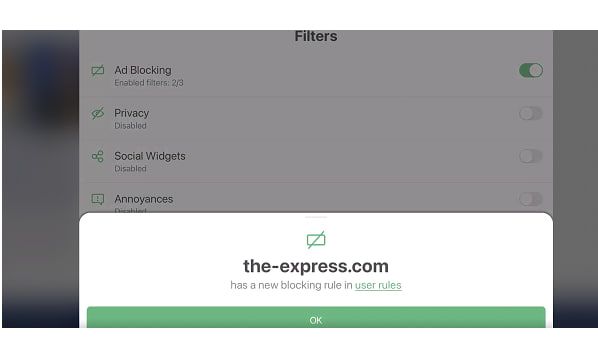
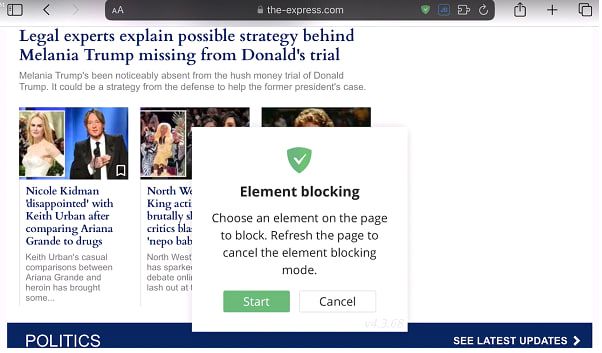
AdGuard has the same feature across all its desktop apps and browser extensions, as well as in AdGuard for iOS, our dedicated Safari content blocker. Depending on your device, it’ll take you from two to four clicks or taps to block any element on the page. For example, in AdGuard for iOS you have to tap the shield icon and select the “Block elements on this page” option.

hkg04safari1
z0wrasafari2

From there, you can click or tap on any element on the page that you’d like to hide.

74znasafari3
3mwuysafari4

You can view the filtering rule associated with the blocked element by clicking on the checkmark icon.

9ja3ssafari5

Screenshot: Selective element ad blocking in the AdGuard for iOS

You can see the video of the entire process here

AI rumors

There have been several, though unconfirmed, reports that the Web Eraser feature might be AI-powered. While there is no indication that it indeed will be AI-driven in AppleInsider’s original report, there is a fertile ground for speculation, given AI’s widespread integration into various facets of our lives, including ad blocking. About a year ago we witnessed the birth of the very first AI-powered ad blocker for YouTube — GPT-AdBlocker — if you’re curious, we’ve tested it and results were quite a mixed bag.

It’s essential to draw an important distinction here. While AI has proven rather successful in tasks like identifying images and speech, identifying ad elements in a page’s code, and most importantly, creating corresponding filtering rules to hide them poses a different challenge. Eyeo, the parent company of AdBlock and Adblock Plus, has been making some progress in that regard, having worked on an AI model that would automatically classify URLs parameters and determine if a certain portion of a page has ads or not. The model has reportedly reached certain precision, but the company is still working on a proof of concept.

The unveiling of the new Apple’s browser version may occur at Apple’s annual Worldwide Developers Conference (WWDC), which spans from June 10 to June 14, just a couple weeks away. It’s anticipated that Apple will also announce iOS 18 during the event and commence beta testing for developers. As per AppleInsider, Safari 18, as the new software will be named, is set to debut “later in 2024.” So we have to be patient and wait for its official release to see if Apple’s in-built ad blocker has some AI features.

But we will be rather surprised if it does. The way we see it, an AI-driven ad blocker should be capable of automatically parsing page code, identifying elements, creating filtering rules, and using them to conceal undesired elements while ensuring the page does not break in the meantime and all the useful elements are displayed in an orderly fashion. While it is possible in theory, this will be incredibly hard to achieve. For one, configuring the AI to create error-free rules is very challenging, since some of these rules can be lengthy and complex.

adguard.com###app > main.main:nth-child(2) > div.welcome > div.product-presentation:nth-child(3) > div.product-presentation__in > div.product-presentation__products:last-child > div.product-presentation__product.product-presentation__product--windows > div.product-presentation__product-slider:first-child > div.swiper.swiper-container.slider.swiper-initialized.swiper-horizontal.swiper-pointer-events.swiper-backface-hidden > div.slider__arrow.slider__arrow--next:last-child

Example of a more complicated ad-blocking rule

Thus, even if AI accurately identifies the ads, there is a quite substantial risk of it botching the rules formulation part. You make one tiny mistake in the rule syntax, and the page looks completely differently from what you’ve intended. Not to mention the interdependencies within these rules. Sometimes, one cannot be added without the other, or one must consider the old rules when adding new ones, and so forth. It’s an incredibly complex and iterative process, in which every character is of outsized importance.

Overall, relying solely on AI for ad blocking isn’t trustworthy at the moment, and it’s susceptible to adversarial methods, meaning it’s easy to trick the model. However, using an AI model to spot bugs in filtering rules is a great idea and such tool would be a great aid for filter developers. We’ll definitely consider it at AdGuard once the technology reaches a sufficient level of maturity.

Concluding thoughts

Apple’s decision to integrate content-blocking into Safari is a boon for privacy. Ads aren’t just irksome and annoying, they’re also trackers, stealthily monitoring your online activity across various websites. These trackers collect data on your browsing habits, preferences, and interests, creating detailed profiles that can be exploited for targeted advertising or even sold to third parties without your consent.

As for the details of the implementation, we can only speculate until we see it with our own eyes. But we wouldn’t count on it being AI-driven to any significant degree; it’s more likely that Apple has drawn inspiration from some tried-and-true techniques that third-party ad blockers have been using for years.


Discuss this and other topics in social media

Спадабаўся пост?
AdGuard VPN AdGuard DNS AdGuard Mail AdGuard Wallet
Галоўны экран AdGuard для Windows
Экран абароны AdGuard для Windows, які паказвае функцыі абароны і налады
Экран Статыстыка AdGuard для Windows, які паказвае статыстыку заблакіраванай рэкламы і праграм сачэння
Экран Кіраванне праграмамі ў AdGuard для Windows, які паказвае параметры кіравання абаронай для праграм, усталяваных на прыладзе
20 363 20363 водгукі
Выдатна!

AdGuard: блакіроўшчык рэкламы для Windows

AdGuard для Windows — гэта больш, чым блакіроўшчык рэкламы. Гэта шматфункцыянальны інструмент, які блакуе рэкламу, кантралюе доступ да небяспечных сайтаў, паскарае загрузку старонак і абараняе дзяцей ад непажаданага кантэнту

Спампоўваючы праграму, вы прымаеце ўмовы Ліцэнзійнага пагаднення
Microsoft Store
Спампоўваючы праграму, вы прымаеце ўмовы Ліцэнзійнага пагаднення
AdGuard для Windows версія 8.0, 14 дзён пробнага перыяду
Галоўны экран AdGuard для Mac
Экран рэжыму нябачнасці AdGuard для Mac
20 363 20363 водгукі
Выдатна!

AdGuard: блакіроўшчык рэкламы для Mac

AdGuard для Mac — гэта ўнікальны блакіроўшчык рэкламы, распрацаваны з улікам macOS. Акрамя абароны ад надакучлівай рэкламы ў браўзерах і праграмах, ён абараняе вас ад адсочвання, фішынгу і махлярства
Спампоўваючы праграму, вы прымаеце ўмовы Ліцэнзійнага пагаднення
Чытаць далей
AdGuard для Mac версія 2.19, 14 дзён пробнага перыяду
Галоўны экран AdGuard для Android
Экран Абарона ад сачэння ў AdGuard для Android
Экран Кіраванне праграмамі ў AdGuard для Android, які паказвае параметры кіравання абаронай для праграм, усталяваных на прыладзе
Экран Статыстыка AdGuard для Android, які паказвае статыстыку заблакіраванай рэкламы і праграм сачэння
Галоўны экран прыватнага браўзера AdGuard для Android
QR-код, каб спампаваць AdGuard для Android
20 363 20363 водгукі
Выдатна!

AdGuard: блакіроўшчык рэкламы для Android

Блакуе рэкламу і трэкеры ва ўсіх браўзерах, гульнях і іншых праграмах. Абараняе вашу прыватнасць і дазваляе вам кантраляваць, як вашы праграмы выкарыстоўваюць Інтэрнэт. Усталёўваецца праз APK
Спампоўваючы праграму, вы прымаеце ўмовы Ліцэнзійнага пагаднення
Чытаць далей
Сканіраванне для загрузкі
Выкарыстоўвайце любы счытвальнік QR-кодаў, даступны на вашай прыладзе
AdGuard для Android версія 4.14, 14 дзён пробнага перыяду
Галоўны экран AdGuard для iOS
Экран абароны AdGuard для iOS, які паказвае функцыі абароны і налады
Экран Статыстыка AdGuard для iOS, які паказвае статыстыку заблакіраванай рэкламы і праграм сачэння
QR-код, каб спампаваць AdGuard для iOS
20 363 20363 водгукі
Выдатна!

AdGuard: блакіроўшчык рэкламы для iOS

Найлепшы блакіроўшчык рэкламы для iOS для iPhone і iPad. AdGuard ліквідуе ўсе віды рэкламы і трэкераў у Safari і абараняе вашу прыватнасць ва ўсіх праграмах на ўзроўні DNS
Спампоўваючы праграму, вы прымаеце ўмовы Ліцэнзійнага пагаднення
Чытаць далей
Сканіраванне для загрузкі
Выкарыстоўвайце любы счытвальнік QR-кодаў, даступны на вашай прыладзе
AdGuard для iOS, 4.5
Галоўны экран AdGuard Content Blocker
Экран фільтры ў AdGuard Content Blocker
Экран налады ў AdGuard Content Blocker
20 363 20363 водгукі
Выдатна!

Блакіроўшчык кантэнту AdGuard

AdGuard Content Blocker ухіляе ўсе віды рэкламы ў мабільных браўзерах, якія падтрымліваюць тэхналогію блакіроўкі змесціва — напрыклад, Samsung Internet і Яндэкс.Браўзер. Яго функцыі абмежаваныя ў параўнанні з AdGuard для Android, але ён бясплатны, просты ў усталёўцы і эфектыўны
Спампоўваючы праграму, вы прымаеце ўмовы Ліцэнзійнага пагаднення
Чытаць далей
Блакіроўшчык кантэнту AdGuard, 2.8
Галоўны экран браузернае пашырэнне AdGuard
Экран Абарона ад сачэння ў браузернае пашырэнне AdGuard
20 363 20363 водгукі
Выдатна!

Браўзернае пашырэнне AdGuard

AdGuard — самае хуткае і лёгкае браўзарнае пашырэнне для блакавання ўсіх тыпаў рэкламы! Абірайце AdGuard для хуткага і бяспечнага сёрфінга без рэкламы.
Усталяваць
Спампоўваючы праграму, вы прымаеце ўмовы Ліцэнзійнага пагаднення
Усталяваць
Спампоўваючы праграму, вы прымаеце ўмовы Ліцэнзійнага пагаднення
Усталяваць
Спампоўваючы праграму, вы прымаеце ўмовы Ліцэнзійнага пагаднення
Усталяваць
Спампоўваючы праграму, вы прымаеце ўмовы Ліцэнзійнага пагаднення
Усталяваць
Спампоўваючы праграму, вы прымаеце ўмовы Ліцэнзійнага пагаднення
Чытаць далей
Усталяваць
Спампоўваючы праграму, вы прымаеце ўмовы Ліцэнзійнага пагаднення
Чытаць далей
Браўзернае пашырэнне AdGuard, 5.5
Галоўны экран Браўзерны памочнік AdGuard
20 363 20363 водгукі
Выдатна!

Памочнік AdGuard

Пашырэнне для браўзера-компаньён для настольных прыкладанняў AdGuard. Яно дазваляе блакіраваць карыстальніцкія элементы на вэб-сайтах, дадаваць вэб-сайты ў спіс дазволеных і адпраўляць справаздачы непасрэдна з вашага браўзера
Памочнік AdGuard, 1.4
20 363 20363 водгукі
Выдатна!

AdGuard Home

AdGuard Home — гэта сеткавае рашэнне для блакіроўкі рэкламы і праграм сачэння. Усталюйце яго адзін раз на вашым маршрутызатары, каб ахапіць усе прылады ў сетцы — дадатковае праграмнае забеспячэнне не патрабуецца. Гэта асабліва важна для розных прылад IoT, якія часта ўяўляюць пагрозу вашай прыватнасці
AdGuard Home, 0.107
Галоўны экран AdGuard Pro для iOS
Экран абароны ў AdGuard Pro для iOS, які паказвае функцыі абароны і налады
Экран Статыстыка ў AdGuard Pro для iOS, які паказвае статыстыку заблакіраванай рэкламы і праграм сачэння
20 363 20363 водгукі
Выдатна!

AdGuard Pro для iOS

AdGuard Pro для iOS пастаўляецца з усімі дадатковымі функцыямі блакіроўкі рэкламы і абароны, якія ўключаны. Ён прапануе тыя ж інструменты, што і платная версія AdGuard для iOS. Выдатна блакіруе рэкламу ў Safari, а таксама дазваляе наладжваць налады DNS, каб адаптаваць вашу абарону. Ён блакіруе рэкламу ў браўзерах і дадатках, абараняе дзяцей ад недапушчальнага кантэнту і захоўвае вашы асабістыя даныя бяспечнымі
Спампоўваючы праграму, вы прымаеце ўмовы Ліцэнзійнага пагаднення
Чытаць далей
AdGuard Pro для iOS, 4.5
Галоўны экран AdGuard Mini для Mac
Экран абароны Safari ў AdGuard Mini для Mac
Экран стварэння правіла ў AdGuard Mini для Mac
20 363 20363 водгукі
Выдатна!

AdGuard Mini для Mac — блакіроўшчык рэкламы ў Safari

AdGuard Mini для Mac — гэта магутны блакіроўшчык рэкламы для Safari. Гэта лёгкая праграма выдаляе рэкламу, блакуе праграмы сачэння і паскарае загрузку старонак. Яна дапамагае вам аглядаць вэб у Safari без адцягненняў і захоўваць вашы даныя ў прыватнасці
Усталяваць
Спампоўваючы праграму, вы прымаеце ўмовы Ліцэнзійнага пагаднення
Чытаць далей
AdGuard Mini для Mac, 2.3
Галоўны экран AdGuard для Android TV з уключанай абаронай
Экран блакіроўкі рэкламы AdGuard для Android TV, які паказвае яго функцыі і налады
Экран налады AdGuard для Android TV
Экран Кіраванне праграмамі AdGuard для Android TV, які паказвае праграмы, дзе рэклама і праграмы сачэння заблакіравана
20 363 20363 водгукі
Выдатна!

AdGuard для Android TV

AdGuard для Android TV — адзіная праграма, якая блакіруе рэкламу, ахоўвае вашу прыватнасць і працуе як міжсеткавы экран для вашага Smart TV. Атрымуйце папярэджанні аб вэб-пагрозах, выкарыстоўвайце бяспечны DNS і атрымлівайце перавагі ад шыфраванага трафіку. Адпачывайце і атрымлівайце асалоду ад улюбёных шоу з першакласнай абаронай і без рэкламы!
AdGuard для Android TV версія 4.14, 14 дзён пробнага перыяду
Маскот AdGuard, Агнар, трымае пінгвіна Linux
20 363 20363 водгукі
Выдатна!

AdGuard для Linux

AdGuard для Linux — гэта першы ў свеце сістэмны блакіроўшчык рэкламы для Linux. Блакуйце рэкламу і трэкеры на ўзроўні прылады, выбірайце з папярэдне ўсталяваных фільтраў альбо дадавайце ўласныя — усё праз інтэрфейс каманднага радка
AdGuard для Linux, 1.4
20 363 20363 водгукі
Выдатна!

AdGuard Temp Mail

Ваш часовы паштовую скрыню, каб на асноўную пошту не прыходзіў спам
20 363 20363 водгукі
Выдатна!

AdGuard VPN

75 лакацый па ўсім свеце

Доступ да любога кантэнту

Моцнае шыфраванне

Без лагавання

Самае хуткае злучэнне

Цэладзённая падтрымка

Паспрабуйце бясплатна
Спампоўваючы праграму, вы прымаеце ўмовы Ліцэнзійнага пагаднення
Чытаць далей
20 363 20363 водгукі
Выдатна!

AdGuard DNS

AdGuard DNS – гэта альтэрнатыўны спосаб заблакаваць рэкламу, абараніць асабістыя дадзеныя і ахаваць дзяцей ад дарослых матэрыялаў. Ён просты ў наладзе і выкарыстанні і забяспечвае патрэбны мінімум абароны ад рэкламы, трэкінгу і фішынгу, незалежна ад платформы.
20 363 20363 водгукі
Выдатна!

AdGuard Mail

Абараняйце сваю асобу, пазбягайце спаму і трымайце ўваходную пошту ў бяспецы з дапамогай нашых псеўданімаў і часовых адрасоў электроннай пошты. Скарыстайцеся нашым бясплатным сэрвісам перасылкі электроннай пошты і праграмамі для ўсіх аперацыйных сістэм.
20 363 20363 водгукі
Выдатна!

AdGuard Wallet

Бяспечны і прыватны крыпта-кашалёк, які дае вам поўны кантроль над вашымі актывамі. Адкрывайце для сябе тысячы крыптавалют для захоўвання, адпраўкі і абмену
Спампоўка AdGuard Каб усталяваць AdGuard, пстрыкніце файл, пазначаны стрэлкай Выберыце «Адкрыць» і націсніце «ОК», затым дачакайцеся спампоўкі файла. У акне, якое адкрылася, перацягніце значок AdGuard у папку «Праграмы». Дзякуй, што выбралі AdGuard! Выберыце «Адкрыць» і націсніце «ОК», затым дачакайцеся спампоўкі файла. У акне, якое адкрылася, націсніце «Усталяваць». Дзякуй, што выбралі AdGuard!
Усталюйце AdGuard на мабільную прыладу