Big Sur: the good, the bad, and the ugly

Not so long ago we released AdGuard v2.5 for Mac, which, among else, made a heavy accent on compatibility with soon-to-come macOS Big Sur. The v2.5.1 patch that followed recently was packed with more compatibility-oriented changes.

I have to say that befriending AdGuard and Big Sur is not a simple task at all. Apple shakes things up really hard this year when it comes to macOS.

First of all, it's because of the deprecation of Kernel Extensions. If you're a frequent reader of our Blog, you probably remember that we mentioned this as early as in March. You can find plenty of information on this topic if you're intrested in digging deeper, but the bottom line is that Kernel Extensions is an API that AdGuard used to rely on in earlier versions, and with Big Sur macOS moves to a new API, and it's very, very different. All internal AdGuard processes had to be rebuilt, accommodating to the new API.

But that's not the only factor. The introduction of Big Sur comes with Apple switching from Intel processors to ARM. As you might guess, it takes its toll as well. Let's take a closer look at both reasons.

ARM support

We'll deal with this one first, because everything is fairly straightforward here. Apple has allowed developers to get so called Developer Transition kit, which includes an ARM-based Mac Mini computer prototype, among other things.
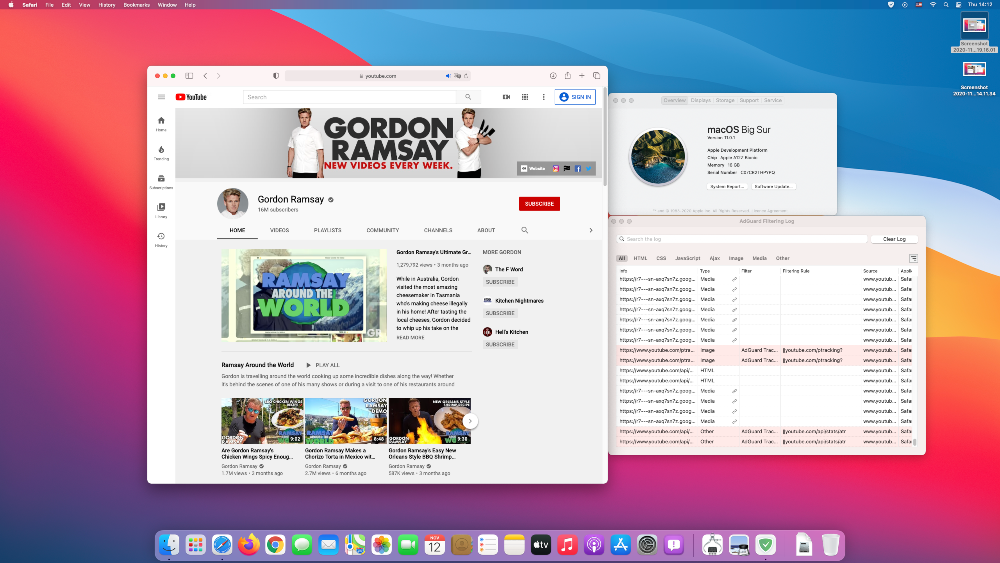
We've tested it out and are happy to report that AdGuard works smoothly with ARM processors.

Moving to Network Extensions

Network Extensions is an API that comes in place of the old Kernel Extensions API. Why Apple did it in the first place? Their motive is to prevent developers from working within the Kernel and confine them to User mode. And proper implementation of Kernel Extensions is quite challenging. You make a mistake and you'll end up crashing the system. Transitioning to User mode all the features that earlier were only possible to implement on Kext level should make the OS more stable altogether, or at least in theory that is. Unfortunately, everything comes at a cost.

As for AdGuard, as already mentioned, the API we'll have to use for system-wide filtering from now on is called Network Extensions. And — you guessed it — adopting it was rather painful as well. Big Sur is the first OS that marked the commonplace use of Network Extensions. We've reported a boatload of bugs and spent countless hours talking to Apple devs. Luckily, all wasn't in vain — all critical issues with Network Extensions have been resolved.

That said, not all these essential changes made it into macOS Catalina, so you'll have to rely on the ol' trusty Kernel Extensions there.

Despite all our efforts, though, there are still some restrictions when it comes to Network Extensions. Here's a rundown on known problems and ways to fix them:

Compatibility with local proxies

Some things have changed in regard to AdGuard working simultaneously with a proxy. Right off the bat, some good news: any remote (non-local) proxy will work normally in Big Sur alongside AdGuard and doesn't require any additional actions from you. But with a local proxy (localhost), you have to remove it from System settings and configure it in AdGuard.

To configure an upstream proxy in AdGuard for Mac in Big Sur, you need to go to AdGuard menu -> Advanced -> Advanced Settings.... Click on the Value area of the upstream.proxy setting to configure a proxy.
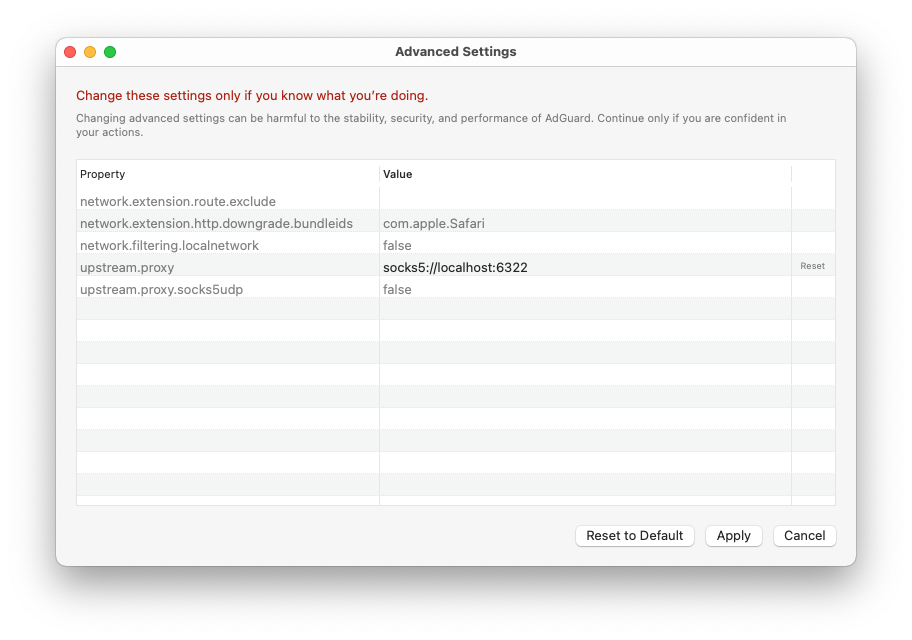
Enter a string that looks like scheme://user:password@host:port, where

  • scheme is either http, https, socks4 or socks5, depending on your proxy type.

If you use socks5 proxy type, set the value of the upstream.proxy.socks5udp setting to true to make AdGuard route UDP traffic to the proxy server.

  • user and password are corresponding username and password of your proxy (if needed). Ignore either or both when not applicable
  • host is the IP address of your proxy server
  • port is the desired port number to be used by the proxy server

Example: socks5://localhost:6322 will configure a SOCKS5 local proxy that listens to port 6322 and doesn't require a username or a password.

Click Apply to make AdGuard route all traffic that went through it to the configured proxy server.

Instructions for some popular local proxies

Depending on what local proxy you're using, there may be slight differencies in setup and other specifics. More detailed instructions for a couple of popular proxies (Surge, Shadowsocks) can be found in our Knowledge Base.

VPN apps with legacy API

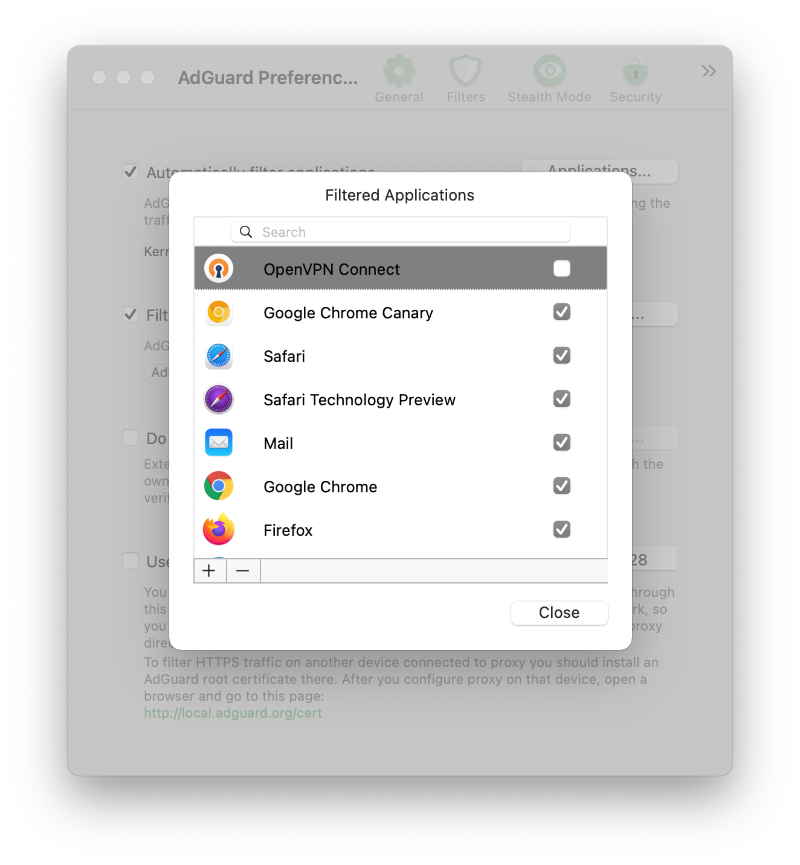
Despite AdGuard is displayed as a VPN in System settings, it shouldn't cause any conflicts when working alongside other VPN-based apps. However, if you're using a VPN-based app that was downloaded from outside the AppStore, there's a chance it uses the old VPN API and you have to exclude it from filtering:

  1. Open AdGuard's menu.
  2. Select Preferences....
  3. Switch to the Network tab.
  4. Click the Applications... button.
  5. Find the app you want to exclude and uncheck the checkbox next to it.
Alternatives to using a Network Extension

It's impossible to foresee each and every possible problem that can pop up in Big Sur, there are countless various hardware/software and settings configurations. If you face any compatibility issues, please contact our support team, but feel free to try one of these workarounds first:

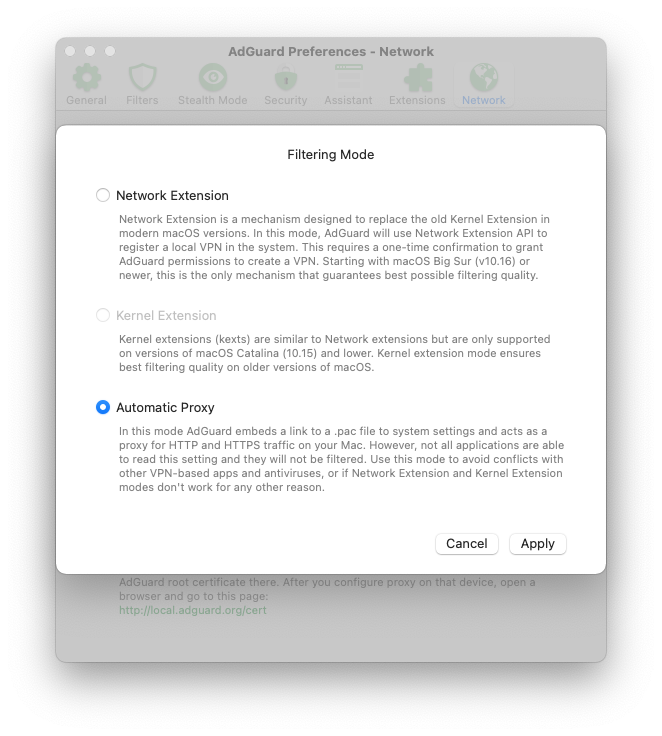
Using "Automatic proxy" filtering mode

You can try switching AdGuard to Automatic proxy mode. This makes the system treat AdGuard like a proxy and thus avoid compatibility problems caused by Network Extensions.

  1. Open AdGuard's menu.
  2. Select Preferences....
  3. Switch to the Network tab.
  4. Click the Select Mode... button.
  5. Select Automatic Proxy.

Now AdGuard has automatically added a .pac file to your Mac's network settings, so that the system will consider AdGuard a proxy and try to send all traffic through AdGuard.

Take into account that some apps may ignore this system setting and their traffic will not be filtered.

Enabling Kernel extensions

This is kind of a last resort. To enable Kernel Extensions, you would need to disable System Integrity Protection (SIP) first. It has a chance to work, but also carries a risk of causing more problems than it'll solve. If you feel determined, follow the instruction from this Knowledge Base article.

Once again, we only recommend using this method if everything else fails, and even then cautiously.

In conclusion

As you can see from this article, Big Sur is good news, bad news, and everything in between. Time will tell which side the pendulum swings, and whether there will be more problems or new possibilities in the future. For now, best you can do is arm yourself with knowledge from this article and be ready to face any potential complications — and let's hope Apple will enter the overdrive mode and fix everything in no time!


Спадабаўся пост?
AdGuard VPN AdGuard DNS AdGuard Mail AdGuard Wallet
Галоўны экран AdGuard для Windows
Экран абароны AdGuard для Windows, які паказвае функцыі абароны і налады
Экран Статыстыка AdGuard для Windows, які паказвае статыстыку заблакіраванай рэкламы і праграм сачэння
Экран Кіраванне праграмамі ў AdGuard для Windows, які паказвае параметры кіравання абаронай для праграм, усталяваных на прыладзе
20 363 20363 водгукі
Выдатна!

AdGuard: блакіроўшчык рэкламы для Windows

AdGuard для Windows — гэта больш, чым блакіроўшчык рэкламы. Гэта шматфункцыянальны інструмент, які блакуе рэкламу, кантралюе доступ да небяспечных сайтаў, паскарае загрузку старонак і абараняе дзяцей ад непажаданага кантэнту
Спампоўваючы праграму, вы прымаеце ўмовы Ліцэнзійнага пагаднення
Microsoft Store
Спампоўваючы праграму, вы прымаеце ўмовы Ліцэнзійнага пагаднення
AdGuard для Windows версія 8.0, 14 дзён пробнага перыяду
Галоўны экран AdGuard для Mac
Экран рэжыму нябачнасці AdGuard для Mac
20 363 20363 водгукі
Выдатна!

AdGuard: блакіроўшчык рэкламы для Mac

AdGuard для Mac — гэта ўнікальны блакіроўшчык рэкламы, распрацаваны з улікам macOS. Акрамя абароны ад надакучлівай рэкламы ў браўзерах і праграмах, ён абараняе вас ад адсочвання, фішынгу і махлярства
Спампоўваючы праграму, вы прымаеце ўмовы Ліцэнзійнага пагаднення
Чытаць далей
AdGuard для Mac версія 2.19, 14 дзён пробнага перыяду
Галоўны экран AdGuard для Android
Экран Абарона ад сачэння ў AdGuard для Android
Экран Кіраванне праграмамі ў AdGuard для Android, які паказвае параметры кіравання абаронай для праграм, усталяваных на прыладзе
Экран Статыстыка AdGuard для Android, які паказвае статыстыку заблакіраванай рэкламы і праграм сачэння
Галоўны экран прыватнага браўзера AdGuard для Android
QR-код, каб спампаваць AdGuard для Android
20 363 20363 водгукі
Выдатна!

AdGuard: блакіроўшчык рэкламы для Android

Блакуе рэкламу і трэкеры ва ўсіх браўзерах, гульнях і іншых праграмах. Абараняе вашу прыватнасць і дазваляе вам кантраляваць, як вашы праграмы выкарыстоўваюць Інтэрнэт. Усталёўваецца праз APK
Спампоўваючы праграму, вы прымаеце ўмовы Ліцэнзійнага пагаднення
Чытаць далей
Сканіраванне для загрузкі
Выкарыстоўвайце любы счытвальнік QR-кодаў, даступны на вашай прыладзе
AdGuard для Android версія 4.14, 14 дзён пробнага перыяду
Галоўны экран AdGuard для iOS
Экран абароны AdGuard для iOS, які паказвае функцыі абароны і налады
Экран Статыстыка AdGuard для iOS, які паказвае статыстыку заблакіраванай рэкламы і праграм сачэння
QR-код, каб спампаваць AdGuard для iOS
20 363 20363 водгукі
Выдатна!

AdGuard: блакіроўшчык рэкламы для iOS

Найлепшы блакіроўшчык рэкламы для iOS для iPhone і iPad. AdGuard ліквідуе ўсе віды рэкламы і трэкераў у Safari і абараняе вашу прыватнасць ва ўсіх праграмах на ўзроўні DNS
Спампоўваючы праграму, вы прымаеце ўмовы Ліцэнзійнага пагаднення
Чытаць далей
Сканіраванне для загрузкі
Выкарыстоўвайце любы счытвальнік QR-кодаў, даступны на вашай прыладзе
AdGuard для iOS, 4.5
Галоўны экран AdGuard Content Blocker
Экран фільтры ў AdGuard Content Blocker
Экран налады ў AdGuard Content Blocker
20 363 20363 водгукі
Выдатна!

Блакіроўшчык кантэнту AdGuard

AdGuard Content Blocker ухіляе ўсе віды рэкламы ў мабільных браўзерах, якія падтрымліваюць тэхналогію блакіроўкі змесціва — напрыклад, Samsung Internet і Яндэкс.Браўзер. Яго функцыі абмежаваныя ў параўнанні з AdGuard для Android, але ён бясплатны, просты ў усталёўцы і эфектыўны
Спампоўваючы праграму, вы прымаеце ўмовы Ліцэнзійнага пагаднення
Чытаць далей
Блакіроўшчык кантэнту AdGuard, 2.8
Галоўны экран браузернае пашырэнне AdGuard
Экран Абарона ад сачэння ў браузернае пашырэнне AdGuard
20 363 20363 водгукі
Выдатна!

Браўзернае пашырэнне AdGuard

AdGuard — самае хуткае і лёгкае браўзарнае пашырэнне для блакавання ўсіх тыпаў рэкламы! Абірайце AdGuard для хуткага і бяспечнага сёрфінга без рэкламы.
Усталяваць
Спампоўваючы праграму, вы прымаеце ўмовы Ліцэнзійнага пагаднення
Усталяваць
Спампоўваючы праграму, вы прымаеце ўмовы Ліцэнзійнага пагаднення
Усталяваць
Спампоўваючы праграму, вы прымаеце ўмовы Ліцэнзійнага пагаднення
Усталяваць
Спампоўваючы праграму, вы прымаеце ўмовы Ліцэнзійнага пагаднення
Усталяваць
Спампоўваючы праграму, вы прымаеце ўмовы Ліцэнзійнага пагаднення
Чытаць далей
Усталяваць
Спампоўваючы праграму, вы прымаеце ўмовы Ліцэнзійнага пагаднення
Чытаць далей
Браўзернае пашырэнне AdGuard, 5.5
Галоўны экран Браўзерны памочнік AdGuard
20 363 20363 водгукі
Выдатна!

Памочнік AdGuard

Пашырэнне для браўзера-компаньён для настольных прыкладанняў AdGuard. Яно дазваляе блакіраваць карыстальніцкія элементы на вэб-сайтах, дадаваць вэб-сайты ў спіс дазволеных і адпраўляць справаздачы непасрэдна з вашага браўзера
Памочнік AdGuard, 1.4
20 363 20363 водгукі
Выдатна!

AdGuard Home

AdGuard Home — гэта сеткавае рашэнне для блакіроўкі рэкламы і праграм сачэння. Усталюйце яго адзін раз на вашым маршрутызатары, каб ахапіць усе прылады ў сетцы — дадатковае праграмнае забеспячэнне не патрабуецца. Гэта асабліва важна для розных прылад IoT, якія часта ўяўляюць пагрозу вашай прыватнасці
AdGuard Home, 0.107
Галоўны экран AdGuard Pro для iOS
Экран абароны ў AdGuard Pro для iOS, які паказвае функцыі абароны і налады
Экран Статыстыка ў AdGuard Pro для iOS, які паказвае статыстыку заблакіраванай рэкламы і праграм сачэння
20 363 20363 водгукі
Выдатна!

AdGuard Pro для iOS

AdGuard Pro для iOS пастаўляецца з усімі дадатковымі функцыямі блакіроўкі рэкламы і абароны, якія ўключаны. Ён прапануе тыя ж інструменты, што і платная версія AdGuard для iOS. Выдатна блакіруе рэкламу ў Safari, а таксама дазваляе наладжваць налады DNS, каб адаптаваць вашу абарону. Ён блакіруе рэкламу ў браўзерах і дадатках, абараняе дзяцей ад недапушчальнага кантэнту і захоўвае вашы асабістыя даныя бяспечнымі
Спампоўваючы праграму, вы прымаеце ўмовы Ліцэнзійнага пагаднення
Чытаць далей
AdGuard Pro для iOS, 4.5
Галоўны экран AdGuard Mini для Mac
Экран абароны Safari ў AdGuard Mini для Mac
Экран стварэння правіла ў AdGuard Mini для Mac
20 363 20363 водгукі
Выдатна!

AdGuard Mini для Mac — блакіроўшчык рэкламы ў Safari

AdGuard Mini для Mac — гэта магутны блакіроўшчык рэкламы для Safari. Гэта лёгкая праграма выдаляе рэкламу, блакуе праграмы сачэння і паскарае загрузку старонак. Яна дапамагае вам аглядаць вэб у Safari без адцягненняў і захоўваць вашы даныя ў прыватнасці
Усталяваць
Спампоўваючы праграму, вы прымаеце ўмовы Ліцэнзійнага пагаднення
Чытаць далей
AdGuard Mini для Mac, 2.3
Галоўны экран AdGuard для Android TV з уключанай абаронай
Экран блакіроўкі рэкламы AdGuard для Android TV, які паказвае яго функцыі і налады
Экран налады AdGuard для Android TV
Экран Кіраванне праграмамі AdGuard для Android TV, які паказвае праграмы, дзе рэклама і праграмы сачэння заблакіравана
20 363 20363 водгукі
Выдатна!

AdGuard для Android TV

AdGuard для Android TV — адзіная праграма, якая блакіруе рэкламу, ахоўвае вашу прыватнасць і працуе як міжсеткавы экран для вашага Smart TV. Атрымуйце папярэджанні аб вэб-пагрозах, выкарыстоўвайце бяспечны DNS і атрымлівайце перавагі ад шыфраванага трафіку. Адпачывайце і атрымлівайце асалоду ад улюбёных шоу з першакласнай абаронай і без рэкламы!
AdGuard для Android TV версія 4.14, 14 дзён пробнага перыяду
Маскот AdGuard, Агнар, трымае пінгвіна Linux
20 363 20363 водгукі
Выдатна!

AdGuard для Linux

AdGuard для Linux — гэта першы ў свеце сістэмны блакіроўшчык рэкламы для Linux. Блакуйце рэкламу і трэкеры на ўзроўні прылады, выбірайце з папярэдне ўсталяваных фільтраў альбо дадавайце ўласныя — усё праз інтэрфейс каманднага радка
AdGuard для Linux, 1.4
20 363 20363 водгукі
Выдатна!

AdGuard Temp Mail

Ваш часовы паштовую скрыню, каб на асноўную пошту не прыходзіў спам
20 363 20363 водгукі
Выдатна!

AdGuard VPN

75 лакацый па ўсім свеце

Доступ да любога кантэнту

Моцнае шыфраванне

Без лагавання

Самае хуткае злучэнне

Цэладзённая падтрымка

Паспрабуйце бясплатна
Спампоўваючы праграму, вы прымаеце ўмовы Ліцэнзійнага пагаднення
Чытаць далей
20 363 20363 водгукі
Выдатна!

AdGuard DNS

AdGuard DNS – гэта альтэрнатыўны спосаб заблакаваць рэкламу, абараніць асабістыя дадзеныя і ахаваць дзяцей ад дарослых матэрыялаў. Ён просты ў наладзе і выкарыстанні і забяспечвае патрэбны мінімум абароны ад рэкламы, трэкінгу і фішынгу, незалежна ад платформы.
20 363 20363 водгукі
Выдатна!

AdGuard Mail

Абараняйце сваю асобу, пазбягайце спаму і трымайце ўваходную пошту ў бяспецы з дапамогай нашых псеўданімаў і часовых адрасоў электроннай пошты. Скарыстайцеся нашым бясплатным сэрвісам перасылкі электроннай пошты і праграмамі для ўсіх аперацыйных сістэм.
20 363 20363 водгукі
Выдатна!

AdGuard Wallet

Бяспечны і прыватны крыпта-кашалёк, які дае вам поўны кантроль над вашымі актывамі. Адкрывайце для сябе тысячы крыптавалют для захоўвання, адпраўкі і абмену
Спампоўка AdGuard Каб усталяваць AdGuard, пстрыкніце файл, пазначаны стрэлкай Выберыце «Адкрыць» і націсніце «ОК», затым дачакайцеся спампоўкі файла. У акне, якое адкрылася, перацягніце значок AdGuard у папку «Праграмы». Дзякуй, што выбралі AdGuard! Выберыце «Адкрыць» і націсніце «ОК», затым дачакайцеся спампоўкі файла. У акне, якое адкрылася, націсніце «Усталяваць». Дзякуй, што выбралі AdGuard!
Усталюйце AdGuard на мабільную прыладу