Bing AI’s ads can trick you into downloading malware

In February 2023, Microsoft beat Google to the punch when it became the first tech giant to integrate a search engine with an AI-powered chatbot. The result of this daring experiment, GPT-4 based Bing AI, immediately attracted a massive user base, reaching 100 million active users in no time, and instantly boosting Microsoft’s profile as a worthy challenger to Google Search’s dominance.

Google Search has long been the cash cow of Alphabet, its parent company. In the second quarter of 2023, Alphabet made $74.6 billion in total revenue, and out of that, $42.6 billion came from ads on Google Search. Google Search also has a commanding lead over Bing and other rivals in terms of search ad revenue share, capturing 58% of the global market compared to Bing’s meager 6% as of 2022.

Perhaps hoping to shake up this status quo, Microsoft rolled out ads in Bing AI in March 2023. Since then, users have occasionally noticed ads sneaking into Bing AI’s human-like responses, mostly in the form of clickable annotations marked with a small, unassuming “Ad” label next to the link. These ad links would typically appear just below or above a link that led to an organic search result (in the screenshot below, the ad link is placed above the genuine search result).
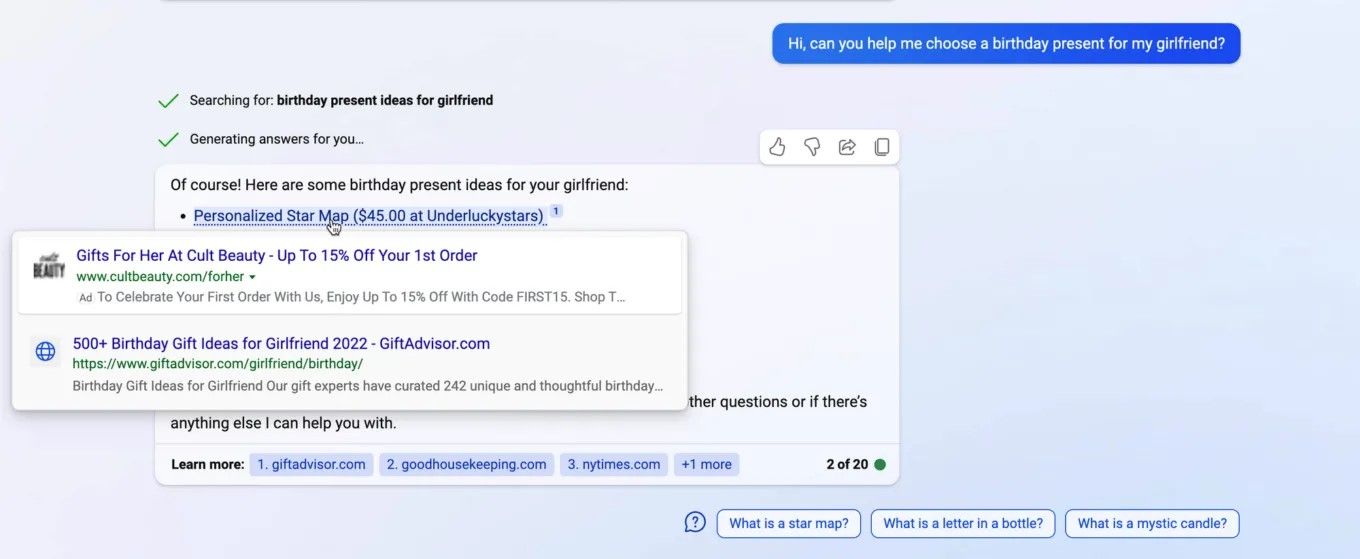
Example of ads in Bing Chat!

Most recently third-party ads also came to Windows Copilot, a Bing Chat-powered feature built directly into the Windows 11 operating system. Ads for Amazon Prime were spotted in the Bing AI sidebar by Windows Latest.

Example of ads in Windows Copilot
Source: Windows Latest

There’s no option to disable ads in Windows Copilot (or Bing AI), and the only way you can get rid of them as of now is by turning the feature off. Microsoft started rolling out Windows Copilot as an optional update in late September, and it should be fully released by the end of the year. After it is fully rolled out, the feature will be turned on by default.

A magnet for cybercriminals

At first glance, there’s not much difference between ads in AI-powered search engines and traditional ones, but there is, and it’s a big one. Studies have shown that people subconsciously trust chat agents more when they sound and act like humans (which is what “friendly” AI-powered bots like Bing AI are pre-trained and fine-tuned to do). As a result, people may be much more easily swayed by the recommendations that AI-powered chat agents give them, as opposed to the recommendations of a depersonalized search engine. Naturally, this makes such chatbots a highly attractive target for cybercriminals, who have been exploiting the Google and Bing ad networks for years to deliver malware through ads.

But it’s one thing to know, or at least strongly suspect, that it’s only a matter of time before cybercriminals turn their attention to Bing Chat, and it’s another to actually see proof that it’s already happening.

In its latest investigation, Malwerbytes uncovered just such a malvertising campaign running on the Bing AI.
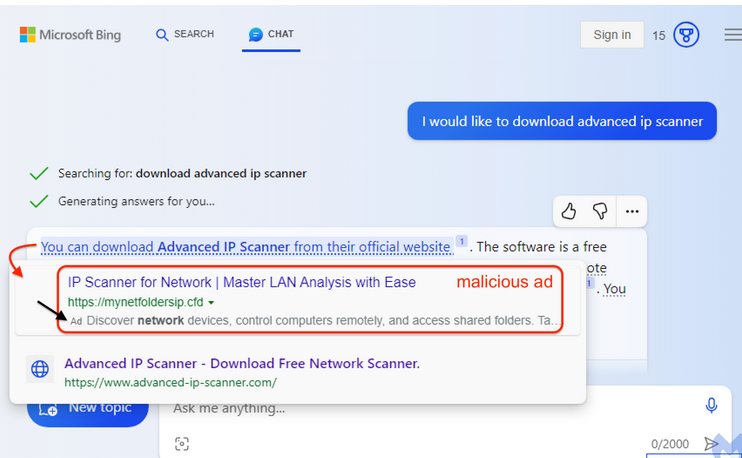
A malicious ad in Bing AI

Source: Malwarebytes

The malicious link appeared as an advertisement for a program called Advanced IP Scanner, a tool typically used by system administrators to locate all network devices. The ad link was placed above the link to the vendor’s official website. Although the ad link is accompanied with an ad label, it’s so tiny and inconspicuous, that it’s very easy to miss. So, what happens if the user, misled into thinking that the first link is the organic search result, clicks on it?

If you click on the link, you will go through a series of redirects that will check your system settings and determine if you are a suitable target. First, you would be redirected to a site called mynetfoldersip[.]cfd, which will scan your IP address and other information to see whether you are a regular user, a bot or, potentially, a security researcher. If you ‘pass’ this test and are determined likely to be an ordinary human, you will be sent to a site called advenced-ip-scanner[.]com with an intentionally misspelled “e” in “advanced” — another filter to weed out security-savvy users. This site pretends to be the official website of the Advanced IP Scanner, but is actually an impostor. If you haven’t smelled the fish by this point, you will be prompted to download a fake installer for the ‘Advanced IP Scanner,’ which contains three files. One of these files is poisoned, and will connect to an external server to download a payload when you run the program.

The researchers failed to identify what kind of a payload it was, but it could be anything from a virus to ransomware to information-stealing malware.

We have written before about how seemingly easy it is for bad actors to place malicious ads in search. The issue of malvertising, which stems from the inadequate and insufficient screening of ads and advertisers, has plagued the search industry for a long time. And as more and more digital advertisers enter the market, it becomes more and more difficult for search engines companies to get a handle on it.

This time, Malwarebytes reported that the source of the attack was a legitimate Australian business, which was apparently hacked and forced to seed malicious ads. In addition to the fake Advanced IP Scanner program, the company’s advertising account was also spotted spreading a malicious ad tailored specifically for lawyers.
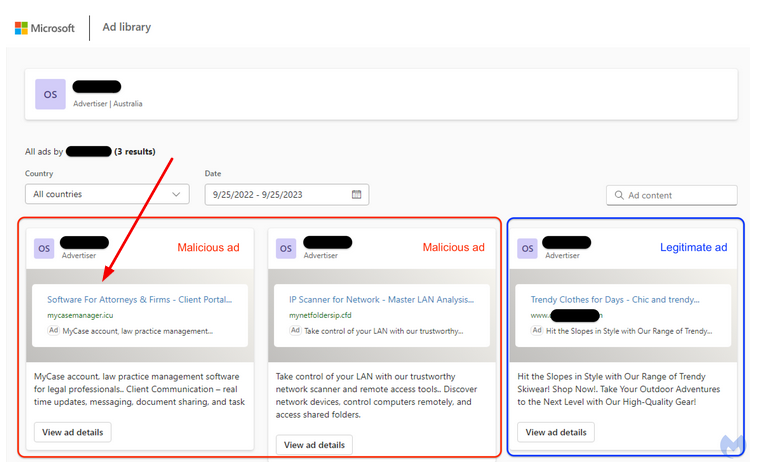
A malicious ad in Bing AI targeting lawyers

Source: Malwarebytes

What makes the problem worse

As we’ve mentioned before, the problem of malvertising is well-documented, it’s not limited only to Bing or Google either, and, in fact, it dates back over a decade. However, with the rise of AI-powered search engines (first and foremost, Bing AI) the problem risks getting dramatically worse.

One reason is that everything suggests that we are more likely to trust conversational chatbots than an impersonal search engine. Another is that, unlike a standard search engine interface with dozens of links on the same page, we are exposed to a limited set of answers within chatbot windows, which arguably makes these answers ever more persuasive.

If we speak about ad blocking, here we encounter yet another problem. Ad blockers are good at blocking search ads (in the AdGuard extension you can do this in one click by toggling Block search ads and website’s self-promotion), but when it comes to blocking ads in the AI-powered chatbots, this is largely an uncharted territory. In our previous articles, we have outlined our thoughts on blocking ads in Bing Chat specifically, and in AI-powered chatbots in general. Without going too far down the rabbit hole, let’s just say that it’s possible, even for ads that are an integral part of the chatbot’s response, but developing an actual solution to this problem will take some time.

However, what ad blockers can do right now is block these malicious domains so that even if you see the bad ad in Bing AI, you will be warned against actually navigating to the site. We’re constantly updating the list of “bad” domains to keep up with emerging threats like this, but there’s always a chance that something will slip through the cracks. So here are our general recommendations on how to avoid falling victim to these ads.

General recommendations

  • Do not click on ads, because why would you? To make sure you don’t accidentally click on an ad, pay attention to those tiny ‘ad’ and ‘sponsored’ labels that all advertising links are supposed to have

  • Before following a link, check its URL for obvious typos. They are usually a tell-tale sign that something’s fishy. In other words, “advenced” is not “advanced”

  • Use antivirus software — well, this advice is pretty self-explanatory

  • Use ad blocking software. Yes, ad blockers have yet to get up to speed as far as blocking ads in AI-powered chatbots is concerned, but we will get there eventually. In the meantime, some ad-blocking solutions can also protect you from malware and phishing sites thanks to special filters. The database used by AdGuard’s anti-malware module, for example, currently contains about 1.5 million phishing and malware sites and is constantly updated.


Спадабаўся пост?
AdGuard VPN AdGuard DNS AdGuard Mail AdGuard Wallet
Галоўны экран AdGuard для Windows
Экран абароны AdGuard для Windows, які паказвае функцыі абароны і налады
Экран Статыстыка AdGuard для Windows, які паказвае статыстыку заблакіраванай рэкламы і праграм сачэння
Экран Кіраванне праграмамі ў AdGuard для Windows, які паказвае параметры кіравання абаронай для праграм, усталяваных на прыладзе
20 363 20363 водгукі
Выдатна!

AdGuard: блакіроўшчык рэкламы для Windows

AdGuard для Windows — гэта больш, чым блакіроўшчык рэкламы. Гэта шматфункцыянальны інструмент, які блакуе рэкламу, кантралюе доступ да небяспечных сайтаў, паскарае загрузку старонак і абараняе дзяцей ад непажаданага кантэнту
Спампоўваючы праграму, вы прымаеце ўмовы Ліцэнзійнага пагаднення
Microsoft Store
Спампоўваючы праграму, вы прымаеце ўмовы Ліцэнзійнага пагаднення
AdGuard для Windows версія 8.0, 14 дзён пробнага перыяду
Галоўны экран AdGuard для Mac
Экран рэжыму нябачнасці AdGuard для Mac
20 363 20363 водгукі
Выдатна!

AdGuard: блакіроўшчык рэкламы для Mac

AdGuard для Mac — гэта ўнікальны блакіроўшчык рэкламы, распрацаваны з улікам macOS. Акрамя абароны ад надакучлівай рэкламы ў браўзерах і праграмах, ён абараняе вас ад адсочвання, фішынгу і махлярства
Спампоўваючы праграму, вы прымаеце ўмовы Ліцэнзійнага пагаднення
Чытаць далей
AdGuard для Mac версія 2.19, 14 дзён пробнага перыяду
Галоўны экран AdGuard для Android
Экран Абарона ад сачэння ў AdGuard для Android
Экран Кіраванне праграмамі ў AdGuard для Android, які паказвае параметры кіравання абаронай для праграм, усталяваных на прыладзе
Экран Статыстыка AdGuard для Android, які паказвае статыстыку заблакіраванай рэкламы і праграм сачэння
Галоўны экран прыватнага браўзера AdGuard для Android
QR-код, каб спампаваць AdGuard для Android
20 363 20363 водгукі
Выдатна!

AdGuard: блакіроўшчык рэкламы для Android

Блакуе рэкламу і трэкеры ва ўсіх браўзерах, гульнях і іншых праграмах. Абараняе вашу прыватнасць і дазваляе вам кантраляваць, як вашы праграмы выкарыстоўваюць Інтэрнэт. Усталёўваецца праз APK
Спампоўваючы праграму, вы прымаеце ўмовы Ліцэнзійнага пагаднення
Чытаць далей
Сканіраванне для загрузкі
Выкарыстоўвайце любы счытвальнік QR-кодаў, даступны на вашай прыладзе
AdGuard для Android версія 4.14, 14 дзён пробнага перыяду
Галоўны экран AdGuard для iOS
Экран абароны AdGuard для iOS, які паказвае функцыі абароны і налады
Экран Статыстыка AdGuard для iOS, які паказвае статыстыку заблакіраванай рэкламы і праграм сачэння
QR-код, каб спампаваць AdGuard для iOS
20 363 20363 водгукі
Выдатна!

AdGuard: блакіроўшчык рэкламы для iOS

Найлепшы блакіроўшчык рэкламы для iOS для iPhone і iPad. AdGuard ліквідуе ўсе віды рэкламы і трэкераў у Safari і абараняе вашу прыватнасць ва ўсіх праграмах на ўзроўні DNS

Спампоўваючы праграму, вы прымаеце ўмовы Ліцэнзійнага пагаднення
Чытаць далей
Сканіраванне для загрузкі
Выкарыстоўвайце любы счытвальнік QR-кодаў, даступны на вашай прыладзе
AdGuard для iOS, 4.5
Галоўны экран AdGuard Content Blocker
Экран фільтры ў AdGuard Content Blocker
Экран налады ў AdGuard Content Blocker
20 363 20363 водгукі
Выдатна!

Блакіроўшчык кантэнту AdGuard

AdGuard Content Blocker ухіляе ўсе віды рэкламы ў мабільных браўзерах, якія падтрымліваюць тэхналогію блакіроўкі змесціва — напрыклад, Samsung Internet і Яндэкс.Браўзер. Яго функцыі абмежаваныя ў параўнанні з AdGuard для Android, але ён бясплатны, просты ў усталёўцы і эфектыўны

Спампоўваючы праграму, вы прымаеце ўмовы Ліцэнзійнага пагаднення
Чытаць далей
Блакіроўшчык кантэнту AdGuard, 2.8
Галоўны экран браузернае пашырэнне AdGuard
Экран Абарона ад сачэння ў браузернае пашырэнне AdGuard
20 363 20363 водгукі
Выдатна!

Браўзернае пашырэнне AdGuard

AdGuard — самае хуткае і лёгкае браўзарнае пашырэнне для блакавання ўсіх тыпаў рэкламы! Абірайце AdGuard для хуткага і бяспечнага сёрфінга без рэкламы.
Усталяваць
Спампоўваючы праграму, вы прымаеце ўмовы Ліцэнзійнага пагаднення
Усталяваць
Спампоўваючы праграму, вы прымаеце ўмовы Ліцэнзійнага пагаднення
Усталяваць
Спампоўваючы праграму, вы прымаеце ўмовы Ліцэнзійнага пагаднення
Усталяваць
Спампоўваючы праграму, вы прымаеце ўмовы Ліцэнзійнага пагаднення
Усталяваць
Спампоўваючы праграму, вы прымаеце ўмовы Ліцэнзійнага пагаднення
Чытаць далей
Усталяваць
Спампоўваючы праграму, вы прымаеце ўмовы Ліцэнзійнага пагаднення
Чытаць далей
Браўзернае пашырэнне AdGuard, 5.5
Галоўны экран Браўзерны памочнік AdGuard
20 363 20363 водгукі
Выдатна!

Памочнік AdGuard

Пашырэнне для браўзера-компаньён для настольных прыкладанняў AdGuard. Яно дазваляе блакіраваць карыстальніцкія элементы на вэб-сайтах, дадаваць вэб-сайты ў спіс дазволеных і адпраўляць справаздачы непасрэдна з вашага браўзера
Памочнік AdGuard, 1.4
20 363 20363 водгукі
Выдатна!

AdGuard Home

AdGuard Home — гэта сеткавае рашэнне для блакіроўкі рэкламы і праграм сачэння. Усталюйце яго адзін раз на вашым маршрутызатары, каб ахапіць усе прылады ў сетцы — дадатковае праграмнае забеспячэнне не патрабуецца. Гэта асабліва важна для розных прылад IoT, якія часта ўяўляюць пагрозу вашай прыватнасці
AdGuard Home, 0.107
Галоўны экран AdGuard Pro для iOS
Экран абароны ў AdGuard Pro для iOS, які паказвае функцыі абароны і налады
Экран Статыстыка ў AdGuard Pro для iOS, які паказвае статыстыку заблакіраванай рэкламы і праграм сачэння
20 363 20363 водгукі
Выдатна!

AdGuard Pro для iOS

AdGuard Pro для iOS пастаўляецца з усімі дадатковымі функцыямі блакіроўкі рэкламы і абароны, якія ўключаны. Ён прапануе тыя ж інструменты, што і платная версія AdGuard для iOS. Выдатна блакіруе рэкламу ў Safari, а таксама дазваляе наладжваць налады DNS, каб адаптаваць вашу абарону. Ён блакіруе рэкламу ў браўзерах і дадатках, абараняе дзяцей ад недапушчальнага кантэнту і захоўвае вашы асабістыя даныя бяспечнымі
Спампоўваючы праграму, вы прымаеце ўмовы Ліцэнзійнага пагаднення
Чытаць далей
AdGuard Pro для iOS, 4.5
Галоўны экран AdGuard Mini для Mac
Экран абароны Safari ў AdGuard Mini для Mac
Экран стварэння правіла ў AdGuard Mini для Mac
20 363 20363 водгукі
Выдатна!

AdGuard Mini для Mac — блакіроўшчык рэкламы ў Safari

AdGuard Mini для Mac — гэта магутны блакіроўшчык рэкламы для Safari. Гэта лёгкая праграма выдаляе рэкламу, блакуе праграмы сачэння і паскарае загрузку старонак. Яна дапамагае вам аглядаць вэб у Safari без адцягненняў і захоўваць вашы даныя ў прыватнасці
Усталяваць
Спампоўваючы праграму, вы прымаеце ўмовы Ліцэнзійнага пагаднення
Чытаць далей
AdGuard Mini для Mac, 2.3
Галоўны экран AdGuard для Android TV з уключанай абаронай
Экран блакіроўкі рэкламы AdGuard для Android TV, які паказвае яго функцыі і налады
Экран налады AdGuard для Android TV
Экран Кіраванне праграмамі AdGuard для Android TV, які паказвае праграмы, дзе рэклама і праграмы сачэння заблакіравана
20 363 20363 водгукі
Выдатна!

AdGuard для Android TV

AdGuard для Android TV — адзіная праграма, якая блакіруе рэкламу, ахоўвае вашу прыватнасць і працуе як міжсеткавы экран для вашага Smart TV. Атрымуйце папярэджанні аб вэб-пагрозах, выкарыстоўвайце бяспечны DNS і атрымлівайце перавагі ад шыфраванага трафіку. Адпачывайце і атрымлівайце асалоду ад улюбёных шоу з першакласнай абаронай і без рэкламы!
AdGuard для Android TV версія 4.14, 14 дзён пробнага перыяду
Маскот AdGuard, Агнар, трымае пінгвіна Linux
20 363 20363 водгукі
Выдатна!

AdGuard для Linux

AdGuard для Linux — гэта першы ў свеце сістэмны блакіроўшчык рэкламы для Linux. Блакуйце рэкламу і трэкеры на ўзроўні прылады, выбірайце з папярэдне ўсталяваных фільтраў альбо дадавайце ўласныя — усё праз інтэрфейс каманднага радка
AdGuard для Linux, 1.4
20 363 20363 водгукі
Выдатна!

AdGuard Temp Mail

Ваш часовы паштовую скрыню, каб на асноўную пошту не прыходзіў спам
20 363 20363 водгукі
Выдатна!

AdGuard VPN

75 лакацый па ўсім свеце

Доступ да любога кантэнту

Моцнае шыфраванне

Без лагавання

Самае хуткае злучэнне

Цэладзённая падтрымка

Паспрабуйце бясплатна
Спампоўваючы праграму, вы прымаеце ўмовы Ліцэнзійнага пагаднення
Чытаць далей
20 363 20363 водгукі
Выдатна!

AdGuard DNS

AdGuard DNS – гэта альтэрнатыўны спосаб заблакаваць рэкламу, абараніць асабістыя дадзеныя і ахаваць дзяцей ад дарослых матэрыялаў. Ён просты ў наладзе і выкарыстанні і забяспечвае патрэбны мінімум абароны ад рэкламы, трэкінгу і фішынгу, незалежна ад платформы.
20 363 20363 водгукі
Выдатна!

AdGuard Mail

Абараняйце сваю асобу, пазбягайце спаму і трымайце ўваходную пошту ў бяспецы з дапамогай нашых псеўданімаў і часовых адрасоў электроннай пошты. Скарыстайцеся нашым бясплатным сэрвісам перасылкі электроннай пошты і праграмамі для ўсіх аперацыйных сістэм.
20 363 20363 водгукі
Выдатна!

AdGuard Wallet

Бяспечны і прыватны крыпта-кашалёк, які дае вам поўны кантроль над вашымі актывамі. Адкрывайце для сябе тысячы крыптавалют для захоўвання, адпраўкі і абмену
Спампоўка AdGuard Каб усталяваць AdGuard, пстрыкніце файл, пазначаны стрэлкай Выберыце «Адкрыць» і націсніце «ОК», затым дачакайцеся спампоўкі файла. У акне, якое адкрылася, перацягніце значок AdGuard у папку «Праграмы». Дзякуй, што выбралі AdGuard! Выберыце «Адкрыць» і націсніце «ОК», затым дачакайцеся спампоўкі файла. У акне, якое адкрылася, націсніце «Усталяваць». Дзякуй, што выбралі AdGuard!
Усталюйце AdGuard на мабільную прыладу
















































