Firefox enables advertisers to track ad performance by default

Mozilla, a company that has always prided itself on putting privacy first, is facing a backlash from users over a Firefox data collection feature designed to help advertisers track ad performance. Adding insult to injury, the feature, called Privacy-Preserving Attribution (PPA), is enabled by default in the newest version of the browser.

In announcing the new feature, Mozilla described it as a “a non-invasive alternative to cross-site tracking.” “Tracking is terrible for privacy, because it gives companies detailed information about what you do online,” it went on. Cross-site tracking has been for the longest time associated with third-party cookies that Mozilla has been blocking in Firefox by default since 2019. However, now that the last abodes of third-party cookies, such as Microsoft Edge and Google Chrome, are finally phasing them out, browser makers are looking for a replacement.

The alternatives proposed by Google Chrome (Protected Audience API) and Microsoft Edge (Ad Selection API) seem sketchy or at least not foolproof when it comes to user privacy. That’s why AdGuard is now blocking both of them.

In light of this, Mozilla’s unveiling of a supposedly private tracking alternative might appear typical — just another browser maker catering to advertisers while also trying to sweeten the pill for users. The catch, however, lies in Mozilla’s own claim that it isn’t your run-of-the-mill tech company — implying it doesn’t shove your privacy aside in pursuit of profits like the others do.

“We’re not a normal tech company. The things we create prioritize people and their privacy over profits. We exist to make the internet a healthier, happier place for everyone,” asserts Mozilla’s mission statement, prominently displayed on its main page.

So, is Mozilla just like the others now? Without jumping the gun on this, let’s take a closer look at this new tracking alternative.

A product of cooperation with Meta

The new feature was rolled out less than a month after Mozilla’s acquisition of Anonym, an ad metrics company. This move raised eyebrows at the time, seen by some, including here at AdGuard, as a reason for concern and a potential step down a slippery slope. That is primarily because embracing technologies that facilitate data sharing for targeted advertising appears to contradict Mozilla’s mission to always prioritize privacy.

On its GitHub page, Mozilla says that it has been “working with Meta and other actors on defining an in-browser attribution API,” so the PPA seems to be the direct result of that work. It goes on to say that it will be conducting a trial of a “lightweight version of a proposal” which is what is happening now in Firefox.

Our hope is that if we develop a good attribution solution, it will offer a real alternative to more objectionable practices like tracking. We are currently testing this approach to see if it can provide advertisers with the information they’re looking for.

So what’s under the hood?

Mozilla provides a detailed technical description of the new API at this link. We will limit ourselves to a more general one.

In a nutshell, Firefox will track attributed conversions, that is where an ad displayed on one site leads to a conversion (like a purchase) on another. Traditionally, this process relies on cross-site tracking to link these events. However, Mozilla claims that its method, where the browser itself manages this, protects user privacy.

During impression registration — when a user views or clicks on an ad — Firefox will store basic information in a write-only repository. This includes the ad’s identifier and whether the user viewed or clicked the ad. When a conversion occurs, the system aggregates this data based on stored impressions. The website where the conversion happens can access related impressions using the ad’s identifier and interaction type (view or click). Mozilla claims that privacy of individual users is protected because the data is aggregated and the noise is added to prevent identifying specific user actions.

Mozilla: privacy loss is offset by the ‘enormous value’ to the advertiser

But not everyone agrees. Digital rights advocate Jonah Aragon points out that there are a “plethora of issues” with the new feature, most importantly that it reflects a misguided belief that advertisers are entitled to the collection of user data.

By baking in software that’s tailor-made for the advertising industry, Mozilla is wrongly asserting that the advertising industry has a legitimate interest in collecting your data and tracking you across the internet over all other parties, including over your own interests.

Even the mere fact that Mozilla is cooperating with Meta out of all companies on this, makes one a little suspicious of the privacy-preserving nature of the technique, but how does Mozilla itself justify it?

On their GitHub page, Mozilla acknowledges that implementing such a tracking scheme would mean users will take a hit on their privacy, with their info being used. However, the browser maker also argues that such loss is justifiable by the “enormous value” advertisers gain from attribution. Their big sell is that other funding models just won’t cut it.

We, however, disagree with the assumption that an advertising-driven model is the only viable option for sustaining online content and services. We believe there are more ethical or privacy-respecting approaches out there worth exploring. And as a self-professed champion of privacy, Mozilla should lead in exploring these alternatives, rather than seemingly trying to accommodate advertisers’ interests.

Why turn it on by default?

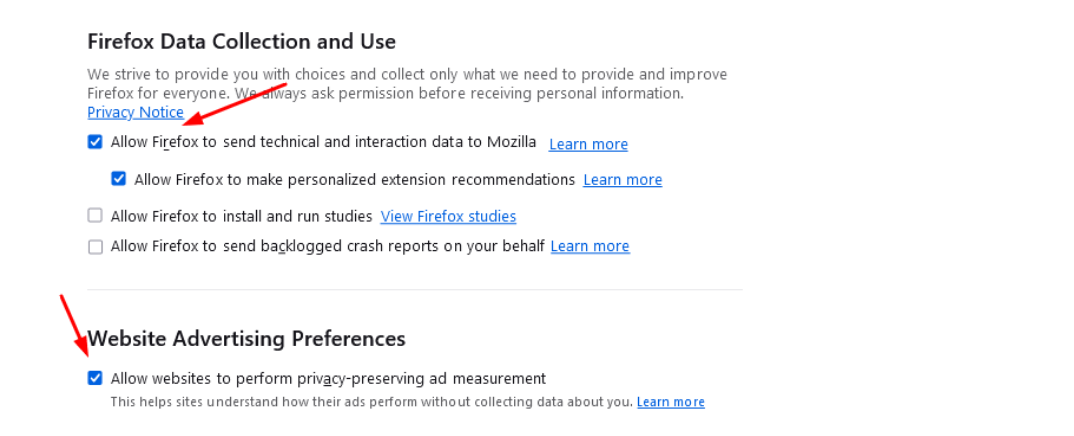
In the meantime, Mozilla’s user forums have been flooded with complaints about the feature. The criticism has focused on two things: first, that Mozilla implemented the feature at all, and second, that it decided to turn it on by default for those users who had telemetry enabled.
l98ppfirefox_1

“Integrating this feature in Firefox, and especially turning it on by default, starts with the assumption that companies have the right to track users online. I am unhappy that Firefox advertises itself as a privacy preserving alternative and then integrates this feature at all,”one of the many comments reads.

Despite the mounting criticism, Mozilla has stood its ground, and has expressed no plans to roll it back or make it opt-in.

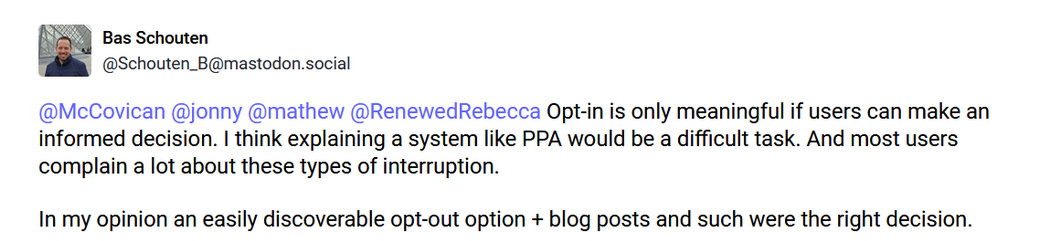
Mozilla engineer Bas Schouten argued that making this feature an opt-in would require explaining its value to the users, which he thinks would be too difficult. Schouten also argued that the opt-out option is easily discoverable.
2wffyscreen_mozilla

Whether the opt-out option is actually easy to find is debatable, but the argument that users are unlikely to grasp the information about the new API and that’s why it’s better to force it on them is not a good look.

For now, the feature can be disabled by going to Firefox’s browser menu. Once there, select Settings, and find the Website Advertising Preferences section in the Privacy & Security panel. Uncheck the box called “Allow websites to perform privacy-preserving ad measurement” and you should be good.

For its part, AdGuard is blocking this API for its app and extension users with the Tracking Protection Filter enabled as a precaution to ensure our users’ privacy remains protected.


Discuss this controversial move by Firefox in our social media

Спадабаўся пост?
AdGuard VPN AdGuard DNS AdGuard Mail AdGuard Wallet
Галоўны экран AdGuard для Windows
Экран абароны AdGuard для Windows, які паказвае функцыі абароны і налады
Экран Статыстыка AdGuard для Windows, які паказвае статыстыку заблакіраванай рэкламы і праграм сачэння
Экран Кіраванне праграмамі ў AdGuard для Windows, які паказвае параметры кіравання абаронай для праграм, усталяваных на прыладзе
20 362 20362 водгукі
Выдатна!

AdGuard: блакіроўшчык рэкламы для Windows

AdGuard для Windows — гэта больш, чым блакіроўшчык рэкламы. Гэта шматфункцыянальны інструмент, які блакуе рэкламу, кантралюе доступ да небяспечных сайтаў, паскарае загрузку старонак і абараняе дзяцей ад непажаданага кантэнту
Спампоўваючы праграму, вы прымаеце ўмовы Ліцэнзійнага пагаднення
Microsoft Store
Спампоўваючы праграму, вы прымаеце ўмовы Ліцэнзійнага пагаднення
AdGuard для Windows версія 8.0, 14 дзён пробнага перыяду
Галоўны экран AdGuard для Mac
Экран рэжыму нябачнасці AdGuard для Mac
20 362 20362 водгукі
Выдатна!

AdGuard: блакіроўшчык рэкламы для Mac

AdGuard для Mac — гэта ўнікальны блакіроўшчык рэкламы, распрацаваны з улікам macOS. Акрамя абароны ад надакучлівай рэкламы ў браўзерах і праграмах, ён абараняе вас ад адсочвання, фішынгу і махлярства
Спампоўваючы праграму, вы прымаеце ўмовы Ліцэнзійнага пагаднення
Чытаць далей
AdGuard для Mac версія 2.19, 14 дзён пробнага перыяду
Галоўны экран AdGuard для Android
Экран Абарона ад сачэння ў AdGuard для Android
Экран Кіраванне праграмамі ў AdGuard для Android, які паказвае параметры кіравання абаронай для праграм, усталяваных на прыладзе
Экран Статыстыка AdGuard для Android, які паказвае статыстыку заблакіраванай рэкламы і праграм сачэння
Галоўны экран прыватнага браўзера AdGuard для Android
QR-код, каб спампаваць AdGuard для Android
20 362 20362 водгукі
Выдатна!

AdGuard: блакіроўшчык рэкламы для Android

Блакуе рэкламу і трэкеры ва ўсіх браўзерах, гульнях і іншых праграмах. Абараняе вашу прыватнасць і дазваляе вам кантраляваць, як вашы праграмы выкарыстоўваюць Інтэрнэт. Усталёўваецца праз APK
Спампоўваючы праграму, вы прымаеце ўмовы Ліцэнзійнага пагаднення
Чытаць далей
Сканіраванне для загрузкі
Выкарыстоўвайце любы счытвальнік QR-кодаў, даступны на вашай прыладзе
AdGuard для Android версія 4.14, 14 дзён пробнага перыяду
Галоўны экран AdGuard для iOS
Экран абароны AdGuard для iOS, які паказвае функцыі абароны і налады
Экран Статыстыка AdGuard для iOS, які паказвае статыстыку заблакіраванай рэкламы і праграм сачэння
QR-код, каб спампаваць AdGuard для iOS
20 362 20362 водгукі
Выдатна!

AdGuard: блакіроўшчык рэкламы для iOS

Найлепшы блакіроўшчык рэкламы для iOS для iPhone і iPad. AdGuard ліквідуе ўсе віды рэкламы і трэкераў у Safari і абараняе вашу прыватнасць ва ўсіх праграмах на ўзроўні DNS

Спампоўваючы праграму, вы прымаеце ўмовы Ліцэнзійнага пагаднення
Чытаць далей
Сканіраванне для загрузкі
Выкарыстоўвайце любы счытвальнік QR-кодаў, даступны на вашай прыладзе
AdGuard для iOS, 4.5
Галоўны экран AdGuard Content Blocker
Экран фільтры ў AdGuard Content Blocker
Экран налады ў AdGuard Content Blocker
20 362 20362 водгукі
Выдатна!

Блакіроўшчык кантэнту AdGuard

AdGuard Content Blocker ухіляе ўсе віды рэкламы ў мабільных браўзерах, якія падтрымліваюць тэхналогію блакіроўкі змесціва — напрыклад, Samsung Internet і Яндэкс.Браўзер. Яго функцыі абмежаваныя ў параўнанні з AdGuard для Android, але ён бясплатны, просты ў усталёўцы і эфектыўны

Спампоўваючы праграму, вы прымаеце ўмовы Ліцэнзійнага пагаднення
Чытаць далей
Блакіроўшчык кантэнту AdGuard, 2.8
Галоўны экран браузернае пашырэнне AdGuard
Экран Абарона ад сачэння ў браузернае пашырэнне AdGuard
20 362 20362 водгукі
Выдатна!

Браўзернае пашырэнне AdGuard

AdGuard — самае хуткае і лёгкае браўзарнае пашырэнне для блакавання ўсіх тыпаў рэкламы! Абірайце AdGuard для хуткага і бяспечнага сёрфінга без рэкламы.
Усталяваць
Спампоўваючы праграму, вы прымаеце ўмовы Ліцэнзійнага пагаднення
Усталяваць
Спампоўваючы праграму, вы прымаеце ўмовы Ліцэнзійнага пагаднення
Усталяваць
Спампоўваючы праграму, вы прымаеце ўмовы Ліцэнзійнага пагаднення
Усталяваць
Спампоўваючы праграму, вы прымаеце ўмовы Ліцэнзійнага пагаднення
Усталяваць
Спампоўваючы праграму, вы прымаеце ўмовы Ліцэнзійнага пагаднення
Чытаць далей
Усталяваць
Спампоўваючы праграму, вы прымаеце ўмовы Ліцэнзійнага пагаднення
Чытаць далей
Браўзернае пашырэнне AdGuard, 5.5
Галоўны экран Браўзерны памочнік AdGuard
20 362 20362 водгукі
Выдатна!

Памочнік AdGuard

Пашырэнне для браўзера-компаньён для настольных прыкладанняў AdGuard. Яно дазваляе блакіраваць карыстальніцкія элементы на вэб-сайтах, дадаваць вэб-сайты ў спіс дазволеных і адпраўляць справаздачы непасрэдна з вашага браўзера
Памочнік AdGuard, 1.4
20 362 20362 водгукі
Выдатна!

AdGuard Home

AdGuard Home — гэта сеткавае рашэнне для блакіроўкі рэкламы і праграм сачэння. Усталюйце яго адзін раз на вашым маршрутызатары, каб ахапіць усе прылады ў сетцы — дадатковае праграмнае забеспячэнне не патрабуецца. Гэта асабліва важна для розных прылад IoT, якія часта ўяўляюць пагрозу вашай прыватнасці
AdGuard Home, 0.107
Галоўны экран AdGuard Pro для iOS
Экран абароны ў AdGuard Pro для iOS, які паказвае функцыі абароны і налады
Экран Статыстыка ў AdGuard Pro для iOS, які паказвае статыстыку заблакіраванай рэкламы і праграм сачэння
20 362 20362 водгукі
Выдатна!

AdGuard Pro для iOS

AdGuard Pro для iOS пастаўляецца з усімі дадатковымі функцыямі блакіроўкі рэкламы і абароны, якія ўключаны. Ён прапануе тыя ж інструменты, што і платная версія AdGuard для iOS. Выдатна блакіруе рэкламу ў Safari, а таксама дазваляе наладжваць налады DNS, каб адаптаваць вашу абарону. Ён блакіруе рэкламу ў браўзерах і дадатках, абараняе дзяцей ад недапушчальнага кантэнту і захоўвае вашы асабістыя даныя бяспечнымі
Спампоўваючы праграму, вы прымаеце ўмовы Ліцэнзійнага пагаднення
Чытаць далей
AdGuard Pro для iOS, 4.5
Галоўны экран AdGuard Mini для Mac
Экран абароны Safari ў AdGuard Mini для Mac
Экран стварэння правіла ў AdGuard Mini для Mac
20 362 20362 водгукі
Выдатна!

AdGuard Mini для Mac — блакіроўшчык рэкламы ў Safari

AdGuard Mini для Mac — гэта магутны блакіроўшчык рэкламы для Safari. Гэта лёгкая праграма выдаляе рэкламу, блакуе праграмы сачэння і паскарае загрузку старонак. Яна дапамагае вам аглядаць вэб у Safari без адцягненняў і захоўваць вашы даныя ў прыватнасці
Усталяваць
Спампоўваючы праграму, вы прымаеце ўмовы Ліцэнзійнага пагаднення
Чытаць далей
AdGuard Mini для Mac, 2.3
Галоўны экран AdGuard для Android TV з уключанай абаронай
Экран блакіроўкі рэкламы AdGuard для Android TV, які паказвае яго функцыі і налады
Экран налады AdGuard для Android TV
Экран Кіраванне праграмамі AdGuard для Android TV, які паказвае праграмы, дзе рэклама і праграмы сачэння заблакіравана
20 362 20362 водгукі
Выдатна!

AdGuard для Android TV

AdGuard для Android TV — адзіная праграма, якая блакіруе рэкламу, ахоўвае вашу прыватнасць і працуе як міжсеткавы экран для вашага Smart TV. Атрымуйце папярэджанні аб вэб-пагрозах, выкарыстоўвайце бяспечны DNS і атрымлівайце перавагі ад шыфраванага трафіку. Адпачывайце і атрымлівайце асалоду ад улюбёных шоу з першакласнай абаронай і без рэкламы!
AdGuard для Android TV версія 4.14, 14 дзён пробнага перыяду
Маскот AdGuard, Агнар, трымае пінгвіна Linux
20 362 20362 водгукі
Выдатна!

AdGuard для Linux

AdGuard для Linux — гэта першы ў свеце сістэмны блакіроўшчык рэкламы для Linux. Блакуйце рэкламу і трэкеры на ўзроўні прылады, выбірайце з папярэдне ўсталяваных фільтраў альбо дадавайце ўласныя — усё праз інтэрфейс каманднага радка
AdGuard для Linux, 1.4
20 362 20362 водгукі
Выдатна!

AdGuard Temp Mail

Ваш часовы паштовую скрыню, каб на асноўную пошту не прыходзіў спам
20 362 20362 водгукі
Выдатна!

AdGuard VPN

75 лакацый па ўсім свеце

Доступ да любога кантэнту

Моцнае шыфраванне

Без лагавання

Самае хуткае злучэнне

Цэладзённая падтрымка

Паспрабуйце бясплатна
Спампоўваючы праграму, вы прымаеце ўмовы Ліцэнзійнага пагаднення
Чытаць далей
20 362 20362 водгукі
Выдатна!

AdGuard DNS

AdGuard DNS – гэта альтэрнатыўны спосаб заблакаваць рэкламу, абараніць асабістыя дадзеныя і ахаваць дзяцей ад дарослых матэрыялаў. Ён просты ў наладзе і выкарыстанні і забяспечвае патрэбны мінімум абароны ад рэкламы, трэкінгу і фішынгу, незалежна ад платформы.
20 362 20362 водгукі
Выдатна!

AdGuard Mail

Абараняйце сваю асобу, пазбягайце спаму і трымайце ўваходную пошту ў бяспецы з дапамогай нашых псеўданімаў і часовых адрасоў электроннай пошты. Скарыстайцеся нашым бясплатным сэрвісам перасылкі электроннай пошты і праграмамі для ўсіх аперацыйных сістэм.
20 362 20362 водгукі
Выдатна!

AdGuard Wallet

Бяспечны і прыватны крыпта-кашалёк, які дае вам поўны кантроль над вашымі актывамі. Адкрывайце для сябе тысячы крыптавалют для захоўвання, адпраўкі і абмену
Спампоўка AdGuard Каб усталяваць AdGuard, пстрыкніце файл, пазначаны стрэлкай Выберыце «Адкрыць» і націсніце «ОК», затым дачакайцеся спампоўкі файла. У акне, якое адкрылася, перацягніце значок AdGuard у папку «Праграмы». Дзякуй, што выбралі AdGuard! Выберыце «Адкрыць» і націсніце «ОК», затым дачакайцеся спампоўкі файла. У акне, якое адкрылася, націсніце «Усталяваць». Дзякуй, што выбралі AdGuard!
Усталюйце AdGuard на мабільную прыладу
















































