How ad blocking is done: a look inside filter developing and why Manifest v3 is a threat

How do ad blockers work? At the very core of any ad blocker lie filter lists (also called 'filters') — literally lists of rules written in a special syntax. If we were to compress ad blockers' job into a few words, we'd say "ad blockers interpret filtering rules". They understand this complex syntax and perform actions with web traffic based on what these rules tell them to do: block specific elements, change web pages in certain ways, etc.

There is a rich variety of filter lists. Thousands of volunteers continuously work on keeping them up-to-date, making sure they block ads and don't break anything important.

You may have heard of the upcoming changes in Chrome browser, also known as Manifest v3. And these changes threaten to end the filters ecosystem as we know it. This article is aimed at Google Chrome developers: we want to believe that they don't have a goal of hurting this ecosystem, but rather simply lack a proper understanding of it. That's why we find it absolutely necessary to describe in detail how it functions and what's wrong with the current implementation of Manifest v3.

And perhaps some of our readers would like to know how it all works, too.

How ad blockers work

As it's been mentioned before, ad blockers are 'translators' that interpret filtering rules. First, an ad blocker download filter lists. It can be any filter lists, downloaded from multiple different places, it doesn't really matter. What matters is that now the ad blocker will start checking web pages' code against all these filtering rules.
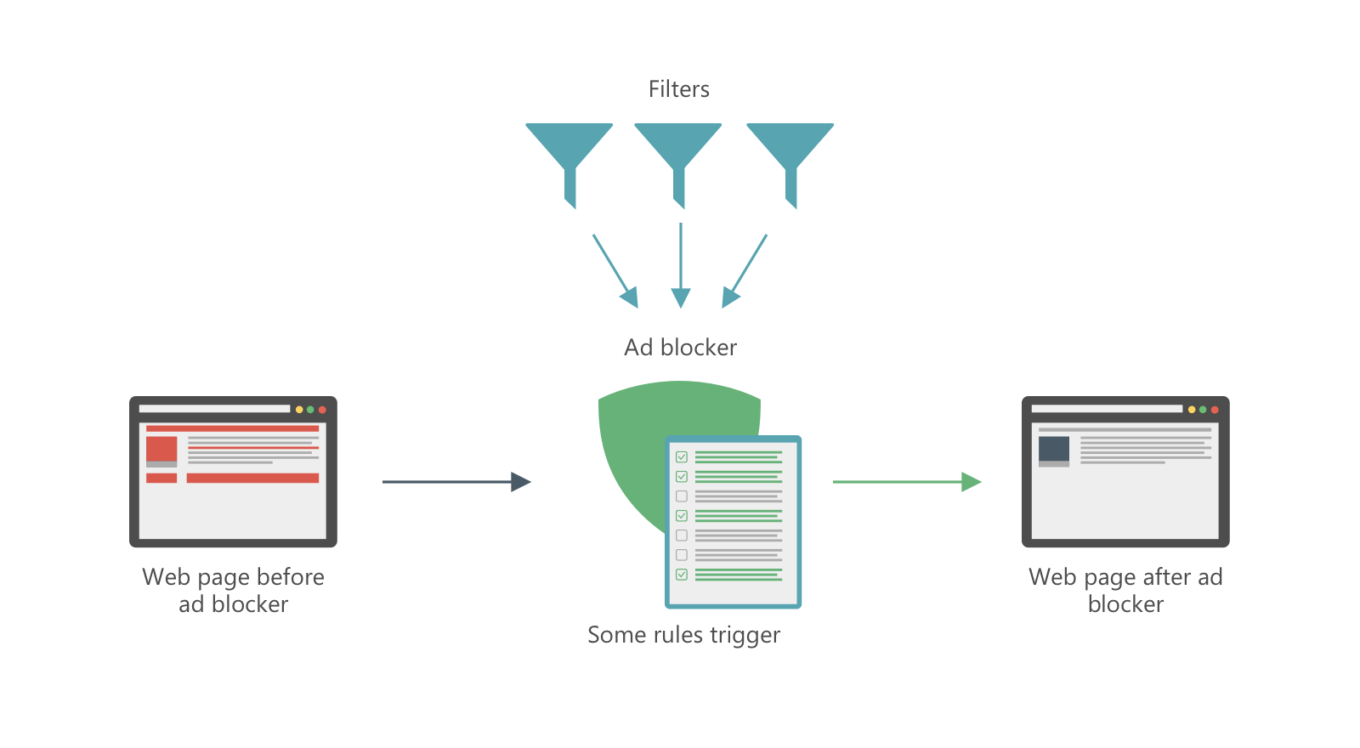
This is how ad blocking works

Let's dive a tiny little bit into technicalities, since there are probably some people who'd like to know how things work on a deeper level. There are several different ways:

Network filtering

Ads on web pages don't appear magically out of thin air. They have to be fetched somehow, i.e. downloaded from a server. To do so, browser needs to send a web request. Filtering rules tell ad blockers which requests are trying to fetch an ad and not useful content and should be blocked.

Cosmetic filtering

Every web page has a DOM ("document object model"), basically an HTML document that contains the page's structure and all its elements. Of course, ads on the page are also elements and are reflected in the DOM. Ad blockers can remove parts of the DOM, and filtering rules help them understand which parts are ads and should be removed, and which shouldn't be messed with.

Of course, in reality it's much more complicated than that, but you can see the general picture. If you'd like to know more about the technical side, check out our ad blocking syntax guide.

Filter lists

There are hundreds, if not thousands of filter lists: AdGuard Filters, EasyList, etc. It takes daily work of thousands of volunteers and professionals to keep these filters updated, so that they are always relevant and don't mess up anything.

Filters can do more than just block ads, and different people choose different combinations of filters to match their personal preferences. Here are some examples of popular filter lists that illustrate just how diverse they can be:

  • EasyList — a base filter for many users, oriented solely to block ads,
  • EasyPrivacy — another popular choice, serves to block online trackers,
  • Fanboy's SocialList — a filter that blocks social widgets, 'Like' buttons etc.,
  • AdGuard Annoyances — AdGuard's filter to block, well, annoyances. I.e. things like cookie notices, online assistants and so on,
  • A plethora of language-specific filter lists: EasyList Germany, RUAdlist, AdGuard Turkish filter, and many, many more.

Feel free to check out this website that has a huge filter lists database.

And here's the problem: the planned Google Chrome changes imply that there will be only one default filter list (so-called 'static' rules). You'd be able to modify it with a set of 'dynamic' rules, but the limit on those is ridiculously small, only 5,000. Many filter lists we mentioned above don't fit this limit alone, imagine if you want to add multiple filter lists.

How filter lists are developed

As we said, filter lists have to be constantly updated. There are two main reasons for that:

  1. To block new ads and
  2. To fix what's broken (with the amount of rules in filter lists something's bound to break at some point).

Of course, filter lists' maintainers can't monitor millions of websites themselves. They rely heavily on user feedback. To put it in perspective:

  • AdGuard Filters repository has over 40,000 closed tasks at the moment. Every week about 500 new tasks appear and approximately the same amount gets resolved.
  • EasyList and its regional filters subscriptions mostly get their feedback from the forum and it has tens of thousands of threads.

Many ad blockers have tools to help users easily report any filter-related issues they face. For example, AdGuard users have access to a special web reporting tool. Based on such complaints, filter developers correct their filter lists. Ad blockers update the filters, and — boom! — the ad is gone.
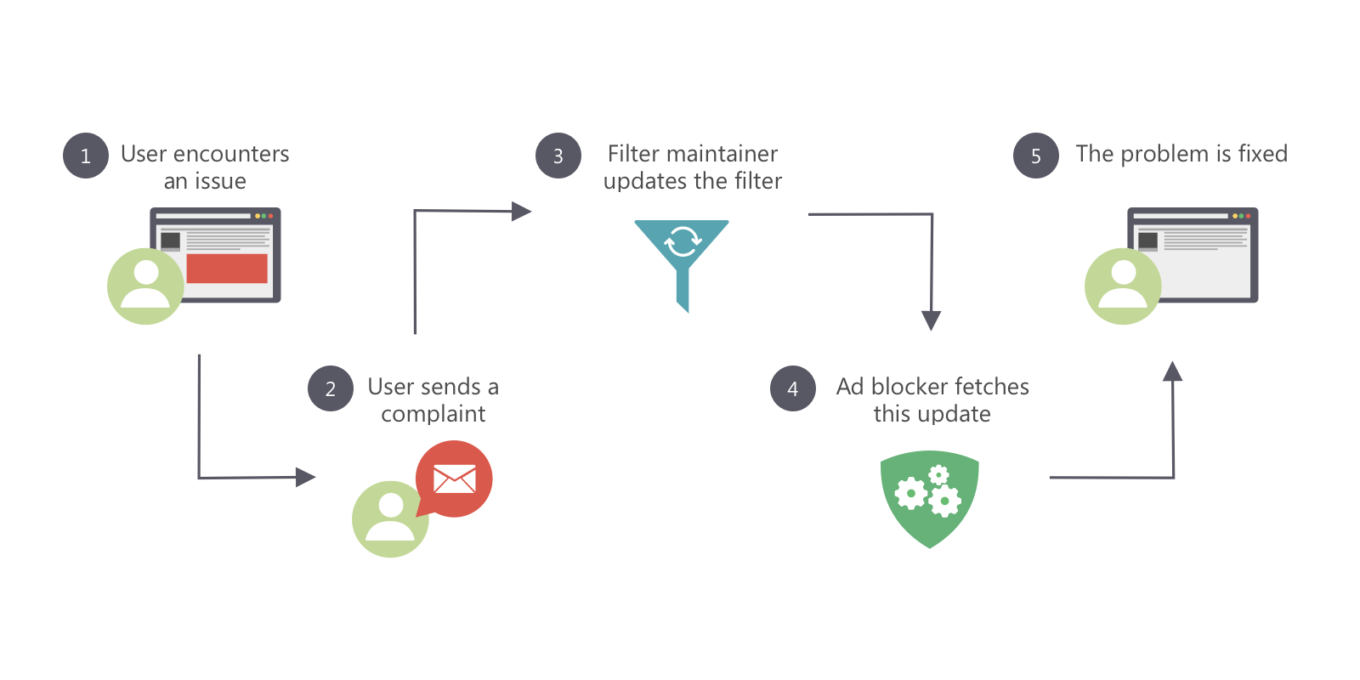
Filters are constantly being updated

This gets us to another problem: dynamic rules in Chrome are going to have a different priority compared to static ones. It only brings more chaos and makes filter lists maintainers' work so much harder.

Where do people get new filter lists?

One of the cornerstones of today's ad blocking is the users' ability to add any custom filter lists by URL (as opposed to choosing from the default list, however large it can be). This is vital for health of the filter lists ecosystem.

  • Users have an option to try new filter lists,
  • Developers can directly share their creations with users, without any third-parties.

Another face of the same problem is that under the existing dynamic rules limitation it would be impossible for all of this to happen. This would lead to slow but sure decline of the filter development community.

What awaits us in the future?

If nothing is done and all changes planned for Chrome become reality, the future will be grim for all of us:

  1. The filters ecosystem is going to receive a very painful blow.
  2. Instead of the familiar filter variety and a large, active community there will be only a handful ad blocker developers left, who'll maintain a few filter lists to the best of their ability.
  3. From users' perspective, instead of flexible approach and the ability to customize ad blocking to their preference they'll get "unified" filter lists that do more or less the same.
  4. The community will shift towards other ad blocking methods and focus its efforts on those.

At the time, we have spoken a lot of harsh words about Safari content blocking, and rightfully so. At least, thanks to countless tricks and 'duct taping' we managed to arrive at a satisfactory solution. With Google Chrome's case, there's honestly no light at the end of the tunnel.

Are there any solution?

Yes, in fact, all these problems can be addressed and solved, and even without deviating too much from the general direction Google wants to take with Chrome. What we think should be done for that:

  • A term 'Filter list' should be introduced for both static and dynamic rules,
  • The limit for dynamic rules should be drastically increased,
  • Filter rules priorities should be rethought. Dynamic rules should have the same priority as static rules.

From the developers' point of view, it would be much simpler to have only dynamic rules. To developer community dividing rules into static and dynamic categories seems not necessary and even chaos-inducing. At the same time, we are ready to have a dialogue with Google Chrome devs and find a compromise that will satisfy everyone, and most importantly — Chrome users.

PS:
If you feel like you have what it takes to become a filter maintainer, we always welcome any help! Check out this page to learn how you can help us improve AdGuard Filters and what you'll get in return for your efforts.


Спадабаўся пост?
AdGuard VPN AdGuard DNS AdGuard Mail AdGuard Wallet
Галоўны экран AdGuard для Windows
Экран абароны AdGuard для Windows, які паказвае функцыі абароны і налады
Экран Статыстыка AdGuard для Windows, які паказвае статыстыку заблакіраванай рэкламы і праграм сачэння
Экран Кіраванне праграмамі ў AdGuard для Windows, які паказвае параметры кіравання абаронай для праграм, усталяваных на прыладзе
20 363 20363 водгукі
Выдатна!

AdGuard: блакіроўшчык рэкламы для Windows

AdGuard для Windows — гэта больш, чым блакіроўшчык рэкламы. Гэта шматфункцыянальны інструмент, які блакуе рэкламу, кантралюе доступ да небяспечных сайтаў, паскарае загрузку старонак і абараняе дзяцей ад непажаданага кантэнту

Спампоўваючы праграму, вы прымаеце ўмовы Ліцэнзійнага пагаднення
Microsoft Store
Спампоўваючы праграму, вы прымаеце ўмовы Ліцэнзійнага пагаднення
AdGuard для Windows версія 8.0, 14 дзён пробнага перыяду
Галоўны экран AdGuard для Mac
Экран рэжыму нябачнасці AdGuard для Mac
20 363 20363 водгукі
Выдатна!

AdGuard: блакіроўшчык рэкламы для Mac

AdGuard для Mac — гэта ўнікальны блакіроўшчык рэкламы, распрацаваны з улікам macOS. Акрамя абароны ад надакучлівай рэкламы ў браўзерах і праграмах, ён абараняе вас ад адсочвання, фішынгу і махлярства
Спампоўваючы праграму, вы прымаеце ўмовы Ліцэнзійнага пагаднення
Чытаць далей
AdGuard для Mac версія 2.19, 14 дзён пробнага перыяду
Галоўны экран AdGuard для Android
Экран Абарона ад сачэння ў AdGuard для Android
Экран Кіраванне праграмамі ў AdGuard для Android, які паказвае параметры кіравання абаронай для праграм, усталяваных на прыладзе
Экран Статыстыка AdGuard для Android, які паказвае статыстыку заблакіраванай рэкламы і праграм сачэння
Галоўны экран прыватнага браўзера AdGuard для Android
QR-код, каб спампаваць AdGuard для Android
20 363 20363 водгукі
Выдатна!

AdGuard: блакіроўшчык рэкламы для Android

Блакуе рэкламу і трэкеры ва ўсіх браўзерах, гульнях і іншых праграмах. Абараняе вашу прыватнасць і дазваляе вам кантраляваць, як вашы праграмы выкарыстоўваюць Інтэрнэт. Усталёўваецца праз APK
Спампоўваючы праграму, вы прымаеце ўмовы Ліцэнзійнага пагаднення
Чытаць далей
Сканіраванне для загрузкі
Выкарыстоўвайце любы счытвальнік QR-кодаў, даступны на вашай прыладзе
AdGuard для Android версія 4.14, 14 дзён пробнага перыяду
Галоўны экран AdGuard для iOS
Экран абароны AdGuard для iOS, які паказвае функцыі абароны і налады
Экран Статыстыка AdGuard для iOS, які паказвае статыстыку заблакіраванай рэкламы і праграм сачэння
QR-код, каб спампаваць AdGuard для iOS
20 363 20363 водгукі
Выдатна!

AdGuard: блакіроўшчык рэкламы для iOS

Найлепшы блакіроўшчык рэкламы для iOS для iPhone і iPad. AdGuard ліквідуе ўсе віды рэкламы і трэкераў у Safari і абараняе вашу прыватнасць ва ўсіх праграмах на ўзроўні DNS
Спампоўваючы праграму, вы прымаеце ўмовы Ліцэнзійнага пагаднення
Чытаць далей
Сканіраванне для загрузкі
Выкарыстоўвайце любы счытвальнік QR-кодаў, даступны на вашай прыладзе
AdGuard для iOS, 4.5
Галоўны экран AdGuard Content Blocker
Экран фільтры ў AdGuard Content Blocker
Экран налады ў AdGuard Content Blocker
20 363 20363 водгукі
Выдатна!

Блакіроўшчык кантэнту AdGuard

AdGuard Content Blocker ухіляе ўсе віды рэкламы ў мабільных браўзерах, якія падтрымліваюць тэхналогію блакіроўкі змесціва — напрыклад, Samsung Internet і Яндэкс.Браўзер. Яго функцыі абмежаваныя ў параўнанні з AdGuard для Android, але ён бясплатны, просты ў усталёўцы і эфектыўны
Спампоўваючы праграму, вы прымаеце ўмовы Ліцэнзійнага пагаднення
Чытаць далей
Блакіроўшчык кантэнту AdGuard, 2.8
Галоўны экран браузернае пашырэнне AdGuard
Экран Абарона ад сачэння ў браузернае пашырэнне AdGuard
20 363 20363 водгукі
Выдатна!

Браўзернае пашырэнне AdGuard

AdGuard — самае хуткае і лёгкае браўзарнае пашырэнне для блакавання ўсіх тыпаў рэкламы! Абірайце AdGuard для хуткага і бяспечнага сёрфінга без рэкламы.
Усталяваць
Спампоўваючы праграму, вы прымаеце ўмовы Ліцэнзійнага пагаднення
Усталяваць
Спампоўваючы праграму, вы прымаеце ўмовы Ліцэнзійнага пагаднення
Усталяваць
Спампоўваючы праграму, вы прымаеце ўмовы Ліцэнзійнага пагаднення
Усталяваць
Спампоўваючы праграму, вы прымаеце ўмовы Ліцэнзійнага пагаднення
Усталяваць
Спампоўваючы праграму, вы прымаеце ўмовы Ліцэнзійнага пагаднення
Чытаць далей
Усталяваць
Спампоўваючы праграму, вы прымаеце ўмовы Ліцэнзійнага пагаднення
Чытаць далей
Браўзернае пашырэнне AdGuard, 5.5
Галоўны экран Браўзерны памочнік AdGuard
20 363 20363 водгукі
Выдатна!

Памочнік AdGuard

Пашырэнне для браўзера-компаньён для настольных прыкладанняў AdGuard. Яно дазваляе блакіраваць карыстальніцкія элементы на вэб-сайтах, дадаваць вэб-сайты ў спіс дазволеных і адпраўляць справаздачы непасрэдна з вашага браўзера
Памочнік AdGuard, 1.4
20 363 20363 водгукі
Выдатна!

AdGuard Home

AdGuard Home — гэта сеткавае рашэнне для блакіроўкі рэкламы і праграм сачэння. Усталюйце яго адзін раз на вашым маршрутызатары, каб ахапіць усе прылады ў сетцы — дадатковае праграмнае забеспячэнне не патрабуецца. Гэта асабліва важна для розных прылад IoT, якія часта ўяўляюць пагрозу вашай прыватнасці
AdGuard Home, 0.107
Галоўны экран AdGuard Pro для iOS
Экран абароны ў AdGuard Pro для iOS, які паказвае функцыі абароны і налады
Экран Статыстыка ў AdGuard Pro для iOS, які паказвае статыстыку заблакіраванай рэкламы і праграм сачэння
20 363 20363 водгукі
Выдатна!

AdGuard Pro для iOS

AdGuard Pro для iOS пастаўляецца з усімі дадатковымі функцыямі блакіроўкі рэкламы і абароны, якія ўключаны. Ён прапануе тыя ж інструменты, што і платная версія AdGuard для iOS. Выдатна блакіруе рэкламу ў Safari, а таксама дазваляе наладжваць налады DNS, каб адаптаваць вашу абарону. Ён блакіруе рэкламу ў браўзерах і дадатках, абараняе дзяцей ад недапушчальнага кантэнту і захоўвае вашы асабістыя даныя бяспечнымі
Спампоўваючы праграму, вы прымаеце ўмовы Ліцэнзійнага пагаднення
Чытаць далей
AdGuard Pro для iOS, 4.5
Галоўны экран AdGuard Mini для Mac
Экран абароны Safari ў AdGuard Mini для Mac
Экран стварэння правіла ў AdGuard Mini для Mac
20 363 20363 водгукі
Выдатна!

AdGuard Mini для Mac — блакіроўшчык рэкламы ў Safari

AdGuard Mini для Mac — гэта магутны блакіроўшчык рэкламы для Safari. Гэта лёгкая праграма выдаляе рэкламу, блакуе праграмы сачэння і паскарае загрузку старонак. Яна дапамагае вам аглядаць вэб у Safari без адцягненняў і захоўваць вашы даныя ў прыватнасці
Усталяваць
Спампоўваючы праграму, вы прымаеце ўмовы Ліцэнзійнага пагаднення
Чытаць далей
AdGuard Mini для Mac, 2.3
Галоўны экран AdGuard для Android TV з уключанай абаронай
Экран блакіроўкі рэкламы AdGuard для Android TV, які паказвае яго функцыі і налады
Экран налады AdGuard для Android TV
Экран Кіраванне праграмамі AdGuard для Android TV, які паказвае праграмы, дзе рэклама і праграмы сачэння заблакіравана
20 363 20363 водгукі
Выдатна!

AdGuard для Android TV

AdGuard для Android TV — адзіная праграма, якая блакіруе рэкламу, ахоўвае вашу прыватнасць і працуе як міжсеткавы экран для вашага Smart TV. Атрымуйце папярэджанні аб вэб-пагрозах, выкарыстоўвайце бяспечны DNS і атрымлівайце перавагі ад шыфраванага трафіку. Адпачывайце і атрымлівайце асалоду ад улюбёных шоу з першакласнай абаронай і без рэкламы!
AdGuard для Android TV версія 4.14, 14 дзён пробнага перыяду
Маскот AdGuard, Агнар, трымае пінгвіна Linux
20 363 20363 водгукі
Выдатна!

AdGuard для Linux

AdGuard для Linux — гэта першы ў свеце сістэмны блакіроўшчык рэкламы для Linux. Блакуйце рэкламу і трэкеры на ўзроўні прылады, выбірайце з папярэдне ўсталяваных фільтраў альбо дадавайце ўласныя — усё праз інтэрфейс каманднага радка
AdGuard для Linux, 1.4
20 363 20363 водгукі
Выдатна!

AdGuard Temp Mail

Ваш часовы паштовую скрыню, каб на асноўную пошту не прыходзіў спам
20 363 20363 водгукі
Выдатна!

AdGuard VPN

75 лакацый па ўсім свеце

Доступ да любога кантэнту

Моцнае шыфраванне

Без лагавання

Самае хуткае злучэнне

Цэладзённая падтрымка

Паспрабуйце бясплатна
Спампоўваючы праграму, вы прымаеце ўмовы Ліцэнзійнага пагаднення
Чытаць далей
20 363 20363 водгукі
Выдатна!

AdGuard DNS

AdGuard DNS – гэта альтэрнатыўны спосаб заблакаваць рэкламу, абараніць асабістыя дадзеныя і ахаваць дзяцей ад дарослых матэрыялаў. Ён просты ў наладзе і выкарыстанні і забяспечвае патрэбны мінімум абароны ад рэкламы, трэкінгу і фішынгу, незалежна ад платформы.
20 363 20363 водгукі
Выдатна!

AdGuard Mail

Абараняйце сваю асобу, пазбягайце спаму і трымайце ўваходную пошту ў бяспецы з дапамогай нашых псеўданімаў і часовых адрасоў электроннай пошты. Скарыстайцеся нашым бясплатным сэрвісам перасылкі электроннай пошты і праграмамі для ўсіх аперацыйных сістэм.
20 363 20363 водгукі
Выдатна!

AdGuard Wallet

Бяспечны і прыватны крыпта-кашалёк, які дае вам поўны кантроль над вашымі актывамі. Адкрывайце для сябе тысячы крыптавалют для захоўвання, адпраўкі і абмену
Спампоўка AdGuard Каб усталяваць AdGuard, пстрыкніце файл, пазначаны стрэлкай Выберыце «Адкрыць» і націсніце «ОК», затым дачакайцеся спампоўкі файла. У акне, якое адкрылася, перацягніце значок AdGuard у папку «Праграмы». Дзякуй, што выбралі AdGuard! Выберыце «Адкрыць» і націсніце «ОК», затым дачакайцеся спампоўкі файла. У акне, якое адкрылася, націсніце «Усталяваць». Дзякуй, што выбралі AdGuard!
Усталюйце AdGuard на мабільную прыладу

















































