Meta’s rumored astronomical fee for Instagram and Facebook in EU: greedy much or just not serious?

When reports first surfaced that Meta was launching paid ad-free tiers for Instagram and Facebook in the EU, we were skeptical, to say the least. As much as we wanted to, it was impossible to take the news of Meta’s paid offering at face value, given that ad tracking has always been at the heart of the company’s business model. At the time, we were still waiting for details on how much Meta would charge for the great privilege of watching user-generated content without interruptions. And while we were happy to be proven wrong, we also had a nagging feeling that Meta was not serious about giving users a real choice between seeing ads and paying a reasonable fee. Rather, we felt it was more of a token gesture to placate the increasingly aggressive (and rightly so) EU privacy regulators challenging its data-hungry practices.

With the new Wall Street Journal report revealing how much these ad-free subscription tiers could actually cost, we had far fewer doubts about whether Meta’s offer was genuine or not: it wasn’t. The prices are not cheap, in fact they are so high that it seems pretty obvious to us that Meta never intended to offer a fair deal to its users.

So let’s cut to the chase, and dive right into the numbers.

Something does not add up

According to the report, Meta has informed the EU’s privacy watchdog in Ireland and digital competition regulators in Brussels that it wants to charge EU users a $10.5 (€10) monthly fee for using a single Facebook or Instagram account on desktop without ads. And if you want to use both Facebook and Instagram on your desktop (which would mean you’re in the absolute minority since only about 1.5% of people use Facebook on their desktop or laptop, while 98.5% use it on mobile devices), you’ll have to shell out extra $6.30 (€6) for an additional account. That means $17 to use both Instagram and Facebook on the desktop. However, if you’re more like the other 98.5% of people who prefer to use phones or tablets to access social media, you’ll have to fork over even more. On mobile, Meta reportedly plans to charge €13 per month ($13.6) for the ad-free access to one account, either Facebook or Instagram. And if we factor in an additional $6.30 (€6) for the remaining Instagram or Facebook account, the total comes to about $20 a month.
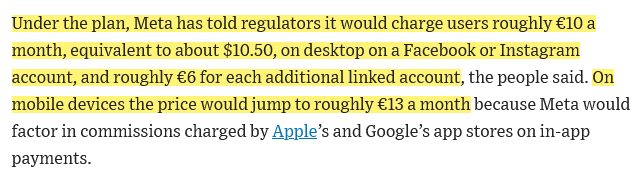
Screenshot from the WSJ report

Source: Wall Street Journal

Now, imagine you’re one of those people who occasionally uses Facebook and Instagram on both desktop and mobile. Apparently, if you want to enjoy an ad-free experience across all your devices in the EU, you’re going to have to tighten your belt, because the total amount you’ll have to pay is going to be… €10 + €6 + €13 + €6 = €35 ($36.7).

Of course, whether a certain fee is high or not is subjective. Some may argue that the price is not exorbitantly expensive, and that it is even a good value. So, let’s put things into perspective. For that, we’ll look at Netflix prices in the EU — depending on the particular EU country, the price can be lower or higher, so we choose Germany, one of the wealthiest countries in the EU per capita among the bigger states. The cheapest ad-free tier in Germany is Basic, it costs €7.99/month (compare to Meta’s €10 for one ad-free account) and allows watching movies on one device. The next cheapest tier is Standard, which costs €12.99/month. It allows you to stream on two devices and allows you to add extra member slots for €4.99 each a month (compare to Meta’s €6 for extra account).

Now, consider this: Netflix has a vast library of shows and movies, licensed content that it pays for and produces. It gives arguably much more value than Instagram or Facebook, which simply provide you access to user-generated content that Meta does not need to buy rights to (at least, not in the EU).

It doesn’t seem fair to pay more to see your friends’ and family’s posts without ads than to watch quality entertainment ad-free. Especially considering that, unlike with Netflix or any other streaming service where you are forced to sit through multiple ad breaks, with Facebook and Instagram you can at least scroll past ads in most cases.

And if you are suspicious of any attempts to compare incomparable, here’s another example — TikTok. The social media app is also reportedly considering an ad-free paid option, only that it is said to cost $4.99 a month.

But what if Meta simply wants to offset the per-user revenue it gets from showing targeted ads to Instagram and Facebook users? That wouldn’t make the fee more realistic, but it would at least explain its rationale.

Well, the issue is extremely tricky, and we can’t say for sure whether this is the case.
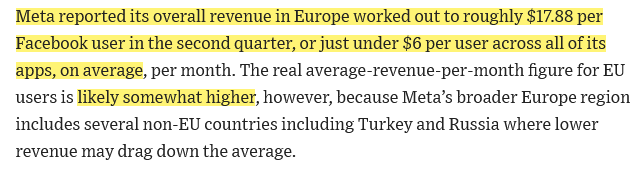
Screenshot from the Wall Street Journal report

In its earnings report for Q2 2023 Meta says that it makes about $17.88 from each person who uses Facebook and Messenger in three months. That means it makes about $6 from each person who uses Facebook in one month. However, these numbers are not very reliable, because while they include “all sources of revenue, the number of MAUs used in this calculation only includes users of Facebook and Messenger” and not the users of Instagram or WhatsApp. But they are the best estimate we have of how much Meta earns from an individual user. The Journal also points out that Meta reports an average revenue per user for a broader Europe region, which also includes non-EU countries that could bring the average down. For example, in Russia, which is also part of broader Europe region in Meta’s report, all advertising on Meta platforms has been paused since March 2022.
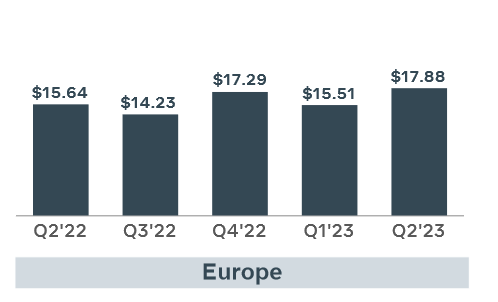
Average revenue per user reported by Meta in Europe

Source: Meta’s quarterly earnings report for Q2 2023

Why is Meta doing this?

Regardless of whether the rumored fees are comparable to what Meta is actually making by milking users’ data through targeted ads, it seems extremely unlikely that Meta really believes that its EU users are willing to shell out nearly $20 just to use ad-free versions of Instagram and Facebook on their phones.

The only conclusion that makes sense to us is that Meta is making a clumsy and very unconvincing attempt to persuade EU regulators that users actually have a choice about whether or not to trade their data for the access to the services.

The EU regulators have already forced Meta to seek consent from EU users for targeted ads. Under EU laws, this consent must be meaningful, but guess what would happen if Meta simply asked its users whether or not they want to be targeted by ads? Look no further than Apple and its App Tracking Transparency feature for the answer — only about 25% of Apple users opted into app tracking when they were faced with a choice. But since Meta does not want to lose the EU market, which generates between 21% and 25% of its global ad revenue, it had to give users some options, even despite its own volition. It seems like Meta’s latest cunning plan is to present users with a false dilemma: either accept ad targeting as usual or pay a ridiculously hefty fee for ad-free access. Besides, we cannot rule out the possibility that Meta will continue collecting your behavioral data and share it with third parties, even though it will no longer serve you ads based on that data on Facebook/Instagram.

It will be interesting to see how the EU regulators will react to this plan, and how much compromise they will accept. Will they allow Meta to get away with this, or will they demand more fairness (and perhaps lower fees) from the company? On our part, we hope they don't budge and will stand up for the rights and interests of the users.


Спадабаўся пост?
AdGuard VPN AdGuard DNS AdGuard Mail AdGuard Wallet
Галоўны экран AdGuard для Windows
Экран абароны AdGuard для Windows, які паказвае функцыі абароны і налады
Экран Статыстыка AdGuard для Windows, які паказвае статыстыку заблакіраванай рэкламы і праграм сачэння
Экран Кіраванне праграмамі ў AdGuard для Windows, які паказвае параметры кіравання абаронай для праграм, усталяваных на прыладзе
20 363 20363 водгукі
Выдатна!

AdGuard: блакіроўшчык рэкламы для Windows

AdGuard для Windows — гэта больш, чым блакіроўшчык рэкламы. Гэта шматфункцыянальны інструмент, які блакуе рэкламу, кантралюе доступ да небяспечных сайтаў, паскарае загрузку старонак і абараняе дзяцей ад непажаданага кантэнту

Спампоўваючы праграму, вы прымаеце ўмовы Ліцэнзійнага пагаднення
Microsoft Store
Спампоўваючы праграму, вы прымаеце ўмовы Ліцэнзійнага пагаднення
AdGuard для Windows версія 8.0, 14 дзён пробнага перыяду
Галоўны экран AdGuard для Mac
Экран рэжыму нябачнасці AdGuard для Mac
20 363 20363 водгукі
Выдатна!

AdGuard: блакіроўшчык рэкламы для Mac

AdGuard для Mac — гэта ўнікальны блакіроўшчык рэкламы, распрацаваны з улікам macOS. Акрамя абароны ад надакучлівай рэкламы ў браўзерах і праграмах, ён абараняе вас ад адсочвання, фішынгу і махлярства
Спампоўваючы праграму, вы прымаеце ўмовы Ліцэнзійнага пагаднення
Чытаць далей
AdGuard для Mac версія 2.19, 14 дзён пробнага перыяду
Галоўны экран AdGuard для Android
Экран Абарона ад сачэння ў AdGuard для Android
Экран Кіраванне праграмамі ў AdGuard для Android, які паказвае параметры кіравання абаронай для праграм, усталяваных на прыладзе
Экран Статыстыка AdGuard для Android, які паказвае статыстыку заблакіраванай рэкламы і праграм сачэння
Галоўны экран прыватнага браўзера AdGuard для Android
QR-код, каб спампаваць AdGuard для Android
20 363 20363 водгукі
Выдатна!

AdGuard: блакіроўшчык рэкламы для Android

Блакуе рэкламу і трэкеры ва ўсіх браўзерах, гульнях і іншых праграмах. Абараняе вашу прыватнасць і дазваляе вам кантраляваць, як вашы праграмы выкарыстоўваюць Інтэрнэт. Усталёўваецца праз APK
Спампоўваючы праграму, вы прымаеце ўмовы Ліцэнзійнага пагаднення
Чытаць далей
Сканіраванне для загрузкі
Выкарыстоўвайце любы счытвальнік QR-кодаў, даступны на вашай прыладзе
AdGuard для Android версія 4.14, 14 дзён пробнага перыяду
Галоўны экран AdGuard для iOS
Экран абароны AdGuard для iOS, які паказвае функцыі абароны і налады
Экран Статыстыка AdGuard для iOS, які паказвае статыстыку заблакіраванай рэкламы і праграм сачэння
QR-код, каб спампаваць AdGuard для iOS
20 363 20363 водгукі
Выдатна!

AdGuard: блакіроўшчык рэкламы для iOS

Найлепшы блакіроўшчык рэкламы для iOS для iPhone і iPad. AdGuard ліквідуе ўсе віды рэкламы і трэкераў у Safari і абараняе вашу прыватнасць ва ўсіх праграмах на ўзроўні DNS
Спампоўваючы праграму, вы прымаеце ўмовы Ліцэнзійнага пагаднення
Чытаць далей
Сканіраванне для загрузкі
Выкарыстоўвайце любы счытвальнік QR-кодаў, даступны на вашай прыладзе
AdGuard для iOS, 4.5
Галоўны экран AdGuard Content Blocker
Экран фільтры ў AdGuard Content Blocker
Экран налады ў AdGuard Content Blocker
20 363 20363 водгукі
Выдатна!

Блакіроўшчык кантэнту AdGuard

AdGuard Content Blocker ухіляе ўсе віды рэкламы ў мабільных браўзерах, якія падтрымліваюць тэхналогію блакіроўкі змесціва — напрыклад, Samsung Internet і Яндэкс.Браўзер. Яго функцыі абмежаваныя ў параўнанні з AdGuard для Android, але ён бясплатны, просты ў усталёўцы і эфектыўны
Спампоўваючы праграму, вы прымаеце ўмовы Ліцэнзійнага пагаднення
Чытаць далей
Блакіроўшчык кантэнту AdGuard, 2.8
Галоўны экран браузернае пашырэнне AdGuard
Экран Абарона ад сачэння ў браузернае пашырэнне AdGuard
20 363 20363 водгукі
Выдатна!

Браўзернае пашырэнне AdGuard

AdGuard — самае хуткае і лёгкае браўзарнае пашырэнне для блакавання ўсіх тыпаў рэкламы! Абірайце AdGuard для хуткага і бяспечнага сёрфінга без рэкламы.
Усталяваць
Спампоўваючы праграму, вы прымаеце ўмовы Ліцэнзійнага пагаднення
Усталяваць
Спампоўваючы праграму, вы прымаеце ўмовы Ліцэнзійнага пагаднення
Усталяваць
Спампоўваючы праграму, вы прымаеце ўмовы Ліцэнзійнага пагаднення
Усталяваць
Спампоўваючы праграму, вы прымаеце ўмовы Ліцэнзійнага пагаднення
Усталяваць
Спампоўваючы праграму, вы прымаеце ўмовы Ліцэнзійнага пагаднення
Чытаць далей
Усталяваць
Спампоўваючы праграму, вы прымаеце ўмовы Ліцэнзійнага пагаднення
Чытаць далей
Браўзернае пашырэнне AdGuard, 5.5
Галоўны экран Браўзерны памочнік AdGuard
20 363 20363 водгукі
Выдатна!

Памочнік AdGuard

Пашырэнне для браўзера-компаньён для настольных прыкладанняў AdGuard. Яно дазваляе блакіраваць карыстальніцкія элементы на вэб-сайтах, дадаваць вэб-сайты ў спіс дазволеных і адпраўляць справаздачы непасрэдна з вашага браўзера
Памочнік AdGuard, 1.4
20 363 20363 водгукі
Выдатна!

AdGuard Home

AdGuard Home — гэта сеткавае рашэнне для блакіроўкі рэкламы і праграм сачэння. Усталюйце яго адзін раз на вашым маршрутызатары, каб ахапіць усе прылады ў сетцы — дадатковае праграмнае забеспячэнне не патрабуецца. Гэта асабліва важна для розных прылад IoT, якія часта ўяўляюць пагрозу вашай прыватнасці
AdGuard Home, 0.107
Галоўны экран AdGuard Pro для iOS
Экран абароны ў AdGuard Pro для iOS, які паказвае функцыі абароны і налады
Экран Статыстыка ў AdGuard Pro для iOS, які паказвае статыстыку заблакіраванай рэкламы і праграм сачэння
20 363 20363 водгукі
Выдатна!

AdGuard Pro для iOS

AdGuard Pro для iOS пастаўляецца з усімі дадатковымі функцыямі блакіроўкі рэкламы і абароны, якія ўключаны. Ён прапануе тыя ж інструменты, што і платная версія AdGuard для iOS. Выдатна блакіруе рэкламу ў Safari, а таксама дазваляе наладжваць налады DNS, каб адаптаваць вашу абарону. Ён блакіруе рэкламу ў браўзерах і дадатках, абараняе дзяцей ад недапушчальнага кантэнту і захоўвае вашы асабістыя даныя бяспечнымі
Спампоўваючы праграму, вы прымаеце ўмовы Ліцэнзійнага пагаднення
Чытаць далей
AdGuard Pro для iOS, 4.5
Галоўны экран AdGuard Mini для Mac
Экран абароны Safari ў AdGuard Mini для Mac
Экран стварэння правіла ў AdGuard Mini для Mac
20 363 20363 водгукі
Выдатна!

AdGuard Mini для Mac — блакіроўшчык рэкламы ў Safari

AdGuard Mini для Mac — гэта магутны блакіроўшчык рэкламы для Safari. Гэта лёгкая праграма выдаляе рэкламу, блакуе праграмы сачэння і паскарае загрузку старонак. Яна дапамагае вам аглядаць вэб у Safari без адцягненняў і захоўваць вашы даныя ў прыватнасці
Усталяваць
Спампоўваючы праграму, вы прымаеце ўмовы Ліцэнзійнага пагаднення
Чытаць далей
AdGuard Mini для Mac, 2.3
Галоўны экран AdGuard для Android TV з уключанай абаронай
Экран блакіроўкі рэкламы AdGuard для Android TV, які паказвае яго функцыі і налады
Экран налады AdGuard для Android TV
Экран Кіраванне праграмамі AdGuard для Android TV, які паказвае праграмы, дзе рэклама і праграмы сачэння заблакіравана
20 363 20363 водгукі
Выдатна!

AdGuard для Android TV

AdGuard для Android TV — адзіная праграма, якая блакіруе рэкламу, ахоўвае вашу прыватнасць і працуе як міжсеткавы экран для вашага Smart TV. Атрымуйце папярэджанні аб вэб-пагрозах, выкарыстоўвайце бяспечны DNS і атрымлівайце перавагі ад шыфраванага трафіку. Адпачывайце і атрымлівайце асалоду ад улюбёных шоу з першакласнай абаронай і без рэкламы!
AdGuard для Android TV версія 4.14, 14 дзён пробнага перыяду
Маскот AdGuard, Агнар, трымае пінгвіна Linux
20 363 20363 водгукі
Выдатна!

AdGuard для Linux

AdGuard для Linux — гэта першы ў свеце сістэмны блакіроўшчык рэкламы для Linux. Блакуйце рэкламу і трэкеры на ўзроўні прылады, выбірайце з папярэдне ўсталяваных фільтраў альбо дадавайце ўласныя — усё праз інтэрфейс каманднага радка
AdGuard для Linux, 1.4
20 363 20363 водгукі
Выдатна!

AdGuard Temp Mail

Ваш часовы паштовую скрыню, каб на асноўную пошту не прыходзіў спам
20 363 20363 водгукі
Выдатна!

AdGuard VPN

75 лакацый па ўсім свеце

Доступ да любога кантэнту

Моцнае шыфраванне

Без лагавання

Самае хуткае злучэнне

Цэладзённая падтрымка

Паспрабуйце бясплатна
Спампоўваючы праграму, вы прымаеце ўмовы Ліцэнзійнага пагаднення
Чытаць далей
20 363 20363 водгукі
Выдатна!

AdGuard DNS

AdGuard DNS – гэта альтэрнатыўны спосаб заблакаваць рэкламу, абараніць асабістыя дадзеныя і ахаваць дзяцей ад дарослых матэрыялаў. Ён просты ў наладзе і выкарыстанні і забяспечвае патрэбны мінімум абароны ад рэкламы, трэкінгу і фішынгу, незалежна ад платформы.
20 363 20363 водгукі
Выдатна!

AdGuard Mail

Абараняйце сваю асобу, пазбягайце спаму і трымайце ўваходную пошту ў бяспецы з дапамогай нашых псеўданімаў і часовых адрасоў электроннай пошты. Скарыстайцеся нашым бясплатным сэрвісам перасылкі электроннай пошты і праграмамі для ўсіх аперацыйных сістэм.
20 363 20363 водгукі
Выдатна!

AdGuard Wallet

Бяспечны і прыватны крыпта-кашалёк, які дае вам поўны кантроль над вашымі актывамі. Адкрывайце для сябе тысячы крыптавалют для захоўвання, адпраўкі і абмену
Спампоўка AdGuard Каб усталяваць AdGuard, пстрыкніце файл, пазначаны стрэлкай Выберыце «Адкрыць» і націсніце «ОК», затым дачакайцеся спампоўкі файла. У акне, якое адкрылася, перацягніце значок AdGuard у папку «Праграмы». Дзякуй, што выбралі AdGuard! Выберыце «Адкрыць» і націсніце «ОК», затым дачакайцеся спампоўкі файла. У акне, якое адкрылася, націсніце «Усталяваць». Дзякуй, што выбралі AdGuard!
Усталюйце AdGuard на мабільную прыладу

















































