Microsoft Edge is getting rid of third-party cookies. What about their replacement?

Following in the footsteps of Google Chrome, Microsoft Edge has announced that it would be phasing out third-party cookies. In the upcoming months, Microsoft said it plans to begin trials with discontinuing Edge’s use of third-party cookies, starting with 1% of users. These cookies, once the linchpin of targeted advertising, have been instrumental in crafting intricate user profiles.

Historically, third-party cookies — tiny data files placed on your browser by sites other than the one you’re visiting — have enabled advertisers to track your visits across all the platforms where they advertise. That’s why the role of the “tracking” cookie in spawning a surveillance economy where user data is treated as a commodity they have no control over can hardly be overestimated.

But as users have become more privacy-conscious, and regulators — primarily in the EU and California — began scrutinizing the handling of personal data, the third-party cookie has been on a steady retreat. Google Chrome’s move earlier this year to finally, after multiple delays, embark on phasing out third-party cookies was a significant blow, effectively sounding the death knell for this tracking technology. Given Chrome’s dominance in the browser market, it’s unsurprising that Microsoft Edge has followed suit. Meanwhile, browsers like Apple Safari and Mozilla Firefox, along with privacy-centric browsers such as Brave, have already been proactively blocking third-party cookies by default.

What is coming in place of cookies

In lieu of cookies, Google proposed the Protected Audience API, a part of its Privacy Sandbox initiative. The stated goal of the Privacy Sandbox is to keep ad targeting as effective as before but make it more privacy-respecting. In other words: Google wants to appease regulators and not throw advertisers under the bus either, since ad revenues are its bread and butter. To cater to both sides is a tall order, and our analysis of the proposed API shows that despite what Google says about it, it is far from being a private solution. If anything, it turns the browser itself into an ad auction tool. Our Protected Audience API demo illustrates the shortcomings of the new mechanism, which we believe can still be misused to achieve functionality similar to that provided by third-party cookies.

Unlike Google, Microsoft is not dependent on advertising profits. The lion’s share of its total revenues (about 60%) comes from Office and cloud computing. So, in theory, Microsoft’s hands should be free to come up with something really private.

As Microsoft announced the gradual deprecation of third-party cookies, it also unveiled a new technology, called Ad Selection API, that is meant to replace them. There are uncanny parallels between this API and the one proposed by Google as you can see from the table below.
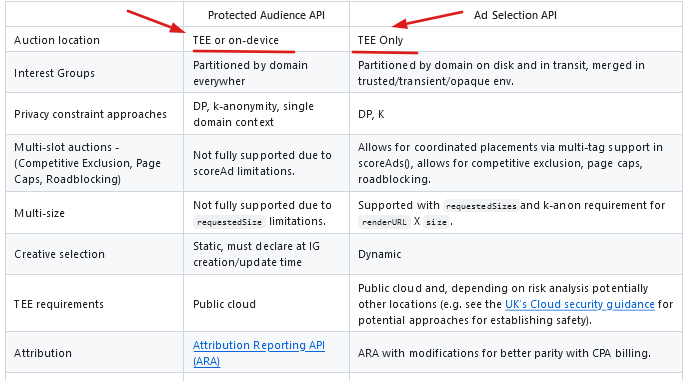
table

Our concerns about Microsoft’s new API

While the APIs are not identical, and there are many minor differences between them, we believe that most of them are negligible. But one difference that stands out is that while Google leaves two options for the location of the ad auction, either in the TEE or on the device, Microsoft wants to run it only in a Trusted Execution Environment (TEE).

So, what is TEE?

A Trusted Execution Environment (TEE) is a secure area within a server’s central processing unit (CPU) and memory. It’s designed to keep sensitive code and data safe from unauthorized access, including from those with high-level privileges or direct access to the hardware. Essentially, it’s a protected space where private computations are performed, ensuring they can’t be tampered with or spied upon.

Microsoft’s rationale for conducting ad auctions exclusively within a Trusted Execution Environment (TEE) stems from concerns about the current scalability of on-device auctions and potential operational hurdles. At the same time they say that on-device auctions “provide a lot of value in enabling effective enforcement of privacy constraints.”

Whatever the reasoning behind Microsoft’s decision, we believe that its refusal to effectively turn the browser into an ad network is a step in the right direction. However, the robustness of this system hinges on a critical assumption: that the TEEs will remain bulletproof against unauthorized access and that no one will be able to take a “sneak peek” inside.

The server-side auctions will be run by individual ad tech companies. In Microsoft’s view, these companies can “leverage well-worn patterns for scaling, deployment, and management.” And while that’s true — indeed, these ad tech behemoths have enough resources to run these auctions efficiently — we can’t trust them by default. By designing the system this way, we will always run the risk of these companies potentially accessing users’ confidential data.

Finally, perhaps the biggest problem we have with Microsoft’s cookie replacement is that a lot of things in the specification are taken for granted. We are supposed to believe that the mere fact that user data is encrypted eliminates the possibility of unauthorized access, that the TEEs are secure environments that no one can penetrate. And if even one of those assumptions turns out to be not entirely true, or riddled with holes, then that shiny, grand vision will come crashing down. As much as we’d like to, it’s hard to believe that Microsoft, or anyone for that matter, will manage to implement such a complex mechanism with so many variables and have it work like a charm on the first attempt.

Final thoughts

Microsoft’s plan to phase out third-party cookies in favor of a novel ad targeting mechanism is quite ambitious. But there are just too many pieces of the puzzle that need to fall into place for it to work smoothly. Finding an adequate replacement for a system that has been entrenched for years is undeniably a formidable challenge, but is it insurmountable? Time will tell.

On the other hand, browsers like Safari and Firefox have long since gotten rid of third-party cookies without causing the ad tech companies to go under. Which begs an important question: How vital were these third-party cookies for the ad tech businesses, and is it truly necessary to find a replacement, or could they simply be discarded?

The answers to these questions will largely depend on Microsoft’s implementation of the new API. However, the fact that its Ad Selection API resembles Protected Audience API to such an extent raises concerns about the potential implications for user privacy.

Since we believe that Protected Audience API is not as private as Google claims it to be, AdGuard has already blocked this API for users who have AdGuard’s Tracking Protection filter enabled. In the meantime, we are working on more advanced ways to disable it. As for Microsoft’s Ad Selection API, which we believe bears uncanny resemblance to Google’s API, our approach will be the same — as soon as Microsoft implements it in Edge, we will start blocking it as well.


Спадабаўся пост?
AdGuard VPN AdGuard DNS AdGuard Mail AdGuard Wallet
Галоўны экран AdGuard для Windows
Экран абароны AdGuard для Windows, які паказвае функцыі абароны і налады
Экран Статыстыка AdGuard для Windows, які паказвае статыстыку заблакіраванай рэкламы і праграм сачэння
Экран Кіраванне праграмамі ў AdGuard для Windows, які паказвае параметры кіравання абаронай для праграм, усталяваных на прыладзе
20 363 20363 водгукі
Выдатна!

AdGuard: блакіроўшчык рэкламы для Windows

AdGuard для Windows — гэта больш, чым блакіроўшчык рэкламы. Гэта шматфункцыянальны інструмент, які блакуе рэкламу, кантралюе доступ да небяспечных сайтаў, паскарае загрузку старонак і абараняе дзяцей ад непажаданага кантэнту

Спампоўваючы праграму, вы прымаеце ўмовы Ліцэнзійнага пагаднення
Microsoft Store
Спампоўваючы праграму, вы прымаеце ўмовы Ліцэнзійнага пагаднення
AdGuard для Windows версія 8.0, 14 дзён пробнага перыяду
Галоўны экран AdGuard для Mac
Экран рэжыму нябачнасці AdGuard для Mac
20 363 20363 водгукі
Выдатна!

AdGuard: блакіроўшчык рэкламы для Mac

AdGuard для Mac — гэта ўнікальны блакіроўшчык рэкламы, распрацаваны з улікам macOS. Акрамя абароны ад надакучлівай рэкламы ў браўзерах і праграмах, ён абараняе вас ад адсочвання, фішынгу і махлярства
Спампоўваючы праграму, вы прымаеце ўмовы Ліцэнзійнага пагаднення
Чытаць далей
AdGuard для Mac версія 2.19, 14 дзён пробнага перыяду
Галоўны экран AdGuard для Android
Экран Абарона ад сачэння ў AdGuard для Android
Экран Кіраванне праграмамі ў AdGuard для Android, які паказвае параметры кіравання абаронай для праграм, усталяваных на прыладзе
Экран Статыстыка AdGuard для Android, які паказвае статыстыку заблакіраванай рэкламы і праграм сачэння
Галоўны экран прыватнага браўзера AdGuard для Android
QR-код, каб спампаваць AdGuard для Android
20 363 20363 водгукі
Выдатна!

AdGuard: блакіроўшчык рэкламы для Android

Блакуе рэкламу і трэкеры ва ўсіх браўзерах, гульнях і іншых праграмах. Абараняе вашу прыватнасць і дазваляе вам кантраляваць, як вашы праграмы выкарыстоўваюць Інтэрнэт. Усталёўваецца праз APK
Спампоўваючы праграму, вы прымаеце ўмовы Ліцэнзійнага пагаднення
Чытаць далей
Сканіраванне для загрузкі
Выкарыстоўвайце любы счытвальнік QR-кодаў, даступны на вашай прыладзе
AdGuard для Android версія 4.14, 14 дзён пробнага перыяду
Галоўны экран AdGuard для iOS
Экран абароны AdGuard для iOS, які паказвае функцыі абароны і налады
Экран Статыстыка AdGuard для iOS, які паказвае статыстыку заблакіраванай рэкламы і праграм сачэння
QR-код, каб спампаваць AdGuard для iOS
20 363 20363 водгукі
Выдатна!

AdGuard: блакіроўшчык рэкламы для iOS

Найлепшы блакіроўшчык рэкламы для iOS для iPhone і iPad. AdGuard ліквідуе ўсе віды рэкламы і трэкераў у Safari і абараняе вашу прыватнасць ва ўсіх праграмах на ўзроўні DNS
Спампоўваючы праграму, вы прымаеце ўмовы Ліцэнзійнага пагаднення
Чытаць далей
Сканіраванне для загрузкі
Выкарыстоўвайце любы счытвальнік QR-кодаў, даступны на вашай прыладзе
AdGuard для iOS, 4.5
Галоўны экран AdGuard Content Blocker
Экран фільтры ў AdGuard Content Blocker
Экран налады ў AdGuard Content Blocker
20 363 20363 водгукі
Выдатна!

Блакіроўшчык кантэнту AdGuard

AdGuard Content Blocker ухіляе ўсе віды рэкламы ў мабільных браўзерах, якія падтрымліваюць тэхналогію блакіроўкі змесціва — напрыклад, Samsung Internet і Яндэкс.Браўзер. Яго функцыі абмежаваныя ў параўнанні з AdGuard для Android, але ён бясплатны, просты ў усталёўцы і эфектыўны
Спампоўваючы праграму, вы прымаеце ўмовы Ліцэнзійнага пагаднення
Чытаць далей
Блакіроўшчык кантэнту AdGuard, 2.8
Галоўны экран браузернае пашырэнне AdGuard
Экран Абарона ад сачэння ў браузернае пашырэнне AdGuard
20 363 20363 водгукі
Выдатна!

Браўзернае пашырэнне AdGuard

AdGuard — самае хуткае і лёгкае браўзарнае пашырэнне для блакавання ўсіх тыпаў рэкламы! Абірайце AdGuard для хуткага і бяспечнага сёрфінга без рэкламы.
Усталяваць
Спампоўваючы праграму, вы прымаеце ўмовы Ліцэнзійнага пагаднення
Усталяваць
Спампоўваючы праграму, вы прымаеце ўмовы Ліцэнзійнага пагаднення
Усталяваць
Спампоўваючы праграму, вы прымаеце ўмовы Ліцэнзійнага пагаднення
Усталяваць
Спампоўваючы праграму, вы прымаеце ўмовы Ліцэнзійнага пагаднення
Усталяваць
Спампоўваючы праграму, вы прымаеце ўмовы Ліцэнзійнага пагаднення
Чытаць далей
Усталяваць
Спампоўваючы праграму, вы прымаеце ўмовы Ліцэнзійнага пагаднення
Чытаць далей
Браўзернае пашырэнне AdGuard, 5.5
Галоўны экран Браўзерны памочнік AdGuard
20 363 20363 водгукі
Выдатна!

Памочнік AdGuard

Пашырэнне для браўзера-компаньён для настольных прыкладанняў AdGuard. Яно дазваляе блакіраваць карыстальніцкія элементы на вэб-сайтах, дадаваць вэб-сайты ў спіс дазволеных і адпраўляць справаздачы непасрэдна з вашага браўзера
Памочнік AdGuard, 1.4
20 363 20363 водгукі
Выдатна!

AdGuard Home

AdGuard Home — гэта сеткавае рашэнне для блакіроўкі рэкламы і праграм сачэння. Усталюйце яго адзін раз на вашым маршрутызатары, каб ахапіць усе прылады ў сетцы — дадатковае праграмнае забеспячэнне не патрабуецца. Гэта асабліва важна для розных прылад IoT, якія часта ўяўляюць пагрозу вашай прыватнасці
AdGuard Home, 0.107
Галоўны экран AdGuard Pro для iOS
Экран абароны ў AdGuard Pro для iOS, які паказвае функцыі абароны і налады
Экран Статыстыка ў AdGuard Pro для iOS, які паказвае статыстыку заблакіраванай рэкламы і праграм сачэння
20 363 20363 водгукі
Выдатна!

AdGuard Pro для iOS

AdGuard Pro для iOS пастаўляецца з усімі дадатковымі функцыямі блакіроўкі рэкламы і абароны, якія ўключаны. Ён прапануе тыя ж інструменты, што і платная версія AdGuard для iOS. Выдатна блакіруе рэкламу ў Safari, а таксама дазваляе наладжваць налады DNS, каб адаптаваць вашу абарону. Ён блакіруе рэкламу ў браўзерах і дадатках, абараняе дзяцей ад недапушчальнага кантэнту і захоўвае вашы асабістыя даныя бяспечнымі
Спампоўваючы праграму, вы прымаеце ўмовы Ліцэнзійнага пагаднення
Чытаць далей
AdGuard Pro для iOS, 4.5
Галоўны экран AdGuard Mini для Mac
Экран абароны Safari ў AdGuard Mini для Mac
Экран стварэння правіла ў AdGuard Mini для Mac
20 363 20363 водгукі
Выдатна!

AdGuard Mini для Mac — блакіроўшчык рэкламы ў Safari

AdGuard Mini для Mac — гэта магутны блакіроўшчык рэкламы для Safari. Гэта лёгкая праграма выдаляе рэкламу, блакуе праграмы сачэння і паскарае загрузку старонак. Яна дапамагае вам аглядаць вэб у Safari без адцягненняў і захоўваць вашы даныя ў прыватнасці
Усталяваць
Спампоўваючы праграму, вы прымаеце ўмовы Ліцэнзійнага пагаднення
Чытаць далей
AdGuard Mini для Mac, 2.3
Галоўны экран AdGuard для Android TV з уключанай абаронай
Экран блакіроўкі рэкламы AdGuard для Android TV, які паказвае яго функцыі і налады
Экран налады AdGuard для Android TV
Экран Кіраванне праграмамі AdGuard для Android TV, які паказвае праграмы, дзе рэклама і праграмы сачэння заблакіравана
20 363 20363 водгукі
Выдатна!

AdGuard для Android TV

AdGuard для Android TV — адзіная праграма, якая блакіруе рэкламу, ахоўвае вашу прыватнасць і працуе як міжсеткавы экран для вашага Smart TV. Атрымуйце папярэджанні аб вэб-пагрозах, выкарыстоўвайце бяспечны DNS і атрымлівайце перавагі ад шыфраванага трафіку. Адпачывайце і атрымлівайце асалоду ад улюбёных шоу з першакласнай абаронай і без рэкламы!
AdGuard для Android TV версія 4.14, 14 дзён пробнага перыяду
Маскот AdGuard, Агнар, трымае пінгвіна Linux
20 363 20363 водгукі
Выдатна!

AdGuard для Linux

AdGuard для Linux — гэта першы ў свеце сістэмны блакіроўшчык рэкламы для Linux. Блакуйце рэкламу і трэкеры на ўзроўні прылады, выбірайце з папярэдне ўсталяваных фільтраў альбо дадавайце ўласныя — усё праз інтэрфейс каманднага радка
AdGuard для Linux, 1.4
20 363 20363 водгукі
Выдатна!

AdGuard Temp Mail

Ваш часовы паштовую скрыню, каб на асноўную пошту не прыходзіў спам
20 363 20363 водгукі
Выдатна!

AdGuard VPN

75 лакацый па ўсім свеце

Доступ да любога кантэнту

Моцнае шыфраванне

Без лагавання

Самае хуткае злучэнне

Цэладзённая падтрымка

Паспрабуйце бясплатна
Спампоўваючы праграму, вы прымаеце ўмовы Ліцэнзійнага пагаднення
Чытаць далей
20 363 20363 водгукі
Выдатна!

AdGuard DNS

AdGuard DNS – гэта альтэрнатыўны спосаб заблакаваць рэкламу, абараніць асабістыя дадзеныя і ахаваць дзяцей ад дарослых матэрыялаў. Ён просты ў наладзе і выкарыстанні і забяспечвае патрэбны мінімум абароны ад рэкламы, трэкінгу і фішынгу, незалежна ад платформы.
20 363 20363 водгукі
Выдатна!

AdGuard Mail

Абараняйце сваю асобу, пазбягайце спаму і трымайце ўваходную пошту ў бяспецы з дапамогай нашых псеўданімаў і часовых адрасоў электроннай пошты. Скарыстайцеся нашым бясплатным сэрвісам перасылкі электроннай пошты і праграмамі для ўсіх аперацыйных сістэм.
20 363 20363 водгукі
Выдатна!

AdGuard Wallet

Бяспечны і прыватны крыпта-кашалёк, які дае вам поўны кантроль над вашымі актывамі. Адкрывайце для сябе тысячы крыптавалют для захоўвання, адпраўкі і абмену
Спампоўка AdGuard Каб усталяваць AdGuard, пстрыкніце файл, пазначаны стрэлкай Выберыце «Адкрыць» і націсніце «ОК», затым дачакайцеся спампоўкі файла. У акне, якое адкрылася, перацягніце значок AdGuard у папку «Праграмы». Дзякуй, што выбралі AdGuard! Выберыце «Адкрыць» і націсніце «ОК», затым дачакайцеся спампоўкі файла. У акне, якое адкрылася, націсніце «Усталяваць». Дзякуй, што выбралі AdGuard!
Усталюйце AdGuard на мабільную прыладу

















































