Welcome to the Adpocalypse: Even your fridge isn’t safe anymore

First, it was cheap smart TVs that came with ads — a compromise we sort of tolerated because the price was low. If you didn’t want the ads, you shelled out more money for a “premium” model. But over the years, the terms of that reluctant deal we all made started to shift, and not in our favor.

Ads started creeping into places they had no business being in. Not just on bargain TVs, but on high-end, flagship screens too. And then — as if that wasn’t enough — they showed up in the infotainment panels of cars. Some were in the form pop-up ads, hitting you in the face every time you stop at a light, as Jeep drivers could attest, although the company has later dismissed it as a glitch.

The trajectory’s been all downhill since. It's like we’re being slowly dragged into a nightmare where no screen, no product, no inch of space is safe from ads.

Over the past few years, we’ve been losing more and more control over our physical products. First came devices that brick themselves if you're behind on payments — yes, we’re talking about Ford’s self-repossessing cars (still just a concept… for now). The gradual loss of control has come together with the steady push into subscription models. That could’ve been fine if those subscriptions actually added something meaningful like new features, better service, more value. But instead, what we’re getting is manufacturers locking basic features behind a paywall, or worse, actively degrading the user experience unless you pay up.

A perfect example of this? Samsung’s latest move to push ads onto its Family Hub fridges, which start at $1,800 in the US.

This is not cool

The update rolled out quietly, almost sneakily. In mid-September, a Reddit user spotted a changelog flash on their fridge screen, and that’s when alarm bells started ringing.
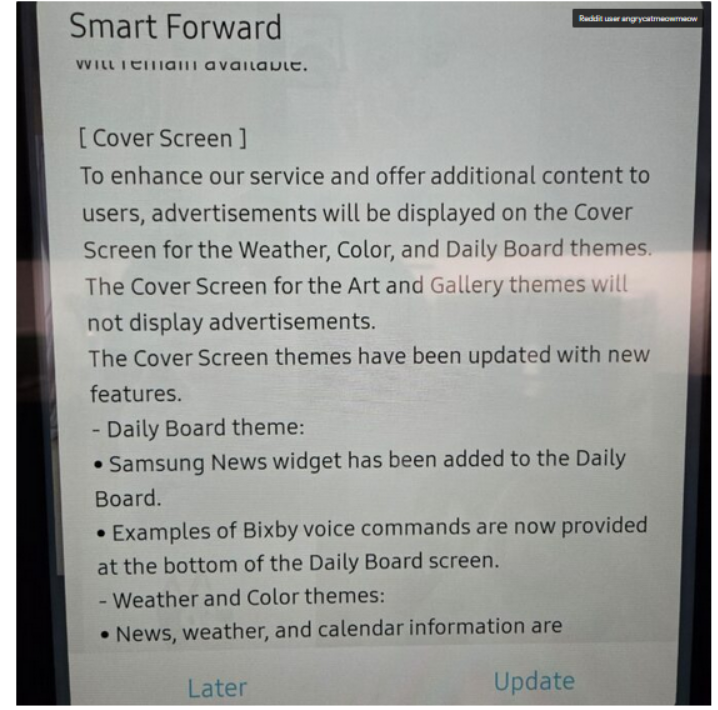
Fridge screen message

Source: Android Authority

The notice that popped up on the poster’s Samsung fridge said that ads would be shown on the door display when it’s idle and set to Weather, Color, or Daily Board themes. If it’s set to Art and Gallery themes like showing photos or pictures the ads won’t appear.

At first, people weren’t even sure it was real. Even Android Authority questioned it, wondering if the changelog was meant for some other product entirely: “There were some doubts that the changelog wasn’t real or that it belonged to a different product.”

But no, it wasn’t a mistake. It wasn’t a glitch. And it definitely wasn’t an April Fool’s joke, no matter how badly we all wished it was.

According to the Fortune, Samsung for now says it will only display ads, and not collect data about how users interact with them, like whether you dismiss an ad or engage with it. But it’s hard not to see that as just step one. More data collection is likely right around the corner.

In a statement shared with Android Authority, Samsung justified the move by saying it’s part of a “pilot program” aimed at offering “promotions and curated advertisements” to increase “everyday value.” The company said this would be done through an over-the-network (OTN) software update, and that ads will only appear when the fridge screen is idle.

Is the Fridge+ subscription on its way?

Currently, there’s no way to turn these ads off — not even a paid, ad-free option. So it seems that people who already shelled out thousands for a fridge are now stuck with ads on its door display, and can do exactly… nothing about it.

Reddit had a field day once Samsung officially confirmed the ads weren’t there by accident.“Imagine paying thousands of dollars for a fridge just to get ads on it?” one Redditor wrote. Others joked — or maybe predicted — that the fridge might soon start showing 30-second pre-roll ads before it lets you open the door, in true YouTube fashion.

And since Samsung has officially announced that it wants to put screens on everything — from ovens to washers and dryers — we can probably expect ads coming to those too.

“Of course you know this is going to end in some f*ckery where the ice maker won’t work unless you have a paid subscription,” another user posted. And honestly, that indeed feels like exactly where we’re headed. It’s not at all beyond the scope of imagination that, at some point, in order to “improve” the very user experience they just degraded, Samsung might roll out a Fridge+ subscription — so you can pay to make your $1,800 fridge feel like it did before the ads showed up.

One of the Reddit comments on the matter

Source: Reddit

Blocking Samsung Fridge ads

One of the first questions that springs to an ad blocking user’s mind is whether the Samsung Fridge ads can be blocked. And while there’s no magical “off” switch or built-in setting to kill them, there are ways to get around them. They’re not the easiest, and definitely not bulletproof, but if you’re a bit tech-savvy, there’s hope.

AdGuard Home: The best (but nerdier) way to block the ads

If you’re comfortable setting up a bit of home network infrastructure,AdGuard Home is likely the most promising method available right now.

It works as a local DNS server running on your network — for example, on a Raspberry Pi or a low-power PC — and lets you filter and block domains (including those used for ads or telemetry) before the traffic ever reaches the internet.

AdGuard Home’s dashboard gives you detailed logs of DNS requests, so if the fridge is making calls to specific ad domains, you can identify and block them manually. Once installed, AdGuard Home will cover all devices on your home network, no additional client software is required. This is especially important for various IoT devices that could pose a threat to your privacy (a smart fridge included).

That said, this approach works best when the fridge fetches ad content through standard domain name lookups, which, in most cases, it likely does. As far as we know, Samsung isn’t using more advanced methods like hardcoded IP addresses or encrypted DNS in its refrigerators, which would make DNS-level blocking much harder. While technically possible, it’s unlikely that a fridge — even a high-end one — would go to those lengths just to serve ads.

AdGuard DNS: The easier to configure but less flexible option

If AdGuard Home sounds like a bit much, there’s also AdGuard DNS that doesn’t need any hardware or installation. You just change your router’s DNS settings to point to AdGuard’s servers, and that’s it.

Most smart fridges (and smart devices in general) automatically get their DNS settings from the router via DHCP, which means they’ll use whichever DNS server the router is configured to use. So, if you set your router’s DNS to AdGuard’s public ad-blocking DNS servers, your fridge will likely start using AdGuard DNS as well — and known ad domains could be blocked at the DNS level. Just like in AdGuard Home, the AdGuard DNS paid plan lets you create custom rules and inspect traffic logs to see exactly what’s happening under the hood.


Спадабаўся пост?
AdGuard VPN AdGuard DNS AdGuard Mail AdGuard Wallet
Галоўны экран AdGuard для Windows
Экран абароны AdGuard для Windows, які паказвае функцыі абароны і налады
Экран Статыстыка AdGuard для Windows, які паказвае статыстыку заблакіраванай рэкламы і праграм сачэння
Экран Кіраванне праграмамі ў AdGuard для Windows, які паказвае параметры кіравання абаронай для праграм, усталяваных на прыладзе
20 362 20362 водгукі
Выдатна!

AdGuard: блакіроўшчык рэкламы для Windows

AdGuard для Windows — гэта больш, чым блакіроўшчык рэкламы. Гэта шматфункцыянальны інструмент, які блакуе рэкламу, кантралюе доступ да небяспечных сайтаў, паскарае загрузку старонак і абараняе дзяцей ад непажаданага кантэнту
Спампоўваючы праграму, вы прымаеце ўмовы Ліцэнзійнага пагаднення
Microsoft Store
Спампоўваючы праграму, вы прымаеце ўмовы Ліцэнзійнага пагаднення
AdGuard для Windows версія 8.0, 14 дзён пробнага перыяду
Галоўны экран AdGuard для Mac
Экран рэжыму нябачнасці AdGuard для Mac
20 362 20362 водгукі
Выдатна!

AdGuard: блакіроўшчык рэкламы для Mac

AdGuard для Mac — гэта ўнікальны блакіроўшчык рэкламы, распрацаваны з улікам macOS. Акрамя абароны ад надакучлівай рэкламы ў браўзерах і праграмах, ён абараняе вас ад адсочвання, фішынгу і махлярства
Спампоўваючы праграму, вы прымаеце ўмовы Ліцэнзійнага пагаднення
Чытаць далей
AdGuard для Mac версія 2.19, 14 дзён пробнага перыяду
Галоўны экран AdGuard для Android
Экран Абарона ад сачэння ў AdGuard для Android
Экран Кіраванне праграмамі ў AdGuard для Android, які паказвае параметры кіравання абаронай для праграм, усталяваных на прыладзе
Экран Статыстыка AdGuard для Android, які паказвае статыстыку заблакіраванай рэкламы і праграм сачэння
Галоўны экран прыватнага браўзера AdGuard для Android
QR-код, каб спампаваць AdGuard для Android
20 362 20362 водгукі
Выдатна!

AdGuard: блакіроўшчык рэкламы для Android

Блакуе рэкламу і трэкеры ва ўсіх браўзерах, гульнях і іншых праграмах. Абараняе вашу прыватнасць і дазваляе вам кантраляваць, як вашы праграмы выкарыстоўваюць Інтэрнэт. Усталёўваецца праз APK
Спампоўваючы праграму, вы прымаеце ўмовы Ліцэнзійнага пагаднення
Чытаць далей
Сканіраванне для загрузкі
Выкарыстоўвайце любы счытвальнік QR-кодаў, даступны на вашай прыладзе
AdGuard для Android версія 4.14, 14 дзён пробнага перыяду
Галоўны экран AdGuard для iOS
Экран абароны AdGuard для iOS, які паказвае функцыі абароны і налады
Экран Статыстыка AdGuard для iOS, які паказвае статыстыку заблакіраванай рэкламы і праграм сачэння
QR-код, каб спампаваць AdGuard для iOS
20 362 20362 водгукі
Выдатна!

AdGuard: блакіроўшчык рэкламы для iOS

Найлепшы блакіроўшчык рэкламы для iOS для iPhone і iPad. AdGuard ліквідуе ўсе віды рэкламы і трэкераў у Safari і абараняе вашу прыватнасць ва ўсіх праграмах на ўзроўні DNS

Спампоўваючы праграму, вы прымаеце ўмовы Ліцэнзійнага пагаднення
Чытаць далей
Сканіраванне для загрузкі
Выкарыстоўвайце любы счытвальнік QR-кодаў, даступны на вашай прыладзе
AdGuard для iOS, 4.5
Галоўны экран AdGuard Content Blocker
Экран фільтры ў AdGuard Content Blocker
Экран налады ў AdGuard Content Blocker
20 362 20362 водгукі
Выдатна!

Блакіроўшчык кантэнту AdGuard

AdGuard Content Blocker ухіляе ўсе віды рэкламы ў мабільных браўзерах, якія падтрымліваюць тэхналогію блакіроўкі змесціва — напрыклад, Samsung Internet і Яндэкс.Браўзер. Яго функцыі абмежаваныя ў параўнанні з AdGuard для Android, але ён бясплатны, просты ў усталёўцы і эфектыўны

Спампоўваючы праграму, вы прымаеце ўмовы Ліцэнзійнага пагаднення
Чытаць далей
Блакіроўшчык кантэнту AdGuard, 2.8
Галоўны экран браузернае пашырэнне AdGuard
Экран Абарона ад сачэння ў браузернае пашырэнне AdGuard
20 362 20362 водгукі
Выдатна!

Браўзернае пашырэнне AdGuard

AdGuard — самае хуткае і лёгкае браўзарнае пашырэнне для блакавання ўсіх тыпаў рэкламы! Абірайце AdGuard для хуткага і бяспечнага сёрфінга без рэкламы.
Усталяваць
Спампоўваючы праграму, вы прымаеце ўмовы Ліцэнзійнага пагаднення
Усталяваць
Спампоўваючы праграму, вы прымаеце ўмовы Ліцэнзійнага пагаднення
Усталяваць
Спампоўваючы праграму, вы прымаеце ўмовы Ліцэнзійнага пагаднення
Усталяваць
Спампоўваючы праграму, вы прымаеце ўмовы Ліцэнзійнага пагаднення
Усталяваць
Спампоўваючы праграму, вы прымаеце ўмовы Ліцэнзійнага пагаднення
Чытаць далей
Усталяваць
Спампоўваючы праграму, вы прымаеце ўмовы Ліцэнзійнага пагаднення
Чытаць далей
Браўзернае пашырэнне AdGuard, 5.5
Галоўны экран Браўзерны памочнік AdGuard
20 362 20362 водгукі
Выдатна!

Памочнік AdGuard

Пашырэнне для браўзера-компаньён для настольных прыкладанняў AdGuard. Яно дазваляе блакіраваць карыстальніцкія элементы на вэб-сайтах, дадаваць вэб-сайты ў спіс дазволеных і адпраўляць справаздачы непасрэдна з вашага браўзера
Памочнік AdGuard, 1.4
20 362 20362 водгукі
Выдатна!

AdGuard Home

AdGuard Home — гэта сеткавае рашэнне для блакіроўкі рэкламы і праграм сачэння. Усталюйце яго адзін раз на вашым маршрутызатары, каб ахапіць усе прылады ў сетцы — дадатковае праграмнае забеспячэнне не патрабуецца. Гэта асабліва важна для розных прылад IoT, якія часта ўяўляюць пагрозу вашай прыватнасці
AdGuard Home, 0.107
Галоўны экран AdGuard Pro для iOS
Экран абароны ў AdGuard Pro для iOS, які паказвае функцыі абароны і налады
Экран Статыстыка ў AdGuard Pro для iOS, які паказвае статыстыку заблакіраванай рэкламы і праграм сачэння
20 362 20362 водгукі
Выдатна!

AdGuard Pro для iOS

AdGuard Pro для iOS пастаўляецца з усімі дадатковымі функцыямі блакіроўкі рэкламы і абароны, якія ўключаны. Ён прапануе тыя ж інструменты, што і платная версія AdGuard для iOS. Выдатна блакіруе рэкламу ў Safari, а таксама дазваляе наладжваць налады DNS, каб адаптаваць вашу абарону. Ён блакіруе рэкламу ў браўзерах і дадатках, абараняе дзяцей ад недапушчальнага кантэнту і захоўвае вашы асабістыя даныя бяспечнымі
Спампоўваючы праграму, вы прымаеце ўмовы Ліцэнзійнага пагаднення
Чытаць далей
AdGuard Pro для iOS, 4.5
Галоўны экран AdGuard Mini для Mac
Экран абароны Safari ў AdGuard Mini для Mac
Экран стварэння правіла ў AdGuard Mini для Mac
20 362 20362 водгукі
Выдатна!

AdGuard Mini для Mac — блакіроўшчык рэкламы ў Safari

AdGuard Mini для Mac — гэта магутны блакіроўшчык рэкламы для Safari. Гэта лёгкая праграма выдаляе рэкламу, блакуе праграмы сачэння і паскарае загрузку старонак. Яна дапамагае вам аглядаць вэб у Safari без адцягненняў і захоўваць вашы даныя ў прыватнасці
Усталяваць
Спампоўваючы праграму, вы прымаеце ўмовы Ліцэнзійнага пагаднення
Чытаць далей
AdGuard Mini для Mac, 2.3
Галоўны экран AdGuard для Android TV з уключанай абаронай
Экран блакіроўкі рэкламы AdGuard для Android TV, які паказвае яго функцыі і налады
Экран налады AdGuard для Android TV
Экран Кіраванне праграмамі AdGuard для Android TV, які паказвае праграмы, дзе рэклама і праграмы сачэння заблакіравана
20 362 20362 водгукі
Выдатна!

AdGuard для Android TV

AdGuard для Android TV — адзіная праграма, якая блакіруе рэкламу, ахоўвае вашу прыватнасць і працуе як міжсеткавы экран для вашага Smart TV. Атрымуйце папярэджанні аб вэб-пагрозах, выкарыстоўвайце бяспечны DNS і атрымлівайце перавагі ад шыфраванага трафіку. Адпачывайце і атрымлівайце асалоду ад улюбёных шоу з першакласнай абаронай і без рэкламы!
AdGuard для Android TV версія 4.14, 14 дзён пробнага перыяду
Маскот AdGuard, Агнар, трымае пінгвіна Linux
20 362 20362 водгукі
Выдатна!

AdGuard для Linux

AdGuard для Linux — гэта першы ў свеце сістэмны блакіроўшчык рэкламы для Linux. Блакуйце рэкламу і трэкеры на ўзроўні прылады, выбірайце з папярэдне ўсталяваных фільтраў альбо дадавайце ўласныя — усё праз інтэрфейс каманднага радка
AdGuard для Linux, 1.4
20 362 20362 водгукі
Выдатна!

AdGuard Temp Mail

Ваш часовы паштовую скрыню, каб на асноўную пошту не прыходзіў спам
20 362 20362 водгукі
Выдатна!

AdGuard VPN

75 лакацый па ўсім свеце

Доступ да любога кантэнту

Моцнае шыфраванне

Без лагавання

Самае хуткае злучэнне

Цэладзённая падтрымка

Паспрабуйце бясплатна
Спампоўваючы праграму, вы прымаеце ўмовы Ліцэнзійнага пагаднення
Чытаць далей
20 362 20362 водгукі
Выдатна!

AdGuard DNS

AdGuard DNS – гэта альтэрнатыўны спосаб заблакаваць рэкламу, абараніць асабістыя дадзеныя і ахаваць дзяцей ад дарослых матэрыялаў. Ён просты ў наладзе і выкарыстанні і забяспечвае патрэбны мінімум абароны ад рэкламы, трэкінгу і фішынгу, незалежна ад платформы.
20 362 20362 водгукі
Выдатна!

AdGuard Mail

Абараняйце сваю асобу, пазбягайце спаму і трымайце ўваходную пошту ў бяспецы з дапамогай нашых псеўданімаў і часовых адрасоў электроннай пошты. Скарыстайцеся нашым бясплатным сэрвісам перасылкі электроннай пошты і праграмамі для ўсіх аперацыйных сістэм.
20 362 20362 водгукі
Выдатна!

AdGuard Wallet

Бяспечны і прыватны крыпта-кашалёк, які дае вам поўны кантроль над вашымі актывамі. Адкрывайце для сябе тысячы крыптавалют для захоўвання, адпраўкі і абмену
Спампоўка AdGuard Каб усталяваць AdGuard, пстрыкніце файл, пазначаны стрэлкай Выберыце «Адкрыць» і націсніце «ОК», затым дачакайцеся спампоўкі файла. У акне, якое адкрылася, перацягніце значок AdGuard у папку «Праграмы». Дзякуй, што выбралі AdGuard! Выберыце «Адкрыць» і націсніце «ОК», затым дачакайцеся спампоўкі файла. У акне, якое адкрылася, націсніце «Усталяваць». Дзякуй, што выбралі AdGuard!
Усталюйце AdGuard на мабільную прыладу
















































